
Our readers keep the lights on and my morning glass full of iced black tea. As an Amazon Associate, I earn from qualifying purchases.
Specs are compiled from manufacturer listings and verified buyer reviews and can change over time — please confirm the key details on the product page before buying.
An affordable wireless keyboard has one job: get out of your way. You want a full-size layout, a connection that does not drop mid-sentence, and keys that do not annoy everyone in the room. The hard part is that budget boards are a mixed bag — some feel flimsy, some lag, and some die after a few months. This guide cuts through that noise and lands on the combos worth your desk space.
I’m Min — the founder and writer behind Gadgets Feed. This guide is built by comparing the manufacturers’ published specifications and the patterns across verified customer reviews, so you get each pick’s real strengths and trade-offs instead of marketing spin.
Every option below earned its spot through real owner feedback, so you can finally stop second-guessing and pick the right affordable wireless keyboard for your typing style, your desk, and your wallet.
Our Picks at a Glance

How To Choose The Best Affordable Wireless Keyboard
Most budget buyers fixate on the price tag first, but the real decision points are the ones you will feel every single day: how the keys sound, how long the battery lasts, and whether the connection holds up. Nail those three and the price almost stops mattering.
Pick your connection: 2.4 GHz vs Bluetooth
A 2.4 GHz USB receiver is the most dependable for a fixed desk setup — plug it in once, and it just works, with ranges up to 33 feet on many models. Bluetooth shines for multi-device users who want to switch between a laptop, tablet, and phone with one click. If you only have one computer, a receiver is simpler and generally more stable.
Decode the battery claims
Battery life is where budget boards quietly separate. A keyboard powered by two AA or AAA batteries can last anywhere from 12 months to a full 3 years, while rechargeable models often give you weeks between charges. Check whether batteries are included in the box — some combos ship ready to type, and others expect you to supply them.
Know your key type: membrane vs mechanical
Most affordable keyboards use membrane keys — soft, quiet, and inexpensive, with a short travel that feels familiar to anyone who has typed on a laptop. Mechanical boards cost more but deliver a satisfying “thock” or “click” with every press, plus hot-swappable switches if you want to customize. For a quiet office, go membrane; for tactile joy, go mechanical.
Quick Comparison
| Model | Best For | Connectivity | Battery Life | Key Type | Amazon |
|---|---|---|---|---|---|
| Logitech MK345★ Best Overall | Office all-rounders | 2.4 GHz | 3 yrs keyboard / 18 mo mouse | Membrane | Amazon |
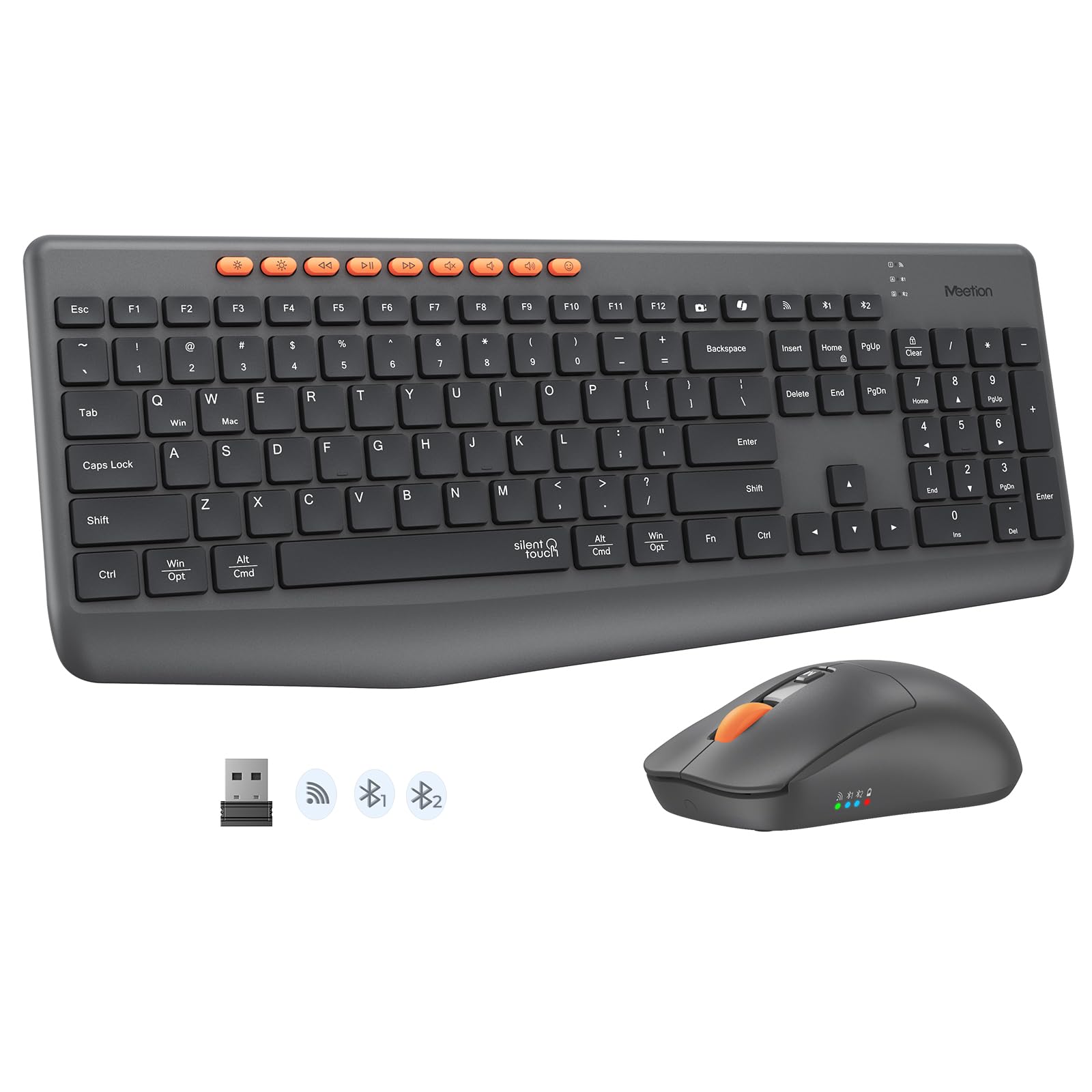
| MEETION C4133Top Performer | Multi-device setups | Bluetooth + 2.4G | Months (2 AA) | Membrane | Amazon |
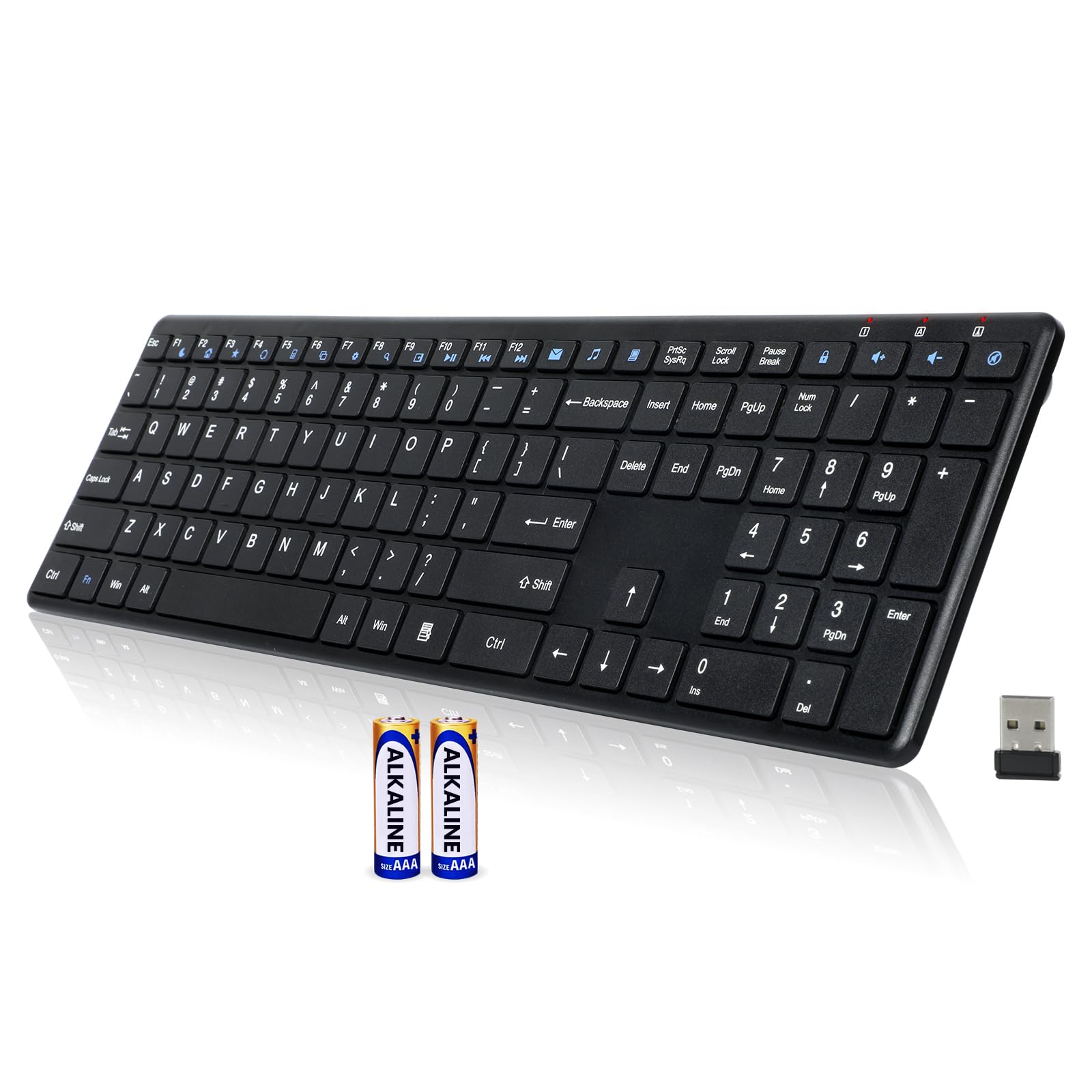
| INFINMIND K913Sleek Pick | Skinny desk setups | 2.4 GHz | 12 months (2 AAA) | Membrane | Amazon |
| Arteck HW192 | Rechargeable fans | 2.4 GHz | 6 mo keyboard / 4 mo mouse | Membrane | Amazon |
| Logitech MK295 | Silent typists | 2.4 GHz | 36 mo keyboard / 18 mo mouse | Membrane | Amazon |
| SABLUTE MA31 | Ergonomic comfort | 2.4 GHz | 2 AA (unspecified) | Membrane | Amazon |
| Redragon K689 PRO | Budget gamers | 2.4 GHz + BT + USB-C | 8-10 workdays | Mechanical | Amazon |
| Redragon K745 PRO | Typing + gaming | 2.4 GHz + BT + USB-C | Rechargeable (unspecified) | Mechanical | Amazon |
| SABLUTE MA31 Pro | Backlit comfort | 2.4 GHz | 4000mAh rechargeable | Membrane | Amazon |
In-Depth Reviews
1. Logitech MK345 Full Size Wireless Keyboard and Mouse Combo
Our pick — 4.5★ from 41,000+ verified ratings; the strongest balance of quality and price.
The crowd-pleasing office combo that outlasts the competition on a single set of batteries.
If you want one box that handles everything for years, this is it. The full-size layout with palm rest and media keys is built for all-day typing, and the 2.4 GHz connection reaches a solid 10 meters at home or work. The real headline is battery life — up to 3 years for the keyboard and 18 months for the mouse, with batteries included from day one.
Buyers report it replaces older Logitech sets and works from the start with no driver on Windows 10, which is about as plug-and-play as it gets. The quality is the thing people praise most — over 2,400 owners call it out — with value for money close behind. It even handles a spill without dying, thanks to the spill-resistant design.
The honest trade-off is durability. The plastic body feels lighter and less sturdy than older Logitech builds, and a small number of owners mention the keyboard lagging or stopping after a couple of months. Most buyers experience zero issues, but if you type aggressively all day, treat the frame gently.
What wins people over
- 3-year keyboard battery means near-zero maintenance
- Familiar full-size layout with palm rest and media keys
- Plug-and-play on Windows, macOS, and ChromeOS
The trade-offs to know
- Plastic build feels lighter than older Logitech models
- A minority report lag or failure after two months
- Keys are on the noisier side for a membrane board
Reach for it if: you want a dependable, long-lasting full-size combo that arrives with batteries and just works.
Look elsewhere if: you need whisper-quiet keys — this one clicks audibly.
2. MEETION Wireless Bluetooth Keyboard and Mouse Combo
A dual-mode combo that jumps between three devices without a single cable in sight.
This is the pick for anyone juggling a laptop, tablet, and phone on one desk. With both Bluetooth and 2.4G wireless, one click pairs and switches between three devices, and The connection stays lag-free up to 33 feet.. The 115-key full-size layout keeps a numeric keypad, so data entry feels like a desktop workstation from day one.
What wins people over is the quiet. Both keyboard and mouse reduce noise by over 90%., which buyers describe as perfect for work from home — “keyboard is super quiet. Mouse is smooth and very responsive.” The responsiveness is the most-praised aspect, with owners noting zero lag and four adjustable DPI levels (1200, 1600, 2400, 3200) for cursor speed control.
The 9 multimedia hotkeys handle volume, music, and brightness with dual-labeled keys for Windows and macOS, so you never memorize complex shortcuts. On the downside, the mouse lacks side scroll and thumb buttons — a minor gap if you rely on those for navigation. Battery uses 2 AA batteries with a smart auto-sleep system for months of use.
Perfect for multitaskers: the tri-device switching is the cleanest way to move between work and personal machines.
The small catch: no dedicated thumb buttons on the mouse, and a few recent owners have flagged keyboard issues arising over time.
3. INFINMIND K913 Ultra Slim Wireless Keyboard
A laptop-style board with a matte finish that shrugs off fingerprints all day.
This one is for the minimalist who wants a full-size layout without the bulk. The ultra-slim frame uses short-throw, laptop-style keys and a matte keycap surface that resists fingerprints and smudges — no more wiping oily gloss off your keys. It is compact enough for shared spaces and home offices while keeping the full number pad and arrow keys.
Noiseless click technology cuts typing noise by up to 90%. Quality is the most-praised aspect, with owners noting it feels like a similar Microsoft keyboard at better value. One buyer summed it up: “It has some weight to it so it doesn’t slide around all over my desk.” The 2.4 GHz connection stays lag-free up to 33 feet, even in crowded environments.
Battery life is a strong 12 months from 2 AAA batteries, with an auto-sleep function kicking in after 15 minutes of inactivity. The catch is reliability — while many connect easily and work well, a subset of customers note connection issues or keys that don’t register properly. For the price, most get a great board; a few get a dud.
Style-first value: the matte finish and slim profile make it the best-looking budget board on this list.
Worth knowing: all 19 multimedia keys work on Windows, but some of the 7 extra shortcuts may not work on Mac.
4. Arteck 2.4G Wireless Keyboard and Mouse Combo

A stainless-steel board that charges once and forgets the charger for months.
If you are tired of swapping AA batteries, this is your pick. The built-in rechargeable lithium battery lasts 6 months for the keyboard and 4 months for the mouse on a single charge (based on 2 hours of non-stop use per day). Reviewers point out charging it just 4 or 5 times a year, and the stainless-steel frame gives it a heavy-duty feel that stays put on the desk.
Quality is the most-praised aspect, with buyers calling it sleek and Mac-like in design. The low-profile keys are quiet yet satisfying, and the ambidextrous mouse works for either hand. One nano USB receiver handles both devices, saving a USB port, and it stows inside the mouse when not in use. It connects instantly with Windows 11, 10, and 8.
The recurring note is the mouse battery dying without warning — there is no low-battery indicator. Some owners also wish it were more ergonomic. For an office setup with a metal frame and monthly charging, this is a strong deal at the budget end.
Why it stands out
- Rechargeable battery — no disposables, charges 4-5 times a year
- Stainless steel frame feels premium and heavy-duty
- Single receiver for both keyboard and mouse
Things to watch
- Mouse can die without warning, so keep a charger handy
- Ergonomics are decent, not exceptional
- Micro-USB port, not USB-C
Buy it for: the rechargeable convenience and metal build that outlasts plastic rivals.
skip it if: you want a mouse with side buttons or a more sculpted grip.
5. Logitech MK295 Full Size Silent Wireless Combo

Logitech’s SilentTouch tech delivers quiet keys without giving up the typing feel.
This is the board for shared offices and late-night typing sessions. SilentTouch technology cuts noise by 90% while preserving the typing and clicking feel. — owners say it’s slightly quieter than even the Logitech K740. Sound quality and noise level are the two most-praised aspects, each with over 1,400 mentions.
Battery life is a serious win: 36 months for the keyboard and 18 months for the mouse, plus on/off switches so nothing drains between uses. The full-size layout includes 8 convenient shortcuts and a full numpad, and the contour mouse delivers smooth, precise clicking on most surfaces. It connects in 3 seconds with a tiny USB receiver and works with Windows or ChromeOS.
The dual wireless-dongle situation is worth knowing: this receiver is factory-paired and not compatible with Logitech’s Unifying or Bolt receivers, so don’t lose it. A few shoppers say occasional lag or freezing, sometimes fixed with a USB extender. The keys can also lose their silence over time, but the 71% recycled plastic keyboard body is a nice sustainability touch.
The quiet wins
- 90% noise reduction with a satisfying typing feel
- 36-month keyboard battery life
- Spill-resistant with sturdy adjustable tilt legs
The fine print
- Receiver is factory-paired, not replaceable with Unifying
- Mouse is small and light, almost toy-like to some
- Keys may lose silence after extended use
Ideal for: quiet office workers who need long battery life and a familiar full-size feel.
Not for: anyone who wants a backlit keyboard or a larger, heavier mouse.
6. SABLUTE Ergonomic Wave Wireless Keyboard and Mouse

Wave-shaped keys and a cushioned rest that let your wrists breathe through long shifts.
For anyone who types all day and feels it in their hands, this keyboard curves the keys to follow the natural arc of your fingers. The wave design reduces awkward hand movement, and the premium leatherette wrist rest is silky-soft and sweat-resistant — easier to clean than fabric and more durable. Front and rear tilt legs let you find the right angle for sitting or standing desks.
Quality is the most-praised aspect, with owners buying multiple sets for entire offices. The keys are quiet and comfortable, and the mouse suits larger hands. One recurring theme is that it handles office productivity beautifully — not pro gaming, but everything else. The 9 shortcut keys give instant access to emoji, screenshots, calculator, and media controls, though calculator and emoji shortcuts don’t work on macOS.
At 2.7 pounds, it has real heft that keeps it planted on the desk. The trade-off is the layout: the delete key section is rearranged, so there is a short adjustment period. A few owners mention keys occasionally sticking, but the vast majority find it long-lasting — some first sets are still running after 2+ years.
Built for marathon typists: the wave layout plus cushioned rest is the most ergonomic affordable combo here.
Know before you buy: the rearranged delete section takes a day to get used to, and it is right-handed only.
7. Redragon K689 PRO Wireless 108-Key Gasket Gaming Keyboard

A creamy mechanical board with tri-mode switching that punches way above its price tier.
Gamers and typists who want mechanical feel without the mechanical price should stop here. This full-size 108-key board uses gasket-mounted construction with 3-layer noise dampening for a soft, silky bounce, and the Mint Mambo linear switches deliver what owners call a satisfying ‘clocky’ sound — softer and quieter than blue switches. It is hot-swappable, so you can swap in almost any 3-pin or 5-pin switch later.
Tri-mode connectivity jumps between USB-C, Bluetooth, and 2.4GHz wireless, so you can move from PC to laptop to tablet without re-pairing. Buyers report flawless switching and a battery that lasts 8-10 workdays on a charge. The key quality is the most-praised aspect, with buyers calling it a budget-friendly pro-level full-size board. The round PBT keycaps resist the greasy shine that ABS caps develop.
The downsides are real but specific: the RGB lighting is dim in bright light, there is no wrist rest, and the internal battery is a gamble if you plan to keep it for years. If you want a tactile, creamy typing experience with gaming-grade connection, this delivers.
The standout: gasket-mounted linear switches give a smooth, cushioned feel you usually only find at double the price.
The catch: dim RGB in daylight and no included wrist rest or extra keycaps.
8. Redragon K745 PRO Wireless 108-Key Gasket Gaming Keyboard

The sibling board that upgrades to see-through PBT caps and an even softer 5-layer bounce.
This is the refined version of the K689 above, and it shows. The gasket-mounted construction steps up to 5-layer noise dampening for an extra-soft, silky bounce, and the translucent PBT keycaps let RGB shine through cleanly while resisting the greasy shine of ABS caps. Owners call the purple palette gorgeous and the creamy clicking sound genuinely satisfying.
Quality is the most-praised aspect by a wide margin, with buyers describing it among the best keyboards they have owned. The Mint Mambo switches feel smooth and light, and it supports fast typing — one owner hit 100+ WPM comfortably. The tri-mode wireless (2.4GHz, Bluetooth, USB-C) switches devices without re-pairing, and the rubber base prevents sliding.
Where it beats the K689 is the lighting — it looks awesome at night and stays visible in different room lighting. The trade-off: it lacks key backlighting (the letters themselves aren’t lit) and battery life is unspecified, though owners mention a rechargeable battery that lasts through workdays. If you want the quieter, prettier sibling, this is it.
The upgrades
- 5-layer dampening for an extra-soft creamy feel
- See-through PBT caps make RGB pop cleanly
- Includes extra switches and a removal tool
The limits
- No backlit lettering on the keys themselves
- Reliability is mixed — some keys can fail within days
- Rechargeable battery has no stated lifespan
Choose this if: you want the premium-feel mechanical board with the best RGB visibility at an everyday price.
Pass it by if: you need backlit lettering or prefer a lighter, more compact board.
9. SABLUTE Ergonomic Wireless Keyboard with 4000mAh Battery

A backlit ergonomic board with double the battery of standard backlit rivals.
This is the luxury-feeling option for low-light workers who also want wrist comfort. The 4000mAh rechargeable battery lasts weeks per charge, doubling the capacity of standard backlit keyboards. — with intelligent auto-sleep saving power between keystrokes. The silky faux lambskin palm rest is sweat-proof and easier to maintain than fabric, and the wave keys promote a more natural hand position.
The backlighting is the flex here: soft tones of blue, cyan, and white for calm focus, and bold colors like red, green, purple, and yellow to match your mood. Owners find the backlit keys particularly helpful in low light, and the quality is the most-praised aspect by far. The keyboard is rated for 10 million keystrokes, doubling the lifespan of standard 5M keyboards.
The bundled RGB mouse adds a 700mAh battery, 6 buttons, and 3 DPI levels (800/1200/1600). The catch is the aggressive auto-sleep, which delays the first keystroke after idle time — a minor annoyance when you start typing again. One owner noted the mouse buttons aren’t programmable, which matters for spreadsheet work. For a backlit ergonomic combo that charges rarely, this is the premium pick.
Best for: evening and night typists who want illuminated keys plus wrist support without constant charging.
The one gripe: auto-sleep can delay your first keystroke, and the mouse buttons aren’t programmable.
Understanding the Specs
Connectivity: 2.4 GHz receiver vs Bluetooth
A 2.4 GHz USB receiver gives you the most rock-solid connection for a stationary desk — plug it in once, and it works with ranges up to 33 feet on many models. Bluetooth adds flexibility to switch between multiple devices, but it can occasionally feel less instant. For a one-computer setup, a receiver wins; for multi-device workflows, Bluetooth or a combo of both is smarter.
Battery life: disposable vs rechargeable
Battery life spans a huge range in this category. AA or AAA-powered boards can last anywhere from 12 months to a full 3 years, while rechargeable models give you weeks between charges. Check whether batteries are included in the box — some combos ship ready to type, and others expect you to supply them. Rechargeable boards (like the 4000mAh SABLUTE) save you from buying disposables but add a charging habit.
FAQ
Will a 2.4 GHz wireless keyboard work with a Bluetooth-only laptop?
How long do batteries actually last in these keyboards?
What is the difference between membrane and mechanical keys?
Is a wireless keyboard good for gaming?
Are silent wireless keyboards actually quiet?
Can I use the keyboard and mouse with one USB receiver?
Will an affordable wireless keyboard work with my Mac?
How do I know if a keyboard will be comfortable for long typing sessions?
What is the difference between the Redragon K689 PRO and K745 PRO?
Should I worry about the keyboard sliding around on my desk?
Final Thoughts: The Verdict
If you want an affordable wireless keyboard that just works, the Logitech MK345 is the one to buy: it runs up to 3 years on two AA batteries, connects via a reliable 2.4 GHz wireless signal (the same band as your Wi-Fi router), and has media keys you will actually use. Over 40,000 buyers have backed it. If you need to switch between three devices and want quiet keys, pick the MEETION C4133. For a mechanical typing feel without the high price, the Redragon K745 PRO is your match. And if your wrists ache after long sessions, the SABLUTE with the 4000mAh battery keeps you typing all day.
How We Picked
We do not accept paid placement. Every pick is matched to a real buyer and a real use-case; we do not hands-on test units.
Sources & Methodology
Specifications: manufacturer listings and product documentation. Review insights: verified customer reviews, as of August 2026. Pricing: not shown on this page (it changes often); check the current price via the retailer link.
As an Amazon Associate, Gadgets Feed earns from qualifying purchases. This does not affect which products we feature.