
Our readers keep the lights on and my morning glass full of iced black tea. As an Amazon Associate, I earn from qualifying purchases.
Specs are compiled from manufacturer listings and verified buyer reviews and can change over time — please confirm the key details on the product page before buying.
Stepping up from a toy-grade machine or buying your first real printer is notable, but the choice can feel overwhelming. The best adult-focused machines today remove the old frustrations — manual leveling, constant tweaking, and hour-long setup rituals — so you spend your time creating, not fighting the hardware.
I’m Min — the founder and writer behind Gadgets Feed. This guide is built by comparing the manufacturers’ published specifications and the patterns across verified customer reviews, so you get each pick’s real strengths and trade-offs instead of marketing spin.
You want a printer that actually delivers, not one that fights you at every turn. This breakdown of the 3d printer for adults sorts the genuinely capable machines from the frustrating ones, so you can pick the right tool for your goals.
Our Picks at a Glance


How To Choose The Best 3D Printer For Adults
Your choice hinges on matching the machine’s strengths to your goals — quick tinkering, detailed miniatures, or engineering-grade parts. A printer that excels for one person can be the wrong tool for another, so focus on the specs that shape your daily experience.
Decide Between FDM and Resin First
FDM printers melt plastic filament and lay it down layer by layer — they are the versatile, low-fuss workhorses for functional parts and big prints. Resin printers use liquid resin cured by light, which produces stunning fine detail but requires messy post-processing and good ventilation. If you want functional objects and ease, go FDM; if ultra-detailed miniatures are your passion and you have a ventilated space, resin is the specialist’s choice.
Look For Automatic Leveling
Manual leveling means fiddling with screws and paper to get the nozzle the exact right distance from the bed — a classic source of failed prints. The best modern machines handle this automatically with sensors, so your first layer sticks perfectly every time. This single feature transforms the experience from frustrating to genuinely enjoyable.
Match Speed To Your Patience
Print speed is quoted in millimeters per second (mm/s), with modern machines reaching 500-600 mm/s. Faster speeds mean a small model finishes in minutes instead of hours, but you need a rigid frame (often a CoreXY design) to keep quality high at speed. If you plan to print large functional parts, a fast machine saves you days of waiting over a year.
Consider the Material You Want To Print
Basic PLA filament works for most hobby prints, but if you want stronger, heat-resistant parts, you will need materials like ABS, PETG, or carbon-fiber composites. These advanced filaments often require a heated chamber — an enclosed, warmed interior that prevents warping — and a high-temperature nozzle. Machines with a 350-370°C nozzle and active chamber heating open up the full range of engineering materials.
Quick Comparison
| Model | Best For | Tech Type | Max Speed | Build Volume | Amazon |
|---|---|---|---|---|---|
| Bambu Lab A1★ Best Overall | Beginners & fast everyday prints | FDM | 10,000 mm/s² accel | — | Amazon |
| ANYCUBIC Photon Mono 4Detail Master | High-detail resin miniatures | Resin | — | 6.04″ x 3.42″ x 6.49″ | Amazon |
| FLASHFORGE AD5MBest Value | Value & one-click leveling | FDM CoreXY | 600 mm/s | 220 x 220 x 220 mm | Amazon |
| Creality K1C | Carbon fiber & speed | FDM CoreXY | 600 mm/s | — | Amazon |
| Bambu Lab P1S | Enclosed reliability | FDM CoreXY | 500 mm/s | — | Amazon |
| FLASHFORGE AD5X | 4-color printing | FDM CoreXY | 600 mm/s | 220 x 220 x 220 mm | Amazon |
| QIDI Q2 | Engineering materials | FDM CoreXY | 600 mm/s | — | Amazon |
| QIDI PLUS4 | Large high-temp prints | FDM CoreXY | — | 12 x 12 x 11 in | Amazon |
| Snapmaker U1 | Waste-free multi-color | FDM CoreXY | 500 mm/s | 270 x 270 x 270 mm | Amazon |
| Prusa MK4S Kit | DIY builders & tinkerers | FDM | — | 9.84 x 8.3 x 8.6 in | Amazon |
| Creality K2 Plus Combo | Large multi-color production | FDM CoreXY | 600 mm/s | — | Amazon |
In‑Depth Reviews
1. Bambu Lab A1 3D Printer
Our pick — over 4.5★ from 600+ verified ratings; the strongest balance of quality and price.
The ready-to-print workhorse that has owners ditching their Prusa and Creality machines.
The A1 takes the stress out of getting started. It handles full-auto calibration — Z-offset, bed-leveling, and more — so your first layer sticks without the classic paper-and-screw ritual. The active flow rate compensation algorithm adjusts extrusion in real time, so buyers report consistently smooth prints with minimal fuss..
Speed is the headline here. With acceleration of 10,000 mm/s², it moves fast enough that buyers mention printing a figurine just minutes after setup. The 1-Clip quick swap nozzle makes maintenance a 10-second job, and active motor noise canceling keeps it quiet enough to run while you work. Multi-color printing is possible with the optional AMS lite unit, letting you bring designs to life in vibrant color.
Owners repeatedly call it a “standout” and note how a 10-year-old can use it independently — though some do report assembly errors, so check the build steps carefully. Owners mention: “Setup was simple and was printing within 20 minutes.” The recurring praise centers on performance and reliability, with owners highlighting its low maintenance compared to older machines. It is a breeze next to the manual leveling and paper-sliding drills they endured with Creality printers.
Why owners love it
- Fully automatic calibration means no learning curve for perfect first layers.
- High-speed printing at 10,000 mm/s² acceleration gets models done fast.
- 1-Clip quick swap nozzle makes maintenance genuinely tool-free.
- Active motor noise canceling keeps it office-friendly.
Things to watch
- Some units arrive with assembly issues, so budget time to check connections.
- Proprietary software is a concern for owners who prefer open-source tools.
- Multi-color requires buying the separate AMS lite unit.
Reach for this if: you want the least frustrating path to reliable, fast prints and may want multi-color later.
Look elsewhere if: you demand open-source firmware and community-modified software without any proprietary lock-in.
2. ANYCUBIC Photon Mono 4
A resin printer whose 10K screen makes layer lines practically invisible.
If your passion is finely detailed miniatures, the Photon Mono 4 delivers detail that FDM machines cannot touch. Its 7-inch mono LCD screen packs a resolution of 9024×5120, with each pixel measuring just 17×17μm on the X and Y axes. That translates to models with exceptional detail and dynamic richness, and the LighTurbo matrix light source reduces layer lines for an ultra-smooth surface.
Setup is genuinely beginner-friendly — customers note being done in about 30 minutes, and the 4-point leveling method means you only level once after tightening four screws. The laser-engraved Print Platform 2.0 improves adhesion to stop warping, and it can resume printing when power is restored, saving material and time.
The honest trade-off with resin is the workflow. Reviewers point out it “needs venting; PPE advised,” and some find prints stick too firmly to the plate. Durability is the recurring concern in the review pattern, with a few owners reporting breakdowns after a few months of use — so treat it as a specialist tool, not a 24/7 workhorse. What wins people over is the printer quality itself, praised across the board for its fine printing capability.
Who it suits: hobbyists and tabletop gamers who want museum-quality miniatures and have a ventilated workspace for the resin.
The catch: resin printing demands gloves, ventilation, and post-processing — plus some owners hit durability issues, so buy with a clear return plan.
3. FLASHFORGE AD5M 3D Printer
A 600 mm/s CoreXY that brings one-click leveling to a very accessible price.
The AD5M proves you do not need to spend big for a modern high-speed machine. It prints at up to 600 mm/s with an all-metal CoreXY structure that keeps quality stable at speed, and the fully automatic one-click leveling measures the nozzle-to-bed distance for a flawless first layer every time. The patent quick-release nozzle swaps in as little as 3 seconds with multiple diameters available (0.25/0.4/0.6/0.8 mm) for high-precision or high-efficiency work.
It is heavier than it looks at 22 pounds, giving it the rigidity needed for fast, accurate motion. The flexible double-sided PEI steel plate makes removing finished models easy by simply bending it, with one side designed specifically for PETG material. The Orca-flashforge slicer enables one-click batch file transmission and multi-printer network monitoring, plus the Flash Maker APP lets you watch prints remotely from anywhere.
Owners call it a “dream machine” for its ease of use and speed, with quality being the most-praised aspect by a wide margin. The honest caveats are real: some report connectivity issues with the monitor cable, and filament clogging appears in the review pattern. It is also note it comes with only half a roll of PLA, so budget for filament right away. The recurring advice is that it is not a toy — it rewards owners willing to research filament settings.
The strong points
- One-click leveling removes the hardest part of 3D printing for newcomers.
- 600 mm/s top speed with stable CoreXY motion structure.
- Tool-free nozzle swap in as little as 3 seconds.
- Remote monitoring via the Flash Maker APP.
The honest downsides
- Connectivity issues with the monitor cable are reported by some.
- Filament clogging is a recurring complaint in reviews.
- Comes with only a half roll of PLA filament to start.
Grab it for: a budget-conscious buyer who still wants modern speed, auto-leveling, and a quick-swap nozzle.
Think twice if: you want hands-off reliability — this machine rewards owners who enjoy learning and tuning.
4. Creality K1C 3D Printer

A closed-chamber speedster that confidently handles carbon fiber filaments.
The K1C is built for people who want to push beyond basic PLA. Its closed chamber and hardened steel nozzle tip mean it can handle carbon fiber filaments like PLA-CF and PETG-CF, which are prized for mechanical strength and dimensional stability. With a 600 mm/s top speed and 20,000 mm/s² acceleration, it runs 12 times faster than a typical printer. while maintaining excellent quality.
The clog-free extruder design is rated for 1,000 hours of smooth extrusion., and the tri-metal nozzle with an integrated thermal barrier blocks heat creep and makes replacement easy. The built-in AI camera monitors prints in real time, offers time-lapse shooting, and proactively alerts you to errors — you can even exclude a failed print from a batch without stopping everything. Silent mode reduces noise to ≤45dB, as quiet as turning a page., while the built-in active carbon filter purifies compounds and particles from molten filament.
Owners coming from older Ender 3 machines describe it as a fantastic upgrade, with flawless self-leveling and fast, reliable output across PLA, PETG, and TPU. One owner ran 200+ prints and still calls it reliable. However, a faulty touchscreen on one unit led an owner to return it, and good warranty service is an open question — the review pattern shows quality and speed are praised, but a few hit jamming issues. It is a serious speed-focused machine that rewards a willing owner.
Built for: makers who want carbon-fiber composites and high speed in an enclosed, quieter package.
Watch out for: occasional touchscreen faults and reported jamming — test thoroughly within your return window.
5. Bambu Lab P1S 3D Printer

The enclosed, low-maintenance FDM machine that makes advanced filaments easy.
The P1S is the answer for owners who want Bambu’s famous ease of use plus the ability to print advanced materials. Its fully enclosed body improves print performance for filaments like PETG, ABS, and ASA, while automatic bed leveling ensures high-quality, successful prints without manual fuss. It hits 500 mm/s with 20,000 mm/s² acceleration, so even complex models finish quickly.
Setup is a major selling point — the brand claims 15 minutes, and owners consistently confirm it is ready to go right from the start. The build quality is praised as premium, with a rigid frame and CoreXY plus dual belt drive delivering smooth, accurate prints. A preloaded Benchy test print comes out perfectly, which is a reassuring first experience. It supports up to 16 colors when paired with the optional Bambu Lab AMS unit, though that is a separate purchase.
Long-time owners with 10+ years of experience say it outperforms machines that cost several times more, calling it a “great FDM workhorse.” Reviewers praise print quality most, with easy setup close behind. They advise keeping the build plate clean — most adhesion failures trace back to a dirty plate, not the machine. Choose this if you want professional results without babysitting the printer.
What stands out
- Enclosed design open up ABS and ASA without warping.
- 500 mm/s speed with 20,000 mm/s² acceleration.
- Setup in about 15 minutes per the brand, confirmed by owners.
- Rigid CoreXY frame with dual belt drive for accuracy.
What to know
- Multi-color printing requires the separate AMS unit.
- Ecosystem software lock-in is a concern for some owners.
- Carbon and glass fiber reinforced polymers are not recommended.
Choose this for: reliable, high-quality FDM printing of advanced materials without constant tuning or monitoring.
skip it if: you want to print carbon-fiber composites — this machine is not recommended for those.
6. FLASHFORGE AD5X Multi-Color 3D Printer

A 4-color FDM machine with a 300°C nozzle and auto filament loading.
The AD5X brings multi-color printing down to a practical level. Its Intelligent Filament System (IFS) handles 4 colors with auto filament loading and unloading, plus an auto refill function that holds up to 4kg of filament — reducing the burden of manual material swaps. The 300°C high-temp nozzle and 32mm³/s large-flow hotend shorten waiting time and enable multi-color printing with flexible TPU, carbon fiber, PLA, and PETG.
Speed is on par with the best in its class, reaching 600 mm/s travel speed with 20m/s² acceleration on a CoreXY all-metal frame. It integrates key features like one-click auto leveling, vibration compensation, a 4.3-inch colorful touchscreen, resume printing, and filament detection. The Flash Maker and Orca-Flashforge software allow remote management of hundreds of printers with real-time progress monitoring — though you need an additional camera kit for that view.
Owners describe it as a solid, engineered printer for people who actually want to learn the craft, with consistent clean prints and accurate dimensions. One first-time owner was impressed that a keychain finished in just 6 minutes. The review pattern shows quality is praised most, but reliability is mixed — one owner hit an extruder failure on day 31, and another noted Chinese parts may wear over time. It is a capable machine that rewards a hands-on owner.
Ideal for: hobbyists and makers who want real multi-color capability and don’t mind a learning curve.
Be aware: reliability is mixed, with occasional extruder and part-wear reports — it’s not a zero-maintenance appliance.
7. QIDI Q2 3D Printer

A professional-grade enclosed printer that open up PPS-CF and other engineering materials.
The Q2 suits adults who want to print serious engineering materials — not just toys. Its nozzle doubles as the leveling sensor, so first-layer accuracy stays unaffected by the bed surface, making it true plug-and-play. The 2nd-generation PTC heated chamber reaches 65°C to minimize warping and ensure strong layer adhesion, while the 370°C high-temp nozzle open up advanced filaments like PPS-CF, PA, PC, and carbon/glass-fiber composites.
It is built for speed too, reaching up to 600 mm/s on a full-metal CoreXY structure with precision linear rails. The upgraded 1.5GT synchronous belt reduces vibration artifacts for ultra-smooth surfaces. A triple filtration system (G3 pre-filter + H12 HEPA + activated carbon) reduces odors and harmful particles, making it safer for indoor use, and the flame-retardant chamber adds confidence. With the QIDI BOX accessory, it expands to 16-color multi-material printing with dry-while-print technology.
Owners praise it as an “extremely high-quality enclosed system” that goes from box to printing in about 10 minutes, with one owner noting it holds a steady 60°C across the build volume. Customer support is repeatedly highlighted as excellent — one owner had a screen issue fixed free of charge. The review pattern shows print quality is praised most, with value for money close behind. One experienced owner who returned a different machine recommends it specifically for engineering filaments, citing the hardened nozzle and high temperatures with no cloud lock-in.
Why it earns its place
- 65°C heated chamber prevents warping in high-temp materials.
- 370°C nozzle open up PPS-CF and engineering composites.
- Triple filtration (G3 + H12 HEPA + activated carbon) for cleaner air.
- Nozzle-as-sensor auto-leveling is unaffected by bed surface.
Considerations
- Some shoppers say needing a printed riser for the glass top.
- The AI spaghetti detection can trigger false positives.
- Reliability is mixed, though support is consistently praised.
Reach for it if: you need to print strong, heat-resistant engineering parts like PPS-CF and want a machine that grows with your skill.
Look elsewhere if: you want a totally hands-off appliance — this is a professional tool that rewards learning.
8. QIDI PLUS4 3D Printer

A big 12-inch build volume with 400W chamber heat for warp-free engineering prints.
The PLUS4 solves the problem of printing large parts without warping. Its large print size of 12 x 12 x 11 inches lets you print multiple models at once, and the second-generation active chamber heating system delivers 400W of ultra-high heating power with air circulation and dual-layer insulation. That keeps the chamber temperature balanced and consistent, effectively reducing warping and cracking when printing high-temperature filaments.
The upgraded 80W high-temperature hotend with a multi-metal integrated throat nozzle reaches a maximum of 370°C, supporting PPS-CF, PPA-CF/GF, ABS, ASA, PC, PA, and PET. The independent dual motor-driven Z-axis and 6mm thickened aluminum hot bed platform increase strength and flatness, while 10mm diameter linear shafts and lead screws ensure high precision. Buyers report it goes from unboxing to printing in about 10 minutes, with a flawless test print in 22 minutes.
The review pattern is strongly positive on quality — one owner liked the Plus 4 so much they bought a second one, running over 100 trouble-free hours printing ASA, ABS-GF, PA12-CF, and PLA+ flawlessly. An impressive 24.5-hour PA12-CF print came out impeccable. Customer support is praised as exceptional, with responsive, helpful service. The durability concern is the most consistent negative, with some owners reporting breakdowns — though the overwhelming majority are thrilled with the near-Bambu print quality at a more accessible price.
The highlights
- 12 x 12 x 11 in build volume for large or multiple models.
- 400W active chamber heating prevents warping.
- 370°C nozzle with 80W hotend for engineering materials.
- Unbox to print in about 10 minutes per owners.
What to weigh
- Durability is the recurring concern in the review pattern.
- Multi-color requires the QIDI BOX accessory, launched later.
- Pre-print prep can take 10+ minutes for bed and chamber heating.
Perfect for: serious makers who want a large build area and reliable high-temp material printing without flagship pricing.
Think twice if: durability concerns worry you — a small minority report failures, so buy with a solid return plan.
9. Snapmaker U1 3D Printer

A 4-toolhead system that swaps in 5 seconds and eliminates filament purge waste.
The U1 rethinks multi-color printing. Instead of loading, unloading, and purging filament between colors like traditional systems, it swaps entire toolheads — four independent ones, each with filament preloaded and preheated. The automatic tool changer cuts change time from about 2 minutes to 5 seconds, with a locking mechanism validated through over 1,000,000 swaps and zero failures.. This yields up to 5X faster multi-color printing and up to 5X less filament waste..
This design also enables true multi-material printing in a single job. You can combine rigid and flexible materials, water-soluble supports, and engineering materials — even colorful shoes using TPUs with different Shore hardness ratings. It is compatible with PLA, PVA, TPU, PETG, PCTG, ABS, ASA, PA, PC, and more. The CoreXY motion system with lightweight carbon fiber X-axis rails reaches speeds up to 500 mm/s across a full 270 x 270 x 270 mm build volume.
Owners consistently call it the most efficient multi-color printer they have used. One owner compared a 32-hour print with zero waste versus 58 hours and 350g of waste on a single-nozzle machine.. Setup takes under 20 minutes, and the automatic toolhead offset calibration, vibration compensation, and fine-tuned extrusion deliver smooth, dimensionally accurate prints. The Snapmaker Orca open-source slicing software includes a built-in model library for easy starts. The review pattern shows quality and reliability are both praised most, with color support and low filament waste earning strong positive mentions.
What makes it special
- 4 independent toolheads eliminate purge waste entirely.
- 5-second tool change versus ~2 minutes on other systems.
- 1,000,000+ validated swaps with zero failures.
- 500 mm/s speed on a 270 x 270 x 270 mm build volume.
What to keep in mind
- Heavy at 59 pounds — plan your workspace placement.
- Power supply fan is noticeably loud.
- Slight bottom-layer stringing reported, fixable via nozzle settings.
Choose this for: serious multi-color and multi-material printing with minimal waste and maximum speed.
pass on it if: you only ever print single-color parts — the toolhead system is overkill for that use.
10. Original Prusa MK4S Kit
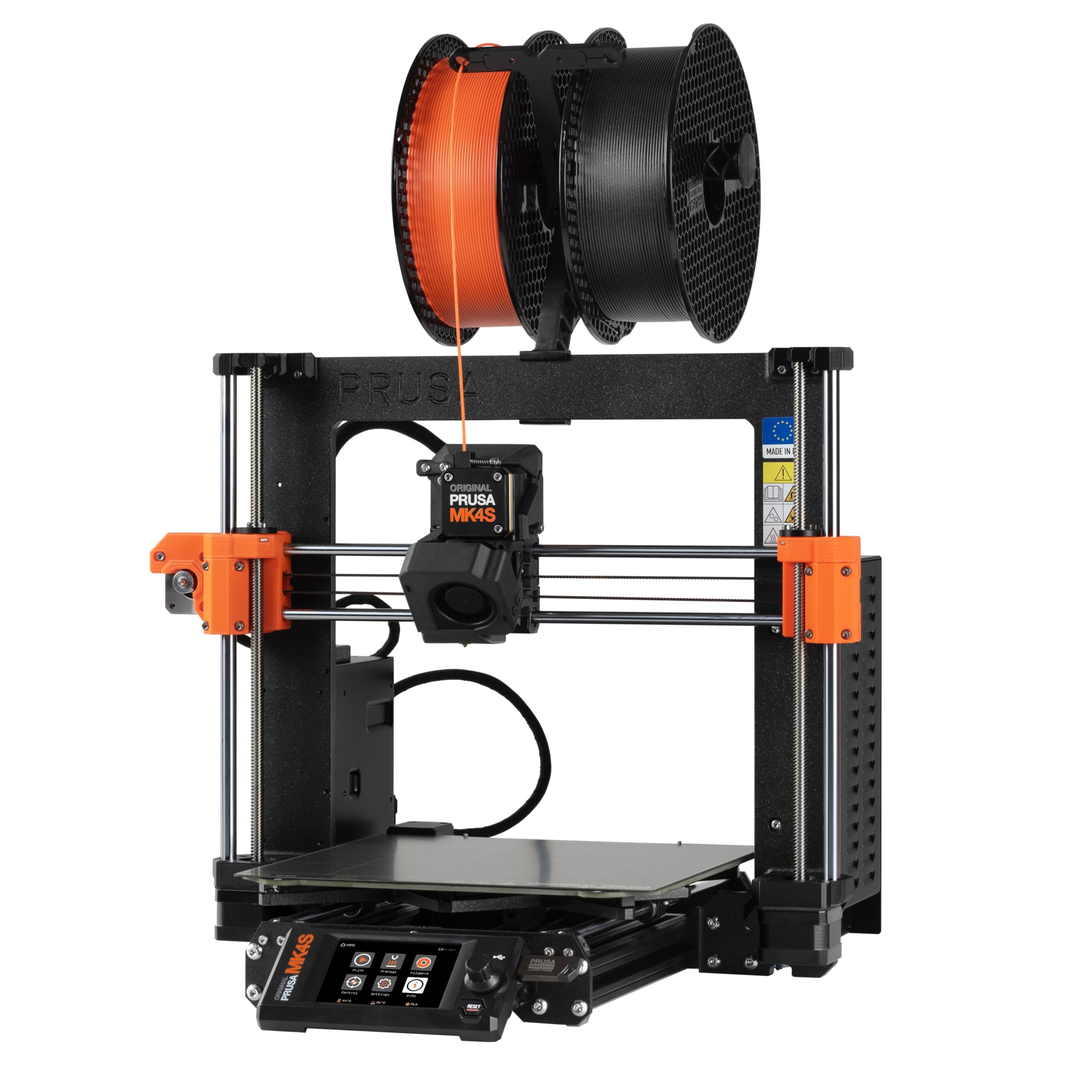
A rewarding DIY build that teaches you the mechanics of professional 3D printing.
The MK4S Kit is for adults who want to understand their machine from the inside out. Instead of a ready-made printer, you assemble it yourself with a detailed step-by-step guide designed to teach the mechanics and electronics of professional 3D printing. It is a genuinely rewarding experience — owners describe a day-long build that is fun even for kids, with clear instructions and no missing parts in most cases.
Once built, it delivers fast, precise printing with excellent surface quality. The input shaping feature reduces ringing and vibration, ensuring sharp edges and consistent quality at higher speeds. It prints on a 9.84 x 8.3 x 8.6 inch volume and is engineered for stable, repeatable performance in workshops and studios. As an open-source design, it is fully upgradeable with long-term firmware support and modular hardware from Prusa Research, and it comes with a sample of Prusament PLA filament plus lifetime technical assistance.
Owners praise its accuracy and consistency versus cheaper models, noting it is the best open-design printer available. One owner printed a dishwasher clip replacement part, capturing the practical value of 3D printing. The build itself takes 3+ days for some, and one owner’s kit was missing trapezoid nuts — quickly solved by ordering parts. The review pattern shows quality is praised most, while assembly, reliability, and instructions all draw mixed feedback. This is not the machine for impatient buyers, but for tinkerers it is a joy.
The appeal
- DIY build teaches maintenance and tuning skills for life.
- Open-source, fully upgradeable, with long-term firmware support.
- Input shaping delivers sharp edges at higher speeds.
- Backed by lifetime technical assistance.
The cost of entry
- Assembly takes hours to days depending on your pace.
- Missing parts reported in rare cases — check the box carefully.
- Rushed assembly hurts performance; meticulousness is key.
Perfect for: tinkerers and DIY enthusiasts who value learning, open-source freedom, and long-term repairability.
Not for: anyone who wants a print-ready machine straight from the box — this is a build project first.
11. Creality K2 Plus Combo 3D Printer
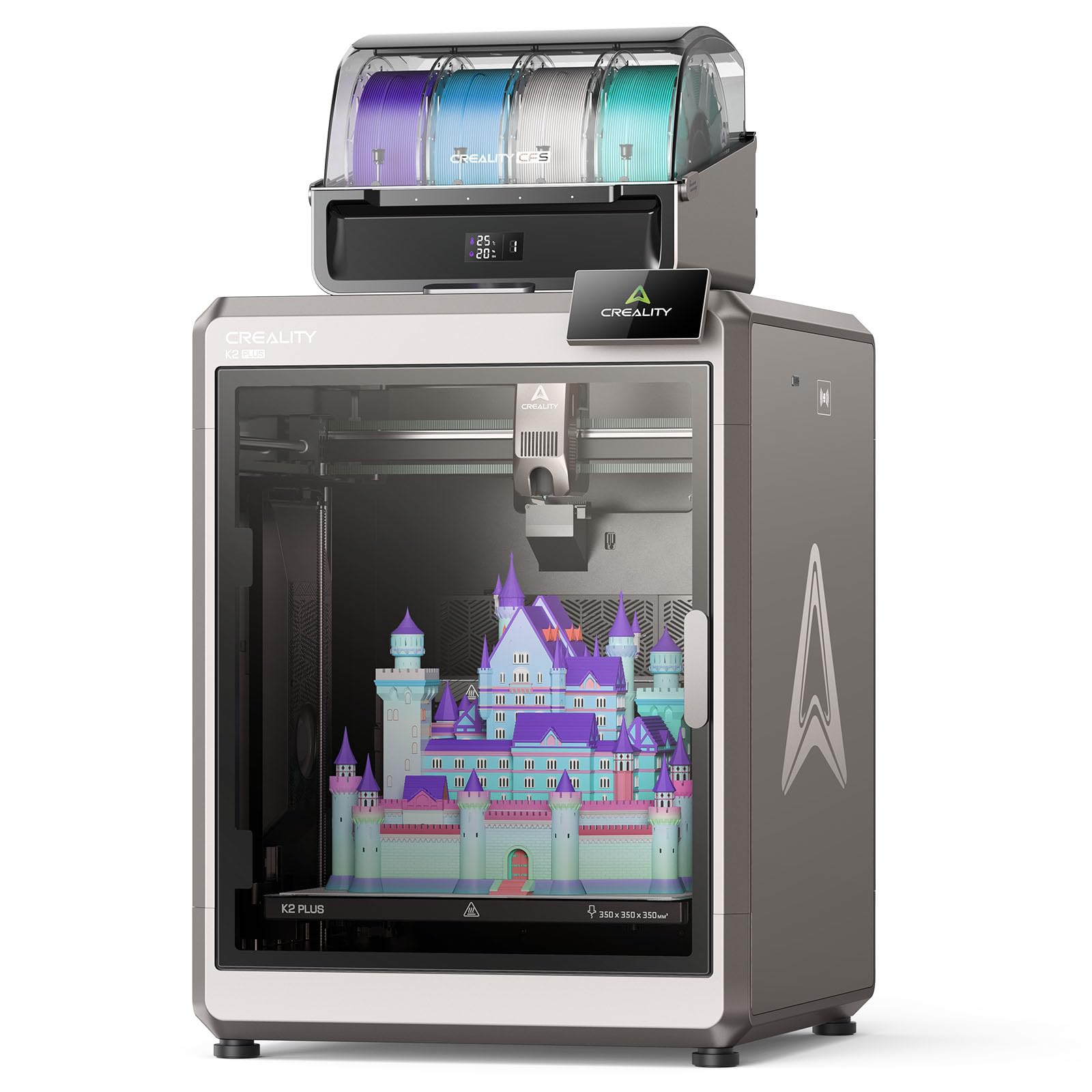
A large-format powerhouse that pairs a 16-color CFS with a 60°C heated chamber.
The K2 Plus Combo is the flagship choice for serious creators who want it all — size, speed, color, and engineering materials. It pairs the K2 Plus printer with a CFS (Creality Filament System) that enables printing up to 16 colors together, with intelligent management of multiple filaments. The large-format machine reaches 600 mm/s, turbocharged by industry-grade FOC step-servo motors that offer 32,768 controllable microsteps per revolution for ultra-precise positioning.
The active heated chamber creates a thermostatic environment up to 60°C, essential for strong prints in ASA, PPS, and other high-end materials. The high-temp nozzle with a hardened steel tip reaches 350°C, supporting PLA, ABS, PETG, PA-CF, PLA-CF, PET, ASA, and PPA-CF. It also features active belt tensioning checked by a pressure sensor, two AI cameras for spaghetti failure detection and auto PA calibration, and two auxiliary cooling fans that nearly double part-cooling airflow.
Owners are impressed by its ease of assembly and performance, completing full-speed prints in 80 minutes. The review pattern shows printer quality is praised most by a wide margin, with ease of use and value for money close behind. One owner noted it outpaced a much more expensive machine. The main caveat is reliability — it is mixed, with some units working perfectly past 200 hours while others fail during prints. It is a serious investment that demands serious consideration of the reliability reports.
The powerhouse specs
- 16-color printing with the included CFS system.
- 60°C actively heated chamber for engineering materials.
- 600 mm/s with 30,000 mm/s² acceleration.
- 350°C hardened steel nozzle for wear-resistant materials.
The honest trade-offs
- Very heavy at 112.4 pounds — needs a dedicated, sturdy space.
- Reliability reports are mixed; some units fail during prints.
- Durability is the most common negative in the review pattern.
Reach for this if: you want flagship multi-color capability and large-format engineering prints in one machine.
Look elsewhere if: reliability is your top priority — the mixed reports make it a calculated risk.
Understanding the Specs
Print Speed & Acceleration
Speed is quoted in millimeters per second (mm/s), and modern machines reach 500-600 mm/s. Acceleration, measured in mm/s², matters just as much — it determines how quickly the print head reaches that speed. A machine with 10,000-30,000 mm/s² acceleration gets models done far faster in real-world use. A rigid CoreXY frame is what allows high speeds without sacrificing print quality.
Build Volume
Build volume defines the maximum size of a part you can print, measured in three dimensions. Small machines like the Photon Mono 4’s 6.04″ x 3.42″ x 6.49″ suit miniatures, while large machines like the QIDI PLUS4’s 12 x 12 x 11 inches handle big functional parts or multiple models at once. Larger build volume also means the printer takes up more physical space, so measure your workspace first.
Heated Chamber & Nozzle Temperature
A heated chamber warms the enclosed printing area, preventing warping in materials like ABS and ASA that shrink as they cool. Nozzle temperature, measured in °C, determines which materials you can print — PLA works at lower temps while PPS-CF and other engineering composites need 350-370°C. If you only print PLA, neither feature matters; if you want strong functional parts, both are essential.
Multi-Color Printing
Multi-color printing lets a single machine produce models in multiple colors. Systems vary: some swap filament spools (AMS, CFS), while the Snapmaker U1 swaps entiretoolheads with zero purge waste. If this matters to you, check how the system handles filament changes — some waste material purging, while others save it.
FAQ
What is the difference between FDM and resin printing?
How important is automatic bed leveling for a beginner?
What does print speed of 600 mm/s actually mean for me?
Do I need a heated chamber to print ABS or carbon fiber?
How does multi-color printing actually work?
What filament should I buy for my new printer?
How long does it take to set up a new 3D printer?
Is resin printing safe to do indoors?
Can I print with my phone or monitor prints remotely?
What size printer do I need for my projects?
Final Thoughts: The Verdict
For the majority of shoppers, the 3d printer for adults winner is the Bambu Lab A1 because it combines full-auto calibration, high-speed printing, and beginner-friendly operation in one reliable package. If you want a resin machine for stunning miniatures, grab the ANYCUBIC Photon Mono 4. And for multi-color printing without the waste, the Snapmaker U1 is the one to reach for.
How We Picked
We do not accept paid placement. Every pick is matched to a real buyer and a real use-case; we do not hands-on test units.
Sources & Methodology
Specifications: manufacturer listings and product documentation. Review insights: verified customer reviews, as of August 2026. Pricing: not shown on this page (it changes often); check the current price via the retailer link.
As an Amazon Associate, Gadgets Feed earns from qualifying purchases. This does not affect which products we feature.