
Our readers keep the lights on and my morning glass full of iced black tea. As an Amazon Associate, I earn from qualifying purchases.
Specs are compiled from manufacturer listings and verified buyer reviews and can change over time — please confirm the key details on the product page before buying.
Every 120mm case fan forces you to choose between moving more air and making more noise. Pick wrong, and your PC runs hot and slows down, or your desk sounds like a small aircraft. The fans below are grouped by what they do best—quiet operation, raw airflow, or RGB lighting—so you can match one to your build and budget.
I’m Min — the founder and writer behind Gadgets Feed. This guide is built by comparing the manufacturers’ published specifications and the patterns across verified customer reviews, so you get each pick’s real strengths and trade-offs instead of marketing spin.
Whether you’re silencing a stock cooler or chasing maximum airflow, the right 120mm case fan depends on your case, radiator, and noise tolerance, which we detail below.
Our Picks at a Glance

How To Choose The Best 120mm Case Fan
Before you buy, you need to decide where the fan will live. A front intake fan pushing air through a mesh panel has different needs than a fan bolted to a thick radiator. Understanding that distinction is the first step to a cooler, quieter PC.
Airflow vs. Static Pressure
Airflow, measured in cubic feet per minute (CFM), tells you how much air a fan can move in open space—ideal for case exhaust or unobstructed intakes. Static pressure, measured in millimeters of water (mmH₂O), tells you how well a fan can push air through resistance like a radiator or dust filter. For most case fans, high CFM is your friend, but if you’re mounting on a radiator, prioritize static pressure.
Noise Levels and PWM Control
Noise is measured in decibels (dB), and a difference of just a few decibels is clearly noticeable. Fans with 4-pin PWM (pulse-width modulation) connectors let your motherboard automatically adjust speed based on temperature, spinning slowly when cool and ramping up when hot. This is the key to a system that’s silent at idle but cool under load.
Quick Comparison
| Model | Best For | Max Speed | Noise Level | Airflow | Amazon |
|---|---|---|---|---|---|
| Noctua NF-S12A FLX★ Best Overall | Near-Silent Airflow | 1200 rpm | 17.8 dB | 107.5 m³/h | Amazon |
| Thermalright TL-C12C-S X3Best Value | Best Value RGB 3-Pack | 1550 rpm | 25.6 dB | 66.17 CFM | Amazon |
| be quiet! Pure Wings 3Radiator Pick | Radiator Performance | 2100 rpm | 30.9 dB | 59.6 CFM | Amazon |
| NZXT F120Q | Quiet Case Intake | 1700 rpm | 25.1 dB | — | Amazon |
| DARKROCK Black F120 3in1 | Infinity Mirror RGB | 1600 rpm | 27.7 dB | 46.7 CFM | Amazon |
| ARCTIC P12 PWM PST A-RGB | Static Pressure Single Fan | 2000 rpm | 0.3 Sone | 48.8 CFM | Amazon |
| ARCTIC P12 Pro A-RGB 3-Pack | High-Pressure Radiator Fans | 3000 rpm | — | 77 CFM | Amazon |
| Noctua NF-A12x25 G2 PWM | Premium All-Rounder | 1800 rpm | 22.5 dB | 107.3 m³/h | Amazon |
| AsiaHorse COSMIQ 3-Pack | Full-Case RGB Sync | 2000 rpm | 29 dB | 68.5 CFM | Amazon |
In‑Depth Reviews
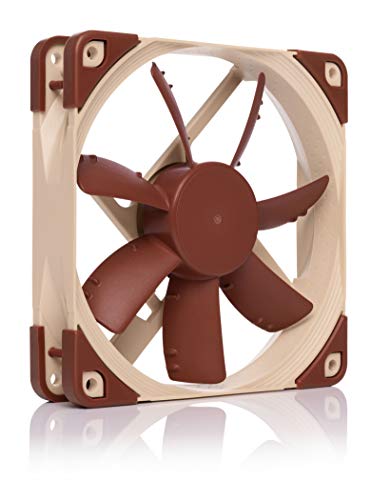
1. Noctua NF-S12A FLX
Our pick — over 4.5★ from 600+ verified ratings; the strongest balance of quality and price.
The near-silent airflow king that owners trust for over a decade.
If your priority is a PC you can’t hear, this is the fan to beat. Its defining spec is a tiny 17.8 dB noise rating—quieter than a whisper in a library—which makes it the most silent fan in this lineup. It achieves this with a maximum speed of just 1200 rpm, proving that you don’t need to spin fast to move air effectively for case ventilation.
This is an airflow-tune design, meaning it’s perfect for unrestricted intake and exhaust spots but not for restrictive CPU coolers or radiators. The package includes anti-vibration mounts, screws, and Low-Noise plus Ultra-Low-Noise adaptors, so you can drop the speed to 900 or 700 rpm for even quieter operation if you wish.
Owners consistently praise its whisper-quiet 17.8 dB operation and report fans still running flawlessly after 13+ years. The crowd favorite holds a 4.9-star score with over 600 ratings. The recurring gripe is the aesthetic; the brown and beige color scheme is functional, not flashy, and the price sits at the premium end for a single fan.
The Strong Points
- Extremely quiet at 17.8 dB
- Excellent build quality and longevity
- Includes anti-vibration mounts and speed adaptors
- Adjustable speed settings (1200/900/700 rpm)
The Trade-Offs
- Not ideal for radiators or restrictive setups
- Beige and brown color scheme
- Premium price point
Reach for this if: you value absolute silence and proven reliability above all else.
Look elsewhere if: you need high static pressure for a radiator or want RGB lighting.
2. Thermalright TL-C12C-S X3
A 3-pack of quiet, bright ARGB fans that beats the value of most singles.
This is the pick that makes you question why you ever paid more for a single fan. You get three 120mm fans with ARGB lighting and a maximum airflow of 66.17 CFM each—that’s a solid 11% more airflow than the be quiet! Pure Wings 3 below. At a max speed of 1550 rpm, they push serious air while keeping noise to a reasonable 25.6 dB.
The build quality punches above the price. They use S-FDB bearings, a type of fluid dynamic bearing that minimizes the blade shake you get with cheaper fans, which keeps noise low and extends lifespan. The ARGB lighting is a highlight, with high-brightness LEDs that diffuse through the blade for a soft, premium glow that syncs with your motherboard.
Buyers praise its durability, with some reporting a year of daily use without issues and calling it “more durable than pricier brands.” The 4.6-star rating across 900+ ratings backs that up. You get great value, but the plastic build and a slightly higher noise floor at full speed than the Noctua are the trade-offs.
Why Buy It
- Exceptional value as a 3-pack
- Good airflow at 66.17 CFM
- Smooth and quiet S-FDB bearings
- Soft, premium-looking ARGB lighting
The Catch
- Plastic construction
- Not the quietest at max speed
Best for: builders who want to fill a case with RGB fans without emptying their wallet.
skip it if: you demand the absolute lowest noise signature of a premium fan.
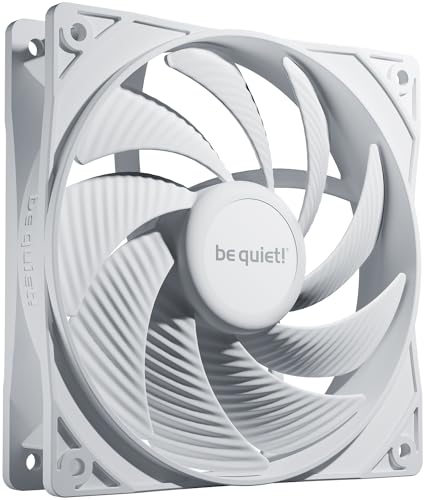
3. be quiet! Pure Wings 3 120mm PWM
High-speed airflow for radiators, wrapped in a near-silent package.
This fan is built for performance where resistance is high, like radiators and dense mesh panels. That high speed comes with a louder 30.9 dB rating, though owners consistently describe it as super quiet in practice.
The innovative design here is a closed-loop motor that keeps the RPM steady regardless of air resistance, so you get consistent cooling even as dust builds up on a filter. The tune fan frame and re-arranged blade angles focus on generating extraordinary air pressure, making it a strong choice for liquid cooling setups.
Buyers report it’s nearly silent at max speed and delivers up to 10°C temperature drops. Many use it as a smooth replacement for a rattling stock fan with no issues since. The 4.6-star score across 700+ ratings shows solid consensus. The rifle bearing (a type of bearing that uses a spiral groove to circulate oil) is rated for an 80,000-hour operating lifetime, so you can install it and forget it.
Performance focus: built for radiators and restricted airflow with a high 2100 rpm ceiling.
Longevity bonus: the rifle bearing’s 80,000-hour lifespan means years of trouble-free service.
4. NZXT F120Q

A smart, quiet fan that pushes air deep into the case.
This fan stands out for its thoughtful engineering aimed at effective, quiet cooling. It uses nine sickle-style blades with a minimal gap between the blade edges and the frame, maximizing the spinning area to boost airflow while reducing turbulence. The result is a focused stream of air that travels far into the case, rather than dispersing at the fan face.
Speed is managed via PWM control, dynamically adjusting from its 1700 rpm maximum based on system temperatures. When your PC is idle, it slows down; during gaming, it ramps up. The fluid dynamic bearing provides stability and a long 60,000-hour lifespan, which is reassuring for a component that runs 24/7.
Owners highlight its quiet yet strong airflow, noting it excels as a bottom intake fan. The 4.6-star score across 400+ ratings confirms it’s a solid, dependable choice. It’s a clean, black, no-frills fan—if you want RGB, this isn’t it, but if you want effective and silent, it delivers.
Strong Points
- Excellent airflow with focused delivery
- Very quiet operation
- Long-lasting fluid dynamic bearing (60,000 hours)
- PWM control for automatic speed adjustment
Considerations
- No RGB lighting
- Not tune for radiator static pressure
Ideal for: case intakes and exhausts where you want a quiet, efficient workhorse.
Think twice if: you need a fan for a thick radiator—the static pressure version is a better fit.
5. DARKROCK Black F120 3in1

An infinity mirror light show with dependable cooling performance.
If your build is as much about looks as thermals, this trio delivers a premium visual experience. The signature feature is the Infinity Mirror Design, which layers the RGB lighting on both the center and sides of the fan for a striking, multi-dimensional effect. It’s an aesthetic that looks significantly more expensive than the asking price.
Under the lights, it’s a solid performer. Nine fan blades push an airflow of 46.7 CFM at speeds that adjust from 800 to 1600 rpm via PWM control. The hydraulic bearing and eight pre-installed rubber pads work to keep operation low-noise and stable, and the daisy-chainable design means you can link all three fans to a single header for a tidy build.
151 owners specifically praise its build quality as a standout feature. The vibrant, synced lighting and consistent airflow earn consistent praise, all at a price that buyers call a steal. The 4.6-star score across 800+ ratings backs that up. The noise at 27.7 dB is fine, and the only minor caveat mentioned is to peel the protective sticker tab off carefully.
Why It Shines
- Stunning Infinity Mirror ARGB design
- Good value as a 3-pack
- Quiet hydraulic bearing with rubber pads
- Daisy-chainable for clean cable management
What To Note
- Moderate airflow at 46.7 CFM
- Requires an ARGB header or controller
Choose this for: a showpiece build where the lighting effect is a centerpiece.
Pass on this if: you need maximum raw airflow or are building a stealth, no-RGB machine.
6. ARCTIC P12 PWM PST A-RGB

A single-fan static pressure specialist that’s nearly inaudible at low speeds.
This is the fan to grab when you need one reliable, high-pressure unit to bolt onto a CPU cooler or a radiator. It’s tune for static pressure, meaning it’s engineered to push air through the tight fins of a heatsink or radiator where a standard airflow fan would struggle. You get a wide 200-2000 rpm range controlled by a 4-pin PWM connector.
The highlight is the flexibility. Thanks to PST (PWM Sharing Technology), the integrated Y-splitter lets you daisy-chain a second fan onto the same header, making it easy to run paired fans on a radiator. The 12 A-RGB LEDs along the hub provide even, rich illumination that syncs with your motherboard’s 3-pin ARGB header.
Owners call it the best affordable static pressure option (static pressure is the ability to push air through tight spaces like radiators) and note it’s barely audible under 60% speed. The 4.6-star score across 900+ ratings shows widespread satisfaction. The trade-off: each fan has two cables (power and RGB), which can get messy if you install many, and the noise rating is in sones (0.3 Sone) rather than the more common decibels.
Performance edge: high static pressure makes it ideal for heatsinks and radiators, not just case airflow.
Setup note: the PST daisy-chain feature means you can run multiple fans off one motherboard header easily.
7. ARCTIC P12 Pro A-RGB 3-Pack

A powerful 3-pack that pushes extreme airflow through the densest radiators.
This is the performance tier of ARCTIC’s lineup, designed for enthusiasts who want serious cooling headroom. The headline spec is a massive 3000 rpm maximum speed, which helps it achieve a huge airflow of 77 CFM—the highest in this list. That power is backed by high static pressure, meaning it can easily penetrate dense radiators and mesh panels where lesser fans give up.
The package includes a Y-cable splitter, and the fans themselves stop completely at less than 5% PWM, which is a great semi-passive feature for a silent idle. The redesigned rotor blades aim for a balance of performance and low noise, and the fluid dynamic bearing keeps things smooth and self-lubricating for a long service life.
Owners mention a 7°C drop in idle CPU temperature thanks to its powerful airflow and static pressure. The 4.6-star score across 500+ ratings confirms the high ceiling. The honest caveat is the noise: at 100% speed, these are loud—one owner compares the sound to an RC drone—so you’ll want to set a fan curve to keep them under 70% for daily use.
The Power
- Extreme airflow at 77 CFM
- 3000 rpm max speed for heavy loads
- Great for dense radiators
- High-quality fluid dynamic bearings
The Reality
- Loud at full speed—needs a fan curve
- 3-pack may be more than some builds need
Grab this if: you run a thick radiator and want maximum cooling headroom with vibrant ARGB.
pass on it if: you’re sensitive to fan noise at high RPM and won’t configure a fan curve.
8. Noctua NF-A12x25 G2 PWM

The next-gen all-rounder that excels in both airflow and static pressure roles.
This is Noctua’s latest flagship, and it’s the rare fan that doesn’t force you to choose between airflow and pressure. It’s designed to excel in both high airflow and high static pressure scenarios, making it the ultimate “one fan for everything” solution—case intake, CPU cooler, radiator, you name it. The 4-pin PWM version runs between 360 and 1800 rpm, and it stops completely at 0% PWM for a fully silent idle.
The engineering here is state-of-the-art. It uses a Progressive Bend impeller with winglets and a Centrifugal Turbulator, plus a frame built from Sterrox LCP, a liquid-crystal polymer that keeps the blade tips incredibly tight to the frame for minimal air loss. The premium-grade SSO2 bearing is rated for over 150,000 hours of operation, which is more than 17 years of continuous use.
Owners praise its premium build, noting it runs quieter at lower RPM while matching or beating other fans’ cooling. The 4.9-star score across 400+ ratings is the highest average in this list. It’s an investment—the most expensive single fan here—and the brown/beige color scheme remains an acquired taste, but as buyers put it, it’s a “buy once cry once” purchase.
The Excellence
- Top-tier performance in both airflow and static pressure
- Exceptional build quality with Sterrox LCP
- Ultra-long lifespan (150,000+ hours)
- Includes radiator gasket, splitter, and extension cables
The Price
- Most expensive single fan in this guide
- Brown and beige color scheme
- No RGB options
Best for: enthusiasts who want one fan that does everything flawlessly and will last for a decade plus.
Reconsider if: your build needs RGB or your budget won’t stretch to a premium single fan.
9. AsiaHorse COSMIQ 3-Pack

A feature-packed RGB trio with daisy-chain wiring and music-sync lighting.
This 3-pack is the full package for a flashy, fully-lit build. The signature feature is the Infinity Mirror RGB design, which offers layered, high-end visuals. But the standout a neat extra is the built-in high-sensitivity sound pickup module that supports 8 kinds of music rhythm light modes—your fans will pulse and flash in time with whatever you’re playing or watching.
Performance is strong, with a maximum airflow of 68.5 CFM at 2000 rpm and a static pressure of 2.05mmH₂O. The daisy-chain design is a major plus for cable management, using interlocking connections to reduce the mess of wires inside your case. It also supports 5V 3-pin motherboard ARGB sync, so you can unify the lighting with the rest of your components.
Owners praise its bright RGB, strong airflow, and clean installation for the price. The 4.5-star score across 500+ ratings shows solid performance, with a note that the noise level is mixed—some find it fairly quiet, others find it loud at full tilt. The included controller for independent lighting control adds value, though the 29 dB noise rating suggests a fan curve is wise.
The Highlights
- Music-sync RGB with 8 lighting modes
- Strong airflow at 68.5 CFM
- Clean daisy-chain wiring design
- Includes dedicated controller
Watch Out For
- Can be loud at maximum 2000 rpm
- Incompatible with some cases needing separated front fans
Pick this for: a full-case RGB makeover with music-sync effects and tidy cables.
Steer clear if: you prioritize whisper-quiet operation over lighting features.
Understanding the Specs
Airflow (CFM) & Static Pressure
Airflow, measured in cubic feet per minute (CFM), tells you how much air the fan moves in free space—this is your number for case intake and exhaust. Static pressure, measured in mmH₂O, tells you how well it pushes through the resistance of a radiator or dust filter. If a fan only lists one number, assume it’s an airflow-tune design.
Noise (dB) & Sones
Noise is usually listed in decibels (dB), where a 3 dB increase is roughly twice as loud. Some manufacturers use sones instead—a different scale where 1 Sone is about the sound of a quiet refrigerator. A fan rated at 17.8 dB is whisper-quiet, while 30 dB is clearly audible. Always check the noise at your expected RPM, not just max speed.
FAQ
What’s the difference between airflow and static pressure fans?
Is a 4-pin PWM fan better than a 3-pin fan?
How many case fans do I actually need?
Will a 120mm fan fit on my radiator?
What does a fluid dynamic bearing do?
How do I control RGB lighting on these fans?
Why is my fan loud even though it’s rated as quiet?
Is it worth paying more for a Noctua fan?
Can I mix different brands of fans in one case?
What is the best fan for a CPU cooler?
Final Thoughts: The Verdict
For the majority of shoppers, the 120mm case fan winner is the Noctua NF-S12A FLX because it delivers legendary quiet operation and class-leading reliability at a 4.9-star rating. If you want the best value with RGB, grab the Thermalright TL-C12C-S X3 3-pack. And for maximum performance on a radiator with vibrant lighting, the ARCTIC P12 Pro A-RGB is the one to reach for.
How We Picked
We do not accept paid placement. Every pick is matched to a real buyer and a real use-case; we do not hands-on test units.
Sources & Methodology
Specifications: manufacturer listings and product documentation. Review insights: verified customer reviews, as of August 2026. Pricing: not shown on this page (it changes often); check the current price via the retailer link.
As an Amazon Associate, Gadgets Feed earns from qualifying purchases. This does not affect which products we feature.