
Our readers keep the lights on and my morning glass full of iced black tea. As an Amazon Associate, I earn from qualifying purchases.
Specs are compiled from manufacturer listings and verified buyer reviews and can change over time — please confirm the key details on the product page before buying.
A 2-in-1 touch screen laptop can replace both your laptop and tablet, so you carry one device instead of two. The tricky part is figuring out which one actually fits how you work, because the price gap between a basic Chromebook and a premium AI-powered convertible is enormous. This guide compares specs and real-world reviews to help you pick the right convertible for your budget.
I’m Min — the founder and writer behind Gadgets Feed. This guide is built by comparing the manufacturers’ published specifications and the patterns across verified customer reviews, so you get each pick’s real strengths and trade-offs instead of marketing spin.
Focus on the hinge mechanism, the processor, the RAM, and the display quality, because those four specs decide whether your 2-in-1 touch screen laptop feels like a tool or a toy.
Our Picks at a Glance



How To Choose The Best 2-In-1 Touch Screen Laptop
Every convertible here can flip into a tablet, but they are not all built for the same jobs. Start with the software you need: ChromeOS for web-only tasks, Windows 11 for full desktop apps.
Processor: The Engine That Decides Speed
The processor determines how responsive the laptop feels. Entry-level machines use Intel Celeron chips like the N4500, which handle browsing and documents fine but struggle with heavy multitasking. Mid-range and premium convertibles use Core i7 or the newer Core Ultra chips, which breeze through dozens of browser tabs, photo editing, and even casual gaming. If you plan to keep the laptop for years, spending more on the processor is smarter than spending on a bigger screen.
RAM and Storage: Your Multitasking Ceiling
RAM determines how many programs you can run simultaneously without lag. A machine with 4GB is fine for light web work, while 16GB lets you keep spreadsheets, video calls, and dozens of tabs open simultaneously. SSDs boot in seconds and feel snappy, while eMMC storage is slower but more affordable. You can’t upgrade RAM on most convertibles, so buy enough from the start.
The Hinge and the Screen: The 2-in-1 Experience
You can flip a 360-degree hinge into tent mode for videos, stand mode for presentations, or tablet mode for drawing. A detachable keyboard lets you leave it behind for true tablet weight. For the screen, IPS technology (a panel type that keeps colors accurate from wide angles) helps when you share the screen. Also, a 2K or higher resolution looks sharper than a standard 1080p display, so text stays crisp when you read up close in tablet mode.
Quick Comparison
| Model | Best For | Screen Size | RAM | Processor Speed (Max) | Amazon |
|---|---|---|---|---|---|
| Lenovo Yoga 7i★ Best Overall | Power users needing a big 2K screen | 16″ | 16GB | 4.8 GHz | Amazon |
| ASUS Chromebook Flip CX1Budget Champion | Students wanting a durable, light Chromebook | 14″ | 8GB | 2.8 GHz | Amazon |
| Samsung 12.2″ Chromebook PlusBest Accessory Bundle | Budget buyers wanting bundled accessories | 12.2″ | 4GB | 1.5 GHz | Amazon |
| Svikou 11″ Pink | Travelers wanting a compact, stylish convertible | 11″ | 16GB | 3.4 GHz | Amazon |
| Jumper EZpad V12Pro | Tablet-first users wanting a detachable keyboard | 12″ | 12GB | 3.4 GHz | Amazon |
| Dell Latitude 5330 | Business buyers wanting a renewed powerhouse | 13.3″ | 32GB | 4.8 GHz | Amazon |
| FUNYET 14″ Tablet Laptop | Casual users wanting a big screen and light weight | 14″ | 16GB | — | Amazon |
| HP OmniBook X Flip | Creators wanting AI features and a bright 2K screen | 16″ | 16GB | 4.8 GHz | Amazon |
| Lenovo IdeaPad Flex 5 5i | Note-takers wanting an included active stylus | 15.6″ | 16GB | 4.7 GHz | Amazon |
| Samsung Galaxy Book5 360 | Creators wanting a stunning AMOLED display | 15.6″ | 16GB | 4.8 GHz | Amazon |
| HP Elite x360 1040 G11 | Executives wanting top security and a 2.8K OLED screen | 14″ | 32GB | 4.8 GHz | Amazon |
In‑Depth Reviews
1. Lenovo Yoga 7i 2-in-1 Laptop
Our pick — over 4.5★ from 200+ verified ratings; the strongest balance of quality and price.
The big-screen convertible that doubles as a desktop replacement, thanks to a 16-inch 2K panel.
For anyone who lives in spreadsheets, databases, or design tools, this Lenovo is the one that feels like a full workstation rather than a compromise. Its 16-inch 2K (1920 x 1200) IPS touchscreen is bright and crisp, and the numeric keypad built into the keyboard is a genuine gift for anyone who punches in numbers all day. Owners say the screen is “clear, crisp” and that the large size plus tent mode makes it a “useful” third monitor when docked.
Performance is the headline here, and it is backed by serious specs. The 12-core Intel Core Ultra 7 155U runs up to 4.8 GHz, paired with 16GB of DDR5 RAM and a huge 2TB PCIe 4.0 SSD. In plain terms, it breezes through demanding apps, boots instantly, and holds dozens of tabs without breaking a sweat. The fingerprint reader and backlit keyboard add polish, while Wi-Fi 6E keeps connections fast in crowded spaces.
The honest trade-off is weight. At this screen size, it is “heavy as tablet,” so holding it in tablet mode gets tiring quickly, and the speakers are the weak point despite Dolby Atmos tuning. For value, the comparison is stark: it offers four times the RAM (16GB vs 4GB) and a 3.2x faster max processor speed (4.8 GHz vs 1.5 GHz) than the budget Samsung Chromebook below.
Why owners rave
- Outstanding performance for heavy multitasking and office work
- Huge 2TB SSD and 16GB RAM for years of headroom
- Great touchscreen with useful tent mode and numeric keypad
Where it compromises
- Heavy to hold as a tablet for long stretches
- Speakers are underwhelming for media
Reach for this if: you need desktop-level power and a big, sharp screen in a machine that still folds flat.
Look elsewhere if: you plan to use tablet mode more than laptop mode — the size and weight work against you.
2. ASUS Chromebook Flip CX1 Convertible Laptop
A rugged 14-inch Chromebook that flips four ways and runs all day on a single charge.
If you live inside Google Classroom, Docs, and Gmail, this is your laptop. The 14-inch FHD (1920×1080) NanoEdge 360-degree touchscreen flips into laptop, tent, stand, and tablet modes. Buyers report it works great in a classroom — one teacher uses it daily for school work and loves the touch screen.
Durability is a standout here. It is built to US Military Grade standard MIL-STD 810H, meaning it shrugs off drops and bumps that would crack a flimsier machine, while weighing just 3.59 lbs. The 8GB RAM and 128GB eMMC storage keep things moving for web-based tasks, and the 11-hour battery life gets you through a full school day without hunting for an outlet.
The catch is raw processing power. The Intel Celeron N4500 tops out at 2.8 GHz, so it is suited for browser-based work rather than heavy apps — owners note speed is decent but not for high-performance tasks. It has noticeably more RAM than the cheaper Samsung Chromebook below (8GB vs 4GB), and buyers call it solid value, with a 45W USB-C charger in the box.
Best in a classroom: the quality and durability win people over, and the touchscreen makes it easy to share work from tent mode.
Buy it if: your day is mostly Chrome tabs, Google apps, and video calls — this does all of it reliably.
Think twice if: you need to run Windows software or heavy creative apps; that is beyond this chip.
3. Samsung 12.2″ FHD 2-in-1 Touchscreen Chromebook Plus
A compact 12.2-inch convertible that arrives with a stylus, mouse, and a docking station in the box.
For a student on a tight budget who wants everything ready to go, this Samsung package is tough to top on contents. The 12.2-inch FHD (1920×1200) touchscreen flips around a 360-degree hinge into tablet mode. The box includes a stylus pen, a wireless mouse, a 7-in-1 docking station with 128GB SSD, and a 32GB MicroSD card — bringing total storage to 224GB. That makes it a true grab-and-go kit.
It is also genuinely light at 2.98 lbs and easy to set up, which owners appreciate. The 720p HD camera covers video calls and online classes. For browsing, streaming, and document work, the Intel Celeron 3965Y (up to 1.5 GHz) and 4GB RAM get the job done without fuss.
The honesty check: this is an entry-level performer. Apps can freeze or run slowly when pushed, and its 4GB RAM is a quarter of what the Lenovo Yoga 7i packs (16GB). One owner found Samsung’s US support wouldn’t register this specific unit. It holds a 2x storage advantage over the ASUS Flip CX1 (224GB vs 128GB), but plan for web-light workloads, not heavy multitasking.
Value-first pick: what wins people over is the bundle — you rarely get this many accessories with a laptop at this level.
Best for: a student who wants a light, cheap convertible with a pen and mouse included, straight from the start.
Not for: anyone expecting snappy performance on big projects — keep expectations realistic.
4. Svikou 11″ Pink 2-in-1 Convertible Touchscreen Laptop
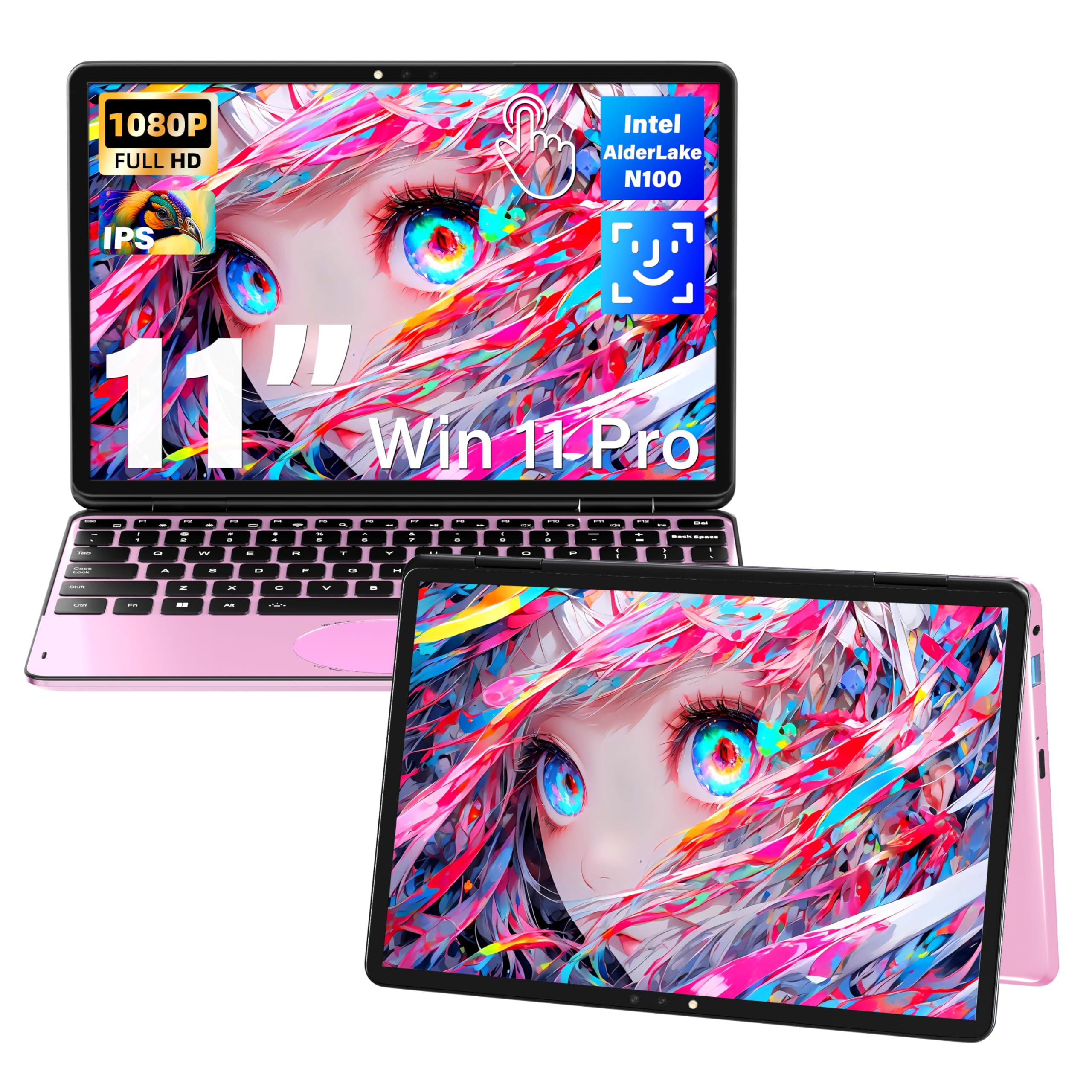
A fun-sized 11-inch convertible that is light enough to forget it is in your backpack.
Travelers and students who want maximum portability with a style statement will like this pink mini. The 11-inch IPS touchscreen (1920×1200) supports a full 360-degree flip into tent, stand, and tablet modes. Buyers praise the compact frame as “lightweight” and “perfect for on-the-go” life — it easily connects a second monitor through mini HDMI for work-from-home setups.
Under the hood, it is surprisingly well-equipped for the size. A 4-core N100 processor runs up to 3.4 GHz, backed by 16GB of DDR4 RAM and SSD storage options up to 1TB. That is enough muscle for document editing, spreadsheet work, and multiple browser tabs, with a full-size backlit keyboard and a gesture touchpad to make typing comfortable. The 2MP front camera and dual-band WiFi cover conference calls.
Different reviews tell different stories here, and that is the honest caveat. A few owners mention the battery drains quickly — around 1.5 hours to hit 30% in one case — and some units have had overheating and touchscreen sensitivity issues. It runs Windows 11 Pro and ships with a 365-day warranty plus 100-day free returns, which softens the risk on an entry-level machine.
Compact appeal: the size and touchscreen are the draw — buyers specifically praise the “crisp responsive touchscreen” and easy portability.
Reach for this if: you want a tiny, colorful convertible for travel, note-taking, and light schoolwork.
Look elsewhere if: your day demands marathon battery life, since real-world runtimes fall short of expectations.
5. Jumper EZpad V12Pro 2-in-1 Laptop Tablet
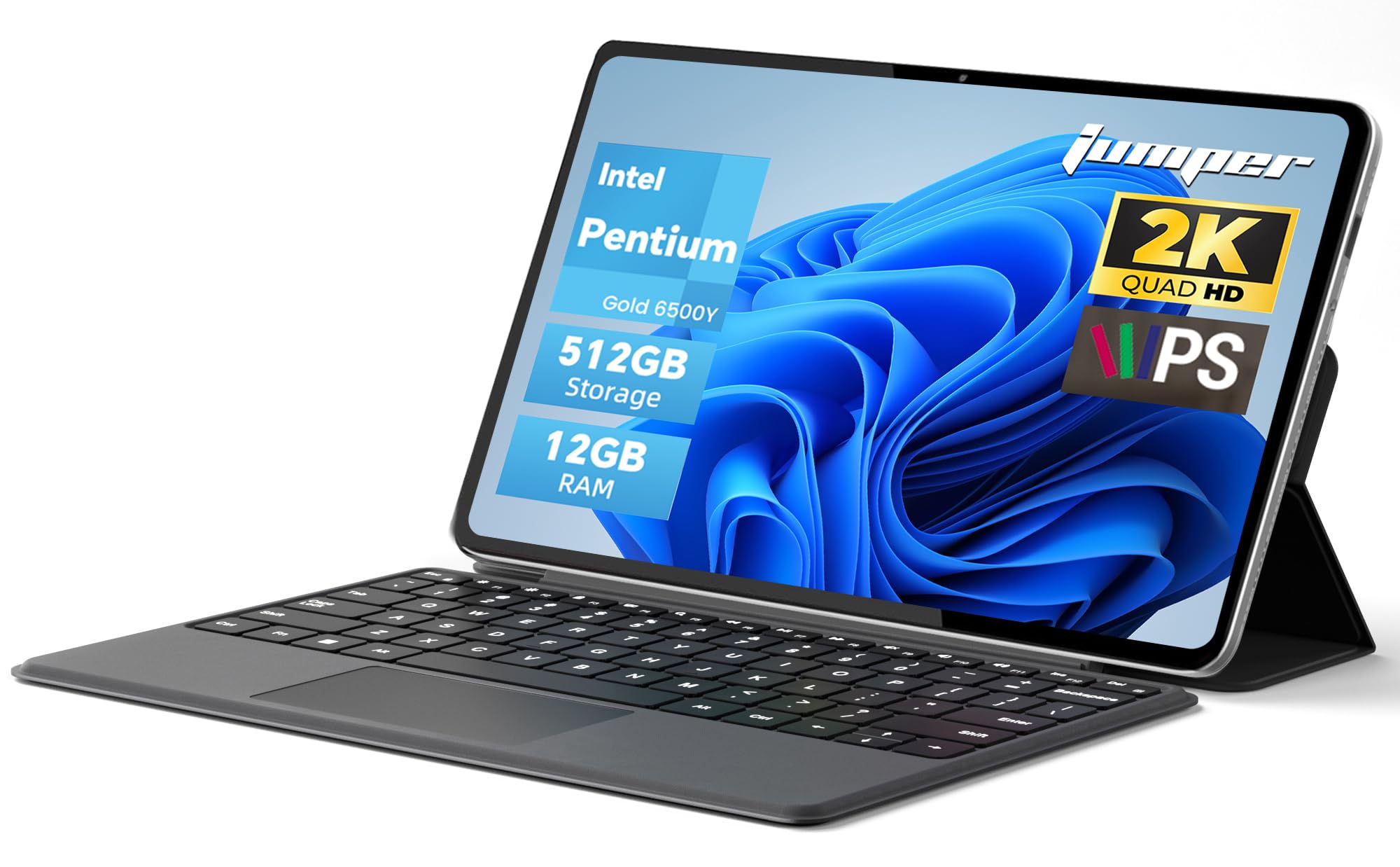
The rare 2-in-1 whose keyboard actually detaches, turning it into a true tablet in seconds.
Unlike the hinge-based convertibles above, this Jumper uses a magnetic leather keyboard that snaps off completely, leaving a 12-inch tablet that weighs just 0.64kg. That makes it ideal for anyone who wants a real Windows tablet for reading and movies but a full laptop for typing. Owners call it “lightweight and easy to carry,” with the detachable design making the laptop-to-tablet switch genuinely convenient.
The display is a highlight: a 12-inch 2K (2000×1200) IPS touchscreen with 10-point capacitive touch and anti-glare technology. Paired with the Intel Pentium Gold 6500Y processor (up to 3.4 GHz), 12GB RAM, and 512GB SSD, it handles daily office software and web browsing smoothly. The 4300mAh battery supports up to 8 hours of video playback, and dual full-function Type-C ports handle charging, data, and video out.
There are a few quirks to know. The two USB-C ports are not equal — only the bottom one supports display and power delivery, and it drops to USB 2.0 speeds. One reviewer noted the Windows license key was not activated on arrival, so be ready to deal with that if it happens. For the price, buyers still call it “excellent value” and a “great investment.”
Tablet-first flexibility: what wins people over is the detachable design and the clear 2K display for both work and entertainment.
Buy it if: you want one device that is a light tablet for media and a capable laptop for work.
Think twice if: you need every port to work the same — the uneven USB-C setup takes some getting used to.
6. Dell Latitude 5330 13.3-Inch 2-in-1 Laptop (Renewed)
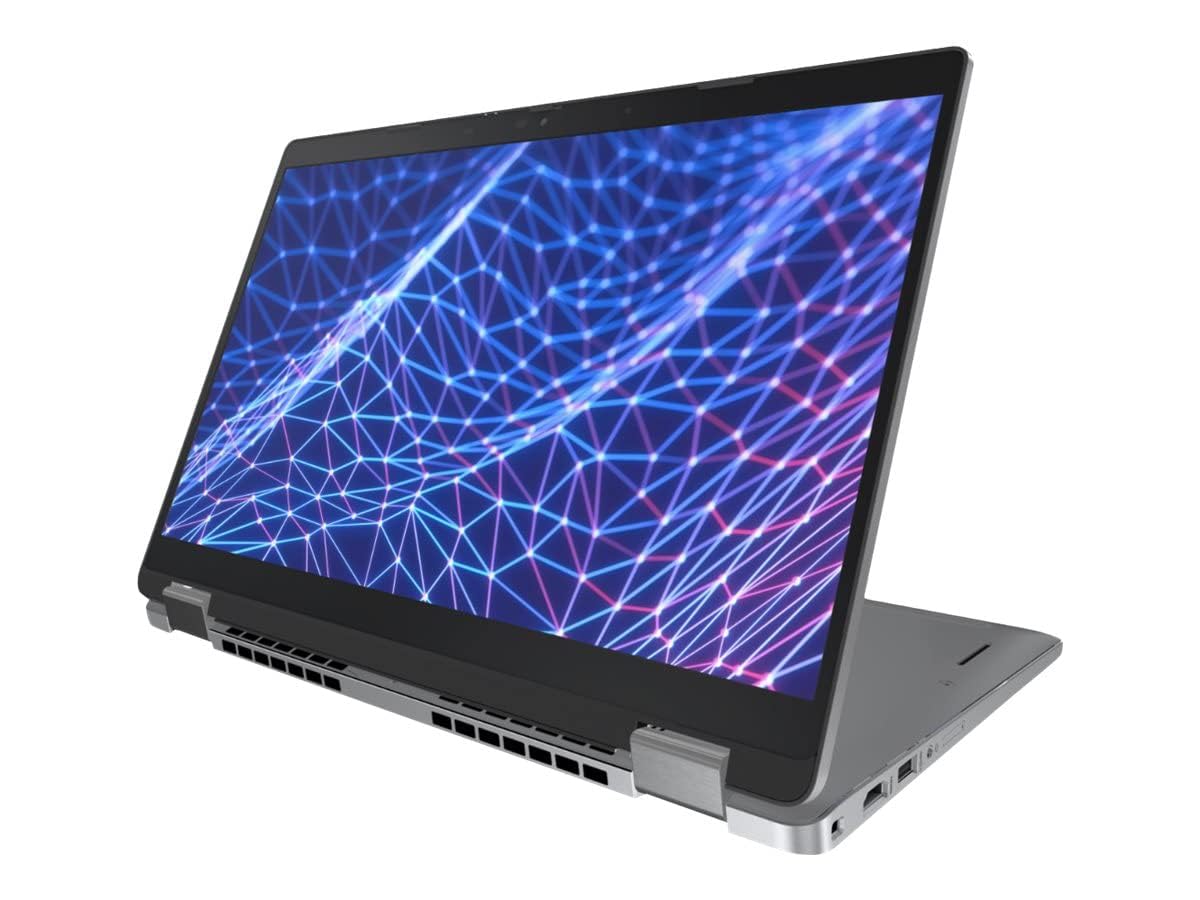
A renewed business laptop that packs 32GB of RAM and a 12th-gen 10-core chip for heavy multitasking.
For professionals who run heavy software, virtual machines, or just keep 50 browser tabs open, this Dell is a sleeper hit. It is a refurbished (renewed) unit, which means you get flagship-level specs at a fraction of the original price. The 13.3-inch touchscreen (1920×1080) is crisp, and the 12th-generation Intel Core i7-1265U processor with 10 cores runs up to 4.8 GHz — matching the top speed of the premium picks here.
The standout spec is the 32GB of DDR4 RAM, which is double what most rivals offer and lets you run multiple demanding applications at once without a hiccup. A 512GB SSD ensures fast boot times and quick file transfers. It ships with Windows 11 Professional, giving you business-grade security and manageability features. Customers note it boots in under a minute and handle games and photo editing well via integrated Iris XE graphics.
The main caveat is battery life. Because this is a powerful business machine, reviewers point out roughly 3 hours of real-world use per charge, and it takes about 7 hours to recharge fully. There is also mention of the initial Windows update causing flickering before settling down. If you are mostly plugged in at a desk, this is a phenomenal value; if you need all-day battery, keep looking.
Raw power for the desk: the 32GB RAM and 10-core processor make this the multitasking king, and buyers confirm it works exactly as described.
Best for: a power user who wants business-grade performance and is happy to stay near an outlet.
Not for: long commutes or all-day travel, where the short battery life will bite.
7. FUNYET 2 in 1 Laptop Touchscreen, 14 Inch

A featherlight 14-inch convertible that weighs only 2 pounds and folds into a tablet.
If portability is your top priority, this FUNYET is a revelation. At just 2 pounds and 0.4 inches thick, it is easy to carry all day, yet it still delivers a 14-inch touchscreen (1920×1200) with 100% sRGB color coverage. The detachable backlit keyboard means you can leave it behind for pure tablet use, and the 16GB of DDR5 RAM (running at a fast 6400MHz) plus 512GB SSD keeps everyday computing smooth.
It is built for media and light productivity. The 12th-gen N100 processor handles web browsing, document editing, and running multiple programs at once. The built-in quad HiFi speakers and microphone make video conferencing and online classes clear, and Wi-Fi 6 plus Bluetooth 5.2 keep wireless connections fast and stable. It runs Windows 11 Pro right from the start.
The recurring complaint is battery life. The makers claim over 10 hours, but real-world shoppers say getting 6 to 7 hours, so plan accordingly. There are also a couple of quirks: you need adapters for USB-C and mini HDMI thumb drives, and the proprietary charging cable can be hard to replace. For the price, buyers still call it “easily worth the money” and praise the large screen.
Featherweight appeal: the 2-pound weight and detachable keyboard are the draws — performance is solid for the price, buyers report.
Reach for this if: you want an ultra-light convertible for travel, study, and media that is easy on the shoulder.
Look elsewhere if: you need all-day battery reliability, since the real-world runtime trails the claim.
8. HP OmniBook X Flip Copilot+ PC 16 inch 2K Touch

A 16-inch AI-powered convertible whose bright 2K screen earns praise from artists and students alike.
This HP is built for creators and students who want a large canvas with modern AI muscle. The 16-inch WUXGA (1920×1200) IPS 2K touchscreen hits 400 nits of brightness with 178-degree viewing angles, and owners say it is “excellent for drawing” — smooth and responsive for stylus work. The 360-degree hinge lets you flip it into tablet or stand mode for sketching or presenting.
Under the hood, the AMD Ryzen AI 5 340 processor clocks up to 4.8 GHz and includes a 50 TOPS NPU (Neural Processing Unit) for on-device AI tasks. That powers the Copilot+ experiences in Windows 11 Home, handling things like live captions and creative tools locally. With 16GB of LPDDR5x memory and a 512GB PCIe Gen4 SSD, it handles many browser tabs, Fortnite, and creative apps without lag. Battery life is a big plus, rated up to 21 hours.
The trade-off is physical. At 16 inches with a metal build, it is “somewhat heavy” and large, so it is not the most travel-friendly. Some owners also note the first day is slow due to background updates. For drawing specifically, this is a standout — buyers call it “a great laptop/tablet replacement” and excellent value for the price.
Creator-ready screen: the display brightness and touch response are what win people over, especially for digital drawing.
Buy it if: you are an artist, student, or multitasker who wants a big, bright screen and AI features without paying flagship prices.
Think twice if: you need something light for constant travel — this is a large machine.
9. Lenovo IdeaPad Flex 5 5i 2-in-1 Laptop

A 15.6-inch convertible that ships with an active stylus for note-takers and digital artists.
For college students in design or photography programs, this Lenovo is a strong pick because it bundles the IST Active Stylus right in the box — no extra purchase needed for drawing or handwritten notes. The 15.6-inch FHD (1920×1080) IPS touchscreen rotates through the full 360 degrees into laptop, tent, stand, and tablet modes. The narrow bezels keep it looking modern.
Performance is well-rounded. The 11th-generation Intel Core i7-1165G7 runs up to 4.7 GHz, backed by 16GB of DDR4 RAM and a 1TB NVMe SSD. That is plenty for photo editing, streaming, and running many tabs at once — owners say it is fast and they can “open up as many tabs as I want.” The fingerprint reader and backlit keyboard add convenience, and the 10-hour battery covers a day of classes.
The biggest risk here is the hinge, which a few owners mention failed after heavy use, leading to screen damage. It is not a universal problem, but it is worth treating the fold-back mechanism gently. There have also been reports of the stylus missing from the box, though the seller responded quickly to ship it. For photo and design work specifically, this is a capable, well-priced tool.
Note-taker’s bundle: the included stylus and fast processor are the main draws, with owners praising the speed and clean software.
Reach for this if: you take handwritten notes or do digital art and want a stylus included with a big screen.
Look elsewhere if: you plan to fold and unfold aggressively — treat the hinge with care.
10. Samsung Galaxy Book5 360 Copilot+ PC

A slim 15.6-inch convertible crowned by a stunning AMOLED touchscreen and deep Samsung ecosystem links.
If you care about visuals, this Samsung is the one to beat. Its 15.6-inch FHD AMOLED touchscreen delivers the deep blacks and vivid colors that OLED is famous for, and reviewers call the display “top-tier” — a dream for photo editing, streaming, and creative work. The 360-degree hinge supports full convertible use, and the whole machine is carved from CNC aluminum at just 13.7mm thick and 3.22 lbs.
Performance is flagship-grade. The Intel Core Ultra 7 Processor 256V runs up to 4.8 GHz with an advanced NPU capable of up to 47 TOPS for on-device AI. That powers tools like AI Select, which searches what you trace on screen, and Photo Remaster for cleaning up blurry photos. The 16GB of RAM and 512GB SSD handle multitasking smoothly, and a 65W adapter keeps it charged. It runs Windows 11 Pro, making it a serious business machine.
The trade-offs are modest but real. There are few USB-A ports, which means you will want a hub for older peripherals, and the battery drains faster at max brightness. The S-Pen is a nice addition for note-taking, and owners describe it as “cool/quiet” with “solid battery.” If you live inside the Samsung ecosystem, the Multi-Control and Quick Share features make this an easy recommendation.
Display-first choice: the AMOLED panel is what wins people over — everything looks richer, and the design gets constant praise.
Buy it if: you are a creator or visual person who wants the best-looking screen and smooth AI features in a light, durable body.
Think twice if: you rely on lots of USB-A accessories without a hub.
11. HP Elite x360 1040 G11, 14″ 2-in-1 Laptop
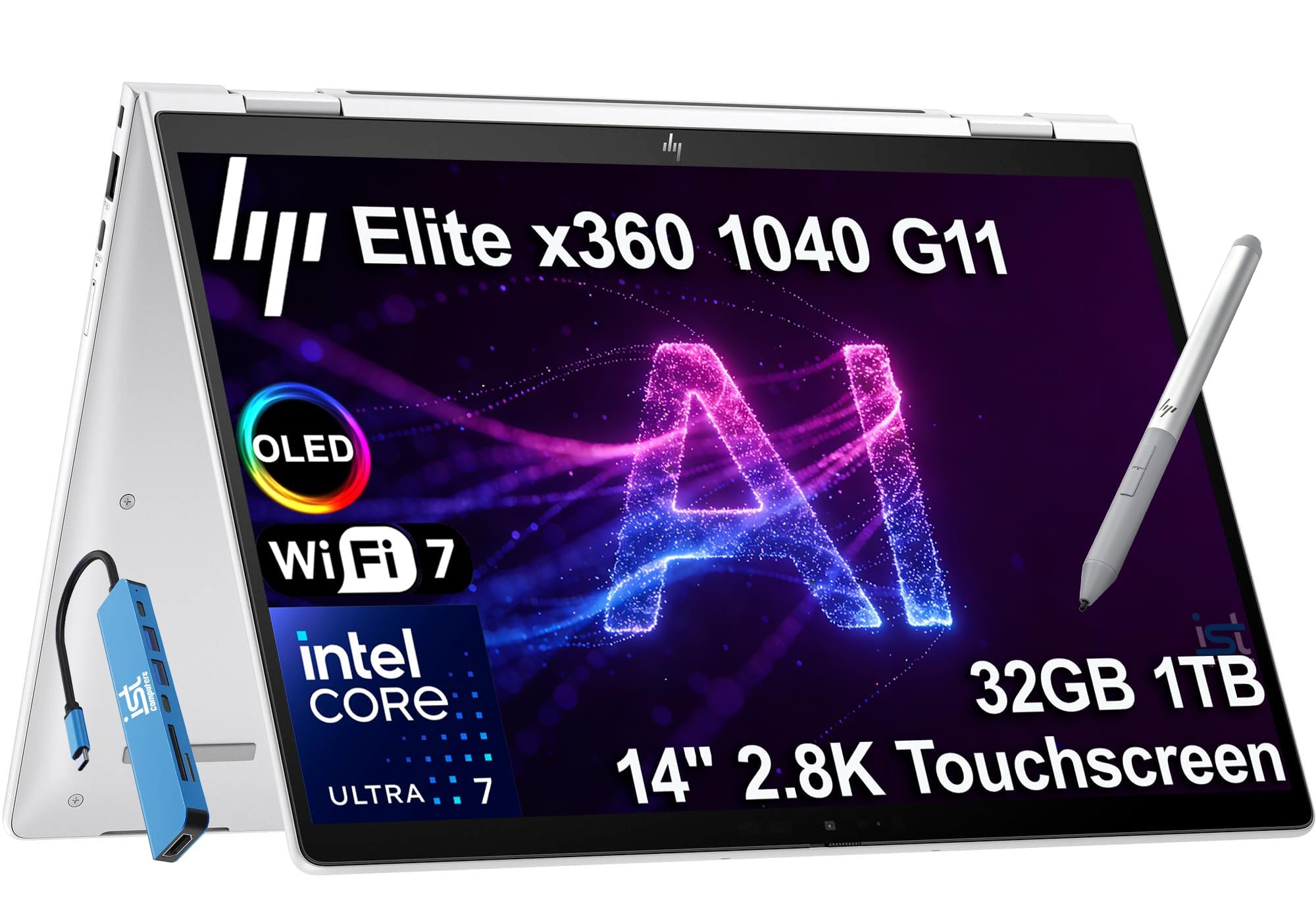
A premium 14-inch executive convertible with a razor-sharp 2.8K OLED screen and 32GB of RAM.
For executives, consultants, and power users who demand the best, this HP Elite is the flagship of the group. The 14-inch 2.8K (2880×1800) OLED IPS touchscreen is stunning — anti-glare, 400 nits, 100% sRGB — and owners say it is vibrant for everything from data analysis to presentations. The 360-degree hinge offers laptop, yoga, flip, and tablet modes, and the bundled HP Active Pen makes it ready for sketching or annotating.
Performance is serious. The Intel Core Ultra 7 155H vPro processor runs up to 4.8 GHz with 16 cores, paired with 32GB of DDR5 RAM (7500 MT/s) and a 1TB PCIe NVMe SSD. That combination handles heavy multitasking, creative apps, and video conferencing without breaking a sweat. It ships with Windows 11 Pro and an IST Computers 7-in-1 USB-C hub, extending connectivity to HDMI, USB, and SD/TF cards. A fingerprint reader and 5MP IR webcam with a privacy shutter round it out.
The honest caveats: it runs warm under load, and a rare unit has been reported to fail shortly after arrival, so buy from a seller with solid return support. Battery life sits around 14 hours rated, though real-world use varies. For a business leader who wants a secure, powerful, and portable machine with a gorgeous screen, this is the one.
Premium build and screen: the quality and the OLED display are what win people over — this feels like a true flagship.
Reach for this if: you need top-tier security, a beautiful screen, and desktop-class power in a portable 14-inch body.
Look elsewhere if: you are sensitive to heat under load or prefer to avoid the premium price tag.
Understanding the Specs
Processor and RAM
The processor dictates overall speed, from booting to multitasking. A Celeron chip handles basic web work, while a Core Ultra or Core i7 handles heavy multitasking and creative apps. RAM is your multitasking ceiling — 4GB is entry-level, 8GB is comfortable, and 16GB or 32GB lets you run many programs at once. Both matter more than screen size for long-term satisfaction.
Hinge Type and Display
A 360-degree hinge folds the screen back into tent, stand, and tablet modes while keeping the keyboard attached. A detachable keyboard separates entirely for true tablet weight. For the screen, IPS technology gives wide viewing angles, and a higher resolution like 2K looks sharper than 1080p. AMOLED and OLED panels offer the best colors and deepest blacks, ideal for media and design.
FAQ
Is a 2-in-1 touch screen laptop worth buying instead of a separate tablet?
How much RAM do I really need in a 2-in-1?
What is the difference between a 360-degree hinge and a detachable keyboard?
Is a Chromebook 2-in-1 enough for everyday use?
What does a 2K or 2.8K touchscreen mean for daily use?
How long does a 2-in-1 laptop battery typically last?
Can I use a stylus or active pen with these touchscreen laptops?
What is the difference between ChromeOS and Windows 11 on a 2-in-1?
Is a renewed or refurbished 2-in-1 laptop a good idea?
What ports should I look for on a 2-in-1 laptop?
Final Thoughts: The Verdict
For most buyers, the 2-in-1 touch screen laptop winner is the Lenovo Yoga 7i because it delivers desktop-class 12-core performance, a generous 16-inch 2K touchscreen, and a massive 2TB SSD in one flexible package. If you want a budget-friendly machine for school and Google apps, grab the ASUS Chromebook Flip CX1 with its rugged build and all-day battery. And for a stunning visual experience with AI features, the Samsung Galaxy Book5 360 with its AMOLED display is the one to reach for.
How We Picked
We do not accept paid placement. Every pick is matched to a real buyer and a real use-case; we do not hands-on test units.
Sources & Methodology
Specifications: manufacturer listings and product documentation. Review insights: verified customer reviews, as of August 2026. Pricing: not shown on this page (it changes often); check the current price via the retailer link.
As an Amazon Associate, Gadgets Feed earns from qualifying purchases. This does not affect which products we feature.