
Our readers keep the lights on and my morning glass full of iced black tea. As an Amazon Associate, I earn from qualifying purchases.
Specs are compiled from manufacturer listings and verified buyer reviews and can change over time — please confirm the key details on the product page before buying.
If you play competitive shooters or just want your mouse hand to stop bumping into the number pad, a 10 keyless mechanical keyboard gives you back that desk space without giving up the keys you actually use. The real question is usually about the switches and the connection: wired for pure speed, wireless for a clean setup. Below, the best tenkeyless boards are split by what they actually do best, from rapid-trigger gaming monsters to quiet workhorse typing boards.
I’m Min — the founder and writer behind Gadgets Feed. This guide is built by comparing the manufacturers’ published specifications and the patterns across verified customer reviews, so you get each pick’s real strengths and trade-offs instead of marketing spin.
Whether you’re after esports-grade speed or a quiet office companion, you’ll find a clear winner in this breakdown of the very best 10 keyless mechanical keyboard options available right now.
Our Picks at a Glance


How To Choose The Best 10 Keyless Mechanical Keyboard
Tenkeyless means the number pad is gone, which shrinks the board by about 20% and puts your mouse closer to the home row. That translates to less arm reach and a cleaner desk, but it doesn’t mean fewer features — many TKL boards pack the same custom software and switch options as their full-size siblings.
Switch Type: The Feel of Every Keypress
The switch determines how a keypress feels and sounds. Linear switches (like Razer’s Yellow or Logitech’s GL Brown) are smooth with no bump, while tactile switches give a small click feedback when you press. Magnetic Hall-Effect switches track analog input, which open up features like Rapid Trigger — where a key resets the moment you release it, without waiting for a full re-press. That feature is a huge advantage in games like CS2 or Valorant where counter-strafing speed matters.
Wired or Wireless: Speed vs. Convenience
For competitive gaming, wired or a dedicated 2.4GHz wireless dongle offers the fastest response time, often with a 1ms report rate. Bluetooth is more convenient for hopping between a laptop, tablet, and desktop, but it typically has higher latency and can feel less responsive. If you want one board for both gaming and work, look for a tri-mode board that does all three.
Build and Keycaps: What Lasts Years
Keycaps made of PBT (a harder, textured plastic) resist the shiny “oily” wear that cheaper ABS caps develop. A gasket mount (a soft layer between the plate and case) makes the board sound deeper and feel springier. Both specs matter more than brand names if you type for hours a day.
Quick Comparison
| Model | Best For | Switch Type | Connectivity | Keys | Amazon |
|---|---|---|---|---|---|
| SteelSeries Apex Pro TKL Gen 3★ Best Overall | Esports & adjustable actuation | OmniPoint 3.0 Magnetic | USB-C Wired | 84 | Amazon |
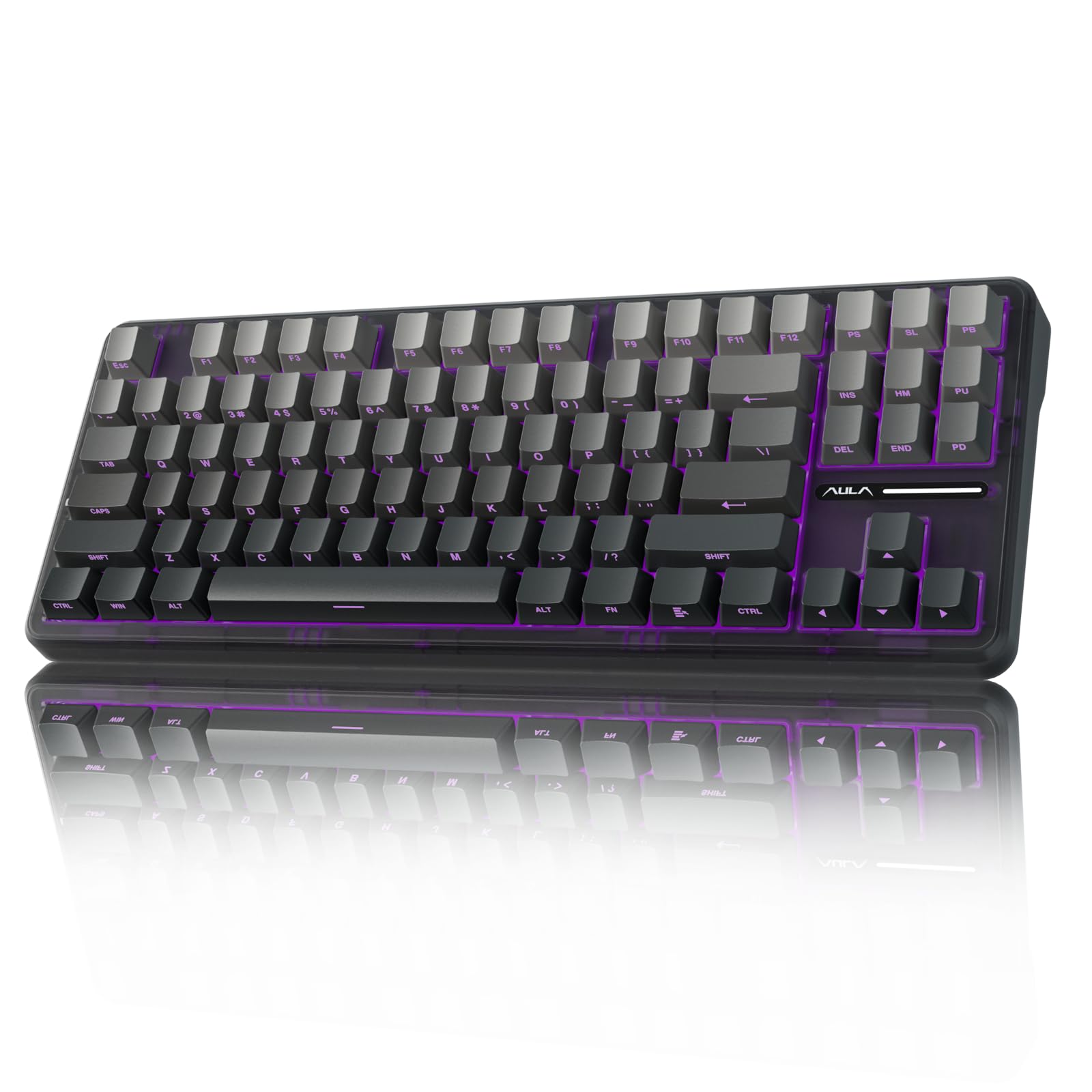
| AULA F87 ProBest Value | Budget wireless with hot-swap | LEOBOG Space Gold Linear | BT / 2.4G / USB-C | 87 | Amazon |
| Logitech G PRO X TKL RapidPro Pick | Tournament rapid trigger | Hall-Effect Magnetic | USB-C Wired | 104 | Amazon |
| Corsair K70 PRO TKL | Dual actuation & build quality | MGX Hyperdrive Magnetic | USB-C Wired | 87 | Amazon |
| Razer BlackWidow V3 TKL | Fast linear feel at a mid price | Razer Yellow Linear | USB-C Wired | 87 | Amazon |
| Logitech G515 Lightspeed TKL | Slim wireless for work & play | GL Brown Tactile | LIGHTSPEED / BT / Wired | 104 | Amazon |
| Keychron K8 | Mac-friendly Bluetooth typing | Keychron Super Brown | BT 5.1 / USB-C | 87 | Amazon |
| Keychron C3 Pro | Programmable budget typing | Keychron Brown | USB-C Wired | 87 | Amazon |
| Redragon K734W | Entry-level wireless value | Hot-swappable Linear | BT / 2.4G / USB-C | 81 | Amazon |
In‑Depth Reviews
1. SteelSeries Apex Pro TKL Gen 3
Our pick — over 4.5★ from 500+ verified ratings; the strongest balance of quality and price.
The analog king that lets you set how deep a keypress must go
This is the board for gamers who want total control over every keypress. The OmniPoint 3.0 Hall-Effect switches give you 40 levels of adjustable actuation, from a hair-trigger 0.1mm to a deep 4.0mm press, so you can set WASD to fire instantly while keeping other keys firm to avoid typos. It also runs 45g of bottom-out force, which feels solid without being tiring.
You get a competitive edge with three patented features no other line offers: Rapid Trigger (resets a key the instant you release it), Rapid Tap (prioritizes your latest key press for faster strafing), and Protection Mode (reduces accidental keypresses on nearby keys). The built-in OLED display and Quickset Auto-Presets load your configs automatically when your game launches, right from the keyboard. Buyers report it feels “amazing, sturdy, high quality” — and one calls it “much more accurate than my Corsair K100 with optical switches.”
The main gripe in the review pages is value — it’s a premium pick, and some wish they’d caught it on sale. But for serious FPS players, the adjustable actuation and Rapid Tap stack is the best competitive advantage here, and the sound quality is the single most-praised thing among owners.
Why it dominates
- Analog magnetic switches with 40-level adjustable actuation
- Rapid Trigger, Rapid Tap and Protection Mode in one board
- Premium PBT keycaps and OLED display for on-board control
Where it stings
- Premium pricing — you’re paying for the exclusivity
- Wired only; no Bluetooth convenience
Reach for this if: you play competitive shooters and want microscopic control over actuation with the fastest reset tech on the market.
Look elsewhere if: you need a wireless board or a budget price tag — this one’s all in on wired performance.
2. AULA F87 Pro
A creamy-sounding wireless board that survives drops and delivers
The AULA F87 Pro is the value king for people who want wireless freedom without paying a premium. It connects to five devices at once across Bluetooth, 2.4GHz, and USB-C, and a 4000mAh battery keeps it running for a long stretch between charges. The pre-lubed LEOBOG Space Gold switches give you that smooth, creamy typing feel that enthusiasts chase, and the hot-swappable base accepts both 3-pin and 5-pin switches, so you can tune it later without soldering.
Owners rave about the sound and durability. One report notes it survived a 3.3-foot drop and kept working, with the hot-swap switches simply popping back into place — that’s a sturdy board for the price. The sound is often described as soft and not loud, and the 16.8 million RGB backlighting adds a lot of visual pop for the money.
The recurring caveat is the RGB software — getting the exact color pattern you want can be a bit wonky, and when the battery gets low, the LEDs turn off entirely. For the price, though, this is the best balance of wireless, sound, and customization you’ll find, beating out boards that cost nearly double.
Smart buy: the F87 Pro delivers premium creamy sound and tri-mode connectivity at a budget price, with durability that surprised owners — the side-printed PBT keycaps and gradient black finish make it feel more expensive than it is.
3. Logitech G PRO X TKL Rapid
Built with esports athletes for millisecond-perfect counter-strafing
The G PRO X TKL Rapid is Logitech’s answer to the analog keyboard craze, and it’s aimed squarely at tournament play. Its magnetic Hall-Effect switches activate at just 35g of force, making every tap featherlight and fast. The Rapid Trigger mode is the standout: it lets a key re-activate without a full release, which is a decisive edge in FPS games where counter-strafing speed decides fights.
Everything is tunable via Logitech G HUB or even on the fly with FN key modes — you can set custom actuation points and sensitivity per key without touching software. Owners highlight the responsiveness as the top trait, saying it’s more quiet than traditional mechanical boards and that the magnetic switches feel nice under the fingers. The build quality gets frequent praise too, and it includes a volume knob.
The downsides are honest: it’s wired only, and some owners note it runs a bit loud with a stabilizer rattle, plus there’s no wrist rest in the box. One report compares it to the Wooting 80HE, calling it a more budget-friendly alternative — but if you’re not chasing that brand, this is a top-tier rapid trigger board at a fair price.
Best for: Valorant and CS2 players who want esports-grade Rapid Trigger without the Wooting price tag. The typing feel is solid but the real magic is in the analog speed.
4. Corsair K70 PRO TKL

A heavyweight with a clever trick: two actions from one keypress
Corsair’s K70 PRO TKL lets one key act as two buttons with its dual actuation feature. You can set a key to fire one command at a shallow 0.4mm press and a second command at a deeper 3.6mm press, all in 0.1mm steps — so you can pull off quick-fire combos without moving your fingers. The pre-lubed MGX Hyperdrive magnetic switches feature a double-rail design to minimize wobble and are rated for 150 million keystrokes.
Everything about this board feels built to last. It’s a heavy 2.1 pounds with an aluminum top plate, and owners call the typing experience silky and quiet, with a satisfying sound. The included wrist rest and volume roller add comfort and convenience, and Rapid Trigger is supported for those who want that esports edge alongside the dual actuation.
Reviews note the iCue software is powerful but has a learning curve, and one owner had an RGB glitch that took a week to sort out. The keyboard feel gets mixed feedback too — some find it great, others find it slightly lacking. But for a gamer who wants one board that does both Rapid Trigger and dual-action commands with heavy-duty build, this is a strong contender.
The standout features
- Dual actuation: two commands from a single keypress
- Heavy 2.1 lb aluminum build with wrist rest
- 150 million keystroke rated switches
Honest trade-offs
- iCue software is complex and occasionally buggy
- Volume knob sits close to the PgUp/Home keys
Pick this for: players who want dual-action combos and a rock-solid wired board with a quiet, pleasant sound.
5. Razer BlackWidow V3 TKL

A fast, firm linear board that brings Razer Chroma to your desk
The BlackWidow V3 TKL is the pick for gamers who want a proven, fast linear switch without the analog learning curve. The Razer Yellow switches activate at just 1.2mm with no tactile bump, making them ideal for rapid key-tapping in games, and built-in sound dampeners keep the noise down. The military-grade metal top plate gives it a heavy, sturdy feel that owners consistently praise.
Razer Chroma RGB is a big draw here, syncing with 16.8 million colors across games, Philips Hue lights, and gear from 30 partner brands. The backlighting glows consistently through the keycaps, which owners call “very nice and consistent.” It’s also highly programmable with Razer Hypershift, letting you remap complex macros, and built to endure with an 80-million-click switch rating.
The honest catch: noise level gets mixed feedback — some find it quiet, others say it’s not quiet at all — and opinions on value are split between fair and overpriced. Two-year owners mention zero problems, which speaks to the build. For a reliable, fast linear TKL that looks great on a Windows gaming setup, this is a safe, proven choice.
The gist: a rock-solid, heavy TKL with an ultra-fast 1.2mm actuation that’s been a daily driver for years without issues — just know the sound might not be whisper-quiet for everyone.
6. Logitech G515 Lightspeed TKL

A low-profile wireless board that fixes the G915’s biggest annoyances
The G515 Lightspeed is the board for people who want a slim, low-profile TKL that works across multiple devices. It connects via Logitech’s LIGHTSPEED wireless, Bluetooth, or wired USB-C, and the factory-lubed GL Brown tactile switches give a discernible bump that feels smooth and precise. A single charge delivers up to 36 hours of play, a solid figure for a low-profile wireless board.
Owners highlight how it fixes the older G915 TKL’s issues — the keycaps are replaceable standard low-profile PBT caps that resist oils, and Logitech swapped the faulty volume roller for function-key media controls. The double-shot PBT keycaps feel premium and textured, and the all-plastic build is dense and solid rather than cold metal. Wireless response is described as flawless, with a 1ms report rate.
Where it falls short: there’s no clicky switch option, it only pairs with one Bluetooth device at a time, and the transparent lettering is tough to read without the backlight on. Some owners note it’s a better value at a discount than full price. For a clean, quiet, low-profile wireless board, this is one of the best you can buy, especially if you’re already in the Logitech G ecosystem.
What wins you over
- 36-hour battery with LIGHTSPEED wireless
- Replaceable double-shot PBT keycaps
- Low-profile, quiet tactile switches
Know before you buy
- Only one Bluetooth device at a time
- Legends hard to read without backlight
Ideal for: clean-desk setups and users who bounce between work and gaming without wanting a bulky, tall board.
7. Keychron K8

A wireless TKL that treats Mac users like first-class citizens
Mac owners get a smooth wireless TKL with the Keychron K8, thanks to its super brown tactile switches with 55±10 gf actuation force and a 50-million keystroke lifespan. It connects to up to three devices over Bluetooth 5.1 and switches between them smoothly, with a USB-C wired mode as a reliable backup. Its 4000mAh battery is among the largest in TKL boards, providing up to 200 hours of wireless use with the backlight off.
What makes it special is the cross-platform support — it’s tune for both macOS and Windows, with additional keycaps for each system included in the box. Owners describe the build quality as solid and the tactile feel as “buttery” with a satisfying click. The 87-key layout keeps navigation keys like Home, End, and Page Up right where you need them, and the two-level adjustable feet make it comfortable for long typing sessions.
Customers note reliable Bluetooth with quick Mac pairing and no input lag, though a few note the volume level is on the louder side and connectivity can be finicky on some setups. The included keycap puller and Mac/Windows caps add real value. For a programmer or writer on a Mac who wants to hop between devices, the K8 is a proven favorite.
Perfect for: MacBook users who want a quiet, tactile wireless board with huge battery life and easy three-device switching.
8. Keychron C3 Pro

A gasket-mounted typing board that programmers can remap to their heart’s content
The Keychron C3 Pro is a wired TKL that’s a dream for anyone who types all day — especially programmers. It runs QMK/VIA open-source software, which lets you remap every single key, set up layers, and create custom shortcuts with a few clicks. The gasket mount structure, combined with sound-absorbing and case foam, gives it a quieter, smoother typing experience that owners describe as a satisfying “thonking clack.”
Under the hood, it has a 1000 Hz polling rate and NKRO (N-Key Rollover), so the board keeps up with fast multi-keypress inputs whether you’re working or gaming. The brown switches are soft, quiet, and satisfying, with a tactile bump that helps reduce typos. You get shiny double-shot ABS keycaps with a red backlight, and the FN + CAPS combo instantly toggles between Mac and Windows layouts.
Owners love the value, calling it “quality at a great price” and noting the heft feels more premium than the plastic suggests. The honest caveats: it’s a tenkeyless layout with no numpad (which is the point here), the tall height benefits from a wrist rest, and there’s no wireless, RGB, or hot-swap. One owner reported a “G” key failing intermittently, which isn’t user-replaceable on this board. If you want a cheap, excellent typing board with class-leading programmability, this is it.
Why programmers love it
- Full QMK/VIA remapping with layer support
- 1000 Hz polling rate & NKRO
- Quiet gasket-mount typing feel
The trade-offs
- Wired only — no wireless or RGB
- Tall profile wants a wrist rest
Who it’s for: coders and typists who want deep remapping at a budget price — the gasket sound makes it feel far more expensive than it is.
9. Redragon K734W
An affordable tri-mode board with a sound that owners call addictive
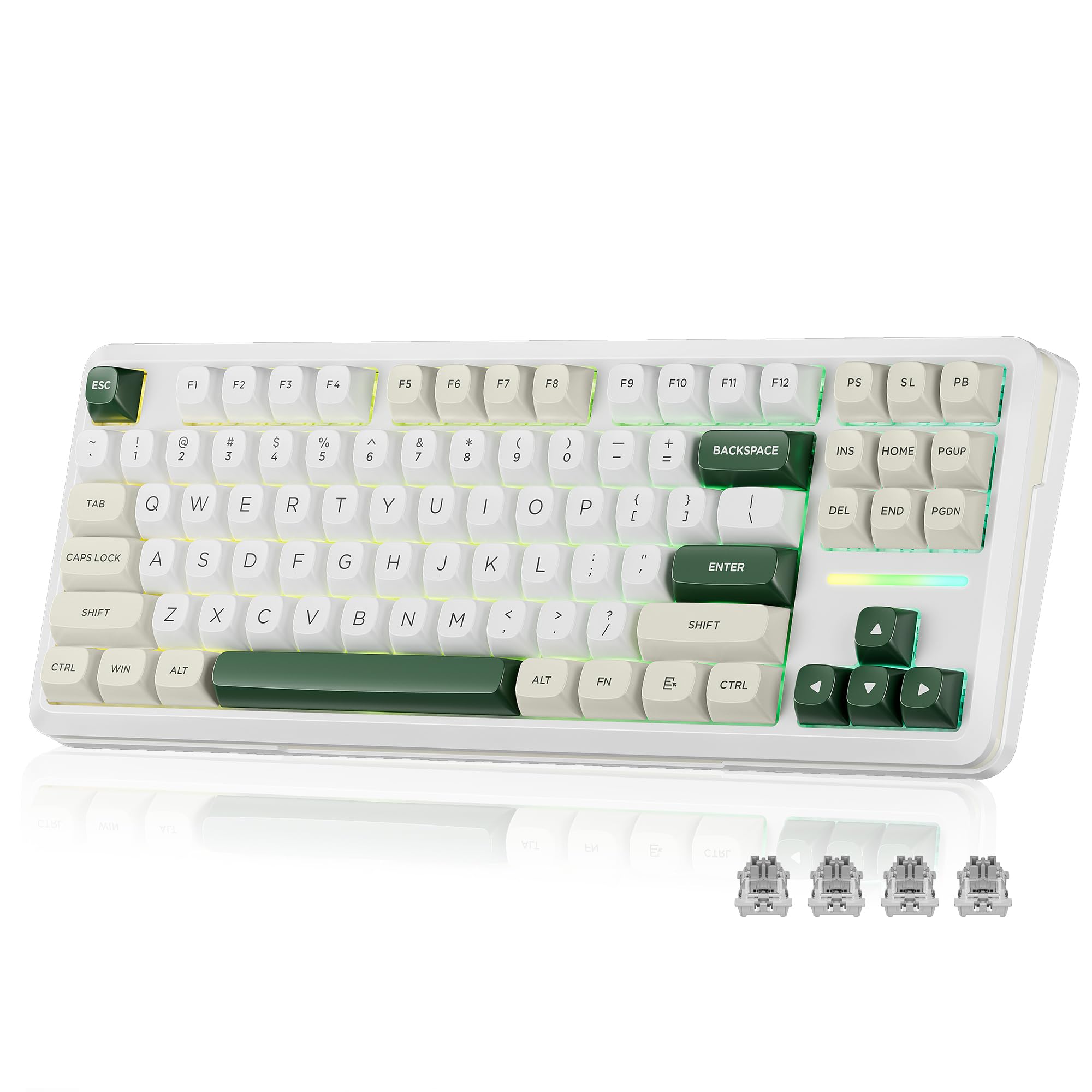
The Redragon K734W is the budget-friendly entry into the wireless TKL world, and it punches well above its price. It connects via Type-C wired, Bluetooth (3.0/5.0), or 2.4GHz, with a range up to 10 meters and easy top-side buttons to switch modes. With an 81-key layout, it’s more compact than a standard 104-key board, giving your mouse plenty of room to move.
Owners describe the typing sound as “hard candy clicks” — crisp and satisfying, with a five-layer noise cancellation system and gasket design that reduces resonance noise. It uses thick-lubed custom linear switches on a hot-swappable socket that accepts nearly all 3-pin or 5-pin switches, so you can easily swap in a different feel later. The south-facing RGB is customizable per-key, and the dye-subbed PBT keycaps keep their legends vivid over time.
The practical notes from owners: battery life reaches about a week on 2.4GHz, and the RGB doesn’t shine through the keycaps. Some report needing two USB ports for full functionality, and a few mention keys can stop working after extended use — a known risk at this price point. The software is limited, but the presets work great from the start. For a first mechanical keyboard or a budget wireless option, this is a solid, fun pick.
Bottom line: the best cheap wireless TKL for someone new to the hobby — the clicky sound and hot-swap options make it feel custom even at a budget price.
Understanding the Specs
Rapid Trigger and Hall-Effect Switches
Magnetic Hall-Effect switches use magnets to detect keypresses, which lets them measure exactly how far a key is pressed rather than just on or off. That enables Rapid Trigger — a setting that resets a key the moment you start releasing it, so you can re-press it faster. This is a huge edge in FPS games where counter-strafing speed wins fights. Actuation point (measured in millimeters) tells you how deep you must press before a key registers — lower is faster for gaming, higher prevents typos when typing.
Polling Rate and NKRO
Polling rate, measured in Hz, is how often the keyboard reports its status to your PC. A 1000 Hz rate means it updates every 1ms, which feels instant. NKRO (N-Key Rollover) means every keypress is registered independently, no matter how many keys you’re holding at once — critical for complex game combos. A quick tip: if a keyboard lists its polling rate, higher is better for gaming, but 1000 Hz is the ceiling you’ll see on most modern boards.
FAQ
What’s the difference between a TKL and a 75% keyboard?
Are wireless TKL keyboards good for gaming?
Can I swap the switches on any TKL keyboard?
How long does a TKL keyboard battery last?
What does actuation point mean on a keyboard?
Is a gasket mount worth paying extra for?
Will my TKL keyboard work with a Mac?
Why are PBT keycaps better than ABS?
What is Rapid Tap or SOCD and why do gamers care?
Does a TKL keyboard save real desk space?
Final Thoughts: The Verdict
Across the board, the 10 keyless mechanical keyboard winner is the SteelSeries Apex Pro TKL Gen 3 because its analog magnetic switches and Rapid Tap stack offer an class-leading competitive edge. If you want a wireless work-and-play board with a huge battery, grab the Keychron K8. And for the best budget pick that everyone raves about, the AULA F87 Pro is the one to reach for — it’s the crowd favorite among wallet-conscious buyers.
How We Picked
We do not accept paid placement. Every pick is matched to a real buyer and a real use-case; we do not hands-on test units.
Sources & Methodology
Specifications: manufacturer listings and product documentation. Review insights: verified customer reviews, as of August 2026. Pricing: not shown on this page (it changes often); check the current price via the retailer link.
As an Amazon Associate, Gadgets Feed earns from qualifying purchases. This does not affect which products we feature.