
Our readers keep the lights on and my morning glass full of iced black tea. As an Amazon Associate, I earn from qualifying purchases.
Specs are compiled from manufacturer listings and verified buyer reviews and can change over time — please confirm the key details on the product page before buying.
If you’re building a Ryzen 7000 or 9000-series rig, you don’t need a liquid cooler to keep it chill. The best air coolers now match most AIOs, run quieter, and can’t leak onto your graphics card. This guide sorts through the options to find which tower fits your CPU, your case, and your RAM—without the pump noise or the water risk.
I’m Min — the founder and writer behind Gadgets Feed. This guide is built by comparing the manufacturers’ published specifications and the patterns across verified customer reviews, so you get each pick’s real strengths and trade-offs instead of marketing spin.
You need an am5 air cooler that keeps your CPU cool without sounding like a jet engine or blocking your RAM slots. The right pick depends on three things: how many heat pipes it has, how loud the fan gets, and whether it clears your memory modules.
Our Picks at a Glance


How To Choose The Best AM5 Air Cooler
Picking an air cooler for your AM5 motherboard isn’t just about raw cooling power. You need to balance the CPU’s heat output, the physical space inside your case, and whether your RAM sticks will fit under the fan. Here’s what actually matters before you click buy.
Match the Cooler to Your CPU’s Appetite
Count your CPU’s cores first. A 6-core Ryzen 5 runs cool on a single-tower cooler with a couple of heat pipes. An 8-core or 16-core chip like the Ryzen 9 generates far more heat, so you’ll want a dual-tower design with more heat pipes moving that energy into the fins. The good news: air coolers rated to dissipate high wattage, like a 270W TDP model, handle the most demanding AM5 chips without breaking a sweat.
Measure Your Case and RAM Before You Order
Height is the first number to check—tall coolers simply won’t fit in slim cases. The second is RAM clearance. Dual-tower coolers often overhang the memory slots, so if you have tall RGB RAM with big heat spreaders, you may need to raise the fan, block a slot, or choose a cooler with an offset design. Most reviews mention checking these two dimensions first, and they’re right to.
Quick Comparison
| Model | Best For | Heat Pipes | Max Fan Speed | Noise Level | Amazon |
|---|---|---|---|---|---|
| Thermalright PS120SE ARGB★ Best Overall | RGB Builds with High-End Chips | 7 | 1500 rpm | ≤25.6 dB(A) | Amazon |
| Thermalright Phantom Spirit 120SEBest Value | Quiet High Performance | 7 | 1500 rpm | ≤25.6 dB(A) | Amazon |
| upHere up2K6Compact Pick | Budget Simplicity | 6 | 1600 rpm | <26 dB(A) | Amazon |
| PCCOOLER RT720TC | High TDP Chips | 7 | 2200 rpm | 34.9 dB(A) max | Amazon |
| Cooler Master Hyper 620S | Proven Reliability | 6 | 1750 rpm | 27.2 dB | Amazon |
| be quiet! Dark Rock 5 | Near-Silent Premiere | 6 | 2100 rpm | 29.8 dB | Amazon |
| Sudokoo SK700 | AM5 Simplicity & Full RAM Access | 7 | 2200 rpm | 32.5 dB | Amazon |
| Sudokoo SK700V | Real-Time CPU Monitoring | 7 | 2200 rpm | 32.5 dB | Amazon |
| Noctua NH-D15 G2 | Absolute Top Performance | 8 | 1500 rpm | 24.8 dB | Amazon |
In‑Depth Reviews
1. Thermalright PS120SE ARGB
Our pick — over 4.5★ from 950+ verified ratings; the strongest balance of quality and price.
The crowd favorite that cools like an AIO without the leak risk.
The thing everyone raves about here is the cooling performance — owners logged idle temps as low as 45°C and heavy gaming loads staying under 70°C. You get that muscle from 7 x 6mm heat pipes with AGHP 4.0 technology (a heat-pipe design that works the same whether the cooler is mounted vertically or horizontally). Buyers report “Gaming at 4K max settings ≤70°C (was 91°C)” after swapping off a stock cooler.
Unlike the non-RGB Phantom Spirit, this one adds addressable RGB lighting with up to 17 light modes, synchronized through your motherboard’s 5V 3-pin ARGB header. The dual 120mm TL-C12B-S V2 PWM fans push 66.17 CFM of airflow at a rated ≤25.6 dB(A) noise level. The 454 g weight is substantial, but owners mention the installation is easy, and the fans can be adjusted for RAM clearance.
This is the top-rated pick in its class with hundreds of owners behind it, and the tempering note is size — it stands 154mm tall, so check your case clearance first. For a Ryzen 9 7900X or 7800X3D, this is the first cooler to consider.
The Performance Payoff
- 7 heat pipes and dual towers cool high-core AM5 chips without throttling
- 17 ARGB modes add visual flair to side-window builds
- 154mm height fits most mid-tower cases
What to Watch
- Noise level gets mixed feedback, so it’s not the quietest here
- Tall RAM may require raising the front fan slightly
The pick if: you want maximum cooling and RGB for a high-end Ryzen chip without paying AIO prices.
Think twice if: absolute silence is your top priority — this unit has mixed noise reports.
2. Thermalright Phantom Spirit 120SE
The quiet sibling with identical cooling DNA, minus the lights.
This cooler wins on quiet cooling. Buyers call it whisper quiet, and one owner saw temps drop from the low 90s to a max of 75°C under stress when replacing a stock cooler on a 5700X3D, with ~70°C during gaming. The dual 120mm TL-C12B V2 PWM fans push the same 66.17 CFM airflow as the ARGB model but without the LED wiring.
This cooler carries the identical 7 x 6mm heat pipe design with AGHP 4.0 technology, and at a fraction of the weight of the RGB version, it’s a far lighter load on your motherboard. The aluminum fins and pure copper base use the same anodized black frosted top for a clean, understated look that fits almost any build aesthetic. Customers note it fits comfortably in micro-ATX towers and mid-sized cases.
The installation is easy with multi-socket brackets, though buyers mention the fan clips can be slightly fiddly and the large heatsink may need RAM clearance adjustment. It’s an absolute benchmark for value in the dual-tower air cooler category.
Silent Strength
- Whisper-quiet operation is the standout buyer consensus
- 7 heat pipes tame high-TDP AM5 chips effectively
- Multi-socket mounting covers AM4, AM5, and LGA1851
Minor Nuisances
- Large heatsink may overhang tall RAM modules
- Fan clip instructions are not the clearest
Reach for this if: you want near-AIO cooling with zero pump noise and a clean, no-LED aesthetic.
Look elsewhere if: you need addressable RGB lighting in your build.
3. upHere up2K6 CPU Air Cooler
A compact dual-tower that slips into mini-ITX without RAM conflicts.
The headline feature here is the tool-free, non-disassembly installation — you don’t have to remove your motherboard or RAM to mount this cooler. Reviewers point out easy installation in mini-ITX boards with no RAM overlap, with one owner seeing a Ryzen 5800X run at 40°C idle and 65-70°C during gaming. The six 6mm heat pipes with a direct contact area of 30mm move heat efficiently into the dual towers.
At a 6.22” height, this is one of the shorter dual-towers on this list, making it a smarter fit for smaller cases where the taller 154mm coolers won’t go. The dual 120mm fans spin up to 1650rpm (the spec lists 1600rpm max; both figures appear in the data), delivering 68.2 CFM of airflow at noise levels below 26dB(A) — slightly higher airflow than the Thermalright twins.
This is the budget champion that covers nearly every socket, including AM5, AM4, AM3, and the older Intel LGA 2011/2066 platforms. The honest caveat: one buyer flagged a thin plastic backplate, noting it’s fine for budget systems but they wouldn’t risk it on a premium high-end board.
Budget Smarts: solid AM5 cooling with a compact footprint and the simplest install on this list — best for mini-ITX and budget builders.
Build Read: average cooling performance at a friendly price, but premium-board owners should consider a sturdier mount.
Pick this for: small cases and first-time builders who want a no-stress install that still cools a 5800X properly.
Pass if: you’re running a flagship chip on a premium motherboard — the plastic backplate is a known weak spot.
4. PCCOOLER RT720TC CPU Air Cooler
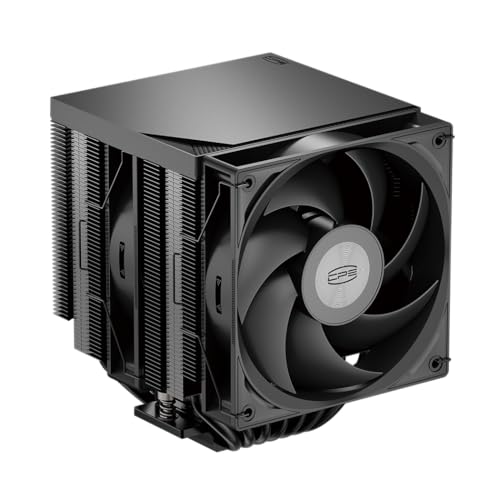
A 270W-rated monster that treats a 7800X3D like a light workout.
Buyers call this “ridiculously good for the price,” and the specs agree. The 7 x 6mm copper heat pipes with a reflow-soldered base are rated to dissipate 270W continuous, which covers even the hungriest AM5 chips. One owner saw a 9800X3D peak at 93°C versus 95°C on rivals, with gaming temps around 80°C ±5°C, and noted that a better AM5 contact frame cut another 5°C off.
The dual 120mm PWM hydraulic bearing fans span a wide 500 to 2200 RPM range, letting them idle nearly silent and ramp up only when the CPU demands it. At typical gaming loads around 1500 RPM, noise measures approximately 27dB, scaling to a maximum of 34.9dBA at full tilt — that 73.32 CFM airflow is the strongest in this lineup. The black, non-LED design with nickel-plated copper base is for builders who want clean aesthetics without RGB.
The catch is physical size. At 157.5mm tall, it fits most ATX mid-towers but may exceed clearance limits in SFF and mini-ITX cases. Buyers also note the asymmetric design covers RAM slots, so install your memory first, and it may block one M.2 SSD slot on some boards.
Heavyweight Cooling: 270W TDP and 73.32 CFM airflow make this the raw-performance value king here.
The Space Check: it’s tall, covers RAM slots, and may hide an M.2 slot — measure your case twice.
Buy this for: high-core AM5 chips like the 9800X3D where you want AIO-level thermals at a fraction of the cost.
skip it if: you’re building in a compact case or want unimpeded access to all your M.2 slots.
5. Cooler Master Hyper 620S Dual Tower ARGB

A long-proven name that keeps cool after years of heavy use.
Cooler Master’s Hyper series has been a pc-building staple for years, and the 620S keeps that reputation — one owner reports it “continues to deliver excellent performance” after nearly two years of use. The six direct-contact copper heat pipes and silver nickel-plated copper base work with a dual-tower design to keep both AMD Ryzen 9 and Intel i7 chips well within safe temperatures.
What sets this apart is the Dynamic PWM control: the fan speed adjusts from 650 to 1,750 RPM automatically, balancing noise and cooling based on your CPU’s temperature moment to moment. The 120mm PWM blades deliver tune airflow, and at 154.9mm tall, it squeezes into standard mid-towers without issue. The installation uses simplified brackets specifically designed for AM5 and LGA 1851/1700 platforms.
The recurring gripe is RAM clearance — some owners had to offset one fan to clear tall memory modules on their motherboards. It’s not a dealbreaker, just a fitting step you may need to handle. With a 2.5 lb weight and solid all-metal build, this is a cooler you can fit and forget.
Built to Last
- Six copper heat pipes with nickel plating resist corrosion over time
- Dynamic PWM quietly adjusts speed from 650 to 1,750 RPM
- Simplified AM5 and LGA1851 mounting brackets
The Fitting Hurdle
- One fan may need offsetting to clear tall RAM
- No digital display for temperature monitoring
Reach for it if: you want a trusted brand with proven multi-year reliability for a mid-range Ryzen build.
Consider another if: you have very tall RGB RAM that leaves no room for fan adjustment.
6. be quiet! Dark Rock 5

The single-tower king that stays nearly silent even at full tilt.
Noise is the strength here — 24 owners specifically single it out, and the collective verdict is “super quiet” and “cools like a snow beast.” The Dark Rock 5 uses the premium Silent Wings 4 120mm PWM fan with a fluid-dynamic bearing (a bearing type that reduces friction noise) and a rubberized frame to stop vibrations from reaching the heatsink. One owner’s R5 7600X stays under 60°C during full load while the fan barely makes itself known.
The single-tower design hides serious capacity: six copper heat pipes and a dense aluminum fin array with a special black coating containing ceramic particles for better heat transfer. The asymmetrical design and heat sink cut-outs give you limitless memory height — no RAM conflicts at all. You can even add a second exhaust fan later for extra performance, and the included long-neck screwdriver makes installation genuinely easy.
At 2.2 lb, it’s the featherweight premium option compared to the dual-tower behemoths. The trade-off: it’s a premium-priced single tower, so for extreme overclocking on the biggest AM5 chips, a dual-tower will still edge it out. But for the vast majority of Ryzen 7 and Ryzen 9 builds, it’s more than enough — and quieter doing it.
Silence Meets Style
- Silent Wings 4 fan with fluid-dynamic bearing stays nearly inaudible
- Unlimited RAM clearance thanks to asymmetric fin design
- Optional second fan adds a performance boost later
Premium Price
- Costs roughly double the Thermalright dual-towers
- Single tower tops out below the biggest dual-tower coolers
Choose this for: a quiet, premium-looking build where RAM clearance matters and you’re not chasing extreme overclocks.
Look elsewhere if: raw maximum cooling for a 16-core chip is your only goal — dual-towers win there.
7. Sudokoo SK700 AM5 Air Cooler

A single-tower wonder that beats a 240mm AIO on a 9800X3D.
Shoppers say this compact cooler “matches or beats” a 240mm AIO on the 9800X3D, with Cinebench staying under 70°C and gaming in the 55-65°C range. The single-tower design with 7 heat pipes — an unusually high count for a single tower — pairs with a 120mm FDB PWM fan that can drop to 0 RPM under 5% PWM load, meaning true silence at idle.
Full RAM clearance means you can see your RGB lighting and tall heat spreaders without obstruction. The L-Rail Lock Mount makes installation tool-free and takes seconds to secure. Buyers praise the sturdy mounting mechanism and note it’s smaller than dual-tower options like the Phantom Spirit, yet the build quality earns top marks.
The honest caveats: this is AM5-only, so no Intel support at all, and it’s mechanically incompatible with the MSI MAG B850M Mortar (WIFI) motherboard — check that specific board before buying. It also carries a 5-year warranty, which is generous for the air cooling category.
Compact Muscle: 7 heat pipes in a single tower deliver AIO-level cooling on flagship AM5 chips with total RAM freedom.
Know Before You Buy: AM5-only socket and a known incompatibility with one specific MSI board — verify your motherboard first.
Buy it if: you want flagship AM5 cooling in a compact package with total RAM clearance and a 5-year warranty.
Steer away if: you own the MSI MAG B850M Mortar (WIFI) or plan to use this with an Intel CPU.
8. Sudokoo SK700V AM5 CPU Cooler

A CPU cooler with a built-in screen for live temperature, load, and frequency.
This is the same 7 heat pipe single-tower design as the SK700, but it adds a real-time digital display that shows your CPU’s temperature in °C or ℉, load percentage, and frequency. Owners control it through the Sudokoo MasterCraft software (Windows 10/11 only) and report it’s a bright, plug-and-play display. One buyer’s 9600X idles at 35°C and maxes at 60°C under load.
The cooling core matches the SK700: a 120mm FDB PWM fan spinning from 500 to 2200 RPM ±10%, with a 0 RPM mode under 5% PWM load for silent idling, and 66.29 CFM of airflow. The tool-free L-Rail Lock Mount and included magnetic screwdriver make installation notably easy. Buyers like the secure 8-screw mounting system and the full RAM clearance.
Opinions split on value — some call it a great product for the price given the display, others find the cost hard to justify for the cooling performance alone. One owner also noted the fan gets noisy above 1200 RPM and that temps rose from 45-50°C idle to 68-75°C after a month of use. It’s a niche choice: the display is the draw, not pure price-per-degree value.
Screen Appeal: live CPU metrics on the cooler itself are genuinely useful for overclockers and monitor-watchers.
Value Read: you’re paying a premium for the display — cooling alone doesn’t justify the cost, and one owner saw temps drift upward over a month.
Reach for it if: you want real-time CPU monitoring without a separate screen and love the clean, data-rich look.
Pass if: you just want maximum cooling per dollar — cheaper coolers cool just as well without the screen.
9. Noctua NH-D15 G2

The crowned king of air coolers, now with 20% more surface area.
The second-generation NH-D15 is the benchmark every other air cooler is measured against. The second generation packs 8 heat pipes (up from 7) and 20% more surface area in the fins, paired with the novel NF-A14x25r G2 140mm fans. Buyers report a Core Ultra 9 285K rarely exceeds 72°C under load, and the cooling is so strong it “works even with overclocking” while staying silent when you’re not pushing it.
What justifies the premium is the complete package: the SecuFirm2+ mounting system with an included Torx-based screwdriver makes installation straightforward, and it includes the superior NT-H2 thermal paste. The offset design with recessed lower fins clears the top PCIe x16 slot on most current motherboards and offers 59mm RAM clearance in single-fan mode (32mm with both fans). It weighs 1525 g, so it’s a heavyweight, but the mounting system is rock solid.
Tall RAM like Corsair Titanium may require removing RGB bars to fit the front fan. For a lower-power CPU, it’s overkill — but for a Ryzen 9 9950X or Core Ultra 285K, it’s the definitive choice with a 6-year warranty.
Flagship Muscle
- 8 heat pipes and 20% more fin area deliver near-AIO cooling
- Includes NT-H2 paste and Torx screwdriver for easy install
- 6-year warranty and legendary Noctua reliability
Flagship Price and Size
- Costs more than many 240mm AIOs
- Needs a full-size case; RAM clearance drops to 32mm with both fans
Buy this for: the absolute best air cooling available on flagship AM5 and Intel chips, with a warranty that outlasts most builds.
Think twice if: you’re on a budget or building in anything smaller than a full-size tower.
Understanding the Specs
Heat Pipes and TDP
Heat pipes are metal tubes that carry heat away from the CPU and into the cooling fins where fans blow it out. More heat pipes (six, seven, or eight) generally mean more heat moved, but the TDP rating (Thermal Design Power, measured in watts) tells you the maximum heat a cooler can handle. A 270W-rated cooler covers even the most power-hungry AM5 chips, while a lower-rated unit suits 6-core CPUs fine.
Fan Speed and Noise
Fan speed is measured in RPM (revolutions per minute), and higher numbers mean more airflow but usually more noise. Noise is measured in dB(A) — every 10 dB sounds about twice as loud, so a 25 dB cooler is noticeably quieter than a 35 dB one. PWM fans (Pulse Width Modulation) automatically adjust speed based on CPU temperature, so they can idle near-silent and ramp up only when needed.
FAQ
Will an AM4 air cooler work on an AM5 motherboard?
How short does my cooler need to be for a mid-tower case?
Is a 270W TDP air cooler enough for a Ryzen 9 or 9800X3D?
Why does RAM clearance matter for a dual-tower cooler?
What’s the difference between a single-tower and dual-tower air cooler?
How loud is “quiet” for CPU coolers?
Do I need a liquid cooler instead for a Ryzen 9 7900X or 7950X?
What does a digital display on a CPU cooler actually show?
Final Thoughts: The Verdict
For most buyers, the am5 air cooler winner is the Thermalright PS120SE ARGB because it pairs genuine dual-tower muscle with flashy RGB at a price that undercuts rivals by miles. If you want dead-silent performance without the lights, grab the Phantom Spirit 120SE. And for a flagship AM5 chip where money is no object, the Noctua NH-D15 G2 is the one to reach for.
How We Picked
We do not accept paid placement. Every pick is matched to a real buyer and a real use-case; we do not hands-on test units.
Sources & Methodology
Specifications: manufacturer listings and product documentation. Review insights: verified customer reviews, as of August 2026. Pricing: not shown on this page (it changes often); check the current price via the retailer link.
As an Amazon Associate, Gadgets Feed earns from qualifying purchases. This does not affect which products we feature.