
Our readers keep the lights on and my morning glass full of iced black tea. As an Amazon Associate, I earn from qualifying purchases.
Specs are compiled from manufacturer listings and verified buyer reviews and can change over time — please confirm the key details on the product page before buying.
When you need to carve metal, wood, or glass with real depth, the biggest mistake is buying a flat 2D engraver and expecting 3D results. True 3D laser carving depends on three things you can compare: laser power in watts, engraving speed in millimeters per second, and software that supports multi-level depth. Here are five machines that actually deliver 3D carving.
I’m Min — the founder and writer behind Gadgets Feed. This guide is built by comparing the manufacturers’ published specifications and the patterns across verified customer reviews, so you get each pick’s real strengths and trade-offs instead of marketing spin.
Whether you run a home business or a serious hobby shop, the right 3d laser carving machine turns raw materials into finished, sellable goods without the steep factory learning curve.
Our Picks at a Glance

How To Choose The Best 3D Laser Carving Machine
Start by identifying your primary material—metal demands a fiber laser, while wood and acrylic work well with a diode laser. Metal needs a fiber laser or a high-power diode, while wood and acrylic cut beautifully with a diode laser. Choosing the wrong laser type renders the machine useless for your intended material.
Match the laser type to your material
A fiber laser uses a 1064nm wavelength that metal absorbs easily, making it the right tool for stainless steel, brass, and titanium. A diode laser works on wood, leather, acrylic, and can mark coated metal, but it lacks the wavelength to truly carve raw metal. Some premium machines pack both into one unit so you can switch materials without buying a second machine.
Look at power in watts, not marketing claims
Higher wattage directly increases carving depth per pass. A 20W machine cuts through thin wood and marks metal, but a 40W or 50W machine slices thick hardwood and produces visibly deeper metal engravings in fewer passes. For batch production, higher wattage saves enough time to justify the extra cost.
Check the working area and rotary support
A larger bed (in inches) accommodates door signs and panels, while a rotary attachment enables engraving on tumblers and mugs. For curved surfaces like spoons or drinkware, verify the machine includes or supports a rotary bundle before purchasing.
Quick Comparison
| Model | Best For | Laser Power | Max Speed | Working Area | Amazon |
|---|---|---|---|---|---|
| xTool S1 40W★ Best Overall | Large wood & acrylic projects | 40W | 600mm/s | 23.93″ x 15.16″ | Amazon |
| WECREAT Vision 20WFully Enclosed Pick | Enclosed desktop safety | 20W | 600mm/s | 24 x 21 x 10 inches | Amazon |
| xTool F2 Dual | Portable on-site metal marking | 15W Diode + 5W IR | 6000mm/s | 6.89″L x 9.33″W | Amazon |
| GWEIKE G2 Max 50W | Industrial deep metal engraving | 50W Fiber | 15000mm/s | 150*150mm | Amazon |
| xTool F1 Ultra 20W | Versatile dual-laser batch work | 20W Fiber + 20W Diode | 10000mm/s | 220mm x 220mm | Amazon |
In-Depth Reviews
1. xTool S1 40W Laser Cutter and Engraver
Our pick — over 4.5★ from 200+ verified ratings; the strongest balance of quality and price.
The heavy-lifting workhorse that slices 18mm wood in a single pass
The S1 earns its top spot because it pairs serious 40W (40,000mW) cutting muscle with a roomy 23.93″ x 15.16″ bed, so you can tackle door signs or batch out 119 dog tags in one run. At speeds up to 600mm/s, it powers through big jobs without babysitting, and the oversized bed is exactly what small shops need for panels that smaller machines cannot fit.
This is the machine to reach for when you want 3D engravings on curved surfaces like spoons and plates, thanks to xTool’s Pin-point Positioning technology. It also handles projects up to 118 inches (3000mm) with AutoPassthrough Technology, so long boards pass through without being cut down first. Owners consistently come back to the same three words: speed, accuracy, and power — the review pages sum it up: “I am thorough enjoying my 40W Xtool S1, its speed, accuracy and power is amazing.”
Safety is a genuine highlight here. The enclosed cover filters 99% of laser light, so you do not need goggles, and built-in 5 flame sensors halt operation automatically if a fire starts. An emergency stop button and a lid-open stop feature round out a Class 1 safety package that is comfortable with kids and pets around. The trade-off is a big one: this machine weighs roughly 100 lbs and needs dedicated space, so it is not a grab-and-go tool.
What owners rave about
- Build quality tops the list — nearly 50 owners single out the solid aerospace-grade aluminum frame
- Ease of use is the second-biggest praise, with beginners reporting near-perfect first test pieces
- Fast enough that a 7 a.m. batch is done before lunch
Where to be cautious
- It is hefty and large, needing a permanent workshop spot
- A few note the xTool software can feel quirky if you switch to LightBurn
- Some say a vent hose is needed to avoid noticeable odor
the balance: serious crafters and small businesses that need power, speed, and a large work area in one dependable machine.
Think twice if: you only have a desk corner to spare — this one needs a real workspace.
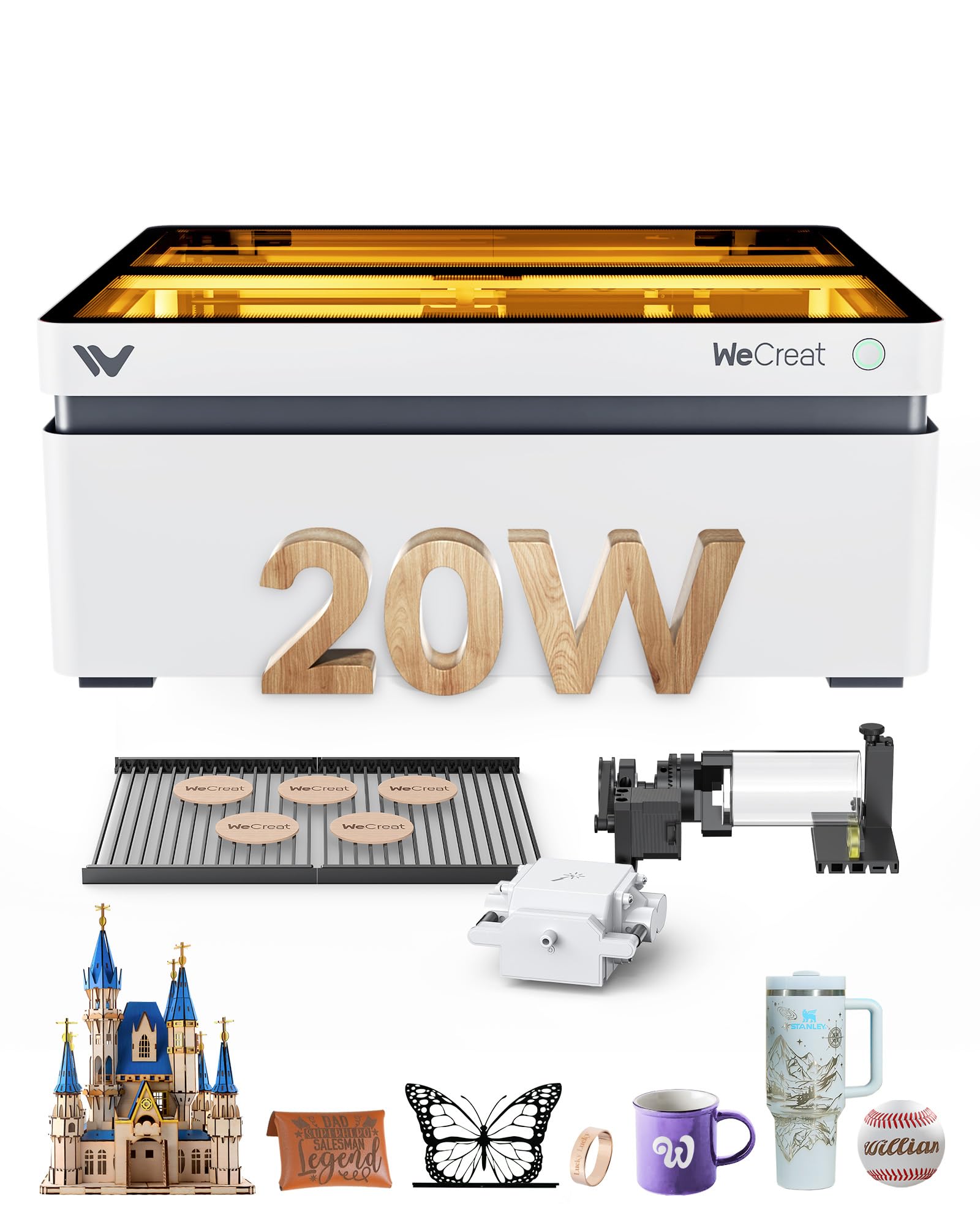
2. WECREAT Vision 20W 4-in-1 Engraver
The desktop unit that lifts itself to fit tall mugs and tumblers
WECREAT’s standout trick is the world’s first auto-lifting bed: a 0-140mm automatic lift adjustment that handles materials of various heights without an extra riser base. That means you can drop in a tall tumbler or a thick block and the machine positions itself, rather than you shimming it by hand. It is a genuinely thoughtful workflow win for anyone doing custom drinkware.
At 20W (20,000mW), this cuts through 10mm wood or 8mm opaque black acrylic in one pass at up to 600mm/s. The 0.06 x 0.08mm laser spot keeps details crisp for jewelry and gift making, and the included Smart Air Assist blows up to 30L/min of air to keep the surface clean while you engrave. The rotary kit covers tumblers, mugs, rollers, chucks, spheres, and rings — everything a home gift business touches.
New users describe getting started within 15 minutes of unboxing, which is rare in this category. The fully enclosed design is FDA Class 1, with an eye-protection cover that filters 99% of laser light, so there is no goggle-wearing or extra enclosure needed. The honest caveat is that precision can be finicky: after calibration struggles, one reviewer noted engraving off by 5mm+ from target, so budget time for setup patience.
The convenience factor: the auto-lift column and built-in HD camera with a 3D Preview make this the easiest enclosed machine here to run daily.
The calibration catch: a small number of buyers hit alignment headaches, so do not expect perfect first prints without a setup run.
Reach for this if: you want a safe, enclosed, self-lifting desktop machine for mugs and gifts and you value easy software over raw power.
Look elsewhere if: you need deep metal carving — 20W diode lasers mark metal but do not carve it like a fiber laser.
3. xTool F2 Dual Laser Engraver
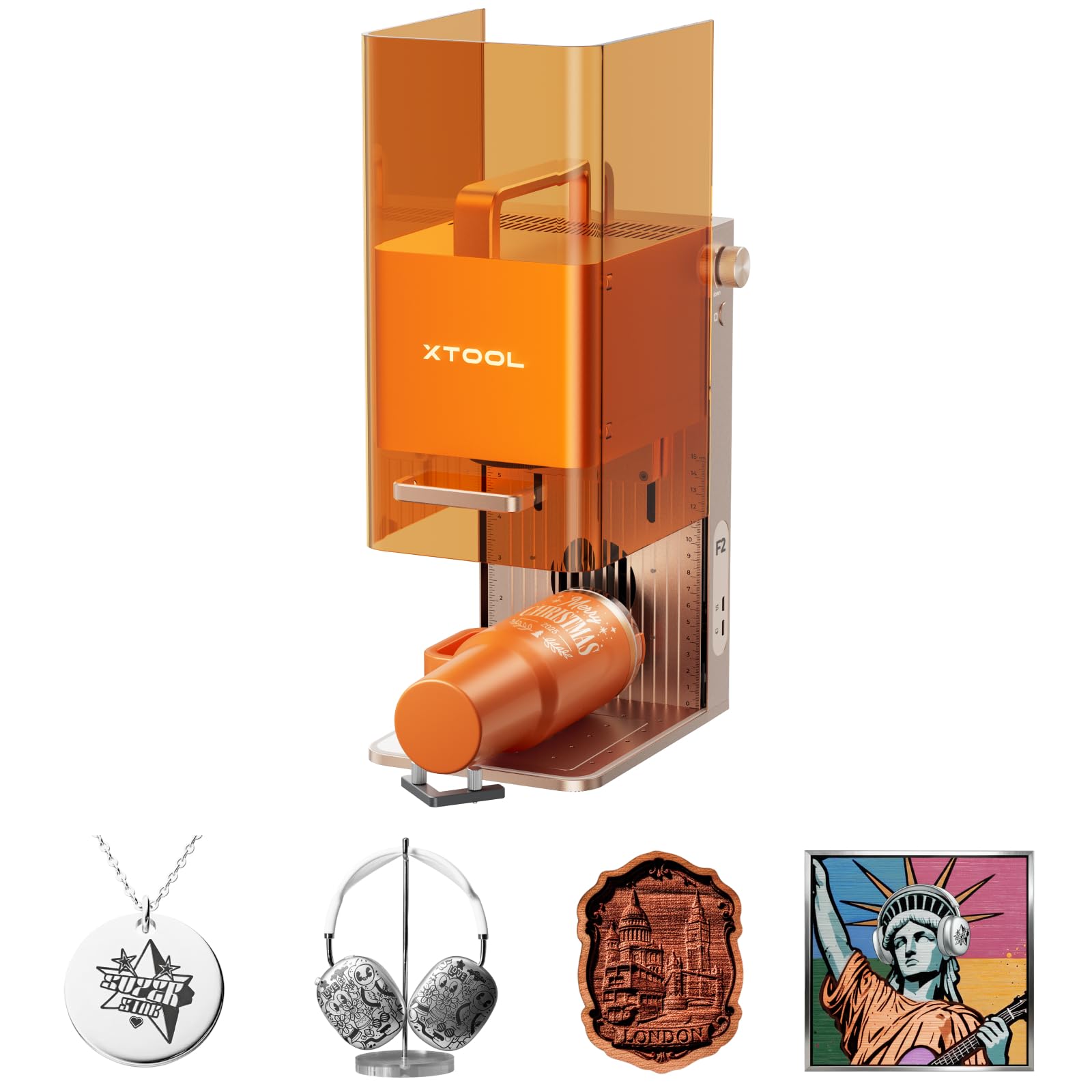
A featherweight 10 lbs that hits a blistering 6000mm/s
Speed is the F2’s entire identity. At 6000mm/s it carves a card in about 3 seconds, which is a 10.0x gap over the 600mm/s the S1 and WECREAT manage — the fastest machine in this lineup by a wide margin. That velocity makes it ideal for on-site customization at fairs, pop-ups, and markets where customers want results while they wait.
The dual-laser combo is what makes it versatile: the 15W diode handles 3D embossing and cutting thick materials, while the 5W IR laser delivers deep, dark, vivid color marking on metal. A built-in 50MP camera frames the workspace and nails alignment down to 0.1mm, so you waste less material. Topping it off, the 0.00199″ motion accuracy keeps crisp, high-resolution results on small pieces.
Portability is a real seller here — at just 4.6 kg (about 10 lbs), it travels in a bag, which is why owners call it the best portable diode and IR laser on the market. The video-game-grade camera makes lining things up easy, and the xTool Studio software is intuitive enough for first-timers. The trade-off is the work plate: at 6.89″L x 9.33″W, it is genuinely small, so this is not the machine for large panels.
The speed demon: nothing else here approaches 6000mm/s, making batch jobs fly.
The size limit: the compact plate suits small pieces, so scale up only with the optional Slide Extension (sold separately).
Best for: mobile engravers, jewelry makers, and anyone engraving at events who wants a machine that fits in a backpack.
Who it misses: users who need to cut large sheets — buy the slide accessory or size up to the S1.
4. GWEIKE G2 Max 50W Fiber Engraver
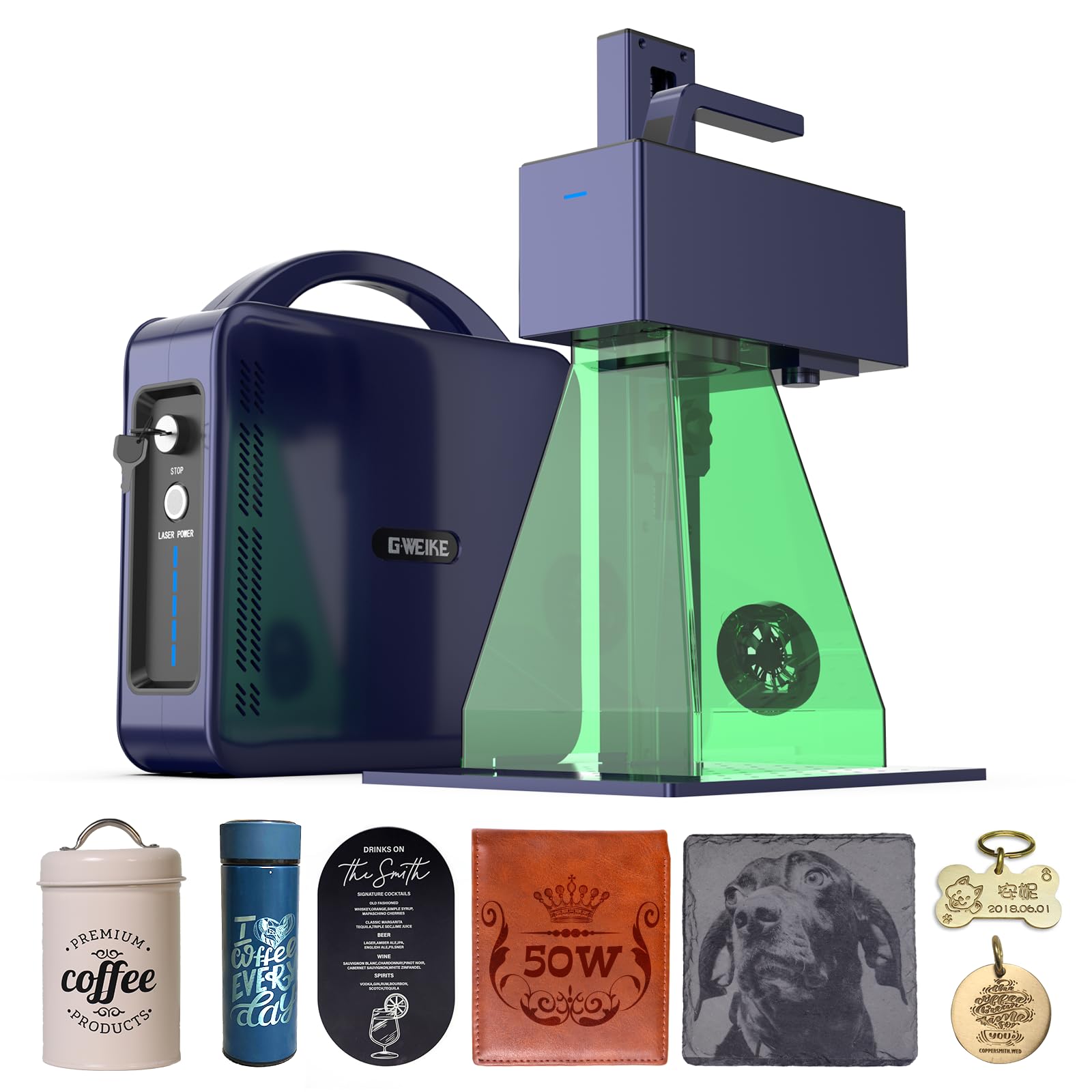
Industrial-grade 50W fiber power for true deep metal carving
If your definition of 3D carving means actual depth in stainless steel and titanium, the G2 Max is built for exactly that. Its 50W 1064nm fiber laser delivers 15000mm/s engraving speed with 0.001mm accuracy, and the high-speed precision galvanometer scanner covers a 150 x 150mm working area. This is the machine that turns metal into jewelry-grade finished work.
Deep engraving is where it shines. The 50W fiber laser handles various metal materials with high-precision depth, and supports HD 8K engraving resolution to capture fine detail. Color work reaches over 90 vibrant colors on stainless steel and titanium, plus it engraves plastic, leather, dark glass, colored ceramics, acrylic, and stone. The electric lift column means focus adjustment is a button push, not a manual fiddle.
The detachable compact design is a bonus — you can lift the head off the frame to engrave almost anywhere, which owners appreciate for small shop flexibility. It connects via WiFi and USB with compatibility for GLaser and LightBurn. The reliability story is honest but mixed: some buyers report fantastic brass results for months, while a rare unit stopped within two weeks.
The depth machine: a true 50W fiber laser that other desktop units simply cannot match for metal carving.
The reliability note: most runs great, but a small share of units fail early, so buy where returns are easy.
Choose it for: small businesses doing serious deep metal engraving and marking where speed and depth pay the bills.
skip it if: you work mostly with wood — a 20W diode cuts wood more efficiently and costs less.
5. xTool F1 Ultra 20W Fiber & Diode Engraver

The largest desktop fiber workspace at 220mm x 220mm
The F1 Ultra carves out its niche with the biggest desktop fiber laser working area in this lineup, at 220mm x 220mm, expandable to 220mm x 500mm with an auto conveyor (sold separately). The 20W fiber laser engraves all metals — gold, silver, copper, stainless steel, brass, titanium — in seconds, while the 20W diode laser handles wood, acrylic, leather, glass, rubber, and fabric.
It is genuinely fast at 10,000mm/s, and the 16MP SMART CAMERA system powers batch engraving that automatically recognizes shapes on the conveyor and fills patterns nonstop. The 20W diode cuts up to 15mm wood and 12mm black acrylic, while the fiber cuts thin stainless steel (0.3mm), brass (0.4mm), and aluminum (0.2mm). For 3D embossing and deep engraving, the dual 20W lasers handle multi-level work on metal, wood, and rock.
Owners praise the user-friendly Creative Space software and find the learning curve friendly for a first engraver. One happy buyer engraved a metal business card in 5 minutes after setup. The honest concern is reliability, which gets mixed feedback — a few units reportedly stop working after about 35 days, though xTool’s customer service is repeatedly described as outstanding at replacing parts quickly.
The productivity edge
- Largest desktop fiber working area in this list, with batch conveyor support
- Versatile dual 20W lasers cover metal and wood without a second machine
- Owners highlight crisp results and a genuinely friendly software experience
The honest watch-outs
- Reliability feedback is split, with some units failing in the first month
- The 7.9″ x 7.9″ base is bigger than many portables but still limits large sheets
- Smoke can get intense indoors without a vent or purifier
Reach for it: if you want one machine that does metal and wood, with the biggest desktop bed and batch-friendly speed.
Be ready for: the reliability gamble — buy it knowing xTool’s support is the safety net, not the exception.
Understanding the Specs
Laser Wattage and Wavelength
Measured in watts (W), this is how deep and fast a laser cuts. A 20W diode laser cuts wood and acrylic and marks coated metal, while a 40W or 50W unit carves real depth into thicker materials. The wavelength matters too: 1064nm fiber lasers absorb into raw metal, while diode lasers work best on organic materials like wood and leather.
Engraving Speed (mm/s)
Stated in millimeters per second, this tells you how fast the laser head moves. A 600mm/s machine handles most hobby jobs, but 6000mm/s or 15000mm/s units like the F2 and G2 Max finish batch work in a fraction of the time. Higher speed is only beneficial if your material can withstand it without scorching.
Alignment and Accuracy
Measured in millimeters, this spec determines how precisely the laser hits your intended spot. A built-in camera improves alignment by showing you the workspace on screen, so you can position designs without wasted test runs. Look for accuracy figures like 0.001mm or 0.1mm to judge how fine the detail can be.
Fully Enclosed Safety Design
An enclosed machine filters about 99% of laser light and contains smoke and noise, eliminating the need for goggles or a separate enclosure. Class 1 designs are safe around kids and pets, while Class 4 machines require protective gear and careful handling. Always check if an emergency stop and lid-open stop are included.
FAQ
What is the difference between a fiber laser and a diode laser for 3D carving?
Will these machines really do 3D engraving and embossing?
Can I engrave stainless steel tumblers with a 20W diode laser?
How big an area can these machines engrave?
Do I need a rotary attachment for engraving tumblers and mugs?
Are these machines safe to use indoors with kids and pets around?
Which software do these machines use, and is it beginner-friendly?
How much power do I need to cut thick wood?
Can I use these machines for a small business?
What is the real difference between the xTool F2 and the xTool F1 Ultra?
Final Thoughts: The Verdict
For most buyers, the 3d laser carving machine winner is the xTool S1 40W because it delivers the best balance of power, bed size, and beginner-friendly software in one enclosed, safe package. If you want true fiber-laser power for deep metal carving, grab the GWEIKE G2 Max 50W. And for portability at events and markets, the xTool F2 is the one to reach for.
How We Picked
We do not accept paid placement. Every pick is matched to a real buyer and a real use-case; we do not hands-on test units.
Sources & Methodology
Specifications: manufacturer listings and product documentation. Review insights: verified customer reviews, as of August 2026. Pricing: not shown on this page (it changes often); check the current price via the retailer link.
As an Amazon Associate, Gadgets Feed earns from qualifying purchases. This does not affect which products we feature.