
Our readers keep the lights on and my morning glass full of iced black tea. As an Amazon Associate, I earn from qualifying purchases.
Specs are compiled from manufacturer listings and verified buyer reviews and can change over time — please confirm the key details on the product page before buying.
If your music sounds flat or your recordings lack detail, your computer’s cheap internal sound card is likely the culprit. An audio interface with a built-in DAC (a digital-to-analog converter that translates your computer’s audio files into sound you can hear through speakers or headphones) replaces that weak link, and buyers report a huge jump in clarity the moment they plug one in. This guide sorts the top performers that combine excellent DACs with quality microphone preamps, so you get studio-grade sound without needing separate boxes stacked on your desk.
I’m Min — the founder and writer behind Gadgets Feed. This guide is built by comparing the manufacturers’ published specifications and the patterns across verified customer reviews, so you get each pick’s real strengths and trade-offs instead of marketing spin.
Tracking vocals, mixing tracks, or just listening at your desk, the audio interface with dac you choose shapes every sound you make and hear.
Our Picks at a Glance


How To Choose The Best Audio Interface With DAC
The right interface for you depends on how many inputs you need for microphones and instruments, how many outputs you want for speakers and headphones, and how much headphone power you need to drive your specific cans. A singer-songwriter rarely needs the same connectivity as a drummer tracking a full kit or a podcaster running two mics plus a guest headphone feed.
Count Your Inputs First
The number one mistake beginners make is buying an interface with too few inputs, forcing them to upgrade within a year. If you record a single mic and a guitar, a 2×2 unit gives you two channels in and two channels out — enough to record both at once. If you need a stereo pair of mics for acoustic guitar or two podcast guests, look for four mic preamps. Some interfaces offer ADAT optical expansion ports, which let you add up to eight more channels later by connecting an external preamp unit, making the interface far more future-proof than its built-in count suggests.
Headphone Power And Outputs Matter
An interface’s DAC does the conversion, but its headphone amplifier determines how loud and clean your headphones get. High-impedance studio headphones (commonly 250 ohms or more) need more voltage to reach satisfying listening levels, so a balanced 4.4mm output that delivers more power can make the difference between thin, weak sound and full, authoritative sound. Check what your headphones need before you choose, because a DAC with a weak amp will leave you disappointed even with excellent converters.
Sample Rate And Bit Depth Explain Clarity
Every interface advertises its maximum sample rate (how many times per second the audio is measured, often 96kHz or 192kHz) and bit depth (the precision of each measurement, typically 24-bit or 32-bit). Higher sample rates capture more high-frequency detail, though the audible difference beyond 96kHz is subtle for most people. What you really hear is the bit depth and the quality of the converters themselves, not just the headline numbers on the box — a well-engineered 24-bit converter often sounds better than a poorly implemented 32-bit one.
Quick Comparison
| Model | Best For | DAC Architecture | Max Sample Rate | Mic Preamps | Amazon |
|---|---|---|---|---|---|
| FiiO K11★ Best Overall | Desktop listening and balanced headphone power | Standard DAC chip | 384kHz | None (line inputs) | Amazon |
| FiiO K11 R2RWarm & Musical | Warm musical sound on a budget | 24-bit R2R ladder | 384kHz | None (line inputs) | Amazon |
| SSL 2 MKII | Musicians and podcasters needing legendary preamps | 32-bit AD/DA converters | 192kHz | 2 XLR | Amazon |
| Audient iD24 | Expandable studio that grows with you | 32-bit DAC converter | 96kHz | 2 XLR | Amazon |
| MOTU M6 | Multi-mic recording with pro-grade conversion | ESS Sabre32 Ultra DAC | 192kHz | 4 XLR | Amazon |
| Focusrite Clarett+ 2Pre | Vocalists wanting the classic ISA 110 sound | High-performance A-D & D-A converters | 192kHz | 2 XLR | Amazon |
In‑Depth Reviews
1. FiiO K11 DAC and Headphone Amplifier
Our pick — over 4.5★ from 750+ verified ratings; the strongest balance of quality and price.
The desktop DAC king that drives demanding headphones with power to spare.
If you listen to music at your desk with high-end wired headphones, this FiiO K11 is the value champion that keeps surprising owners. Its 4.4mm balanced output puts out a massive 1400mW of power, which is why owners mention it “drives HD650s to damaging levels on high gain” — that’s Sennheiser headphones known for being power-hungry, being pushed well past comfortable listening volumes. It supports USB, coaxial, and optical inputs, so you can connect a computer, TV, or game console, and it also handles 384kHz/24Bit DSD256 files, meaning it decodes high-resolution audio formats that standard computer sound cards simply ignore.
What wins people over is the sound quality — the thing everyone raves about is how the DAC beats onboard sound and old sound cards, with crisp detail and a clean, neutral character. The compact aluminum alloy body with a VA display screen (a high-contrast screen that shows sample rate, volume, gain, and output mode) makes it a genuinely nice desk accessory. Customers note the double-press knob toggles between PC speakers and headphones, which makes switching outputs easy during a work session.
The trade-off is the input layout: this is a DAC and headphone amp for listening, not a recording interface, so it has no microphone preamps — you plug in a USB source like a computer or TV, not a mic. The menu navigation takes a moment to learn, and some owners find the digital filters (which shape the sound signature) alter the audio more than expected; filter 6 is the bypass option for a purist sound. With a crowd backing it at 4.6 stars and hundreds of owners, this is the strongest all-round pick for pure listening.
Why It Wins Listeners Over
- 1400mW balanced output drives high-impedance headphones loudly even on low gain
- Clean detailed sound that outperforms onboard computer audio
- Sleek aluminum build with an intuitive VA status display
Who Should Think Twice
- No mic preamps — this is playback-only, not for recording
- Menu navigation feels unintuitive at first
- Digital filters noticeably change the sound signature until you learn them
Reach for this if: you want the best-sounding desktop DAC for pushing demanding headphones and listening to hi-res files without spending a fortune.
Look elsewhere if: you need to record microphones or guitars — pick a dedicated audio interface for that.
2. FiiO K11 R2R DAC and Headphone Amplifier
The R2R newcomer brings that analog warmth to your desktop at a budget price.
If you find digital audio can sound harsh or fatiguing, the FiiO K11 R2R is the counter-punch — it’s FiiO’s first entry-level desktop DAC using a full R2R architecture (a resistor-ladder design that converts digital signals in a way fans describe as smoother and more musical than standard chips). It delivers 1300mW through the balanced 4.4mm output, and reviewers point out it “drives demanding planars easily (Moondrop Venus at 33% volume)” — that’s a power-hungry planar magnetic headphone needing barely a third of the dial, which tells you the amp section is seriously capable.
The headline feature is the switchable sound modes: NOS mode preserves the original sampling rate for pure, authentic playback, while OS mode upsamples everything to 384kHz for extra detail and separation. Owners describe the NOS setting as lush and natural, and the OS setting as more analytical, so you get two distinct personalities in one box. A buyer sums up the consensus: it smooths harsh highs and makes music more enjoyable to listen to for hours without fatigue, though it isn’t the tool for critical mixing work.
The catch is pickiness about what sits around it: several owners found a linear power supply noticeably lowers the noise floor and removes glare, which implies the stock wall adapter leaves some performance on the table. The single-knob control is a minor annoyance, and occasional audio dropouts were reported while navigating menus. It also runs warmer in tone than the standard K11, so if you want a transparent, analytical sound for editing, the sibling above is the better fit — this one is for the musical listening experience.
The Music-First Verdict: Buyers call it a budget champ that delivers a warm, fatigue-free sound signature rare at this price — ideal for long listening sessions and pairing with high-impedance cans.
Where It Falls Short: The menu system confuses some owners, and its strengths shine brightest when fed by a clean linear power supply rather than the stock adapter.
Grab this for: easy, all-day listening where a smooth analog-like tone beats a surgeon’s scalpel of detail.
Choose the standard K11 instead if: you want a neutral, analytical sound for mixing or editing rather than a musical signature.
3. Solid State Logic SSL 2 MKII USB Audio Interface

The console-maker’s name on the front, and the legendary SSL sheen inside.
You don’t get to put the SSL name on a box without earning it, and the SSL 2 MKII backs it up with two XLR mic preamps plus a Legacy 4K analog enhancement button that adds a touch of that famous console high-frequency presence. It’s a true 2×2 recording interface — two inputs for mics, instruments, or line sources, and two 1/4-inch line outputs for your studio monitors — with 32-bit / 192 kHz AD/DA converters (the analog-to-digital and digital-to-analog converters that capture and play back sound with very high precision). For podcasters and voice artists, the high-pass filter is the hero feature: it clears out low-end rumble, and shoppers say crisper vocals and far fewer mouth noises after switching.
The build matches the brand’s studio reputation — a heavier, industrial-feeling unit with rubber feet and solid gain knobs that owners describe as having real weight to them. Setup is genuinely plug-and-play across Windows and Mac, and voice actors note flawless drivers even on Windows 11, which is a rare compliment for a pro-audio device. The +48V phantom power (which powers condenser microphones) works cleanly with a 3-second flash on toggle, and the headphone amp drives studio cans with a clean, no-noise signal. Buyers upgrading from other interfaces consistently call it a clear step up in clarity and detail, with one noting 32-bit vocal recordings come out very clean.
The honest caveat: this is bigger and heavier than competing 2×2 interfaces like the Focusrite Scarlett 2i2, so it takes up more desk space, and because it has only two inputs, you can’t record a full drum kit without adding an ADAT expander. The crowd rating across a couple hundred owners is a solid 4.6 stars, and the overwhelming sentiment is that the SSL sound is finally accessible at a home-studio price.
What Makes It A Legend
- Pristine preamps with the Legacy 4K button adding console-style presence
- 32-bit / 192 kHz AD/DA converters for high-resolution capture
- High-pass filter and stereo loopback for podcasters and streamers
The Fine Print
- Bulky and heavy compared to its 2×2 rivals
- Only two inputs limit multi-mic setups without extra gear
Buy this for: a professional-sounding preamp tone and rock-solid drivers that make recording feel easy at a mid-range price.
Hold off if: you need more than two mic inputs or prefer a smaller footprint on a cramped desk.
4. Audient iD24 USB-C Audio Interface

The interface that grows into a full studio with inserts and ADAT expansion.
The Audient iD24 is for the serious home-studio owner whose recording ambitions outgrow a simple 2×2 box. Its two Class-A mic preamps use the same discrete circuit design as Audient’s flagship ASP8024-HE console, delivering ultra-low noise and low distortion with a touch of analogue warmth — this is genuinely pro-grade capture hardware. Under the hood, 32-bit DAC converter technology and a 126dB dynamic range (the gap between the quietest and loudest signal) mean you hear subtle details, spot problematic frequencies, and make better mix decisions, as owners describe the difference as revelatory.
What sets this apart is the expandability rarely found in its class. The ADAT and SPDIF optical input/output lets you add up to 8 extra channels of mic preamps by connecting an external unit — perfect for tracking drums or a live band. The two fully balanced insert points are the true differentiator: they let you route external preamps or outboard effects directly to the A/D converters (the hardware that converts your analog mic signal into digital), bypassing the internal preamps entirely for the cleanest possible signal path. Owners upgrading from simpler units report hearing feedback, hissing, and subtle issues they couldn’t detect before, which is exactly what an ultra-transparent converter should reveal.
The catch is power: buyers report the unit “heats up even without a workload” and is “very power-hungry,” so don’t plug it into a USB 2.0 port — it wants a proper USB-C connection with enough juice. For an owner who wants to hear every flaw in a mix and has room to expand, this is the long-term pick.
The Pro’s Choice: Buyers praise the real, super-clear sound and the insert point routing that connects external gear straight to the converters — a capability almost no competitor offers at this level.
The One Caveat: It runs hot and demands a sturdy USB-C power source, so check your computer’s port before you commit.
Choose this if: you’re an advanced user with outboard gear or plans to expand channel count via ADAT and want converter transparency to hear every detail.
Pass if: you’re a casual recordist on a budget or running an older laptop with only USB 2.0 ports.
5. MOTU M6 6×4 USB-C Audio Interface

Four preamps and a reference-grade DAC chip for serious multi-mic rigs.
The MOTU M6 is the workhorse for anyone recording with multiple microphones — it packs four mic preamps, so you can track a drummer, a live band, or a two-guest podcast without compromising. Its headline is the ESS Sabre32 Ultra DAC technology (a premium digital-to-analog chip design used in high-end gear), which delivers a 120dB dynamic range on the line outputs, and the ultra-clean preamp circuits measure -129 dBu EIN (a measure of self-noise so low it’s essentially silent). Buyers with expensive monitors report the sound quality rivals interfaces costing thousands.
Monitoring is where this stands apart. The full-color 160×120 pixel LCD gives you clear, detailed level meters for every input and output — the only unit in its class with this — and the A/B monitor switch lets you connect two pairs of speakers and flip between them instantly to check your mix on each. Both headphone outputs run off the ESS DAC and have independent volume control; the second output even has a 3-4 switch so it can monitor a completely separate mix. MOTU’s ultra-low 2.5 ms round trip latency (the delay between playing a note and hearing it through the computer) at a 32-sample buffer at 96kHz means live monitoring through your DAW feels instant.
Buyers praise its easy setup and convenience, with one calling the sound “very similar to interfaces” when compared directly. The reliability track record is slightly mixed — most units work flawlessly for years, but a small number of owners have reported units that stopped working, which is note for a long-term purchase. Standalone operation via the included DC power adapter means you can run it without a computer, making it flexible for live use. For its channel count and converter quality, it’s a compelling mid-to-premium value.
Why It Impresses: The combination of four preamps, ESS-grade conversion, and the A/B monitor switching makes this the most versatile multi-mic interface in its bracket.
Fair Warning: A minority of owners hit reliability issues, so buy from a retailer with a solid return policy for confidence.
Ideal for: drummers, podcast hosts with multiple guests, and anyone who needs four quality mic channels with a professional monitoring screen.
Not the best fit if: you only record one mic and want the smallest, simplest box possible — you’re paying for channels you won’t use.
6. Focusrite Clarett+ 2Pre USB-C Audio Interface
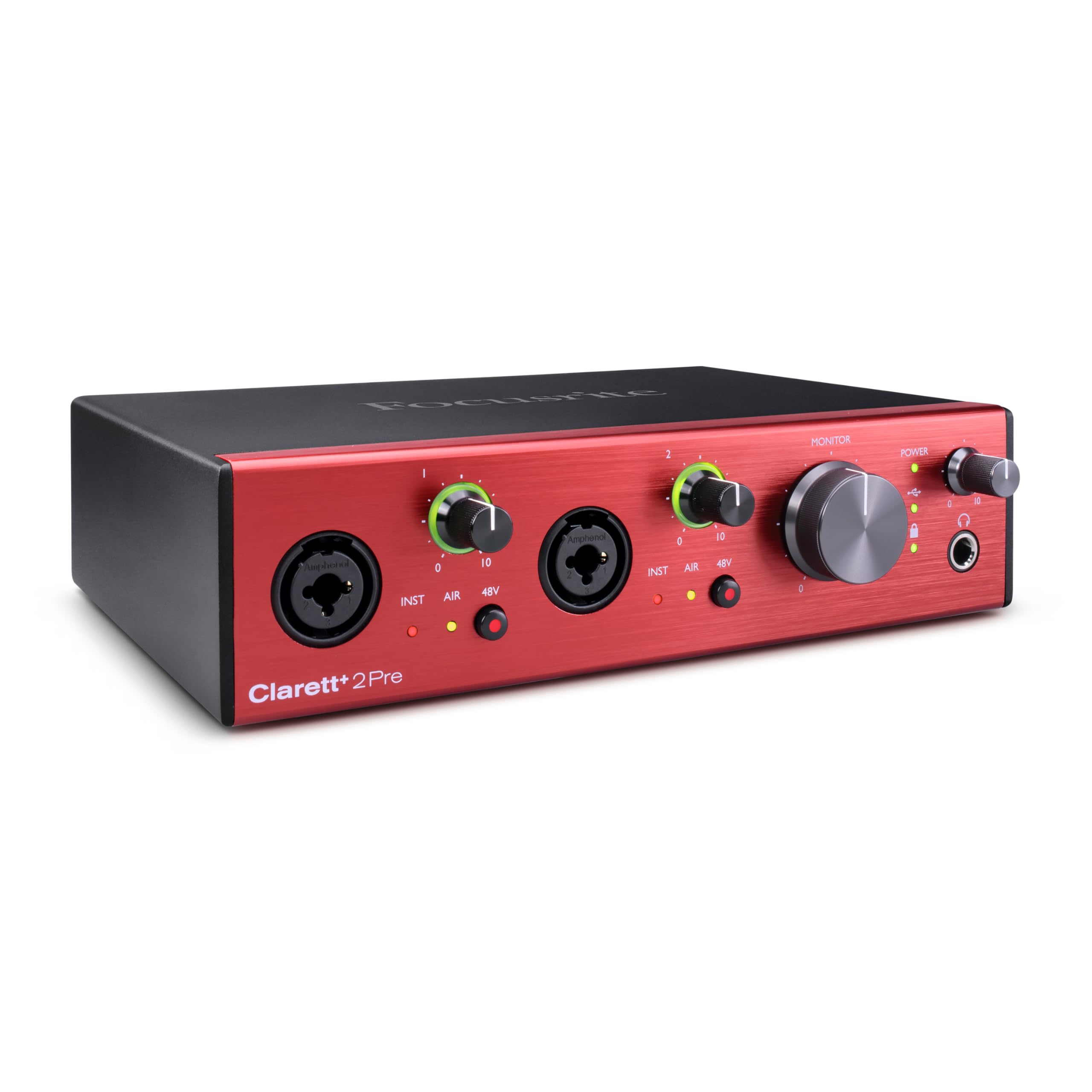
The vocalist’s interface that recreates the classic ISA 110 preamp sound.
If you’re a singer who lives or dies by the sound of your vocal chain, the Focusrite Clarett+ 2Pre brings a piece of studio history to your desk. Its two preamps feature All-analogue Air mode — relay-controlled circuitry on every preamp that emulates the legendary ISA 110 by switching impedance to 2.2kΩ and adding two cumulative high shelves for a 4dB high-frequency boost. In plain terms, it flips a switch to give your voice that airy, detailed sheen you hear on professional recordings. Dedicated JFET instrument inputs (ultra-high-impedance circuits that mimic the input stage of a guitar amp) preserve the natural tone of your guitar so it captures true character.
The independent A-D and D-A converters deliver extremely low noise, low distortion, and high dynamic range, and the headphone output offers a flat frequency response at all levels — meaning your mix translates accurately to any pair of headphones. Buyers moving up from the entry-level Scarlett line report it’s a “big step up” in quality and clarity, and the USB-C bus power means it runs off a single cable so long as your port supplies enough wattage. It also expands via ADAT optical input for eight extra channels of digital connectivity.
The honest picture is more nuanced than the rave reviews suggest. One critical voice found the vocal upgrade over the Scarlett 2i2 “not better” in a direct comparison, and another buyer returned it after struggling to drive a low-output Shure mic to adequate volume without an external booster. A few owners also flagged that the interface can’t do 24-bit/192kHz operation on all channels simultaneously, which is a spec limitation cheaper rivals offer. The crowd score sits at a respectable 4.4 stars, making this best for someone who values the Air mode’s instant vocal character and a big-brand name.
The Studio Sound: The Air mode’s ISA 110 emulation gives vocals a professional presence and clarity that owners consistently describe as a clear step up from entry-level Focusrite gear.
Know Before You Buy: The vocal improvement over a Scarlett 2i2 is subtle enough that some buyers can’t justify the premium, and low-output mics may need extra gain help.
Step up to this if: you’re a vocalist or instrumentalist who wants that ISA-style character and flawless low-noise recordings with pro preamps.
Save your money if: you’re happy with your current interface’s vocal quality and can’t hear the difference the Air mode makes.
Understanding the Specs
Balanced vs Single-Ended Outputs
A balanced headphone output (commonly a 4.4mm or XLR connection) splits the audio signal into positive and negative copies, which cancels out electrical noise picked up along the cable. For high-impedance studio headphones, this means more power to drive them loudly and a quieter background, so you hear the music clearly without hiss. A single-ended 6.35mm output is the standard jack on most gear, and it works fine, but if you own demanding 300-ohm headphones, a balanced connection is the biggest single upgrade you can make.
Dynamic Range And Noise Floor
Dynamic range, measured in dB, describes the space between the quietest and loudest sound an interface can handle before distortion creeps in — a figure around 120dB is considered excellent, and the difference shows up as clean, distortion-free mixes with subtle details intact. Noise floor is the low-level hiss an interface produces when nothing is playing; a well-designed unit with a figure like -129 dBu EIN is effectively silent. For quiet instruments like acoustic guitar or whisper-quiet vocals, a low noise floor means you don’t hear tape hiss behind the silence when you record.
FAQ
Does an audio interface with a DAC improve sound quality for listening to music?
What is the difference between the FiiO K11 and the FiiO K11 R2R?
Can I record a microphone through the FiiO K11 or K11 R2R?
What is phantom power and why do I need 48V on an interface?
What does ADAT expansion mean for an audio interface?
Does a higher sample rate like 192kHz sound better than 96kHz?
What is impedance and why does it matter for headphones?
What is the Air mode on the Focusrite Clarett+ 2Pre?
Do these interfaces work on both Windows and Mac?
Final Thoughts: The Verdict
For pure desktop listening with serious headphones, the audio interface with dac winner is the FiiO K11 because its 1400mW balanced output and clean, detailed converters deliver audiophile-grade sound at a budget-friendly price. If you want the warm, musical R2R character, grab the FiiO K11 R2R. And for recording microphones and instruments with professional-grade preamps, the SSL 2 MKII is the one to reach for.
How We Picked
We do not accept paid placement. Every pick is matched to a real buyer and a real use-case; we do not hands-on test units.
Sources & Methodology
Specifications: manufacturer listings and product documentation. Review insights: verified customer reviews, as of August 2026. Pricing: not shown on this page (it changes often); check the current price via the retailer link.
As an Amazon Associate, Gadgets Feed earns from qualifying purchases. This does not affect which products we feature.