
Our readers keep the lights on and my morning glass full of iced black tea. As an Amazon Associate, I earn from qualifying purchases.
Specs are compiled from manufacturer listings and verified buyer reviews and can change over time — please confirm the key details on the product page before buying.
The best desk upgrades quietly solve daily annoyances like cable tangles, outlet hogs, and wrist strain. This guide cuts through the noise to nine genuinely useful awesome pc accessories that solve real problems, sorted by how well they earn their spot on your desk.
I’m Min — the founder and writer behind Gadgets Feed. This guide is built by comparing the manufacturers’ published specifications and the patterns across verified customer reviews, so you get each pick’s real strengths and trade-offs instead of marketing spin.
You’ll find power strips that clamp out of sight, keyboards that feel creamy under your fingers, and a monitor riser that gives your neck a break—each one chosen because owners actually rave about it in their daily setups.
Our Picks at a Glance

How To Choose The Best Awesome PC Accessories
Before you click buy, think about what your desk actually lacks. The biggest mistake is grabbing a power strip with tons of ports but no way to mount it, or a keyboard that feels great but lacks the keys you use daily. Choose accessories that fit your actual desk and usage, not marketing buzz.
Start With Power Delivery
If you want to charge a laptop, the USB-C port’s wattage is the single number that matters. A 30W port handles phones and tablets easily, but a 70W port can actually power a MacBook Pro. Check the wattage before you assume any USB-C port will charge your main machine.
Measure Your Desk Edge
Desk clamps are fantastic space savers, but they only work if your desk edge fits their range. Most clamps accept edges between 0.5 and 1.8 inches thick. If your desk has a curved lip, a sloped edge, or no overhang at all, a clamp-on strip won’t work—look for a screw-in tray instead.
Think About the Sound and Feel
Mechanical keyboards are a personal thing. “Hot-swappable” means you can change the switches without soldering, so you can tune the feel later. A “gasket-mount” structure uses soft layers to make the typing sound deeper and less hollow—often described as “creamy” or “thocky.” If you type all day, this matters more than RGB lighting.
Quick Comparison
| Model | Best For | Power Output | Outlets/Ports | Key Feature | Amazon |
|---|---|---|---|---|---|
| Anker Nano Power Strip★ Best Overall | Clamp-on laptop charging | 70W Max | 10 total | 1500J Surge Protection | Amazon |
| EPOMAKER TH99 KeyboardBest Value | Full-size productivity | 8000mAh Battery | 102 Keys (1800) | Gasket-Mount Thock | Amazon |
| AULA S75 PRO KeyboardTop Performer | Compact creamy gaming | N/A | 80 Keys (75%) | LCD Screen & Knob | Amazon |
| Logitech MK270 Combo | Budget wireless typing | N/A | Keyboard + Mouse | 36-month battery life | Amazon |
| Mifaso PD30W Clamp | Compact desk clamping | 30W USB-C PD | 8 total | 1080J Surge Protection | Amazon |
| Acozvin 17-in-1 Clamp | Max device capacity | 40W Total | 17 total | 10ft Flat Extension Cord | Amazon |
| AULA SC580X Mouse | Budget wireless gaming | 500mAh Battery | 6 Programmable Buttons | 12000 DPI Sensor | Amazon |
| Univivi 36″ Cable Tray | Hiding big power bricks | N/A | 36″L x 5.5″W | No-drill clamp design | Amazon |
| Fenge Dual Monitor Riser | Ergonomic eye-level setup | N/A | 99lbs Capacity | Two-tier Storage | Amazon |
In-Depth Reviews
1. Anker Nano Power Strip
Our pick — over 4.5★ from 550+ verified ratings; the strongest balance of quality and price.
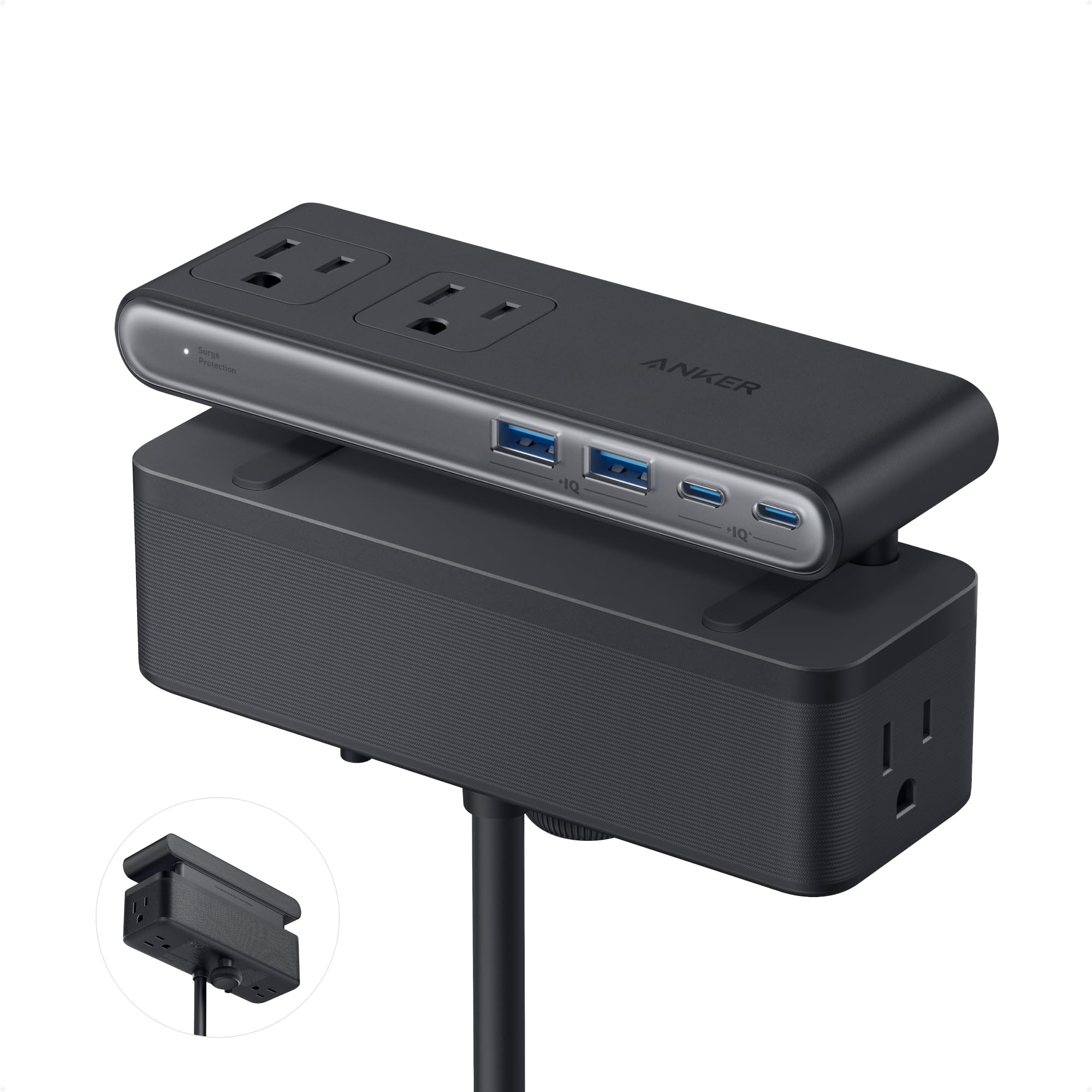
The desk clamp that charges a MacBook Pro and vanishes into your setup.
This is the centerpiece of a clean desk. The 70W USB-C port uses GaN technology (a compact power chip that shrinks the charger) to deliver enough juice for a laptop, and the clamp mounts to desk edges 0.6–1.8 inches thick. Buyers report it powers a docking station, two monitors, and a standing desk without breaking a sweat.
It splits into 6 AC outlets, 2 USB-C, and 2 USB-A ports across top and bottom zones. That layout keeps permanent plugs like a monitor adapter hidden below the desk, while the top stays clear for temporary gear. The 5 ft cord (about the width of a queen bed) reaches most wall sockets easily.
The design earns the most praise from owners by a wide margin—48 people single it out alone. Owners mention: “3 months use: sleek, unnoticed.” The one-handed clamp operation means you can yank a plug out without the whole unit shifting, and the 1500J surge protection (a measure of how much energy it can absorb during a spike) guards your expensive gear.
Why It Wins the Desk
- 70W USB-C powers full laptops, not just phones
- 10 total ports with tidy top/bottom zoning
- Stable clamp survives one-handed plug pulls
Who Should Measure First
- Needs a flat, clampable edge 0.6–1.8 inches thick
- Not for curved or heavily sloped desk edges
Grab it for: a home office where one clamp wipes out tangled chargers and powers every device on your desk.
Think twice if: your desk has a curved lip or no overhang—this clamp needs a flat edge to bite into.
2. EPOMAKER TH99 Wireless Keyboard
A full-size thock machine that lasts 800 hours between charges.
If you need a number pad and want that satisfying “creamy” typing sound, this is the one. The TH99 uses a gasket-mount structure (soft layers that cushion each keystroke) with 5 sound-dampening layers, so the typing feels soft and sounds deep instead of hollow. Owners call the sound “buttery” and “thocky”—the good kind of mechanical noise.
The 8000mAh battery is the headline: it lasts 800 hours with the backlight off. That’s months of daily work before you even think about the USB-C cable. In cable and 2.4G mode, latency drops to a mere 2-5ms (the delay between your keypress and the screen), which is why gamers and typists both gravitate here.
It houses 102 swappable keys in a compact 1800 layout (full numpad plus arrow keys without the wasted width) with grease-resistant PBT keycaps (a tougher plastic that won’t shine up). The keyboard quality is the most-praised aspect, with 116 owners highlighting it. A recurring note is the weight—over 1 kg makes it feel as solid as a premium board, not a flimsy plastic toy.
Heavy hitter: The 1800 layout gives you a numpad and function row without the bulk of a full-size frame. The trade-off is the rainbow-only backlight—no true white or solid color options.
Pick this for: spreadsheet-heavy workdays where a numpad is non-negotiable and you want a premium thock without the premium price tag.
Note the catch: some units arrive with dead keys—check yours early, and the RGB is limited to 8 colors rather than full customization.
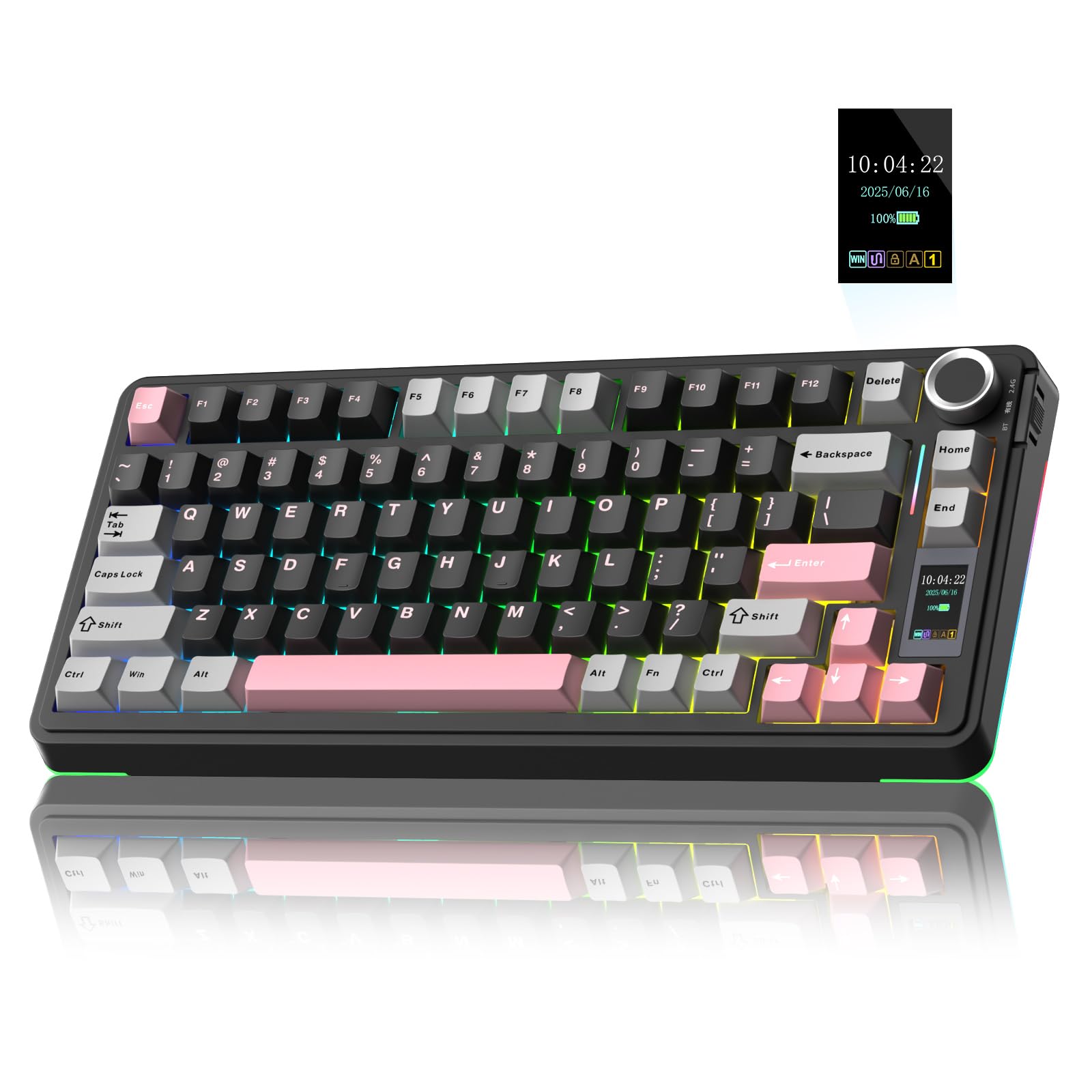
3. AULA S75 PRO Wireless Keyboard
The 80-key board with a built-in screen for GIFs, battery stats, and volume.
This compact 75% layout (80 keys, dropping the numpad to save desk space) packs a neat extra: a built-in LCD screen that shows battery status, date, and even custom GIF images. The multi-function knob beside it lets you twist through volume, backlight effects, and OS settings without touching software.
The sound quality is what owners rave about most—129 of them mention it. The pre-lubricated switches (factory-oiled so they glide smoothly) and five layers of sound-dampening filling produce that creamy, “thocky” noise without the clack. It’s hot-swappable too, so you can pull out the switches with the included tool and pop in different ones to change the feel.
Connection is tri-mode: BT5.0, 2.4GHz wireless, and USB-C wired, saving up to five devices with a side-button switch. The PBT keycaps (a dense, fade-resistant plastic) are double-shot molded, meaning the lettering won’t wear off. Battery life lands around 20 hours with full RGB on, stretching to a week with sleep mode—good but not the class leader.
Creamy compact: The typing feel is soft and elastic thanks to the silicone pad structure. The catch is the screen only configures on Windows in wired mode—Mac users see the date but can’t upload GIFs.
Reach for this if: you want a space-saving board with a party-piece screen and a sound that feels richer than its price.
Look elsewhere if: you need a numpad for data entry, or you’re on Mac and want full screen customization.
4. Univivi 36″ Cable Management Tray
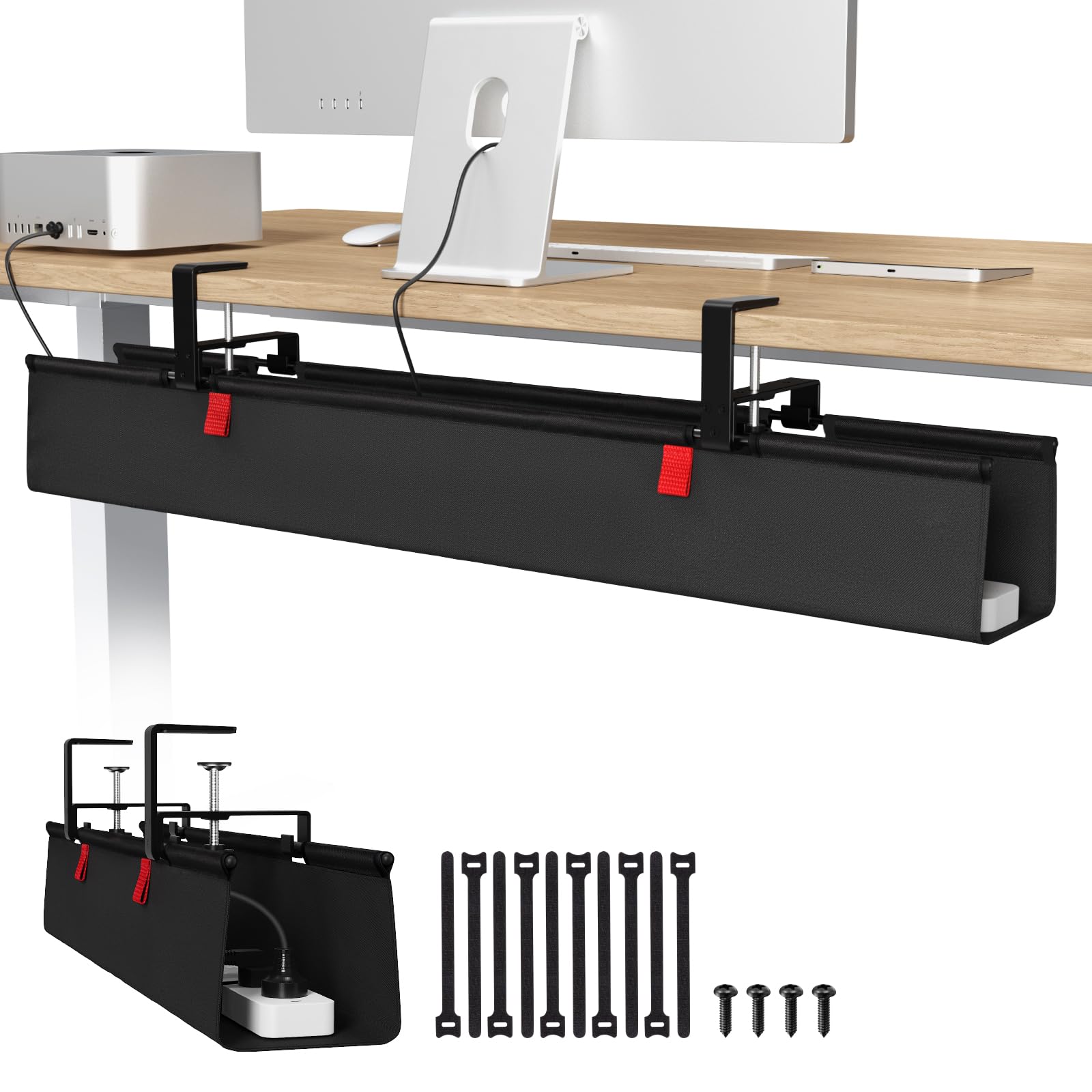
The 36-inch fabric trough that swallows surge protectors and hides them forever.
This is the finishing move for a clean desk. The tray measures a generous 36″L x 5.5″W x 5.5″H, and its real a neat extra is the drop-down design—you can unfold it to drop in a power strip and all your adapters, then fold it back up. Customers note it swallows multiple surge protectors and big power bricks without bulging.
Installation is truly tool-free: the no-drill clamp grips tabletops of any material—wood, glass, or metal—and you can tighten it by hand. The thick 600D oxford fabric (a rugged woven synthetic) is flame retardant for safety. The built-in ties let you fasten each cable so nothing dangles.
The quality earns the most praise, with 151 owners singling it out, and “easy to install” trails close behind at 146. Owners love that it lets them vacuum under the desk and keeps cords off the floor entirely. It requires 5.3 inches of under-desk clearance, and the side clips remain visible.
Under-desk hero: If your floor is a graveyard of cables, this is the fix. The trade-off is the fabric shell needs clearance under your desk, and it won’t disappear entirely.
Best for: anyone with a standing desk or a cluttered floor who wants a weekend project that takes one minute.
Check before buying: measure the underside of your desk for 5.3 inches of clear space, or the clips won’t fit.
5. Fenge Dual Monitor Stand Riser
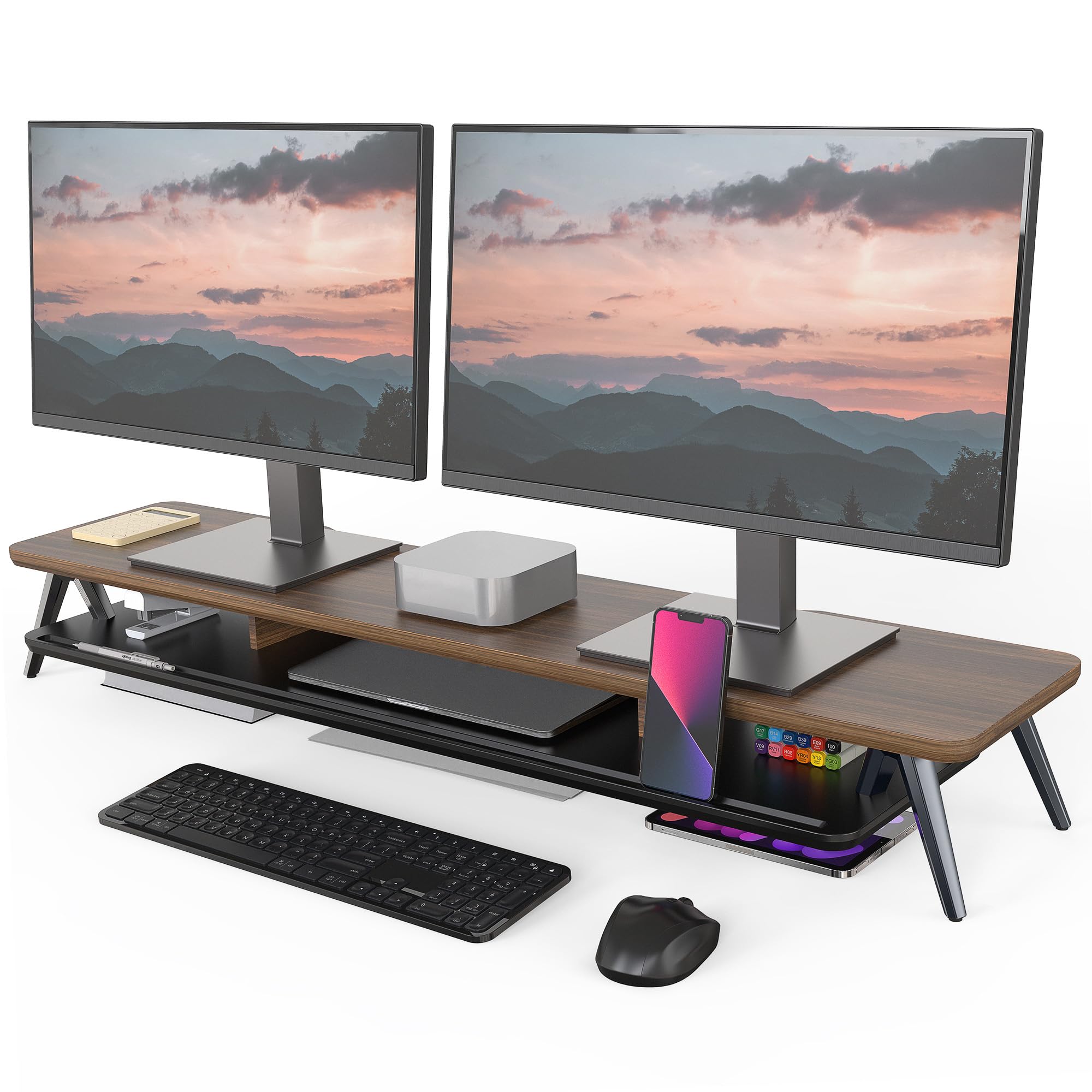
The walnut-and-aluminum shelf that lifts dual monitors to eye level and stores the mess below.
The 5.7-inch lift raises dual monitors to eye level, easing neck strain from hunching. The thick 0.7-inch MDF panel (a dense fiberboard) sits on solid aluminum footing rated for 99 lbs, so two monitors plus a stack of gear won’t make it sag or wobble.
It’s also a storage powerhouse. The 42.5-inch span holds dual 27-inch monitors with room to spare, and the two-tier design offers 1 universal device-holder slot plus 3 compartments underneath. Owners stash laptops, USB switches, and even an iPad Pro on the lower shelf, keeping the desktop surface clear.
The build quality is the top praise, with 114 owners mentioning it, and appearance follows at 90. Assembly takes about 5-8 minutes with the included manual and tools. The walnut finish and rounded corners give it a premium look, though the surface is engineered wood, not solid hardwood—treat it gently against scratches.
Ergonomic anchor: It combines ergonomic elevation with under-monitor storage to clear desktop clutter. The occasional unit arrives with scratches, but customer service resolves it quickly.
Pick this for: a dual-monitor setup where you want eye-level ergonomics and serious under-monitor storage in one clean piece.
skip it if: your desk is tiny—at 42.5 inches wide, it needs real estate and a matching aesthetic.
6. Logitech MK270 Wireless Combo
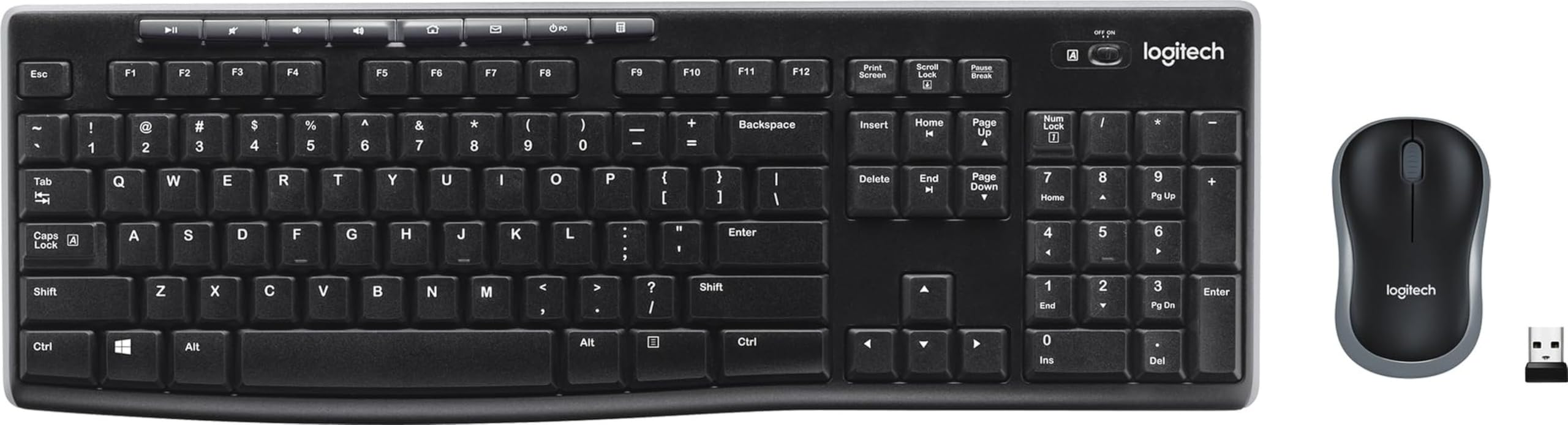
The reliable workhorse combo where the keyboard battery outlasts your patience for upgrades.
It’s a plug-and-play combo that delivers reliable wireless performance without setup fuss. The MK270’s keyboard runs for a claimed 36 months on two AAAs (a low-power wireless design that sips energy), while the mouse gets 12 months from a single AA. The USB receiver (a tiny dongle you plug into a port) connects wirelessly up to 33 feet, so dropouts are a non-issue.
The quality is the most-praised aspect—5,100 owners mention it—and value for money trails at 2,700. The low-profile keys are quiet, which matters in shared offices, and the full-size layout includes a number pad and arrow keys. The spill-resistant design (a sealed membrane under the keys) forgives coffee accidents.
Setup is famously simple. As owners put it: “The box has simple 1,2,3 steps for setting it up.” The mouse is ambidextrous and compact, though some find it small even with average-sized hands. Connectivity is inconsistent: most pair instantly, but some mice drop the link. It’s USB-A only, so USB-C-only laptops (like newer MacBooks) need a dongle adapter.
Zero-fuss favorite: For a basic, dependable combo, this is the crowd-pleaser. The mouse feels cheap to some hands, and the receiver needs a USB-A port.
Reach for this if: you want a no-brainer wireless setup that you’ll forget until the batteries die years from now.
Look elsewhere if: you need USB-C connectivity or a mouse that feels substantial in larger hands.
7. AULA SC580X Wireless Mouse
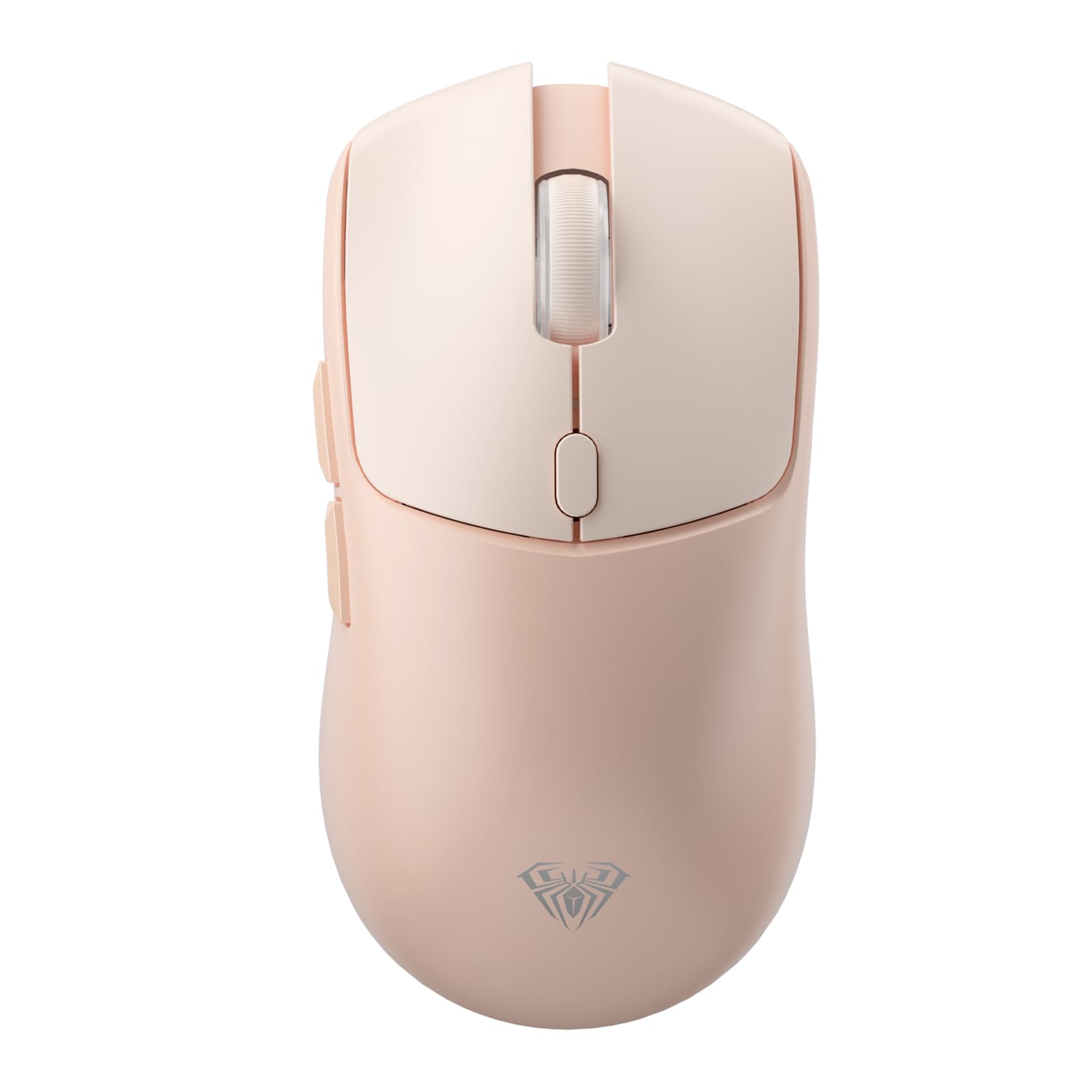
The 84-gram wireless mouse that brings 6 DPI levels and a 500mAh battery to budget gaming.
For under, this mouse punches well above its weight. It connects three ways—2.4GHz dongle, Bluetooth 5.0, or USB-C wired—and can remember up to 4 devices for quick switching with a bottom button. At 84g with side grip tape, it stays comfortable for extended gaming sessions.
The 6 DPI levels (dots per inch, or cursor sensitivity) range from a precise 800 up to a blazing 12,000, adjustable on the fly with a button. The 1000Hz polling rate (how often the mouse reports its position, 1000 times per second) keeps movement smooth and lag-free. Owners praise the quality most—106 mention it—with reliability close behind at 61.
The 500mAh battery lasts a claimed 10-14 days with 5 hours of daily use, and the low-battery indicator flashes red when it’s time to recharge. The honest trade-off: responsiveness and battery life get mixed feedback. A few reviewers point out the mouse freezing randomly, and Bluetooth mode can have slight lag. The driver software for programming the 6 buttons only works on Windows in 2.4G or wired mode.
Budget aimer: The sensor, weight, and grip tape make it a steal for its price. The mixed feedback on battery and Bluetooth means wired or 2.4G is the safer bet.
Pick this for: a right-handed gamer on a budget who wants a light, responsive mouse with adjustable DPI and grip tape included.
pass on it if: you need left-handed ergonomics or flawless Bluetooth with zero lag—stick to the dongle.
8. Mifaso PD30W Desk Clamp Power Strip

The compact 8-in-1 clamp that adds 4 AC outlets and a 30W USB-C port to any desk edge.
This is the budget-friendly cousin to the Anker, and it nails the essentials. The 30W USB-C Power Delivery (PD) port charges phones and tablets fast—and even tops up a MacBook, though not at full speed. It supports multiple voltage outputs (5V/3A, 9V/3A, 12V/2.5A, and more) for broad device compatibility, with a combined max of 18W when using multiple USB ports at once.
The clamp fits desk edges between 0.5 and 1.96 inches thick, and foam pads protect your tabletop from scratches. A generous 1.9-inch spacing between AC sockets means bulky power adapters can sit side by side without blocking each other—a detail owners appreciate. The 45° right-angle plug leaves room for other plugs below it.
Quality is the top praise, with 57 owners mentioning it, and functionality follows at 39. It’s a favorite on gaming desks and standing desks, clamping securely without extra hardware. The build is solid, though the 1080J surge protection (energy absorption rating) is lower than the Anker’s 1500J, so it’s less armored against big power spikes. It’s also lighter on the power-delivery front—30W vs the Anker’s 70W, a real gap if you’re charging a full laptop.
Compact clampsman: For a small desk or dorm room, this adds serious outlet capacity without bulk. The 30W cap is fine for phones but not full laptop charging.
Grab it for: a tidy, tool-free outlet expansion on a gaming or standing desk where phones and tablets are the main charges.
Think twice if: you need to power a 70W laptop at full speed—step up to the Anker.
9. Acozvin 17-in-1 Desk Clamp Power Strip
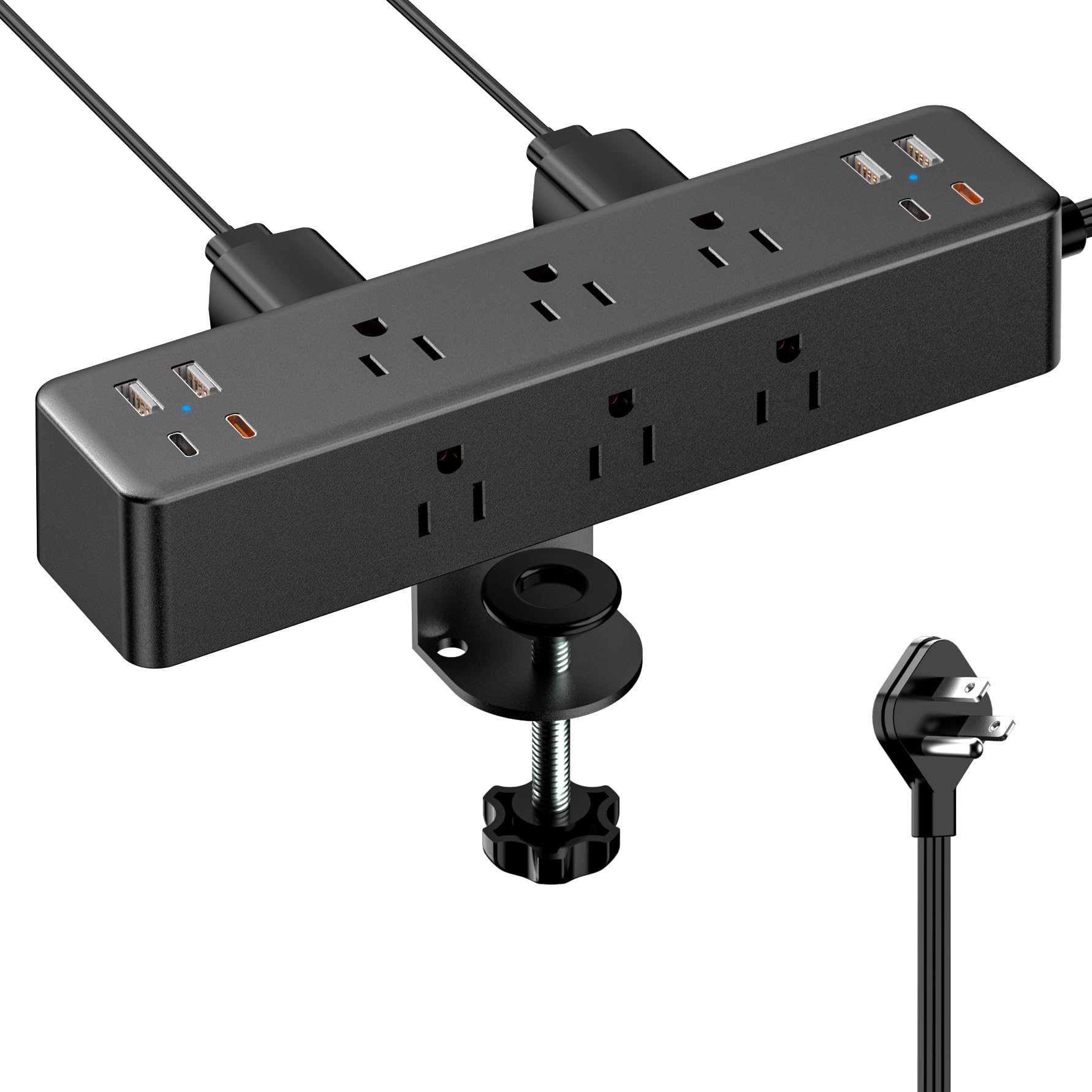
The 17-port power station with a 10-foot flat cord that reaches any outlet in the room.
If you’ve ever run out of outlets mid-setup, this is the cure. It packs 9 AC outlets and 8 USB ports (4 USB-A, 4 USB-C) into a single clamp that mounts to your desk edge—up to 17 devices charged simultaneously. The 10-foot flat extension cord (a thin, bendable cable that hugs the wall) means you can reach a distant wall socket and hide the cord behind furniture.
The USB-C ports are split: two orange ones deliver 20W each (fast charging for modern phones), while two black ones max at 12W. The total output is 40W across all USB ports, so it’s not for laptop charging at full speed, but phones and tablets charge quickly. The 0.3-inch flat plug sits flush against the wall, saving space behind heavy furniture.
Ports are the most-praised aspect, with 48 owners mentioning them, and the clamp follows at 33. Owners love that it mounts securely to desks or even guitar amp stands, keeping cables off the floor. The catch: charging performance gets mixed feedback—a few shoppers say a USB-A port that doesn’t work, so test all ports on arrival. The clamp fits desk edges up to 1.7 inches thick.
Outlet arsenal: For the most devices per square inch, this wins. The 40W USB total means laptops stay on AC, and a dud USB-A port is an occasional lottery ticket.
Best for: a desk with a distant outlet and a mountain of devices—phones, tablets, lamps, and audio gear all at once.
Check on arrival: run a test through every USB port, as a rare unit ships with a dead one.
Understanding the Specs
USB-C Power Delivery (PD) Wattage
This number (like 30W or 70W) tells you how fast a USB-C port charges your device. A 30W port is plenty for a phone or tablet. You need at least 60W to charge most laptops at full speed. If the spec sheet lists multiple voltages (like 5V/3A, 9V/3A), that’s the port negotiating power with different devices—higher wattage means faster charging.
For a power strip, the total wattage often splits across ports when you plug in several things at once. The Anker’s 70W can drive a laptop alone, but the Mifaso’s 30W will slow down if you also charge a phone. Match the number to your primary device.
Joule Rating in Surge Protectors
A joule rating (like 1080J or 1500J) measures how much energy the protector can absorb during a power spike before it gives up. Higher is better—it means more protection for your expensive electronics. A 1500J rating like the Anker’s offers more headroom than the Mifaso’s 1080J.
This matters if you live in an area with frequent storms or unstable power. Your computer and monitor are worth protecting; the surge protector is a cheap insurance policy. It won’t stop a direct lightning strike, but it handles the everyday spikes that shorten electronics’ lives.
FAQ
Will a 30W USB-C power strip charge my laptop?
What desk thickness do clamp power strips fit?
How long does the Logitech MK270 battery actually last?
What does hot-swappable mean on a mechanical keyboard?
Is a 75% keyboard missing keys I need?
How much weight can a monitor riser safely hold?
What does the joule rating on a surge protector actually protect?
Can I use a desk clamp power strip on a glass desk?
What is the difference between a gaming mouse DPI and polling rate?
Will a wireless keyboard work with my Mac and Windows PC?
Final Thoughts: The Verdict
If you want one dependable pick, the awesome pc accessories winner is the Anker Nano Power Strip because it solves the desk’s biggest problem—power and clutter—with a 70W USB-C port and a stable clamp. If you want a creamy full-size typing experience, grab the EPOMAKER TH99. And for the finishing touch that clears cable chaos, the Univivi Cable Tray is the one to reach for.
How We Picked
We do not accept paid placement. Every pick is matched to a real buyer and a real use-case; we do not hands-on test units.
Sources & Methodology
Specifications: manufacturer listings and product documentation. Review insights: verified customer reviews, as of August 2026. Pricing: not shown on this page (it changes often); check the current price via the retailer link.
As an Amazon Associate, Gadgets Feed earns from qualifying purchases. This does not affect which products we feature.