
Our readers keep the lights on and my morning glass full of iced black tea. As an Amazon Associate, I earn from qualifying purchases.
Specs are compiled from manufacturer listings and verified buyer reviews and can change over time — please confirm the key details on the product page before buying.
Most 1080p monitors claim “Full HD” and call it a day, but real buyers discover the panel type, refresh rate, and stand quality matter just as much as the resolution. This guide cuts through the marketing to show you which 60Hz-class 1080p monitor actually delivers crisp text, comfortable viewing, and a desk setup that works for you.
I’m Min — the founder and writer behind Gadgets Feed. This guide is built by comparing the manufacturers’ published specifications and the patterns across verified customer reviews, so you get each pick’s real strengths and trade-offs instead of marketing spin.
For a dependable office workhorse or a secondary display, a 60Hz 1080p monitor keeps text sharp, reduces eye strain, and connects easily to your PC or laptop.
Our Picks at a Glance


How To Choose The Best 60Hz 1080p Monitor
Before you click buy, understand that a monitor’s panel technology and refresh rate shape your daily experience more than the resolution alone. You want a screen that’s easy on your eyes, fits your desk, and connects to your computer without fuss.
Panel Type: IPS is the Safe Bet
IPS (In-Plane Switching) panels give you consistent colors and wide viewing angles, so the picture stays accurate even when you’re not sitting dead-center. Cheaper TN (Twisted Nematic) panels often wash out colors when viewed from the side, which gets annoying fast with a shared screen or a mounted display.
Refresh Rate: Smoothness You Can Feel
Refresh rate is how many times per second the screen updates the image. A 60Hz display updates 60 times a second, which is fine for office work, but 100Hz or 120Hz makes scrolling through documents and moving windows feel noticeably smoother and reduces eye strain during long sessions.
Ergonomics and Connectivity
Look for a monitor with tilt and height adjustment so you can align the top of the screen with your eye level—your neck will thank you. Check for HDMI and DisplayPort inputs to match your laptop or PC, and consider VESA mounting holes if you want to attach the display to an arm for a cleaner desk.
Quick Comparison
| Model | Best For | Panel Type | Refresh Rate | Contrast Ratio | Amazon |
|---|---|---|---|---|---|
| Dell SE2725HM★ Best Overall | Office comfort & reliability | IPS | 100Hz | 1000:1 | Amazon |
| ArcticPro AD27ZF1Best Value | Budget dual-screen setup | IPS | 120Hz | 1000:1 to 3000:1 | Amazon |
| Amazon Basics C24M2020DNA | Value with built-in speakers | IPS | 100Hz | 2000:1 | Amazon |
| ViewSonic VS2747-H | Everyday work & study | IPS | 100Hz | 1000:1 | Amazon |
| ViewSonic VA2756A-MHD | Multi-monitor setups | IPS | 120Hz | 1500:1 | Amazon |
| HP 24mh | Ergonomic premium pick | IPS | 75Hz | — | Amazon |
In‑Depth Reviews
1. Dell 27 Monitor SE2725HM
Our pick — over 4.5★ from 850+ verified ratings; the strongest balance of quality and price.
The 27-inch office favorite that pairs eye comfort with buttery-smooth scrolling.
The 4.8-star crowd favorite with over 800 owners earns its top praise for build quality. The display is a 27-inch IPS panel at 1920 x 1080, and while that resolution is the classic 1080p you searched for, the 100Hz refresh rate makes scrolling through spreadsheets feel glide-smooth instead of choppy. Buyers report great screen size, color accuracy, and a nighttime feature. That nighttime feature is ComfortView Plus, Dell’s always-on built-in filter that cuts harmful blue light without washing out colors.
It’s an anti-glare matte screen, which owners praise for killing reflections in bright rooms. The tilt adjustment and VESA mount give you flexibility to angle it just right or attach it to an arm. A built-in power supply and cable holder keep the desk tidy, and the included HDMI cable (1.8m) means you can be up and running right from the start.
The trade-off is connectivity: this monitor sticks to HDMI and VGA inputs, with no USB ports or USB-C. That’s a non-issue for a standard laptop hookup, but if you want a single-cable docking setup, you’ll need an adapter. There are no built-in speakers either, so plan for separate ones.
What owners celebrate
- Matte anti-glare screen keeps reflections out of your eyes
- Dead-center VESA mount allows balanced wall or arm mounting
- Quality leads the praise, with picture quality close behind
What to know first
- No USB ports or USB-C for single-cable laptop setups
- No built-in speakers, so you’ll need your own audio
Reach for this if: you want a trusted 27-inch IPS panel with low-blue-light comfort and a clean, small-footprint desk setup.
Look elsewhere if: your desk needs USB hub ports or you want speakers built straight into the monitor.
2. ArcticPro 27 Inch Monitor 120Hz
The 120Hz budget stunner that makes your home office feel twice as smooth.
For graphic design and office work, that extra smoothness translates to less eye fatigue when you’re dragging windows around or scrolling long documents. The IPS panel covers 99% sRGB and 72% NTSC color gamuts, which is exactly what you want if accurate color matters for your projects.
Owners highlight the “super easy plug and play setup,” and the three-sided borderless design makes it a natural fit for a dual-monitor arrangement. The 178° horizontal and vertical viewing angles keep the image consistent from the side, and the tilt adjustment of -5° to 15° lets you angle it to your eye line. Adaptive Sync, which pairs with FreeSync, solves picture lagging and tearing so fast scenes in movies and games stay smooth.
The recurring gripe is the 3-year warranty process—owners love the panel but found it confusing to figure out who to contact for a replacement. There are also no speakers, so you’ll need headphones or external ones. The ports are limited to one HDMI 1.4 and one VGA, with the HDMI cable included.
Why it wins
- 120Hz refresh makes motion look fluid and reduces eye strain
- 99% sRGB color gamut for accurate, vivid colors
- 75x75mm VESA mount for flexible arm setups
Keep in mind
- Warranty claim process is unclear per buyers
- No built-in speakers; HDMI and VGA only
Grab this for: a smooth, colorful 27-inch screen for office work, graphic design, or a second display without spending much.
skip it if: you need USB-C connectivity or in-built audio for a clutter-free desk.
3. Amazon Basics 24 Inch Monitor

The 24-inch value king with surprising contrast and speakers that actually work.
Its 2000:1 contrast ratio doubles the Dell’s 1000:1, delivering deeper blacks and punchier text for documents. It’s a 23.8-inch viewable IPS panel running 1920 x 1080 at up to 100Hz, and it weighs just 6.6 pounds, so it’s easy to move or mount. Owners mention it looks surprisingly good for the money.
The built-in speakers are the standout feature here, and owners say they’re “much better than you would expect for this price point.” It also includes HDMI, VGA, and DisplayPort inputs, which is the most flexible port selection in this lineup. The rear USB port helps declutter your hub, though it needs a separate USB-B to A cable to function.
The catch is the control scheme—owners find the rear buttons non-intuitive, and the speaker volume can feel weak until you tweak the EQ. The tilt adjustment does its job, but there’s no height adjustment, so you may need a stand or books to get the perfect eye level. Remember to remove the protective film with the date code from the panel before use.
Standout strengths
- 2000:1 contrast ratio delivers deep blacks and sharp text
- Built-in speakers exceed expectations for the price
- HDMI, VGA, and DisplayPort give flexible connectivity
Things to watch
- Rear controls take time to learn, per owners
- No height adjustment, only tilt
Best suited for: budget-conscious buyers who want a small, sharp screen with speakers included and don’t need height adjustment.
Think twice if: you want precise ergonomic positioning or a monitor with an intuitive control joystick.
4. ViewSonic VS2747-H 27 Inch 1080p

The 27-inch eye-care specialist built for long study sessions and aging eyes.
Owners call it “particularly suitable for aging eyes,” thanks to Flicker-Free technology and a Blue Light Filter that minimize eye fatigue during long workdays. It’s a 27-inch 1080p IPS panel running at 100Hz with 250 nits of brightness, and the SuperClear IPS tech keeps colors consistent from wide angles, making it great for group viewing when someone leans over to look at your screen.
The exclusive ViewMode presets let you switch between “Game,” “Movie,” “Web,” “Text,” and “Mono” modes, each tuned with its own gamma curve, contrast, and brightness. That’s a genuinely useful feature for students who jump from reading PDFs to watching lectures. Build quality earns strong praise, with the top aspects being quality and picture quality, and the frameless design fits neatly on a desk.
There’s a wrinkle in the data: performance feedback is mixed, with some owners reporting units that stop working after several days of use, and the power cord draws negative mentions. That’s a minority experience, but worth knowing if you’re buying for a setup that must never go down. Connectivity is HDMI and VGA, which covers most laptops and older desktops.
What stands out
- Flicker-Free and Blue Light Filter ease long-hour eye strain
- ViewMode presets tune display for games, movies, and text
- Frame-less design keeps multi-monitor setups clean
Be aware
- Mixed reports on long-term performance reliability
- No height adjustment, only tilt
Choose this if: you log long hours reading or studying and want a screen that’s gentle on your eyes with handy preset modes.
Pass it over if: your priority is a monitor with rock-solid longevity reputation and you can’t accept any reliability risk.
5. ViewSonic VA2756A-MHD 27 Inch
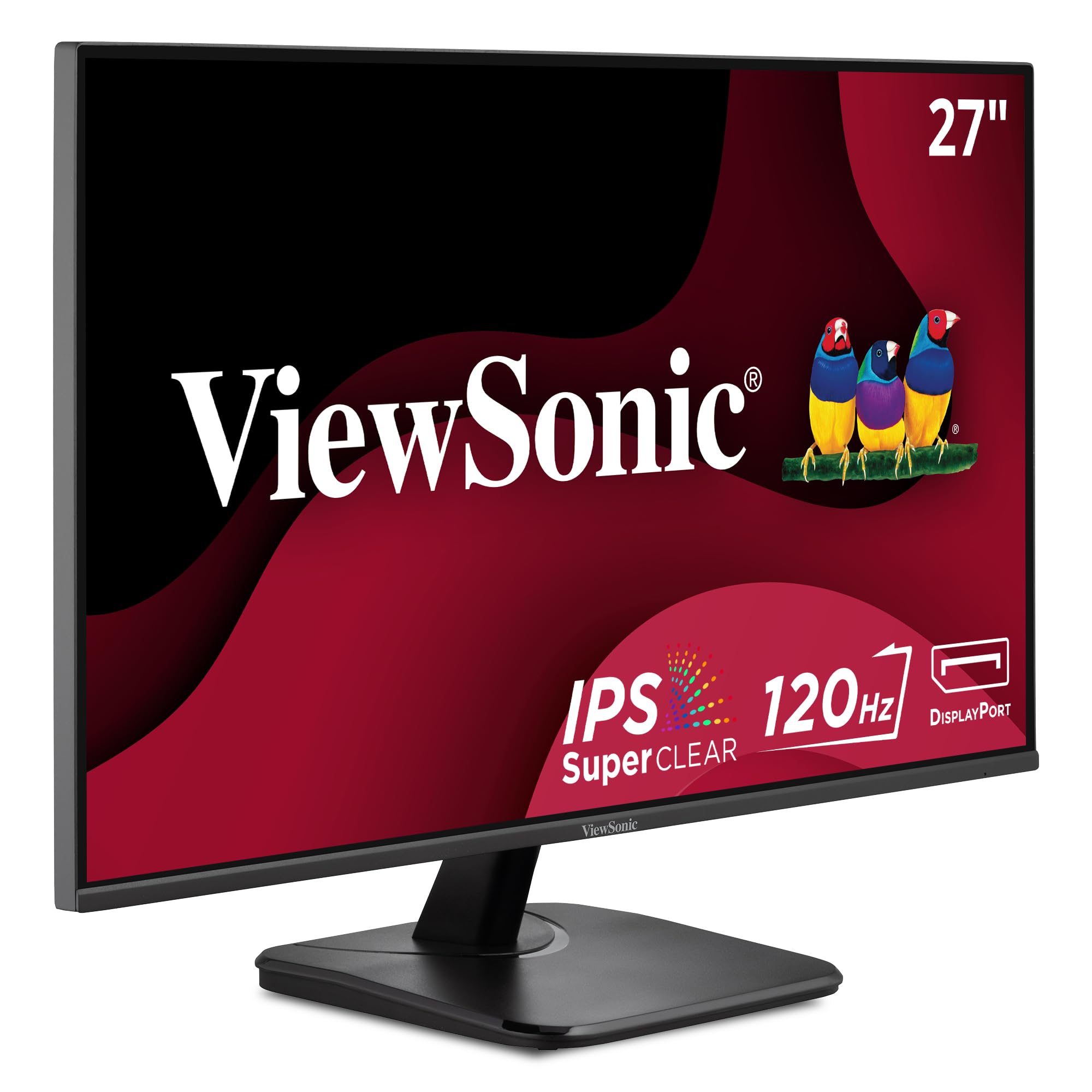
The multi-monitor maestro that daisy-chains your desk into one clean workspace.
This is the ViewSonic to beat if you run multiple displays, thanks to a DisplayPort-out that lets you daisy-chain monitors with a single cable between screens. That’s a massive convenience for a clutter-free desk, and it pairs with the 27-inch 1080p IPS panel running a smooth 120Hz refresh rate. The 1500:1 contrast ratio splits the difference between the Dell’s 1000:1 and Amazon Basics’ 2000:1, giving you solid depth without the cost.
Buyers praise the monitor’s quality, noting it works beautifully with a MacBook Air and fits perfectly in an at-home office. The SuperClear IPS tech delivers accurate colors and sharp images from wide angles, and the Anti-Glare screen keeps reflections manageable. Connectivity spans HDMI, DisplayPort, and VGA, plus a 3.5mm audio out, so legacy devices and modern laptops are both covered.
Long-term customers note ViewSonic monitors still working after 10 years of daily use. The trade-offs are the basic stand with no height adjustment, a 250-nit brightness cap, and no USB hub. It also lacks built-in speakers beyond the basic expectation, and the 120Hz refresh is wasted if your system only outputs 60Hz.
Why it impresses
- DisplayPort-out enables daisy-chaining for multi-monitor setups
- 120Hz refresh delivers fluid motion and scrolling
- VGA, HDMI, and DisplayPort cover modern and legacy devices
Limitations
- Basic stand lacks height adjustment
- No USB hub and a modest 250-nit brightness
Reach for it if: you’re building a multi-monitor rig and want reliable daisy-chain connectivity plus proven ViewSonic durability.
pass on it if: you need height-adjustable ergonomics or a USB hub built into the display.
6. HP 24mh FHD Monitor

The ergonomic 23.8-inch workhorse with a 100mm height-adjustable stand.
This 4.7-star favorite with over 25,000 owners earns top praise for quality and value for money. The 23.8-inch IPS panel runs 1920 x 1080 at 75Hz, which is at the lower end of the refresh rates here, but the ergonomic stand is the real draw. You get 100mm of height travel and a 5° forward or 23° backward tilt, so you can position the screen precisely at eye level without aftermarket risers.
The micro-edge display gives you a virtually bezel-free experience on three sides, which owners love for smooth multi-monitor setups. Two built-in 2W speakers deliver “incredible sound” per the listing, though reviewers point out the volume needs to be raised in the menu from 50% to 100% to get real loudness. The 178° horizontal and vertical viewing angles keep colors consistent from any position, and FreeSync helps reduce screen tearing during casual gaming.
Shoppers say this is a great budget Full HD display for office or home use, with tool-free setup and a rock-solid rotating stand. The known compromise is screen durability—some buyers report monitors stopping for no reason—so it’s worth keeping the 1-year warranty in mind. There are no USB ports, and the 75Hz refresh is capped but perfectly smooth for everyday work.
What owners rave about
- Height-adjustable stand with 100mm travel and tilt control
- Micro-edge design enables smooth multi-monitor setups
- Built-in 2W speakers are genuinely usable after a volume tweak
Worth noting
- Occasional reports of screens failing without warning
- No USB ports for accessory connectivity
Pick this if: you want the best ergonomic stand in this list and a proven, mass-approved display for office comfort.
Look beyond if: you need a higher 100Hz+ refresh rate or USB hub functionality in your monitor.
Understanding the Specs
Refresh Rate Explained
Refresh rate tells you how many times per second your screen redraws the image. A 60Hz screen updates 60 times a second, which is fine for email and documents, but 100Hz or 120Hz makes everything feel noticeably smoother—scrolling, dragging windows, and watching video. Your computer must be set to output that rate in display settings, and you generally need a modern HDMI or DisplayPort cable to carry it.
Contrast Ratio and IPS Panels
Contrast ratio compares the brightest white to the darkest black a monitor can show—a higher number like 2000:1 delivers deeper blacks and more punchy text than a 1000:1 panel. IPS (In-Plane Switching) is the panel technology that keeps colors accurate and viewing angles wide, so the picture doesn’t wash out when you’re not sitting dead-center. Most of these picks use IPS, which is the right choice for work and general use.
FAQ
Is a 60Hz monitor enough for office work?
What is the difference between IPS and TN panels?
Can I mount these monitors on a wall or arm?
Do these monitors have built-in speakers?
Which refresh rate is better for a 1080p monitor?
What is a blue light filter and why does it matter?
Can I use these monitors with a MacBook or gaming console?
Do I need a DisplayPort cable for these monitors?
What does a higher refresh rate do for eye strain?
Are these monitors good for gaming?
Final Thoughts: The Verdict
If you want one dependable pick, the 60hz 1080p monitor winner is the Dell SE2725HM because its 100Hz refresh, low-blue-light ComfortView Plus, and rock-solid build quality make it the safest all-rounder for daily work. If you want a budget-friendly smooth operator for a dual-screen setup, grab the ArcticPro. And for the most ergonomic premium experience with a height-adjustable stand, the HP 24mh is the one to reach for.
How We Picked
We do not accept paid placement. Every pick is matched to a real buyer and a real use-case; we do not hands-on test units.
Sources & Methodology
Specifications: manufacturer listings and product documentation. Review insights: verified customer reviews, as of August 2026. Pricing: not shown on this page (it changes often); check the current price via the retailer link.
As an Amazon Associate, Gadgets Feed earns from qualifying purchases. This does not affect which products we feature.