
Our readers keep the lights on and my morning glass full of iced black tea. As an Amazon Associate, I earn from qualifying purchases.
Specs are compiled from manufacturer listings and verified buyer reviews and can change over time — please confirm the key details on the product page before buying.
Before you buy a 3D camera, decide what you want to do with the depth it captures — that choice matters more than the price. You might want a pocketable stereo camera for glasses-free viewing, a 360-degree VR rig for rich video, or a depth scanner for 3D printing; these are completely different tools. The biggest mistake is assuming every “3D camera” does the same job, so here are the top performers broken down by what they actually capture and who they genuinely suit.
I’m Min — the founder and writer behind Gadgets Feed. This guide is built by comparing the manufacturers’ published specifications and the patterns across verified customer reviews, so you get each pick’s real strengths and trade-offs instead of marketing spin.
The key is matching the capture technology—stereoscopic lenses, dual sensors, or LiDAR—to your intended output, whether that’s VR content, spatial imaging, or printable models, and the 3d camera list below orders itself around that real-world fit.
Our Picks at a Glance


How To Choose The Best 3D Camera
Before comparing specs, decide if you need stereoscopic stills, 360-degree VR video, or depth data for 3D printing. A stereo camera for personal 3D photos, a 360-degree rig for VR, and a depth scanner for 3D printing solve entirely different problems. Here is what separates them.
1. Match the capture method to your output
Stereo cameras use two lenses spaced about 65mm apart — similar to your eyes — to create depth that feels natural when you view the images. Built-in depth sensors like LiDAR (a laser-based system that measures distance) or structured light (projected patterns that map surfaces) instead measure the physical distance to objects, making them ideal for 3D printing or CAD work. 360-degree cameras stitch together footage from multiple wide-angle lenses for rich VR. Choosing the wrong capture type leaves you with files that don’t match your intended output.
2. Understand the playback and viewing path
A 3D camera is only half the equation—you also need a compatible display, viewer, or headset to see the depth. Some models, like the Fujifilm W3, have a built-in autostereoscopic screen that shows depth without glasses. Others require a 3D TV, VR headset, or a companion viewer accessory. Before buying, confirm your display setup can handle the camera’s output, or you might be stuck with flat-looking files.
3. Prioritize sensor and video specs that fit your use
For still photos, look at megapixel count and the sensor’s low-light performance. For video, the frame rate matters — some cameras only hit 15 or 24 fps, which looks choppy for action. For scanning, accuracy (often stated in millimeters) and point-cloud resolution are the metrics that determine whether a model is usable for printing. Prioritize the spec that matches your primary output—megapixels for stills, frame rate for video, accuracy for scanning—not the biggest number on the box.
Quick Comparison
| Model | Best For | Capture Type | Photo Resolution | Video Resolution | Amazon |
|---|---|---|---|---|---|
| Fujifilm FinePix Real 3D W3★ Best Overall | Glasses-free 3D stills | Stereoscopic Dual CCD | 10 MP | 720p HD | Amazon |
| KODAK PIXPRO ORBIT360Best Value | Budget 360° VR video | Dual 20MP CMOS Sensors | 8 MP Effective | 4K 3840px | Amazon |
| Nishika N8000Retro Pick | Analog lenticular prints | Quadrascopic Film | 35mm Film | — | Amazon |
| XREAL Beam Pro | Spatial computing & AR | Dual 50MP ASPH Cameras | 50 MP | FHD 1080p | Amazon |
| KanDao QooCam EGO | Instant 3D viewer playback | Stereoscopic | 24 MP / 8000×3000 | 4K 3840×1080 @60FPS | Amazon |
| Intel RealSense D415 | Depth sensing & robotics | Active IR Depth | 64 MP | 720p | Amazon |
| Revopoint INSPIRE 2 | Portable 3D scanning | IR Structured Light + Laser | — | — | Amazon |
| Matterport Pro3 | Professional LiDAR tours | LiDAR | — | — | Amazon |
In‑Depth Reviews
1. Fujifilm FinePix Real 3D W3
Our pick — over 4★ from 300+ verified ratings; the strongest balance of quality and price.
The pioneer with a built-in autostereoscopic screen that displays 3D depth without glasses.
This Fujifilm model is the definitive glasses-free stereo camera, with a 3.5-inch widescreen autostereoscopic LCD that displays images and movies in 3D instantly. The twin 10-megapixel CCD and lens system captures high-resolution stills, while its 3X optical zoom lens with image stabilization helps keep handheld shots sharp. It records HD 3D movies at 720p resolution and saves to SD/SDHC cards, so you are not locked into a proprietary format.
The defining trait here is the near-ideal 75mm lens separation, which is what makes faces and people shots look natural rather than distorted. Owners with decades of stereo photography experience call it the best 3D camera they have owned in 60 years, praising how sharp images are straight from the start. The image quality earns the most praise by far — well over 290 owners single it out — and the 3D effects are the second most-discussed highlight, with over 110 happy owners.
It connects to a compatible 3D HDTV via the mini-HDMI output jack, making it easy to share the depth on a big screen. The trade-off is the screen can be hard to see in bright sunlight, and the small body means your fingers can cover the lenses until you learn the hold. Video is a bit jerky too, as it does not quite reach full 24fps, so treat this as a master of 3D stills rather than smooth motion capture.
Why It Wins People Over
- Real glasses-free 3D viewing built into the camera
- Sharp 10MP stills from the dual CCD system
- Full manual controls and non-destructive parallax adjustment for enthusiasts
Honest Limitations
- Screen washes out in bright sunlight
- Video is not full 24fps, so motion looks slightly jerky
- Short battery life — plan to buy spares
Reach for this if: you want the most natural-looking 3D stills you can view instantly on the camera itself, and you value manual control.
Look elsewhere if: you need smooth high-frame-rate video or you mostly shoot outdoors in harsh sun.
2. KODAK PIXPRO ORBIT360 4K
The budget 360-degree VR camera built for rugged field documentation.
If your goal is full 360-degree video rather than stereoscopic depth, this KODAK is the budget entry point that professionals actually use for work. Its two curved lenses work in tandem with dual 20MP CMOS sensors to capture full 360-degree 4K video, with an 8MP effective still resolution. It offers three shooting angles — a 360-degree Spherical VR mode, a 197-degree 4K Ultra Wide mode, and a 235-degree Dome mode — so you can frame the shot the way you need it.
Building inspectors and field workers are the ones who rave about this camera, noting it handles the rough-and-tumble of job sites far better than more fragile units they have used. The removable battery and SD card are practical for long workdays, and the included Bluetooth remote lets you trigger captures without touching the camera. Reviewers consistently praise its durability compared to competitors that cracked in the same conditions.
The honest catch is the battery life — it lasts about 1 hour and 45 minutes of continuous recording, which owners say is shorter than needed, so buy a spare. The 360 video has a visible seam line when you zoom in, and there is no image stabilization in 360 mode, so it gets shaky on a selfie stick. Connectivity is the weakest area, so keep expectations measured for app reliability, but for stationary tripod work in good light, the value is strong.
Workhorse Value: durable build, removable battery, and an affordable price make it a solid field tool, but stabilization and stitching are where the corners get cut.
Best for: inspectors and creators who need a rugged 360 camera for stationary, tripod-based shots on a tight budget.
Think twice if: you walk and film at the same time — the lack of 360 stabilization makes footage noticeably shaky.
3. Nishika N8000 Quadrascopic
A 35mm film classic that captures four sequential frames for lenticular prints and wiggle effects.
This is the analog outlier — a fully mechanical 35mm film camera that captures 3D through its Quadra lens system, firing four sequential frames to create the classic “wiggle” effect or lenticular prints. It ships brand new in factory packaging with the owner’s manual, batteries, and a neckstrap, plus a built-in light meter and aperture control to help you expose correctly. For a hobbyist who loves the film process, there is nothing else quite like it on the market.
What wins people over here is pure entertainment value — the camera is described as awesome and fun, with owners praising its quality more than anything else, and fun being the second most-mentioned highlight. It works exactly as expected for creating unique prints and GIF-style animations, and it is light and portable enough to carry anywhere. If you want a tactile, deliberate shooting experience that produces a distinctive 3D effect you can hold in your hand, this delivers.
The performance is mixed, though, and the recurring caution is durability — specifically the film advance lever, which one owner reported breaking after roughly 10 rolls of use despite careful handling. It is also a film camera, so you must factor in the cost and time of developing. Approach it as an enjoyable novelty for creative sessions, not as a daily workhorse, and it will reward you with results no digital file can replicate.
Fun-First Design: the joy of shooting and the unique lenticular output are the real draws, but the plastic build demands gentle hands and patience for film development.
Reach for this if: you are a film enthusiast who wants the authentic stereo-photography experience and unique physical prints.
Look elsewhere if: you need a durable daily shooter or expect instant digital results — this is a fragile, slow, analog process.
4. XREAL Beam Pro

A pocket Android device with dual 50MP cameras that captures spatial 3D for XREAL AR glasses.
Instead of a traditional camera, this is a spatial-computing companion designed around XREAL AR glasses, but its dual 50MP ASPH 3D cameras let you capture stunning full HD spatial images and videos in 3D. It runs Android 14 with full access to the Google Play Store, meaning millions of 2D apps can be viewed in 3D space. The 4300 mAh battery and WiFi 6 with a 90Hz refresh rate make it a smooth streaming device for services like Netflix and Xbox Game Pass.
The thing everyone raves about is the device quality and the crisp display, which makes it the perfect match for XREAL glasses where a regular phone often fails. The dual 3D cameras impress owners, and the unit functions as a full Android phone with 256GB of storage, even without a SIM card. These are the best points by far — the device build and screen quality are exactly what make it feel premium.
However, reliability gets mixed feedback, with some owners finding certain apps need workarounds. Streaming services like Prime Video can look bad, and the app stability — virtual keyboard quirks and occasional crashes — makes it feel like unfinished software to some. It is a niche device: brilliant if you already own XREAL glasses and want a dedicated spatial companion, but not a great standalone purchase if you do not have that ecosystem.
The Strong Points
- Dual 50MP cameras capture full spatial 3D content
- Runs the full Google Play Store in a 3D interface
- Chargeable while in use, ideal for long sessions
Where It Stumbles
- App stability is inconsistent, with some crashes reported
- No fingerprint sensor for quick open up
- Limited AR customization in follow mode
Best for: XREAL glasses owners who want a dedicated, high-quality spatial media player and 3D capture device.
Think twice if: you are not already in the XREAL ecosystem or you need a bug-free daily driver — the software can frustrate.
5. KanDao QooCam EGO
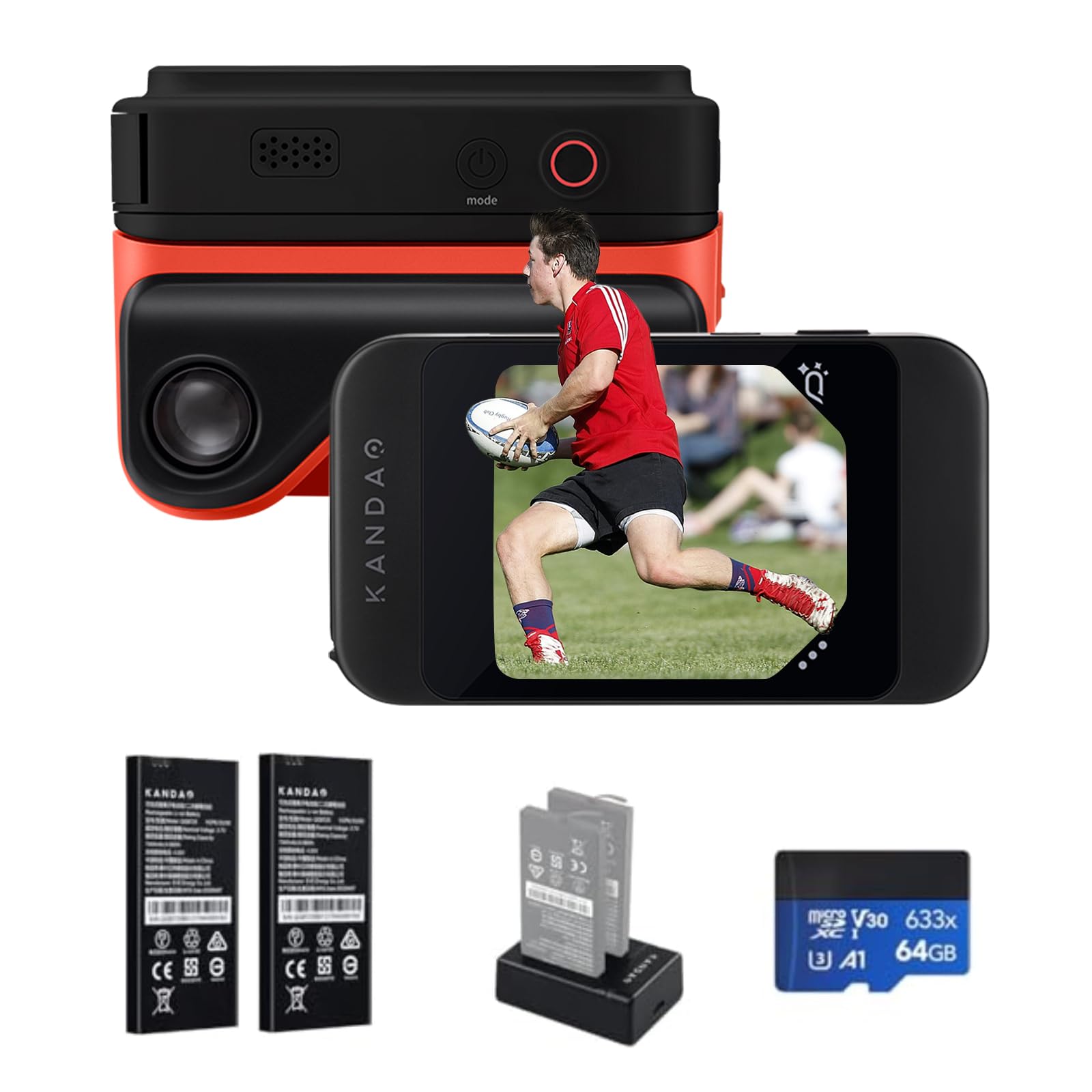
The world’s first pocket 3D camera with a magnetic viewer attached.
This camera solves the biggest 3D problem — playback — with a magnetic 3D viewer that snaps onto the camera so you can watch your footage with stereoscopic depth right after shooting. The 65mm distance between its two lenses matches human eye separation, capturing the world just as you see it. It shoots impressive 3840×1080 video at 60 frames per second, with photo resolution reaching 8000×3000, and a built-in IMU sensor provides stabilization so you can shoot without a gimbal.
What wins people over is the image quality and the magical 3D effect, which owners say make landscapes look spectacular. The instant viewing experience is the standout feature — the magnetic viewer makes it a portable alternative to a VR headset. It is also one of the few sub- 3D cameras available, with a firmware update that adds autofocus and stabilization, making it a great point-and-shoot for enthusiasts.
The recurring gripes are battery life, which owners say lasts only a few hours and forces you to carry swappable batteries, and its tendency to overheat after extended use. The startup is slow at 15-20 seconds, so you will miss spontaneous shots, and close-up subjects under 3 feet can suffer from a “Pinocchio nose” distortion. It is not for fast action either — fast-moving subjects blur — but for still 3D photography and viewing on VR headsets, it delivers magic.
Viewer-First Design: the instant magnetic playback is genuinely unique and delightful, but the poor battery and overheating mean you must plan your shoots carefully.
Reach for this if: you want instant glasses-free 3D viewing and are happy to carry extra batteries for longer sessions.
Look elsewhere if: you need long continuous recording or you shoot fast-moving sports — this is a slow, heat-prone point-and-shoot.
6. Intel RealSense Depth Camera D415
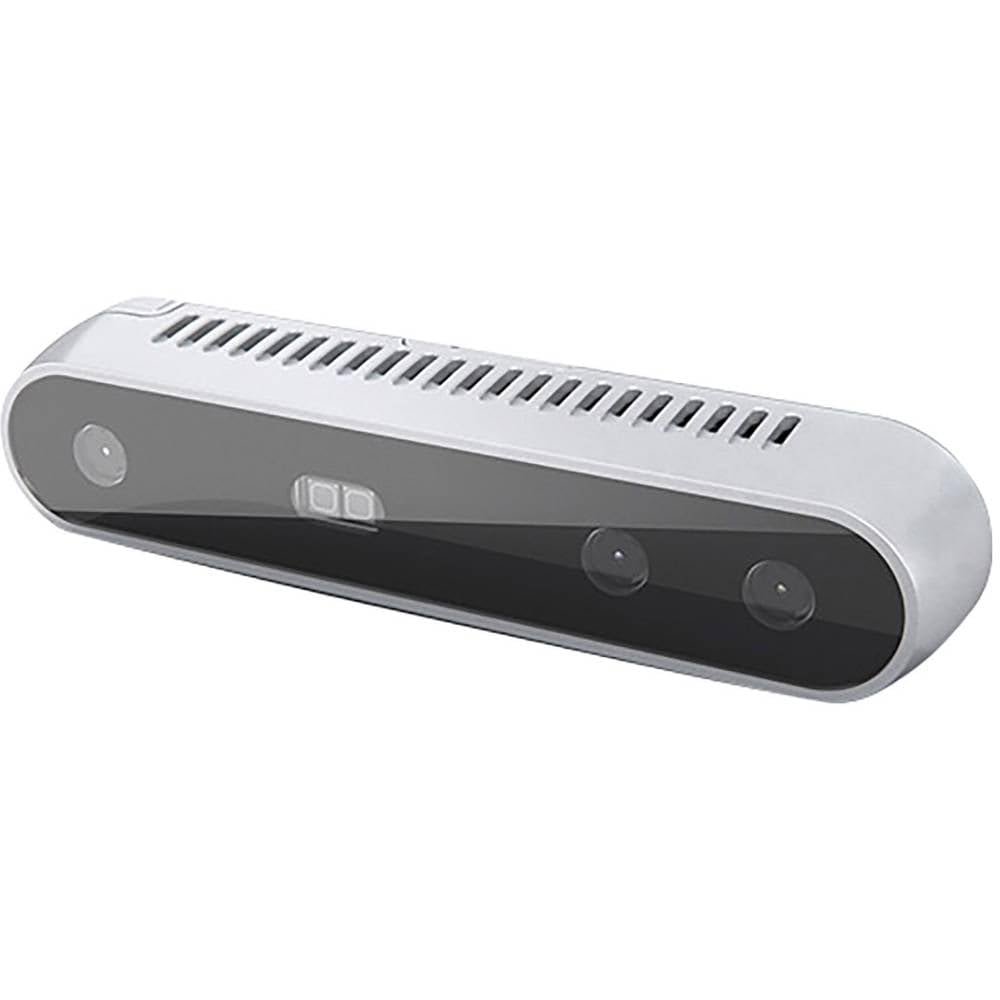
The depth-sensing workhorse for robotics and AR prototyping.
This is not a camera for taking pretty pictures — it is a depth sensor built for augmented reality, robotics, and 3D scanning applications that need to measure distance and structure. It connects via USB to your laptop or PC, delivering depth data that developers and engineers use for machine vision projects. At just 0.550 lbs, it is light enough to mount on a robot arm or a monitor setup for active development.
Developers and hackers describe it as a great tool to get started in machine vision, with an effective still resolution of 64 MP for detailed captures. It is designed for tinkering — owners call the machine-vision hacking fun and praise its value as a development platform. If you are building a project that needs to perceive depth, this is the kind of sensor that makes that possible without a huge investment.
The catch is the packaging and mounting — some buyers report receiving only the camera sensor without the tripod or USB 3.0 cable they expected, and the included mount design draws criticism. It is a developer tool, not a consumer camera, so you should expect to handle your own mounting solution. The limited 720p video resolution also means it is not for content creation.
Purpose-Built Sensor: ideal for AR, robotics, and 3D scanning projects where reliable depth data matters more than image quality, but you must budget for your own cables and mounts.
Best for: developers and engineers building robotics or AR projects that need depth perception on a budget.
Think twice if: you want a ready-to-use camera for photos or video — this is a bare sensor, not a complete consumer package.
7. Revopoint INSPIRE 2 3D Scanner
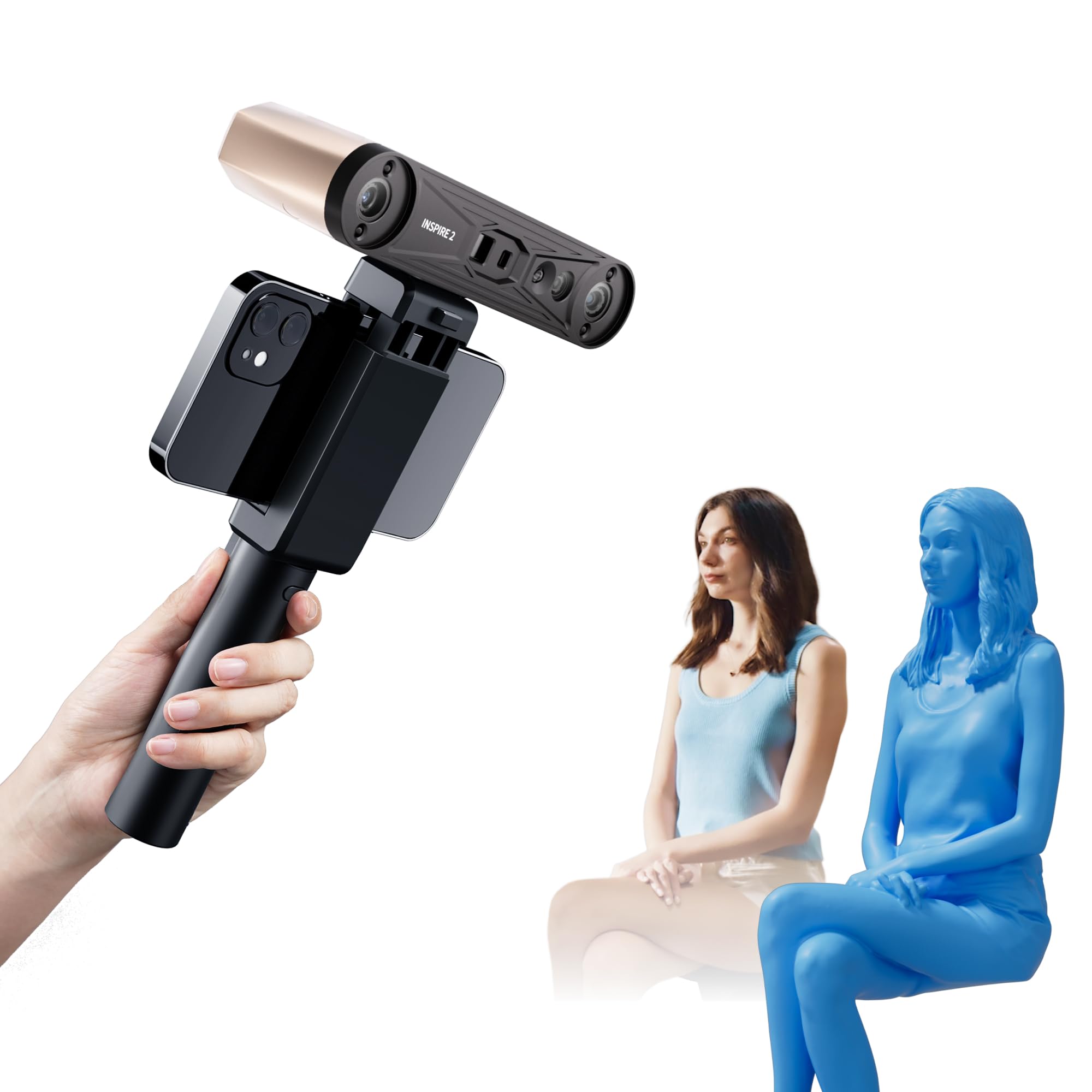
The featherweight scanner that captures detail for 3D printing outdoors.
If your goal is 3D printing, the INSPIRE 2 is a precision tool that scans objects with an accuracy of up to 0.05 mm and a precision of up to 0.03 mm, creating highly detailed models. At only 190g, it is remarkably lightweight and portable, with an aerospace-grade aluminum alloy front panel for durability. Its dual scanning modules use infrared structured light and multi-line laser scanning, with 11 infrared laser lines letting it capture reflective and dark surfaces without any scanning spray.
The standout feature is the ability to scan outdoors in up to 20,000 lux lighting — that is bright daylight — meaning you are not confined to a dark studio. The adjustable optical zoom at 1.5x and 2x magnification helps capture detail on mixed-geometry surfaces. Owners praise its excellent accuracy and find it offers great value compared to competitors that cost roughly double, with the AI-powered software streamlining the scan-to-CAD workflow.
The recurring frustration is the setup and calibration, which beginners find steep — the sticky calibration markers are a frequent complaint for not staying put, and the tripod can struggle to hold the camera steady during calibration. The software demands a powerful PC, needing an Intel i7 13th Gen or AMD Ryzen 7 5800 with at least 16GB RAM, and some owners experienced app crashes and USB disconnects. It is a capable scanner for small objects, but it has a learning curve that punishes new users.
The Real Strengths
- High accuracy up to 0.05 mm for detailed 3D printing
- Scans outdoors in bright conditions without spray
- Lightweight 190g body with durable aluminum front
The Real Hurdles
- Steep learning curve for calibration and setup
- Sticky calibration markers do not stay put
- Demanding PC requirements and some software instability
Reach for this if: you are a maker with a capable PC who wants professional-grade scanning accuracy for printing small parts and objects.
Look elsewhere if: you are a complete beginner looking for a plug-and-play experience — the calibration curve can be brutal.
8. Matterport Pro3 LiDAR Scanner
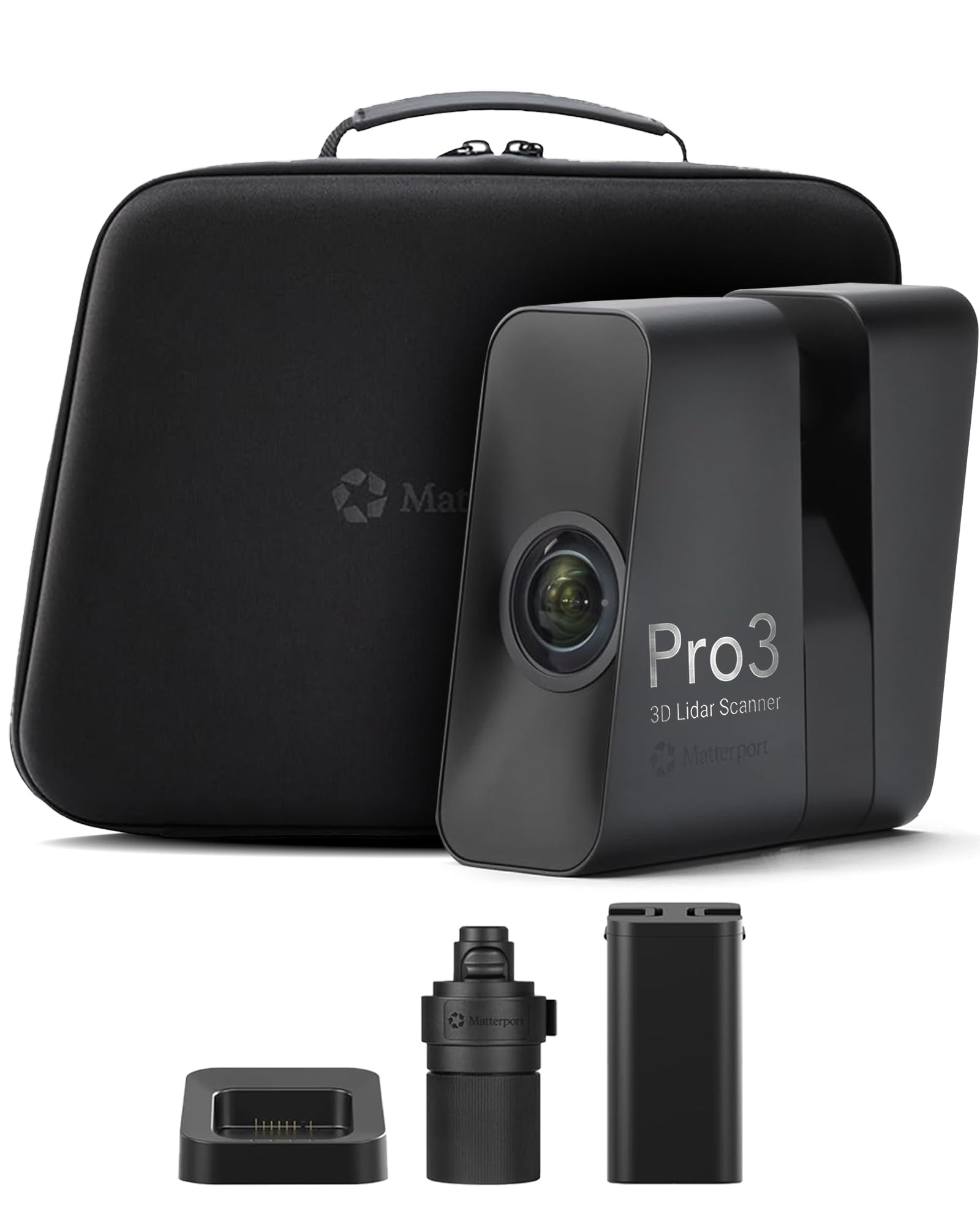
The professional-grade LiDAR scanner built for large-scale virtual tours.
This is the heavyweight champion for professionals who need precise, large-scale documentation — a LiDAR scanner that achieves ±20 mm accuracy at 10 meters and captures 100K points per second. Its extended scanning range reaches up to 100 meters in E57 files, letting teams document large residential, commercial, and outdoor environments with fewer setups. A complete scan takes under 20 seconds, powered by an advanced engine built for maximum productivity on the job site.
It is designed for real-world conditions, performing reliably in direct sunlight, low light, and mixed lighting. The swappable, removable batteries support extended capture sessions with minimal downtime, making it ideal for continuous professional operation. Owners upgrading from the previous generation call it a world of difference — faster, more accurate, and excellent for exterior scanning, with a build quality that feels sturdy and professional.
The big caveats are the platform and the workflow. Matterport software is required, and it works best with a Professional or Business subscription — it is not compatible with the free or starter plans, and point cloud files cost extra. Some owners mention field stitching glitches around doorways and a lack of manual alignment options, which can cause delays. It is also a significant investment: at 2.2 kg, it is a serious piece of equipment for a serious business.
Built for Business: the speed, range, and accuracy are exactly what a professional scanning service needs, but the software subscription and platform captivity are real costs to plan for.
Best for: professional property surveyors and virtual-tour services who need fast, accurate scans of large spaces and have a Matterport subscription budget.
Think twice if: you only need basic virtual tours or are not ready for a subscription-based workflow — the value depends entirely on the software ecosystem.
Understanding the Specs
Stereo Lens Separation
Measured in millimeters, this is the distance between the two lenses on a stereo camera. Human eyes are roughly 65mm apart, so cameras like the KanDao QooCam EGO with a 65mm distance produce depth that feels natural. A wider or narrower separation changes the 3D effect — wider creates more exaggerated depth, while narrower looks flatter. This matters most for close-up people shots.
Depth Accuracy
For depth sensors and scanners, accuracy is stated in millimeters and tells you how precisely the device measures distance. The Revopoint INSPIRE 2 offers accuracy up to 0.05 mm, which is professional-grade for 3D printing. The Matterport Pro3 lists ±20 mm at 10 meters, which sounds larger but is perfectly suited for room-scale scanning. Match the accuracy to your output — printing needs sub-millimeter, virtual tours do not.
FAQ
Can I view 3D photos without wearing special glasses?
What is the difference between a 3D camera and a 360-degree camera?
Will a 3D camera work with my VR headset?
How long does the battery last on these 3D cameras?
Is a 3D scanner the same as a 3D camera?
Do I need a powerful computer to use a 3D depth camera?
Can I use a 3D film camera without prior photography experience?
What software do I need to process 3D scan data?
Are these cameras suitable for outdoor use?
Final Thoughts: The Verdict
For most buyers, the 3d camera winner is the Fujifilm FinePix Real 3D W3 because it delivers the most natural stereoscopic depth with instant glasses-free viewing, backed by a decade-spanning reputation as the best consumer 3D camera. If you want the instant playback magic of a magnetic viewer, grab the KanDao QooCam EGO. And for professional virtual tours of large properties, the Matterport Pro3 is the one to reach for, provided the subscription workflow fits your business model.
How We Picked
We do not accept paid placement. Every pick is matched to a real buyer and a real use-case; we do not hands-on test units.
Sources & Methodology
Specifications: manufacturer listings and product documentation. Review insights: verified customer reviews, as of August 2026. Pricing: not shown on this page (it changes often); check the current price via the retailer link.
As an Amazon Associate, Gadgets Feed earns from qualifying purchases. This does not affect which products we feature.