
Our readers keep the lights on and my morning glass full of iced black tea. As an Amazon Associate, I earn from qualifying purchases.
Specs are compiled from manufacturer listings and verified buyer reviews and can change over time — please confirm the key details on the product page before buying.
If your old computer feels sluggish, the fastest fix isn’t a new processor — it’s a solid-state drive. A 2 TB SSD gives you both speed and room, so you stop juggling files or uninstalling games to free up space. The real question is which type fits your machine: the classic 2.5-inch SATA drive for older laptops and desktops, or the newer M.2 NVMe card that reads data several times faster. Here are the best 2 TB SSDs for every buyer, from the budget-minded reviver of an aging laptop to the power user who needs the fastest transfer speeds.
I’m Min — the founder and writer behind Gadgets Feed. This guide is built by comparing the manufacturers’ published specifications and the patterns across verified customer reviews, so you get each pick’s real strengths and trade-offs instead of marketing spin.
You’ll see exactly which 2 TB SSD delivers the best blend of speed, reliability, and value for your specific setup and budget.
Our Picks at a Glance



How To Choose The Best 2 TB SSD
Choosing a 2 TB SSD depends on three decisions: the physical shape your computer accepts, the speed standard it supports, and how much you’re willing to spend for that speed. Get the first one wrong and the drive won’t fit or connect. Get the second one wrong and you pay for speed your machine can’t use.
Form Factor: The Shape That Fits
You’ll see two main shapes. The 2.5-inch SATA drive is the same size and connector as an old laptop hard drive, so it’s the natural swap for a computer from the last decade. The M.2 2280 is a slim stick that slots directly into the motherboard — most modern laptops and desktops use this. If your computer is newer and has an M.2 slot, that’s almost always the faster and cleaner route.
Interface: SATA vs. NVMe
SATA is the older standard, capped at roughly 550 MB/s. NVMe (Non-Volatile Memory Express) is the newer protocol that rides on the PCIe bus, and a PCIe Gen 4 drive can hit over 7,000 MB/s. That’s a massive difference in real terms: an NVMe drive moves huge video files or loads games in a fraction of the time a SATA drive needs. If your computer supports it, NVMe is the clear choice; if it only has a SATA port, a good SATA SSD is still a night-and-day upgrade over a hard drive.
Quick Comparison
| Model | Best For | Form Factor | Max Read Speed | Interface | Amazon |
|---|---|---|---|---|---|
| Samsung 860 EVO★ Best Overall | Reliable SATA upgrade | 2.5-inch | 550 MB/s | SATA III | Amazon |
| WD Blue SN5100Best Value | Fast NVMe internal | M.2 2280 | 7,100 MB/s | PCIe Gen 4.0 | Amazon |
| BIWIN NV7400Top Performer | Peak NVMe performance | M.2 2280 | 7,450 MB/s | PCIe Gen 4.0 | Amazon |
| TEAMGROUP Vulcan Z | Budget SATA bulk storage | 2.5-inch | 550 MB/s | SATA III | Amazon |
| Silicon Power A55 | Reviving older systems | 2.5-inch | 500 MB/s | SATA III | Amazon |
| Lexar ES3 | Portable external backup | External | 1,050 MB/s | USB-C | Amazon |
| SanDisk Extreme | Rugged portable storage | Portable | 1,050 MB/s | USB | Amazon |
| Crucial P310 | Handheld gaming consoles | M.2 2280 | 7,100 MB/s | PCIe Gen 4.0 | Amazon |
| TEAMGROUP MP44L | Budget NVMe gaming | M.2 2280 | 4,800 MB/s | PCIe Gen 4.0 | Amazon |
In‑Depth Reviews
1. Samsung 860 EVO 2TB SATA III
Our pick — over 4.5★ from 76,500+ verified ratings; the strongest balance of quality and price.
The gold standard for a safe, dependable SATA upgrade that just keeps working.
The 860 EVO is the drive people recommend when they can’t afford to lose data. It reads and writes at up to 550 MB/s and 520 MB/s, respectively, the practical ceiling for SATA III. Buyers report boot times dropping from two minutes to around 30 seconds after cloning their old hard drive.
Reliability is the headline here, backed by a 1.5 million hour MTBF (Mean Time Between Failures — a rating of how long the drive is expected to operate before a fault). It also includes AES 256-bit hardware-based encryption, so you can lock your data with a password if you like. The 5-year limited warranty outlasts most budget drives.
A few caution that cloning with third-party tools sometimes required a second attempt, but the end result was always the same dramatic speed gain. It works with Windows, macOS, and Linux from the start, and it’s a popular drop-in for PS4 consoles too. The 2 TB capacity gives you room for a large game library or years of photos and videos.
Why It Wins
- Blistering SATA speeds that max out the interface
- Elite reliability rating of 1.5 million hours
- Hardware encryption and a 5-year warranty
The Trade-Off
- Still SATA — far slower than modern NVMe drives if your PC has an M.2 slot
- Premium pricing for a drive technology that’s being phased out
Reach for this if: you want a bulletproof, no-drama upgrade for an older laptop or desktop that only has a SATA port.
Look elsewhere if: your motherboard has an M.2 slot — an NVMe drive will be several times faster for similar money.
2. WD Blue SN5100 2TB NVMe SSD
The NVMe speed demon that makes an aging laptop feel brand new again.
If your machine has an M.2 slot, this is the upgrade that makes you wonder why you waited. The WD Blue SN5100 hits read speeds up to 7,100 MB/s on the PCIe Gen 4.0 interface — that’s more than twelve times faster than the Samsung 860 EVO’s 550 MB/s. Copying large files or loading games is virtually instant, and the difference is obvious from the first boot.
It’s built on the M.2 2280 form factor, the slim stick shape that slots directly into modern laptops and desktops. Owners praise it for reviving old Windows 11 laptops with failed drives, calling it an easy install that adds serious capacity. The 5-year limited warranty from SanDisk (which owns WD) covers the drive for the long haul, and the included Acronis True Image download makes migrating your old data straightforward.
The only mixed feedback concerns compatibility on certain systems, which is typical for NVMe drives — always confirm your motherboard has a Gen 4 M.2 slot before buying. For gaming, one owner notes they can’t tell a difference between this and a pricier WD Black drive during load times. That’s about the highest praise a value-oriented NVMe drive can get.
The Speed Story
- Up to 7,100 MB/s reads on PCIe Gen 4.0
- Slim M.2 2280 form factor for modern builds
- Includes data migration software and 5-year warranty
Check First
- Needs a Gen 4 M.2 slot to reach full speed
- Compatibility varies on some older systems
The pick for: anyone with a compatible M.2 slot who wants near-flagship speed without the flagship price tag.
Who it’s not for: older machines limited to the 2.5-inch SATA connector — that’s the Samsung 860 EVO’s territory.
3. BIWIN Black Opal NV7400 2TB
The speed king for power users who unzip huge games and edit 4K footage.
At the top of the speed chart sits the BIWIN NV7400, with a maximum read speed of 7,450 MB/s and writes up to 6,500 MB/s. That’s the fastest read spec in this entire lineup, paired with random read and write speeds of up to 1,000K IOPS (Input/Output Operations Per Second — a measure of how quickly the drive handles lots of small file requests). For power users, this means unzipping large games in seconds and zero stutter in demanding workflows.
It uses the PCIe Gen 4×4 interface with 3D TLC NAND, and a 0.5mm graphene aluminium heat sink keeps it cool during heavy loads so performance doesn’t throttle. The included Biwin Intelligence software handles performance tests, data migration, and firmware updates in one place. Owners note it’s proven itself in builds with high-end graphics cards, handling big file extraction without issue.
That said, compatibility gets mixed marks in reviews — one owner had to adjust six different Windows power settings to stop idle crashes, though the drive itself ran perfectly afterward. There’s also a strong caution in the reviews: be careful during installation, as a dropped mounting screw can short a motherboard. Take your time, and this drive rewards you with market-leading speed.
The Performance Edge
- Fastest read spec here: 7,450 MB/s
- Graphene heat sink prevents throttling
- Free management software included
Handle With Care
- Occasional Windows compatibility quirks reported
- Installation requires care to avoid damaging the motherboard
Built for: enthusiasts running heavy loads who want every last MB/s and keep the drive cool.
Think twice if: you’re not comfortable with a careful M.2 installation or you’re on a system with known compatibility issues.
4. Crucial P310 2TB NVMe SSD

The versatile NVMe drive that’s at home in a laptop, desktop, or handheld console.
Few drives advertise as broad a compatibility list as the Crucial P310. Beyond laptops and desktops, it’s specifically tested for handheld gaming consoles like the ROG Ally X, Lenovo Legion Go, and AYANEO Kun — plus it’s backward compatible with older PCIe Gen 3 systems. That makes it a uniquely flexible upgrade path if you game on the go or at a desk.
Performance is strong at up to 7,100 MB/s read and 6,000 MB/s write. Crucial rates it up to 2x faster than the previous Gen 3 generation, and owners confirm applications launch “in the blink of an eye.” It even pairs well with a Mac Mini, where one owner used it to effectively expand their storage by 50%. The included Acronis data recovery software and Crucial Storage Executive tooling cover the software side.
Built on Micron’s G8 NAND with thermal control, it’s a trusted name for good reason. The one honest caveat is reliability gets a mixed verdict in a small share of reviews — a reminder that no drive is immune to the occasional defect. But with nearly 11,000 ratings averaging strong performance feedback, the odds are heavily in your favor.
The Flexibility Win
- Tested for handheld consoles and Gen 3 systems
- Up to 7,100 MB/s read speeds
- Includes recovery software and management tools
The Reality Check
- A small minority report reliability issues
- Premium price for the broad compatibility
Grab it for: gamers who want one drive that works across a handheld, a laptop, and even an older desktop.
skip it if: your priorities are pure cost savings on a basic SATA machine — you’d be paying for speed you can’t use.
5. Lexar 2TB ES3 External SSD

A pocket-sized external drive built for fast, on-the-go backups.
When your storage needs are portable, the Lexar ES3 makes a strong case. It’s rated at up to 1,050 MB/s read and 1,000 MB/s write — the maker claims 9.5x faster than a hard disk drive — so backing up a whole computer happens in minutes, not hours. Owners confirm transfer speeds stay sturdy even during large, continuous writes.
The compact, sturdy design is a big part of the appeal, with double-layer graphite sheets inside that conduct heat away to keep it cool during fast transfers. It’s drop-resistant up to 2 meters, so a slip off a desk won’t necessarily end your data. Plug-and-play is easy thanks to the included 2-in-1 USB-C/USB-A cable, working with PC, Mac, tablets, phones, and gaming consoles alike.
Owners mention the cable is on the shorter side, and that you need to use the included cable to hit maximum speeds. But the consensus is clear: it’s reliable, speedy, and a great fit for creative work and office backups. For PS5 and PC gaming clip storage, owners call it a 10/10 — silent, cool, and always ready.
The Portability Perk: drop-resistant to 2 meters and cool-running even during sustained transfers, so it survives the everyday shuffle between desk and bag.
The One Grumble: the short cable length is the recurring nitpick — plan for it, and use the included cable for full speed.
Made for: photographers, videographers, and anyone who needs a fast, durable drive that travels with them.
Not ideal for: internal upgrades — this is an external drive, so it’s a backup companion, not a boot drive replacement.
6. SanDisk 2TB Extreme Portable SSD

The tough little drive that fits in your palm and shrugs off drops and dust.
If your storage needs to survive the outdoors, the SanDisk Extreme is the one. It’s rated for 3-meter drops and IP65 water/dust resistance. A built-in carabiner loop lets you clip it to a backpack, and the rubberized build feels solid in hand. Owners note it fits in the palm of your hand.
Performance matches its toughness: up to 1,050 MB/s read and 1,000 MB/s write speeds. It also includes password protection with 256-bit AES hardware encryption, so your private files stay private even if the drive is lost. The included SanDisk Memory Zone app automates file management and space cleanup.
The honest trade-off is reliability — a notable share of customers note drives failing after a few months, with some experiencing unrecoverable data loss. That’s a serious flag for anyone using this as their only backup. It’s also note that it needs a USB 3.1 or 3.2 Gen 2 port to reach full speed, and the included cable is on the short side. For travel and everyday use it’s a favorite, but don’t treat it as your only copy of irreplaceable data.
The Toughness Factor
- 3-meter drop protection and IP65 water/dust rating
- Hardware encryption keeps data private
- Carabiner loop for easy attachment
The Risk
- Reliability concerns reported by a significant share of owners
- Short cable and requires Gen 2 USB for full speed
Choose this for: travel, field work, and any environment where a drive will face rough handling.
Be cautious if: you need your only backup to be bulletproof — consider a second copy or a different drive for mission-critical data.
7. TEAMGROUP T-Force Vulcan Z 2TB SATA III

The budget SATA drive that gives an old computer a second life and a 2 TB library of room.
For the money, the T-Force Vulcan Z is a tempting way to give an aging desktop or laptop a serious storage boost. It’s a 2.5-inch SATA drive rated for read and write speeds up to 550 and 470 MB/s, respectively — the practical limit of the SATA III interface. Reviewers describe it as a significant upgrade over a hard drive, with solid read and write performance right from the start.
It uses SLC Cache technology and 3D NAND QLC to balance speed and capacity, with a slim metal casing that helps dissipate heat. The 2 TB capacity is the real draw, giving low-maintenance room for a large game library or years of media. It’s certified for use with the Xbox Series S and X, and the PlayStation 5 as an external drive, plus any desktop or laptop with a SATA port.
Here’s the honest catch: reliability gets mixed feedback, with some units failing within months while others last a year and a half. There are also reports that real-world speeds lag the advertised figures — one tester measured around 402 MB/s read and 343 MB/s write versus the 550/470 claimed. For everyday use it’s a fine value, but if you’re constantly moving gigantic files, the advice in the reviews is clear: step up to an M.2 NVMe drive instead.
The Value Proposition: a low-cost way to add 2 TB of solid-state storage to any SATA-capable machine.
The Honest Warning: reliability is a lottery here — some units die fast, so don’t store your only copy of anything irreplaceable on it.
Best for: budget builders who need maximum capacity for minimum spend and don’t mind a modest speed ceiling.
Steer clear if: you’re a heavy file mover or you need a drive you trust with critical data — go with the Samsung 860 EVO or an NVMe drive instead.
8. TEAMGROUP MP44L 2TB NVMe SSD

A budget NVMe stick that punches far above its price for gamers and builders.
Not every NVMe drive needs to cost a fortune. The MP44L delivers solid Gen 4 speeds — up to 4,800 MB/s read and 4,400 MB/s write — at a price that undercuts most rivals. That’s more than double what the PCIe Gen 3 interface could manage, and it uses SLC Caching to keep performance snappy under load. Owners call it one of the best storage options for a budget-conscious PC builder.
The spec sheet has some clever touches. It uses a conductive graphene coating on the label — less than 1mm thick — plus an onboard heat sink to double heat dissipation, which keeps things cool during long gaming sessions. It’s a standard M.2 2280, compatible with modern Intel and AMD desktops and laptops. It also works with the Xbox Series S and X and the PS5.
Quality feedback leans positive, though a few owners noted the raw formatted capacity comes in around 1.82 TB — normal for any 2 TB drive, since some space is reserved for the file system. One owner switched from a failing Samsung drive and found flawless compatibility across multiple TEAMGROUP purchases with no throttling in testing. For gaming rigs and everyday builds, it’s a smart value pick.
Why It’s Smart
- Up to 4,800 MB/s reads at a budget price
- Graphene-coated label plus heat sink for cooling
- Broad compatibility with modern platforms and consoles
What to Expect
- Not the fastest Gen 4 drive available
- Formatted capacity is about 1.82 TB of usable space
Grab it for: a budget PC build or laptop upgrade where you want NVMe speed without the premium cost.
Pass if you: need maximum transfer speeds for huge file workloads — the BIWIN or Crucial are faster.
9. Silicon Power A55 2TB SATA III
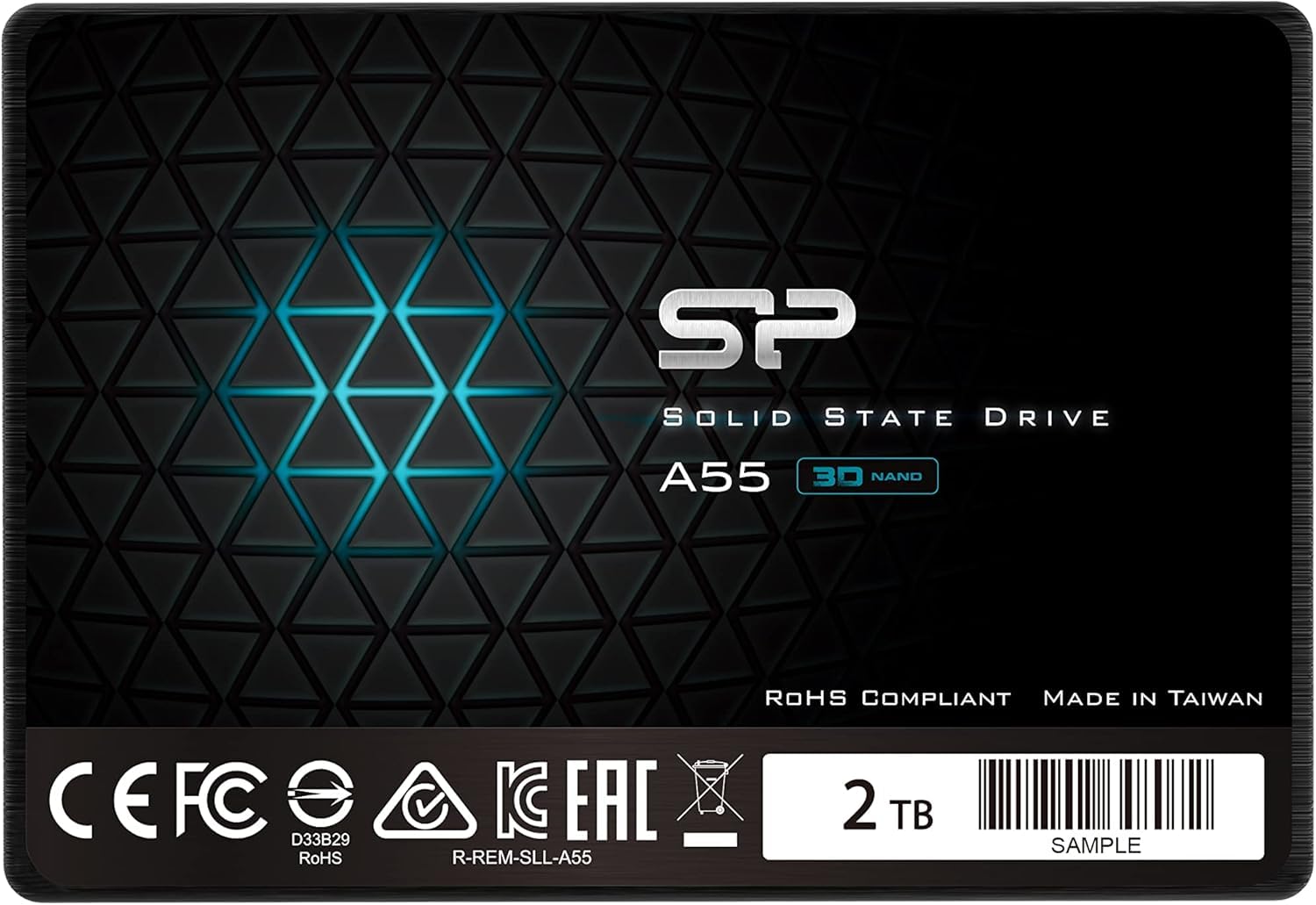
A slim, reliable workhorse that makes an old laptop feel new for very little money.
The Silicon Power A55 is the drive to grab when you want to revive an older laptop on a strict budget. Its 7mm slim profile means it fits ultrabooks and ultra-slim notebooks that reject thicker drives, and owners consistently report that it makes old systems feel brand new — faster boot times and snappier overall use. It’s a straightforward SATA III drive with data transfer up to 500 MB/s.
It uses 3D NAND flash and advanced SLC Cache Technology to boost both performance and lifespan. The 3-year limited warranty is shorter than some rivals, but the value proposition is strong. Owners describe it as a great utility drive for servers, HTPCs, and emulation machines — with one noting the maker’s RMA process replaced a failed unit quickly. It’s sold as shock-resistant, which suits laptops that get moved around a lot.
The mixed durability feedback is the honest caveat: some units have run for three years without issues, while others failed within three months. A fair side-by-side comparison also showed a Samsung 860 Pro outperforming it on the same SATA III port, which is no surprise given the price difference. For its price, it’s a capable and stable drive — just keep backups of anything critical.
The Practical Appeal: a slim, stable SATA drive that wakes up older laptops and fits where thicker drives won’t.
The Durability Caveat: longevity is a mix — some drives last for years, others die fast, so treat it as a utility drive, not a vault.
Reach for it if: you need a cheap, slim SATA drive to breathe new life into an old laptop or home server.
Consider alternatives if: long-term reliability is non-negotiable — the Samsung 860 EVO is the safer bet.
Understanding the Specs
Form Factor: The Physical Shape
The 2.5-inch SATA drive is the classic size that matches older laptop and desktop bays. The M.2 2280 is a slim stick that mounts directly on the motherboard — 22mm wide and 80mm long. If your computer has an M.2 slot, that’s the modern choice. If not, the 2.5-inch SATA is your only option. External SSDs connect via USB and work with anything, but they’re for backups, not boot drives.
Read and Write Speeds
SATA III tops out around 550 MB/s, which is what the 2.5-inch drives in this guide deliver. NVMe drives on PCIe Gen 4.0 can hit 7,000 MB/s or more — over ten times faster. That speed matters for loading large games, editing video, or moving big files. For everyday web browsing and documents, the difference between SATA and NVMe is far less noticeable. Check what your motherboard supports before you buy.
FAQ
Will a 2 TB SSD fit in my laptop or desktop?
What’s the difference between SATA and NVMe SSDs?
How long will a 2 TB SSD last?
Can I use a 2 TB SSD with my PlayStation 5 or Xbox?
Why is my 2 TB SSD showing less than 2 TB of space?
Should I buy an external SSD or an internal one?
Is it worth paying more for a faster NVMe drive?
Do I need special software to move my data to a new SSD?
Final Thoughts: The Verdict
Across the board, the 2 tb ssd winner is the Samsung 860 EVO because it’s the most trusted, reliable SATA drive you can buy — the crowd favorite with a proven track record among tens of thousands of owners. If you want modern NVMe speed for gaming, grab the WD Blue SN5100. And for a rugged, portable backup you can clip to a bag, the SanDisk Extreme is the one to reach for.
How We Picked
We do not accept paid placement. Every pick is matched to a real buyer and a real use-case; we do not hands-on test units.
Sources & Methodology
Specifications: manufacturer listings and product documentation. Review insights: verified customer reviews, as of August 2026. Pricing: not shown on this page (it changes often); check the current price via the retailer link.
As an Amazon Associate, Gadgets Feed earns from qualifying purchases. This does not affect which products we feature.