
Our readers keep the lights on and my morning glass full of iced black tea. As an Amazon Associate, I earn from qualifying purchases.
Specs are compiled from manufacturer listings and verified buyer reviews and can change over time — please confirm the key details on the product page before buying.
Dolby Vision, the HDR format that boosts contrast and color scene by scene, is now standard on budget TVs. The real choice is which budget model pairs that vivid picture with the smart-TV platform and gaming features you use most.
I’m Min — the founder and writer behind Gadgets Feed. This guide is built by comparing the manufacturers’ published specifications and the patterns across verified customer reviews, so you get each pick’s real strengths and trade-offs instead of marketing spin.
You will see exactly how these six sets handle Dolby Vision, refresh rates, and built-in sound, and which one earns the crown as the budget dolby vision tv for your living room.
Our Picks at a Glance

How To Choose The Best Budget Dolby Vision TV
For a budget TV that makes movies and shows pop, Dolby Vision (a high-dynamic-range format that boosts contrast and color) is the key feature to seek. All six picks here support Dolby Vision, so your real choice is which extras—like gaming features or smart-TV software—fit your room and habits best.
Backlight tech: Mini-LED versus plain QLED
The backlight is what turns a decent budget screen into a great one. Mini-LED backlighting uses tiny LEDs in precise zones to control brightness locally, which gives you deeper blacks and brighter highlights without washing out dark scenes. Standard QLED without local dimming still looks colorful and bright, but it cannot match that contrast in a dark room.
Refresh rate and gaming features
For smooth sports and gaming, a native 144Hz panel refreshes the image 144 times a second, so fast action stays blur-free. Add VRR (Variable Refresh Rate, which syncs the screen to your console’s frame output to stop tearing) and ALLM (Auto Low Latency Mode, which switches the TV into game mode automatically), and you get a serious gaming setup for far less than a premium set.
Smart platform: Fire TV, Roku, or Google TV
Your remote is what you touch daily, so the interface matters as much as the panel. Roku is famous for a clean, simple home screen, Fire TV leans heavily into Alexa voice control and Amazon recommendations, and Google TV offers broad app support with Google Assistant. None is objectively best — it depends on whether you live inside the Alexa ecosystem or just want the least clutter.
Quick Comparison
| Model | Best For | Screen Size | Refresh Rate | Backlight Type | Amazon |
|---|---|---|---|---|---|
| Roku 55″ Plus Series★ Best Overall | Overall simplicity and picture quality | 55 inches | VRR (Variable Refresh Rate) | QLED Mini-LED | Amazon |
| Toshiba 50″ M450 SeriesBest Value | Entry-level value with Alexa | 50 inches | 60Hz | QLED | Amazon |
| iFFALCON 55U85 | Serious console gaming on a budget | 55 inches | 144Hz native, up to 240Hz VRR | MiniLED | Amazon |
| Hisense 50″ E7 Cinema Series | Cinematic HDR and AI-enhanced picture | 50 inches | 144Hz native | Hi-QLED Mini-LED | Amazon |
| TCL 55″ QM64L Series | Bright-room viewing with deep blacks | 55 inches | 144Hz native | QD-Mini LED | Amazon |
| Amazon Ember 55″ QLED Series | Deep Alexa integration and smart features | 55 inches | Not specified | QLED with full-array local dimming | Amazon |
In‑Depth Reviews
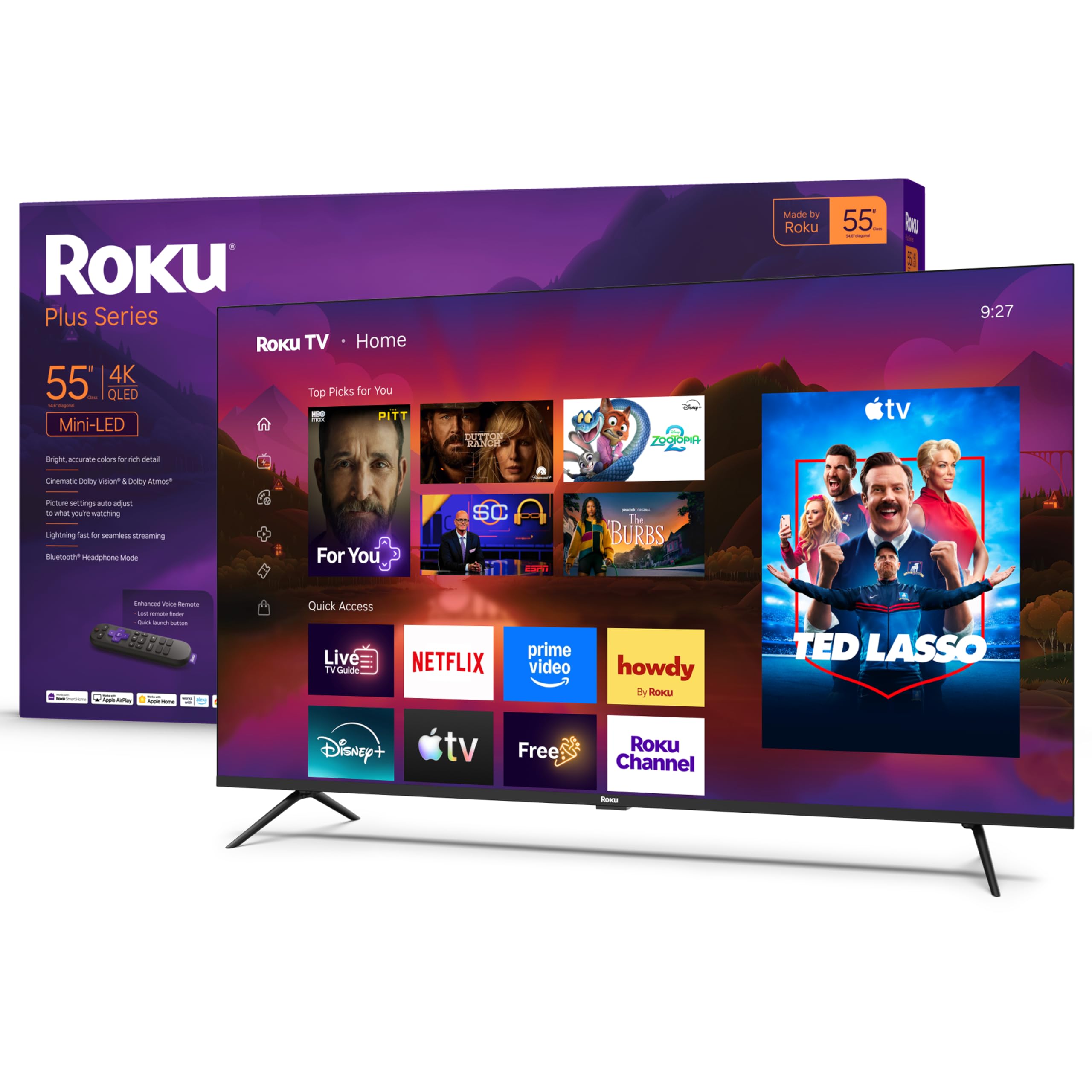
1. Roku 55-Inch Plus Series Smart TV
Our pick — 4.5★ from 650+ verified ratings; the strongest balance of quality and price.
The easy-going Mini-LED that makes every app feel easy
This 55-inch 4K QLED Mini-LED set earns its spot as the crowd favorite among budget-friendly Dolby Vision TVs, holding a 4.5-star average across hundreds of owners. Buyers praise its build quality most, then picture quality, and the specs back that up: Dolby Vision plus a high contrast ratio delivers rich detail and vivid highlights.
The Roku experience is the real star for daily use. Setup takes minutes, the Home Screen stays simple and uncluttered, and the enhanced voice remote searches across thousands of apps and even includes a lost-remote finder. Ownership feedback, as buyers report, is that the picture stays “sharp, bright” and “easy” to control, performing “as well as Samsung/LG after 6 months.”
For movie nights, Dolby Atmos (a surround-sound format) and a built-in subwoofer deliver spatial audio you can feel, and Bluetooth Headphone Mode lets you listen privately without waking the house. The catch is modest: a large VESA mount (the standard hole pattern for wall brackets) means you should check your wall bracket’s compatibility before hanging it, and gaming extras like Game Mode and VRR (Variable Refresh Rate) are included but not class-leading like on dedicated gaming sets.
What buyers cheer
- Stunningly bright QLED Mini-LED picture with Dolby Vision
- Truly simple Roku interface and quick setup
- Built-in subwoofer plus Dolby Atmos for rich sound
Worth a second look
- Large VESA mount — check wall bracket compatibility
- Thin LED TVs generally benefit from a soundbar
Reach for this if: you want the best blend of picture, sound, and simple to use simplicity in one box.
Look elsewhere if: your priority is a 144Hz panel for competitive console gaming.
2. Toshiba 50″ M450 Series QLED 4K UHD Smart Fire TV
The 50-inch entry point that pairs Dolby Vision with a familiar Alexa ecosystem
At 50 inches, this is the most budget-friendly screen in the lineup, yet it still brings Dolby Vision HDR together with Dolby Atmos sound for an engaging audio-visual experience. The REGZA Engine ZR Gen3 handles the picture processing, and the QLED panel keeps colors rich and lifelike, with quality and picture quality the two most-praised aspects.
The experience here is more of a hands-on setup. Owners mention the factory “energy saving mode” dulls the picture until you disable it, and the Fire TV interface is quick enough once you are used to it. As customers note: “I really am pleased with this TV. I think it moves fast enough, has an excellent picture quality with really great color. It was easy to use and set up was smooth.”
Gaming gets a boost from Game Mode with ALLM (Auto Low Latency Mode), VRR (Variable Refresh Rate), and eARC support, plus HDR10+ Adaptive for scene-by-scene brightness. The honest trade-offs are that Wi-Fi is the only connectivity option, a few owners found the included analog inputs shown in photos were missing in the box, and the Fire TV interface can feel sluggish to non-tech users. If you want a smaller screen with the least upfront cost, this is your pick.
Real-world read: the picture genuinely impresses for the money once you tweak one setting, but treat the Fire TV software and thin connectivity as the trade-off.
The honest caveat: no analog audio output and legs that stick out far are the recurring nagging points.
3. iFFALCON 55″ 4K MiniLED Smart TV

A 144Hz MiniLED panel built to keep up with your console
This is the gaming specialist of the group, and its defining spec is a native 144Hz panel with VRR (Variable Refresh Rate) that runs up to 240Hz, so fast-paced shooters stay smooth and tear-free. It also delivers up to 1000 nits of bright HDR luminance and a 6000:1 contrast ratio with local dimming, making dark scenes readable even in bright rooms. It supports Dolby Vision IQ, Dolby Vision Gaming, HDR10+, and IMAX Enhanced, so every major HDR format is covered—and owners call it the best MiniLED TV with Dolby Vision and Atmos at its price point.
The four HDMI 2.1 ports are the practical advantage: two run 4K@144Hz for next-gen consoles and gaming PCs, while the other two handle 4K@60Hz for streaming boxes. ALLM (Auto Low Latency Mode) switches the TV into game mode instantly, and the 50W 2.1-channel audio system with Dolby Atmos and DTS Virtual:X fills a room without a soundbar. What wins people over is overall quality, with picture quality the second most-praised aspect.
The one genuine caution is provenance: the brand is a TCL subsidiary, so a few owners warn not to expect firmware updates and to treat it as a solid few-years purchase rather than a long-term flagship. Google TV keeps the interface fast and responsive, AirPlay 2 and Chromecast built-in mean iPhone and Android users can cast directly, and there is even a hotel mode with IP/IR control for Airbnb or office installations.
Built for gamers
- Native 144Hz panel with VRR up to 240Hz
- Up to 1000 nits brightness for HDR highlights
- Four HDMI 2.1 ports, two at full 4K@144Hz
Know the limits
- TCL subsidiary — expect no firmware updates
- Slightly thicker chassis than premium rivals
Grab it for: smooth, tear-free 4K gaming at 144Hz without paying flagship prices.
skip it if: you want a brand with a long software-support roadmap.
4. Hisense 50″ E7 Cinema Series Hi-QLED Mini-LED 4K UHD Smart Fire TV

Mini-LED contrast plus AI picture smarts tuned for cinematic nights
Hisense positions this as a “no-regret purchase,” and the reason is Hi-QLED Mini-LED backlighting that uses precise light zones to enhance contrast, so you see deeper shadows and brighter highlights in every scene. Dolby Vision IQ (which adjusts HDR based on room lighting) and Dolby Atmos pair together for cinematic HDR with rich sound, and the total HDR solution also covers HDR10+ Adaptive, HDR10, and HLG formats.
The native 144Hz Game Mode keeps fast movement fluid and sharp, which helps both competitive gaming and rapid camera shots in shows. AI picture processing analyzes content scene by scene and adjusts brightness, contrast, and color in real time, while AI Sports Mode instantly recognizes sports and boosts crowd audio. FILMMAKER MODE preserves the original aspect ratio, color, frame rate, and sound so directors’ intent survives the stream.
Owners consistently praise the vibrant colors and the way Mini-LED enhances dark scenes, with quality the top-praised aspect and picture quality second. The recurring niggles are weaker packaging in shipping and plastic stands, plus a note that overall picture processing is less desirable for non-smart-app media clarity. Voice control via the Alexa remote makes it accessible even for visually impaired users, and the Fire OS interface stays simple and responsive.
The verdict: the best picture-per-dollar for movie lovers who want AI-assisted tuning and deep blacks in a 50-inch frame.
The fit caveat: budget-friendly stands and packaging mean you handle assembly with a little care.
5. TCL 55-Inch QM64L Series Mini LED QLED 4K HDR Gaming TV
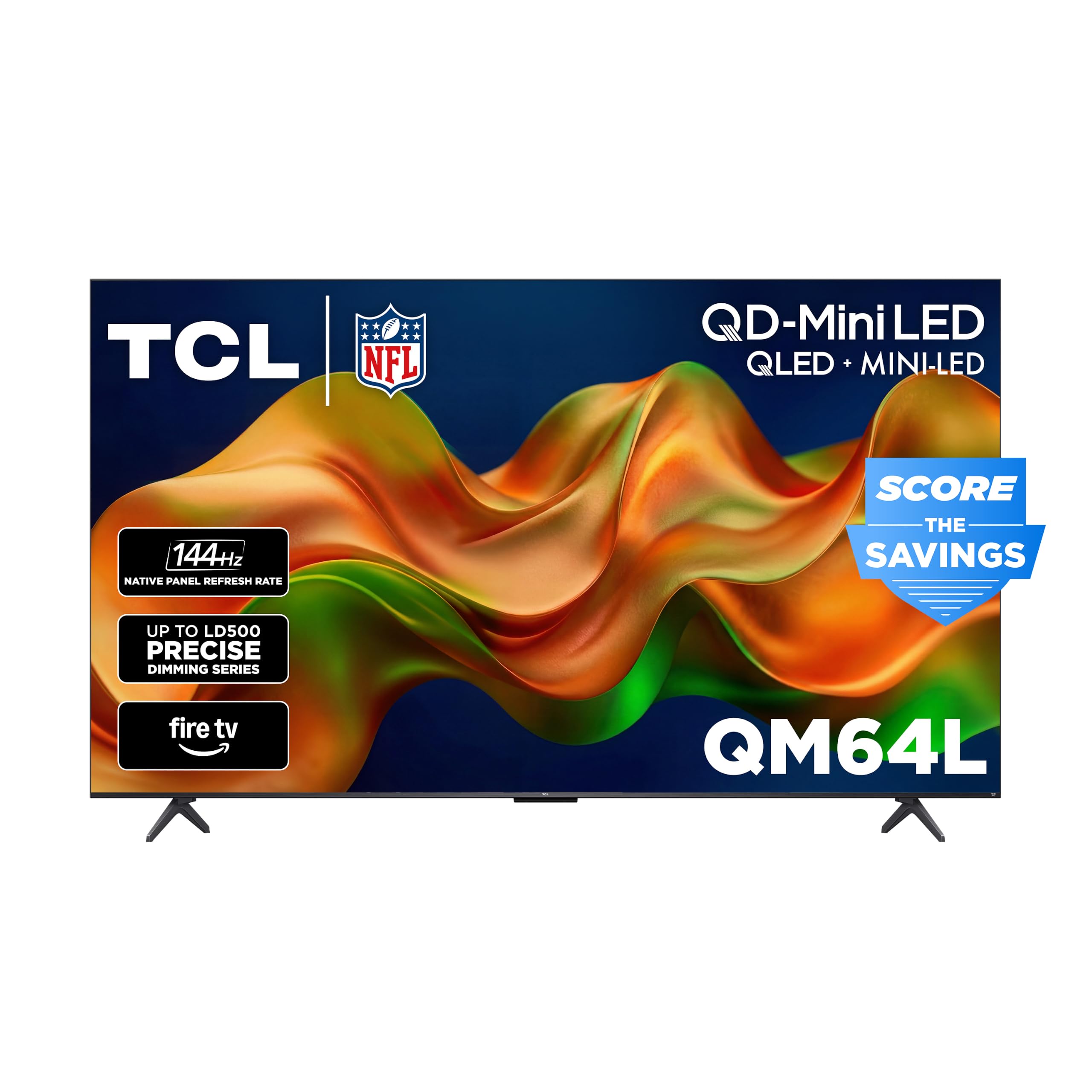
Up to 500 dimming zones deliver deep blacks that survive a sunlit room
The headline spec here is the Halo Control System with up to 500 precisely controlled local dimming zones, which gives deeper blacks and brighter highlights with virtually no blooming — a feature many competing Mini-LED TVs skip entirely. Owners describe the picture as comparable to higher-end brands, with virtually zero halo effect around bright objects, making it a standout for bright-room viewing.
The 144Hz native refresh pairs with Motion Rate 480 and Game Accelerator 240, plus VRR and ALLM, so sports and competitive gaming stay smooth from side angles thanks to the HVA panel’s 178° viewing angle. On the audio side, a built-in Onkyo 2.1 system with Dolby Atmos, DTS Virtual:X, and DTS-X passthrough delivers cinema-grade sound without a soundbar. Quality is the most-praised aspect, with picture quality a close second.
The recurring criticism targets the Fire TV interface and remote, described by some as “horrendous” for streaming — slow, illogical buttons, and frequent restarts needed — which leads several owners to recommend an external streamer. A few also flag visible local dimming zones on fast motion and only 2 of 4 ports supporting 144Hz. For the money, you get 1.07 billion colors of QLED and one of the best dimming systems at this level.
Why it stands out
- Up to 500 local dimming zones for deep blacks
- Onkyo 2.1 audio with Dolby Atmos built in
- 144Hz native with 178° viewing angle
The trade-off
- Fire TV interface and remote frustrate frequent streamers
- Only 2 of 4 ports run at 144Hz
Choose it for: a bright living room where deep blacks and side-angle viewing matter most.
Think twice if: you want a polished streaming interface from the start.
6. Amazon Ember 55″ QLED Series with Fire TV

An Alexa-first QLED that feels instantly familiar to Fire TV households
Amazon’s own-brand Ember QLED pairs Dolby Vision with HDR10+ Adaptive and full-array local dimming, so scenes look beautiful in any light with deeper blacks and brighter whites. The defining feature is the newest Fire TV experience (2026) with Alexa+, where you press the voice remote button and talk naturally to find shows, manage your smart home, or dive into any topic—no remote needed at all for hands-free control.
Performance gets a lift from Wi-Fi 6 (the latest wireless standard) and a new quad-core processor, so apps open and load fast. A custom Omnisense technology with built-in sensors wakes the display when you enter the room to show artwork or start watching instantly. You can stream games through Amazon Luna and Xbox Game Pass with no console needed, and four HDMI inputs plus AirPlay cover your physical connections. Owners note how Dolby Vision makes movies and shows pop, with quality the most-praised aspect.
The honest tension is software reliability: several owners describe freezes, tiling, and reboots that require unplugging the set, with software updates that occasionally degrade performance, while others call it the best TV they have ever owned. Latency and reliability are the most-discussed negative aspects, so this one fits best if you live deep in the Alexa ecosystem and can tolerate occasional glitches in exchange for smooth voice control and instant-on convenience.
Real-world read: the picture and Alexa integration genuinely impress, but the Fire TV software can be temperamental.
Who it suits: Alexa loyalists who want hands-free control and instant wake, not purists chasing a flawless stream every time.
Understanding the Specs
Dolby Vision vs HDR10+
Dolby Vision uses dynamic metadata, which adjusts brightness and color scene by scene, so explosions stay vivid and dark alleys stay detailed. HDR10+ does the same thing with a competing standard, and both beat plain HDR10 which only sets one value for the whole movie. A TV that supports both, like the Hisense and TCL, future-proofs your library.
Refresh Rate and VRR
Refresh rate is how many times per second the screen redraws the image, measured in Hertz. A 60Hz panel is fine for movies and casual shows, but a native 144Hz panel keeps fast sports and competitive gaming smooth and blur-free. VRR (Variable Refresh Rate) syncs the screen to your console’s frame output to stop tearing, while ALLM (Auto Low Latency Mode) switches the TV into game mode automatically.
Local Dimming and Mini-LED Backlighting
Local dimming divides the backlight into zones, so the TV can darken parts of the screen while keeping other parts bright — this is what creates deep blacks without washing out highlights. Mini-LED backlighting packs more, smaller LEDs into those zones for finer control, which is why a TCL with up to 500 zones outperforms a plain QLED in a dark room.
Smart Platform and Voice Assistants
Your remote is what you touch daily, so the platform matters. Fire TV leans heavily into Alexa and Amazon recommendations, Roku keeps a clean uncluttered home screen, and Google TV offers broad app support with Google Assistant. Choose the platform that matches the voice assistant you already use at home.
FAQ
What is the difference between Dolby Vision and HDR10 on a budget TV?
Do I need a 144Hz TV if I only watch movies and shows?
Is Mini-LED backlighting worth the extra cost on a budget TV?
Can I use a soundbar with these budget Dolby Vision TVs?
Will my PS5 or Xbox use all the gaming features on these TVs?
How do Fire TV, Roku, and Google TV compare for daily streaming?
What should I check before wall-mounting a budget Dolby Vision TV?
Will these TVs show lower-resolution content clearly?
Are these budget TVs reliable for long-term daily use?
How much does screen size matter for the Dolby Vision experience?
Final Thoughts: The Verdict
For most households, the budget dolby vision tv winner is the Roku 55-Inch Plus Series because it pairs a bright Mini-LED picture with the simplest interface and genuinely good built-in sound. If your priority is smooth console gaming, the iFFALCON 55U85 delivers a 144Hz panel with four HDMI 2.1 ports at a budget-friendly price. And for a sunlit living room where deep blacks must survive daylight, the TCL 55″ QM64L with up to 500 dimming zones is the one to reach for. Choose with your room and habits in mind, and any of these six will bring Dolby Vision to your couch while staying affordable.
How We Picked
We do not accept paid placement. Every pick is matched to a real buyer and a real use-case; we do not hands-on test units.
Sources & Methodology
Specifications: manufacturer listings and product documentation. Review insights: verified customer reviews, as of August 2026. Pricing: not shown on this page (it changes often); check the current price via the retailer link.
As an Amazon Associate, Gadgets Feed earns from qualifying purchases. This does not affect which products we feature.