
Our readers keep the lights on and my morning glass full of iced black tea. As an Amazon Associate, I earn from qualifying purchases.
Specs are compiled from manufacturer listings and verified buyer reviews and can change over time — please confirm the key details on the product page before buying.
You sell online, so you know hand-packing orders is only half the battle. The other half is getting crisp, scannable 4×6 shipping labels out the door without fighting a finicky machine. A dedicated thermal label printer cuts out ink, toner, and most of that frustration, making it among the most reliable, cost-saving upgrades for your shipping setup.
I’m Min — the founder and writer behind Gadgets Feed. This guide is built by comparing the manufacturers’ published specifications and the patterns across verified customer reviews, so you get each pick’s real strengths and trade-offs instead of marketing spin.
We’ve matched picks using flexible, human-like criteria for the 4×6 label size, so not every model is a perfect exact match but each serves the same daily shipping job. Here is the clear-eyed rundown to help you find the best 4×6 thermal printer for your desk.
Our Picks at a Glance


How To Choose The Best 4×6 Thermal Printer
Before you click buy, think about how your day actually runs. Do you print one label at a time from your phone while packing, or do you batch-print dozens from a laptop at a desk? Your answer decides if you need Bluetooth, USB, or both, and how fast the printer really needs to be.
Resolution and Print Speed
Look at the print head’s DPI (dots per inch) — the measure of how sharp the text and barcodes come out. 203 DPI is the standard that scans fine for most carriers; 300 DPI gives noticeably crisper tiny barcodes if you print dense labels. Speed is measured in millimeters per second or labels per minute, and it dictates how fast you clear a pile of orders. Faster is better, but only if the print stays sharp at that pace.
Connectivity and Software
Decide how you want to send the label to the printer. Bluetooth lets you print straight from a phone app, which is a lifesaver for small sellers who pack anywhere. USB is the most reliable, plug-and-play option for a fixed desk setup. A few models add Ethernet or a touchscreen for shared office use, but those features raise the price.
The Real Cost: Labels, Not Ink
Every printer here is direct thermal, meaning it heats the paper to form the image, so you never buy ink, toner, or ribbons again. Your ongoing cost is just the labels themselves. Fanfold labels are accordion stacks; roll labels are on a spool. Check which the printer’s built-in holder handles best, since that decides how tidy your packing station stays.
Quick Comparison
| Model | Best For | Print Speed | Resolution | Connectivity | Amazon |
|---|---|---|---|---|---|
| Rollo USB★ Best Overall | High-volume USB desks | 150mm/s | 203 DPI | USB | Amazon |
| Nelko PL70EBest Value | First-time phone printing | 150mm/s | 203 DPI | Bluetooth + USB | Amazon |
| MUNBYN Wireless | Quiet shared workspaces | 150mm/s | Not specified | Bluetooth + USB | Amazon |
| CLABEL G4 | Multi-user mobile teams | 152mm/s | 203 DPI | Bluetooth + USB | Amazon |
| Phomemo D530Pro | Crisp barcodes, large rolls | 150mm/s | 300 DPI | Bluetooth + Ethernet + USB | Amazon |
| Phomemo D420D | Touchscreen workflow control | 150mm/s | 203 DPI | Bluetooth + USB | Amazon |
| Westinghouse WHTP203e | No-DRM label flexibility | 6 inch/sec | 203 DPI | USB + Ethernet | Amazon |
In‑Depth Reviews
1. Rollo USB Shipping Label Printer
Our pick — over 4.5★ from 16,000+ verified ratings; the strongest balance of quality and price.
The workhorse that prints a 4×6 label per second without breaking a sweat.
If your business lives on a laptop and a desk, this is a printer owners often call a “standout.” It prints at 150mm/s — that’s one 4×6 label per second — using direct thermal technology (no ink or toner needed), with a 203 DPI print head (dots per inch, meaning sharp text and barcodes) that keeps labels clear and scannable. Setup is plug-and-play: connect via USB to Windows (XP and newer) or Mac (10.9 and newer), install the driver, and you are rolling.
Buyers report it works flawlessly straight from the start, with no jams and no wasted labels, even after months of daily use. The quality is the thing everyone raves about, and the ease of use runs a close second. It prints labels from 1.57″ up to 4.1″ wide, so it pulls double duty for barcodes, product labels, and thank-you stickers, not just shipping. It plays nice with all the major platforms — FedEx, UPS, USPS, Shopify, Etsy, eBay, and more.
One honest caveat: a few owners hit a misalignment issue that was fixed by holding the red button for five to seven seconds to realign the printer. The inkless design saves you real money over time, but the upfront cost is the highest here, and a rare few found the print quality mixed. For a serious seller, the speed and dependability justify it.
Why sellers stick with it
- Printing at 150mm/s means one label per second.
- Works with Windows and Mac plus every major shipping platform.
- Handles labels from 1.57″ to 4.1″ wide for multi-purpose use.
Know before you buy
- No wireless connectivity — USB cable only.
- Premium price; an occasional alignment reset is needed.
Best desk setup: The go-to for high-volume sellers on a laptop who want zero jams and one-label-per-second speed.
Think twice if: You need to print from a phone across the room — this one is strictly tethered to your computer.
2. Nelko Bluetooth Thermal Shipping Label Printer
The beginner-friendly compact that prints straight from your phone.
Starting out with Depop, Poshmark, or Facebook sales? This one is designed exactly for that. It prints via Bluetooth from the “NELKO” app on iOS and Android, so you can slap a label on a box from anywhere — no laptop required. Printing speed hits 150mm/s, which works out to up to 72 sheets of 4×6 labels per minute, and the 203 DPI head keeps prints clear.
The defining trait here is quality, with ease of use right behind it in what owners talk about most. The compact size earns frequent praise — it is much smaller than a traditional printer and only needs a small slice of desk space. It handles both fanfold and roll labels and supports sizes from 1.54″ to 4.1″ wide. Buyers describe the print quality for 4×6 labels as “impeccable and very clear.”
There is one catch worth knowing: all devices connect through the app, not directly via Bluetooth. That means a few owners hit connection hiccups, and one reported the unit dying before four months of use, with support not offering a fix outside the return window. For the price, though, it gets beginners shipping within minutes, which is exactly the point.
Best for first-timers: If you pack with your phone in hand, the app-based Bluetooth flow gets labels out in minutes, and the compact size fits any shelf.
The trade-off: App-only connections can occasionally drop, so if you demand rock-solid reliability for thousands of labels, step up to the Rollo.
3. MUNBYN Bluetooth Thermal Label Printer

A whisper-quiet option for home offices where every click echoes.
If your “packing station” is also your living room, the noise level matters. MUNBYN’s printer operates at just 60 dB — quieter than typing — so it won’t disturb a video call or a sleeping household. It prints direct thermal labels from 1.57″ to 4.25″ wide, covering shipping, return, product, and inventory labels from one compact machine.
Owners praise the quality most, with ease of use a close second, and they call it a smart buy for small businesses. The maker leans into longevity: it is The maker claims a lifespan of up to 970,000 labels — about six times longer than typical printers — and a jam rate under 0.01%.. An auto-calibrating chip reportedly prevents 99.8% of label misalignment., which means far fewer wasted labels.
The catch surfaces with computer printing. Some owners had trouble getting Windows 11 to recognize it over USB or Bluetooth, and one found Chrome only printed one-inch labels. The app has some interface quirks, and the autofeed wastes one label per load. Phone printing works well via the app, but if your workflow is strictly desktop-based, this one deserves caution.
Reach for this if: You print from a phone in a quiet shared space and want a machine that sips space and stays silent.
Look elsewhere if: Your setup is Windows desktop-only; the connection quirks there are the recurring theme.
4. CLABEL G4 4×6 Shipping Label Printer

A built-in 500-label bin and multi-device sharing for growing teams.
As your fulfillment outgrows a single person, the CLABEL G4 grows with you. Its built-in 125mm label bin holds up to 500 4×6 labels, so you are not swapping rolls mid-shipment. It supports roll and fanfold labels, and the spring-loaded paper guide makes loading straightforward. Printing speed reaches 152mm/s — a touch faster than most here — with a 203 DPI head for sharp output.
The standout feature is shared access: the Clabel app supports up to 10 mobile devices (7 Android and 3 iOS) for printing labels together. That makes it a natural fit for a small team packing orders from their own phones. It also handles labels from 20mm to 118mm wide, covering carrier labels for Amazon, UPS, USPS, and FedEx, plus inventory and retail tags.
The honest trade-off is the app. Multiple owners describe the setup as finicky, with elements shifting or overlapping on the screen and a learning curve before the workflow feels smooth. Early buyers still rate it highly for value and crisp output, with labels that hold up well even outdoors. Just budget time to learn the software, and know that tiny fonts lose some precision.
Grab it for: A multi-phone team that wants one cheap printer everyone can fire labels from.
Skip it for: One person who wants zero app fuss — the software is the weak link here.
5. Phomemo 300DPI Ethernet Thermal Label Printer

The sharpest text in the lineup with three ways to connect.
When label barcodes absolutely must scan every time, this is the printer to beat. It packs a 300 DPI print head — noticeably sharper than the 203 DPI standard on most rivals — and still runs at 150mm/s, averaging 72 4×6 labels per minute. Owners confirm barcodes scan perfectly on the first try, and the print quality is what they praise most.
Flexibility is the theme here. It connects over Bluetooth, Ethernet, and USB, so you can print from a phone, a wired desktop, or a shared office network. The built-in paper slot holds up to 500 4×6 label rolls, cutting the need for a separate holder and keeping your desk clean. A return-to-paper-towel function helps save every piece of the label, reducing waste. Print width ranges from 1″ to 4.6″.
The weakness is in the newer model’s Bluetooth. Some owners mention the connection drops after about four labels, requiring an unplug-and-reconnect, with print times stretching to 10–45 seconds when it glitches. The older model was rock-solid from 70 feet away, so this feels like a regression. For USB and Ethernet use it is excellent; for wireless, it is a gamble.
Why it leads on clarity
- 300 DPI head prints crisper barcodes than 203 DPI rivals.
- Bluetooth, Ethernet, and USB cover every setup.
- Built-in bin holds up to 500 labels with no extra holder.
The wireless caveat
- Newer models can drop Bluetooth mid-batch.
- Print time slows noticeably when the connection glitches.
Choose it for: The sharpest 300 DPI output and a wired setup that bypasses Bluetooth quirks entirely.
Pass on it if: You plan to rely on wireless printing — reliability there is the recurring complaint.
6. Phomemo Shipping Label Printer with Touchscreen
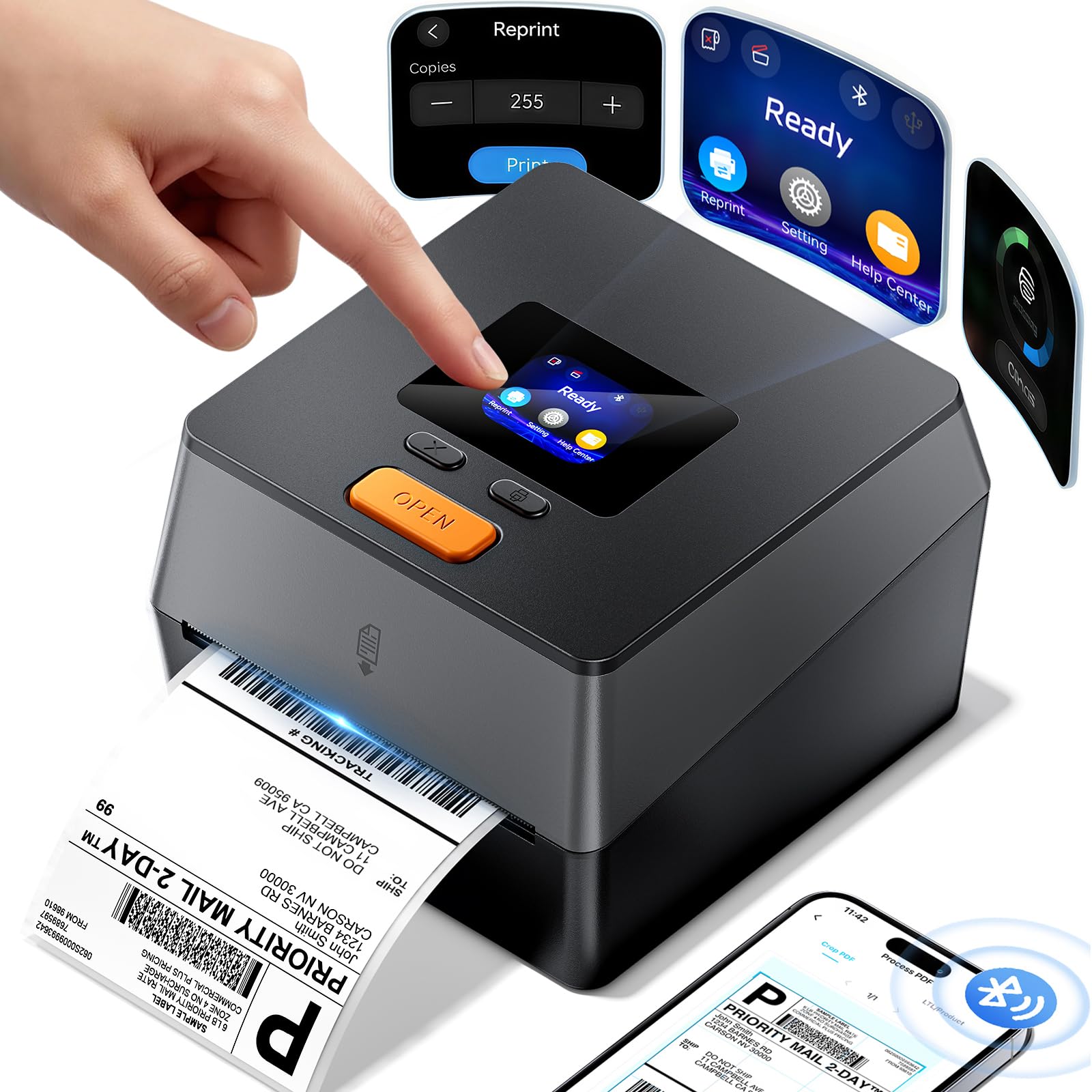
A touchscreen that puts print status and quick fixes at your fingertips.
Most thermal printers are blind boxes — you find out a label failed after it prints. The D420D breaks that pattern with a smart touchscreen that lets you monitor real-time print status at a glance. It adds one-click factory reset, reprint of the last label, and a Smart Help Center, all of which reduce downtime when something goes sideways.
It is genuinely compact at 7.2 x 6.3 x 5.3 inches, taking up about half the desk space of a standard printer, per the manufacturer., so it fits on a crowded desk. The integrated telescopic label bin holds up to 250 4×6 roll labels, so you do not need an external holder. It connects via Bluetooth 5.0 (true wireless) or USB, handles labels from 1 to 4.6 inches wide, and prints at 72 labels per minute with a 203 DPI head.
Owners who run several printers call this one “the best by a mile,” praising the easy load and clear templates. The catch is occasional Bluetooth drops that force a reset by disconnecting and reconnecting — a few owners hit this twice in the first eight weeks. There is also an extra charge for the better label design and printing options, which caught some off guard. The interface, though, wins over everyone.
Best for: A tidy desk where a touchscreen, built-in bin, and quick reprint keep your workflow moving.
The caveat: Be ready to reconnect Bluetooth occasionally, and expect upsell prompts inside the app for premium features.
7. Westinghouse Thermal Shipping Label Printer

A commercial-grade USB workhorse that respects your choice of labels.
Some printers try to lock you into their own brand of labels. The Westinghouse does the opposite, with owners explicitly praising the absence of label DRM nonsense. It is a commercial-grade USB printer built for daily, high-volume use, printing at a top speed of 6 inches per second with a 203 DPI head for sharp text and graphics on 4×6 labels.
It works with fanfold labels or label rolls, handles media widths from 0.78″ to 4.6″ with a max print width of 4.25″, and supports Windows, macOS, and Linux, plus ZPL software for advanced label coding. Ethernet capability is there for router speeds under 1GHz. Setup is easy, and owners highlight the fast, crisp prints and reliable performance — several call it a worthy alternative to pricier thermal printers.
The trade-offs are practical. It is not Bluetooth-capable, so it is strictly a desk machine. The network setup instructions get mixed reviews, with some finding them unclear, and a few owners note the included labels are generic quality. Also, the Ethernet cable and USB-C adapter are sold separately, so factor that in. And if you print very tiny barcodes, the 203 DPI head might leave you wanting the sharpness of a 300 DPI model.
Pick this for: A reliable, no-lock-in USB printer that lets you buy any brand of labels and never fight for ink.
Who it’s not for: Phone-first packers who need Bluetooth — this one must sit at a desk, wired in.
Understanding the Specs
DPI (Print Resolution)
DPI stands for dots per inch — the number of tiny dots the print head lays down in every inch of the label. Higher is sharper. 203 DPI is the everyday standard that scans fine with most carriers. 300 DPI is noticeably crisper, which matters if your labels pack in lots of tiny text or dense barcodes. For most 4×6 shipping labels, 203 DPI gets the job done, but 300 DPI is a real upgrade for detail-heavy labels.
Print Speed (mm/s and Labels per Minute)
Speed is measured in millimeters per second (mm/s) or the number of labels a printer can output per minute. Common speeds here run from 150mm/s up to 152mm/s, which translates to one label coming out every second or so. The faster the speed, the quicker you clear a mountain of orders. The real test is whether the print stays sharp at top speed — a fast printer that smudges saves you nothing.
Connectivity Options
How you send a label to the printer decides where it can live. USB is the most reliable and simple — plug in a cable and you are set, but the printer must sit beside the computer. Bluetooth, usually through a companion app, lets you print from a phone anywhere nearby, which suits sellers who pack on the move. Ethernet adds wired networking for shared office setups, and a touchscreen bring control to the printer itself. Choose the connection that matches how your day actually runs.
Label Capacity and Types
Thermal printers accept two main label formats. Fanfold labels are accordion-style stacks that fold flat; roll labels are wrapped on a spool. Some printers have a built-in bin that holds a large roll — capacities here range from 250 up to 500 labels — so you make fewer swaps during a long packing session. Matching the printer’s holder to your preferred label format keeps your station tidy and your workflow uninterrupted.
FAQ
Do I need ink or toner for a 4×6 thermal printer?
Will a thermal printer work with USPS, UPS, and FedEx labels?
What is the difference between 203 DPI and 300 DPI?
Can I print from my phone with a Bluetooth label printer?
What is the difference between fanfold and roll labels?
How fast do thermal label printers actually print?
Which thermal printer is better for a small business, Rollo or Nelko?
Can I use off-brand labels in these printers?
Final Thoughts: The Verdict
If you want one dependable pick, the 4×6 thermal printer winner is the Rollo USB because it pairs one-label-per-second speed with rock-solid reliability and universal platform support. If you want the freedom of printing straight from your phone on a budget, grab the Nelko Bluetooth. And for the sharpest barcode clarity and a wired, multi-connection setup, the Phomemo 300DPI is the one to reach for.
How We Picked
We do not accept paid placement. Every pick is matched to a real buyer and a real use-case; we do not hands-on test units.
Sources & Methodology
Specifications: manufacturer listings and product documentation. Review insights: verified customer reviews, as of August 2026. Pricing: not shown on this page (it changes often); check the current price via the retailer link.
As an Amazon Associate, Gadgets Feed earns from qualifying purchases. This does not affect which products we feature.