
Our readers keep the lights on and my morning glass full of iced black tea. As an Amazon Associate, I earn from qualifying purchases.
Specs are compiled from manufacturer listings and verified buyer reviews and can change over time — please confirm the key details on the product page before buying.
When you press a button on your own arcade cabinet, the feel tells you everything: genuine Sanwa parts (the Japanese brand that sets the standard) give a soft, quiet, precise touch, while cheaper clones often feel stiff, clicky, or mushy. That difference decides whether your build feels authentic or budget. This guide helps you pick the right joysticks, buttons, and encoder kits for your exact project, whether it’s a MAME cabinet (a machine that runs classic arcade games), a Raspberry Pi RetroPie build (a DIY console using a tiny computer), or a tournament-ready fight stick.
I’m Min — the founder and writer behind Gadgets Feed. This guide is built by comparing the manufacturers’ published specifications and the patterns across verified customer reviews, so you get each pick’s real strengths and trade-offs instead of marketing spin.
You’ll learn exactly which joysticks, buttons, and USB encoders deliver the most authentic feel for your build, so arcade game components stop being a guessing game and start being a confident purchase.
Our Picks at a Glance

How To Choose The Best Arcade Game Components
Before you spend money, decide what you are actually building. A two-player MAME cabinet needs a full kit with encoders, joysticks, and a pile of buttons. A single fight stick for Street Fighter 6 needs a premium joystick and a handful of high-quality buttons. Buying the wrong size or type wastes both money and time.
Know Your Platform: PC, Raspberry Pi, or Console
The encoder is the brain that turns button presses into USB signals your device understands. Most DIY kits include a “Zero Delay” USB encoder that works with Windows and Raspberry Pi. If you want to play on a modern console like PS5, you need a dedicated fight stick with console compatibility built in — a standard DIY encoder will not work there.
The Real Difference: Sanwa vs. Clone Parts
Genuine Sanwa parts from Japan are the gold standard for fighting games. They are known for a smooth, quiet, non-clicking micro switch and a precise return-to-center spring. Clone parts are cheaper, but they often feel stiffer or clickier, and the joystick top screws can strip easily. If you plan to play competitively or want that authentic arcade feel, genuine parts are worth the jump in price.
Button Mounting and Panel Thickness
Not all buttons fit all control panels. Sanwa buttons snap into panels up to 5mm thick, while many DIY kits require a 30mm mounting hole for large buttons and a 24mm hole for the joystick. Check your cabinet or panel thickness before ordering, or you will be drilling new holes.
Quick Comparison
| Model | Best For | Joystick Type | Button Count | Platform | Amazon |
|---|---|---|---|---|---|
| Sanwa JLF-TP-8YT + 8 Buttons★ Best Overall | Authentic feel | 4 & 8-way | 8 | PC, PS3, Xbox 360 | Amazon |
| EG STARTS 1P LED KitBest Value | Budget single-player | 8-way | 10 | PC, Raspberry Pi | Amazon |
| EG STARTS 2P Contest Kit | Two-player MAME | 8-way | 23 | Windows PC | Amazon |
| Qenker 2P LED Kit | Value 2-player | 8-way | 20 | PC, Raspberry Pi, Mac | Amazon |
| LED Arcade 2P Parts Kit | RetroPie beginners | 8-way | 20 | PC, Raspberry Pi | Amazon |
| Sehawei Haute42 T16 | Leverless fighting | Leverless | 16 | PC, PS4, Switch | Amazon |
| Victrix Pro FS | Tournament play | Sanwa JLF (detachable) | 8 | PS5, PS4, PC | Amazon |
In‑Depth Reviews
1. Sanwa JLF-TP-8YT Joystick + 8x OBSF-30 Buttons
Our pick — over 4.5★ from 800+ verified ratings; the strongest balance of quality and price.
The genuine Japanese joystick and buttons that define the feel of real arcade fighting games.
This is the set that serious fighting game players rebuild with. It pairs the JLF-TP-8YT joystick with eight 30mm OBSF-30 push buttons, all genuine Sanwa parts from Japan. The joystick is switchable between 4-way and 8-way operation, so you can change the gate to match the game — 8-way for fighters and 4-way for classic games like Pac-Man. Each button uses a non-clicking micro switch, which is why the whole setup feels smooth, responsive, and noticeably quieter than clone buttons.
The numbers tell the story of how different this is from a full DIY kit. At 100 g, the Sanwa set is 5.2x lighter than the 520 g EG STARTS kit, reflecting its stripped-down, high-quality build. At 1.97 x 1.97 x 0.79 inches, it drops into an existing panel or fight stick. Buyers report the joystick feels great and that the quality is the real deal, though one honest note is that the joystick top screws strip easily — so go easy on them during assembly.
It’s designed to replace parts in most Hori and MadCatz joysticks, and it works with panels up to 5mm thick. Owners mention it fits perfectly into a modded fight stick and instantly upgrades an old budget controller, feeling noticeably better than the dusty stock parts. The catch is that this is a bare-bones bundle: you get the joystick and buttons, but no USB encoder or wiring, so you’ll need to supply those yourself or swap them into an existing stick.
The standard-setter: Quality is what wins people over here — it’s the thing owners rave about most. The button responsiveness is a close second, which is exactly what you want when every frame of a combo matters.
Know the setup: This is for upgrading, not building from scratch. Plan to bring your own encoder and wiring, and treat those joystick top screws gently during install.
Reach for this if: you want the authentic Japanese arcade feel without any LED bells and whistles, and you’re comfortable wiring your own encoder.
Look elsewhere if: you need a complete plug-and-play kit with a USB encoder included, or you’re building a full two-player cabinet from nothing.
2. EG STARTS 1 Player LED DIY Kit
A complete single-player LED arcade kit that wires up in about 30 minutes.
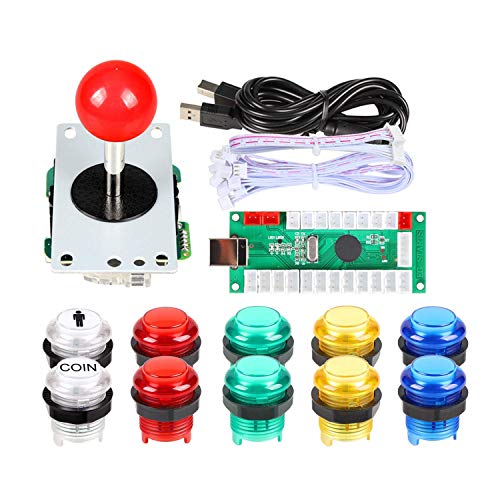
If you’re building your first arcade controller or a Raspberry Pi RetroPie machine, this kit takes the guesswork out of the project. It includes a Zero Delay LED USB encoder, a USB cable, and 10 total buttons — two white buttons for Player 1 and Coin functions, plus eight colored LED buttons in red, yellow, blue, and green. The setup is famously easy: customers note a full install in about 30 minutes with zero input lag and vibrant lighting effects that make the panel look alive.
The 8-way joystick uses a gilded-contact microswitch rated for 1,000,000 cycles. The kit runs on DC 5V power, and everything is plug-and-play with Windows, Raspberry Pi for RetroPie, and MAME. Reviewers point out it works perfectly for virtual pinball setups like Pinball FX, and that the included link to button layout templates is a thoughtful touch for planning your permanent build. One practical note: the large buttons need a 30mm mounting hole and the joystick needs a 24mm hole, so have a 32mm step bit ready if you’re drilling a fresh panel.
The trade-off here is the button quality ceiling. Several shoppers say the buttons contain soldered mechanical keyboard switches, which are responsive but not the same as genuine Sanwa micro switches — and they’re only swappable if you’re comfortable with a soldering iron. The responsiveness pulls mixed feedback, with most owners happy but a few finding occasional unresponsive presses. For the money, it’s a complete, working start for a single-player build, but expect to upgrade the buttons later if you get serious about fighting games.
What makes it a great first kit
- Complete single-player package with encoder, joystick, and 10 LED buttons
- Wires up in about 30 minutes with zero input lag reported
- Compatible with Windows, RetroPie, MAME, and DIY projects
Where it cuts corners
- Buttons use soldered mechanical switches, not upgrade-friendly without soldering
- Responsiveness is mixed — most are happy, a few find unresponsive presses
Pick it if: you want one affordable box with everything needed for a single-player RetroPie or MAME controller, and you value fast setup over authentic arcade feel.
Pass on it if: you’re building a two-player cabinet or you demand genuine Sanwa-quality micro switches from day one.
3. EG STARTS 2 Player Arcade Contest DIY Kit

The chrome-ringed, two-player LED kit built for a full MAME cabinet build.
This is the kit you grab when you’re building a proper two-player arcade cabinet and want the chrome-ringed look. It ships with 2 five-pin joysticks, 2 Zero Delay USB encoders, and 19 chrome LED buttons split across Player 1, Player 2, and Coin functions — 23 buttons in total. That’s nearly three times the button count of the Sanwa bundle above: 23 buttons versus the Sanwa’s 8, a 2.9x gap that shows just how much more control surface you’re getting for a full cabinet.
Buyers report the setup is quick and the LED lighting looks great, with the chrome-colored rings singled out as a nice visual touch. It works on Windows systems and plays nicely with a Raspberry Pi 3 running RetroPie. The kit is a staple for MAME and JAMMA-style projects (JAMMA is the standard wiring for arcade cabinets), and virtual pinball builders report it’s perfect for creating a VPIN table (a digital pinball machine). At 1 kg and 8.27 x 4.33 x 5.51 inches, it’s 4.2x the Sanwa bundle’s footprint, matching full-cabinet scale.
The honest catch is in the button feel. A recurring observation is that the buttons are fragile and the spring mechanism inside them feels weak, which matters if your cabinet sees heavy daily play. The button functionality draws mixed feedback overall, with a few owners reporting configuration hiccups and LED issues. Set expectations: this is a value-priced, good-looking kit for a casual home cabinet, not a tournament-grade setup.
Setup wins: Ease of setup is the top praise here — owners mention it works great once you inspect the pieces and figure out the instructions.
Build with care: The springs feel weak to some owners, so treat the buttons gently and expect to swap them out if you play hard.
Grab it for: a two-player home cabinet where looks, LED glow, and easy wiring matter more than tournament-grade button durability.
skip it if: you need buttons that will survive years of aggressive fighting-game mashing — look at genuine Sanwa parts instead.
4. Qenker 2-Player LED Arcade DIY Kit

A two-player LED kit with strong value and heat-resistant plastic construction.
For a two-player MAME cabinet on a budget, this Qenker kit delivers a lot of control for the money. It includes 2 arcade joysticks, 20 LED arcade buttons, and 2 Zero Delay USB encoders, all in a blue and red color scheme. Heat-resistant plastic construction handles the warmth of hours-long cabinet sessions. Compatibility is wide: it works with PC, Raspberry Pi, Android, Linux, and Mac.
What wins people over here is the value, with owners calling it hard to pass up at the price. Customers note the buttons are responsive and the joystick works well, and that setup is simple — you just plug each button into the board. The LED effect is a highlight, with owners noting the controls transformed a modded Mortal Kombat cabinet. The crowd favorite use case is replacing the controls on an Arcade1Up cabinet, where this kit is a direct, affordable upgrade.
The mixed territory is button responsiveness and lighting. Some reviewers point out occasional button sticking, and a few found two LEDs burned out on first power-up. There’s also a real wiring caution: exposed daisy-chain LED wire ends touching each other can cause shorts, so cover any unused wire ends during install. The feel also isn’t arcade-authentic — it lacks the classic click of old-school Happ buttons — so purists should adjust expectations.
Why owners pick this kit
- Strong value for a full two-player setup with joysticks, buttons, and encoders
- Simple plug-and-play wiring straight to the encoder board
- Broad compatibility across PC, Raspberry Pi, Android, Linux, and Mac
Watch out for
- Occasional sticking buttons and a few LEDs arriving dead on arrival
- Exposed LED wire ends can short — cover them during install
Best suited for: a budget two-player cabinet where bright LED presentation and easy wiring outweigh the need for a classic clicky feel.
Think twice if: you’re a fighting-game purist who wants authentic arcade button feel — this leans casual and value-minded.
5. LED Arcade DIY Parts 2P Kit (Red + Blue)

The two-player kit beginners reach for, with clicky joysticks and bright LEDs.
This kit has become a favorite for first-time cabinet builders, especially those working with RetroPie. It bundles 2 Zero Delay USB encoders, 2 eight-way joysticks, and 20 LED illuminated push buttons in red and blue. The joysticks are notably clicky, which gives satisfying tactile feedback, and the LEDs are bright enough to make the panel pop. Shoppers say it works with NES, SNES, and MAME games, and that the encoders are auto-recognized by Raspberry Pi as a Dragonrise USB Generic Controller — no drivers needed.
The assembly is genuinely beginner-friendly, with owners reporting a daughter built a full cabinet in about three days using this kit. There are some helpful wiring patterns that come up repeatedly: the crown logo on the joystick should sit with red on the lower-left and yellow on the upper-left, and if an LED lights but goes out when you press the button, you have a wire in the wrong place. Buyers also advise using a powered USB hub to avoid straining the LEDs with power draw.
The trade-off is the button feel. Multiple owners note the buttons are not clicky like the classic Happ brand — they feel nice but softer, which is a consideration if you want that loud, tactile cabinet experience. One owner flagged that a ground crimp can push out of its connector, so check that if a button fails. The instructions are thin, but the responsive support team has helped owners fix wiring issues. For a first build, this is a solid, well-documented path to a working cabinet.
Beginner-proof: Owners consistently call it easy to assemble and get working, with the encoder recognized instantly by RetroPie.
Expect softer buttons: If you want the loud click of classic Happ buttons, budget for an upgrade — these feel nice but not clicky.
Choose this if: it’s your first cabinet build and you want a kit with a proven, community-documented wiring path for RetroPie.
Look past it if: you want authentic clicky arcade buttons or you’re not comfortable troubleshooting a loose wiring connector here and there.
6. Sehawei Haute42 T16 Leverless Controller

A leverless fight pad with 1ms delay that drops inputs for precise, keyboard-style play.
Leverless controllers swap the joystick for direction buttons, and this T16 is one of the smartest budget entries into that world. It’s essentially an open-source alternative to the premium Hit Box — buyers report it’s cheaper, endlessly customizable, and has no dropped inputs. The 40nm chip delivers a 1ms delay with no dropped inputs, giving you a real edge in Street Fighter 6 and Tekken 8.
The layout is 16 buttons total, laid out keyboard-style but with bigger, more comfortable keys. Owners with over 20 years in fighting games report it solves dash cancel and instant-while-running issues that plague stick players, and the extra buttons give you a dedicated thumb jump. It supports 5 controller modes — X-input, Switch, PS3, D-input, PS4, and Keyboard — covering PC, Steam Deck, Switch, PS3/PS4, Raspberry Pi, and MiSTer. It’s hot-swappable, so you can change mechanical keys without any soldering, and the transparent acrylic design lets you create custom skins for a personalized look.
The ergonomics win real praise: at 11.65 x 7.71 x 0.49 inches and 2.05 lb, it’s comfortable on the lap and accommodates larger hands. Owners mention it’s great for standing 360 motions with Zangief and that the quality justifies the price. The honest limitations: it’s not plug-and-play on PS5 — that needs a firmware update and an adapter — and there’s no analog stick, so games requiring analog input need a button preset instead. Some owners note a slight creaking that loosening the screws resolves.
The precision tool: Quality and value are the top praises, and the button quality earns its own strong mention — this is a serious upgrade for fighting game fans.
Modern but limited: It covers PC and older consoles beautifully, but PS5 players will need extra steps and gear for full compatibility.
Pick it up if: you play fighting games on PC or Switch and want leverless precision, hot-swappable keys, and deep customization without paying Hit Box prices.
Pass it by if: you’re a PS5-only player not willing to mess with firmware and adapters, or you prefer the traditional feel of a joystick.
7. Victrix Pro FS Fight Stick

The premium aluminum fight stick built for tournament travel and top-tier PS5 play.
This is the fight stick that ends the search — the one owners call better than anything they’ve ever used. CNC-machined from aircraft-grade aluminum, it survives tournament travel. Inside, you get genuine 30mm Sanwa Denshi buttons and a patented Link 2 detachable joystick on a Sanwa JLF base, combining the authentic Japanese feel with a rugged, professional shell. The 6.28° wrist slope and foam lap pad keep you comfortable through long sessions.
It’s natively built for PlayStation 5, PlayStation 4, and PC, with a built-in mode switch to jump between them. Tournament Mode locks out the control bar buttons so you never accidentally pause or trigger a DQ mid-match. The quick-access back panel opens to cleanly laid out components, and it ships with an Allen wrench for easy mods and updates. Customers note the quality is excellent and the weight on the lap gives that genuine old arcade feel, and that it doubles beautifully for classic beat ’em ups and shoot ’em ups.
The honest concern is long-term reliability. Reviewers point out the stick and buttons feel amazing and that it’s worth the premium, but durability draws negative feedback, with one owner reporting issues after 100 hours of use. The delivery packaging has also drawn a complaint for having too much empty space with no protective padding. If you want the absolute best-feeling, best-looking stick for PS5 competition and are willing to accept the reliability risk and the high price, this is a remarkable piece of gear.
The premium experience: Quality and design are the standout praises — owners describe it as a perfect work of art and the last stick they’ll ever need.
The real risk: Reliability is the talking point to weigh — some owners hit issues after extended use, so factor that into a purchase this size.
Invest if: you compete in PS5 fighting games, travel to tournaments, and want the premium aluminum build with genuine Sanwa parts and easy modding.
Hold off if: you’re on a budget, want a casual home cabinet part, or you’re uneasy about the reported long-term reliability concerns.
Understanding the Specs
Zero Delay USB Encoder
This is the small circuit board that turns each button and joystick press into a USB signal your PC or Raspberry Pi reads as a game controller. “Zero delay” means your inputs register the instant you press, with no noticeable lag between the button press and the action on screen. Every DIY kit in this guide includes one or two of these, and they’re the reason wiring a full cabinet is now a plug-and-play job instead of a soldering project.
4-Way vs 8-Way Joystick
This refers to how many directions the joystick can register. An 8-way joystick detects all eight compass directions, which is what you want for fighting games and most modern arcade titles. A 4-way joystick only registers up, down, left, and right, which is the correct feel for classic games like Pac-Man where diagonal inputs create errors. The Sanwa JLF is switchable between both, letting you change the gate to match the game you’re playing.
FAQ
What is the difference between genuine Sanwa parts and clone arcade buttons?
Will these DIY arcade kits work with my Raspberry Pi RetroPie build?
What size mounting holes do arcade buttons need?
How thick can my control panel be for a Sanwa button install?
What is a leverless controller and why do fighting game players use it?
Do these LED kits work with a PS4 or PS5 console?
How many buttons do I need for a two-player MAME cabinet?
What does the five-pin connector on a joystick do?
How do I fix a button that lights but doesn’t respond when pressed?
Is a fight stick or a leverless controller better for beginners?
Final Thoughts: The Verdict
For most builders, the arcade game components winner is the Sanwa JLF-TP-8YT + 8 Button Bundle because it delivers the genuine Japanese feel that every serious player wants, and its quality and responsiveness are the most-praised traits across its reviews. If you’re building your first cabinet on a budget, grab the EG STARTS 1 Player LED Kit for a complete, easy 30-minute setup. And for tournament-grade PS5 play with genuine Sanwa parts in a rugged aluminum shell, the Victrix Pro FS is the one to reach for.
How We Picked
We do not accept paid placement. Every pick is matched to a real buyer and a real use-case; we do not hands-on test units.
Sources & Methodology
Specifications: manufacturer listings and product documentation. Review insights: verified customer reviews, as of August 2026. Pricing: not shown on this page (it changes often); check the current price via the retailer link.
As an Amazon Associate, Gadgets Feed earns from qualifying purchases. This does not affect which products we feature.