
Our readers keep the lights on and my morning glass full of iced black tea. As an Amazon Associate, I earn from qualifying purchases.
Specs are compiled from manufacturer listings and verified buyer reviews and can change over time — please confirm the key details on the product page before buying.
The 2.4GHz band carries your smart-home traffic through walls and across the house. It pushes through walls, reaches the garage, and keeps your smart bulbs and doorbells talking when faster bands drop out. The problem is picking a router that makes that band strong without overpaying for features you will never use. This guide matches each router’s specs to your home size, device count, and internet plan.
I’m Min — the founder and writer behind Gadgets Feed. This guide is built by comparing the manufacturers’ published specifications and the patterns across verified customer reviews, so you get each pick’s real strengths and trade-offs instead of marketing spin.
My focus here is the specific hardware that keeps your 2.4GHz devices connected reliably, from budget single-band units to tri-band Wi-Fi 7 flagships. this 2.4ghz wifi router guide helps you skip the hype and find stable coverage for your smart home.
Our Picks at a Glance


How To Choose The Best 2.4GHz WiFi Router
Your router choice hinges on your internet plan’s speed and your device count, not the box’s headline number. A router’s speed rating only matters if your internet plan can deliver close to it. Match the router’s LAN port speed and wireless rating to your ISP’s plan.
Know your internet plan first
If your plan is under 100 Mbps, a budget-friendly router with a 100 Mbps Ethernet port will max out your line fine. But if you pay for gigabit service — 1000 Mbps — you need a router with Gigabit LAN ports (1000 Mbps bandwidth) so you are not stuck waiting on a wired connection. Check the LAN port bandwidth, not just the wireless speed rating.
Count your devices and your square footage
Coverage area and device count tell you if the router fits your home’s size and gadget load. A small apartment with a dozen gadgets can get away with an entry-level unit. A multi-story house with concrete walls and dozens of smart devices needs more antennas and a stronger processor to keep everything responsive. Compare the coverage figure against your home’s square footage and wall construction.
Quick Comparison
| Model | Best For | Data Transfer Rate | Frequency Band | Wired Ports | Amazon |
|---|---|---|---|---|---|
| MikroTik hAP lite★ Best Overall | Budget tinkerers who want control | 10100 Mbps | 2.4 GHz (Single) | 4x Fast Ethernet | Amazon |
| Cudy WR1300Budget Champion | Cost-conscious homes wanting dual-band | 1200 Mbps | 5 GHz (Dual) | 4x Gigabit LAN | Amazon |
| Cudy WR1500Wi-Fi 6 Upgrade | Small homes upgrading to Wi-Fi 6 | 1500 Mbps | 5 GHz (Dual) | 4x Gigabit | Amazon |
| NETGEAR RAX36 | Mid-size homes (2,000 sq ft) | 3000 Mbps | 5 GHz (Dual) | 4x 1G Ethernet | Amazon |
| TP-Link Archer AX80 | Large homes needing strong 2.4GHz | 4804 Mbps | 5 GHz (Dual) | 1x 2.5G + 4x Gigabit | Amazon |
| TP-Link Archer BE600 | Gamers and streamers on Wi-Fi 7 | 9700 Mbps | 6 GHz (Tri) | 1x 10G + 3x 2.5G | Amazon |
| NETGEAR BE9300 | Whole-home coverage on Wi-Fi 7 | 9300 Mbps | 6 GHz (Tri) | 2x 2.5G + 2x 1G | Amazon |
| ASUS RT-BE88U | Wired networking enthusiasts | 7200 Mbps | 5 GHz (Dual) | 2x 10G + 6x Gigabit | Amazon |
| Amazon eero Max 7 | Smart homes needing mesh reliability | 4300 Mbps (wireless) | 6 GHz (Tri) | 2x 10 Gigabit | Amazon |
In‑Depth Reviews
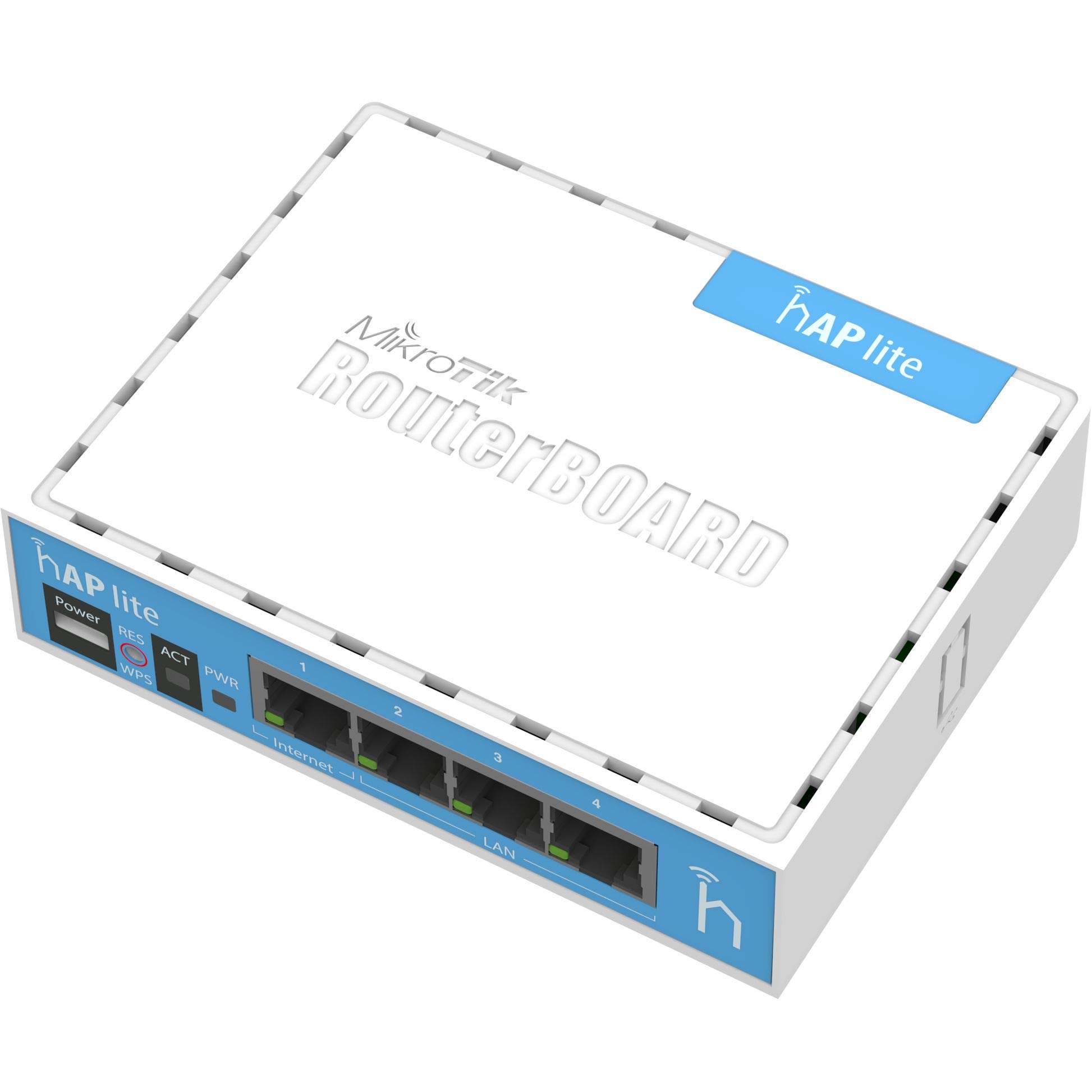
1. MikroTik RB941-2nD RouterBoard hAP lite
Our pick — over 4.5★ from 750+ verified ratings; the strongest balance of quality and price.
A tiny box with enterprise-grade software that networking hobbyists swear by.
You get deep control over your network, not just a plug-and-play appliance. It runs RouterOS, which includes business-grade features like bandwidth shaping, firewall rules, and user access control, plus a button-triggered WPS (Wi-Fi Protected Setup, a quick way to connect devices) so guests can join without you typing a long password. Inside sits a 650MHz CPU with 32MB of RAM, enough power for a small apartment or office.
The honest limit here is speed. Its four Fast Ethernet ports cap out at 100 Mbps each, and the wireless is 2.4GHz only. As buyers report, it is “not for >50Mbps internet” — so this shines on modest plans, not gigabit fiber. This makes it the perfect match for a single-story home with basic broadband needs, and its lower signal strength is even a plus for anyone trying to reduce wireless radiation exposure.
What wins people over is the build quality and the value — it is a genuine RouterOS L4 license for roughly the cost of a takeout dinner. The recurring gripe is the steep learning curve: the interface is not beginner-friendly, and some describe setup as difficult. This router suits tinkerers who enjoy setup, not plug-and-play users.
compact budget starter
- Full enterprise-grade RouterOS with frequent updates
- USB-powered, so it runs off a phone charger in a pinch
- WDS bridging and mesh-style setups for advanced users
older tech limits
- 100 Mbps Ethernet caps wired speed on fast plans
- 2.4GHz only — no 5GHz band for busy networks
- Setup interface is complex for beginners
small homes: you are a hobbyist who wants to learn networking and control every setting on a budget.
power users: your internet plan exceeds 100 Mbps or you want a zero-configuration router from the start.
2. Cudy AC1200 Gigabit WiFi Router (WR1300)
Dual-band speeds and full Gigabit ports at a price that undercuts the big names.
For a small apartment with mixed devices, this dual-band router is a smart budget pick. It delivers 1200 Mbps total across the two bands — 300 Mbps on 2.4GHz plus 900 Mbps on 5GHz — which is an 8.4x jump over the single-band MikroTik’s 10100 Mbps-rated Wi-Fi. That headroom means smoother 4K streaming and less buffering when several gadgets are active at once.
The four Gigabit LAN ports are the real story here. At this price point, most rivals use 100 Mbps ports, but this one lets you wire your PC or console directly at full speed, making it ideal for any internet plan up to gigabit. Four external antennas with Beamforming technology focus the signal toward your devices for boosted coverage across a long range. It even runs an OpenWrt-based firmware, a bonus for tinkerers who like extra control.
Buyers praise its quality and value, calling it a great-looking, well-featured router that holds a stable connection for months. The honest catch is reliability over time — the highest-count feedback is mixed, with an occasional unit stopping after about 7 months, and one reviewer noted dropped signal strength during peak mid-day hours before finding a better spot for it. It is a fantastic deal, just not a set-and-forget device for everyone.
gigabit value pick: apartment dwellers on mid-speed plans who want dual-band speed and Gigabit wired ports without spending much.
no wifi 6: treat the unit as replaceable — longevity is mixed in the feedback, and it runs warm without vents.
3. Cudy AX1500 Gigabit Mesh Wi-Fi 6 Router (WR1500)
A featherweight Wi-Fi 6 router that punches above its class for small homes.
This is the upgrade path for anyone still running an ancient 300 Mbps router and wondering what Wi-Fi 6 actually feels like. The AX1500 spec splits as 1201 Mbps on 5GHz plus 300 Mbps on 2.4GHz, with 1024-QAM modulation — the maker claims this delivers 38% faster 5GHz speeds than an AC1200-class router. For a small to medium home, that translates to smooth 4K streaming and low-lag gaming.
What makes it interesting for smart homes is OFDMA. That technology divides channels into sub-carriers so multiple devices share the same transmission window instead of waiting in line. The result is 8x more capacity on 2.4GHz and 16x on 5GHz, which keeps all your smart home devices responsive even when they are all chatting at once. Four Gigabit ports (1x WAN plus 3x LAN) give wired gaming rigs a direct line, and beamforming pushes usable coverage out to 1100 sq ft through walls and floors.
Buyers are impressed with the quality and how easy it is to set up — one noted it “was so easy to set up,” and another swapped out a Spectrum rental for it. The same owner measured 600 Mbps on the old Spectrum router versus 500 Mbps on the Cudy, noting that is “less than its advertise of 1000+ mbps but enough for my need.” That is the honest summary: real-world speeds rarely hit the sticker number, but this little router is more than enough for most households, and it even includes a WireGuard VPN client built in.
apartments: first-time Wi-Fi 6 buyers who want next-gen efficiency and easy setup without a hefty price tag.
large houses: if you have a gigabit-plus fiber plan, this router will bottleneck your wired speeds — step up for that.
4. NETGEAR Nighthawk WiFi 6 Router (RAX36)

Reliable Wi-Fi 6 speed that quieted daily disconnects for frustrated owners.
If your current router drops connections during a video call, this Nighthawk is the reliability fix. The biggest theme in owner feedback is exactly that — people who fixed daily disconnects and saw a huge performance improvement right after setup. It is rated AX3000, meaning up to 3 Gbps wireless speed with Wi-Fi 6 technology, and covers up to 2,000 sq ft for up to 25 devices, which fits most mid-size homes.
Coverage is generous enough that one buyer with a 3,400 sq ft house reported strong signal everywhere — well beyond the stated 2,000 sq ft. The four 1G Ethernet ports let you wire in a game console or smart TV directly, and the built-in USB 3.0 port is handy for sharing a storage drive across the network. A built-in VPN feature adds a privacy layer without needing third-party software.
The thing everyone raves about is rock-solid reliability and how easy it is to get running. The honest caveats are modest: the companion app was described as unusable by one owner who preferred configuring via the web interface, and one unusual unit failed exactly 30 days after install, requiring a factory reset to recover. This is a dependable, well-rounded router — just budget a few minutes for manual setup over the app.
solid midrange: the go-to choice for homes that value stability and long-range signal over bleeding-edge specs.
single band: it is router-only, so you will need a separate cable modem — this does not include one.
5. TP-Link AX6000 Wi-Fi 6 Dual Band Router (Archer AX80)

A concrete-wall crusher that reaches every corner without a mesh system.
This is the router for homes where signal dies in the back bedroom. The Archer AX80 pushes up to 4804 Mbps on the 5GHz band and 1148 Mbps on 2.4GHz, and it backs that speed with eight high-gain antennas using Beamforming to cover 3+ bedroom houses. One owner with concrete walls everywhere reported 800 Mbps on Wi-Fi from the furthest point of the house on a 1G plan, declaring “no mesh needed.”
Performance is the most-praised aspect by a wide margin, with owners also highlighting easy setup, strong signal strength, and impressive range. TP-Link OneMesh support means you can add a range extender later and get smooth roaming if you ever need to stretch further. The 2.5G Multi-Gigabit WAN port is forward-thinking — it keeps the router from being the bottleneck as ISPs push faster wired plans, and it works with Alexa for voice control of your guest Wi-Fi.
The recurring gripe is connectivity — some owners hit connection issues, and one spent a couple of hours getting HomeKit devices to respond after setup. The weight of the praise, though, points to a powerful, feature-rich router that is “a beast” for most homes. If you have a big house and a fast plan, this delivers the reach and speed to match.
large families: your home has thick walls or a large footprint and you want one router to cover it all.
tiny spaces: you are on a modest plan below 300 Mbps — the extra 2.4GHz speed and 2.5G port will go unused.
6. TP-Link Tri-Band BE9700 WiFi 7 Router (Archer BE600)

Future-proof Wi-Fi 7 speed with a 10 Gbps port for multi-gig internet plans.
This is a flagship for people who want the latest wireless tech and have the internet plan to use it. The tri-band BE9700 spec delivers up to 5,765 Mbps on the 6GHz band, 2,882 Mbps on 5GHz, and 1,032 Mbps on 2.4GHz — enough throughput for 8K streaming and AR/VR gaming. It covers up to 2,600 sq ft and handles up to 120 devices at once, with six antennas and Beamforming focusing signals into hard-to-cover areas.
Wired connectivity is a highlight: a 10 Gbps WAN/LAN port plus a 2.5 Gbps port and three more 2.5 Gbps LAN ports mean your fastest devices — NAS drives, gaming PCs — can actually use multi-gig internet. Owners love the easy setup through the Tether app, with one reporting the whole hookup took about 15 minutes, and the range gets praise for covering a 2,600 sq ft home with ease. Multi-Link Operation combines bands into one stream for stable connections even while moving.
The loudest caution is that the 2.4GHz band, ironically the focus of this guide, does not get the same love: one owner wrote it “does not do well to connect 2.4 g, many times the network is not responding.” Reliability and connectivity feedback is mixed overall, so this is a router for early adopters who lean on 5GHz and 6GHz devices. If your smart gadgets are all on 2.4GHz, weigh that complaint before buying.
future ready: tech-forward homes with Wi-Fi 7 devices and a multi-gig internet plan who want the fastest wired ports.
tight budgets: your network leans on 2.4GHz smart devices — this model’s 2.4GHz handling drew the sharpest criticism.
7. NETGEAR Nighthawk WiFi 7 Router (BE9300)

The rare Wi-Fi 7 router owners single out for strong 2.4GHz performance.
Most Wi-Fi 7 flagships treat 2.4GHz as an afterthought, but this Nighthawk draws specific praise for it. The summary of owner feedback calls out “particularly noting the strong 2.4ghz performance” — a rarity at this tier. Tri-band Wi-Fi 7 delivers up to 9.3 Gbps across the 2.4GHz, 5GHz, and 6GHz bands, and it stays backward compatible with older Wi-Fi 6 and earlier devices, so your existing smart home gear just works.
Coverage reaches up to 2,500 sq ft with support for 100 devices, and the feedback says it hits every corner of the house without dead spots. Wired connections are handled by two 2.5 Gig ports and two 1 Gig LAN ports, which is plenty for a gaming console and a PC. Owners consistently praise the quality, reliability, and easy setup, with one measuring “3x faster speeds, closer to paid cable speed” without needing to change their modem.
Setup takes roughly 15 minutes for most, and the Nighthawk app manages everything from anywhere. The mixed notes are about value for money — it is not cheap — and the app occasionally struggled to find a mobile device during setup. Security is strong from the start with WPA3 encryption and automatic firmware updates. For a large home that wants future-proof speed without sacrificing 2.4GHz coverage, this is the premium pick.
streaming 4k: you run a big house with lots of devices and want a Wi-Fi 7 router that still treats your 2.4GHz gadgets properly.
wired setups: you are on a budget or your internet plan is under 300 Mbps — the speed here will be wasted.
8. ASUS RT-BE88U WiFi 7 Router

A wired-network dream with two 10G ports and a quad-core brain.
If you have a NAS, a gaming PC, and a home server, this ASUS is built for you. It packs two 10G ports — one SFP+ and one WAN/LAN — plus six more Gigabit ports, for a total wired capacity that can head toward 34G. That is an unusual amount of connectivity for a home router, and it pairs with a quad-core 2.6GHz 64-bit CPU to keep everything moving.
Wireless throughput hits up to 7200 Mbps with Wi-Fi 7 tech including Multi-Link Operation and 4096-QAM, and it covers up to 3,000 sq ft. One owner measured 900+ Mbps up and down while running 30+ devices across a 3,100 sq ft two-story home with no extender. The router supports up to five SSIDs with Guest Network Pro, which makes managing a house full of IoT gadgets much cleaner, plus commercial-grade AiProtection Pro from Trend Micro for security.
Setup and speed earn the most praise, especially the easy configuration and the sheer port selection. The honest downsides: feedback on reliability and signal strength is mixed — one unit worked great for two weeks then slowed to a crawl, though that appears to be a defective unit, and another owner noted the absence of the 6GHz band. For a wired enthusiast who wants advanced control and VPN features, this delivers more than most.
prosumers: power users with lots of wired devices who want 10G connectivity and serious administrative control.
casual users: you just need Wi-Fi for a phone and laptop — you will pay for ports and CPU you never touch.
9. Amazon eero Max 7 mesh wifi router

The smart-home hub that turned a 40 Mbps crawl into a gigabit sprint.
This is the premium mesh router for households drowning in smart devices. The eero Max 7 covers up to 2,500 sq ft — a 28-foot radius — and connects 250+ devices, which is more than most homes will ever own. Its patented TrueMesh intelligence dynamically finds the ideal path for data, limiting interference and keeping connections stable even as you move through the house.
Speed is transformative for owners on fast plans. Two 10 Gigabit Ethernet ports enable wired speeds up to 9.4 Gbps and wireless up to 4.3 Gbps, and one buyer with AT&T Fiber 1000 saw speeds jump from 500-700 Mbps to 900+ Mbps, up to 1225. Another upgrading from eero 6 nodes went from 40 Mbps to 1 Gbps in their studio and 800 Mbps in the farthest room — real-world proof the Wi-Fi 7 hardware delivers. The same owner called it “flawless after 3 months.”
Setup takes under 10 minutes with the app guiding every step, and it doubles as a smart home hub for Thread, Matter, and Zigbee devices. The biggest mixed feedback is value for money — it is the most expensive pick here — and one owner with 200+ devices hit a nightmare transferring gadgets from an old mesh. If you are starting fresh or have a moderate smart home, this is the most reliable whole-home solution; if you are migrating a massive existing network, budget time for it.
whole home: you want easy mesh coverage, a smart home hub, and the speed to match a gigabit-plus internet plan.
single rooms: you are moving 200+ devices from another system — the migration was the sharpest complaint in the feedback.
Understanding the Specs
Data Transfer Rate
This is the maximum theoretical wireless speed the router can push, usually labeled in Mbps like 1200 or 4804. That number is the sum of all bands combined, so a dual-band router’s real per-band speed is lower. Match it to your internet plan — a 3000 Mbps router does not make a 100 Mbps plan any faster.
Frequency Band Class
This tells you how many separate wireless networks the router broadcasts. Single-band runs only 2.4GHz, great for range and old devices. Dual-band adds 5GHz for speed, and tri-band adds 6GHz for the newest Wi-Fi 7 gadgets. More bands mean less congestion when many devices are active.
FAQ
Is a 2.4GHz-only router still worth buying in a dual-band world?
Will my old 2.4GHz smart devices work on a Wi-Fi 6 or Wi-Fi 7 router?
What does LAN port bandwidth mean for my wired connections?
How many devices can a 2.4GHz router actually handle?
How do I know if I need a mesh router instead of a single unit?
What is the difference between dual-band and tri-band routers?
Does a higher data transfer rate mean better range?
My router needs a modem. What should I look for?
Final Thoughts: The Verdict
For most buyers, the 2.4ghz wifi router winner is the MikroTik hAP lite because it delivers genuine enterprise-grade software and rock-solid build quality at a price that undercuts everything else. If you want dual-band speed for streaming and gaming, grab the Cudy WR1300. And for a large home that needs future-proof Wi-Fi 7 coverage with strong 2.4GHz handling, the NETGEAR BE9300 is the one to reach for. The crowd favorite in this lineup — the MikroTik — holds a 4.6-star score across 700+ owners, which is the strongest combined rating and review count of any pick here, and it is also the cheapest, making it the clear value champion for budget-minded buyers.
How We Picked
We do not accept paid placement. Every pick is matched to a real buyer and a real use-case; we do not hands-on test units.
Sources & Methodology
Specifications: manufacturer listings and product documentation. Review insights: verified customer reviews, as of August 2026. Pricing: not shown on this page (it changes often); check the current price via the retailer link.
As an Amazon Associate, Gadgets Feed earns from qualifying purchases. This does not affect which products we feature.