
Our readers keep the lights on and my morning glass full of iced black tea. As an Amazon Associate, I earn from qualifying purchases.
Specs are compiled from manufacturer listings and verified buyer reviews and can change over time — please confirm the key details on the product page before buying.
Buying your first robot arm feels like a gamble. You worry about stripped gears, vague instructions, and servos that burn out after an hour. This guide cuts through that noise to find kits that actually assemble cleanly, move reliably, and teach real coding without endless frustration.
I’m Min — the founder and writer behind Gadgets Feed. This guide is built by comparing the manufacturers’ published specifications and the patterns across verified customer reviews, so you get each pick’s real strengths and trade-offs instead of marketing spin.
Whether you are a hobbyist, a parent, or an educator, finding the right affordable robot arm means balancing metal build quality, servo power, and coding options to match your skill level.
Our Picks at a Glance


How To Choose The Best Affordable Robot Arm
Before you buy, understand what separates a toy from a tool. The biggest mistake is chasing a high axis count while ignoring the build quality of the joints and the power of the servos.
Metal vs. Plastic Construction
An aluminum frame resists flexing, which keeps movements precise and repeatable. Plastic arms feel lighter but tend to wobble, and the mounting points can strip over time. Look for metal brackets and metal gears in the servos for long-term durability.
Servo Quality and Feedback
Servos drive every joint, so their torque and feedback determine how well the arm lifts and holds position. Standard analog servos are cheap but have no feedback, so the controller never knows the true position. Smart bus servos report position, voltage, and temperature, enabling accurate, repeatable motion and protecting against burnout.
Quick Comparison
| Model | Best For | Degrees of Freedom | Control Method | Weight | Amazon |
|---|---|---|---|---|---|
| LewanSoul LeArm★ Best Overall | Best Overall | 6DOF | PC, App, Handle | 4.2 lbs | Amazon |
| LewanSoul MaxArmPython Power | Python & ESP32 | 6DOF | Python, Arduino, WiFi | — | Amazon |
| Hiwonder xArm1SPrecision Pick | Precision & Payload | 6DOF | PC, App, PS2 Controller | 2.4 lbs | Amazon |
| Waveshare RoArm-M2-S | Lightweight & Web Control | 4DOF | Web App, ROS2 | 1.87 lbs | Amazon |
| LewanSoul miniArm | Sensor Expansion | 5DOF | Arduino, Knob, App | 2.8 lbs | Amazon |
| ACEBOTT QD043 | 4-in-1 Versatility | 5DOF | App, IR Remote | — | Amazon |
| ACEBOTT QD037 | Mecanum Wheels | 5DOF | App, IR Remote | 2.5 lbs | Amazon |
| VANLINNY Robot Arm | Kids & Beginners | 4DOF | Remote Control | — | Amazon |
| Gewbot RaspTank | Raspberry Pi Tinkering | 4DOF | Python, GUI App | 2 lbs | Amazon |
In‑Depth Reviews
1. LewanSoul Robotic Arm Kit 6DOF
Our pick — over 4★ from 300+ verified ratings; the strongest balance of quality and price.
The metal-boned 6DOF arm that hobbyists and classrooms keep coming back to.
This kit earns its reputation through a metal frame, high-torque servos, and industrial-grade bearings. The base uses high-torque servos and industrial-grade bearings, so the whole arm stays stable when it moves. It weighs 4.2 pounds, which tells you this is a solid desktop tool, not a featherweight toy.
You control it five ways: PC, app, mouse, and wireless handle. Beginners get simple programming software and tutorials, while students and engineers can push it further with Arduino compatibility. The 6DOF movement means it bends at six joints, letting it reach around obstacles like a real industrial arm.
The anti-stall clutches on three servos are a standout feature, disengaging under stress to prevent motor burnout. Three servos have gear clutches that disengage under stress, saving the motors from burning out. Assembly takes patience, and the video-only manual means you will pause and rewind a lot, but the payoff is a capable arm that handles roughly one pound of load.
Solid Foundations
- Metal bracket and bearing turntable for stability
- Anti-stall clutches extend servo lifespan
- Multiple control methods; Bluetooth app works smoothly
Assembly Hurdles
- Instruction manual is video-only
- Mixed tiny screws and one misaligned hole reported
Reach for this if: you want a durable metal arm with smooth Bluetooth control and room to grow into Arduino projects.
Look elsewhere if: you expect a one-hour build with a printed manual — this rewards careful, patient assembly.
2. LewanSoul MaxArm Starter Kit
A smart-bus-servo arm that speaks Python fluently for serious tinkerers.
MaxArm skips the clunky analog servos for three precision smart bus servos. These report their exact position back to the controller, which means smoother, more accurate motion along a programmed path. Combined with a link mechanism and inverse kinematics, the gripper moves cleanly along the x, y, and z axes instead of guessing its way there.
The ESP32 brain brings WiFi and Bluetooth, so you can control it from a PC, app, or wireless controller. It is a genuinely open-source platform — the kind of kit that invites you to add a buzzer, LED, or sensor through its expansion ports. A suction nozzle is included for picking up flat objects.
Coders report using it in test fixtures, praising its smooth, accurate movements. The catch is that live-control code samples are scarce, so a beginner may spend hours reverse-engineering Python control over serial or Bluetooth. It is a strong learning tool for those willing to reverse-engineer Python control code.
Smart Servo Advantage: Bus servos give accurate, repeatable positioning that analog arms simply cannot match.
The Real Trade-off: Documentation assumes you already know Python — total beginners will hit a wall.
3. Hiwonder xArm1S 6DOF
Six intelligent servos deliver the torque and feedback for genuinely precise tasks.
This is the arm for people who want to do real work, not just wave a gripper around. Six high-precision serial bus servos provide position, voltage, and temperature feedback, and they are strong enough to grasp objects up to 500 grams. Owners have used it to pick up a washer and drop it onto a bolt — a task that demands real accuracy.
The aluminum alloy frame keeps everything rigid, and the base rides on industrial-grade bearings. Control options are extensive: PC software, a phone app, a mouse, and even a wireless PS2-style controller. Action editing works on PC, in the app, or offline, so you can program a sequence and run it without a computer.
What wins people over is the functionality — it just works extremely well once assembled. The assembly itself is the hurdle: expect a four-hour build with poor screw labeling and no printed instructions. The software also demands a Mac with an M1 chip or newer, so check your machine before you buy.
Real Capability
- Grabs up to 500g with strong smart servos
- Precision rated around 0.24° per servo
- Built-in controller routines for pick/place/drop
Documentation Gap
- No printed instructions; assembly takes hours
- Screws are very small and poorly labeled
Go for it if: you need a precise, strong arm for real projects and can follow YouTube build guides.
Think twice if: you want plug-and-play setup — this one demands assembly skill and patience.
4. Waveshare RoArm-M2-S

A featherweight 4DOF arm that runs straight from your web browser, no installs needed.
RoArm-M2-S is the arm for makers who want to mount it on a moving robot. It weighs under 850 grams, light enough to sit on a rover or UGV base without straining the drivetrain. Its 360-degree base and three joints create a work envelope with a 1-meter diameter, and it still lifts half a kilogram at half a meter of extension.
The standout control method is a cross-platform web application with a visual coordinate mode. Buyers report being ready to move in under two minutes over Wi-Fi. It is completely open source, works with ROS2, and the control codes and communication interfaces are fully documented for secondary development.
Owners praise the pre-assembled build and easy table mount, and one even lifts a game controller at full extension. The documentation lives only online, so do not expect a printed manual in the box. A few report missing screws and a stripped thread during setup — check the hardware first.
Browser-Based Control: The web app removes the biggest barrier — no drivers, no installs, just connect and move.
Light Mounting: At under 850g, this is the smart choice for mobile robot platforms.
5. LewanSoul miniArm Starter Kit

An Arduino-native 5DOF arm built for expanding with sensors and custom code.
miniArm is built on the Atmega328 platform, so it speaks Arduino from the start. The programs are open source, with tutorials and secondary development examples included. Weighing in at 1.28 kg, it is a solid aluminum desktop unit that feels more like an instrument than a toy.
What makes it special is the expansion story. It has multiple ports for sensors like an ESP32 Cam, accelerometer, touch sensor, or glowing ultrasonic sensor. You can also control it in real time with a six-channel knob controller — a fun, tactile way to move the arm without touching code. The Starter Kit does not include those sensors; you would step up to the Standard Kit for them.
Buyers call it a fantastic learning tool with accurate servos and easy setup. One educator used it in a middle school robotics class with great results. The only real complaint is that pin locations are confusing when writing new code, so keep the I/O map handy. It is an affordable, functional gateway into hobby engineering.
Knob Control Fun: The six-channel knob controller gives instant, intuitive manual control before you ever write a line of code.
Pin Confusion: The wiring map is detailed but not obvious — beginners should book mark it.
6. ACEBOTT 4-in-1 Robot Arm with Tank Car
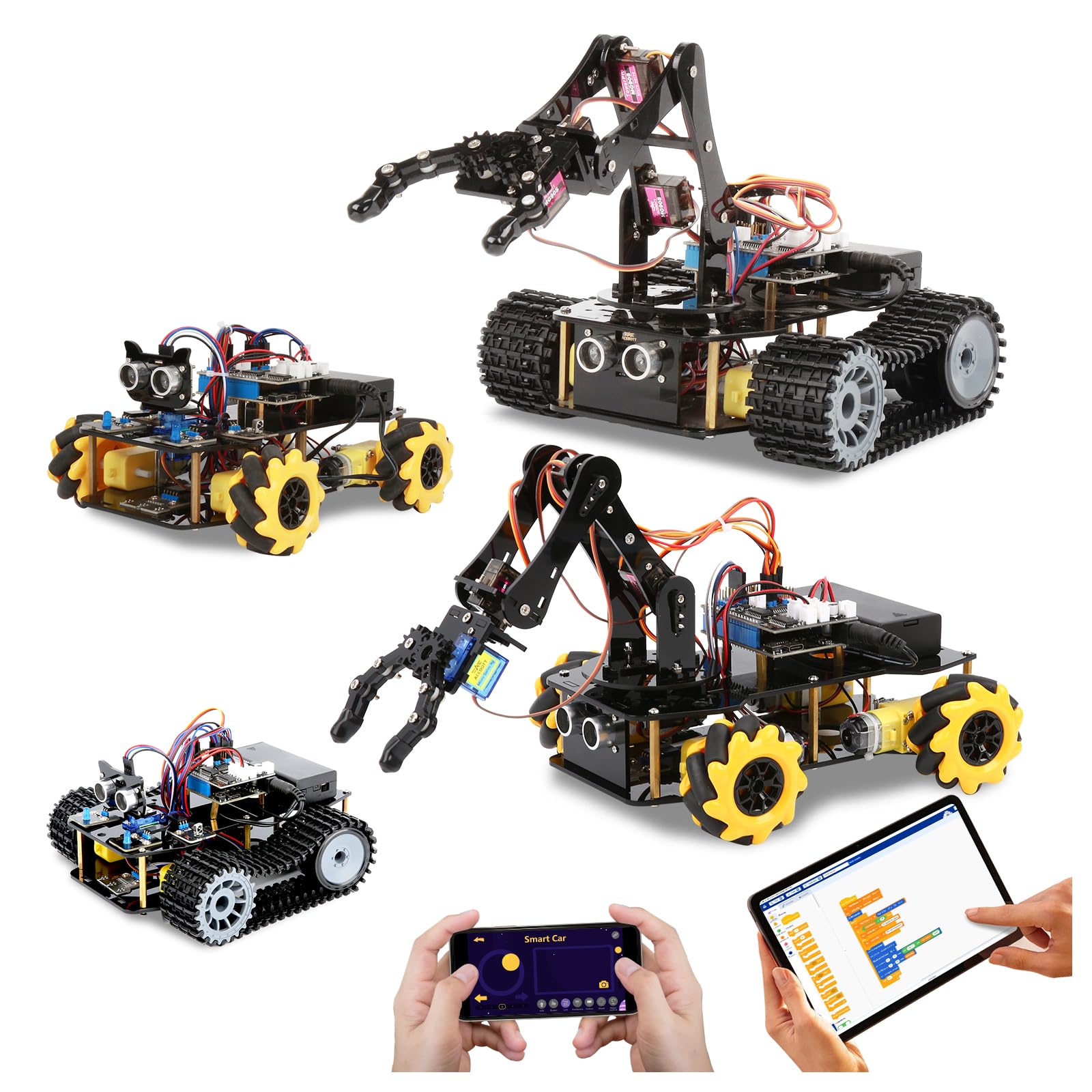
One kit that transforms between an arm car, a tank, and a hybrid grabbing rover.
This is the Swiss Army knife of the list. The base robot car, a tank track expansion, and a 5DOF robotic arm combine into four different builds. You can create a robotic arm car to grab objects, a tank robot for outdoor trails, or merge them into a robotic arm tank for the full experience.
The ESP32 controller is compatible with both Arduino and Scratch, making it friendly for kids aged 12 and up. Sixteen guided tutorials walk you through assembly and coding, and an IR remote plus smartphone app give you control indoors and out. The rubber tank treads handle grass, gravel, and slopes with ease.
Quality is the thing everyone praises, along with the educational value for young builders. Batteries are not included, which catches some families off guard. Buyers also report that some of the more advanced features do not respond as expected, so stick to the guided tutorials at first. It offers lasting value for a mechanically inclined child who enjoys building and coding.
Build Variety
- Four robot configurations from one kit
- Rubber treads handle off-road terrain
- 16 story-based coding tutorials included
Power Gap
- Batteries are not included
- Advanced features may not work as advertised
Best suited for: a young builder who wants variety — an arm, a car, and a tank in one box.
Consider another if: you want a focused desktop arm rather than a multi-vehicle kit.
7. ACEBOTT Smart Robot Arm Car Kit
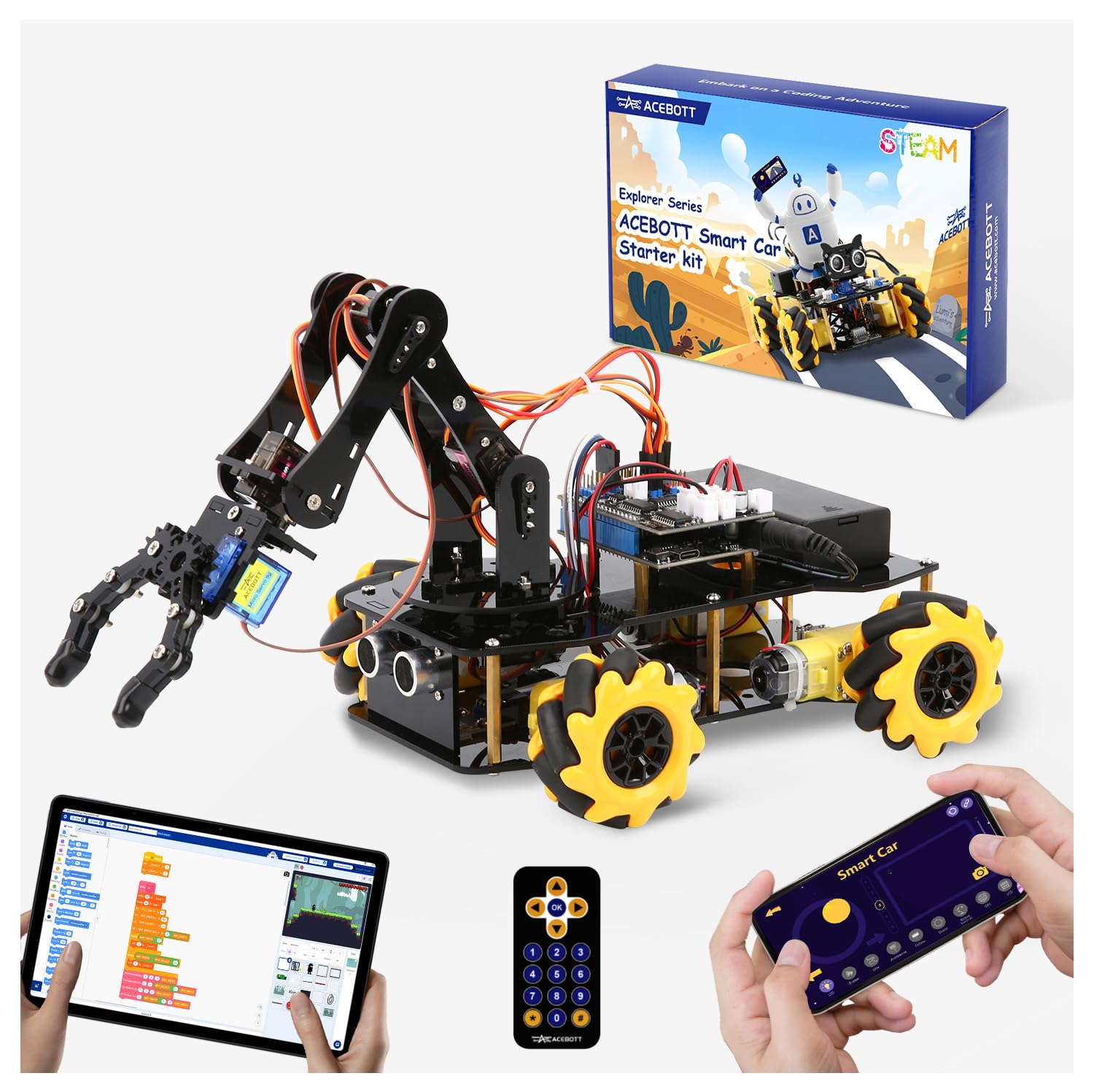
A 5DOF arm on Mecanum wheels that drifts and slides diagonally like nothing else here.
The headline feature is the omnidirectional 6cm Mecanum wheels. These allow the car to drift, travel diagonally, and turn precisely in tight spaces — movement patterns you simply cannot get from a standard wheelbase. This makes it excellent for navigating complex routes and testing spatial-awareness code.
It runs on an ESP32 controller with a pre-burned program, so you can enjoy the robot right after assembly without downloading tutorials. Uniform screws and a paper manual make it approachable for beginners aged 8 to 12. Dual control comes from an IR remote or the iOS/Android app.
Buyers rate the build quality on par with premium maker boxes, and kids love playing with it. The arm is expandable with modular add-ons like cameras and solar panels sold separately. There are two honest caveats: batteries are required but not included, and one buyer hit a confusing electrical issue with the motor wiring that needed extra adapters.
Drift Capability: Mecanum wheels make this the most fun and maneuverable arm car in the lineup.
Electrical Learning Curve: A pre-burned program helps, but advanced wiring may require troubleshooting.
8. VANLINNY Robot Arm STEM Project

A fast, fun 360-degree arm that a seven-year-old can build and drive.
This is the gift-style kit aimed squarely at kids aged 8 to 12, and it nails the fun factor. Assembly takes about two hours, and parents report a seven-year-old building it with ease. The arm moves at multiple angles, rises and falls freely, and grabs objects with cool simulation sound effects.
It is made from ABS and aluminum alloys with four motors, giving it impressive speed and a full 360° of rotation. Numbered accessory bags make assembly straightforward, and the included remote control lets kids drive it immediately. Sturdy packaging makes it gift-ready.
What wins people over is the fun — kids genuinely enjoy building and operating it. The trade-off is that the arm can be a bit weak; one reviewer noted the arm jumps off its gears under load, and the speed control is jumpy. An occasional unit arrives missing a part, but the seller is known for quick replacements. It is a solid first robotics project, not a precision instrument.
Built for Kids
- Fast assembly with numbered parts
- 360° rotation and 4 motors for speed
- Great seller support for missing or broken parts
Playful Limits
- Arm can jump gears under load
- Some units arrive with missing pieces
Pick this for: a younger child’s first taste of robotics — it prioritizes fun and easy assembly over precision.
skip it if: you need a serious coding arm — this one is remote-control focused and lighter duty.
9. Gewbot RaspTank with 4-DOF Arm

A tank rover with a 4-DOF gripper that runs entirely on a Raspberry Pi brain.
This is the kit for people who already own a Raspberry Pi. The RaspTank is compatible with RPi 3B, 3B+, and 4, and it uses that Pi for object recognition, motion detection, and line tracking based on OpenCV. A 4-DOF robotic arm rides on top, ready to grab and place objects.
A 73-page illustrated PDF manual walks you through assembly, and easy-to-understand Python code comes included. The GUI program works on Windows and Linux, and WS2812 RGB LEDs add a techy glow. Real-time video transmission lets you see what the robot sees from your PC.
The important catch: the Raspberry Pi board is not included, and owners mention it will not work on its own without one. Boards can cost a significant amount extra. The included code works perfectly for some, but the acrylic body is brittle and the starter batteries last under three minutes. It is a rewarding project for a parent-child team, but it expects prior Pi knowledge.
Pi-First Design: Full OpenCV tracking and Python control make this the most advanced coding platform here.
Hidden Cost: You must supply a Raspberry Pi board and better batteries — factor that into the budget.
Understanding the Specs
Degrees of Freedom
This is the number of independent joints in the arm. A 4DOF arm moves like a basic pick-and-place machine. A 6DOF arm bends at more points, letting it reach around obstacles and orient the gripper at different angles. More DOF means more complex movements but also more servos to control and program.
Bus Servos vs. Analog Servos
Standard analog servos just receive a position command and try to hold it. Smart bus servos talk back to the controller, reporting their real position, voltage, and temperature. This feedback loop keeps motion accurate and guards against overheating. For serious robotics, bus servos are a major upgrade.
FAQ
Do I need to know coding before buying a robot arm?
What is the difference between a 5DOF and 6DOF arm?
What is a bus servo and why does it matter?
Does the RaspTank work without a Raspberry Pi board?
How much weight can these affordable robot arms lift?
Can I control these arms from my phone?
Do any of these kits include batteries?
What is OpenCV and why does the RaspTank use it?
Are these robot arms suitable for kids?
Can I expand my robot arm with extra sensors or cameras?
Final Thoughts: The Verdict
After reviewing the options, the affordable robot arm winner is the LewanSoul LeArm because it pairs a metal frame and anti-stall servos with multiple control methods at a price that makes sense. If you want Python and ESP32 flexibility, grab the MaxArm. And for precision tasks with a 500-gram payload, the Hiwonder xArm1S is the one to reach for.
How We Picked
We do not accept paid placement. Every pick is matched to a real buyer and a real use-case; we do not hands-on test units.
Sources & Methodology
Specifications: manufacturer listings and product documentation. Review insights: verified customer reviews, as of August 2026. Pricing: not shown on this page (it changes often); check the current price via the retailer link.
As an Amazon Associate, Gadgets Feed earns from qualifying purchases. This does not affect which products we feature.