
Our readers keep the lights on and my morning glass full of iced black tea. As an Amazon Associate, I earn from qualifying purchases.
Specs are compiled from manufacturer listings and verified buyer reviews and can change over time — please confirm the key details on the product page before buying.
Long DisplayPort runs are where ordinary copper cables go to die—you know the drill: a monitor that flickers, blacks out for a second, or simply refuses to hit its advertised refresh rate the moment you stretch past a few feet. An active cable fixes that by embedding a signal-amplifying chip right in the line, so the data stays clean and error-free over distances that would crush a passive cord.
I’m Min — the founder and writer behind Gadgets Feed. This guide is built by comparing the manufacturers’ published specifications and the patterns across verified customer reviews, so you get each pick’s real strengths and trade-offs instead of marketing spin.
Have a 15-foot gap between your GPU and monitor, or a VR headset that needs room to roam? You need the right active displayport cable to keep that high-refresh signal rock solid at length.
Our Picks at a Glance
How To Choose The Best Active DisplayPort Cable
Buying an active cable is about eliminating the two biggest annoyances in long runs: signal dropouts and refresh-rate caps. Once you know your length and your monitor’s demands, the choice narrows fast.
Length vs. Signal Integrity
Copper DisplayPort cables start struggling past roughly 6 to 10 feet at high bandwidths. An active chipset in the cable regenerates the signal, so you can run 16 or even 30 feet without hunting for random black screens. That is the entire point of going active—length without the penalty.
Bandwidth and Refresh Rate Matching
A 4K monitor at 144Hz needs a cable that carries enough data per second; the two real tiers here are 32.4 Gbps (DisplayPort 1.4, great for 8K at 60Hz) and 54 Gbps (DisplayPort 2.0/2.1, built for 8K at 120Hz and 4K at 240Hz). Match the cable’s ceiling to what your monitor and GPU actually support—a faster cable always works backward, but a slow one will bottleneck the picture.
Quick Comparison
| Model | Best For | Data Rate | Max Resolution | Length | Amazon |
|---|---|---|---|---|---|
| Cable Matters Active DisplayPort Extension★ Best Overall | VR Headset Extension | 32.4 Gbps | 8K at 60Hz | 16 feet | Amazon |
| RUBMUD 8K Fiber Optic DP 2.1 | High-Refresh Gaming | 54 Gbps | 8K at 60Hz | 6.6 feet | Amazon |
| OREI 8K DisplayPort 2.0 AOC | Long Cable Routing | 54 Gbps | 8K at 120Hz | 15 feet | Amazon |
| Fibopitcal 54Gbps Fiber Optic DP 2.1 | Wall Runs & Commercial AV | 54 Gbps | 8K at 120Hz | 30 feet | Amazon |
In‑Depth Reviews
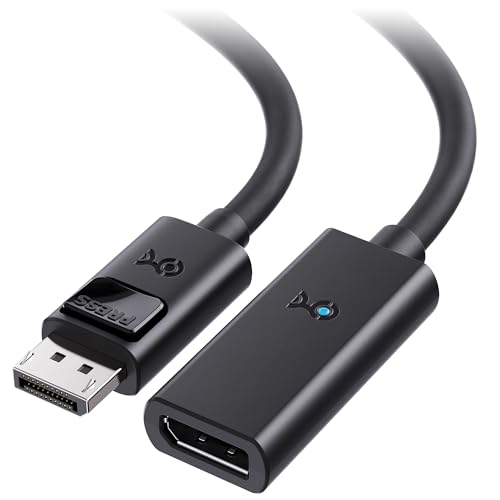
1. Cable Matters Active DisplayPort Extension Cable, DP 1.4, 16ft / 5m
Our pick — over 4.5★ from 1,500+ verified ratings; the strongest balance of quality and price.
The 16-foot extender that finally lets your VR headset roam the room
If you own a VR headset like the Valve Index or Oculus Rift S, you already know the bundled cable keeps you tethered to a tiny zone. This male-to-female extension adds 16 feet of reach, and the built-in active chipset keeps the signal error-free across that longer span—no external power brick needed since it draws everything from the DisplayPort signal itself.
It handles the full DisplayPort 1.4 toolkit, including HBR3 bandwidth at 32.4 Gbps to drive an 8K display at 60 fps. Buyers report testing it at 3440×1440 with 144Hz, 10-bit color, and HDR with no issues across picture, connectivity, or sound—and one owner said it eliminated the VR artifacts they saw with a passive 6-foot cable, matching direct GPU quality at a lower cost than a fiber run.
The honest trade-off: signal quality gets mixed feedback, with some owners reporting display blackouts, and the cable itself is plain black and unbraided. It locks firmly into the DisplayPort, so remember to press the open up button on the connector before pulling it from your graphics card.
Why it wins: The functionality is what wins people over—this is the one cable here designed specifically to boost the length of a headset’s tether, and it does it without a power supply.
The catch: Compatibility is the most mixed aspect; it pairs brilliantly with some headsets and monitors, but a minority hit intermittent black screens.
Reach for it if: you need a reliable, no-power extension that stretches a VR play area or a desktop monitor across a room.
Look elsewhere if: you are chasing the fastest 8K refresh rates—its 32.4 Gbps ceiling is well below the 54 Gbps of the fiber options further down.
2. 8K Fiber Optic DisplayPort Cable 2.1, 6.6ft Active DP Cable 54Gbps

A 6.6-foot fiber optic shot that broke a 120Hz cap wide open
This is the cable for the person whose monitor is being held back by copper. It uses fiber optic chips instead of a traditional copper core, which means faster transmission, less signal fade, and strong resistance to electromagnetic interference—and it gets slimmer and more flexible as a bonus. The plugs are gold-plated and wrapped in a zinc alloy housing rated to survive over 20,000 bending cycles.
On a Samsung Odyssey Neo G9 57 with dual 4K resolution, owners mention the jump from copper to this fiber cable open up a full 240Hz—previously capped at 120Hz—and another owner running 33 feet at 7680 x 2160 with HDR noted zero flicker and richer colors than their older passive cable. It carries 54 Gbps of bandwidth, supports FreeSync and G-Sync, and works with HDR, HDCP, and DSC 1.2a.
The one quirk to know before buying: this is a unidirectional cable. One end is marked “SOURCE” (goes to your PC or graphics card) and the other is marked “DISPLAY” (goes to your monitor), and you will get no signal if you flip them. It is also male-to-male, so it replaces a cable rather than extending one.
What owners rave about
- open up full refresh rates that copper cables cap
- Fiber build kills flicker and electromagnetic noise
- Gold-plated, zinc-alloy, tough and flexible
Before you order
- Directional ends—plug in backwards and you get nothing
- Only 6.6 feet, so it suits short clean runs
Grab it for: a gaming rig where your monitor and GPU sit close together and you want every last hertz your panel can show.
Skip it for: long wall runs or permanent routing—at this length, you are paying fiber prices for a very short distance.
3. OREI 8K DisplayPort 2.0 AOC Cable 15ft – 54Gbps

A hybrid fiber run that stays crisp through 35 feet of wall raceway
This one is built for the person who does not just want a longer cable—they need to route it through walls, under floors, and around corners. The hybrid AOC design converts DisplayPort signals to optical transmission, which keeps latency low and signal loss at zero over its 15 feet, and the fiber core is immune to electromagnetic and RF interference from nearby power cables in dense setups.
At 54 Gbps it steps past the extension cable above by a 67% margin in data rate, open up 8K at 120Hz and 4K at 240Hz, with support for VRR, ALLM, and QFT for smoother gaming. Customers note running it through 35 feet of cable raceway with several corners and getting phenomenal picture quality with no loss of signal, and one routed it safely behind an 80-inch office demo monitor. It is 15 feet long, but if you push it through a conduit, the reach extends far beyond that.
The recurring gripe is initialization: a few owners say the startup handshake can be finicky, occasionally taking a moment for the display to recognize the signal before it locks in. Once connected, though, the performance is clean with no flicker or dropouts.
Built for routing: this is the pick when you are concealing cable in a raceway or behind furniture—the flexible PVC jacket and gold-plated connectors hold up well, and the fiber core shrugs off interference.
Know the quirk: expect a possible few-second handshake delay at power-on; performance after that is rock solid.
Choose this if: you need a 15-foot active optical run that survives being tucked into tight, interference-heavy spaces.
Think twice if: you want instant picture the moment your PC wakes—the occasional slow handshake may annoy you.
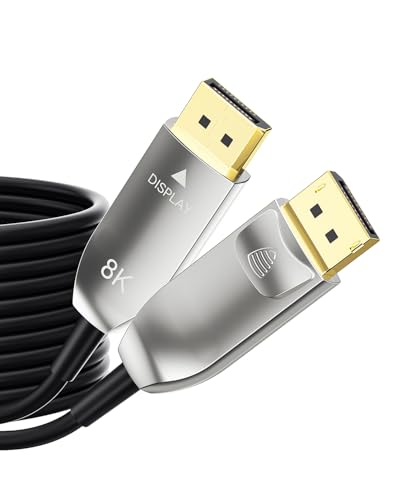
4. 54Gbps Fiber Optic Displayport 2.1 Cable 30FT 8K@120Hz
The 30-foot fiber line for in-wall TV runs and zero-degradation long hauls
This is the serious install cable. At 30 feet, it is built for the person mounting a TV over a fireplace or running a signal from a server room to a distant display—and unlike copper, which the maker says fails past 3 meters, this fiber optic line delivers full 8K quality up to 100 feet with no boosters or repeaters. It uses light instead of electricity, making it completely immune to EMI and RFI from routers, power strips, and speakers.
The build is the other headline: a precision-machined aluminum shell, reinforced zinc-alloy connector head, 24K gold-plated contacts, and a flexible jacket tested to 30,000+ bends. Reviewers point out that a monitor flashing on and off constantly was fixed the moment this cable was connected, and the whole thing locks securely into both the monitor and tower. It supports 8K at 120Hz with DSC and 4K at 240Hz, plus HDR10, HDR10+, and Dolby Vision with 10-bit to 12-bit color depth.
It is directional like the other fiber options—connect the end marked “SOURCE” to your PC or GPU and the end marked “DISPLAY” to your monitor—and it is unapologetically the premium choice here, aimed at commercial AV and creator workstations rather than casual desk setups.
Worth it for
- Zero signal loss at 30 feet and beyond, no repeater needed
- Immune to interference from nearby electronics
- Aluminum shell and 30,000+ bend rating for daily abuse
Keep in mind
- Price sits at the top of the range—this is an investment, not an impulse buy
- Directional ends mean you must plug each side into the right device
Best for: permanent installations, in-wall TV runs, and anyone who has been chasing flicker for months and wants it gone for good.
Not for: tight budgets or short desk setups where 6 to 15 feet is plenty—you would be paying for length you do not use.
Understanding the Specs
Data Transfer Rate (Gbps)
This is the cable’s bandwidth ceiling—the amount of data it can push per second. A 32.4 Gbps cable handles DisplayPort 1.4, which drives 8K at 60Hz. A 54 Gbps cable covers DisplayPort 2.0 and 2.1, which open up 8K at 120Hz and 4K at 240Hz. Match the number to your monitor’s specs; a faster cable always works fine on slower displays.
Active vs. Passive
A passive cable is just wires—it works fine at short lengths but loses signal strength as it gets longer. An active cable has a chip inside that regenerates or converts the signal, so it stays clean over long runs. Fiber optic active cables go further: they convert the electrical signal to light, which resists interference and degradation almost entirely.
FAQ
Why does my monitor flicker or black out with a longer cable?
What is the difference between 32.4 Gbps and 54 Gbps cables?
Can I use a DisplayPort extension cable with a VR headset?
What happens if I plug a directional fiber cable in backwards?
Is a fiber optic DisplayPort cable better than a copper one?
Does an active cable need its own power source?
Can a faster cable damage my monitor or graphics card?
How long can a fiber optic DisplayPort cable run before signal loss?
Is there a difference between DisplayPort 2.0 and 2.1 cables?
Final Thoughts: The Verdict
For the majority of shoppers, the active displayport cable winner is the 8K Fiber Optic DisplayPort Cable 2.1 because it solves the two problems that plague long runs—refresh-rate caps and flicker—at a length most desk setups need. If you want a dedicated VR or extension solution, grab the Cable Matters 16ft extender. And for a permanent in-wall or professional install, the 30ft Fibopitcal fiber cable is the one to reach for.
How We Picked
We do not accept paid placement. Every pick is matched to a real buyer and a real use-case; we do not hands-on test units.
Sources & Methodology
Specifications: manufacturer listings and product documentation. Review insights: verified customer reviews, as of August 2026. Pricing: not shown on this page (it changes often); check the current price via the retailer link.
As an Amazon Associate, Gadgets Feed earns from qualifying purchases. This does not affect which products we feature.