
Our readers keep the lights on and my morning glass full of iced black tea. As an Amazon Associate, I earn from qualifying purchases.
Specs are compiled from manufacturer listings and verified buyer reviews and can change over time — please confirm the key details on the product page before buying.
The core promise of a 4×2 HDMI matrix is simple: connect four gadgets—a console, a streaming stick, a PC, a Blu-ray player—and send any of them to either of your two screens, independently. It means you can be gaming on the big living-room TV while your partner watches something entirely different on the bedroom display, all without unplugging a single cable.
I’m Min — the founder and writer behind Gadgets Feed. This guide is built by comparing the manufacturers’ published specifications and the patterns across verified customer reviews, so you get each pick’s real strengths and trade-offs instead of marketing spin.
The key is matching the right features to your actual displays and devices, and this breakdown of the 4×2 hdmi matrix options will help you choose the one that fits your setup without overpaying.
Our Picks at a Glance


How To Choose The Best 4×2 HDMI Matrix
A matrix sounds complicated, but the buying decision boils down to a few clear questions: what resolution your screens actually run, how you want to handle sound, and if you need fancy extras like on-screen menus or multi-view modes. Answer those and the right model picks itself.
Match the Bandwidth to Your Screens and Sources
The most important spec is bandwidth, measured in gigabits per second (Gbps). Entry-level 4×2 matrices run at 18Gbps, which fully supports 4K@60Hz with full-color 4:4:4 chroma subsampling—that means crisp text and vibrant HDR on modern TVs. If you own an 8K TV or a high-refresh-rate gaming monitor, you need a pricier 40Gbps unit that handles 8K@60Hz and 4K@120Hz, but for most homes 18Gbps is plenty.
Decide How You’ll Handle Audio
If your TV passes sound to a soundbar or receiver via HDMI ARC, most matrices will work fine. But if you have an older receiver without ARC, or you’re sending audio to powered speakers, you want a matrix with audio extraction—an optical SPDIF port or a 3.5mm headphone jack that pulls sound straight from the start. Check whether the audio extraction follows Output A or can be switched per-output, as that varies between models.
Consider Switching Speed and EDID
Some matrices switch inputs in under a second; others drop the picture for a few seconds as the displays re-negotiate. That matters if you’re switching live during a presentation or streaming session. EDID management—how the box tells each source what your screens can do—is what lets a 4K source talk to a 1080p TV without issues. Models with downscaling can send 4K to one output and 1080p to a second, older display at the same time.
Quick Comparison
| Model | Best For | Bandwidth | Audio Extraction | Control Options | Amazon |
|---|---|---|---|---|---|
| FERRISA 8K Matrix★ Best Overall | Future-proof gaming & 8K | 40Gbps | RCA + SPDIF | Remote, Panel, ARC | Amazon |
| OREI UHDS-402ASmart Value | Reliable 4K@60Hz value | 18Gbps | SPDIF + L/R | Remote, Panel, ARC | Amazon |
| AV Access 4KMX42-H2APro Installer | Pro installs & RS-232 control | 18Gbps | SPDIF + 3.5mm | Remote, RS-232, DIP | Amazon |
| ROFAVEZCO EZ-MX42HAS | High-fidelity gaming & CEC | 18Gbps | SPDIF + 3.5mm | Remote, IR Extender | Amazon |
| CORSAHD Matrix | Massive EDID flexibility | 18Gbps | SPDIF + 3.5mm | Remote, RS-232, DIP | Amazon |
| OREI HDS-402MV | Multi-view PIP monitoring | 4K@30Hz | Optical + L/R | Remote, RS-232 | Amazon |
| Monoprice Blackbird | Simple 4K@60Hz with downscale | 18Gbps | Optical + Analog | Remote, Auto-switch | Amazon |
| PORTTA N4MX42QS | smooth multi-view switching | 4K@30Hz | SPDIF + 3.5mm | Remote, Panel | Amazon |
In-Depth Reviews
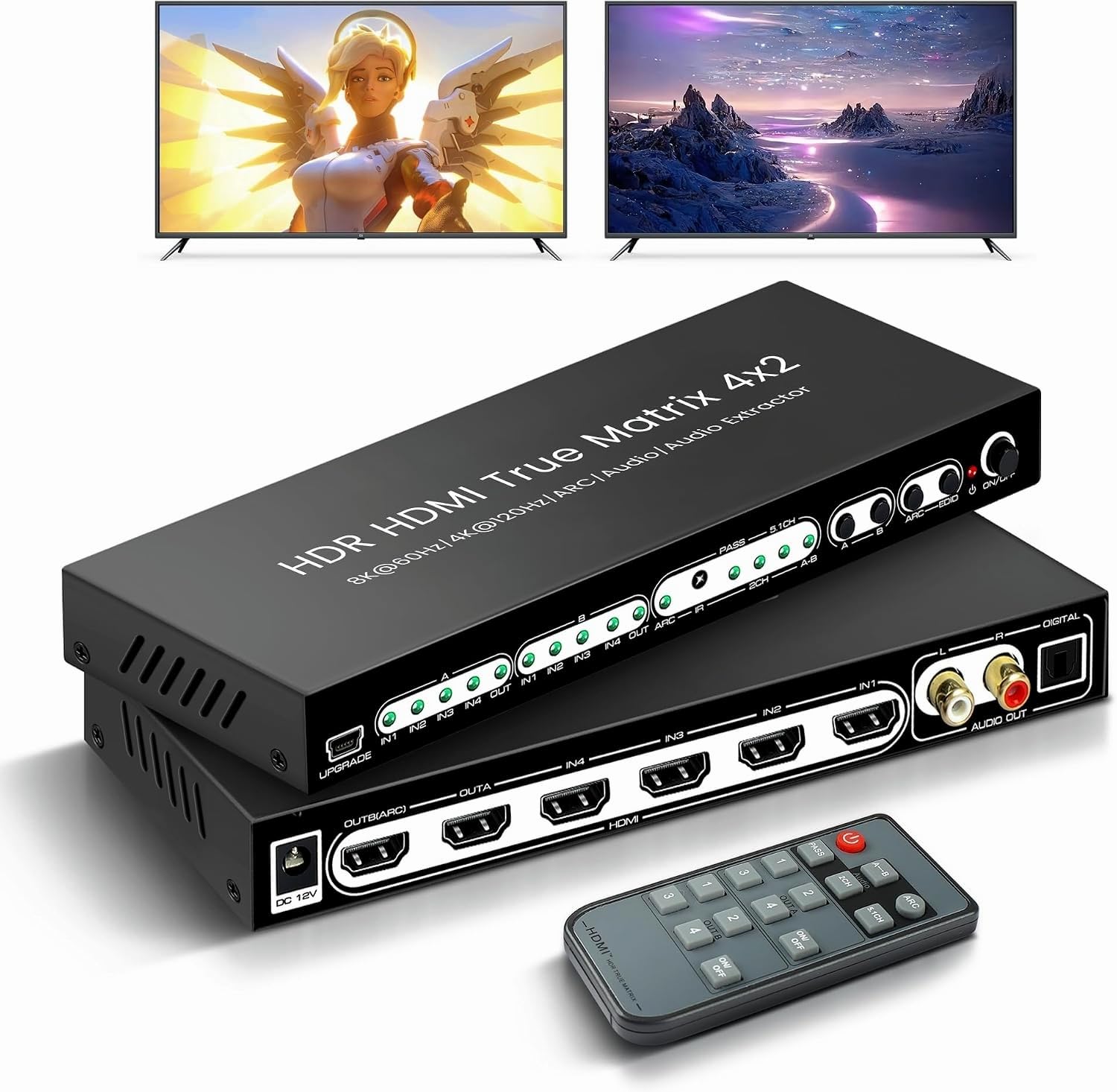
1. 8K 4×2 HDMI Matrix Switch, HDMI 2.1 Audio Extractor EDID, ARC Dolby Atmos
Our pick — over 4★ from 1,500+ verified ratings; the strongest balance of quality and price.
The only matrix here built for tomorrow’s 8K consoles and today’s 4K 120Hz gaming.
This FERRISA box is the raw-bandwidth king of the list, moving data at 40Gbps while the rest of the field runs at 18Gbps—that’s the headroom that open up 8K@60Hz and 4K@120Hz, so a high-refresh-rate gaming monitor actually gets the frames it craves. It also carries VRR (variable refresh rate, which stops screen tearing), HDCP 2.3, HDR10, CEC, and Dolby Vision, making it the most complete feature set for a serious gamer’s den.
For audio, it pulls sound out to both RCA and SPDIF ports simultaneously, handles LPCM 2.0/5.1, DTS, and Dolby Digital, and includes ARC so your TV’s native apps can send sound back to a receiver. The maker also claims a cooling system that cuts fan noise by 70%., a nod to the fact that 40Gbps hardware runs warm. Control comes via the IR remote, front-panel buttons, or a one-second switch between sources with an LED showing which port is live.
Buyers report that switching inputs feels easy and video quality is strong, and owners mention the setup is genuinely plug-and-play. The cautionary note in the review pages is reliability: A handful of owners describe flickering that starts a few weeks in., with “Flickering is unbearable, Started 33 days in” being the harshest summary. One output reportedly stopped working for some after roughly nine months., so this is a great unit—if you’re willing to ride out the occasional lemon.
What Earns the Crown
- The only 40Gbps unit here, ready for 8K@60Hz and 4K@120Hz
- Simultaneous RCA and SPDIF audio extraction for flexible hookups
- ARC support plus a one-second button switch with clear LED status
Honest Trade-offs
- Recurring reports of flicker and output failure that can start around a month in
- Remote control gets mixed feedback, with some owners finding it unreliable
- Premium pricing for bandwidth most current TVs can’t use yet
Grab it if: you have an 8K screen or a 4K 120Hz monitor and want the full spec sheet today.
Look elsewhere if: your displays are standard 4K@60Hz and you prefer a cheaper, battle-tested 18Gbps unit.
2. OREI 4×2 HDMI Matrix Switch 4K with Audio Extraction, ARC, EDID, Downscale
The dependable 18Gbps workhorse that handles two 4K displays without breaking a sweat.
This OREI UHDS-402A is the value pick that does everything a typical home theater needs, at a bandwidth of 18Gbps that comfortably runs 4K@60Hz 4:4:4 on both outputs. It’s the crowd favorite in this roundup—the review pages show a strong consensus on easy setup and solid value—and it’s fully compliant with HDMI 2.0 and HDCP 2.2/1.4, so it plays nice with modern consoles and older Blu-ray players alike.
The extra ports are the difference-maker here: this unit has 4 HDMI inputs while the 8K FERRISA above only offers 3, so you can keep a fourth source—say, a retro console or a second streaming stick—permanently plugged in. For audio, it extracts to optical SPDIF and analog L/R outputs, supports Dolby Vision, HDR10+, and HLG, and includes ARC to return TV audio to the optical and L/R jacks. It also does 4K-to-1080p downscaling on one output while the other stays in 4K, with AUTO, COPY, and STD EDID modes for stable handshaking.
The thing owners rave about is the rock-solid build, with customers note the screw-lock power cord and responsive remote are a cut above the cheap no-name brands. The review pages note that one brand loyalist replaced a failing generic unit with this OREI and got flawless performance for months. The honest caveats: There’s a reported 10-second lag between views in some setups., compatibility quirks with certain Samsung monitors, and a gamer’s note that “Works great! After a while some lag input happens when i use the ps5 for certain games” — likely an HDR handshake issue rather than the box itself.
Value Champion: 4 ports, 4K@60Hz, audio extraction, and downscaling at a price that undercuts the premium tier — the best all-around pick for a standard dual-TV home.
The Recurring Note: some HDR-related input lag in specific console games is the most common gripe, so if you’re a hardcore PS5 esports player, test it carefully.
3. AV Access HDMI Matrix Switch 4×2 4K@60Hz HDR ARC/SPDIF 5.1CH
A cable-ready workhorse with RS-232 serial control for custom installs.
This AV Access 4KMX42-H2A is built for the person who wants serious control: it’s a 4-in-2-out HDMI 2.0 matrix at 18Gbps that handles 4K@60Hz 4:4:4, and it brings RS-232 serial communication—the kind of wired control used in conference rooms and commercial AV racks—along with a documented API. It runs HDR10, HLG, and Dolby Vision, and it’s the only unit here that publicly lists a 1-year warranty for all customers and a 3-year warranty for business customers.
The audio section is deep: a DIP switch on Output 2 toggles between ARC and de-embed modes, S/PDIF Toslink out supports PCM 2.0/5.1 and DTS up to 5.1 channels, and a 3.5mm L/R analog jack pulls audio from Output 1. HDMI passthrough formats go all the way up to PCM 7.1, TrueHD, Atmos, DTS-HD Master Audio, and DTS:X. Each output independently downscales 4K to 1080p, so you can drive a 4K TV and an older 1080p projector at the same time. The sturdy metal enclosure survives the heat that killed a cheaper splitter in one owner’s setup — they noted it runs cool where a unit burned out in five months.
The consensus is that this is a quality product with real versatility, and what wins people over is the solid build and the flexibility of different or identical sources per room. The recurring caveat: switching is not smooth, with both displays blacking out for a 5-8 second delay before the new source appears. That makes it fine for home theater and presentations, but not for live-event switching where every second counts.
Best for: the AV integrator or tech-savvy homeowner who wants RS-232 control, a documented API, and business-grade warranty terms.
The Catch: expect a few seconds of black screen on every switch — never use this one for live event mixing.
4. HDMI Matrix ARC 4 In 2 Out 4K HDR EDID 4K7.1/5.1/COPY Switch with SPDIF L/R Audio Extractor

The gamer-focused matrix with G-Sync support and fast 1-3 second input switching.
This ROFAVEZCO EZ-MX42HAS is aimed squarely at high-fidelity gaming and home entertainment, and its spec sheet reads like a console gamer’s wishlist. It’s an 18Gbps HDMI 2.0 matrix that supports HDCP 2.2, 4K@60Hz 4:4:4 8-bit, HDR, and Dolby Vision, and it’s one of the few here that explicitly lists G-Sync and Nvidia Shield compatibility. It also handles high refresh rates for PC gamers with 1080p@144Hz or 120Hz support. The maker claims 1-3 second fast input switching., which is noticeably snappier than the AV Access unit’s 5-8 seconds.
Control is flexible: you get an IR remote with an extension cable, plus ARC and CEC support on Output 1—so your TV’s remote can talk to a soundbar through the matrix. Audio extraction is available via SPDIF optical (5.1CH) and a 3.5mm stereo jack, with HDMI audio passthrough for 7.1CH, Dolby Atmos, and DTS:X. There’s a downscaler that converts 4K sources to 1080p on one or both outputs, though the maker is upfront that it won’t downscale 4K HDR Dolby Vision or VRR signals. Setup is genuinely plug-and-play, and the box covers Windows, macOS, Android, and Linux devices.
Reviewers point out it works well for switching between work and home computers, and one verified buyer notes the universal remote compatibility—it “works with universal remotes like logitech, just sync it up.” The honest gripes: auto-detection can fail when waking a device, with one owner noting it “frequently fails to auto detect input and switch to it when I turn one of them on,” and a slight TV-incompatibility is mentioned by a computer switcher. The mix of fast switching, G-Sync, and universal remote support makes this a strong mid-range pick for desk-and-TV setups.
Who It’s For: the PC + console gamer running two screens who wants G-Sync, fast switching, and universal-remote friendliness.
Who Should Pass: anyone relying on auto-switch when waking devices — that’s the most common stumble in the reviews.
5. HDMI Matrix 4 in 2 Out 4K 60Hz 4:4:4 ARC HDR Dolby Vision Atmos SPDIF 5.1CH
A spec-dense switcher for the enthusiast who wants total control over handshakes.
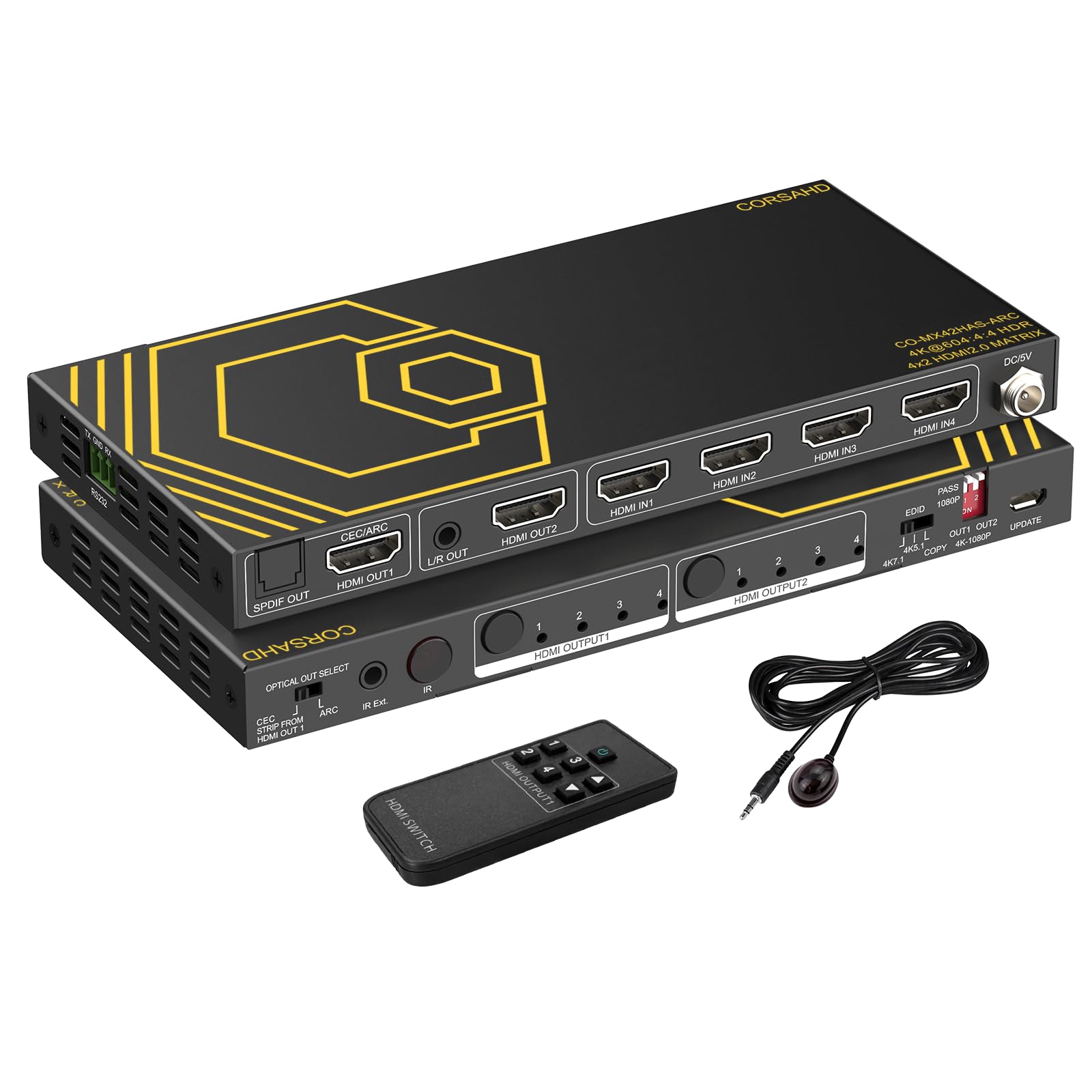
This CORSAHD matrix is the most control-heavy 18Gbps unit in the lineup, with a 16-position EDID DIP switch bank that lets you force exactly how your sources see your displays. For the uninitiated, EDID is the handshake that tells a console or PC what resolutions and audio formats your TV supports—and when you have mismatched screens (one 4K HDR, one 1080p), that control is the difference between a working setup and a blank screen. It’s a niche feature, but for the AV tinkerer it’s gold.
The video spec is current: 4K@60Hz, 1080p@120Hz, HDR, Dolby Vision, HDCP 2.2 and 2.3 bypass, plus IMAX Digital 2K/4K support. Audio goes wide too, with ARC, Dolby Atmos, 7.1CH, DTS:X, Dolby TrueHD, and DTS-HD Master Audio, extracted via optical SPDIF or a 3.5mm stereo jack. Output 1 handles CEC and ARC through an “Optical Out Select” switch, and there’s an IR remote plus an IR extension cable and RS-232 control for automation. One detail power users will appreciate: The review pages note the PSU is UL/ETL certified with a locking barrel connector., plus a RS-232 Phoenix port and micro USB for firmware.
The standout real-world praise comes from a two-TV household: “I have a tv on each side of a wall, one in the livingroom and one in the bedroom… This lets me use my playstation and xbox with either tv easily, no more dragging my console between rooms.” Another notes it handles a PS5 Pro, Switch 2, and Series X across two screens cleanly. The downsides: one unit arrived powered on but refused to pass any signal, and there’s zero documentation for the RS-232 or firmware port. It’s a powerful tool for the patient, but not the most beginner-friendly box here.
Reach for it if: you’re juggling mismatched 4K and 1080p TVs and need deep EDID control to force compatibility.
Proceed with eyes open: the learning curve is real, and the no-documentation RS-232 and firmware ports are for seasoned integrators only.
6. OREI 4×2 Quad Multi HDMI Viewer 4K Downscale RS-232 IR 3.5mm/Analog OSD
The multi-view specialist that puts four sources on one screen at once.
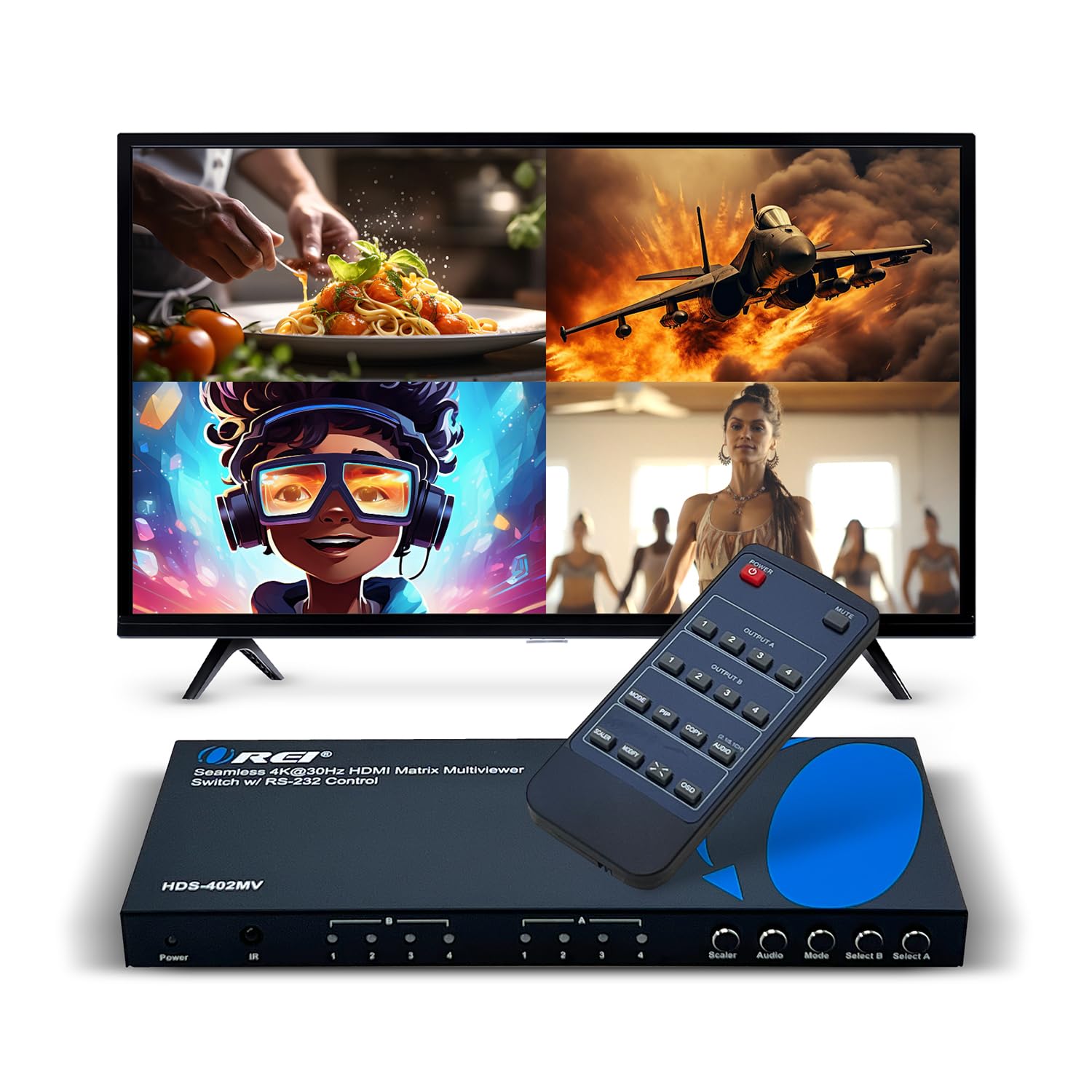
This OREI HDS-402MV is a different beast from the other matrices here: it adds a Quad Multi Viewer mode, meaning you can display all four HDMI inputs on a single screen simultaneously. It supports Picture-in-Picture (PIP) with the window positioned in any corner, plus a full-screen single-source mode, making it a perfect fit for church services, security camera banks, or a control room where you want to watch everything at a glance. You can control it via IR remote, front panel buttons, or RS-232 for automation.
The resolution ceiling is where this unit makes its trade-off: it handles up to 4K@30Hz for multi-view, and 1080p@50/60Hz, 720p, and 480p in other modes. That’s fine for monitoring and presentations, but not ideal if you want 4K@60Hz gaming on the same box. Audio exits through Optical or L/R analog ports, supporting LPCM and AC3/DTS formats. It comes with a dual-voltage supply with a US plug plus an international adapter, and OREI backs it with a 1-year warranty and lifetime tech support.
The real-world reports are glowing for its intended use: a church AV lead calls it “a most for my church services,” noting it “has proven to work the best” for switching multiple inputs during services. Another owner confirms it “can split a screen into four parts” exactly as advertised. The one repeated caveat from the review pages is a color and resolution shift that one buyer says is “not for the better” in certain modes — so the multi-view scaling isn’t pixel-perfect. It’s the clear pick if you need to watch everything at once, and a hard pass if you demand crisp 4K@60Hz on a gaming rig.
Perfect for: houses of worship, security monitoring, or any setup where seeing all sources at once matters more than max refresh rate.
Not for: gamers — the 4K@30Hz cap and occasional color shift make it a poor fit for a primary gaming display.
7. Monoprice Blackbird 4K HDMI Matrix 4×2 HDR 18G 4K@60Hz YCbCr 4:4:4

The straightforward 18Gbps classic that keeps things simple and just works.
Monoprice’s Blackbird keeps its mission simple: a no-fuss 4×2 matrix that’s fully compliant with HDMI 2.0b and HDCP 2.2/1.4, running at 18Gbps for 4K@60Hz YCbCr 4:4:4 on both outputs. It passes 7.1-channel high-definition audio, and it’s one of the few here with auto-switching that the review pages confirm works reliably. The compact metal chassis keeps things tidy, and audio from Output A can be de-embedded to both optical and analog jacks, while Output B can downscale its video to 1080p.
What makes this unit stand out is the option to disable ARC, which is a lifesaver for CEC conflicts—the annoying situation where one device’s remote turns off a different device. An owner noted that turning off ARC “fixing CEC conflicts” made this the best in its price range. Another reports it “works well at 2k with a monitor and a 1080p tv… No problems at all and setup in no time,” driving an Xbox X, PS5, and Nintendo Switch at once. The audio through the headphone jack also gets a shoutout for clean sound.
The review pages have two clear gripes. First, the bright blue LEDs are borderline distracting in a dark theater room. Second, and more seriously, there’s a durability concern: the review pages detail One owner went through two units, each failing at exactly the 13-month mark., just past the warranty window. That’s a hard caution for a box you’d hope to install and forget. The switching itself also drops the picture for a beat or two, an accepted trade-off in this class.
Choose the Blackbird if: you want a simple, competent 4K@60Hz matrix with ARC that can be disabled to fix CEC headaches.
Think about the longevity: the documented 13-month failure pattern means it’s best as a budget-friendly solution, not a forever install.
8. 4K HDMI Multiviewer Switch 4×2 with PIP, PORTTA Quad Multi Viewer smooth Switcher

A multi-view marvel that switches sources smoothly, no waiting for a black screen.
This PORTTA N4MX42QS is the most feature-dense multi-viewer in the lineup, pairing a 4-in-2-out matrix with a staggering six viewing modes on Output A: 4 equal screens, side-by-side dual, up-and-down dual, PIP, full screen, and a “1 big with 3 small” layout. Output B can either mirror Output A or independently show any single source, and in full-screen mode under the same resolution it switches smoothly between inputs—with no 5-8 second black screen wait that plagues other matrices. That single feature makes it a standout for live switching.
The resolution ceiling is 4K@30Hz, and it’s compatible with HDCP 1.4 and 1.3, so it’s best matched with slightly older sources and displays. Output A adds a scaler that can go up or down between 1080p, 1600p, and 4K@30Hz, and it carries both SPDIF (5.1CH) and 3.5mm (2.0CH) audio extraction. The box lists broad compatibility across security cameras, PCs, PS4/PS4 Pro, Xbox, Nintendo Switch, Blu-ray players, and Chromecast, and it’s backed by a 2-year warranty and lifetime tech support.
Owners are enthusiastic about the flexibility, with one noting it “does not lock you in very specific modes” and gives full control over the second output via the remote—worth the extra cost for multi-device households. Another owner said it’s “great for 70″+” TVs and projectors, with picture quality unchanged. The review pages also surface a useful tip: the remote battery sometimes needs its contact wiped before first use, which restores the PIP feature instantly. The darker side is a durability complaint—One owner describes a unit that failed after a month with flickering and audio screeching., and another flags the short remote range as a minor annoyance.
Grab it if: you want a multi-viewer that switches without black-screen gaps and need flexible mode control for a mixed source setup.
The catch is longevity: while most owners are thrilled, the occasional unit fails early, so the 2-year warranty is genuinely worth having.
Understanding the Specs
Bandwidth and Resolution
Bandwidth, measured in Gbps, is the data pipe that carries your video signal. An 18Gbps matrix supports 4K@60Hz 4:4:4, which is the full-fat color depth you want for text clarity and HDR. A 40Gbps matrix adds headroom for 8K@60Hz and 4K@120Hz, but only matters if your screen and source can actually output those formats. For most people, 18Gbps is the balance of compatibility and price.
EDID Management and Downscaling
EDID is the digital handshake where your source asks your TV what it can display. When you have one 4K screen and one 1080p screen, a matrix with EDID management and downscaling can tell the source “4K for output A, 1080p for output B” — so both get a perfect picture. Without it, one display often shows a blank screen or forces the other to drop to the lowest common resolution.
FAQ
What exactly does a 4×2 HDMI matrix do that a regular HDMI switch doesn’t?
Will a matrix work if my two TVs are different resolutions?
Do I need a matrix with 40Gbps bandwidth for gaming?
How do I get sound to a soundbar or receiver without HDMI ARC?
Is a 4×2 matrix a good choice for gaming consoles?
What is the difference between smooth and non-smooth switching?
Why does my screen go blank for a few seconds after I switch inputs?
Can I control a matrix with my phone, universal remote, or smart home system?
What is PIP mode on a multi-viewer matrix?
Do I need high-quality HDMI cables for a matrix to work?
Final Thoughts: The Verdict
For most buyers, the 4×2 hdmi matrix winner is the OREI UHDS-402A because it balances four inputs, 4K@60Hz 18Gbps bandwidth, audio extraction, and downscaling into a reliable package that handles the typical two-TV home perfectly. If you want future-proof gaming with 8K and 4K 120Hz support, grab the FERRISA 40Gbps matrix. And for monitoring multiple sources at once on a single screen, the PORTTA Multi-Viewer is the one to reach for.
How We Picked
We do not accept paid placement. Every pick is matched to a real buyer and a real use-case; we do not hands-on test units.
Sources & Methodology
Specifications: manufacturer listings and product documentation. Review insights: verified customer reviews, as of August 2026. Pricing: not shown on this page (it changes often); check the current price via the retailer link.
As an Amazon Associate, Gadgets Feed earns from qualifying purchases. This does not affect which products we feature.