
Our readers keep the lights on and my morning glass full of iced black tea. As an Amazon Associate, I earn from qualifying purchases.
Specs are compiled from manufacturer listings and verified buyer reviews and can change over time — please confirm the key details on the product page before buying.
Finding a VR headset that plugs into your PC without draining your savings used to mean choosing between blurry screens and clunky tracking. This guide cuts through the noise to find headsets that deliver real immersion — crisp displays, smooth tracking, and a comfortable fit — without the flagship price. We focus on what actually matters when you are tethered to a gaming rig, so you can pick the one that fits your setup and your budget.
I’m Min — the founder and writer behind Gadgets Feed. This guide is built by comparing the manufacturers’ published specifications and the patterns across verified customer reviews, so you get each pick’s real strengths and trade-offs instead of marketing spin.
Whether you are a sim racer, a fitness fan, or a first-time explorer, the budget vr headset for pc on this list balances value and performance for your next virtual step.
Our Picks at a Glance

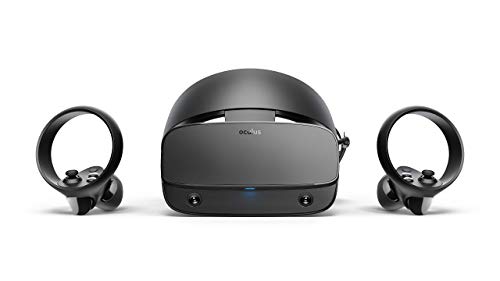
How To Choose The Best Budget VR Headset For PC
Buying a PC VR headset on a budget means knowing which compromises are worth taking. The wrong choice can leave you with a blurry image, a headache, or a headset that does not work with your computer at all. Here is what to look for before you commit.
Resolution and Refresh Rate: The Clarity Check
The display resolution (the number of pixels on the screen) decides how sharp the image looks, while the refresh rate (measured in Hertz, or Hz) decides how smooth motion appears. A higher resolution, like the Acer’s 2880 x 1440, reduces the “screen-door” effect where you can see the grid of pixels. A solid 90Hz refresh rate is the baseline for comfortable, smooth play without causing motion sickness.
Tracking: Inside-Out vs External Sensors
Tracking is how the headset knows where your head and hands are. “Inside-out” tracking uses cameras built into the headset to map your room, meaning zero external sensors to mount on walls. This is simpler to set up and easier to pack away. Older systems, like the original Oculus Rift, need external sensors placed around your room, which gives precise tracking but takes more effort to configure.
The Renewed Factor: Buying Used
To hit a budget, several of these headsets are “renewed” (refurbished) units. This means they were returned or used, then tested and restored to working order. The savings can be significant, but you are taking a chance on longevity. It is wise to check the specific return policy and read recent reviews to see if the seller’s quality control is consistent.
Quick Comparison
| Model | Best For | Resolution | Field of View | Refresh Rate | Amazon |
|---|---|---|---|---|---|
| Meta Quest 2 (Renewed)★ Best Overall | Fitness & Casual Gaming | 1832 x 1920 | 90 degrees | 90 Hz | Amazon |
| Oculus Rift S (Renewed)Strong Field of View | The Oculus Library | 1920×1080 | 110 degrees | 90 Hz | Amazon |
| Acer Windows Mixed Reality | Sharp Value & Glasses Wearers | 2880 x 1440 | 100 degrees | 90 Hz | Amazon |
| HTC Vive Pro 2 (Headset Only) | High-End Upgrades | 2448 x 2448 | 120 degrees | 120 Hz | Amazon |
| Oculus Rift (Original) | Maximum Immersion | 1920 x 1080 | 110 degrees | 90 Hz | Amazon |
In‑Depth Reviews
1. Meta Quest 2 — Advanced All-In-One Virtual Reality Headset — 256 GB (Renewed)
Our pick — over 4★ from 100+ verified ratings; the strongest balance of quality and price.
The all-rounder that keeps you moving, whether boxing in your living room or exploring new worlds.
For many, the Quest 2 is the gateway drug to VR, and the crowd favoritism is well-deserved — it is the top pick here because it nails the essentials. It allows you to play wirelessly or connect to your PC for a wider game library, making it the most versatile pick on this list. The 256GB storage capacity means you can install a hefty collection of apps and games before you ever need to manage space.
At the heart of the experience is a crisp 1832 x 1920 resolution per eye (a 57% sharper picture than the Acer’s 2880 x 1440 combined), ensuring text and distant objects stay readable. Owners consistently rave about the enjoyment factor — the thing everyone raves about is how much fun it is. It is a common refrain from buyers that the Fit XR boxing app is the first workout they have ever stuck with, which speaks to the headset’s ability to make exercise feel like play.
You get silicone grip covers that guard against sweat, dust, and scratches, plus adjustable knuckle straps so you can relax your hands without dropping the controllers. The 1.8-pound weight is manageable, but the head strap design can be a weak point for some. A few buyers report that a unit can arrive broken — the experience is excellent when you get a good one, but the “renewed” lottery is a real factor to consider.
What Wins You Over
- Huge 256GB storage for your growing game library
- Sharp 1832 x 1920 resolution per eye for clear, rich scenes
- Grippy silicone controller covers and adjustable knuckle straps included
- Simple, easy setup gets you playing fast
What to Watch For
- It is a renewed unit, so the condition can vary between good and broken
- The head strap may not offer the best support for every head shape
Reach for this if: you want the safest, most versatile entry point into PC VR with a huge app store and fitness potential.
Look elsewhere if: you cannot accept the risk that comes with a refurbished electronic device.
2. Oculus Rift S PC-Powered VR Gaming Headset – 301-00178 (Renewed)
A wider window into virtual worlds, but one that demands a patient owner.
If raw field of view is your priority, the Rift S steps up with a 110-degree view — a 22% wider window than the Quest 2’s 90-degree scope. This wider angle lets you see more of your environment naturally, reducing the “tunnel vision” effect that can break immersion. The improved optics also do a solid job of reducing the “screen-door” effect, so you see fewer pixels and more of the game.
Ergonomics get a clear upgrade with the halo headband. A quick twist of the fit wheel secures it comfortably in place, so it can take your fastest reactions without shifting around. The Oculus Insight tracking system translates your movements into VR without needing external sensors, giving you room-scale freedom right from the start.
The catch here is reliability. The comfort and visuals are praised, but the recurring gripe is that reliability can be a coin toss. The review data shows the highest count of mentions is around reliability, and it is mixed — some units work perfectly, while others have failed quickly. As owners mention: “Worked 4-5 days, then crashes escalated from every 2 hours to every few minutes,” which highlights the risk of buying this specific model renewed, especially since it is no longer actively supported by the manufacturer.
Best for: a patient tinkerer who finds a working unit and wants a wide, comfortable view into the Oculus store.
The real trade-off: you are gambling on a refurbished unit of a discontinued product, where reliability issues are the most common complaint.
3. Acer (AH101-D8EY) Windows Mixed Reality Headset Model VD.R05AP.002

The sharp, no-frills workhorse that proves more pixels don’t have to cost more money.
For pure value, the Acer Windows Mixed Reality headset gets the most praise from owners. The value for money is the most-mentioned positive aspect by a wide margin, and setup earns the second-highest praise — many note it can be up and running within 5 minutes of plugging it in. That combination of low cost and high ease is exactly what a budget buyer wants.
Where it truly shines is its display. The 2880 x 1440 resolution is a 57% sharper picture than the Quest 2’s 1832 x 1920, making it the crispest option in the budget tier. This sharpness is a standout for text readability and spotting fine details, like reading cockpit instruments in a flight sim. The 90Hz refresh rate keeps motion smooth, and the 100-degree field of view offers a solid, rich window.
It is notably friendly to glasses wearers — it fits over them comfortably, which is a huge win for those with poor vision. However, the tracking is not always perfect. It works well until the motion controllers move behind your head, where they can be lost. The setup can also be finicky for non-techies, sometimes requiring an HDMI-to-DisplayPort adapter or a USB 3.0 port that it likes. Customers note it is “great for disabled users; easy setup, virtual classroom use, fits over glasses,” which shows its versatility, but the nose pad can cause discomfort for some during long sessions.
Why It’s A Smart Buy
- Crisp 2880 x 1440 resolution that beats pricier rivals
- Easy 5-minute setup for most users
- Fits over glasses without touching the lenses
- Solid value with controllers included
Know Before You Buy
- Tracking loses the controllers when they are behind your head
- Setup can be picky with USB ports and adapters
- Foam nose padding can feel uncomfortable over time
Stick with this if: you want the sharpest image for your dollar and wear glasses, and you are comfortable with a little technical setup.
Pass it up if: you want a walk-in-the-park setup or need flawless 360-degree controller tracking.
4. HTC Vive Pro 2 Headset Only

A flagship upgrade in pixels and smoothness for those who already own the ecosystem.
If you are already invested in the Vive ecosystem, the Pro 2 headset-only is the single biggest upgrade you can make on a budget-conscious path. It visualizes in 5K clarity, with a combined 4896 x 2448 resolution, bringing out the finer details in every scene. This is the highest resolution on this list, and it makes cockpit instruments in flight sims readable for the first time — a detail owners upgrading from the original Vive Pro specifically call out.
The experience is not just about resolution. The 120Hz refresh rate delivers smooth visuals, reducing motion blur in fast-paced games. You also get a wide 120-degree field of view — the widest here, beating the Rift S’s 110 degrees — which better aligns with human eyes and lets you see more naturally. Comfort is handled by an industry-defining balanced construction, and the IPD adjustment dial (a dial that moves the lenses to match the distance between your pupils) helps minimize eye fatigue.
This is not a plug-and-play device. It requires a DisplayPort connection — HDMI is unsupported — and you will need to reinstall drivers and SteamVR to get it working. While it provides a major quality upgrade for existing owners, the higher resolution demands more GPU and memory power. The most-discussed aspect here is quality, and it is mixed; while some say it is excellent, others describe it as one of the worst, with the built-in mic failing and a small “balance” that causes blur if the headset shifts, so treat it as an enthusiast upgrade, not a casual buy.
Who it’s for: an existing Vive owner with a powerful PC who wants the max resolution and field of view the platform can offer.
The honest catch: it is the priciest pick here, and you are paying for potential that demands a high-end rig and some setup tinkering to open up.
5. Oculus Rift – Virtual Reality Headset
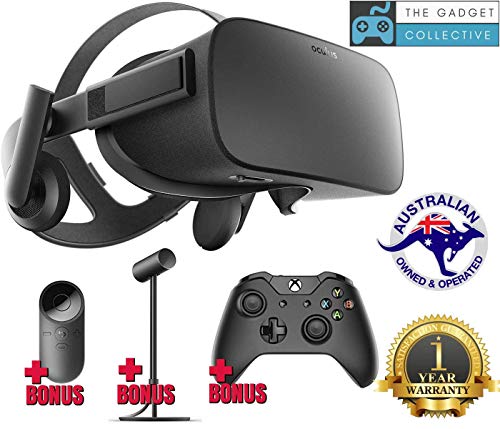
The original pioneer that still delivers a mind-blowing, high-immersion experience despite its age.
Even years after its debut, the original Oculus Rift remains famous for one thing: the sense of “presence.” The combination of its precise, low-latency constellation tracking system and an OLED display — which is the only pick here using OLED — creates a level of immersion that buyers describe as UNBELIEVABLE. For games like Elite Dangerous, it stands out as a transformative experience, and the light weight means you rarely feel neck strain during long sessions.
The VR experience is the aspect that wins people over, and it is the most-mentioned positive by a wide margin. The 110-degree field of view matches the Rift S, and the display refreshes at a smooth 90Hz. The OLED panel offers deep blacks and vivid colors, making dark, atmospheric games look noticeably better than they do on LCD screens. It is also glasses-friendly, fitting over them without touching the lenses.
The trade-off for that immersion is a demanding setup. This is the opposite of the Quest 2’s ease — it requires an updated version of USB 3.0, a beefy PC, and it needs 6 USB 2.0 ports, 2 USB 3.0 ports, and 1 HDMI connection. The image clarity is sub-HD, described as DVD-like, which is noticeable next to the Acer’s sharper 2880 x 1440 panel. And you will need a Facebook account to log in, which is a sticking point for some buyers. It is a classic, but only for those who value immersion over convenience.
The Immersion Winners
- OLED display with deep blacks and vivid colors
- Wide 110-degree field of view enhances immersion
- Lightweight design reduces neck strain
- Fits over glasses comfortably
The Setup Hurdles
- Requires 6 USB 2.0, 2 USB 3.0, and 1 HDMI port
- Sub-HD “DVD-like” image clarity shows its age
- Needs a Facebook account to log in
Choose this one for: the most rich, headset-and-sensor experience with stunning OLED colors, if you have the PC ports and patience for setup.
Choose something else if: you want sharp text, simple setup, or you do not want a Facebook account tied to your hardware.
Understanding the Specs
Resolution and Clarity
Resolution is the total number of pixels on the screen, which directly affects sharpness. A higher resolution, like the Acer’s 2880 x 1440, means you see fewer individual pixels and a smoother image. This is crucial for reading small text or spotting distant objects in games without the “screen-door effect” — the visible grid line between pixels. For a budget headset, aiming for at least 1832 x 1920 like the Quest 2 ensures a clear, enjoyable view.
Field of View (FOV)
Field of view measures how wide your visible area is in degrees. Think of it as the difference between looking through a pair of binoculars versus wearing goggles. A wider FOV, such as the Rift S’s 110 degrees, helps you see more of your environment naturally, which greatly boosts immersion and reduces eye strain. The Quest 2 has a tighter 90-degree view, which feels more like a “tunnel” but is still perfectly usable for focused gaming.
FAQ
Does the Meta Quest 2 work with a PC?
What is the difference between inside-out and external sensor tracking?
Will these headsets work with SteamVR games?
What PC specs do I need for a smooth VR experience?
Can I wear glasses with these VR headsets?
What is a “renewed” VR headset?
Do these headsets require a Facebook account?
Is a higher refresh rate better for VR?
Final Thoughts: The Verdict
Across the board, the budget vr headset for pc winner is the Meta Quest 2 because it offers a fantastic blend of high-resolution visuals, a huge game library, and the flexibility to work with or without a PC. If you want the absolute sharpest image for a sim setup or wearing glasses is a concern, the Acer Windows Mixed Reality is the value-focused choice to reach for. And for the most rich, wide-field-of-view experience with OLED colors, the classic Oculus Rift remains a viable pick for those with a compatible, powerful PC.
How We Picked
We do not accept paid placement. Every pick is matched to a real buyer and a real use-case; we do not hands-on test units.
Sources & Methodology
Specifications: manufacturer listings and product documentation. Review insights: verified customer reviews, as of August 2026. Pricing: not shown on this page (it changes often); check the current price via the retailer link.
As an Amazon Associate, Gadgets Feed earns from qualifying purchases. This does not affect which products we feature.