
Our readers keep the lights on and my morning glass full of iced black tea. As an Amazon Associate, I earn from qualifying purchases.
Specs are compiled from manufacturer listings and verified buyer reviews and can change over time — please confirm the key details on the product page before buying.
If your modem shows one bar of LTE, the tiny internal antenna is usually the culprit, not your router. An outdoor antenna grabs signal from outside and pipes it in, potentially turning a 2 Mbps trickle into a connection that streams 4K without buffering.
I’m Min — the founder and writer behind Gadgets Feed. This guide is built by comparing the manufacturers’ published specifications and the patterns across verified customer reviews, so you get each pick’s real strengths and trade-offs instead of marketing spin.
Whether you live in a rural valley or a city dead zone, this breakdown of the best 4g lte antenna options shows you which model fixes your specific signal problem and which specs matter.
Our Picks at a Glance


How To Choose The Best 4G LTE Antenna
Most people pick an antenna by its dBi number, but the real decision starts with your physical situation: are you pointing at a tower you can identify, or are you surrounded by obstacles coming from all sides? Your answer decides if you need a directional antenna that focuses a narrow beam, or an omnidirectional one that hears everything equally.
Directional vs. Omnidirectional
A Yagi (a long, rod-style antenna) or panel antenna is directional — it collects signal from a narrow angle, so you must aim it at the nearest tower. That focus delivers higher gain, which is why these are the go-to for remote homes with a known tower. An omnidirectional antenna picks up signal from a full circle, so there’s zero aiming needed, but the gain is lower — it’s the right choice when your modem moves around or you don’t know exactly where the tower is.
MIMO and the Multi-Channel Effect
Modern routers support MIMO (multiple input, multiple output), meaning they can use two or four antenna ports at once. A 2×2 MIMO kit sends two separate data streams, which often doubles your throughput compared to a single antenna. If your router has four ports, a 4×4 setup like the Waveform pushes that even further — but it only helps if your router actually supports that many channels.
Connectors and Coax Length
Every antenna ends in a connector — SMA, TS9, or N-type — and if it doesn’t match your router, you’re buying adapters and losing signal in the process. The cable matters just as much: long runs of cheap coax (the cable that carries signal) bleed your signal away, so the shortest route between the antenna and the modem is always the best one, or you buy a kit with high-grade low-loss cable included.
Quick Comparison
| Model | Best For | Type | Gain | Connector | Amazon |
|---|---|---|---|---|---|
| Proxicast Pro-Gain 2×2 MIMO★ Best Overall | Rural full-coverage installs | Omnidirectional | 7 dBi | Dual N Female | Amazon |
| Tupavco TP514 YagiBudget Champion | Budget tower targeting | Directional Yagi | 9 dBi | SMA-Male / TS9 | Amazon |
| Eifagur 10-12dBi Omni | Hotspot no-aim setups | Omnidirectional | 10-12 dBi | SMA Male / Dual TS9 | Amazon |
| Eifagur 11dBi MIMO Panel | Mid-range MIMO routers | Directional Panel | 11 dBi | Dual SMA Male | Amazon |
| Proxicast ANT-129-001 Panel | High-gain multi-carrier | Directional Panel | 7-10 dBi | 2x N Female | Amazon |
| MOPHAMP 15dBi MIMO Kit | Complete long-range kits | Directional Log Periodic | 15 dBi | Dual TS9 | Amazon |
| Waveform QuadMini 4×4 | Premium no-aim 5G | Omnidirectional | 5.2 dBi | 4x SMA (via kit) | Amazon |
In‑Depth Reviews
1. Proxicast Pro-Gain 4G/5G 2×2 MIMO Antenna
Our pick — over 4★ from 90+ verified ratings; the strongest balance of quality and price.
The heavy-duty omnidirectional that rescues rural routers with genuine 2×2 MIMO muscle.
If your modem sits in a valley between trees where no single tower direction is clear, this Proxicast is the fix. Its omnidirectional elements swallow signal from every side at once while the 2×2 MIMO design uses two channels — where cheaper single-channel antennas send one stream, this one sends two, which is exactly how owners end up reporting speeds like 26-28 Mbps down on a 25 Mbps plan.
The physical build is the first thing you notice: it’s a 30-inch mast that weighs 4 pounds, so this is a permanent roof or PVC-pipe installation, not a window clip. Buyers report that it replaced a Panorama antenna on a Cradlepoint IBR600 and saw uploads jump from 0.1 Mbps to 22 Mbps, and another owner in a dense-tree valley at 12-13.5 miles from towers went from being stuck on 3G to a consistent Band 14 connection for 10+ devices.
The trade-off is in the setup logistics: it requires two coax extension cables because the dual N connectors sit at the base, and at 7 dBi it’s the lower-gain end of this list — but for a full-circle no-aim install, that’s the point. Its sheer size and weight are the price of that coverage, and one owner found their paddle antennas actually brought in faster speeds, so it’s a reminder that no antenna beats a poor placement.
What Own
- True 2×2 MIMO across all 4G/LTE and 5G bands — two data streams beat one
- Omnidirectional pickup needs zero aiming in any direction
- Heavy 4-pound build that survives harsh outdoor mounting
What It Asks
- Requires 2 coax extension cables — nothing included for the run to your router
- At 7 dBi, the gain is modest versus directional panel rivals
- 30-inch mast is a permanent install, not a quick window mount
Your best bet if: you have a modem with two antenna ports and zero idea which direction the tower sits — the omnidirectional MIMO does the aiming for you.
Look elsewhere if: you need a compact setup or already have coax cables wired — this one expects you to supply the extensions.
2. Tupavco TP514 Yagi Antenna
The sub-forty buck Yagi that turned 2 Mbps dead zones into 30 Mbps reality.
When you already know exactly where the tower is, this Tupavco Yagi is the cheapest serious upgrade on the list. It’s a directional log-periodic antenna pulling 9 dBi of gain across both the 806-960 MHz and 1.7-2.5 GHz bands, and it ships with a 2-foot SMA-Male to TS9 cable so it plugs into most hotspots from the start.
Owners mention going from under 2 Mbps to a steady 30 Mbps at over 9 kilometers from the tower. Customers note going from under 2 Mbps to a steady 30 Mbps at over 9 kilometers from the tower, and a rural owner saw their AT&T Nighthawk jump from 1-2 bars to a consistent 4 bars with a two-mile line of sight. Owners praise the sub-forty dollar price for delivering 30 Mbps speeds from a 2 Mbps baseline.
Signal quality varies: a Yagi only works when aimed well and fed by short cable, so owners stress keeping coax under 50 feet. Owners stress keeping coax under 50 feet, and the lack of instructions makes the first install a guessing game for sourcing the right connectors. Buy two and mount them perpendicular for a DIY MIMO effect, and you’ll see the 22+ Mbps down that makes the multi-device streaming work.
Perfect-entry pick: a beginner-friendly directional antenna that proves the concept for pocket change — just plan on buying a second one and some decent coax to get the full speed story.
Reach for this if: you’re on a budget, know your tower’s direction, and want to test whether an antenna fixes your signal before spending big.
Expect this quirk: the SMA-Male connector is fixed, so a router with a different port means adapters and a few dB of lost signal.
3. Eifagur 10-12dBi Omni Antenna

The no-aim omnidirectional that hands hotspot owners a huge 5-meter cable to play with.
Netgear Nighthawk M1 and MR1100 owners, this one was built with your exact ports in mind. The Eifagur omni spans 698-2700 MHz with a 10-12 dBi gain, and the standout detail is the included 5-meter low-loss cable with an SMA-Male connector plus an SMA-Female to dual-TS9 adapter — so it physically clicks onto the Nighthawk, MiFi 8800L, and a long list of Huawei and ZTE routers without extra shopping.
A houseboat owner reports that rotating the antenna 90 degrees toward the nearest tower (tracked via an app) took them from poor results to smooth AT&T streaming, and a Netgear LB1120 user saw signal quality climb from 39 to 58 with RSRP moving from -120 to -98 — enough to stabilize a shaky one-bar connection into two steady bars.
The catch is that signal strength gets the most discussion here, and it’s genuinely mixed: it works brilliantly for some and does nothing for others. Focused aiming still matters even on an omni, the included mast is not, and one owner found the single cable acts as one channel despite the Y-adapter — a reminder to check that your router truly uses both TS9 ports before expecting MIMO gains.
Straightforward reach: the best pick when you want one antenna that physically fits a Nighthawk M1 or MiFi with zero adapter hunting — the 5-meter cable is the hidden gift.
Buy it if: your hotspot has dual TS9 ports and you want a single, no-aim antenna with a long factory cable that reaches a window or mast.
skip it if: you expect a guaranteed speed jump — aiming and line-of-sight still rule the day here, exactly as the mixed results show.
4. Eifagur 11dBi 2×2 MIMO Panel

A rugged 2×2 panel that gives MoFi and Cradlepoint routers the double-channel signal they crave.
If your router already supports MIMO, a single-antenna setup is leaving speed on the table — and this Eifagur panel is made for routers like the MoFi 4500, MoFi 5500, and Cradlepoint IBR900. It pulls 11 dBi of directional gain across 698-2700 MHz and ships with two 5-meter RG58 cables and dual SMA-Male connectors, so the router gets two full data streams instead of one.
A Verizon Jetpack 8800L user gained 1-2 bars and roughly double the speed using SMA-to-TS9 adapters. A Verizon Jetpack 8800L user gained 1-2 bars and roughly double the speed using SMA-to-TS9 adapters, and another owner who replaced a Netgear MIMO saw RSSI go from -107 to -102 with SNR jumping from a fragile 0-3 dB to a rock-solid 15 dB — translating to a stable 25-27 Mbps down at 7 miles from the tower through dense trees. The included dual U-bolt brackets fit 1.5- to 2-inch pipe, and the waterproof housing shrugs off weather.
Signal quality feedback is split: it’s fantastic for some, but one owner watched speeds collapse after five hours. It needs aiming like any directional, works best outdoors, and dual-SMA means you’ll want a router that genuinely has two ports — not a single-channel hotspot expecting a miracle.
The Double-Channel Payoff
- True 2×2 MIMO with two 5-meter cables for dual-port routers
- 11 dBi directional gain that measurably lifts RSSI and SNR
- Waterproof build with U-bolts for standard masts
The Aiming Reality
- Directional means you must find and point at the tower
- Dual SMA connectors demand a true MIMO router to benefit
- Result varies by location — some see little gain indoors
Your move if: you own a MoFi or Cradlepoint with two antenna ports and want the MIMO speed jump without a premium price.
Think twice if: your router has a single antenna connection or you can’t mount outdoors — the directional panel punishes wrong placement.
5. Proxicast ANT-129-001 Panel

The cross-polarized panel that doubled speeds for owners miles away from any tower.
This Proxicast is the precision tool of the list: a 75-degree beamwidth directional panel that cross-polarizes its MIMO signal to reduce interference, pulling 7-10 dBi across the full 600-960/1710-6000 MHz range. Its defining trick is that you can buy two and mount one vertically with the other at 45 degrees to build a 4×4 MIMO 5G antenna — a path no other pick here offers.
Reviewers point out downloads jumping from 9-10 Mbps to 45-50 Mbps and uploads from 1-2 to 10-15 Mbps after aiming. Shoppers say a rural install two miles from a tower with no line-of-sight that went from -110/-103 dB to a far healthier -95 dB, driving downloads from 9-10 Mbps up to 45-50 Mbps and uploads from 1-2 up to 10-15 Mbps. Another owner on an island more than 10 miles out finally got stable internet instead of 1.5 Mbps DSL, streaming HD without a single buffer.
The catch is right in the name: it’s directional, and one owner summed it up plainly — you have to find the tower and point the panel straight at it. That aiming effort pays off with signal strength being the thing everyone raves about, but the two female N connectors mean you’re buying two coax extension cables and the mount hardware yourself. It’s a serious install for a serious result.
Precision payoff: the highest-trust panel for owners willing to aim carefully — the 4×4 expansion path makes it the only pick here you can grow into later.
Choose this if: you can identify your tower, mount outdoors, and want a panel with a clear upgrade path to 4×4 MIMO down the road.
Be ready for: buying your own coax cables and doing the aiming work — this is not a set-and-forget antenna.
6. MOPHAMP 15dBi MIMO Log Periodic Kit
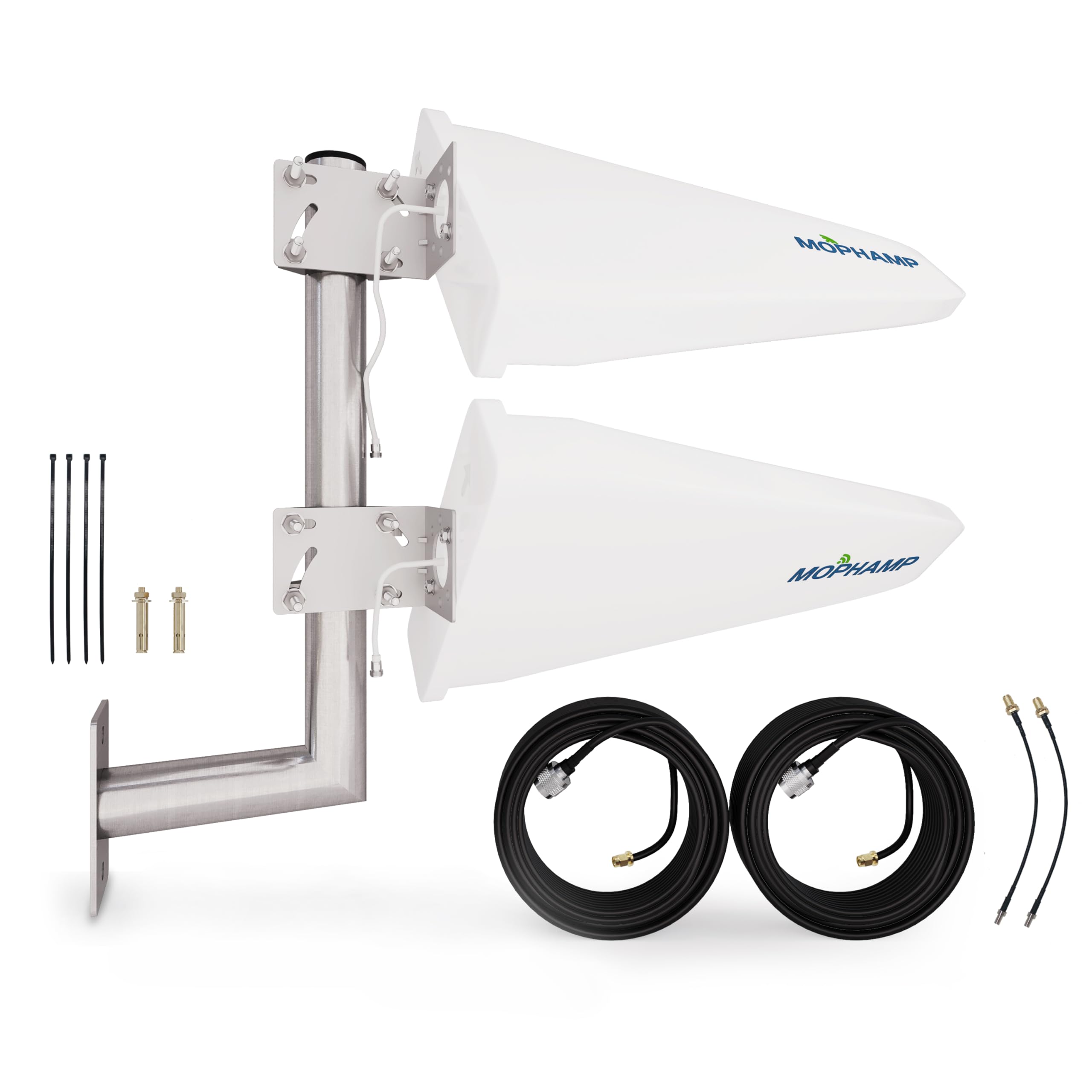
A 15 dBi log-periodic kit that arrives with everything except the aiming patience.
This MOPHAMP kit is the highest-gain directional option here, and it arrives as a true turnkey bundle: two antennas, two 32-foot low-loss coaxial cables, two TS9 adapters, a solid L-mount, anchors, cable ties, and step-by-step guides. At 15 dBi across 698-3800 MHz, it’s aimed at 4G and 5G alike, and the complete-package approach removes the “what else do I need” shopping trip that trips up other builds.
A Netgear MR6500 owner went from under 1 Mbps to roughly 300 Mbps down and 20 Mbps up with proper aiming. A Netgear MR6500 owner went from under 1 Mbps to roughly 300 Mbps down and 20 Mbps up by tripod-mounting the kit near a window pointed at the tower, and another owner with a tower just two blocks away saw only a modest 5 Mbps gain — proof that the gain number is only as good as your placement.
What owners flag most here is the mounting, not the signal. The stainless base plate drew honest criticism for being thin with minimal tack welds that can wobble in wind, and one owner replaced it entirely with a heavier strut-channel setup for safety. The antennas and low-loss cables themselves get solid marks — it’s the included mount that asks for a hard look before you commit to a high, exposed installation.
Kit-complete value: the only pick here that hands you antennas, cables, and mount in one box — just budget a stronger mount if your install site sees serious wind.
Grab this if: you want maximum gain and a full kit without piecing together cables and adapters separately.
Swap this thinking if: you’re mounting high in an exposed spot — consider replacing the included plate before relying on it long-term.
7. Waveform QuadMini 4×4 MIMO

The mini 4×4 MIMO box that treats aiming as optional and doubles uploads overnight.
For T-Mobile Home Internet and Verizon users with a four-port gateway, this Waveform is the premium answer to the aiming problem. Its 4×4 MIMO design pushes four channels into your router — more than any other pick here — and the omnidirectional pattern means you just place it on the side of the house with the best signal and walk away. The 5.2 dBi gain looks small next to the panel numbers, but with four streams working together, the throughput math is a different game.
Owner reports show uploads doubling to 100 Mbps and downloads stabilizing from 90-320 Mbps swings to a steady 220-280 Mbps. A user with a T-Mobile gateway saw uploads double to 100 mb/s with better download latency, and another went from inside swings of 90-320 Mbps down to a stabilized 220-280 Mbps inside, then 480 Mbps on an outside pole. The installation is genuinely easy — suction cups for the window, a pole adapter, a desktop stand, or direct wall mounting — and the complete kit ships with a window-entry cable, weatherproofing boots, and expert support seven days a week.
The premium price buys polish, but it’s not flawless. The cables are bulky and stiff enough that one owner said they interfered with a T-Mobile gateway’s base, and the setup for a truly outdoor install is more involved than the indoor window placement suggests. If your router has only two antenna ports, the fourth channel goes unused — so check your gateway’s ports before you spend for the full 4×4 experience.
The 4-Stream Advantage
- True 4×4 MIMO for any router with four antenna ports
- Omnidirectional pickup with zero tower-aiming required
- Complete kit with window entry cable and weatherproofing included
The Premium Fine Print
- Highest price here by a wide margin
- Stiff, bulky cables can crowd a gateway’s base
- 4×4 benefit only exists if your router has four ports
Splurge on this if: you have a four-port 5G gateway and want the easiest no-aim install with the best long-term support in the category.
Hold off if: your router has only two antenna ports — you’d be paying for two channels you can’t use.
Understanding the Specs
Gain (dBi) and What It Really Buys
Gain is the antenna’s ability to focus signal in a direction, measured in dBi. Higher numbers like 15 dBi mean a tighter, more powerful beam — excellent for a known tower miles away. Lower numbers like 5.2 dBi on an omnidirectional mean the antenna hears in a full circle, so the gain trades focus for coverage. The right choice depends on whether you can aim, not on chasing the biggest number.
MIMO Channels and Data Streams
A 2×2 MIMO antenna carries two channels, and a 4×4 carries four, each channel acting as a separate data pipe to your router. More channels only help if the router has matching ports — a single-port hotspot can’t use a 4×4 antenna’s extra streams. When both sides match, the speed gain is often dramatic, which is why MIMO kits dominate the highest-performing installs.
FAQ
Will any 4G LTE antenna work with my router or hotspot?
What is the difference between a Yagi and a panel antenna?
Do I need an omnidirectional or directional antenna?
What does MIMO mean and why does it matter for my speed?
Does a longer cable help me place the antenna higher up?
Can an outdoor antenna improve my upload speed or just downloads?
How far from a cell tower can an antenna still help?
Why did my antenna not improve my signal at all?
Final Thoughts: The Verdict
For most buyers, the best 4g lte antenna is the Proxicast Pro-Gain 2×2 MIMO because its omnidirectional design removes the hardest part of any install — figuring out where the tower is — while still delivering true two-channel MIMO speed. If you know your tower’s direction and want the biggest speed-per-dollar, the budget Tupavco Yagi is a phenomenal starting point. And if you own a four-port 5G gateway and want a no-aim premium solution, the Waveform QuadMini is the one to reach for — it’s the category’s crowd favorite for good reason, earning its reputation across well over 500 owners.
How We Picked
We do not accept paid placement. Every pick is matched to a real buyer and a real use-case; we do not hands-on test units.
Sources & Methodology
Specifications: manufacturer listings and product documentation. Review insights: verified customer reviews, as of August 2026. Pricing: not shown on this page (it changes often); check the current price via the retailer link.
As an Amazon Associate, Gadgets Feed earns from qualifying purchases. This does not affect which products we feature.