
Our readers keep the lights on and my morning glass full of iced black tea. As an Amazon Associate, I earn from qualifying purchases.
Specs are compiled from manufacturer listings and verified buyer reviews and can change over time — please confirm the key details on the product page before buying.
The Intel Core i9-14900K is a powerhouse, but it runs incredibly hot. Its peak power draw creates heat that air coolers simply cannot handle, so a 360mm liquid cooler is the standard answer for keeping it stable. This guide looks at ten 360mm AIO coolers (all-in-one liquid coolers) built for LGA1700 sockets, sorting through performance, noise, and software to find which one fits your build.
I’m Min — the founder and writer behind Gadgets Feed. This guide is built by comparing the manufacturers’ published specifications and the patterns across verified customer reviews, so you get each pick’s real strengths and trade-offs instead of marketing spin.
Here is the practical breakdown of the best aio cooler for 14900k, focused on the specs and real-world experience that keep this demanding processor running cool and quiet.
In this article
Note: This list uses flexible matching for radiator size, accepting 280mm as a smaller alternative. However, for the 14900K, 360mm is the standard to handle its heat; 120mm and 140mm single-fan units are rejected for this purpose.
Our Picks at a Glance



How To Choose The Best AIO Cooler For 14900K
Choosing a cooler for the 14900K is not about aesthetics first; it is about physics. This CPU can pull over 300 watts under a full multi-core load, which generates massive heat that must be moved away quickly. A 360mm radiator with three 120mm fans provides the surface area needed to dissipate that heat effectively, keeping your system stable and preventing thermal throttling.
Prioritize Radiator Size and Compatibility
The 14900K’s 300W+ peak draw demands a 360mm radiator to avoid thermal throttling. Before buying, measure your case to ensure it can mount a 360mm radiator (usually around 394-397mm long) on the top or front. Also, confirm your motherboard socket is LGA1700 compatible, as all picks here are, but it is a vital first check.
Decode Fan and Pump Specs
Look at airflow (measured in CFM, cubic feet per minute) for fans and pump speed (in RPM, revolutions per minute). A higher CFM moves more air across the radiator fins, which helps cool the liquid. A faster pump circulates the liquid more quickly, ensuring the heat is transferred efficiently from the CPU block to the radiator.
Check Noise Levels and Software
Consider noise, measured in decibels (dB or dBA); lower is quieter. A cooler that is powerful but sounds like a jet engine is a poor trade for daily use. Also, if you choose a cooler with an LCD screen, remember it requires background software to run, which can use CPU resources and occasionally cause headaches with customization.
Quick Comparison
| Model | Best For | Max Pump/Fan Speed | Noise Level | Airflow (CFM) | Amazon |
|---|---|---|---|---|---|
| MSI MAG Coreliquid A13 360★ Best Overall | Mainstream Performance | 5200 RPM | 14.4 dB | — | Amazon |
| Thermalright FW360 SE ARGB V2Best Value LCD | Budget LCD Choice | 2000 RPM | 28.2 dBA | 68.9 | Amazon |
| ARCTIC Liquid Freezer III Pro 360Cooling King | Extreme Value Cooling | 3000 RPM | — | 77 | Amazon |
| Thermaltake TH360 V2 ARGB | Budget RGB Performance | 2000 RPM | 25.8 dB | — | Amazon |
| PCCOOLER DC360 | Budget IPS Display | 2500 RPM | 15 dB | 90.56 | Amazon |
| NZXT Kraken Plus 360 | Quiet LCD Performance | — | 30 dBA | — | Amazon |
| Lian Li GA II Trinity SL-INF 360 | Infinity Mirror Aesthetics | 3200 RPM | 35 dBA | 61.3 | Amazon |
| MSI MEG CoreLiquid S360 | VRM Cooling & Display | 2250 RPM | 23 dBA | 56.2 | Amazon |
| NZXT Kraken Elite 360 RGB | Large, Brilliant LCD | 2400 RPM | 30 dBA | 78.86 | Amazon |
| ASUS ROG Ryujin III ARGB Extreme 360 | Absolute Top Performance | — | 16 dBA | — | Amazon |
In-Depth Reviews
1. MSI MAG Coreliquid A13 360
Our pick — over 4.5★ from 300+ verified ratings; the strongest balance of quality and price.
The rock-solid mainstream pick that blends serious cooling with a near-silent pump.
This MSI cooler is the crowd’s choice for good reason: it tames the 14900K’s heat without fuss. Its integrated three-phase pump spins up to 5200 RPM for strong circulation, yet the noise rating sits at just 14.4 dB, which is whisper-quiet. Buyers report dropping from a loud 85°C on stock coolers down to 50-55°C during intense gaming, and one long-term user notes it has been “Working well.after over 6 months of hard use and demanding games and AI computing. Cpu.stays super cool.”
You get out-of-box support for LGA 1851, the newest Intel socket, alongside LGA 1700, making it a future-proof option. The 390mm triple-layered water tubes feature reinforced mesh sheathing to prevent evaporation over time, adding to its durability. Installation is simplified by preinstalled fans and included thermal paste, which is a huge time-saver for a new build.
The main trade-off here is physical size, as some owners found mounting the large 360mm unit tricky in tighter cases. The split-flow radiator with an integrated pump is a well-engineered design that balances durability with reduced motor resonance, so you get performance and longevity. This is the definition of a sensible, high-value upgrade for a 14900K system.
What Wins Owners Over
- Excellent cooling performance with drops of ~30°C reported
- Quiet operation at 14.4 dB thanks to ceramic bearings
- Easy setup with preinstalled fans and included paste
Where It Gets Tricky
- Large radiator size can make mounting a challenge in small cases
- Some found the MSI logo alignment with mounting brackets imperfect
Reach for this if: you want a dependable, proven cooler that keeps the 14900K icy cold while staying affordable.
Look elsewhere if: your case is compact, as the 360mm size needs plenty of room for comfortable installation.
2. Thermalright FW360 SE ARGB V2
An entry-level LCD AIO that undercuts the competition on price without sacrificing core cooling.
The standout feature here is the 2-inch LCD screen on the pump, which you can customize to show system stats, images, or animated GIFs through Thermalright’s software. While this is a premium feature, the true strength lies in its cooling capability, which owners say keeps even a 14700K well within temperature specs. The three TL-M12Q 120mm PWM fans spin up to 2000 RPM, pushing 68.9 CFM of airflow to the radiator.
A unique design choice is the daisy-chain fans, which connect to each other to reduce cable clutter and improve case airflow. It supports a wide range of sockets, including Intel LGA1851, 1700, 1200, and 115X, plus AMD AM5 and AM4. Weighing just 200 g, this is significantly lighter than the 2005 g ARCTIC Liquid Freezer III Pro, a 10x difference that makes it much easier to handle during installation.
The recurring gripe is the LCD software, which is described as a resource hog.
Smart Budget Buy: You get a functional, attractive LCD AIO for less than most non-LCD rivals, and the core cooling performance is praised across the board. The 5-year warranty adds confidence.
Pick this for: a budget-conscious build wanting the LCD aesthetic without the premium price tag.
Be aware: the LCD customization software demands an always-running service that consumes more CPU than you would expect for a small screen.
3. ARCTIC Liquid Freezer III Pro 360 A-RGB
A thick-radiator heavyweight that outperforms far pricier rivals with a clever VRM fan.
It uses a contact frame for Intel LGA1851 and LGA1700 to distribute pressure optimally, which protects the CPU and improves heat transfer. The integrated VRM fan is a unique addition that cools your motherboard’s voltage converters, ensuring stable power delivery under heavy loads.
Owners consistently report stellar temperatures, with one noting their 9800X3D stays under 60°C while gaming. The native offset mounting shifts the cold plate toward the CPU hotspot for more efficient heat transfer. At 2005 g, it is a hefty unit, but that weight comes from a thicker radiator and sturdy build quality.
The catch is case compatibility, as the thickest radiator in this roundup will not fit in small cases like a Meshify C. Some owners also found the pre-installed cables too short, which complicates cable management. If your case has the space, this is hands-down one of the best-performing coolers you can buy for the money.
Performance Leader: The combination of high airflow, offset mounting, and the VRM fan makes this the top choice for sustained all-core workloads on the 14900K. It is the smart play for overclockers and heavy multitaskers.
Best for: users with a roomy mid-tower or full-tower case who want maximum cooling headroom.
Think twice if: you have a compact case, as the thick radiator and short cables create installation headaches.
4. Thermaltake TH360 V2 ARGB
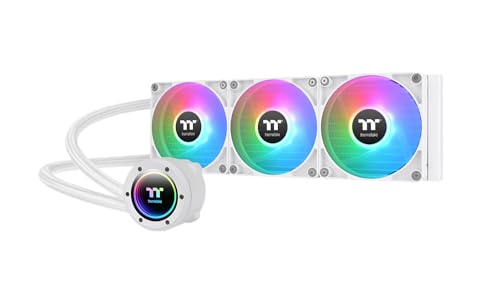
A white-armed RGB performer with a mirror waterblock and solid copper cooling core.
Thermaltake’s TH360 V2 is all about the visual impact, featuring a 360-degree rotational cap with Infinity Mirror Lighting for diverse effects. This ARGB version syncs smoothly with ASUS Aura Sync, GIGABYTE RGB Fusion, MSI Mystic Light Sync, and ASRock Polychrome, so it blends into your existing ecosystem. The high-performance copper base plate accelerates heat conductivity, and the pump enables maximum water circulation.
Under the showy exterior, it holds its own. The three 120mm PWM fans spin up to 2000 RPM with a noise level of 25.8 dB, and owners mention a noticeable temperature drop under load. One long-term user who has run it for 2 years praised it, saying “you can’t beat it – would recommend!” The socket compatibility is extensive, covering Intel LGA 2066/2011-3/2011/1700/1200 and older, plus a huge list of AMD sockets.
Installation gets mixed feedback, with some owners finding the instructions vague. The short tubes and cables can also limit mounting flexibility. For a build where looks matter, this cooler delivers a strong RGB punch without slacking on actual cooling duty.
Visual & Thermal Assets
- Stunning Infinity Mirror lighting synchronized with all major RGB software
- Copper base plate for high heat conductivity
- Proven reliability with multi-year use reported
Practical Hiccups
- Vague installation instructions leave some connectors unexplained
- Short tubes and cables can complicate case placement
Choose this for: a vivid RGB build where motherboard lighting sync matters as much as temperature readings.
Note that: installation may require patience, as the manual is not the clearest guide.
5. PCCOOLER DC360
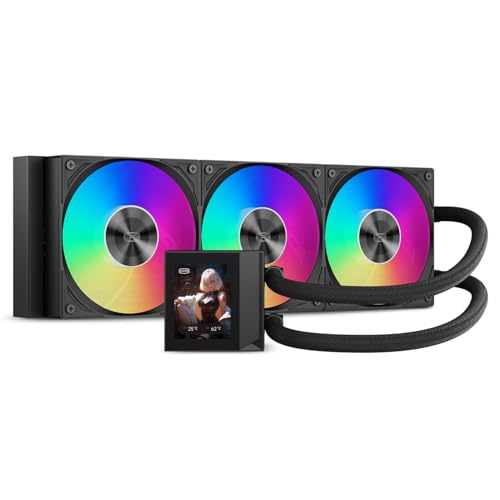
The budget screen king with the highest airflow and a razor-sharp 2.4-inch IPS display.
The PCCOOLER DC360 packs the biggest punch for the price, featuring a customizable 2.4-inch IPS LCD that displays real-time system info or plays custom PNG, JPG, GIF, and MP4 files. Its three 120mm fans are the most powerful in this lineup, pushing a massive 90.56 CFM of airflow at up to 2500 RPM, while the noise level stays at a modest 15 dB. This combination delivers cooling that keeps a Ryzen 9 5950X ice-cold under heavy gaming, according to owners.
You get a 400mm tubing length for flexible top or front mounting, and pre-installed fans reduce setup time significantly. It supports Intel LGA1851/1700/1200/115X and AMD AM5/AM4 sockets, making it a sturdy choice for modern builds. The screen orientation can be adjusted to suit different pump-block layouts, which is a thoughtful touch.
The main downside is noise at full speed, with one owner describing the fans as “jet-engine loud” under max load. The LCD software is also a bit finicky and harder to find, though it eventually works and supports GIFs. For a 14900K, this is a high-airflow option that will keep temps in check while turning heads with its display.
The Display Champion: This offers the largest and most capable screen in the budget tier, backed by the highest fan airflow of any pick here. It is a phenomenal value for a 14900K build that wants a visual centerpiece.
Best for: builders who want an impressive LCD screen without paying premium-tier prices.
Keep in mind: at max fan speed it gets loud, and the customization software is not the most polished.
6. NZXT Kraken Plus 360
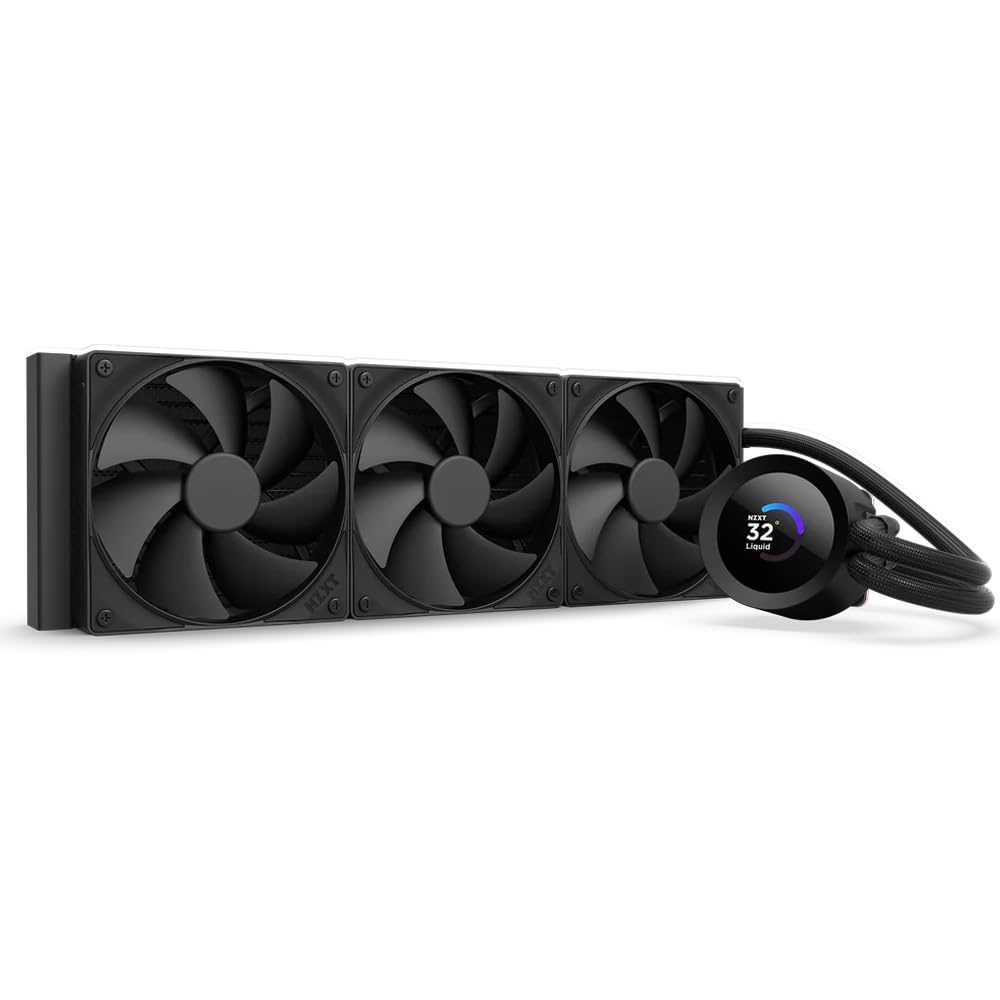
A sleek 360mm with a bright square LCD and true silent operation at idle.
The NZXT Kraken Plus 360 delivers the polish the brand is known for, headlined by a bright 1.54-inch square LCD that shows temps, GIFs, or even web integrations like Spotify and YouTube via NZXT CAM software. The custom Turbine pump is engineered for high flow and head pressure, providing efficient, low-noise cooling. Customers note CPU temps below 30°C during idle and light use, which is outstanding for a high-end chip.
Its defining feature is Zero RPM Mode, which completely stops the fans at low loads for silent operation. This makes it an excellent choice for a quiet workstation or a gaming rig where background noise is a concern. The single breakout cable from the pump cap reduces cable clutter, and pre-applied thermal paste speeds up installation.
The trade-off is the software, as the pump requires NZXT CAM to be running, and one owner reported a critical pump failure at 90°C that required deep system cleanup to fix. While this is an uncommon event, it is a durability concern to be aware of. For most users, this cooler is a beautiful, quiet performer that keeps things frosty.
Silent & Stylish: The combination of a crisp LCD and Zero RPM fan mode makes this the quietest premium choice in the lineup. It is a solid mid-premium option for those who value acoustics.
Ideal for: a quiet, clean build where the LCD and near-silent idle matter more than raw overclocking headroom.
Be cautious: the reliance on NZXT CAM for pump control is a single point of failure; pump issues have been reported by a minority.
7. Lian Li GA II Trinity SL-INF 360

The infinity-mirror showstopper that directly tames a 14900K to 80°C peaks.
Lian Li’s GA II Trinity is a direct answer for 14900K owners, with verified reports of this cooler keeping an i9-14900K at peak temperatures of 80°C and idling between 50-65°C during gaming. This is a clear improvement over a previous NZXT x62 that hit 90°C+. The three interchangeable pump caps each feature two individually controllable rings of lighting, offering deep customization.
The 27mm thick radiator provides significant thermal performance, and the 45-degree tubing connector allows for 360° tube rotation for easier routing. The 120mm fans use fluid dynamic bearings for stable, quiet operation. Its 3200 RPM maximum speed ensures effective airflow, though it runs at 35 dBA, which is the loudest in this group.
The design focuses on easy installation, with uniquely designed mounting backplates compatible with most mainstream sockets. The copper plate fin spacing is 13% larger to prevent buildup over time, and the tube diameter is 20% bigger to increase water flow. Owners praise the L-Connect 3 software for offering comprehensive fan curves and sync.
Why It Shines
- Verified 14900K performance with 80°C peaks under load
- Stunning infinity mirror fans with dual lighting rings
- Easy installation with adjustable 45-degree tube connector
Consider This
- Noisiest pick in the lineup at 35 dBA
- RGB less vivid than some competitors like Corsair
Reach for this if: you want a proven 14900K cooling solution with class-leading infinity-mirror aesthetics.
Look elsewhere if: you need near-silent operation, as this unit is noticeably louder than other premium options.
8. MSI MEG CoreLiquid S360
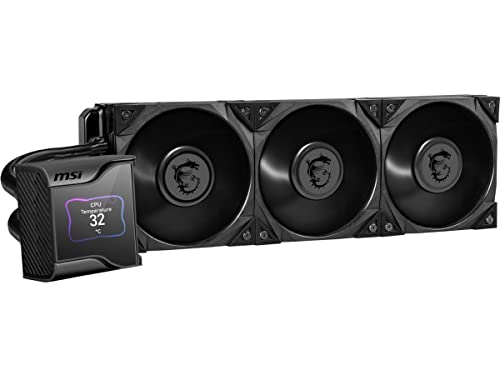
A 7th-gen Asetek pump paired with a unique VRM fan and a crisp 2.4-inch display.
The MSI MEG CoreLiquid S360 is a premium cooling solution built on the reliable Asetek 7th Generation pump, PWM-controlled with a 50,000-hour life expectancy. Its defining feature is a concealed 60mm downdraft fan hidden between the pump and IPS panel that actively cools the VRM, M.2 SSD slots, and surrounding components. This is ideal for the 14900K, which can put significant stress on motherboard power delivery.
The 2.4-inch IPS display offers 320 x 240 pixels with 16-bit color and 500 nits of brightness, protected by a magnetically attached transparent cover. The Silent Gale P12 fans are engineered for minimal noise, and reviewers point out excellent performance, keeping a 14700K at just 54°C and working well with the i9-13900K. The pump noise is rated at a very quiet 21.2 dBA.
Installation is straightforward with tool-free mounting, though the hose is noted as short. The MSI Center software handles control of fans and the display, but one owner hit a bug that was fixed by disabling the onboard GPU in BIOS. This is a top-tier choice for users who want VRM cooling as standard, delivering reliability and a large, clear display.
The Enthusiast’s Tool: The integrated VRM fan sets this apart for heavy overclocking, ensuring the motherboard stays cool as the CPU works. The display is large and crisp, making it a premium package for the 14900K.
Choose this for: maximum stability under extreme loads, thanks to active VRM cooling and a proven Asetek pump.
Note that: the price is premium, and the short hose may limit radiator placement options.
9. NZXT Kraken Elite 360 RGB

The most stunning 2.72-inch LCD you can put on a pump, with 60Hz smooth visuals.
The NZXT Kraken Elite 360 RGB is the definitive statement cooler, featuring a large 2.72-inch IPS LCD with a crisp 640 x 640 resolution, a smooth 60 Hz refresh rate, and an ultra-bright 690 cd/m² backlight. This screen is a genuine centerpiece, allowing you to display GIFs, monitor system performance, or even integrate Google Photos, Spotify, and YouTube. The RGB LED ring syncs with on-screen content for a cohesive look.
Under the display, the custom Turbine pump delivers a 10%* performance boost with less noise, efficiently cooling even the most heat-prone CPUs. Shoppers say temps between 60-70°C for a Ryzen 7 9800X3D, and praise the easy setup with pre-applied thermal paste and tool-free brackets for AMD AM5/AM4 and Intel LGA 1851/1700.
The most common negative is a ticking noise from the pump at lower RPMs, which some owners find annoying. There is also one report of a pump failing after 4 months, though this is rare. For those who prioritize an class-leading display experience and are willing to accept the premium price, this is the cooler to beat.
The Visual Showpiece: No other AIO here matches the screen size and resolution of the Kraken Elite. It is a fantastic choice for builders who treat the cooler as the centerpiece of their PC.
Ideal for: a premium build where the LCD is the star and you want the largest, sharpest screen available.
Be aware: some units emit a ticking noise from the pump at low speeds, and the price is at the top of the range.
10. ASUS ROG Ryujin III ARGB Extreme 360

The ultimate 360mm with a 3.5-inch LCD and the latest Asetek Gen8 V2 pump.
The ASUS ROG Ryujin III ARGB Extreme is the pinnacle of liquid cooling, built on the latest Asetek Emma Gen8 V2 pump with a 3-phase motor for ultimate cooling performance, higher flow, and lower impedance. It features the largest screen in this lineup, a 3.5-inch LCD with 640×480 resolution for animated GIFs or live monitoring of clock frequency, voltage, temperature, fan speed, and coolant flow. The embedded fan in the pump housing cools motherboard VRMs, and the thickened ARGB fans snap together with magnets for streamlined installation.
Owners are emphatic about its performance, with an AMD 9950X3D idling at 42°C and staying under 70°C while gaming. The noise level is rated at just 16 dBA, making it remarkably quiet for such a powerful unit. The ARGB fans provide high airflow and static pressure with noise optimization, and Armoury Crate software allows for smooth synchronization of pump, embedded fan, and screen.
The clear drawbacks are the premium price and the software, with one owner noting “the software sucks” despite the hardware being amazing. However, for enthusiasts who want the absolute best cooling and a statement-piece aesthetic, this is the definitive choice. It is “HULK OF A CPU COOLER” as one satisfied owner put it.
Why It’s the Flagship
- Largest 3.5-inch LCD with 640×480 resolution
- Latest Gen8 V2 pump for superior flow and cooling
- Exceptionally quiet at 16 dBA despite massive cooling power
The Premium Catch
- Highest price point in this guide
- Armoury Crate software is considered annoying by some owners
Best for: enthusiasts and content creators who demand top-tier cooling and are willing to pay for the best hardware available.
Accept that: you will spend the most money here, and you will need to tolerate Armoury Crate for full control.
Understanding the Specs
Pump Speed (RPM)
The pump moves the liquid coolant between the CPU block and the radiator. A higher pump speed, measured in revolutions per minute (RPM), means faster circulation, which helps transfer heat away from the processor more quickly. For a 14900K, a pump capable of 2000-3000+ RPM is typical; the MSI A13 hits 5200 RPM for aggressive circulation, though this does not always translate to quieter operation.
Airflow (CFM) and Static Pressure
Airflow, measured in cubic feet per minute (CFM), tells you how much air the fans push through the radiator. Higher CFM generally means better cooling, but static pressure (measured in mmH2O) matters just as much for pushing air through the dense radiator fins. The PCCOOLER DC360 leads with 90.56 CFM, while the ARCTIC pushes 77 CFM, making both strong choices for dissipating the 14900K’s heat.
FAQ
Is a 360mm AIO necessary for the Intel 14900K?
Will these coolers fit my LGA1700 motherboard?
How do I check if my PC case fits a 360mm radiator?
What is the difference between an AIO and a custom liquid cooling loop?
How important is the LCD screen on an AIO cooler?
What does the noise level (dBA) mean for daily use?
Should I buy a cooler with a higher pump speed for better cooling?
What is a VRM fan and why does it matter for the 14900K?
How long will a 360mm AIO cooler last?
Is thermal paste included with these AIO coolers?
Final Thoughts: The Verdict
For most people, the best aio cooler for 14900k is the MSI MAG Coreliquid A13 360 because it blends strong cooling performance, a quiet 14.4 dB pump, and out-of-box LGA 1851 support at a sensible price. If you want the most cooling headroom and an integrated VRM fan to protect your motherboard, the ARCTIC Liquid Freezer III Pro 360 is the one to reach for. And for the ultimate LCD experience with top-tier visuals, the NZXT Kraken Elite 360 RGB is the definitive statement piece. With a high star rating and a largegroup of nearly a thousand owners backing it, the MSI A13 is the crowd-proven pick for a reason.
How We Picked
We do not accept paid placement. Every pick is matched to a real buyer and a real use-case; we do not hands-on test units.
Sources & Methodology
Specifications: manufacturer listings and product documentation. Review insights: verified customer reviews, as of August 2026. Pricing: not shown on this page (it changes often); check the current price via the retailer link.
As an Amazon Associate, Gadgets Feed earns from qualifying purchases. This does not affect which products we feature.