
Our readers keep the lights on and my morning glass full of iced black tea. As an Amazon Associate, I earn from qualifying purchases.
Specs are compiled from manufacturer listings and verified buyer reviews and can change over time — please confirm the key details on the product page before buying.
Your laptop likely has too few ports, forcing you to juggle dongles for a mouse, an Ethernet cable, and a monitor. A USB docking station adapter fixes that with one cable from your laptop to a box of ports, turning your desk into a full workstation. The right one depends on how many screens you run, how fast you move files, and if you want your laptop charged through the same cable.
I’m Min — the founder and writer behind Gadgets Feed. This guide is built by comparing the manufacturers’ published specifications and the patterns across verified customer reviews, so you get each pick’s real strengths and trade-offs instead of marketing spin.
For most people, a great pick balances enough ports for daily gear, solid 4K display support, and reliable laptop charging. That’s why knowing what to look for in a usb docking station adapter is the key to a clean setup that actually lasts.
Our Picks at a Glance


How To Choose The Best USB Docking Station Adapter
Before you buy, the first thing to verify is your laptop’s USB-C port. For a dock to output video at all, that port must support DisplayPort Alt Mode (a feature that lets a USB-C connection carry a video signal) or Thunderbolt. If your laptop only has a plain USB-C port for data, no dock on this list will drive your monitors.
Count Your Screens First
Decide how many external monitors you need. Many docks deliver dual 4K@60Hz output on Windows, but macOS typically forces every external screen to show the same mirrored image. If you need different content on two screens, a Mac is a poor match for most of these hubs — check each product’s Mac notes.
Do the Charging Math
Pass-through charging sounds simple, but the dock keeps some power for itself. A hub with 100W Power Delivery (the fast-charging standard over USB-C) usually delivers only 85W to your laptop, so you need a 100W charger to get full speed. Lighter laptops are fine; power-hungry models may need more.
Match Ports to Your Gear
Look at what you plug in daily. Ethernet and SD card slots are essential for some, while others only need USB-A and HDMI. Also check the data speeds: 10Gbps ports move large files much faster than 5Gbps ones, so photographers and video editors should prioritize speed.
Quick Comparison
| Model | Best For | Ports | Max Display Output | Charging | Amazon |
|---|---|---|---|---|---|
| Selore 14-in-1★ Best Overall | Max Port Variety | 14 | Dual 4K + VGA | 100W PD | Amazon |
| Anker Nano 8-in-1Compact Pick | Compact Travel | 8 | Dual 4K@60Hz | 85W PD | Amazon |
| LIONWEI 13-in-1Desk Declutterer | Desk Clutter Control | 13 | Dual 4K + DP | 100W PD | Amazon |
| Acer 11-in-1 | Triple Display | 11 | Triple (4K+4K+1080p) | 100W PD | Amazon |
| Baseus 10-in-1 | Single 4K@120Hz | 10 | Single 4K@120Hz | 100W PD | Amazon |
| ZMUIPNG 15-in-1 | 8K Display Output | 15 | DP 8K@30Hz | 100W PD | Amazon |
| UGREEN 10-in-1 | Reliable Daily Driver | 10 | Dual 4K@60Hz | 85W PD | Amazon |
| UGREEN 12-in-1 | Triple 4K Windows PC | 12 | Triple 4K@30Hz | 85W PD | Amazon |
| Lenovo Travel Dock | Frequent Travelers | 7 | Dual 4K | 65W PD | Amazon |
In‑Depth Reviews
1. Selore USB C Docking Station Dual Monitor, 14-in-1 Laptop Docking Station
Our pick — over 4★ from 22,000+ verified ratings; the strongest balance of quality and price.
The full-featured desk command center that out-ports nearly everything else here.
The standout promise is its 14 ports — a count that dwarfs the Anker’s 8 ports below. You get 2 HDMI ports plus a VGA port (a legacy connection for older projectors or monitors you might already own). On Windows laptops with a DP 1.4 port, you can run three different screens at once, which is the kind of setup that makes a cluttered multi-dongle nightmare obsolete.
The data side is just as generous. It includes 3 USB ports running at 10Gbps (that’s about a thousand megabytes per second), which makes moving large video files painless. There are also 4 USB-A ports, SD and microSD card readers, gigabit Ethernet (a wired network port for stable, fast internet), and a 3.5mm audio jack for headphones or a mic. Charging hits up to 100W Power Delivery, though power out is capped at 87W for safety.
Buyers report that plug-and-play truly means plug-and-play here — no drivers to install. The reviews show a mix of everyday users and specific setups: a MacBook Air owner calls it handy, and an Intel NUC owner confirms HDMI, USB, Ethernet, and charging all work as expected. There’s one recurring theme worth noting: a few owners hit Ethernet failures, but support stepped in and resolved the issue. It’s also plastic-bodied, so it won’t win beauty contests on a premium desk.
Why it leads: The top praise centers on functionality — over a thousand owners highlight how well it just works, with build quality as the second most-cited strength. It’s the rare dock that genuinely covers every port you might need without a second purchase.
The honest trade-off: Some owners mention reliability issues, so check the warranty and after-sales support before buying. If you need hardware that lasts for years without hiccups, this trade-off matters.
The verdict: This is the one to build a serious dual- or triple-screen Windows setup around.
Look elsewhere if: You need a truly pocketable hub, or you’re paranoid about long-term Ethernet reliability without support backup.
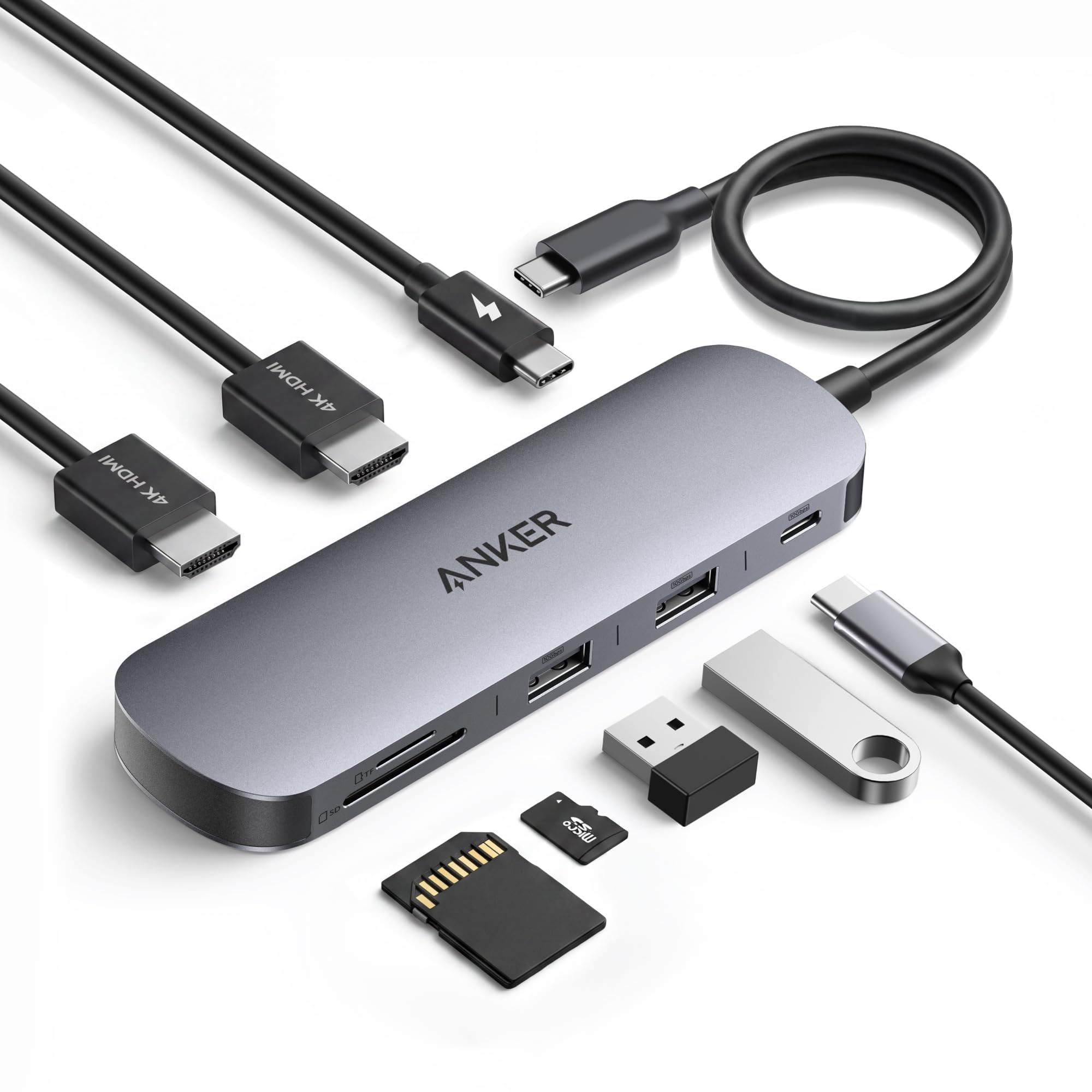
2. Anker Nano Laptop Docking Station Dual Monitor,8-in-1 USB C Hub for Windows
A travel-friendly hub that still drives dual 4K displays, minus the bulk.
Anker’s Nano line is built on one idea: shrink the footprint without gutting the ports. At 8 ports it’s the smallest count here, but the selection is smart. You get two HDMI ports that hit 4K@60Hz, two USB-A ports at 10Gbps, a 10Gbps USB-C data port, an SD/TF card slot, and a USB-C upstream plug that feeds your laptop up to 85W of pass-through charging.
That charging number needs context: it uses a 100W PD input but reserves 15W for the hub itself, so your laptop gets up to 85W. For most ultrabooks that’s plenty. The data speeds are the real story — every USB port runs at 10Gbps, which matches the Selore above and beats the 5Gbps you’ll find on many comparable docks in this class.
The trade-off for the small size is obvious once you look: there is no Ethernet port. Customers note you may need a separate adapter if you rely on wired internet. Also, on macOS, both external monitors will mirror the same content rather than extending your desktop. But for Windows users with a full-function USB-C, Thunderbolt 3, or USB4 laptop, the reviews say dual monitors connect flawlessly and one cable pulls your whole desk together.
The build speaks: Build quality is what owners praise most — 22 mention how solid and premium it feels. The compact design and quick setup follow closely behind.
Fine print: A few owners found compatibility hiccups depending on their laptop’s USB-C implementation. Verify your laptop supports DP Alt Mode before buying.
Reach for this if: You want a reliable, portable dock that hides behind your laptop and still runs two 4K screens.
Think twice if: You need a wired Ethernet connection or a Mac where extended displays are non-negotiable.
3. Docking Station Dual Monitor 4K HDMI 13-in-1 USB C Hub for Laptop MacBook
A 13-port workhorse that hides cable mess while running three Windows displays.
This LIONWEI dock is aimed squarely at the work-from-home crowd. Its 13 ports include 2 HDMI ports and a DisplayPort, plus two USB-C ports that each support 100W Power Delivery and 10Gbps data transfer. The port layout reads like a checklist for a full desk: USB 3.1, three USB 3.0 ports, two USB 2.0 ports, a 3.5mm audio jack, and gigabit Ethernet.
The display flexibility is a genuine strength. Windows systems support both mirroring and extending across three screens, with HDMI up to 4K@60Hz and DP up to 4K@60Hz. Mac users get a harder deal — macOS can only extend one monitor at 4K@60Hz. The charging math is transparent: 100W PD input means 87W reaches your laptop, since the hub consumes 13W to run itself.
Owners describe it as a desk-cleaner that works instantly. A teacher runs two displays plus a TV cast with an iPad, clicker, and HDD all connected. A work-from-home reviewer notes everything — monitors, Ethernet, mic, mouse, keyboard — comes up immediately, with occasional mouse lag when running through the dock. It runs warm under heavy load but stays cool during ordinary use. The 18-month warranty is a solid safety net if you hit a rare HDMI failure down the road.
What owners love
- Excellent port variety: 2 HDMI, DisplayPort, USB-C, and USB-A all in one compact bar
- Stable gigabit Ethernet for lag-free gaming and quick downloads
- Plug-and-play with zero driver headaches
What to watch
- Macs only extend a single monitor, so triple-screen Mac setups are out
- Runs warm under sustained load
- Rare HDMI failures have been reported after months of use
Best suited for: Windows users who want every port filled without a second dock, backed by an 18-month warranty.
skip it if: You’re on a Mac and need two extended monitors with different content.
4. Acer Laptop Docking Station 3 Monitors, 11-in-1 USB C Docking Station
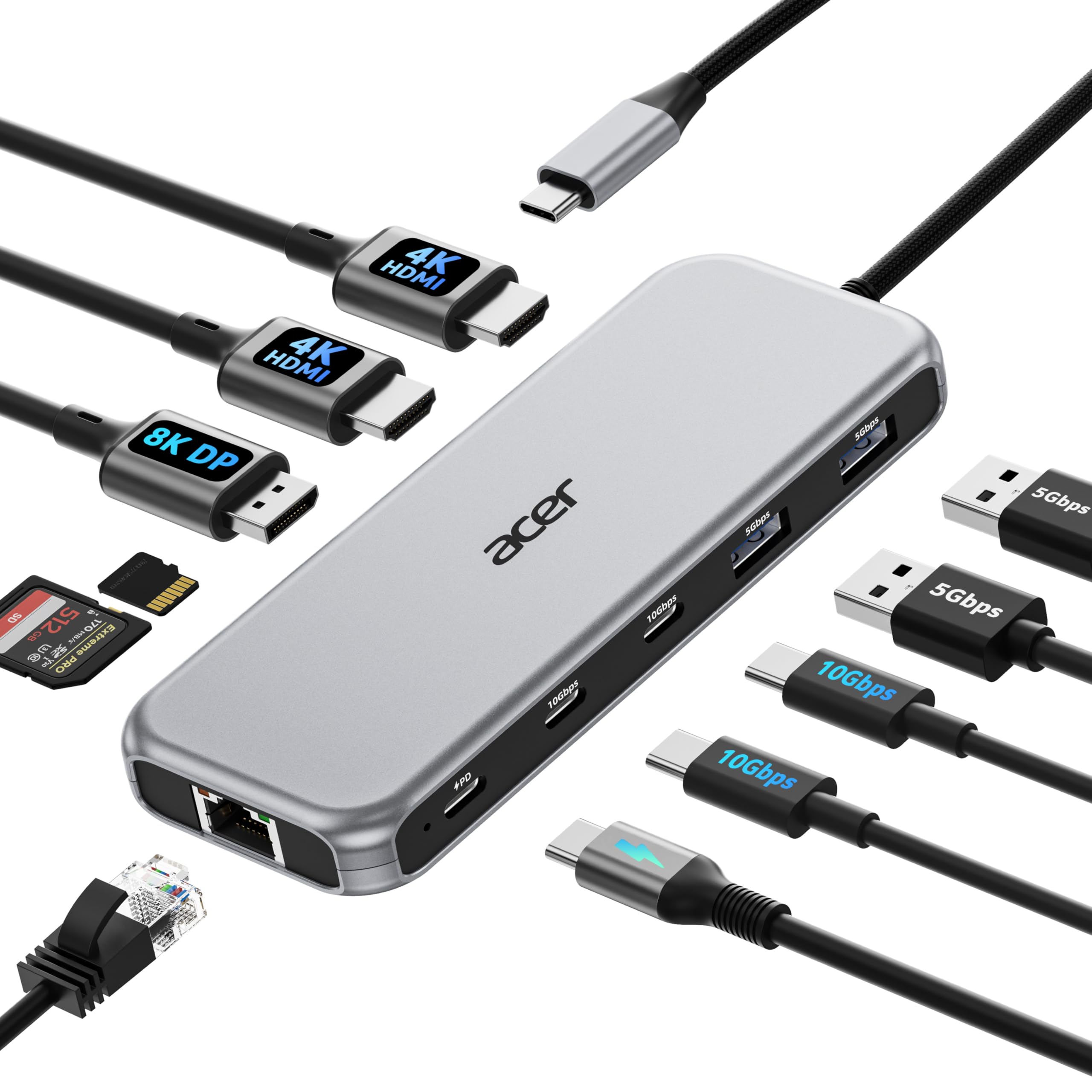
An entry-level gateway to triple displays without the triple-digit price tag.
The Acer makes 8K and 4K sound far more attainable than the price suggests. It packs 2 HDMI ports at 4K@60Hz and 1 DisplayPort at 8K@30Hz (an ultra-high resolution for a single screen), alongside two USB-C ports at 10Gbps, two USB-A ports at 5Gbps, gigabit Ethernet, and SD/MicroSD slots. Triple displays work from the start, typically at 4K@60Hz plus 4K@60Hz plus 1080p all at once.
Charging is handled with a 100W input that safely delivers 85W to your laptop. One big caveat in the fine print: you must have a USB-C port with DP Alt Mode — the manufacturer is explicit that your laptop needs DisplayPort Alternate Mode support, or none of the video features work. It works with Windows, macOS, ChromeOS, and Linux, but macOS only mirrors content across external displays.
Owners praise the immediate connection — no drivers, just mount and go. A reviewer connected two SSDs plus a 4K 60Hz monitor instantly and compared it favorably against expensive powered docks. The build quality and connectivity are the two most-cited strengths. There are honest warnings too: one unit reportedly burned out after a week of light use with a burnt electrical smell, so quality control can vary. Value for money splits opinion — some say it’s worth it, others disagree.
Owner consensus: Quality and connectivity lead the reviews — it feels well-made and hooks up instantly without drivers.
The honest watch-out: The value debate is real, and a rare unit can fail quickly. Treat the DP Alt Mode requirement as a hard gate before buying.
Grab this if: You want three screens on a budget and your laptop has a proper full-function USB-C port.
Pass if: You need maximum long-term reliability — the durability record here is more mixed than the pricier picks.
5. Baseus Docking Station Dual Monitor 10Gbps 10 in 1 USB C Hub with 2 HDMI

A high-refresh specialist that hits 4K@120Hz on a single screen, with a privacy lock button.
Here’s the standout spec most docks can’t touch: this Baseus supports a single display up to 4K@120Hz, which means a smooth, high-refresh experience on a compatible monitor — noticeably slicker for gaming or scrolling than the standard 60Hz. When you go dual, both HDMI ports deliver 4K@60Hz. That flexibility makes it a favorite among Steam Deck owners, who report HDR at 4K/120 over HDMI.
The port list is broad: 2 HDMI, 1 USB-C data port, 3 USB-A, 1 USB-C PD 100W, Ethernet, and an SD/TF card reader. Data speeds hit 10Gbps on select USB 3.2 ports, with card reads up to 104MB/s. Charging tops out at 85W delivered to your laptop from a 100W input. There’s also a one-touch screen lock button — press once on Windows to blank the display, twice on macOS — for quick privacy.
The recurring gripe is the integrated USB-C cable: it’s short and non-replaceable, which can force repositioning when you swap laptops. Owners note the hub runs warm, but the metal chassis (110g, 5.31 inches long) dissipates heat well. Functionality is the most-praised aspect, with dozens of owners noting easy setup and dependable dual-monitor output.
The thing everyone raves about: Functionality — owners consistently find it handles dual monitors and peripherals flawlessly for the money.
The recurring gripe: That permanent, short cable is the main drawback. If you frequently swap laptops or need flexibility, it’s a real friction point.
Best for: Anyone with a high-refresh monitor who wants one dock for both 120Hz gaming and everyday dual-screen work.
Look elsewhere if: You need a detachable or extra-long cable, or you’re bothered by heat buildup on longer sessions.
6. USB C Docking Station Dual Monitor Laptop Docking Station 2 HDMI 4K DP 8K

A 15-port powerhouse with an 8K DisplayPort and a privacy screen-lock button.
This ZMUIPNG dock is the port-count champion of the list, and it brings some unique extras. The headline is a DisplayPort that reaches 8K@30Hz (with DP 1.4), alongside two HDMI ports at 4K@60Hz. There’s even a physical button to turn off your screens instantly — a privacy protection feature that blanks the display without unplugging anything, plus a detection lamp that tells you when the dock is compatible and working.
Beyond video, you get 3 USB 3.0 ports, 2 USB 2.0 ports, a USB-C 3.0 port, a 100W USB-C PD port, gigabit Ethernet, SD/MicroSD readers, and a 3.5mm mic/audio combo. The compatibility requirement is strict: this dock only works with laptops that have Thunderbolt 3/4 or a full-function USB-C port. If your laptop has an HDMI port instead, the manufacturer says it won’t be compatible — an unusual but important note.
Durability is where the reviews split. On the positive side, one owner has run it for over 2 years and says it’s still working strongly, and remote workers praise the multi-monitor support and cable cleanup. But durability is the most-cited negative aspect — some units reportedly fail after 6 months, with one reviewer noting the vendor refunded fully after a review. The Ethernet and high-power USB ports get consistent praise for daily use.
What stands out: Quality and versatility lead the positives — reviewers find it a solid plug-and-play solution that adds ports without fuss.
The honest caveat: Long-term durability is the most-cited concern, with some failures around the 6-month mark. Buy with a warranty mindset.
The verdict: This is the premium pick for 8K-capable setups that also want 15 ports and a privacy button.
Think twice if: You cannot tolerate a small risk of mid-life failure, or your laptop lacks a full-function USB-C/Thunderbolt port.
7. UGREEN USB C Docking Station Dual Monitor, 10-in-1 Laptop Dock with 2 HDMI
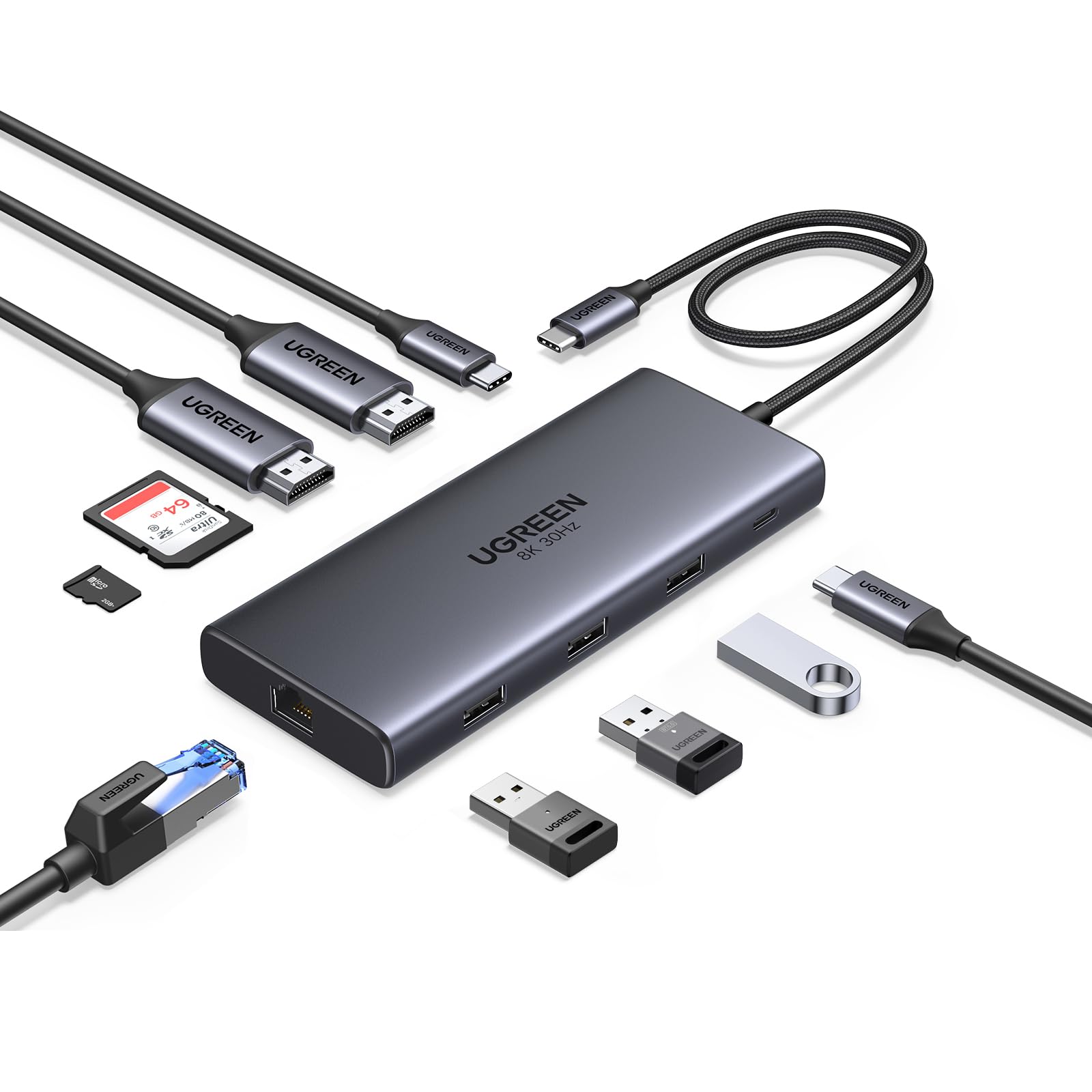
The no-surprises daily driver that does dual 4K and Ethernet exactly as advertised.
UGREEN’s 10-in-1 is the dock you buy when you’re tired of gambling on specs that don’t deliver. It offers 2 HDMI ports (dual 4K@60Hz or a single 8K@30Hz on HDMI 2), a 100W USB-C PD port, a 5Gbps USB-C data port, a USB-A 3.0, two USB-A 2.0, RJ45 gigabit Ethernet, and an SD/MicroSD reader. It’s a balanced set with nothing exotic and nothing essential missing.
Charging is a key detail: the 100W PD input delivers up to 85W to your laptop, with 15W powering the hub itself. Data transfers run at 5Gbps on the USB-C and USB-A ports — quick for everyday files, though not the 10Gbps you get on pricier docks. One reviewer compared Ethernet speed to WiFi and found it matched smoothly, and SD card transfers hit the advertised speeds.
Reliability is the theme in the feedback. Owners describe it as sturdy, easy to fit on a desk or in a laptop case, and reliable over time. The most-praised aspects are build quality and port selection. However, display reliability gets some negative mentions — a few reviewers point out glitches or flickering, and power consumption on the USB-C port draws mixed feedback. It’s a great everyday choice, but not flawless.
Owner consensus: Quality and ports lead the praise — it’s a well-built hub that solves the “laptop has only two USB-C ports” problem cleanly.
The honest caveat: Display glitches and flicker show up in a minority of reviews. If pixel-perfect stability is critical, check return policies.
Reach for this if: You want a dependable, compact dock that covers dual monitors, Ethernet, and SD cards without fuss.
Look elsewhere if: You need 10Gbps data speeds or you’re sensitive to occasional display flicker reports.
8. UGREEN USB C Docking Station Triple Monitor 4K, 12-in-1 Dock with 2xHDMI+DP
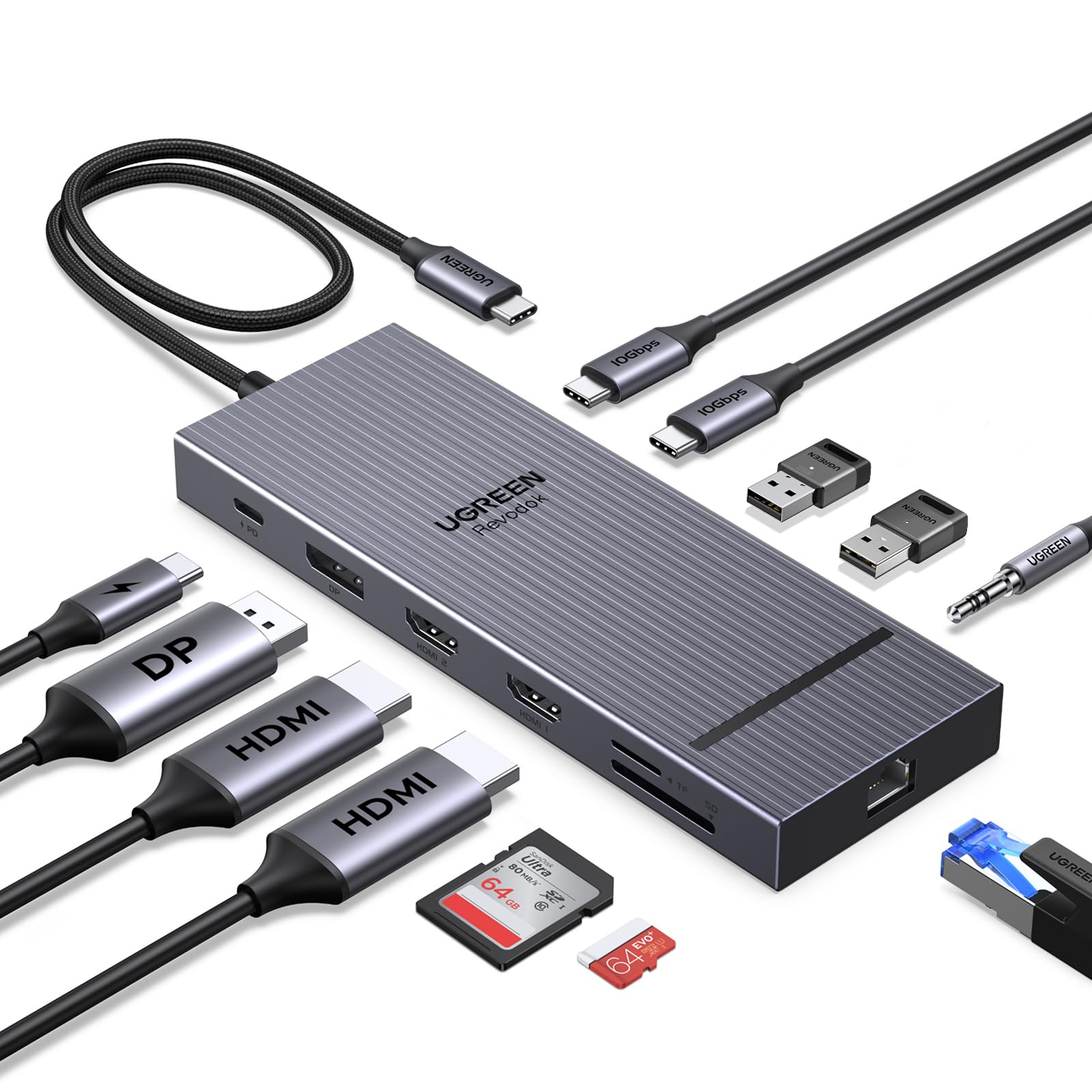
A triple-4K specialist for Windows PCs, wrapped in a compact, high-end chassis.
This 12-in-1 UGREEN is the sibling upgrade for people who refuse to choose between screens. It supports single-screen 4K@120Hz, dual-screen 4K@60Hz, and triple-screen 4K@30Hz — the only dock here that hits 4K@120Hz on a single display. The port loadout includes 2 HDMI, 1 DisplayPort, 2 USB-C 3.2 ports at 10Gbps, 2 USB-A 2.0, SD/TF card reader, 100W PD charging, and 3.5mm audio with 24-bit 192KHz output.
The 10Gbps USB-C ports are the data backbone — reviewers describe blazing-fast file transfers during heavy workloads. Charging maxes out at 85W to your laptop from a 100W input. The 2-year warranty adds confidence. The audio jack, however, is a known weak spot: one owner found volume output surprisingly low through external speakers, though the rest of the features worked as expected.
Shoppers say it handles multiple high-resolution displays without flickering, lag, or overheating during heavy workloads — a strong sign for long workdays. Yet functionality gets mixed reviews: some owners say it works well with a Microsoft Surface Pro 9, while others report it stops working unexpectedly. Value, compatibility, and power delivery also draw mixed feedback. It’s superb when it works, but reliability varies more than the 10-in-1.
What impresses: Build quality is the top positive — owners call it a great multi-purpose hub that keeps a workstation organized and cool.
The honest caveat: Functionality is the most-mentioned aspect and it’s mixed, with some units stopping unexpectedly. The warranty helps, but this is the riskier premium bet.
Best for: Windows PC users running three 4K screens who prioritize display capability above all else.
pass on it if: You need guaranteed long-term reliability or you rely heavily on the built-in audio jack.
9. Lenovo USB-C Dual Display Travel Dock – 7 Ports, Integrated Cable

The compact road companion that powers a laptop and runs dual monitors on the go.
Lenovo’s travel dock is the smallest footprint here at 7 ports, and it’s designed around one lifestyle: moving between desks. The ports include 1 USB-A 3.2 at 10Gbps, 2 USB-C at 10Gbps (with one always-on port for continuous charging of your phone), a DP 1.4, an HDMI 2.0, and an RJ45 Ethernet port. The integrated USB-C cable means no separate dongle to lose, though it’s also non-replaceable if it ever breaks.
This is the only pick that comes with a power adapter situation worth understanding: the model with a power adapter includes a 100W USB-C charger delivering 65W to your laptop. If you need more juice, an optional 135W charger provides 100W. from the start, that 65W is plenty for a slim ultrabook but light for a power-hungry workstation. Buyers report the second monitor may need its own wall adapter in some setups.
The identity here is genuinely travel-first. Owners call it tiny, sturdy, and easy to hook up, with the compact size as the dominant praise. One reviewer confirmed it handles a 32-inch HDMI monitor, LAN, and a wireless keyboard/mouse receiver without issue. But here’s the key fit note: despite the “Dual Display” name, more than one owner found it supports only one extra monitor in practice — a common point of confusion. Port compatibility is the most-discussed aspect, and it’s mixed. If you need two external screens plus your laptop, read the reviews carefully first.
What wins people over: The compact size and portability — it slips into a laptop case and powers up a desk in seconds.
The honest caveat: The dual-display claim confuses owners, and it doesn’t support fast charging or come with power in all configurations. It’s best as a one-external-monitor travel companion.
The verdict: This is the one for road warriors who want a durable, no-moving-parts dock that fits in a pocket.
Look elsewhere if: You need two external monitors, or you require fast-charging capability built in from day one.
Understanding the Specs
DisplayPort Alt Mode (DP Alt Mode)
This is the feature that lets a USB-C port carry a video signal to a monitor. Without it, a dock simply cannot output to your screen. Most modern full-function USB-C and Thunderbolt ports support it, but check your laptop’s manual before buying.
Power Delivery (PD) Charging
PD is the fast-charging standard over USB-C. A 100W PD input on a dock usually means your laptop gets 85W, since the hub reserves 15W for its own operation. Compare the delivered wattage, not the advertised input, to your laptop’s charger.
FAQ
Will any USB docking station work with my laptop?
Why does my Mac only mirror my monitors instead of extending them?
What does 100W Power Delivery really mean for my laptop?
Can I run two 4K monitors at 60Hz from any of these docks?
Why is there no Ethernet port on some compact docks?
How fast do USB data ports transfer files on these docks?
Is a powered dock better than a non-powered one?
Why does my dock sometimes stop working or flicker?
What is the “screen lock” or privacy button for?
How many ports do I actually need in a docking station?
Final Thoughts: The Verdict
For the majority of shoppers, the usb docking station adapter winner is the Selore 14-in-1 because it packs the most ports, triple-display Windows support, and 100W PD charging into one plug-and-play box. If you want a compact travel-friendly hub that still drives dual 4K, grab the Anker Nano 8-in-1. And for a truly premium triple-4K setup on a Windows PC, the UGREEN 12-in-1 is the one to reach for.
How We Picked
We do not accept paid placement. Every pick is matched to a real buyer and a real use-case; we do not hands-on test units.
Sources & Methodology
Specifications: manufacturer listings and product documentation. Review insights: verified customer reviews, as of August 2026. Pricing: not shown on this page (it changes often); check the current price via the retailer link.
As an Amazon Associate, Gadgets Feed earns from qualifying purchases. This does not affect which products we feature.