
Our readers keep the lights on and my morning glass full of iced black tea. As an Amazon Associate, I earn from qualifying purchases.
Specs are compiled from manufacturer listings and verified buyer reviews and can change over time — please confirm the key details on the product page before buying.
The quickest way to make your battlestation feel brand new isn’t a new GPU—it’s fixing the small stuff around it. A headset drowning in cables, a controller sliding off the desk mid-match, and a phone charger hogging your only outlet all add up to a setup that fights you instead of helping you. This guide zeroes in on the gear that solves those daily annoyances, covering stands, charging mats, mice, keyboards, power strips, and lighting—the accessories that genuinely change how your desk works.
I’m Min — the founder and writer behind Gadgets Feed. This guide is built by comparing the manufacturers’ published specifications and the patterns across verified customer reviews, so you get each pick’s real strengths and trade-offs instead of marketing spin.
From sturdy headset docks to fast-charging pads and precise peripherals, here are the best accessories for gaming pc to upgrade your desk setup.
Our Picks at a Glance


How To Choose The Best Accessories For Gaming PC
Before you click buy, think about the one thing that irritates you most at your desk right now. Is it the tangled mess of charger cables? The headset that keeps falling off the monitor? The mouse that feels slightly off in your hand? Every accessory here solves a specific problem, so start by naming yours.
Charge Speed vs. Convenience
Wireless charging pads are brilliant until they aren’t. A 15W pad sounds fast, but if your phone case is thick or you bump the phone, the charging can stop. For a desk mat, that trade-off means a clean surface at the cost of having to set your phone down precisely. If you’d rather plug in and forget it, look at how many USB-C ports a hub or power strip offers.
Desk Real Estate
A 60% keyboard frees up a surprising amount of space, but you lose the number pad and function row. A full-size desk mat covers everything but eats up the whole surface. Measure your actual desk space and be honest about what you need—a compact layout only works if you don’t constantly reach for missing keys.
Quick Comparison
| Model | Best For | Key Feature | Size / Layout | Power Delivery | Amazon |
|---|---|---|---|---|---|
| UPERGO Walnut Stand★ Best Overall | Desk organization | Walnut wood cradle | 4.72 x 8.27 x 6.3 in | — | Amazon |
| KDD Charging StandPremium Pick | All-in-one charging | Wireless charging base | Tower, 360° rotation | 2 USB + 1 Type-C | Amazon |
| Schkner RGB Mouse PadBest Value | Full-desk surface | 15W wireless charging | 31.5L x 11.8W in | 15W wireless | Amazon |
| Logitech G502 Hero | Precision aiming | HERO sensor | Right-handed | Wired USB | Amazon |
| Aula WIN60 HE | Competitive FPS | Hall effect switches | 60% compact | Wired USB-C | Amazon |
| 4000J Surge Protector | Protecting the whole rig | 4000J surge protection | 6 AC outlets | USB-A 2 USB-C (20W) | Amazon |
| Govee G1 Monitor Light | rich ambience | RGBIC backlight | Fits 27-34 in screens | 18W adapter | Amazon |
| FIFINE AmpliGame D6 | Stream control | 15 LCD macro keys | Compact keypad | Wired USB | Amazon |
| Anker Nano Station | Clean multi-device charging | Retractable USB-C cables | 4.76 x 2.86 x 2.09 in | 100W max USB-C | Amazon |
In‑Depth Reviews
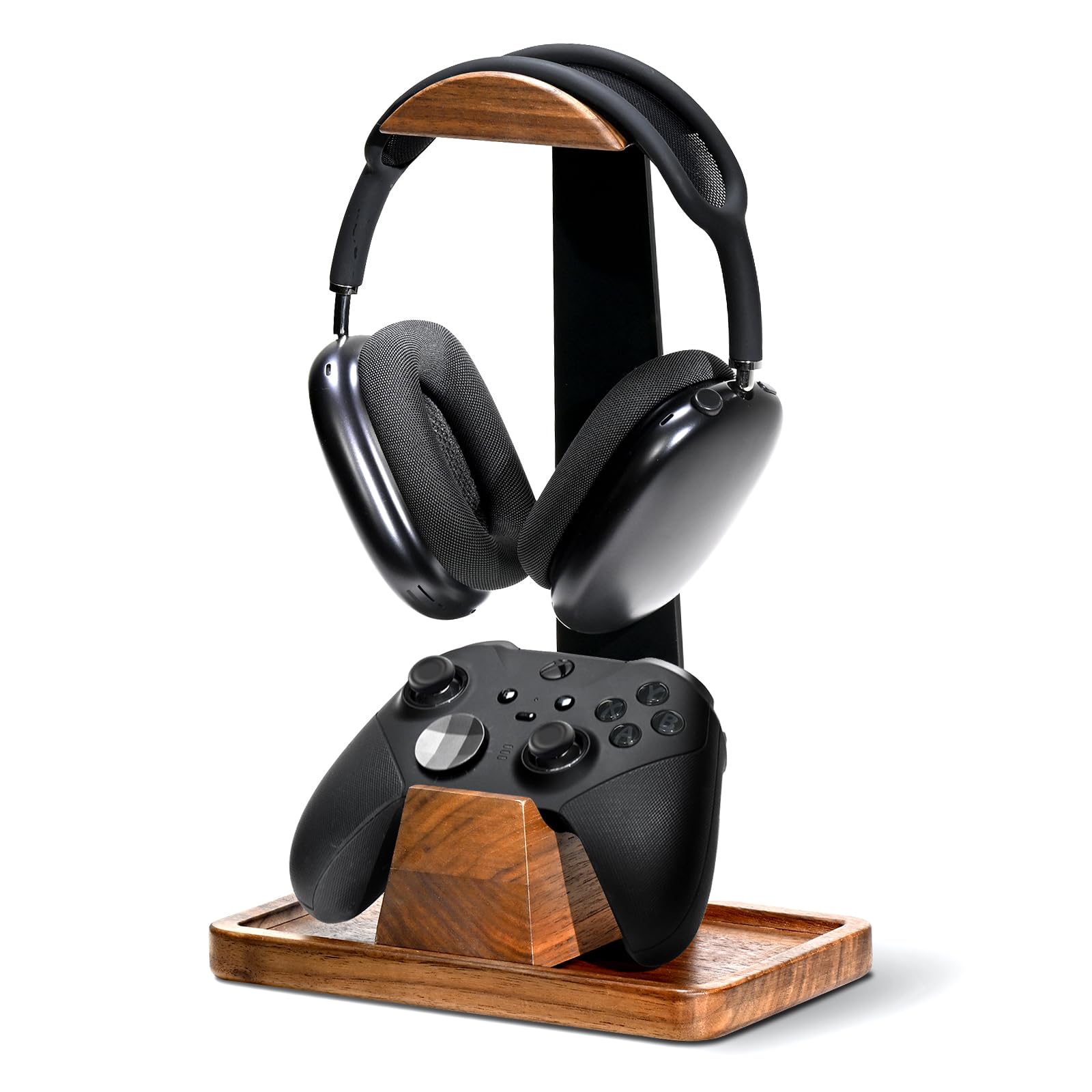
1. UPERGO Walnut Headphone Stand with Controller Holder & Storage Base
Our pick — over 4.5★ from 250+ verified ratings; the strongest balance of quality and price.
The desk tidier that holds your headset and controller in genuine wood.
Keep your headset and controller within arm’s reach without cluttering your desk. This walnut wood tower has a curved cradle on top for your over-ear headset and a wooden dock below that holds your Xbox or PS5 controller securely. The base is weighted with anti-slip silicone pads underneath, so it grips the desk firmly and won’t tip over even with a bulky, mic-equipped headset hanging on it. The hollow base doubles as a hidden storage tray for earpads, charging cables, or SD cards—solving the daily “where do I put this?” question in one spot.
Assembly takes under two minutes thanks to a simple 3-part snap-together design that needs no tools. Buyers report the build is exactly what the photos promise—”Sturdy, heavy, genuine wood/metal.”—and the thing owners praise most is the quality, with dozens of users calling out the solid construction and the way the pieces fit together snugly. The wood is polished and smooth to the touch, and the whole unit sits perfectly level without rocking a single corner.
The one honest limit: the controller stand slides side to side and there is no headphone height adjustment, so if you need to fine-tune the exact height of your headset, this won’t do it. And because the headphone cradle takes up space above, the storage tray only fits smaller items. For most setups, that’s a fair trade for a piece that looks this good on a desk and keeps everything within arm’s reach.
What wins people over
- Genuine wood and metal construction feels premium and weighs enough to stay planted
- Holds headset plus controller with a hidden storage tray for small gear
- Tool-free assembly in minutes
The trade-offs
- No headphone height adjustment
- Tray only fits small accessories due to the headphone placement above
Grab this if: you want a handsome, heavy stand that clears your headset and controller off the desk while keeping everything organized.
Look elsewhere if: you need to adjust headset height or expect the tray to hold larger gear.
2. KDD Headphone & Controller Stand with Wireless Charging
A glowing tower that charges your phone while holding your whole controller lineup.
If your desk is a mess of controllers and cables, this stand consolidates them into one rotating hub. The headset arm rotates 360° and the detachable hooks can hold one headset plus two controllers—or four game controllers if you skip the headset. A wireless charging pad on the base tops up your phone while you play, and there are two USB ports plus one Type-C port for charging a tablet or other devices. One catch worth knowing: the Type-C port doesn’t charge iPhones.
The lighting is the showstopper here. There are 9 modes total: a 7-color fast blinking mode, a 7-color breathing mode, and seven monochrome options in red, green, blue, purple, light blue, yellow, and white. You switch colors with a button on the side, and the lighting memory remembers your last choice after you power down. The fire-proof hardened plastic casing adds a practical safety layer, with protection systems against overloading, short-circuiting, and over-current issues.
The thing everyone raves about is the quality—it’s sturdy, assembles in about 30 seconds from three parts, and frees up noticeable desk space. As owners put it: “Love this charging station, my son loves it.”—with one household even buying a multi-plug cable so three controllers could charge at once from a single USB port. The hooks are sturdy and optional, and the top is adjustable, so you can tailor the layout. The main recurring gripe is packaging: because it ships in the original retail box, some units arrive with a roughed-up outer box. That’s a delivery issue, not a product flaw.
Desk-space hero: consolidates headset, controllers, and phone charging into one small footprint with vibrant RGB.
Before you buy: the Type-C port won’t charge an iPhone, and shipping protection is minimal.
3. Schkner RGB Gaming Mouse Pad with Wireless Charging 15W
An XXL charging mat that upgrades your surface and your phone’s battery at once.
This is one accessory that does three jobs: it’s a giant desk mat, a wireless charger, and an RGB light show. At 800x300x4mm, it’s big enough to hold your keyboard, mouse, and even a few small items like pens or earbuds, so it effectively becomes the floor of your whole setup. The surface is a micro-textured waterproof fabric with stitched edges, meaning a soda spill wipes off without ruining the mat—something buyers have put to the test. The natural rubber base grips the desk so the mat won’t slide during intense games.
The built-in 15W wireless charging pad lets you drop a compatible phone on the corner and charge it without a cable cluttering your desk. It works with iPhone 15/14/13/12/11/X/8 Series, Samsung Galaxy S23/S22/S21/S20/S10/S9/S8/Note 9/8, Airpods 3rd, Airpods Pro 2nd, and Airpods Pro. One button cycles through 10 different light modes—3 dynamic and 7 static—and a memory function remembers your last choice. Everything runs off a single Type-C cable with no drivers or software needed.
The thing owners praise most is the functionality; it genuinely transforms a desk setup by pairing a smooth, responsive surface with convenient charging. The honest fit note: wireless charging is the most-mentioned topic overall, and it’s a mixed bag. The pad needs to stay plugged in, charging can stop if your phone shifts slightly, and thick cases can interrupt the connection—it works reliably without a case. The charging isn’t fast, but for daily top-ups while you work or game, it’s a clean, cable-free convenience.
Why it earns its spot
- Full-desk coverage at 800x300x4mm fits keyboard plus mouse comfortably
- Waterproof stitched fabric survives spills; non-slip rubber base stays put
- 10 RGB modes with memory across one button
Know before you add to cart
- Wireless charging is finicky with thick phone cases and stops on slight movement
- Charging is convenient but not fast
Reach for this if: you want one mat to cover the desk, add ambience, and wirelessly top up your phone.
Think twice if: you use a bulky case or expect rapid charging from the pad.
4. Logitech G502 Hero Wired Gaming Mouse

The legendary wired mouse that balances precision, weight, and a grip for bigger hands.
Ask why gamers keep coming back to the G502 and you’ll hear the same answer: the HERO sensor. It delivers precision tracking up to 25600 DPI with zero smoothing, filtering, or acceleration, and it can detect movement at the sub-micron level—less than one millionth of a meter. For flick shots and fine tracking, that translates into a mouse that does exactly what your hand tells it, with no lag or artificial glide. It connects over a simple wired USB, so there’s no battery to charge mid-session.
Customization is the other pillar. There are 11 programmable buttons and a dual-mode hyper-fast scroll wheel that toggles between free-spin and a tactile, notched feel—handy for both gaming and long spreadsheets. You can also arrange up to five 3.6g weights inside to tune the heft and balance to your liking. This matters if you like a heavier, more planted mouse or a lighter one for fast movements. The left and right buttons use a metal spring tensioning system with metal pivot hinges for a crisp, clean click that gives rapid feedback.
The thing everyone raves about is build quality, with the ergonomics a close second—it’s a favorite for people with larger hands, and the sculpted shape keeps it comfortable through long sessions. The weight customization and easy-to-reach programmable buttons are the other big draws. The honest caveat that surfaces across owner experiences: reliability is mixed, and double-clicking is the most-discussed negative. A portion of users find the mouse stops working properly after heavy use. It’s a beloved, proven performer, but the longevity isn’t perfect for every unit.
Precision workhorse: 25600 DPI sensor with zero smoothing plus 11 programmable buttons and tunable 3.6g weights.
Fair warning: some owners mention double-clicking or failures after months of intense use, so warranty matters.
5. Aula WIN60 HE 60% Mechanical Gaming Keyboard

A hall-effect keyboard that brings premium FPS features to a compact 60 percent frame.
Get rapid trigger technology without paying custom-board prices. The Win60 HE uses hall effect magnetic switches—key presses register magnetically with no physical contact, so the switch mechanism never wears out. It delivers up to an 8000Hz polling rate (how often the keyboard reports to your PC) for ultra-fast response, and the rapid trigger step distance is just 0.02mm, letting you re-press a key dramatically faster for quick-stop shooting and rapid peeking in Valorant or CS2. The switches are hot-swappable, so you can swap them without soldering.
The 60% layout is the whole point for desk space—it’s about 11 inches wide, leaving room for a huge mouse pad and a more expansive mouse swing. The PBT keycaps sit above a lower-position light design, and you get 16.8 million customizable RGB colors to match your setup. Customization runs through a web-based driver, so there’s no bulky software download—you can remap keys, create macros, and tweak lighting from any browser.
The thing owners praise most is the quality, with value for money a close second—the general consensus is that this feels and sounds like boards that cost more. The typing experience is described as smooth and fluid, and the sound is satisfying without being noisy. The most-discussed negative is the software, which owners find unpolished. A few also note the stock keycaps feel cheap and can worsen the sound, and the 8k polling can cause USB issues on some AMD systems. Swapping keycaps and dialing in the actuation solves most of those complaints.
Competitive edge
- Hall effect switches with 0.02mm rapid trigger for faster re-presses
- 8000Hz polling rate for ultra-low latency
- Hot-swappable switches and browser-based customization
What to expect
- Web software is functional but unpolished
- Stock keycaps feel cheap and can dull the sound
- 60% layout drops the function row and number pad
Pick this for: competitive FPS players who want rapid trigger tech and a tiny footprint without the custom-keyboard price.
Not for you if: you need a number pad, or you expect flawless software from the start.
6. 4000J Gaming Surge Protector Power Strip with USB Ports

A protective power strip that keeps your whole rig safe and glowing.
A gaming PC and its peripherals draw a lot of power, and a flimsy power strip is a weak link. This one packs 4000J surge protection and 15A overload protection, so a thunderstorm or a power spike won’t silently damage your components. It also has a built-in EMI/RFI filter that reduces electrical interference, which can translate to cleaner audio and fewer weird glitches during sessions. The RGB ambient light adds atmosphere with four adjustable brightness levels and three lighting modes—enough to match your setup’s vibe without being a full light show.
The layout is designed for bulky chargers. Outlets are angled at 10° with 1.8-inch spacing, so even big wall-wart power bricks don’t block the neighboring sockets. The cord exits at a 60° angle and runs 6 feet, giving you flexible placement behind a desk. In total you get 6 AC outlets rated at 15A/1875W, plus 1 USB-A port and 2 USB-C ports delivering up to 20W max. A built-in intelligent chip manages power delivery to your computer and assorted devices.
Owners praise quality first, functionality second—every outlet is reportedly 100% usable, even with chunky adapters plugged in. The surge protection and 15A overload protection get specific callouts, and the RGB lighting is well-received. Buyers running high-wattage power supplies report no drops during demanding games. An 18-month US-based customer service backup adds confidence. The main note: it’s a power strip built for a gaming desk, so it’s not the most travel-friendly option.
Rig protector: 4000J surge protection plus 15A overload cutoff and wide-spaced angled outlets for bulky plugs.
Best for: a permanent desk setup where you want RGB ambience and real surge protection in one box.
7. Govee Gaming Light for Monitor G1, RGBIC LED Backlight

A monitor backlight that pulls color straight from your screen for full immersion.
If you’ve seen a gaming setup where the wall behind the monitor glows in sync with the game, that’s Govee’s VibraMatch technology at work. The light reads the pixels on your screen and projects matching colors behind the monitor, so explosions and lightning on screen visually spill out around your display. The strip uses 108 high-density LED beads for even light distribution—noticeably brighter and more vibrant than standard RGB strips. It runs at 18 watts and fits screens from 27 to 34 inches, including curved monitors.
You get 123 preset scene modes and 11 music modes via the Govee Home app, so the light can pulse to your playlist or match a specific mood. The strip covers all four sides of the screen for a 360° color-matching effect that makes games and movies feel more enveloping. Setup is straightforward: stick the strip on the back of the monitor, then connect the Govee Home app and desktop software to enable screen color-matching. It also works with PC DreamView tech to sync with at least 10 other Govee gaming lights, and it’s compatible with Razer Chroma.
Owners praise the quality and appearance—the lights are described as stunningly bright with vivid, responsive colors that make gaming genuinely more rich, and setup is easy. The sticky tape holds firmly. The honest mixed area is functionality and connectivity: a portion of customers note the light sometimes fails to sync or has connection hiccups, and there can be a slight delay in the syncing. Cable management also gets a negative mention, so plan where that control box and power adapter will live.
Immersion boost
- VibraMatch reads screen pixels for real-time color sync
- 108 high-density LED beads for bright, even lighting
- 123 scene modes plus 11 music-reactive modes in the app
Watch for
- Occasional sync or connectivity hiccups reported
- Slight delay between screen action and light response
- Cable management needs planning
Get this for: a setup where you want the game world to visually extend beyond the monitor for max immersion.
skip it if: you can’t tolerate occasional connectivity quirks or a small sync delay.
8. FIFINE AmpliGame Stream Controller with 15 Macro Keys

A 15-key macro pad that puts your entire stream at one fingertip.
If you stream on Twitch or YouTube, the difference between a smooth broadcast and a fumbled one is often how fast you can switch scenes. This keypad gives you 15 customizable LCD macro keys that display the app or action they trigger right on the keys themselves. A single press launches software, switches OBS scenes, or adjusts audio levels—no more hunting through overlapping windows mid-stream. The visual feedback tells you at a glance what each button does.
It plays nicely with the big streaming tools: OBS Studio, Streamlabs, Twitch, and YouTube all work with it. You can drag-and-drop plugins and icons from the console’s store to fill out your setup, and you can create folders to organize different programs—with individual scenes processed independently. Beyond streaming, it handles gaming, photography, video editing, music creation, and office multitasking. A glowing RGB ring around the pad offers 9 different modifiable effects to match your setup’s look.
The thing owners praise most is the quality, with value for money as the close second—the consensus is that it delivers surprising quality for the price compared to big-name alternatives. It’s responsive, the display is clear, and setup is easy. The mixed area is button responsiveness and compatibility: some reviewers point out buttons that don’t consistently activate, and a few note it works best with OBS Studio specifically rather than every streaming app. If you’re a dedicated OBS user, those edges rarely bite.
Streamline your workflow: 15 LCD macro keys with drag-and-drop setup for OBS, Streamlabs, Twitch, and YouTube.
Consider first: button responsiveness varies per unit, and OBS Studio is its most reliable home.
9. Anker Nano Charging Station, 100W 7-in-1 Power Strip

A compact 7-in-1 station that hides its cables and fast-charges everything at once.
This is the desk charger that eliminates the cable tangle for good. The Anker Nano packs 7 ports into a brick that’s about the size of a couple of stacked decks of cards—4.76 × 2.86 × 2.09 inches—and weighs roughly as much as a 13″ iPad Air. The headline feature is two built-in retractable USB-C cables that extend up to 2.3 ft (70 cm) and retract back in about one second with a smooth pull. That means your essential cables are always there, never coiled on the desk.
Power delivery is serious. Each USB-C port can deliver up to 100W when used alone, which is enough to charge a 16″ MacBook Pro (M3 Pro) to 50% in 35 minutes—power is shared when multiple devices are connected. Alongside the two USB-C ports you get one USB-A port and three AC outlets, so a laptop, phone, earbuds, and a desk lamp can all live off this one brick. A small LCD display shows real-time charging status, so you can see when a device is actually pulling power and troubleshoot connection issues.
The thing owners praise most is the quality, with fast charging a close second—shoppers say charging two Galaxy phones at supercharge speed at the same time, and a MacBook plus iPhone overnight without issue. The retractable cables are the other big draw, and the compact design replaces multiple wall chargers. The honest mixed area is value: some say it’s pricey for what it is, though most find it worth it. The retractable cables only reach 2.3 ft, it’s light enough to need two hands to plug in, and there’s no extra USB-C/A port beyond the included ones. It also carries 300J surge protection, which is modest compared to dedicated surge strips.
Clean power, fast
- 100W max USB-C charges a 16″ MacBook Pro to 50% in 35 minutes
- Two retractable USB-C cables keep the desk tidy
- Seven ports total with real-time LCD power display
Fair caveats
- Retractable cables reach only 2.3 ft
- 300J surge protection is lighter than dedicated protectors
- Lightweight body needs two hands to plug in
Choose this for: a clean, compact charging hub that fast-charges a laptop and phone while keeping cables tucked away.
Pass if: you need long cable reach or heavy-duty surge protection.
Understanding the Specs
DPI and Sensor Quality
DPI measures how many dots per inch a mouse sensor tracks—think of it as sensitivity. A higher DPI like 25600 lets you move the cursor across the screen with a tiny wrist flick. What matters more than the max number is whether the sensor adds smoothing or acceleration, which can make your aim feel unpredictable. A quality sensor tracks your exact movements with no artificial filtering.
Polling Rate and Rapid Trigger
Polling rate is how often a keyboard reports its status to your PC, measured in hertz. At 8000Hz, the keyboard communicates 8,000 times per second, meaning less delay between your press and the action on screen. Rapid trigger goes further—it lets the keyboard register a key release and re-press faster by detecting the exact position of the switch, so you can strafe or counter-strafe more quickly in shooters.
FAQ
Will a headset stand fit my bulky gaming headset?
Can I charge my iPhone on a wireless gaming mouse pad?
What is a hall effect keyboard switch?
How much surge protection does my gaming PC need?
Is a 60 percent keyboard good for gaming?
Can a stream controller work with OBS Studio?
How many devices can a 100W charging station power at once?
What does RGBIC mean on a monitor light?
Final Thoughts: The Verdict
Across the board, the accessories for gaming pc winner is the UPERGO Walnut Stand because it tackles the most universal problem—a cluttered desk—with a handsome, durable piece that holds both headset and controller while hiding small gear. If you want fast multi-device charging, grab the Anker Nano Station. And for a competitive edge in FPS games, the Aula WIN60 HE brings premium rapid-trigger tech to a compact, budget-friendly frame.
How We Picked
We do not accept paid placement. Every pick is matched to a real buyer and a real use-case; we do not hands-on test units.
Sources & Methodology
Specifications: manufacturer listings and product documentation. Review insights: verified customer reviews, as of August 2026. Pricing: not shown on this page (it changes often); check the current price via the retailer link.
As an Amazon Associate, Gadgets Feed earns from qualifying purchases. This does not affect which products we feature.