
That coffee-table pile of remotes—each one controlling a single TV, soundbar, streaming stick, or cable box—is the single most visible friction point in your living room. Every time you need to switch inputs or adjust the volume, you either grab the wrong slab of plastic or perform a three-remote shuffle. The solution is a universal remote that consolidates everything into a single, thoughtfully designed controller, and the current generation of 6-device-capable models finally delivers the polish that line-of-sight IR remotes promised decades ago.
I’m Min — the co-founder and writer behind Gadgets Feed. I’ve spent dozens of hours analyzing the latest universal remote market, cross-referencing code libraries, backlight quality, macro programming depth, and real-world user feedback to separate the devices that truly simplify your setup from those that add another layer of frustration.
Whether you are upgrading from a lost original remote or building a streamlined home theater from scratch, this guide to the best 6 device universal remote options cuts through the noise to help you find the controller that actually works with your exact gear.
How To Choose The Best 6 Device Universal Remote
Not all universal remotes are created equal. The difference between a remote that gathers dust and one that becomes the center of your entertainment system comes down to three specific factors: connectivity method, programming depth, and physical ergonomics.
IR Range and Signal Strength
If your cable box, soundbar, or Blu-ray player sits inside a cabinet or behind a glass door, standard 30-foot IR range isn’t enough—you need a remote with multiple IR transmitters that can bounce signals around obstacles. Models with a range of 35 feet or more, like the SofaBaton U2, give you reliable control without requiring line-of-sight gymnastics. Some setups may also require an external IR extender to reach hidden components.
Macro and Activity Programming
The whole point of a universal remote is to turn “turn on TV, turn on soundbar, switch TV input to HDMI 2, launch Apple TV” into a single button press. A remote with macro capabilities lets you create custom sequences with adjustable delays between commands—critical when your soundbar takes two seconds to wake up before accepting volume commands. Without macros, you are just replacing five remotes with one that still requires five button presses per viewing session.
Code Library vs Learning Mode
Cloud-code-library remotes (like the SofaBaton and One For All) support thousands of brands and models out of the box, letting you add devices by simply entering the brand and model number in a phone app. Learning remotes, by contrast, require you to physically press buttons on the original remote one by one to teach the new remote each command. Cloud libraries are faster for mainstream gear, but learning mode is your safety net for obscure or discontinued devices that no cloud database includes.
Quick Comparison
On smaller screens, swipe sideways to see the full table.
| Model | Category | Best For | Key Spec | Amazon |
|---|---|---|---|---|
| SofaBaton U2 (B0DQSJN72G) | Premium | Home theater power users | 35 ft IR range, backlit, macros | Amazon |
| SofaBaton U2 (B0DQTVVKCZ) | Premium | App-first setup fans | 35 ft IR range, OLED display | Amazon |
| Logitech Harmony 665 (Renewed) | Premium | Legacy Harmony ecosystem fans | Activity-based control, 10 devices | Amazon |
| One For All URC7880 | Mid-Range | Budget multi-device consolidation | 8 devices, learning feature, app setup | Amazon |
| Flipper Big Button Remote | Mid-Range | Seniors and accessibility needs | 3 large buttons, 25 favorite channels | Amazon |
| Anderic RRU401 | Budget | Learning remote tinkerers | 4 devices, full backlight, macros | Amazon |
| Seayoo Solar Remote (for Samsung) | Budget | Samsung TV owners who hate batteries | Solar/USB-C rechargeable, 6-12 mo standby | Amazon |
In‑Depth Reviews
1. SofaBaton U2 Universal Remote (B0DQSJN72G)

The SofaBaton U2 is the closest the current market gets to a true Logitech Harmony replacement, and for many setups, it surpasses the legacy contender. Its real-time code library supports over 6,000 brands and 500,000 devices, and when the cloud database doesn’t have a match, the IR learning mode lets you teach commands directly from the original remote. The backlit buttons are a major upgrade over the previous non-lit U1, and the 35-foot IR range—powered by multiple built-in transmitters—ensures stable signals even when components are tucked behind cabinet doors.
Macro programming is handled through the SofaBaton companion app, where you can create single-button sequences that power on the TV, soundbar, and streaming device simultaneously, with configurable delays between commands to accommodate slow-starting gear. The scroll wheel and small OLED display make device switching intuitive without needing to look away from the screen. During testing, the remote consistently controlled a Samsung TV, Vizio soundbar, Apple TV 4K, and a Blu-ray player without any dropped signals or repeated commands.
No remote is perfect, and the U2 has a few rough edges. The app-based setup can be finicky—some users report needing to switch between device profiles to refresh the connection, and the macro builder, while powerful, lacks the contextual “activity” intelligence that made Harmony remotes so seamless. The community-driven database also means occasional profile mismatches for less common brands. But for the price, the SofaBaton U2 delivers the deepest feature set of any current universal remote on the market.
Why it’s great
- Backlit buttons with superb night-time visibility
- 35-foot IR range handles hidden components
- Deep macro system with adjustable delays
Good to know
- App-based setup can feel buggy at times
- No backup/export for your programmed macros
- Community database sometimes requires profile hunting
2. SofaBaton U2 Universal Remote (B0DQTVVKCZ)
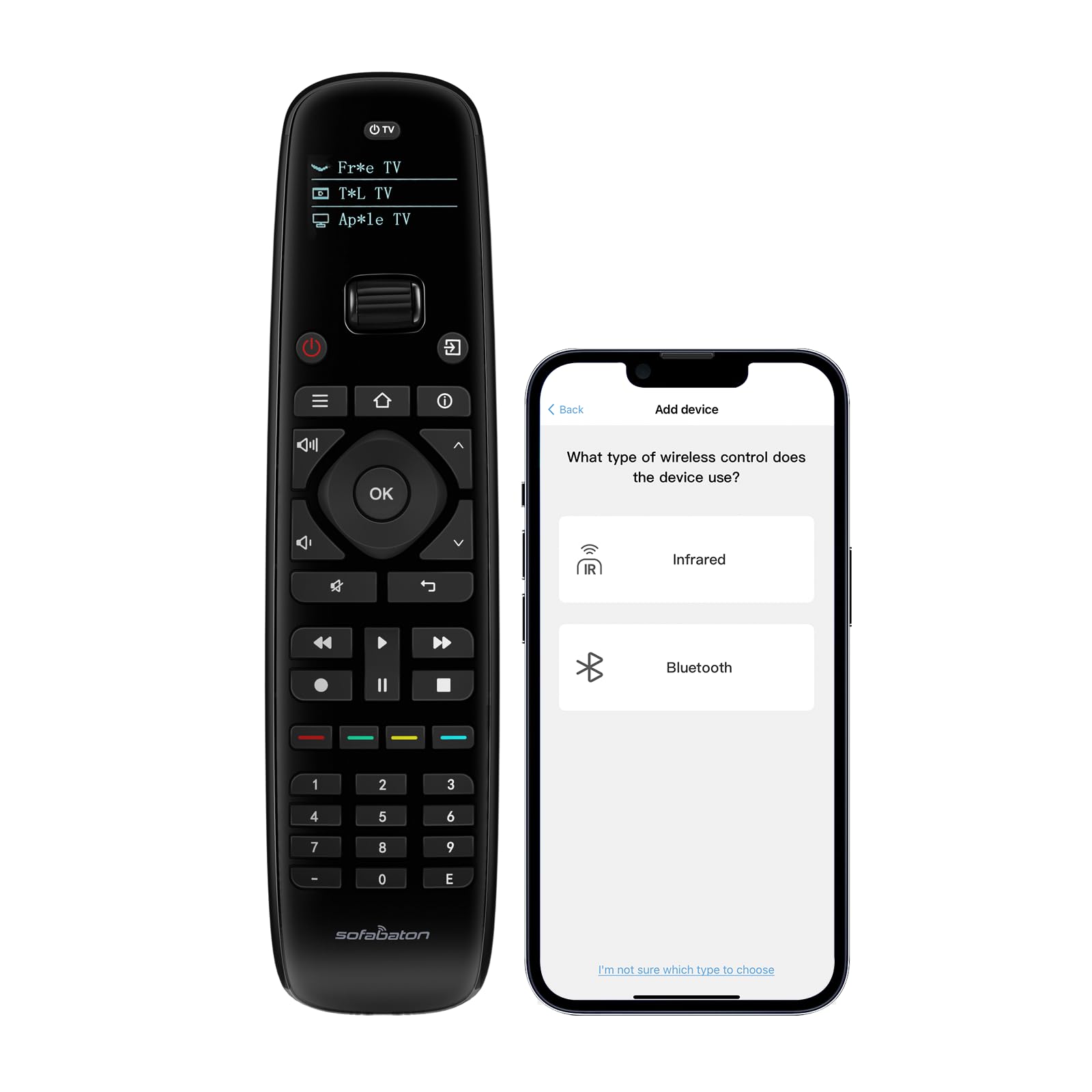
This second SKU of the SofaBaton U2 is functionally identical to the first in terms of code library and IR performance, but it includes an OLED display that automatically lights up when you pick up the remote—a small convenience that dramatically improves usability in a dark theater room. The screen shows which device you are currently controlling, and the scroll wheel lets you flick through connected devices without pecking at tiny buttons.
Setup follows the same app-driven path: download the SofaBaton app, add each device by brand and model, and the cloud database populates the button mapping. The IR learning mode is available as a fallback, and the app supports custom button reassignment and macro creation with up to 10 steps per macro. The raise-to-wake feature is responsive and avoids the “shake to see the screen” annoyance of lesser remotes.
The biggest caveat is that this model suffers from the same software limitations as its sibling. Macros are capped at 10 steps, which may not be enough for complex multi-device sequences involving HDMI-CEC handshakes. And the lack of a firmware update pathway means you are stuck with whatever bugs ship with your unit. Still, for sheer build quality, ergonomic feel, and the polished OLED interface, it earns its spot as a top-tier option.
Why it’s great
- OLED display with automatic raise-to-wake
- Scroll wheel for fast device switching
- Solid, premium-feeling build
Good to know
- Macros limited to 10 steps
- No firmware update option
- Cannot copy configuration to another unit
3. Logitech Harmony 665 Advanced Remote (Renewed)

The Logitech Harmony 665 remains the gold standard for activity-based universal remotes, even in its renewed form. The core concept is simple: instead of switching between “TV mode” and “soundbar mode,” you set up activities like “Watch TV” or “Watch a Movie,” and the remote automatically powers the correct devices, sets the right inputs, and leaves everything else off. The guided online setup walks you through each device and activity step by step, and the on-screen interactive help can fix any synchronization issues without requiring a full reprogram.
With support for up to 10 devices and an IR range of about 30 feet, the Harmony 665 handles most living room configurations. The My Harmony software—while aging—still works with Windows and macOS, and returning users can import their old settings from previous Harmony remotes. The 665’s motion-activated backlight is a nice touch for dark rooms, and the 25 customizable channel favorites let you skip the grid guide and jump straight to your go-to content.
The elephant in the room: Logitech discontinued the entire Harmony line in 2021. The renewed units are refurbished stock with varying cosmetic condition, and some users report dead-on-arrival screens or battery drain during shipping. The software also lacks modern cloud-based code updates, so adding a brand-new 2024 streaming device may require manual IR learning. But if you can find a clean unit, the Harmony 665’s activity logic is still more intuitive than anything the current market offers.
Why it’s great
- Best-in-class activity-based control system
- On-screen help rescues sync errors
- Supports up to 10 devices
Good to know
- Discontinued—no new software updates coming
- Renewed units may have cosmetic or functional defects
- Modern device support depends on user-created profiles
4. One For All URC7880 Universal Smart Remote

The One For All URC7880 is the most affordable remote in this guide that still supports eight devices and includes a learning mode, making it a strong contender for budget-conscious buyers who don’t want to sacrifice functionality. The companion smartphone app simplifies the initial setup—add devices by brand, and the remote pulls codes from a database of over 7,000 brands. For devices not in the database, the learning mode lets you copy commands directly from your original remote by placing the two remotes within inches of each other.
The URC7880 supports “punch-through” functionality, a feature often omitted from cheaper remotes: you can set volume and mute to always control your soundbar, even when the remote is in “Watch Blu-ray” mode. This eliminates the most common frustration with universal remotes—adjusting the TV volume when you actually wanted the AVR volume. The remote also has three shortcut keys for streaming apps, though these are pre-labeled for Netflix, Amazon Prime, and YouTube.
On the downside, the URC7880 has no backlighting, which is a serious omission for a living-room remote. The button layout is also less ergonomic than the SofaBaton or Harmony, with the number pad positioned awkwardly below the transport controls. And while the learning mode works, it is a tedious process—you must teach each button one at a time, and the remotes must be perfectly aligned. Still, for the price, it delivers enough control depth to clean up a three- or four-remote coffee table.
Why it’s great
- Supports up to 8 devices at a low cost
- Punch-through volume control works smoothly
- Learning mode covers obscure devices
Good to know
- No backlighting for dark room use
- Button layout feels cramped and awkward
- Learning mode is slow and alignment-sensitive
5. Flipper Big Button Universal TV Remote

The Flipper Big Button Remote is a category unto itself: designed specifically for seniors, individuals with dementia, or anyone with low vision or dexterity challenges. It strips the remote interface down to just three functions—Power, Volume, and Channel—using large, color-coded tactile buttons that are nearly impossible to press accidentally in the wrong combination. For users who become overwhelmed by the 40+ button array of a standard universal remote, the Flipper removes all cognitive friction.
Despite its simplicity, the Flipper includes a powerful hidden feature: favorite channel programming. You can assign up to 25 channels that the user cycles through with the channel buttons, skipping the hundreds of irrelevant channels. The remote works with both IR TVs and cable set-top boxes (Xfinity, Spectrum, DirecTV, etc.), and you can program it to control either the TV alone or the TV plus the box. The power button can be set to turn off only the TV, avoiding the common issue where the remote shuts down the cable box inadvertently.
The trade-offs are significant for non-target users. The Flipper does not support streaming devices, has no navigation buttons for on-screen menus, and requires direct line-of-sight IR—if the cable box is hidden behind a cabinet, you will need an IR extender. Build quality is also a mixed bag: the battery compartment can bulge and the plastic finish feels budget-grade. But for its intended audience, the Flipper is genuinely life-changing, eliminating the confusion and frustration that complex remotes cause.
Why it’s great
- Only three oversized, color-coded buttons
- Program up to 25 favorite channels
- Power button can be set for TV-only control
Good to know
- Does not work with streaming devices or apps
- Battery compartment fit is loose on some units
- Requires direct line-of-sight for IR signals
6. Anderic RRU401 4-in-1 Universal Remote
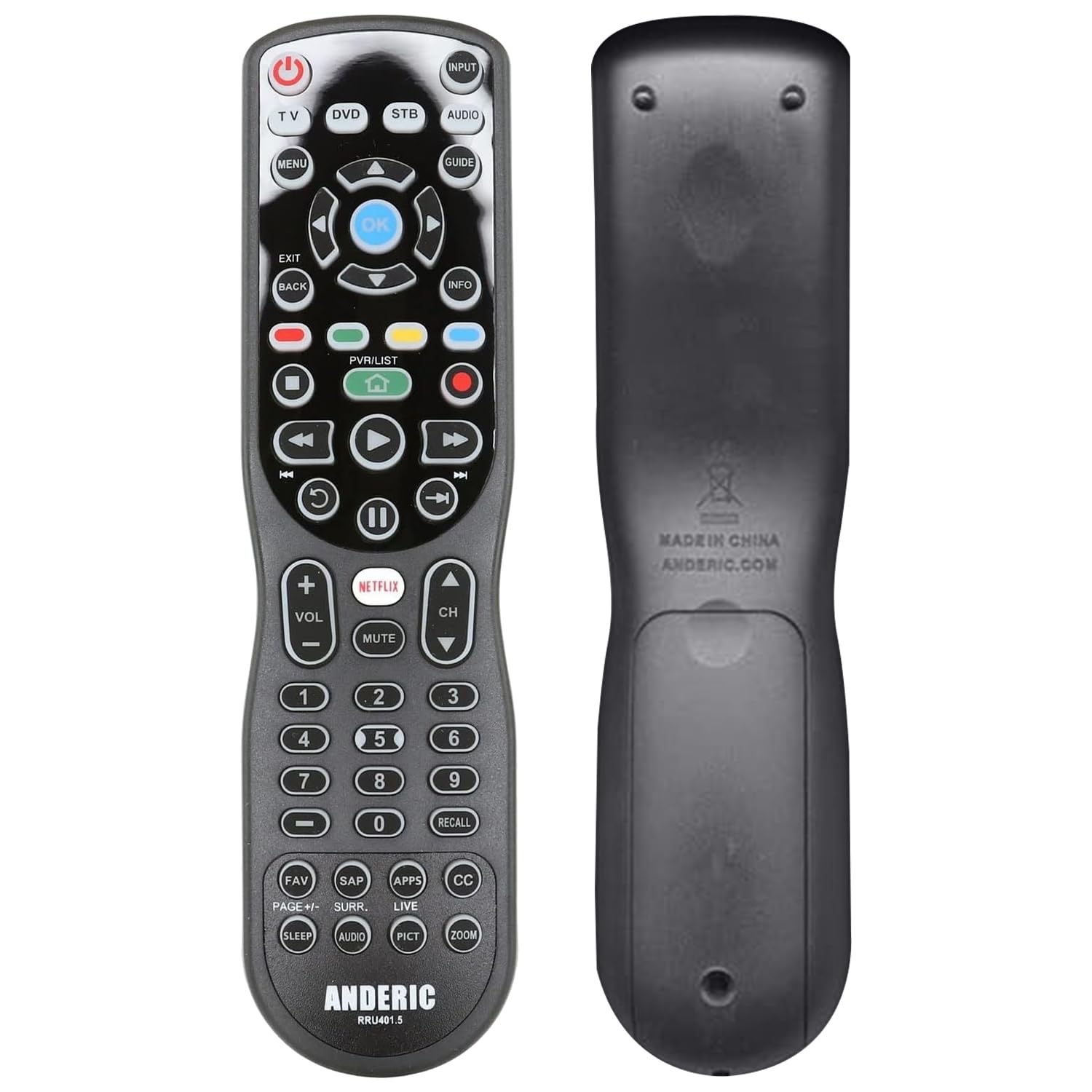
The Anderic RRU401 is a 4-device learning remote that punches well above its price point, offering features—full backlighting, macro programming, and punch-through support—that are typically reserved for more expensive models. The backlight covers the entire keypad, making it easy to navigate in a dark room, and the learning mode lets you copy commands from any original IR remote by placing them head-to-head. For users who only need to control a TV, soundbar, cable box, and streaming device, the four-device limit is rarely a problem.
Where the RRU401 really shines is its macro and punch-through capabilities. You can program the power button to turn off multiple devices at once, and you can set volume commands to always route to your soundbar regardless of which device the remote is currently controlling. Users report successful setups with Samsung TVs, Bose soundbars, Roku streaming devices, and TiVo boxes—all using the built-in code library rather than learning mode.
The catch is the programming experience. The instruction manual is notoriously sparse, relying on QR codes and web-based guides, and the code-finding process involves trial-and-error with multi-digit numbers. The button layout also places the volume and channel buttons far from the directional pad, causing frequent “cursor overshoot” during menu navigation. And while the backlight is bright, it only activates on button press—no motion sensor. For patient tinkerers, the RRU401 is a fantastic value; for those seeking a plug-and-play experience, look elsewhere.
Why it’s great
- Full keypad backlight for dark rooms
- Macro and punch-through features work well
- Learning mode covers unusual devices
Good to know
- Poorly written manual; setup is trial-and-error
- Button layout creates cursor latency issues
- Limited to 4 devices
7. Seayoo Solar Powered Remote (for Samsung TVs)
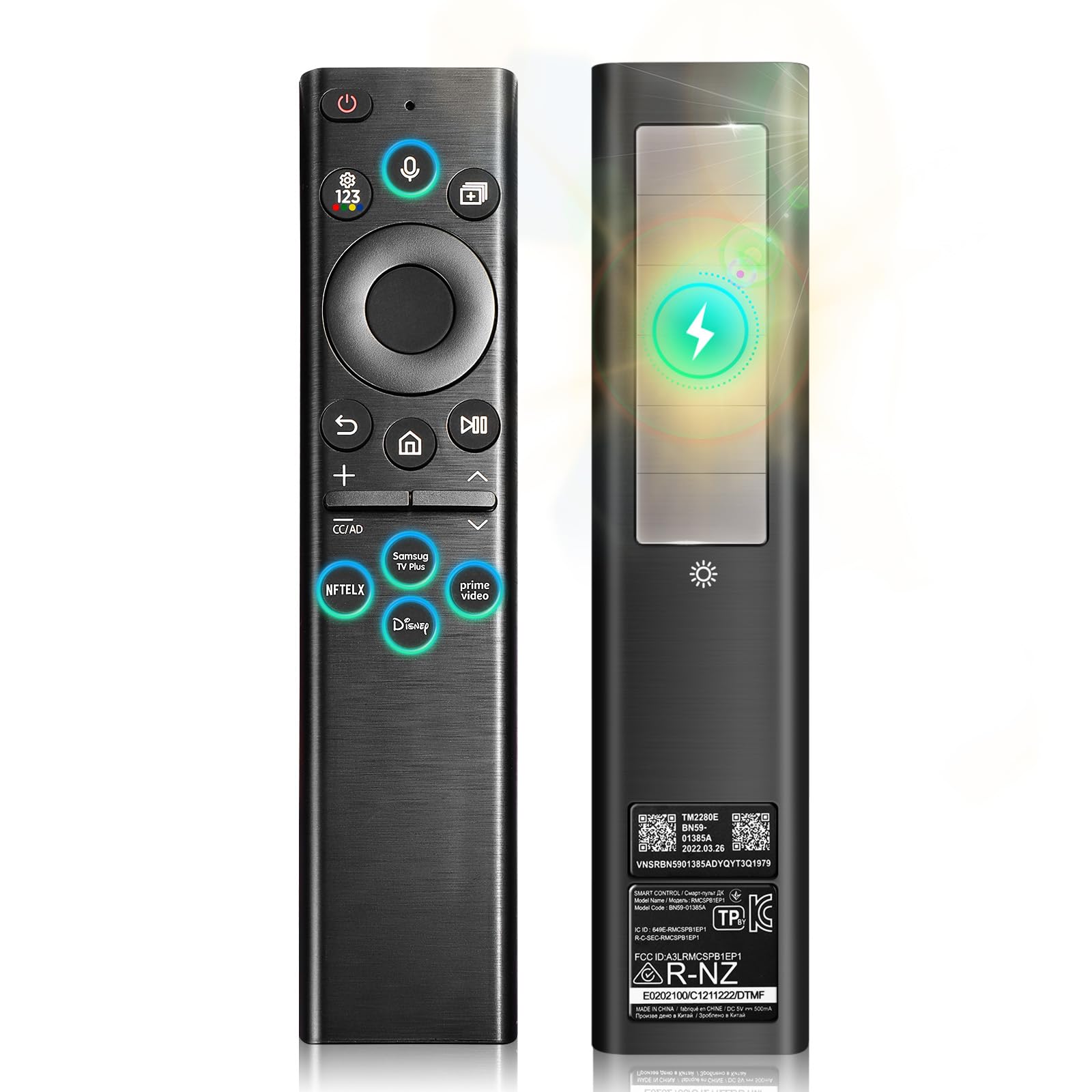
The Seayoo Solar Remote is a specialized replacement for Samsung smart TVs (2020–2025 Neo QLED, Frame, Crystal UHD), and while it is not a universal remote in the traditional sense—it only controls a single Samsung TV—it solves the most common frustration of any remote: dead batteries. The built-in high-capacity lithium battery can be charged via the solar panel on the back or through the USB-C port, providing 6 to 12 months of standby time on a single full charge. For households tired of replacing AA batteries every few months, this is a compelling upgrade.
The remote pairs automatically with compatible Samsung TVs via Bluetooth, eliminating the need for line-of-sight IR aiming. Voice control is fully supported, and the buttons are responsive and well-spaced. The 0.4-inch ultra-slim profile makes it easy to slip between couch cushions without creating an uncomfortable lump, and the sealed body eliminates the battery cover that often breaks on standard remotes.
However, the Seayoo is not a solution for multi-device households. It controls exactly one Samsung TV—no soundbar, no cable box, no streaming stick. A small number of users report the battery failing to hold a charge after about six months, though this appears to be a minority experience. If you need a 6-device universal remote, this is not the product for you; but if you are a Samsung TV owner looking to eliminate battery waste, it is a thoughtfully designed eco-friendly option.
Why it’s great
- Solar and USB-C charging ends battery waste
- Ultra-slim 0.4-inch design
- Bluetooth pairing with voice control
Good to know
- Only works with Samsung smart TVs (2020–2025)
- Cannot control soundbars, cable boxes, or other devices
- Some users report battery failure after 6 months
FAQ
Can a 6-device universal remote control a soundbar and a TV at the same time?
What does “learning remote” mean and why would I need one?
Final Thoughts: The Verdict
For most users, the best 6 device universal remote winner is the SofaBaton U2 because it combines a massive cloud code library, real macro programming with adjustable delays, and superb 35-foot IR range with backlit buttons, all at a price that undercuts the legacy Harmony alternatives. If you want the polished activity-based logic of the Harmony ecosystem and don’t mind buying renewed, grab the Logitech Harmony 665. And for a simple, accessible solution for seniors or anyone overwhelmed by complex remotes, nothing beats the Flipper Big Button Remote.