
Dropping a quarter-second input on a wake-up DP or missing a punish because your joystick registered the wrong direction is the difference between a tournament win and a trip to the losers’ bracket. Affordable fight sticks have closed the gap between budget gear and pro-level hardware, but choosing the wrong one means fighting your controller every round instead of your opponent.
I’m Min — the co-founder and writer behind Gadgets Feed. I’ve spent hundreds of hours researching the sub-1ms latency, switch actuation forces, and SOCD cleaning implementations that separate a competent entry-level arcade stick from a frustrating paperweight.
Whether you main a shoto on leverless or you swear by the tactile feedback of a traditional joystick, this guide cuts through the noise to deliver the best affordable fight sticks that actually hold up in real matches.
How To Choose The Best Affordable Fight Sticks
Not every budget arcade stick delivers the same experience. The price tag is only the first filter — input method, build quality, switch type, and platform compatibility determine whether your stick helps or hinders your gameplay. Focus on these three factors to avoid wasting money on a controller that feels mushy or drops inputs during critical moments.
Form Factor: Leverless vs. Traditional Joystick
The single most important decision is whether you want a joystick-based stick or an all-button leverless controller. Leverless designs use directional buttons instead of a joystick, which eliminates gate restrictions and can reduce input errors for motions like quarter-circles and dragon punches. Traditional sticks offer tactile feedback through a physical lever, which many players prefer for games like Tekken that require precise Korean backdash timing. Leverless controllers typically use low-profile switches with shorter travel, while traditional sticks use full-size microswitches or optical sensors in the joystick assembly.
Connectivity and Platform Support
Native PS5 support is the most expensive feature to obtain due to licensing requirements. Many affordable sticks work on PS4, PC, and Switch natively, then require an adapter for PS5 or Xbox Series X|S. Check whether the controller uses GP2040-CE firmware, which offers sub-1ms latency across all platforms, versus proprietary firmware that may introduce delay or compatibility issues. Wired USB-C connections are preferred for zero-latency play, but wireless options via Bluetooth or 2.4GHz are available for casual setups.
Switches and Customization Potential
Hot-swappable switches allow you to change actuation force and feel without soldering. Low-profile Kailh Choc switches are common in leverless controllers, offering options from linear reds (light actuation) to clicky blues (tactile feedback with audible click). Traditional arcade buttons use 30mm or 24mm diameters with OBSF or OBSN microswitches. A stick that lets you swap the joystick plate (for Sanwa JLF compatibility) or replace the button switches extends its lifespan significantly and allows you to upgrade as your skills improve.
Quick Comparison
On smaller screens, swipe sideways to see the full table.
| Model | Category | Best For | Key Spec | Amazon |
|---|---|---|---|---|
| HORI Fighting Stick Alpha (TEKKEN 8) | Premium Traditional | Native PS5 tournament play | Hayabusa lever & buttons | Amazon |
| MAYFLASH F300 Elite | Traditional Multi-Platform | Cross-platform with Sanwa parts | Sanwa joystick & 9 buttons | Amazon |
| 8Bitdo Retro Arcade Fight Stick | Wireless Traditional | Casual play on Switch/PC | 40-hour battery (2.4G) | Amazon |
| Qanba Drone 2 | Licensed Traditional | PS5 entry-level stick | Official Sony license | Amazon |
| Haute42 R16 | Premium Leverless | Mid-range leverless upgrade | GP2040-CE, <1ms latency | Amazon |
| Sehawei Haute42 R16 | Leverless Crystal | Stylish RGB leverless build | Crystal acrylic, 16 keys | Amazon |
| GuileKeys GK-18 | Budget Leverless | Best entry leverless value | 18 keys + OLED screen | Amazon |
In‑Depth Reviews
1. HORI Fighting Stick Alpha (TEKKEN 8 Edition)

The HORI Fighting Stick Alpha in its TEKKEN 8 Edition is the only entry in this roundup with native PS5 support out of the box, thanks to its official Sony license. The Hayabusa lever uses a square gate with a light spring tension that makes Korean backdash and wavedash motions feel snappy without requiring excessive force. The Hayabusa buttons are rated for millions of presses and feature a shorter throw than Sanwa OBSF buttons, which competitive players often prefer for rapid double-taps.
The top panel artwork is replaceable, and HORI includes downloadable alternate TEKKEN 8 art files so you can print your own. Opening the case is tool-free — just press the latch and the internals swing open for easy component swapping. The lever mounting plate accepts standard Sanwa JLF-compatible joysticks, and the button holes are sized for 30mm and 24mm arcade buttons, giving you a clear upgrade path without drilling.
At just under 5.6 pounds, the Alpha has enough weight to stay planted on your lap or a tabletop during intense sessions. The Hayabusa lever does produce a fairly audible click with each directional input, which some players find satisfying and others find distracting in quiet environments. The included USB cable is detachable, which is a welcome feature for travel and storage.
Why it’s great
- Native PS5 compatibility — no adapters needed for tournament play
- Tool-free case opening makes modding and maintenance effortless
- Hayabusa lever and buttons offer excellent responsiveness out of the box
Good to know
- Premium price point compared to budget-friendly leverless options
- Lever is louder than some competitors due to microswitch design
2. MAYFLASH Arcade Stick F300 Elite
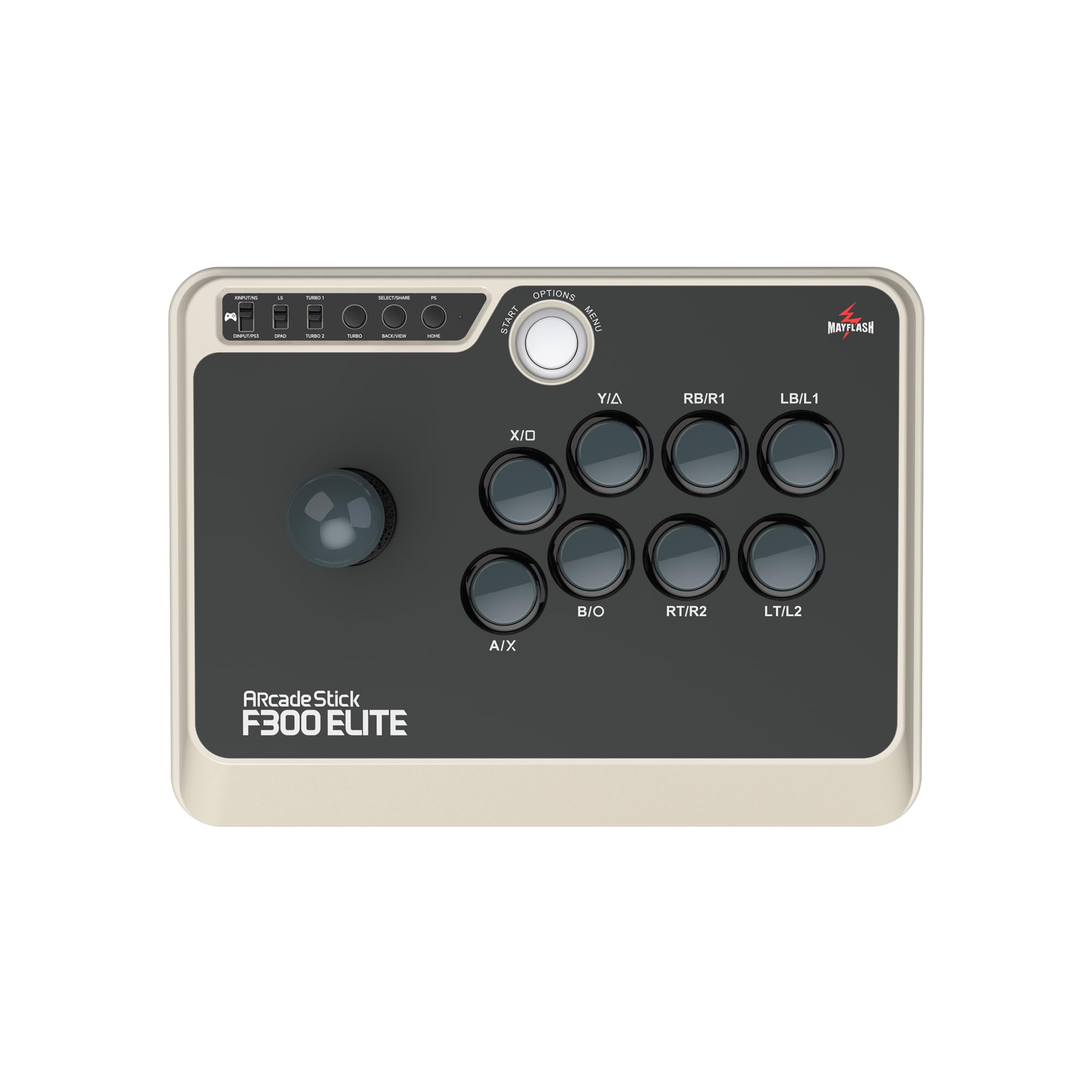
The MAYFLASH F300 Elite is one of the few affordable fight sticks that ships with genuine Sanwa joystick and Sanwa buttons straight from the factory. The Sanwa JLF-8Y joystick uses a 2.8-pound spring with a square gate, providing the precise, gate-defined diagonal detents that competitive Street Fighter players rely on for consistent dragon punches and supers. The 30mm OBSF buttons use microswitches with a crisp actuation and about 1.5mm of travel before bottom-out.
Platform support covers PS3, PS4, Xbox Series X|S, Xbox One, Xbox 360, Nintendo Switch/Switch 2, PC via XInput and DInput, macOS, Steam Deck, and Android. For PS5, you need the MAYFLASH Magic-S Ultimate adapter, which adds roughly to the total investment. The stick itself is surprisingly compact at 11.8 x 8.9 x 2.2 inches, making it one of the more portable traditional sticks available.
Out of the box, the F300 Elite requires a controller plugged into the included passthrough USB port for console use on PS4 and Xbox systems — a design decision that can be a hassle at local tournaments. The Sanwa parts alone justify the cost, since upgrading a standard F300 to Sanwa components would cost nearly the same as buying the Elite version outright. The case is solid molded plastic with enough internal space for simple button swaps or a joystick replacement down the line.
Why it’s great
- Comes with genuine Sanwa joystick and buttons at an affordable price
- Extensive multi-platform compatibility covering nearly every modern console and PC
- Compact and portable form factor without sacrificing durability
Good to know
- Requires controller passthrough for console play on PS4 and Xbox
- PS5/Xbox Series X play needs an additional adapter
3. 8Bitdo Retro Arcade Fight Stick
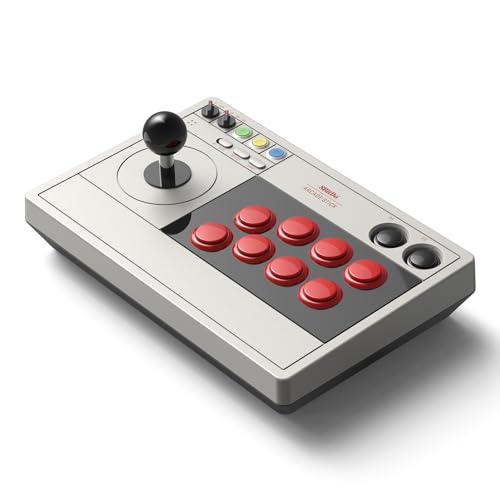
The 8Bitdo Retro Arcade Fight Stick takes a different approach by focusing on wireless freedom and retro compatibility rather than tournament-grade latency. It supports Bluetooth, 2.4GHz via a hidden receiver compartment, and wired USB-C connections. The 2.4GHz mode delivers 40 hours of playtime on a full charge, and the included receiver stores inside the stick itself, so you rarely need to worry about losing it during travel.
The stick uses an 8-way joystick with a universal mounting plate that accepts virtually any aftermarket joystick — including Sanwa JLF, Semitsu, and Hori Hayabusa models. The buttons are 30mm and 24mm arcade sizes, also swappable. The 8BitDo Ultimate Software allows full button remapping and macro creation on the two dedicated P1/P2 macro buttons, which is rare at this price point. The dynamic button layout physically shows different labels depending on whether you are in Switch or PC (X-Input) mode.
Build quality is solid for casual and intermediate play, though the stock buttons feel slightly less crisp than Sanwa units and may benefit from a replacement set if you plan to compete. The wireless connection is stable in both 2.4G and Bluetooth modes, with no noticeable input delay during casual play on PC or Switch. The stick works best for retro fighters and modern games where sub-1ms latency is not critical.
Why it’s great
- Excellent battery life with 40 hours on 2.4GHz wireless
- Universal joystick mounting plate accepts any brand of lever
- Dedicated macro buttons and customizable software
Good to know
- Stock buttons feel cheaper than Sanwa or Hayabusa equivalents
- Not ideal for competitive tournament play due to wireless latency
4. Qanba N3 Drone 2 Wired Joystick

The Qanba Drone 2 is an officially licensed Sony PlayStation peripheral, which means it works natively on PS5 and PS4 without any workarounds or authentication dongles. The lever uses the Qanba OV7 OMRON switch mechanism, which provides a distinct tactile click with each gate contact — loud enough to be audible over game audio in a quiet room, which helps with muscle-memory development for Mishima players practicing electric wind god fists in Tekken 8. The 30mm Qanba B30 buttons use mechanical switches with a responsive, positive actuation feel.
The Drone 2 weighs 3.9 pounds and measures 14 x 8.7 x 4.6 inches, making it noticeably larger than the F300 Elite but also more stable on a lap. The control panel includes a full touchpad, a 3.5mm microphone input with mute button, and a button layout that mirrors the PS5 DualSense controller for navigating the console UI. The cable is non-detachable, which is the single most common complaint among owners who travel to local scenes.
While the Qanba B30 buttons are a step above generic arcade buttons, they do not match Sanwa OBSF in terms of consistent actuation force across every press. The lever is loud and the response is slightly more springy than the Hayabusa or Sanwa JLF, which some players appreciate for the audible feedback and others dislike for the noise. The removable bottom plate uses quick-release screws for easy access to the internals, so you can upgrade the lever or buttons later.
Why it’s great
- Official Sony license provides plug-and-play PS5 compatibility
- Lever has clear, audible feedback that helps with timing in Tekken
- Built-in touchpad and 3.5mm audio jack for full console functionality
Good to know
- Non-detachable USB cable makes storage and transport awkward
- Buttons feel less refined than premium Sanwa or Hayabusa options
5. Haute42 R16 Leverless Controller

The Haute42 R16 puts the GP2040-CE firmware — the same open-source firmware used by custom hitbox builders — at the heart of a production affordable leverless controller. The result is sub-1ms input latency in every mode, with proper SOCD cleaning that prioritizes Last Input for neutral skip protection in tournament settings. The RP2040 chip gives you a built-in web configurator accessible at 192.168.7.1 when plugged into a PC, letting you remap every button, adjust RGB zones, and update firmware without installing drivers.
The controller measures 296 x 196 x 12.5mm and weighs 780 grams, making it one of the thinner leverless options available. The low-profile Kailh Choc switches are hot-swappable, so you can change from linear reds to clicky blues or tactile browns in seconds using the included switch puller. The 16-button layout places the action buttons in a standard 8×2 arcade grid, with the directional keys in a WASD-style cluster. The M2 button has been moved to the left pinky position, which is ergonomically superior for games that require a dedicated dash macro.
The acrylic case can develop minor creaking if the screws come loose during transport, but tightening them with the included tool resolves the issue. The stock switches are pre-lubed from the factory but benefit from a swap to Kailh Shadow Hunting low-profile switches for 1.2mm total travel. This controller does not natively support PS5 — it requires a Brook Wingman FGC or similar adapter.
Why it’s great
- GP2040-CE firmware delivers sub-1ms latency with full SOCD cleaning
- Hot-swappable Kailh Choc switches allow easy customization
- Built-in web configurator for easy mapping and firmware updates
Good to know
- Acrylic case can creak if screws are not tightened periodically
- PS5 support requires a third-party adapter
6. Sehawei Haute42 Arcade Stick R16

The Sehawei Haute42 R16 shares the same GP2040-CE foundation as the standard Haute42 R16 but differentiates itself with a crystal acrylic enclosure that makes the per-key RGB lighting significantly more vibrant and diffused. The transparent material shows the internal PCB and switch sockets clearly, creating a distinctive look that stands out on any streaming desk or local setup. The button rims have been redesigned to mimic the raised edges of classic Sanwa OBSF buttons, providing a tactile boundary for your fingers during fast inputs.
The controller is 2.8mm thinner than the Haute42 T13 and T16 models, which reduces wrist strain during long sessions. The Type-C port has been reinforced to prevent the cracking issue that affected earlier revisions. The 16-button layout includes M1 and M2 custom macro keys that can be programmed through the web configurator for instant dash or throw macros. SOCD cleaning modes include Last Input, First Input, and Neutral, which covers all major tournament regulations.
The stock Kailh Choc low-profile switches have a 3.5mm total travel and 50g actuation force, which is slightly heavier than linear red switches and can feel stiff during extended play sessions. The acrylic surface is prone to fingerprints and scratches if handled without care. The controller works natively on PS3, PS4, Switch, and PC, but requires an adapter for PS5.
Why it’s great
- Crystal acrylic shell produces the best RGB diffusion in this price range
- GP2040-CE firmware with multiple SOCD cleaning modes
- Thinner profile than earlier Haute42 models for better ergonomics
Good to know
- Stock switch actuation force may feel heavy for rapid inputs
- Acrylic surface shows fingerprints and scuffs easily
7. GuileKeys GK-18 Leverless Arcade Stick
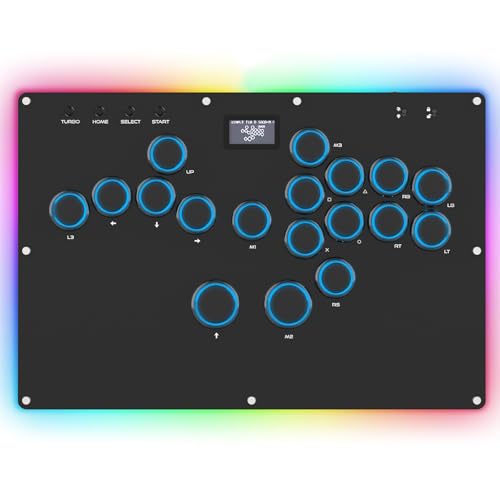
The GuileKeys GK-18 proves that sub- leverless controllers can deliver competitive performance without corner-cutting on the critical specs. It uses the RP2040 chipset and GP2040-CE firmware, the same sub-1ms latency foundation found in controllers costing three times as much. The 18-button layout includes two extra keys beyond the standard 16, which you can map to throw, parry, or dash macros through the built-in web configurator. The OLED screen on the top panel displays the current input mode, button layout, and SOCD cleaning mode.
The Kailh Choc low-profile switches are hot-swappable, and the keycaps also pull off without tools, so you can replace both the switch and the cap independently. The RGB lighting offers 15 backlight modes and 14 colors, with per-key zones that can be configured through the web interface. The GK-18 also includes a Tournament Lock switch that disables all macro and turbo functions, making it legal in most competitive rulesets that ban programmable inputs.
Build quality is impressive for the price point, with a solid acrylic sandwich construction that feels stiffer than some competitors in the same bracket. The extra spacing between the directional cluster and the action buttons — 2.5cm gap — fits natural hand placement for players with larger hands better than the tighter layout on the Haute42 M- or T-series. The included USB-C adapter for PS4/PS5 authentication reportedly disconnects every few minutes, so a Brook Wingman FGC or similar adapter is recommended for console play.
Why it’s great
- RP2040 chip with GP2040-CE firmware delivers pro-level latency
- 18-button layout with OLED screen and per-key RGB customization
- Hot-swappable switches and keycaps without any soldering
Good to know
- Included PS4/PS5 authentication adapter has connectivity issues
- Acrylic construction can feel fragile if handled roughly during transport
FAQ
Will an affordable leverless controller work on PlayStation 5 without an adapter?
What is SOCD cleaning and why does it matter for tournament play?
Can I replace the joystick or buttons on an affordable fight stick?
How much input latency is acceptable for competitive fighting games?
Final Thoughts: The Verdict
For most users, the best affordable fight sticks winner is the Haute42 R16 because it combines GP2040-CE sub-1ms latency with hot-swappable low-profile switches, an ergonomic 16-button layout, and a built-in web configurator — all at a price that undercuts traditional sticks with similar latency performance. If you want native PS5 compatibility in a traditional joystick form factor, grab the HORI Fighting Stick Alpha. And for the absolute best value in an entry-level leverless controller, nothing beats the GuileKeys GK-18 with its 18-button layout and OLED screen.