
Our readers keep the lights on and my morning glass full of iced black tea. As an Amazon Associate, I earn from qualifying purchases.
Specs are compiled from manufacturer listings and verified buyer reviews and can change over time — please confirm the key details on the product page before buying.
Two monitors usually mean two wobbly bases that swallow your desk space. A 2-computer screen stand fixes that by holding both displays on one sturdy frame, so you reclaim desk space and align both screens to a comfortable viewing height.. To pick the right one, you need to know three things: your monitors’ weight, how often you’ll reposition them, and whether you can clamp to your desk or need a free-standing base.
I’m Min — the founder and writer behind Gadgets Feed. This guide is built by comparing the manufacturers’ published specifications and the patterns across verified customer reviews, so you get each pick’s real strengths and trade-offs instead of marketing spin.
The mounting pattern on the back of your monitor is the first thing to check before you pick a 2-computer screen stand that will actually fit your screens.
Our Picks at a Glance

How To Choose The Best 2-Computer Screen Stand
Most dual monitor stands fail for one simple reason: the buyer skipped the VESA check. That is the square hole pattern on the back of your monitor, and it comes in two common sizes — 75x75mm and 100x100mm. Almost every stand here supports both, but a few niche models only fit one, so it is the single quickest way to avoid a return.
Weight capacity per arm
Every stand lists a maximum weight per arm, usually between 15 and 22 lbs. Heavier monitors, especially 32-inch curved panels, need the higher end of that range. If your screen sits right at the limit, the arm can slowly drift downward over time — so give yourself a few pounds of headroom when you can.
Clamp, grommet, or free-standing
A C-clamp grips the back edge of your desk and is the most stable option, but it needs a solid lip to bite into. A grommet mount drops through a hole in the desk, which works for glass or thin tabletops. A free-standing base sits on the surface itself — perfect for desks against walls or shared workspaces where you cannot clamp anything.
Movement range
Think about how often you actually reposition your screens. Full-motion arms with tilt, swivel, and rotation let you switch between landscape and portrait for coding or documents. Simpler risers just lift both monitors to eye level. More movement usually means more setup fiddling, so match the flexibility to how you work.
Quick Comparison
| Model | Best For | Max Screen Size | Weight Per Arm | Maximum Tilt | Amazon |
|---|---|---|---|---|---|
| VIVO STAND-V002W★ Best Overall | Everyday value with full motion | 30 inches | 22 lbs | 90 degrees | Amazon |
| Mount-It! MI-4781Best Free-Standing | Free-standing on any desk | 32 inches | 19.8 lbs | 45 degrees | Amazon |
| HUANUO HNDS18Best for Big Screens | Largest screens with heavy panels | 32 inches | 22 lbs | 90 degrees | Amazon |
| AX WABER AX05TB02 | Vertical stacked setups | 34 inches | — | 15 degrees | Amazon |
| Amazon Basics DS-MADDBE | Gas spring smooth movement | 27 inches | 15.4 lbs | — | Amazon |
| Mexin JA-ZGJ-39-WH | Storage with drawers | — | — | — | Amazon |
| WESTREE CS3007-BK | Monitor plus laptop combo | — | — | — | Amazon |
| WALI GMF002 | Glass base aesthetics | 27 inches | 22 lbs | 90 degrees | Amazon |
In‑Depth Reviews
1. VIVO Dual Monitor Desk Mount STAND-V002W
Our pick — over 4.5★ from 60,500+ verified ratings; the strongest balance of quality and price.
The crowd-favorite mount that balances price, reach, and rock-solid steel at a scale almost nothing else matches.
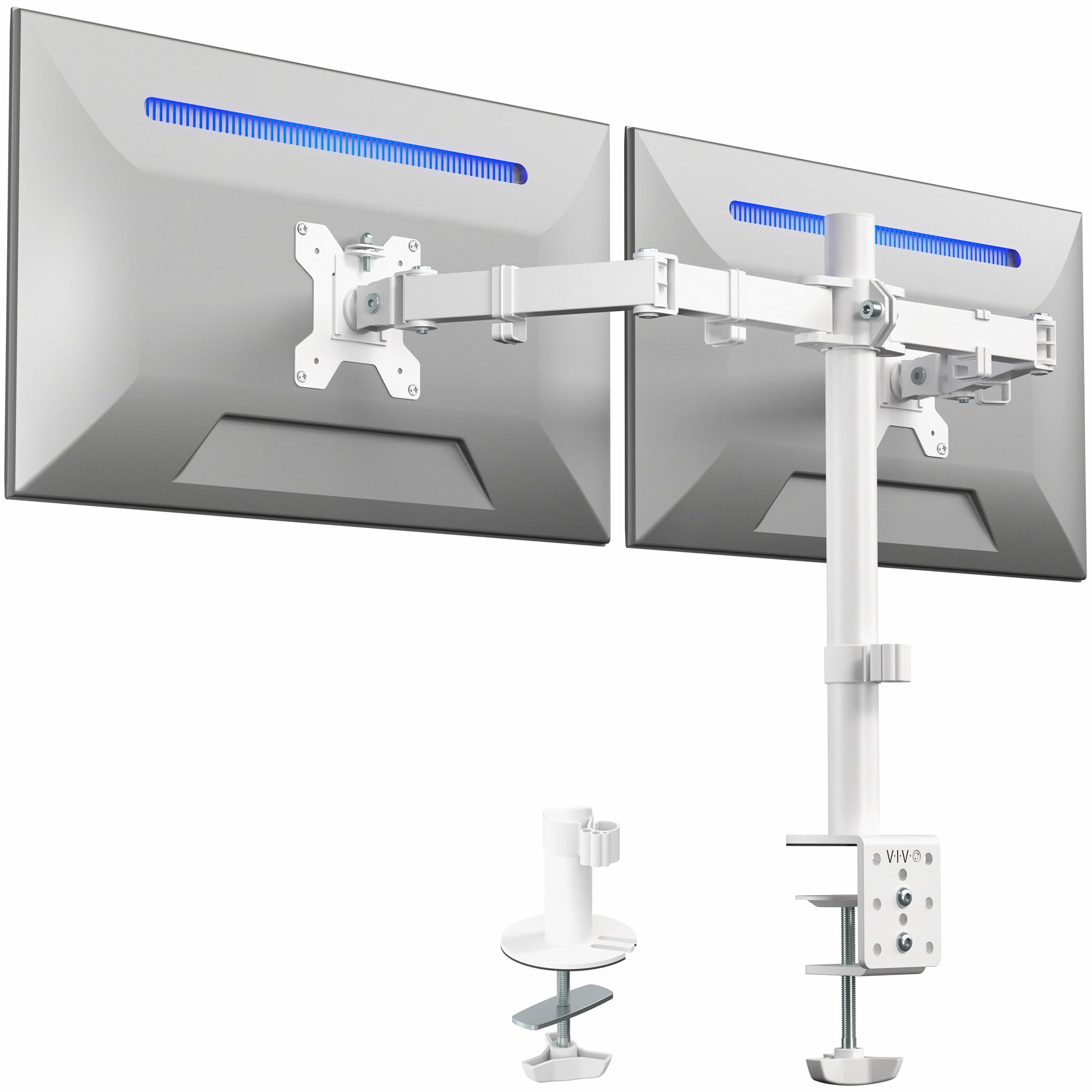
Tens of thousands of buyers pick this stand because it does everything a dual arm should without a premium price. Each arm holds up to 22 lbs, and you get a full range of motion: 90 degrees of tilt to cut glare, 180 degrees of swivel to share your screen with a coworker, and 360 degrees of rotation to flip into portrait mode for code or documents. It fits screens from 13 to 30 inches, so it covers most home setups.
The mounting flexibility is what makes it a safe bet for almost any desk. A heavy-duty C-clamp grips the back edge of desks up to 3.25 inches thick, and there is an optional grommet mount if you prefer to drop it through a hole. Detachable VESA plates make the actual install straightforward — you bolt the plates to the monitors, hang them on the arms, and tighten. Buyers report it holds screens “no problem and it doesn’t fall or shake,” and the sturdy steel build is wrapped in a 3-year manufacturer warranty.
The honest caveat is that this is best for a static setup. Some owners find the joints can migrate slightly under load, letting a monitor tilt downward over weeks of use, and the hex-nut adjustments are not the quickest to fiddle with. It is also a heavier unit, so it wants a solid desk rather than a flimsy folding table. Once leveled, it clears your desk surface and holds its position once leveled..
What wins people over
- Easy assembly with detachable VESA plates
- Full motion: 90° tilt, 180° swivel, 360° rotation
- Fits 13″ to 30″ screens at 22 lbs per arm
- 3-year manufacturer warranty
Who should look elsewhere
- Joints can drift under load over time
- Height adjustment requires removing monitors
- Better for static setups than frequent repositioning
Reach for this if: you want the best all-around value with full motion on screens up to 30 inches.
Think twice if: you constantly reposition your monitors — the stiff joints reward a set-and-level approach.
2. Mount-It! Dual Monitor Desk Stand MI-4781
The free-standing pick that lifts two big 32-inch screens without touching your desk edge.
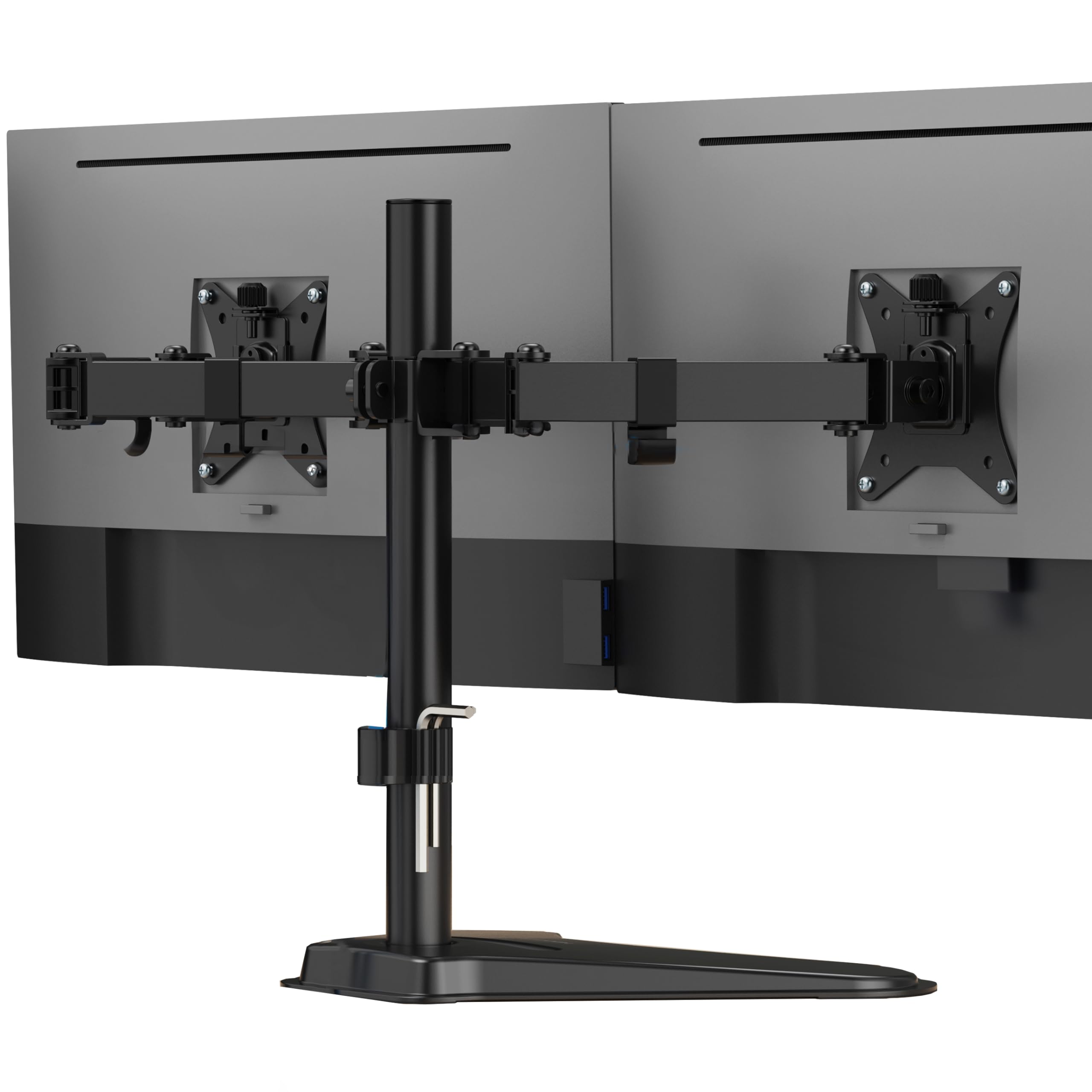
Unlike the clamp-based VIVO above, this Mount-It! stand sits on a heavy-duty freestanding base, which makes it the practical answer for desks against walls, glass tabletops, thin surfaces, cubicles, or shared workstations where a C-clamp simply will not work. It still supports screens up to 32 inches at 19.8 lbs per arm, so it is not trading capacity for convenience.
Both monitors slide vertically along a 16.5-inch center pole, letting you set a comfortable viewing height that reduces neck and eye strain during long work sessions.. Each arm tilts to fight glare, swivels for collaboration, and rotates between landscape and portrait. Owners mention it holds dual 32-inch monitors steadily on a corner desk, and the verdict from the review pages sums it up: “Works perfect holds my 2 screens no problem and it doesn’t fall or shake.”
The trade-off is in the setup and footprint. The joints arrive stiff, so balancing two mismatched monitors takes patience and some trial-and-error, and the deep base demands real desk space. It also supports 75×75 and 100×100 VESA patterns only — there is no grommet option here. If your desk is a no-clamp zone and you run big screens, this is the one.
Solid and simple: a free-standing frame that holds up to 32-inch monitors with zero sag and full tilt, swivel, and rotation.
The patience point: stiff joints make first-time balancing fiddly, and the deep footprint needs generous desk space.
Best for: anyone with a glass, thin, or wall-hugging desk who still wants 32-inch support.
Look elsewhere if: your desk is cramped — this base needs room to sit.
3. HUANUO Dual Monitor Mount HNDS18
The heaviest lifter here, built from aerospace-grade aluminum to hold 32-inch panels without a sag.
When you are mounting big curved 32-inch monitors, weight capacity is everything, and this HUANUO leads the list. The aerospace-grade aluminum alloy build is what keeps those heavy panels steady without drooping.
The articulation is the most complete in this lineup. A 90-degree swivel directs each screen toward you, a +90/-35 degree tilt kills glare, and 360-degree rotation flips between landscape and portrait. You can pull screens out 17.5 inches toward you or raise them up to 17.5 inches above the desktop, so ergonomic positioning is genuinely flexible. Assembly is a 10-minute job with included tools, and the clamp fits desks 0.39 to 2.56 inches thick while the grommet option covers 0.39 to 2.17 inches.
The common gripe is that the two arms sit close together, which limits how far apart you can spread screens side-by-side horizontally. A few owners also note the VESA screws can sit slightly proud on curved monitors, causing a creak when tilting. For a solid, premium-feeling mount at a value price, this is the pick that large-screen owners keep coming back to.
Why it earns its spot
- 22 lbs per arm handles heavy 32″ curved panels
- 90° swivel, +90/-35° tilt, 360° rotation
- Arms extend and raise up to 17.5 inches
- 10-minute assembly with included tools
The honest limits
- Arms sit close, limiting horizontal spread
- VESA screws may creak on curved screens
Pick this if: you run two large or heavy monitors and want the strongest per-arm capacity here.
Consider the Mount-It! instead if: your desk cannot take a clamp — this one needs one.
4. AX WABER Dual Monitor Stand AX05TB02

The one that stacks screens vertically on a glass base, saving desk space in the tightest corners.
Most dual mounts put your screens side by side, but this AX WABER stacks one above the other, which suits small desks and research-heavy workflows that favor a one-above-the-other layout.. It fits most 13- to 34-inch LCD monitors with 75×75 or 100×100 VESA patterns, and it holds up to 44 lbs total across the two screens. Owners have even run a 32-inch on top and a 27-inch below with zero stability complaints.
The tempered glass base is the standout feature here — it looks genuinely premium on a desk and keeps the whole structure surprisingly stable without any drilling or clamping. A grommet base is included as an option if you want extra rigidity. Each screen gets a 15-degree tilt, 45-degree swivel, and 360-degree rotation, plus height adjustment, so you can still dial in a comfortable posture even in a stacked layout.
What you trade for the vertical format is range of motion. The 15-degree tilt is modest compared to the 90-degree tilt on the HUANUO above, and a vertical stack does not suit every task — side-by-side coding or comparison work is harder. But for a tidy, space-saving workstation, buyers consistently call it a standout value with a high-quality feel.
Space-saver: a vertical dual stack with a tempered glass base that holds up to 34-inch screens without drilling.
Know the constraint: tilt is limited to 15 degrees, so this is about a fixed ergonomic height, not aggressive angle play.
Best for: small desks and research-heavy workflows that favor one screen above the other.
Not ideal for: anyone who needs wide side-by-side screens or heavy articulation.
5. Amazon Basics Gas Spring Dual Monitor Arm DS-MADDBE

The gas-spring arm that glides into place with a touch, once you set the tension right.
This is the pick for people who reposition their monitors constantly and want that smooth, counterbalanced glide. A gas spring system (a pressurized cylinder that counteracts the monitor’s weight) sits inside each arm, so screens stay exactly where you put them and move with a light push. Each arm supports 4.4 to 15.4 lbs, which covers most 15- to 27-inch office monitors, though it is the lightest capacity in this lineup — the HUANUO above holds 22 lbs per arm.
The catch is setup, and it is a real one. The arms ship pre-tightened with tension set for a heavier monitor, so you must turn the adjustment screw gradually to match your screen’s weight before it balances properly. Buyers with a strong mechanical bent call it excellent and adjustable with great flexibility, but the manual gets mixed feedback and some find the initial tuning confusing. The C-clamp also needs several inches of horizontal clearance under your desk edge — a folding table with a thin rim will not work.
Once the tension is set, the arm holds any position and frees your desk surface.. One owner runs a heavy older 32-inch and 27-inch on it daily, leaving the joints loose for easy adjustments, on a budget desk no less. If you want buttery positioning and will invest ten minutes in the setup, this delivers; if you prefer a set-it-and-forget mount, one of the fixed-arm options above is friendlier.
The flexibility payoff
- Gas spring gives smooth, hold-anywhere positioning
- Fits 15″ to 27″ monitors from 4.4 to 15.4 lbs
- Includes C-clamp and grommet options for 0.39″–4″ desks
What needs patience
- Tension must be tuned to your monitor weight first
- Clamp needs several inches of under-desk clearance
- Manual gets mixed feedback on clarity
Best for: tinkerers and frequent repositioners who want counterbalanced, glide-y movement.
skip it if: you want zero setup fuss or run monitors heavier than 15.4 lbs.
6. Mexin 39 Inch Dual Monitor Stand Riser JA-ZGJ-39-WH
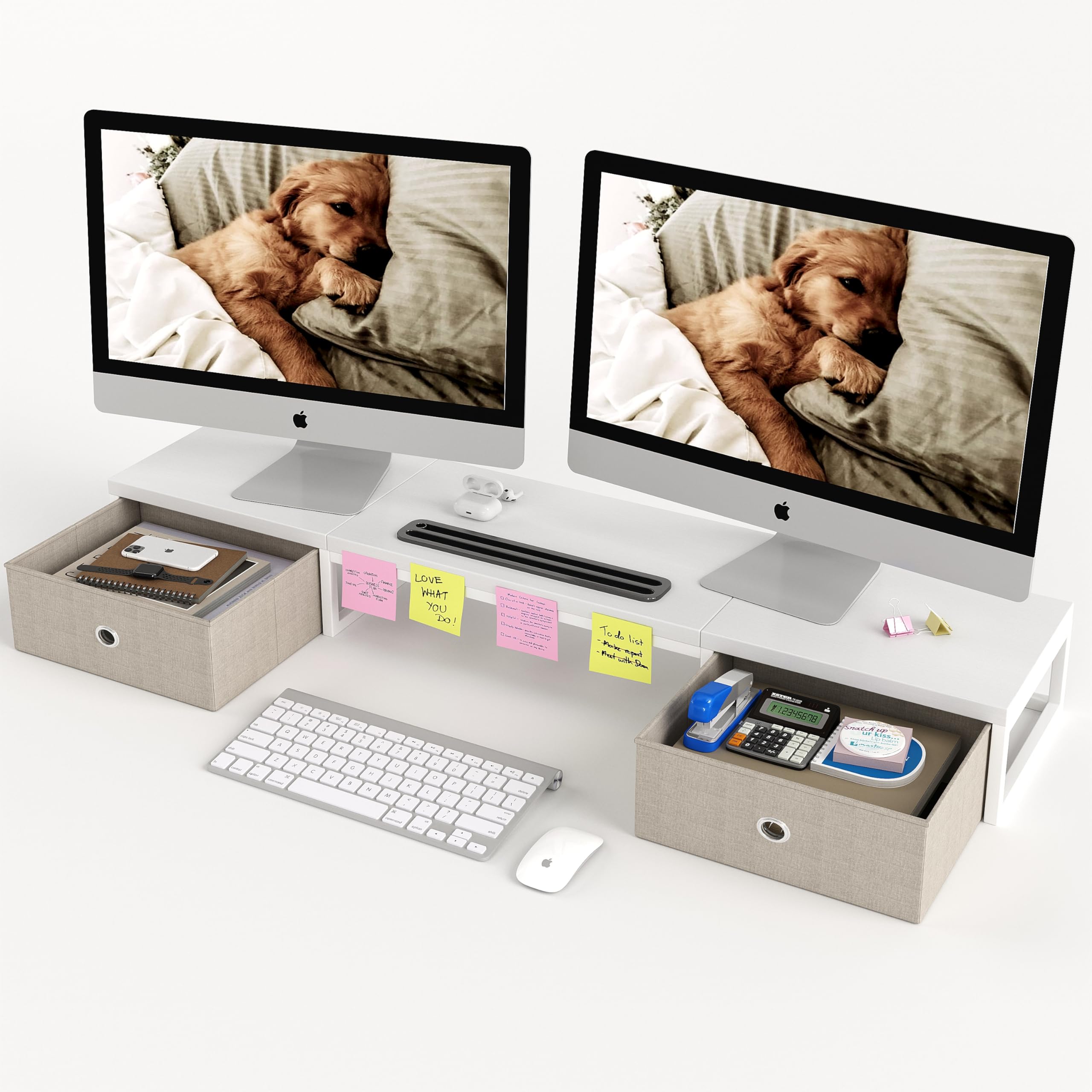
The wooden riser that lifts your monitors and swallows desk clutter in two slide-out drawers.
If your problem is not wobbly arms but a messy desk, this is a completely different kind of 2-computer screen stand. It is a 39-inch extra-long wooden riser that raises your screens to a fixed 5.7-inch ergonomic eye level while the space underneath becomes storage. Two slide-out fabric drawers hide pens, clips, and phone, and a built-in slot holds your phone or tablet upright within reach.
The build is genuinely heavy-duty for a riser. It is made from high-quality MDF wood (a dense engineered wood) and supports up to 100 lbs without sagging, so you can stack a printer or laptop on top alongside your monitors. The water-resistant white finish keeps it looking clean, and non-slip rubber pads on the bottom protect your desk from scratches. Assembly takes under 5 minutes with no tools — buyers routinely confirm it is just a few screws.
The honest trade-off is that this does not articulate at all. There is no tilt, swivel, or rotation; it simply raises your screens to a fixed height, which is perfect for a tidy static workstation but wrong for anyone who needs to reposition displays. Some owners also wish the 39.37-inch length was even longer. For an organized, professional desk, the review consensus is strong: people call it well-made, easy to assemble, and a favorite among coworkers.
Desk organizer first, stand second: a 39-inch riser with two drawers that lifts screens to 5.7 inches and holds up to 100 lbs.
The limitation: zero articulation — this raises and stores, it does not tilt or swivel.
Reach for this if: you want storage plus a clean, fixed ergonomic height in a tidy white finish.
Look elsewhere if: you need to angle or rotate your monitors at all.
7. WESTREE Monitor Stand Riser CS3007-BK

The steel riser built for the laptop-plus-two-monitors crowd, with a tilting middle shelf.
This WESTREE stand solves a specific problem the others ignore: how to raise your laptop to the same eye level as your monitors. The middle shelf is an adjustable laptop stand with 5 height levels, so you can align a 9- to 17.3-inch laptop right alongside your two screens. Customers note it fits two 27-inch monitors plus a 15-inch laptop cleanly, turning a cluttered multi-device setup into one organized tier.
The construction is thick steel with a powder-coated black finish, and the shelf uses a snowflake pattern that leaves airflow gaps underneath to keep your laptop cool. Anti-slip pads on top stop devices from sliding. Two cloth slide-out drawers tuck away post-it notes and writing utensils, and the whole thing lifts your screens to a comfortable sight level that reduces neck strain during extended use.. One owner notes the laptop keyboard tilts for easier typing, which is a nice bonus.
The recurring note is to measure your space first. A couple of owners found the laptop shelf lets the laptop slide down a bit and fixed it with rubber stickers, and in tighter areas the stand just fits. For a stable, organized, multi-device desk, it earns consistent praise as a sturdy value that should last.
The multi-device win
- 5-level adjustable laptop shelf for 9″ to 17.3″ devices
- Thick steel frame with anti-slip and cooling airflow design
- Two slide-out drawers for desk organization
Measure first
- Laptop can slide on the shelf without extra grip
- Needs a defined space — it has a real footprint
Best for: laptop users who want all three screens at matching eye level on one steel frame.
Consider the Mexin instead if: you want a wooden aesthetic and more drawer storage rather than a laptop shelf.
8. WALI Free Standing Dual Monitor Stand GMF002

The free-standing glass-base mount that keeps your workspace looking modern and sleek.
If you don’t want to clamp anything, this WALI gives you a free-standing base with a premium look. The tempered glass base measures 16.8 by 10.2 inches, sits on your desk, and supports two screens up to 27 inches at 22 lbs per arm. For extra rigidity, you can swap in a grommet base for desks 0.4 to 3 inches thick. The glass look is the main draw — buyers consistently call the base solid and attractive, and several have built quad setups by pairing two stands.
Movement is genuinely full-range despite the free-standing design. Screens shift side-to-side along 31-inch arms, move up and down a 16-inch pole, tilt 90 degrees, swivel 90 degrees, and rotate 360 degrees into portrait. Protective rubber pads guard your desk surface, and cable clips keep wires organized. Reviewers point out the base is so stable it even works as a shelf above a laptop, and one owner reports holding roughly 50-60 lbs on a single clamp without issue.
The consistent gripe is the assembly experience. The manual reads like a rough translation, so you have to match part letters carefully, and a few owners found their monitors lean slightly forward and resist leveling no matter how tight the bolts. It also needs hex wrenches rather than quick knobs for adjustment. For a clean, stable, free-standing frame that looks great, this is a strong pick — just budget extra time for the build.
Style and stability: a tempered glass base with full 90-degree tilt, swivel, and rotation on 27-inch screens.
The setup tax: the manual is confusing and leveling can be finicky — schedule patience for assembly.
Pick this if: you want a free-standing mount that looks premium and holds up to 27-inch screens steadily.
Think twice if: you want quick tool-free adjustments — this needs hex wrenches.
Understanding the Specs
VESA Pattern
This is the square arrangement of screw holes on the back of your monitor, most commonly 75x75mm or 100x100mm. The stand’s mounting plate must match this pattern to attach at all. Measure the distance between the holes on your screen before buying, because almost every compatibility issue starts here.
Weight Capacity Per Arm
Each arm lists a maximum monitor weight, usually 15 to 22 lbs. Heavier or curved panels need the higher end. If your screen sits near the limit, the arm can slowly drift down over time, so a few pounds of headroom keeps your setup locked in place.
Tilt, Swivel, and Rotation
Tilt angles the screen up or down to cut glare, swivel turns it left or right to share your view, and rotation flips it fully into portrait mode for code or tall documents. More range means more setup fiddling, so match the flexibility to how you actually work day to day.
Clamp vs Free-Standing
A C-clamp grips the back edge of your desk for maximum stability but needs a solid lip to bite into and clearance underneath. A free-standing base sits on the surface, which suits glass tablets, thin desks, cubicles, and wall-hugging setups where you cannot clamp anything at all.
FAQ
Will a dual monitor stand fit my two monitors?
What is the difference between a C-clamp and a grommet mount?
Can a free-standing monitor stand hold heavy 32-inch monitors?
How much desk clearance does a C-clamp need?
Is a gas spring monitor arm worth the extra setup effort?
Can I stack monitors vertically with a dual monitor stand?
Why do my monitor arms sag or drift downward over time?
What is the difference between a monitor riser and a monitor arm?
Does a dual monitor stand work with mismatched monitor sizes?
Final Thoughts: The Verdict
For most buyers, the 2-computer screen stand winner is the VIVO STAND-V002W because it pairs full motion with a 22-lbs-per-arm capacity and a 3-year warranty at a value price. If you want the strongest grip for big 32-inch panels, grab the HUANUO HNDS18. And for a free-standing setup that works on any desk, the Mount-It! MI-4781 is the one to reach for.
How We Picked
We do not accept paid placement. Every pick is matched to a real buyer and a real use-case; we do not hands-on test units.
Sources & Methodology
Specifications: manufacturer listings and product documentation. Review insights: verified customer reviews, as of August 2026. Pricing: not shown on this page (it changes often); check the current price via the retailer link.
As an Amazon Associate, Gadgets Feed earns from qualifying purchases. This does not affect which products we feature.