
Our readers keep the lights on and my morning glass full of iced black tea. As an Amazon Associate, I earn from qualifying purchases.
Specs are compiled from manufacturer listings and verified buyer reviews and can change over time — please confirm the key details on the product page before buying.
If you’re still running an older LGA 1150 board (the socket for Intel’s Haswell-era processors), your main battle is keeping that CPU cool without overspending or wrestling with a tricky install. The coolers below are all built for that job, from compact single-tower models that fit tight cases to big dual-tower units that can handle a heavy overclock. Most also include mounting hardware for newer sockets, so if you upgrade your motherboard later, the cooler can move with you.
I’m Min — the founder and writer behind Gadgets Feed. This guide is built by comparing the manufacturers’ published specifications and the patterns across verified customer reviews, so you get each pick’s real strengths and trade-offs instead of marketing spin.
Whether you are reviving a classic build or just need reliable cooling, this breakdown of the best 1150 cpu cooler choices focuses on the models that actually fit, perform, and stay quiet.
Our Picks at a Glance


How To Choose The Best 1150 CPU Cooler
Matching a cooler to an LGA 1150 build is less about raw power and more about clearance and compatibility. A cooler that is too tall will bang against your side panel, and a fat dual-tower design can sit right on top of your RAM slots. You want a cooler that fits your case, clears your memory, and actually moves enough air to keep your CPU from throttling.
Measure Your Case and RAM Clearance First
The tallest cooler here stands at 154mm. Most mid-tower cases accept coolers up to 160mm, so that height is usually safe, but you must check your specific chassis. For RAM, a dual-tower cooler can overhang the memory slots — look for designs with cut-outs or adjustable fans so you can raise the fan to clear tall heat spreaders like those on Corsair Vengeance Pro modules.
Match the Heat Pipes to Your CPU’s Output
A 4-heat-pipe cooler is plenty for a standard 65W or 84W processor. A 6 or 7-pipe dual-tower unit is the better pick if you are running an open up “K” series chip and pushing an overclock. More pipes and more fin surface area mean the cooler can dump heat faster, which keeps temperatures lower under sustained load.
Quick Comparison
| Model | Best For | Heat Pipes | Max Fan Speed | Noise Level | Amazon |
|---|---|---|---|---|---|
| Thermalright PS120SE ARGB★ Best Overall | Best Overall | 7 | 1500 rpm | 25.6 db | Amazon |
| be quiet! Dark Rock 5Premium Pick | Premium Pick | 6 | 2100 rpm | 29.8 db | Amazon |
| Thermalright PS120SE | Top Performer | 7 | 1650 rpm | 25.6 db | Amazon |
| Thermalright Phantom Spirit 120 SE ARGB | Best Value | 7 | 1500 rpm | 25.6 db | Amazon |
| upHere CPU Air Cooler | Budget Champion | 6 | 1600 rpm | 25 db | Amazon |
| upHere UE2K6 | Easiest Install | 6 | 1650 rpm | 25 db | Amazon |
| Cooler Master Hyper Spectrum V3 | Compact Pick | 4 | 1500 rpm | 31.4 db | Amazon |
In-Depth Reviews
1. Thermalright PS120SE ARGB
Our pick — over 4.5★ from 950+ verified ratings; the strongest balance of quality and price.
The dual-tower heavyweight that makes liquid cooling feel unnecessary.
The single most convincing spec here is the 7x6mm heat pipe layout with AGHP 4.0 technology — a design that resists the gravity effects that can starve coolers mounted vertically or horizontally. Buyers report an i7-4790K dropping from 91°C to 70°C during 4K gaming without undervolting. The two 120mm TL-C12B-S V2 fans spin up to 1500rpm and push 66.17 CFM of air, which is plenty for a Haswell chip running hot.
The trade-off for that cooling muscle is height — at 154mm, it stands 6.06 inches tall, so you need a case with real clearance. The ARGB fans use 5V 3-pin headers and offer up to 17 lighting modes synced through your motherboard, which owners say reflects beautifully off the black anodized fins.
The removable protective sticker on the copper base is a classic first-timer trap — forget it and your temps will look scary. Owners mention idle temps of 55°C and Cinebench hitting 95°C on a Ryzen 9 7900X, quieter than the 360mm AIO it replaced.
Why It Wins
- 7 heat pipes handle even overclocked high-TDP chips
- ARGB lighting with 17 modes looks great through the fins
- Comes with brackets for LGA 1700/1851 and AM5, so it survives future builds
Watch Out For
- 154mm height needs a mid-tower or bigger case
- Large body can interfere with non-low-profile RAM unless you raise the fan
Reach for this if: you want near-AIO performance (customers note just a 1-2% difference) without any liquid leak risk.
Look elsewhere if: your case is a slim chassis with under 155mm of cooler clearance.
2. be quiet! Dark Rock 5
The all-black tower that cools like a snow beast in near-total silence.
This is the premium option for builders who care as much about acoustics as thermals. The Silent Wings 4 120mm PWM fan uses a fluid-dynamic bearing and a 6-pole motor, and it can spin up to 2100 rpm — a higher ceiling than any other fan here. Despite that speed, the rated noise stays at 29.8 db because the rubberized frame stops vibrations from traveling into the heatsink.
The asymmetrical design and heat sink cut-outs are the headline feature for anyone with tall RAM — they give you essentially limitless memory height clearance, and the cut-outs also keep VRM coolers unobstructed. Six high-performance copper heat pipes and a dense aluminum fin array do the heavy lifting, finished with a ceramic-particle black coating that improves heat transfer to the air.
Installation is genuinely easier than the big dual-towers thanks to a preinstalled mounting bridge, and a long-neck screwdriver is included. Reviewers point out idle temps dropping from the upper 40s to about 32°C, and one verdict sums up the experience well: it is the rare cooler that feels like an upgrade over a loud AIO water cooler. The catch is its 6.33-inch height — that is the tallest profile in this list, so double-check your case before ordering.
Quiet Luxury: This is the pick for silent-PC purists who want a premium aesthetic — the magnetic mesh top cover hides all the pipe ends and screws for a clean finish.
The Trade-off: It is heavier at 2.2 pounds than the dual-tower Thermalright options, and the fan cable is a little tricky to plug in during install.
Choose this for: a quiet home server or a media PC where noise is your number one priority.
skip it if: you are on a strict budget and prefer maximum cooling per dollar over premium build quality.
3. Thermalright PS120SE

The non-RGB twin that trades lights for raw, unrivaled cooling muscle.
Want the same cooling performance as our top pick but without the RGB lighting? This model uses the identical 7x6mm heat pipes (the metal tubes that carry heat away from the CPU) and the same 154mm dual-tower design, but swaps in TL-C12B V2 fans that spin up to 1650 rpm — slightly faster than the ARGB version’s 1500 rpm ceiling. Airflow stays at 66.17 CFM (cubic feet per minute, a measure of how much air the fan moves), and the rated noise holds at 25.6 dB, so it stays quiet under load.
This cooler has a 105W to 280W TDP rating, which makes it one of the few air coolers that can legitimately handle a high-end overclock. An i7-4790K dropped from a throttling 98°C to under 65°C, with LGA 1150 brackets included. It also ships with TF7 thermal paste, so you are ready to go straight from the start.
The installation is the one thing owners warn about — it is a large unit that needs rear motherboard access, so it is far easier to mount before the board goes into the case. The 154mm height also needs roughly 2cm of clearance above typical CPU placement. On the upside, the aluminum and copper construction weighs only 408 grams, and owners note the S-FDB bearings keep the fans whisper-quiet even under stress tests.
The Performance Edge
- Rivals more expensive coolers in benchmarks, per owners
- 7 heat pipes with AGHP 4.0 handle vertical or horizontal mounting
- Y-splitter and thermal paste included
Install Reality
- Blocks motherboard access — build your PC around this cooler
- Included paste can arrive dried out, so having spare paste is wise
Best for: enthusiasts building fresh who want flagship air cooling without paying a premium.
Not ideal for: a quick drop-in upgrade on an already-built machine with limited access to the back of the motherboard.
4. Thermalright Phantom Spirit 120 SE ARGB
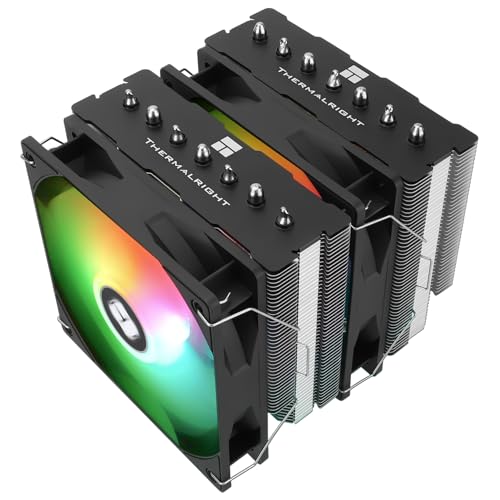
The masterclass in value-to-performance engineering, according to the review pages.
This shares the 7x6mm heat pipe design and AGHP 4.0 technology of the other Thermalright entries but lands as the budget-friendly way into that flagship-level performance. The 105W-280W TDP rating tells you it is not a compromise cooler — it is built for serious chips. Shoppers say idle temps dropping in about 30 seconds and sustained stress loads staying under 70°C.
The dual TL-C12B-S V2 fans push 66.17 CFM at a maximum of 1500 rpm while holding noise at or below 25.6 db. That S-FDB bearing design (a fluid-dynamic bearing that reduces friction and wear) is rated for up to 20000 hours of industrial service life, so this is built to outlast your current build. It fits mid-towers easily at 154mm tall, and the included TF7 thermal paste is good for two or three applications.
The main complaint buyers report is the ARGB wiring — the daisy-chain of 5V 3-pin connectors (the small plugs that control the lighting) can be fiddly for first-time builders. Also, the cooler is tall enough that you may need to raise the fan slightly to clear your RAM. One reviewer saw load temps on an i5-14400F drop from 89°C to 52°C, with fans nearly silent.
Value King: Buyers describe it as outperforming the Peerless Assassin 120 (an older Thermalright classic) thanks to extra heat pipes and better fans, making it the smart money pick.
The Caveat: The size gets mixed feedback — it is big, and some wish it were smaller, so measure your case before committing.
Reach for this if: you want top-tier cooling and are happy to manage a little ARGB cable routing.
Think twice if: you want the simplest possible install with zero RGB wiring — the non-RGB PS120SE is the cleaner choice.
5. upHere CPU Air Cooler

Name-brand cooling performance from an off-brand cooler, at a fraction of the price.
This is the entry-level hero for anyone reviving an older socket. Six 6mm heat pipes cool a 130W i7-965 to under 70°C at stock, around 80°C overclocked. The two 120mm fans spin up to 1600 rpm, pushing 68.2 CFM while keeping noise below 25.6 db, which is quieter than several pricier options here.
The installation uses a clever adjustable bracket that owners praise, though the cooler is large enough that mounting it outside the case is the easier path. Compatibility is wide — it handles Intel LGA 2011/2066 (X79/X99) and 1700/1200/1150/1155/1156, plus AMD AM5/AM4/AM3. One owner saw load temps on a 165W i9-9940x drop by 25°C.
Owners mention the fan clips are very tight and hard to remove once installed, and the fit receives mixed feedback across different boards — some need a separate mounting plate for older AMD motherboards. But the consensus is clear: it delivers performance that rivals similar name-brand coolers at a budget price point.
The Upside
- Massive cooling for the money — 6 pipes plus dual towers
- Fans are quiet and move a lot of air
- Single 4-pin connector keeps cable management simple
The Downside
- Fan clips are too tight to easily remove
- Mounting can be rough if the motherboard is already in the case
Best for: budget builders who want serious cooling power without the brand-name markup.
Not for: anyone who plans to swap fans frequently or expects a flawless fit on older AMD boards.
6. upHere UE2K6 Dual Tower

The dual-fan tower one builder called the easiest cooler in over 40 years of building.
This shares the 6 heat pipe and dual-tower DNA with its upHere sibling but adds PWM fan control, meaning the two 120mm fans automatically adjust speed based on CPU temperature. The maximum speed is slightly higher at 1650 rpm, yet the rated noise stays at or below 25 db — the quietest figure on this list. That self-adjusting behavior makes it a strong choice for a first-time builder who wants set-and-forget cooling.
The installation is the standout feature here. The non-disassembly fan design means you install the cooler without removing your motherboard or memory modules, and it ships with all the tools you need. Customers note an FX-8350 dropping from 90°C at 50% load to under 70°C at 100% load with fans at minimum speed. RAM compatibility is excellent too — one owner fits four sticks of Corsair Vengeance Pro RGB without any blockage.
The minor gripe is that a few units have heatsink screw holes that are slightly misaligned, requiring the removal of the top cover to access them. But the included screwdriver handles it, and the overall experience — from the clear instructions to the silent operation — has owners calling it a genuinely budget-friendly 11/10.
First-Timer Friendly: The PWM fans plus tool-included install make this the least intimidating dual-tower cooler on the market.
Honest Limitation: The mounting hardware is mostly praised, but a small number of buyers find the screw alignment fiddly — not a dealbreaker, just a slight patience test.
Reach for this if: you are new to PC building and want an easy, quiet, effective cooler that won’t fight you.
Look elsewhere if: you need the absolute maximum thermal headroom for extreme overclocking — the 7-pipe Thermalrights beat it there.
7. Cooler Master Hyper Spectrum V3

The compact single-tower that fits tight cases without sacrificing airflow.
This is the right pick when your case cannot fit a 154mm dual-tower monster. The Hyper Spectrum V3 stands just 152mm tall, making it the shortest cooler in this lineup, and its 5.43-inch depth is noticeably more compact. Despite the smaller frame, its single 120mm Spectrum ARGB fan moves the most air here at 71.93 CFM — beating the dual-tower Thermalrights’ 66.17 CFM.
The four nickel-plated copper heat pipes use Direct Contact Technology, which boost the contact surface against the CPU lid for efficient heat exchange. It is rated for a Ryzen 5 5600G overclock, with one owner reporting a max of 85°C during summer in a 30°C room. The ARGB fan syncs with Asus Aura, ASRock RGB, GIGABYTE, and MSI motherboard software, so it integrates cleanly into an existing RGB setup.
The honest trade-off is noise — at 31.4 db it is the loudest rated cooler here, and the cooling efficiency does depend on good case airflow. It is also heavier than the Thermalright dual-towers at 650 grams, which feels dense for such a compact unit. The redesigned mounting brackets genuinely simplify installation on the latest platforms, and the included 120mm ARGB case fan is a nice bonus.
Compact Strengths
- 152mm height fits smaller cases and mini-towers
- Highest airflow in the lineup at 71.93 CFM
- Works with major RGB sync software
Size Trade-offs
- Rated at 31.4 db — the noisiest here under load
- 4 heat pipes mean less headroom for heavy overclocks than 6 or 7-pipe designs
Choose this for: a compact or HTPC build where height clearance is the deciding factor.
pass on it if: silence is your priority or you plan to push a high-end overclock — the bigger dual-towers serve better.
Understanding the Specs
Heat Pipes and TDP
Heat pipes are sealed copper tubes that carry heat away from the CPU lid toward the aluminum fins. More pipes and thicker pipes (6mm is standard here) mean more heat can be moved. TDP, or thermal design power, tells you the maximum wattage of CPU the cooler can handle — a 4-pipe cooler suits a standard 84W chip, while a 7-pipe dual-tower handles chips rated 105W to 280W.
Airflow and Noise
Airflow, measured in CFM (cubic feet per minute), tells you how much air the fans move — higher is better for cooling. Noise, measured in decibels (db), tells you how loud it gets at maximum speed. The quietest coolers here rate around 25 db, which is roughly a whisper, while 31 db is more like a quiet conversation. A cooler that pushes high CFM at low db gives you the best of both worlds.
FAQ
Will these coolers actually fit my LGA 1150 motherboard?
How do I know if a cooler will fit inside my case?
Will a big dual-tower cooler block my RAM slots?
Is a 4-heat-pipe cooler enough for my CPU?
What is the difference between a single-tower and dual-tower cooler?
Do I need to buy thermal paste separately?
Are these coolers compatible with newer sockets if I upgrade later?
How loud are these coolers during normal use?
Final Thoughts: The Verdict
If you want one dependable pick, the 1150 cpu cooler winner is the Thermalright PS120SE ARGB because its 7 heat pipes deliver near-liquid-cooling performance at a fraction of the cost and with zero leak risk. If you want a premium, hushed build, grab the be quiet! Dark Rock 5. And for a budget-friendly upgrade that keeps an older system ice-cold, the upHere CPU Air Cooler is the one to reach for.
How We Picked
We do not accept paid placement. Every pick is matched to a real buyer and a real use-case; we do not hands-on test units.
Sources & Methodology
Specifications: manufacturer listings and product documentation. Review insights: verified customer reviews, as of August 2026. Pricing: not shown on this page (it changes often); check the current price via the retailer link.
As an Amazon Associate, Gadgets Feed earns from qualifying purchases. This does not affect which products we feature.