
Our readers keep the lights on and my morning glass full of iced black tea. As an Amazon Associate, I earn from qualifying purchases.
Specs are compiled from manufacturer listings and verified buyer reviews and can change over time — please confirm the key details on the product page before buying.
You don’t have to choose between a sore wrist and a clacky desk when you shop on a budget. The picks here include comfortable palm rests, quiet keys, and even backlights, so you get real comfort without spending much. What separates a great cheap keyboard from a frustrating one depends on layout, key feel, and how it connects.
I’m Min — the founder and writer behind Gadgets Feed. This guide is built by comparing the manufacturers’ published specifications and the patterns across verified customer reviews, so you get each pick’s real strengths and trade-offs instead of marketing spin.
We’ve sorted the top contenders to find the most reliable budget computer keyboard for your desk setup.
Our Picks at a Glance

How To Choose The Best Budget Computer Keyboard
Your keyboard is the one piece of gear you touch all day, so comfort should drive the decision. A full-size layout with a number pad helps with data entry, while an ergonomic wave or a built-in palm rest protects your wrists during long stretches. Before you sort by price, decide which of those matters most for your daily work.
Wired vs. Wireless
A wired connection like USB-A is truly plug-and-play — no batteries, no pairing, no signal drops. Wireless options with a 2.4GHz receiver give you a cleaner desk and a reliable link up to 33 feet, but you take on battery changes and occasional connection quirks. If you type in one spot all day, a quality wired board is often the lower-stress choice.
Backlighting and Readability
Large print keycaps are a standout feature if you work in dim light or have aging eyes. Some boards offer 7 backlight colors with multiple brightness levels, which makes finding the right key easy in a dark room. Just remember that multimedia shortcut keys on many budget boards don’t fully work with Mac OS, so check compatibility before you buy.
Key Feel and Noise
Most budget keyboards use a membrane design with soft, quiet keys rather than loud mechanical clicks. Look for words like “quiet” and “silent” in the description if you share an office or type late at night. Keep in mind that some keys on cheaper boards can feel sensitive or occasionally stick, so a responsive feel is worth prioritizing in reviews.
Quick Comparison
| Model | Best For | Connection | Layout | Backlight | Amazon |
|---|---|---|---|---|---|
| EDJO Wired Combo★ Best Overall | All-day comfort & value | USB Wired | 104-Key with Palm Rest | None | Amazon |
| SABLUTE K31PROHigh-Visibility Pick | Large print & low-light work | USB-A Wired | 104-Key with Phone Holder | 7-Color | Amazon |
| X9 PerformanceVision Aid Choice | Vision-friendly big letters | USB-A Wired | 107-Key with Number Pad | 7-Color | Amazon |
| Logitech MK270 | Reliable wireless combo | 2.4GHz Wireless | Full-Size | None | Amazon |
| HeengYanson | Quiet typing with glowing keys | USB-A Wired | 104-Key with Wrist Rest | 7-Color | Amazon |
| Luzarriba | Spill-resistant daily driver | USB-A Wired | Full-Size Membrane | 7-Color | Amazon |
| Logitech MK345 | Familiar full-size with palm rest | 2.4GHz Wireless | Full-Size with Palm Rest | None | Amazon |
| EDJO Wave Keys | Ergonomic wave for large hands | 2.4GHz Wireless | Compact Wave with Wrist Rest | None | Amazon |
| MOFII Retro | Style and a buttery key feel | USB-A Wired | 104-Key Round Typewriter | None | Amazon |
In-Depth Reviews
1. EDJO Wired Keyboard and Mouse Combo
Our pick — over 4.5★ from 950+ verified ratings; the strongest balance of quality and price.
A near-flawless balance of comfort, quiet keys, and a mouse that fits both hands.
The full 104-key layout gives you a number pad and arrow cluster, and the built-in palm rest keeps your wrists level while you type. The foldable stand underneath lets you tilt the board to a better angle, and the anti-slip base stops it from sliding mid-sentence. It’s a wired, plug-and-play setup — no drivers, no batteries, just stable input that responds instantly.
The optical mouse is symmetrical, so it suits left-handed and right-handed users alike, and it tracks on smooth surfaces even without a pad. Reviewers consistently highlight the quiet keys and easy setup, with many noting it’s remarkably well-designed for a smooth workflow. The value is the real headline here: a full keyboard plus a genuinely comfortable mouse for less than some single boards cost.
The main trade-off is that it’s not backlit, and the matte plastic build feels lightweight rather than premium. A few owners note the key responsiveness is mixed, with occasional reports of sticky shift keys. For a basic, dependable daily driver that won’t strain your hands, this combo is hard to fault.
The Comfort Highlights
- Built-in palm rest supports wrists during long sessions
- Quiet keys reduce office noise
- Symmetrical mouse works for either hand
Watch Out For
- No backlighting for dark rooms
- Feels lightweight, not premium
Reach for this if: you want one reliable wired setup that covers typing and pointing without making your wrists ache.
Look elsewhere if: you need glowing keys for late-night work or you prefer a heavier, more solid frame.
2. SABLUTE Wired Large Print Backlit Keyboard K31PRO
Bold letters three times the size make every key obvious, even in a dim office.
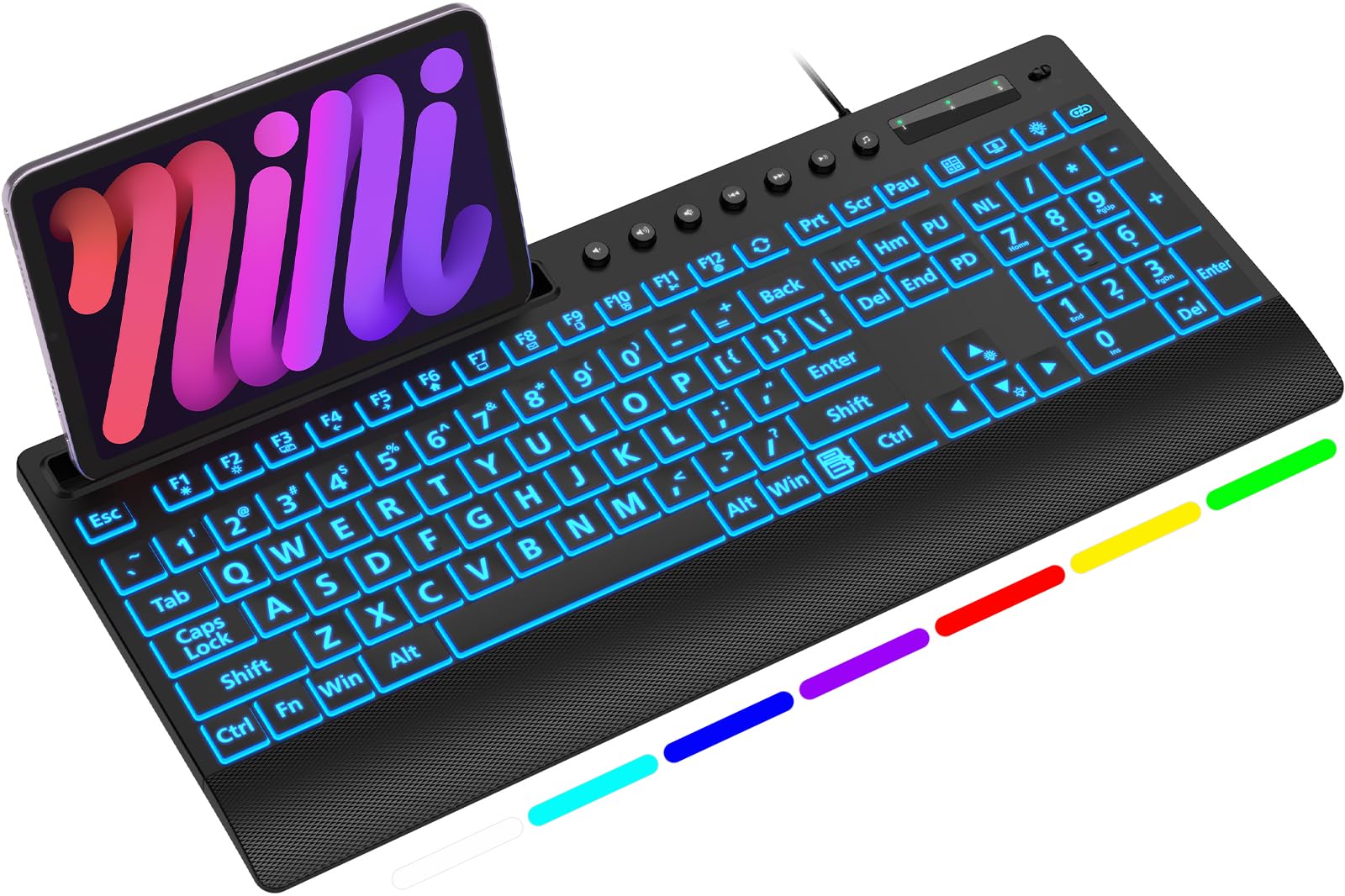
This full-size 104-key board pairs its oversized characters with 7 vivid backlight colors and 3 brightness levels, all controlled by a single key. The backlight remembers your preferred setting across reboots, so you don’t have to fiddle with it every morning. A built-in top console slot holds a phone or tablet under 11.5 inches at a handy angle while you type.
The design goes beyond visibility — a low-profile wrist rest and foldout tilt stands promote neutral wrist alignment during long shifts. It’s a wired, driver-free connection, which means zero latency and no battery anxiety. The dedicated privacy key puts your screen to sleep instantly, which is useful if you walk away from a shared desk.
The catch is the phone slot: buyers report it’s useless if your phone has a case on it. The multimedia shortcut keys also may not be fully compatible with Mac platforms. For anyone with poor eyesight or anyone who wants to actually see their keys at night, this is the standout budget pick.
The Big-Letter Wins
- 3x larger keycaps are easy to read
- 7 backlight colors with memory function
- Quiet, soft keys with a wrist rest
Know Before You Buy
- Phone slot won’t fit most cased phones
- Some multimedia keys don’t work on Mac
Best for: seniors, students, and anyone struggling to see standard key labels at a glance.
skip it if: you’re on a Mac and rely on the full row of media shortcut keys.
3. X9 Large Print Backlit Computer Keyboard
Feels like typing on a typewriter, with oversized letters that light up.
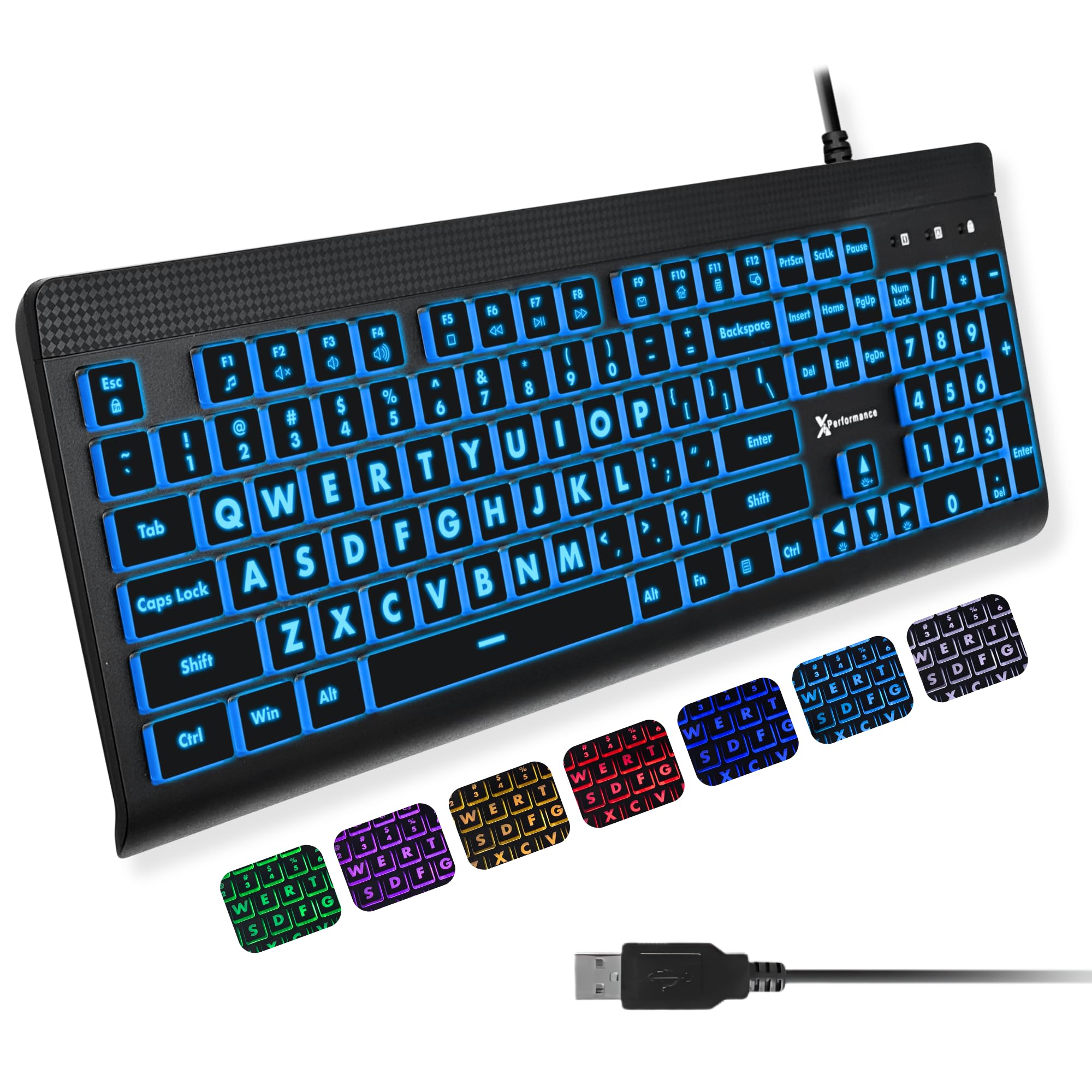
The full-size 107-key layout includes a dedicated number pad plus 12 shortcut keys, making data entry and navigation faster. Each key carries large, bold print that’s easy to see, and the backlight offers 7 colors with 4 brightness levels so you can dial in exactly the glow you need. It’s a simple USB-A wired connection — no software required, just plug in and type.
If you struggle to see keys in low light, owners mention the large, backlit letters make typing easy in dim rooms. The keys have a satisfying, typewriter-like feel but stay quiet, and the build feels solid without being heavy. Reviewers also note that customer service quickly replaced faulty keys during the warranty period.
A few notes: some buyers find the keys feel a bit loose, and the backlight brightness isn’t perfectly even across the board. But if your priority is seeing every character clearly, especially as a senior or a student burning the midnight oil, this delivers.
Why It Stands Out
- Large, bold letters ideal for low vision
- 7 colors and 4 brightness levels
- Solid build with a typewriter feel
Minor Gripes
- Keys can feel slightly loose
- Backlight brightness is uneven in spots
Choose this for: a senior or visually impaired user who needs maximum legibility and a satisfying keystroke.
Think twice if: you want a perfectly uniform glow or a heavier, ultra-sturdy frame.
4. Logitech MK270 Full Size Wireless Keyboard and Mouse Combo
The dependable wireless standard that keeps typing quietly for three years on one battery.
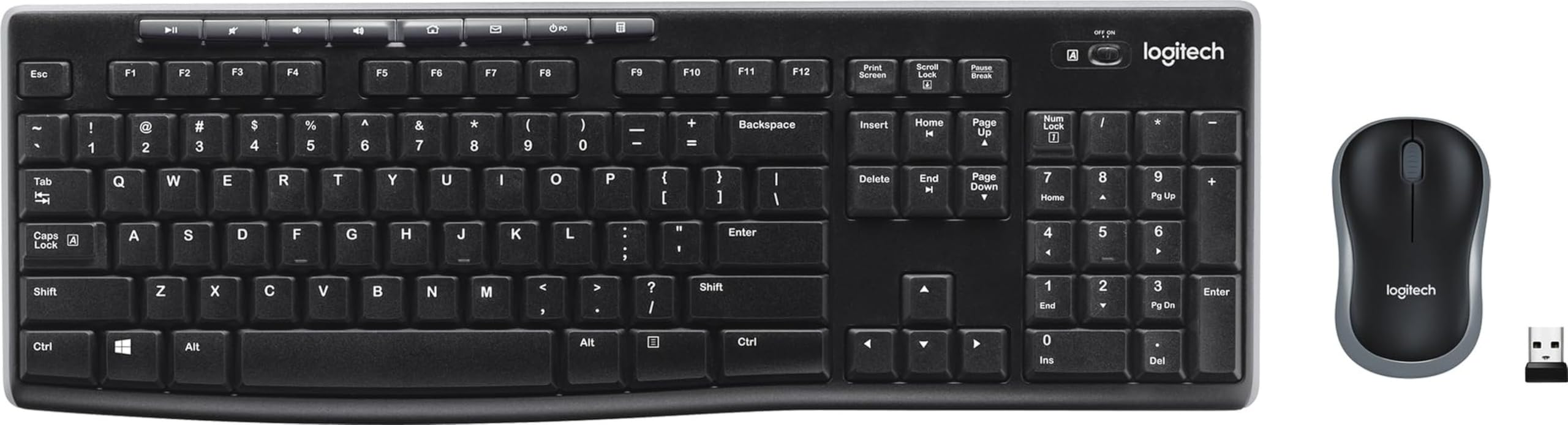
The MK270’s defining feature is its battery life — the keyboard runs up to 36 months and the mouse up to 12 months on included batteries, with on/off switches to stretch it further. A single USB-A Nano Receiver connects both devices with a reliable 2.4GHz wireless link up to 33 feet. The low-profile, quiet keys and standard full-size layout with a number pad make it an easy transition from any desktop keyboard.
It features 8 multimedia hotkeys for quick access to the internet, email, play/pause, and volume. The compact mouse is designed for both left- and right-handed use, though some owners find it small even for average hands. The keyboard itself is spill-resistant, and the tilt legs let you adjust the height.
The most common feedback highlights its value and easy setup, with many calling it a dependable workhorse. The main limitation is that it uses a USB-A connection, so laptops with only USB-C ports need an adapter. For a no-fuss wireless combo that rarely needs attention, this remains a top pick.
The Wireless Perks
- Keyboard battery lasts up to 36 months
- Spill-resistant design with durable keys
- 8 multimedia hotkeys for quick access
Keep In Mind
- Mouse feels small for some hands
- Requires USB-A port or adapter
Grab this if: you want a proven wireless combo you can set up in minutes and ignore for months.
Look elsewhere if: you need a backlit keyboard or have larger hands that need a bigger mouse.
5. HeengYanson Large Print Backlit Keyboard

A silent, softly-lit board that a 30-year writer calls an all-time favorite.
This wired 104-key keyboard combines oversized, bold keycaps with 7 backlight colors and 3 brightness levels — blue, green, red, cyan, purple, yellow, or white. The ergonomic design adds a 7-degree typing angle and a built-in wrist rest, so your hands stay in a natural position through long hours. Keys have a soft touch and no loud clicks, making it ideal for late-night sessions.
Setup takes about 10 seconds: plug in the USB and the keyboard is ready with no driver needed. It’s widely compatible with Windows and even Raspberry Pi 3/4, though multimedia keys may not fully work on Mac. The kickstand construction and wrist rest keep your hands comfortable even during extended use.
The glowing keys are bright enough to find easily without being distracting, which owners love for working in the dark. The main complaints are minor: the caps lock light doesn’t work on some units, and reliability gets mixed feedback over time. For a quiet, easy-on-the-eyes typing experience at a budget price, it’s an excellent fit.
The Comfort Highlights
- 7-degree angle with wrist support
- Silent keys for late-night work
- 7 colors and 3 brightness levels
Minor Caveats
- Caps lock indicator may not work
- Multimedia keys limited on Mac
Best for: writers and night owls who want a soft keystroke and glowing keys without the clatter.
pass on it if: you need a fully functional caps lock indicator or complete Mac media key support.
6. Luzarriba Backlit Computer Keyboard

Coffee-proof keys and vibrant backlighting that a 911 dispatcher swears by.
This full-size membrane keyboard offers 7 stylish backlight colors with 3 brightness levels, so you can click through options with a button rather than software. The spill-resistant design means a coffee or water accident won’t ruin your day, and it’s rated for over 5,000,000 key presses. A foldable stand on the back keeps your wrists in a comfortable position during long shifts.
It’s plug-and-play via USB-A, with no driver required and no batteries to swap. Compatibility spans Windows 2000 through 11, plus Raspberry Pi 3/4, though Mac multimedia keys may not be fully supported. The keys are quiet, making it a good fit for an open office or a late-night gaming session.
Reviewers appreciate the easy color changes and the durable build — one owner survived a full liquid spill without issue. The key feel is described as good and clicky, ideal for gaming. The trade-off is that it’s lightweight and can slide on smooth desks, plus it resets to green at max brightness after a restart. It’s also not ergonomic, so a wrist pad is advisable for long sessions.
The Durable Wins
- Spill-resistant design for daily accidents
- 7 colors with easy key-based switching
- Quiet keys with a clicky feel
Heads Up
- Resets to green max brightness on restart
- Lightweight frame slides on some desks
Reach for this if: you want a tough, spill-proof board with colorful lighting and a satisfying key press.
Look elsewhere if: you need an ergonomic curve or you’re annoyed by resetting your backlight preference.
7. Logitech MK345 Full Size Wireless Keyboard and Mouse Combo

A familiar full-size layout with a palm rest and a three-year battery in the keyboard.
The MK345’s keyboard battery lasts up to 3 years, with the mouse running 18 months on its included batteries. A single USB-A Nano Receiver connects both devices over a reliable 2.4GHz wireless link with a range up to 10 meters. The full-size keyboard includes a comfortable palm rest, a spill-resistant design, and easy-access media keys for quick control.
Plug in the receiver and it works right away with Windows, macOS, and ChromeOS — no setup needed. The included mouse has a contoured shape for right-handed users, so it stays comfortable all day and tracks smoothly. Owners describe the keyboard as having traditional key height with a light, tactile sound that typists appreciate.
Durability gets mixed feedback, with some users reporting the keyboard can lag or stop working after a couple of months of heavy use. The mouse is also described as light plastic and somewhat small for larger hands. For a budget-friendly wireless combo with a palm rest, though, it’s a solid choice that replaces aging Logitech sets well.
The Long-Life Perks
- Keyboard battery lasts up to 3 years
- Integrated palm rest for wrist support
- Spill-resistant with easy media keys
Consider This
- Keyboard can lag on some units over time
- Mouse is small for larger hands
Choose this for: a comfortable, familiar-feeling wireless setup with a palm rest and long battery life.
Think twice if: you’re a heavy typist who needs rock-solid reliability or you have larger hands.
8. EDJO Wireless Ergonomic Keyboard with Wrist Rest
A wave-shaped deck that lets large hands stretch naturally and type without fatigue.
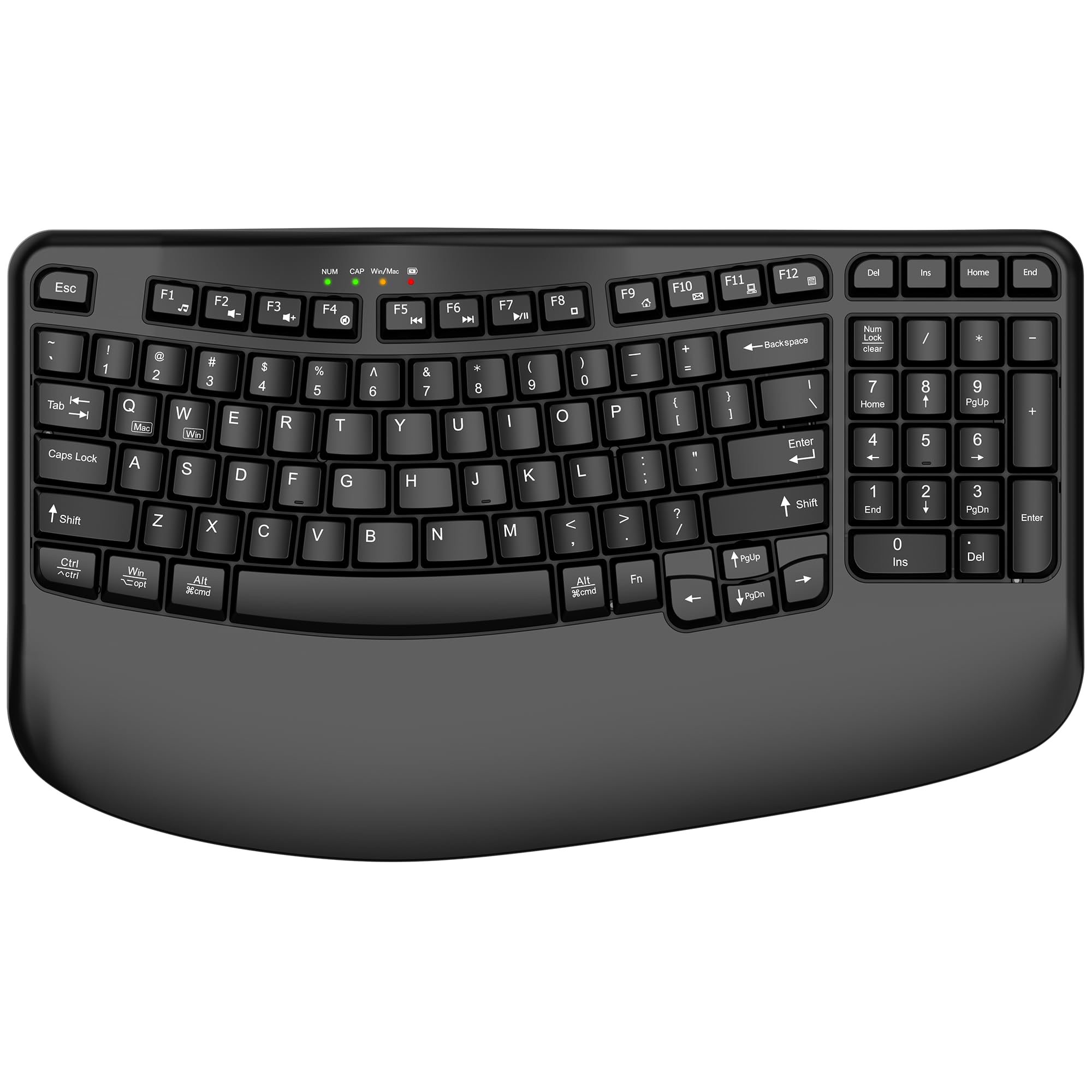
This wireless keyboard is built for medium to large-sized hands, with a wide palm rest that keeps your wrists level with the keys. The unique wave-shaped key design follows the natural curve of your hand, so your fingers relax into position rather than straining. It connects reliably via 2.4GHz wireless up to 33 feet with a simple USB nano receiver — no drivers needed.
It runs on 1 AA battery (not included) with a power switch and auto-sleep after 10 minutes of inactivity to extend battery life. The dual-system layout lets you switch between Mac and Windows with a single touch, and it works with PCs, laptops, Chromebooks, and TVs. You get 12 multimedia shortcut keys, a numeric keypad, and 4 LED indicator lights.
Owners appreciate the reduced wrist fatigue and stable, lag-free wireless performance. The compact design brings your mouse closer to your body for a more natural shoulder position. The main complaints are mixed: the board is wide for smaller hands, the keys can feel overly sensitive for fast typists, and some find it a bit noisy. If ergonomics are your priority, this is a strong budget option.
The Ergo Wins
- Wave keys fit the natural hand curve
- Reliable 2.4GHz up to 33 feet
- Dual Mac and Windows layout
Be Aware
- Too wide for smaller hands
- Keys can be overly sensitive for fast typists
Best for: people with medium-to-large hands who type for hours and want serious wrist relief.
it’s not for you if: you have smaller hands or you’re a rapid typist who needs firmer, less sensitive keys.
9. MOFII Wired Retro Round Typewriter Keyboard
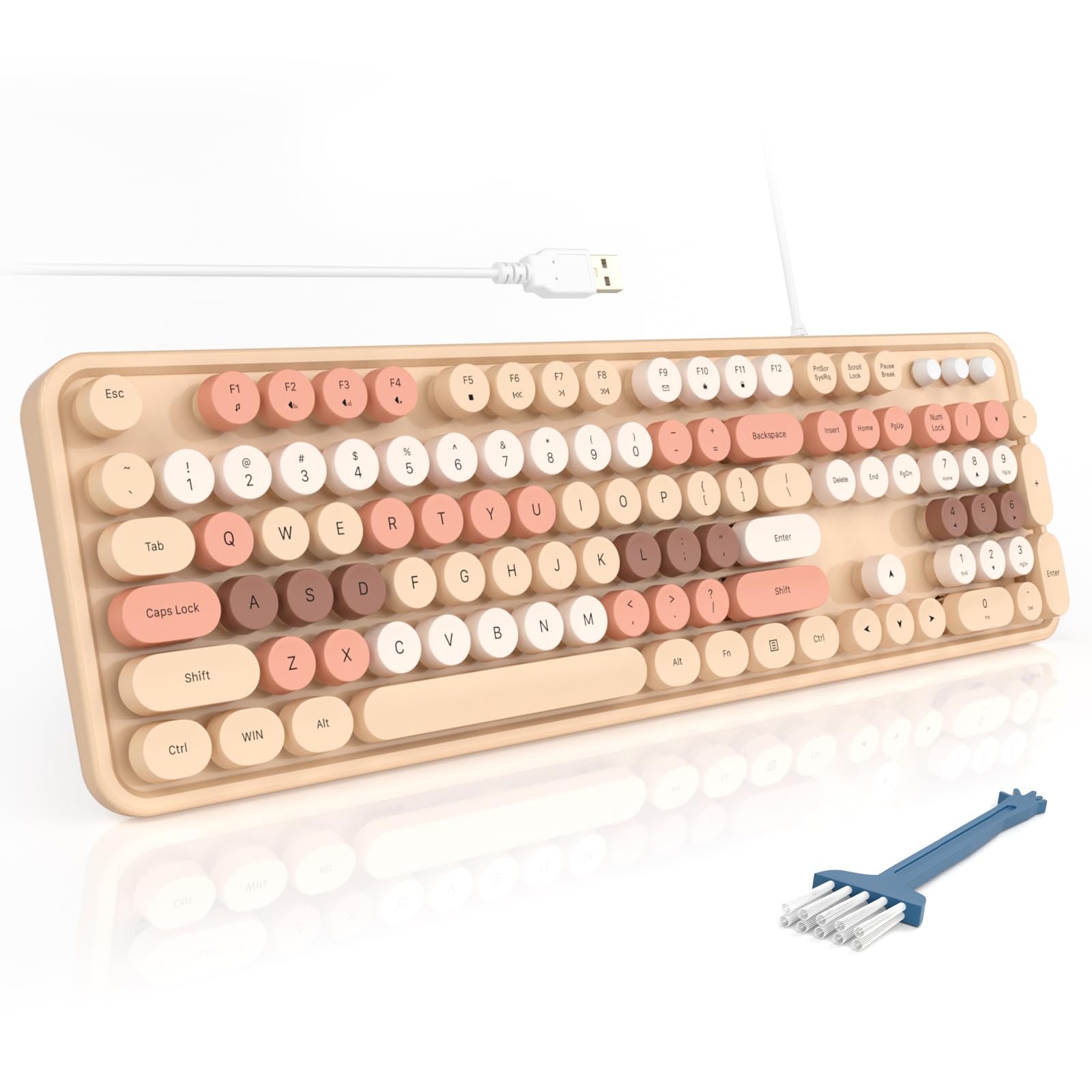
A quirky-cute typewriter look with round keys that are buttery smooth to press.
The MOFII’s retro round keycaps deliver the nostalgic charm of a typewriter while staying comfortable for long sessions. It’s a full-size 104-key board with a spacious number pad, 3 indicator lights, and 12 multimedia shortcuts for controlling video playback, volume, and email. The ergonomic foldable stand and anti-slip pads keep it stable and comfortable during extended use.
It’s a wired, plug-and-play keyboard that works with any USB device — no driver, no charging, no connection interference. Compatibility spans Windows 7 through 11, plus Chrome OS, Linux, and TV. It even includes a dust brush, making cleaning between those round keys easy.
The Milk Tea Colorful finish is the star here, with owners loving the vintage color scheme and the soft, satisfying clack that isn’t annoyingly loud. Key feel earns consistent praise for being smooth and buttery, and connectivity is rock-solid. Some users note a learning curve with the round key shapes, and responsiveness gets mixed reviews with occasional stuck keys. If you want a desk that sparks joy, this is it.
Why It Charmed Us
- Retro round keys with a buttery feel
- Beautiful vintage color scheme
- 12 multimedia shortcuts and a dust brush
Small Trade-Offs
- Round keys take time to get used to
- Some report occasional stuck keys
Reach for this if: you want a statement piece that’s genuinely comfortable and pleasant to type on every day.
Look elsewhere if: you need a strictly traditional key layout or can’t tolerate any learning curve.
Understanding the Specs
Backlight Colors and Brightness
Backlit keyboards usually advertise a number of colors and brightness levels. More colors (like 7) mean you can match your room’s mood or your desk setup, while multiple brightness levels let you tone the glow down so it doesn’t distract you. A memory function that remembers your last setting across reboots saves you from re-adjusting every morning.
Battery Life in Wireless Combos
Wireless keyboards and mice quote battery life in months — for example, a keyboard lasting 36 months and a mouse lasting 12 to 18 months. The longer the battery life, the fewer times you’ll dig for batteries. Look for on/off switches and auto-sleep modes, which stretch that rated life even further by cutting power when you step away.
Ergonomics and Wrist Support
An ergonomic design might mean a built-in palm rest, a wave-shaped key deck, or a foldable tilt stand. These features keep your wrists level and your hands in a natural position to reduce strain during long typing sessions. If you have medium-to-large hands, look for a board that specifically mentions accommodating them, since some budget ergo boards run wide.
Large Print Keycaps
Keyboards with “large print” have characters that are significantly larger than standard — sometimes 3 times the size. This makes keys dramatically easier to read for seniors, students, or anyone with vision issues. When combined with a backlight, it’s the most effective budget solution for typing comfortably in dim lighting.
FAQ
Will a budget wired keyboard work with my Mac?
How long does a wireless keyboard battery typically last?
What does “spill-resistant” mean on a budget keyboard?
Is a backlit keyboard worth it for a budget build?
Are ergonomic keyboards actually better for wrist pain?
What is the difference between a full-size and a compact keyboard?
Why do some keys on a new budget keyboard feel sensitive or stick?
Should I buy a keyboard and mouse combo or separately?
Do I need to install drivers for a plug-and-play keyboard?
Final Thoughts: The Verdict
For the majority of shoppers, the budget computer keyboard winner is the EDJO Wired Combo because it pairs a comfortable palm rest with quiet keys and a genuinely useful mouse at a price that’s tough to top. If you want glowing keys and oversized letters for dim rooms, grab the SABLUTE K31PRO. And for a spill-proof daily driver with colorful backlighting, the Luzarriba is the one to reach for.
How We Picked
We do not accept paid placement. Every pick is matched to a real buyer and a real use-case; we do not hands-on test units.
Sources & Methodology
Specifications: manufacturer listings and product documentation. Review insights: verified customer reviews, as of September 2026. Pricing: not shown on this page (it changes often); check the current price via the retailer link.
As an Amazon Associate, Gadgets Feed earns from qualifying purchases. This does not affect which products we feature.