
Our readers keep the lights on and my morning glass full of iced black tea. As an Amazon Associate, I earn from qualifying purchases.
Specs are compiled from manufacturer listings and verified buyer reviews and can change over time — please confirm the key details on the product page before buying.
If you are juggling a laptop, tablet, and phone at one desk, the constant re-pairing and cable swapping is the real pain. The right Bluetooth keyboard switches across three devices with one key press and lasts weeks per charge — the wrong one brings sticky keys, dropped connections, or a dead battery by afternoon. This guide ranks the best options by battery life, multi-device switching, and typing feel.
I’m Min — the founder and writer behind Gadgets Feed. This guide is built by comparing the manufacturers’ published specifications and the patterns across verified customer reviews, so you get each pick’s real strengths and trade-offs instead of marketing spin.
You need a keyboard that pairs instantly, feels comfortable for long sessions, and fits how you actually work, and the bluetooth keyboard choices below cover every budget and setup style.
Our Picks at a Glance


How To Choose The Best Bluetooth Keyboard
Before you buy, match the keyboard to the devices you own, not the ones you wish you had. A Mac-only board will frustrate you on a Windows PC, so check the compatibility list first. Then think about how many devices you switch between — if it is more than one, a keyboard with dedicated device-switching keys saves you constant re-pairing.
Battery and charging style
Rechargeable keyboards save you from buying batteries, but you need to remember to charge them. Many last weeks on a single charge if you use them a couple of hours a day, and some even last months. Coin-cell keyboards run for years but require a tiny screwdriver and a replacement battery when they finally die, while AAA-powered boards are the easiest to top up on the go.
Layout and size
Full-size boards with a numeric keypad are ideal for spreadsheet work and data entry, but they take up desk space. Compact tenkeyless designs (no number pad) sit closer to your mouse and slip into a bag, making them the better companion for travel. Think about where this keyboard will live most of the time before you commit to a size.
Key feel and noise
Membrane keys are quiet and soft, good for shared offices. Scissor-mechanism keys give a snappier, laptop-like response with a low profile. If you type for hours, the feel matters more than the brand name — so buy from a retailer with easy returns if you are unsure.
Quick Comparison
| Model | Best For | Layout | Battery | Device Switching | Amazon |
|---|---|---|---|---|---|
| Apple Magic Keyboard with Numeric Keypad★ Best Overall | Mac users who need a numpad | Full-size | Rechargeable (weeks per charge) | Pairs with Apple devices | Amazon |
| Logitech Signature Slim K950Quiet All-Rounder | Multi-OS desktop setups | Full-size | 2 x AAA | 3 devices | Amazon |
| ProtoArc K90-A | Mac/iPad users who want backlighting | Compact (no numpad) | Rechargeable 1200mAh | 3 devices | Amazon |
| TECKNET Bluetooth Keyboard | Quiet typing on multiple OS devices | Full-size | Rechargeable 300mAh | 3 devices (dual Bluetooth + 2.4G) | Amazon |
| Microsoft Designer Compact Keyboard | Small desks and Windows users | Compact (no numpad) | Coin cell | 3 devices | Amazon |
| Logitech Keys-To-Go 2 | Travel with tablets | Compact (no numpad) | Coin cell (up to 3 years) | 3 devices | Amazon |
| Arteck Universal Multi-Device Keyboard | Budget buyers across all platforms | Compact (no numpad) | Rechargeable (6-month rated) | 3 devices | Amazon |
In‑Depth Reviews
1. Apple Magic Keyboard with Numeric Keypad
Our pick — over 4.5★ from 550+ verified ratings; the strongest balance of quality and price.
The Apple-made full-size board that pairs instantly and charges once every couple of months.
For anyone living inside spreadsheets and finance apps, the dedicated numeric keypad here is the reason to buy — you get the full extended layout with document navigation controls and full-size arrow keys for quick scrolling. It pairs wirelessly with your Mac, iPad, or iPhone via Bluetooth, so there are zero dongles and zero setup headaches.
The rechargeable internal battery is the standout feature. Buyers report charging it every 2-3 months, while Apple rates it for a month or more per charge. A Lightning to USB cable comes in the box for pairing and charging from a Mac’s USB port.
Typing feel is exactly what you expect from Apple — comfortable and precise, with responsive keys. It requires macOS 10.12.4 or later, iPadOS 13.4 or later, or iOS 10.3 or later, so older Apple gear may not connect.
What wins people over
- Battery that genuinely lasts months — one charge every 2-3 months in real-world use
- Numpad and full-size arrows built for data entry
- Instant pairing with Mac, iPad, and iPhone
What to know first
- Apple ecosystem only — no Windows or Android support
- Uses the older Lightning connector, though the cable is included
Reach for it if: you own a Mac and spend your days in numbers, forms, or finance work.
Look elsewhere if: you need to switch between a Mac and a Windows PC on the same desk.
2. Logitech Signature Slim K950
A solid, full-size Logitech that types quietly and talks to nearly every operating system.
If your desk holds a Windows PC, a Mac, and a phone, this is the keyboard that talks to all of them. It switches between three devices with a single tap and connects via Bluetooth or the Logi Bolt USB receiver, working with Windows, macOS, Chrome OS, Linux, iPadOS, iOS, and Android.
Typing is deliberately quiet — soft membrane keys that keep the noise down in shared offices. The feel is familiar laptop-style, and the board is built with at least 48% certified post-consumer recycled plastic, so it is a greener choice without feeling cheap.
Power comes from two AAA batteries, which makes it easy to top up anywhere. Two-year owners mention solid durability and battery life, with rare disconnects fixed by a power cycle. One-tap out-of-the-box shortcuts handle music, mute, volume, and the snipping tool right away.
Type-across-everything pick: the K950 is the rare full-size board that genuinely works across Windows, Mac, and mobile without compromise.
The honest trade-off: it is a pricier multi-device option, but owners who have run it for two-plus years say the build justifies it.
3. ProtoArc K90-A Backlit Bluetooth Keyboard
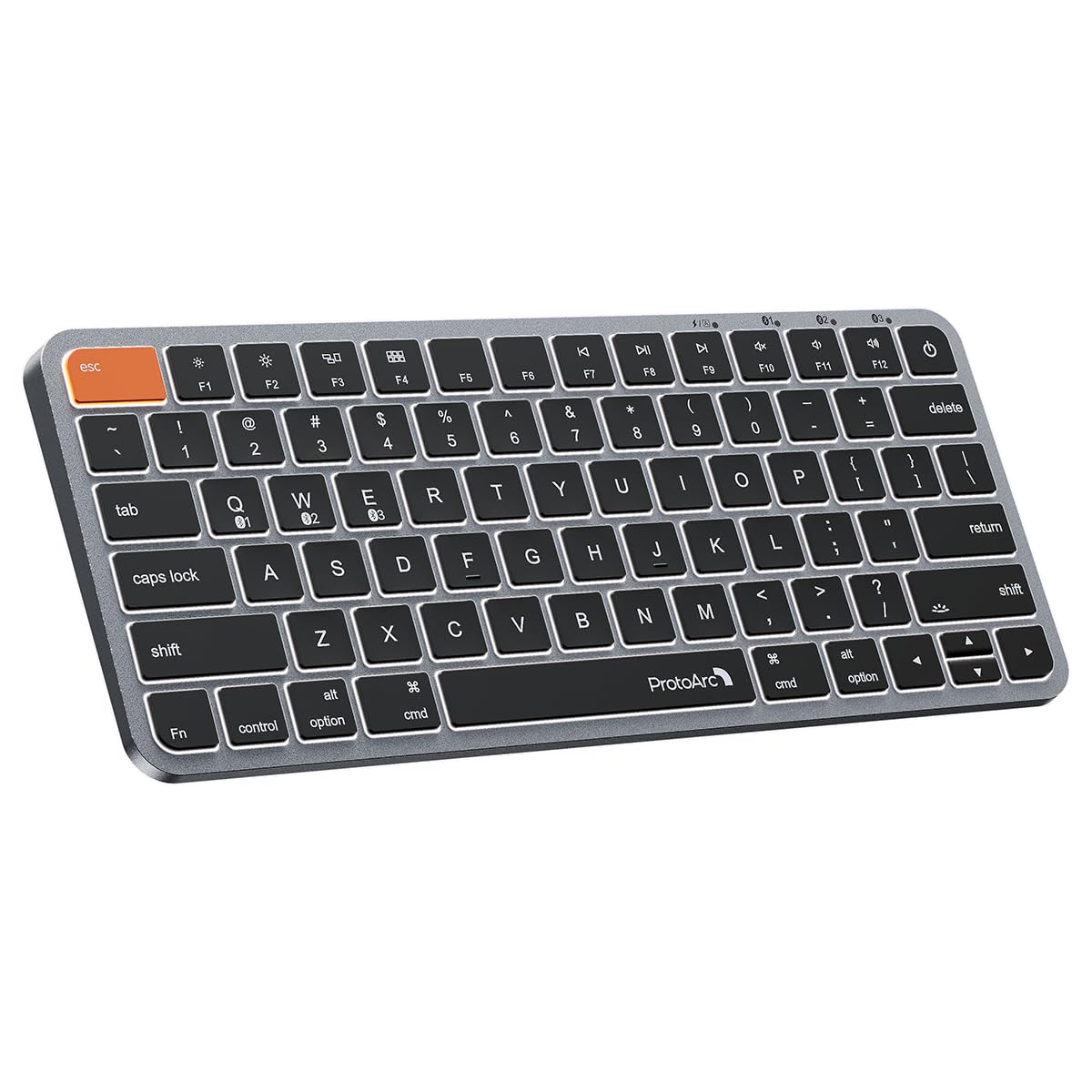
The Mac-first compact with three backlight levels and a wider Command key for fewer mis-hits.
If you live in the Apple ecosystem, this keyboard is made for you — it runs on Mac OS 10.12 or later, iOS, and iPadOS 13.0 or above, but it will not work with Linux, Windows, or Windows installed on Mac hardware. You get backlit Mac keys and a sleek metallic plate that matches your Mac setup, so it feels like part of your desk, not an add-on.
The standout feature is the noticeably wider Command key. It sits right where your thumb rests, making copy-paste and app switching feel natural. Typing comes from low-profile scissor-mechanism keys with tactile feedback, giving a snappy, MacBook-like response.
A built-in 1200mAh rechargeable battery powers the board, and it enters sleep mode after 60 minutes of inactivity to save energy. You get three soft white LED brightness levels to cut eye strain in dim rooms. The compact 78-key layout drops the numpad for portability, and a cover is included.
A value play over Apple’s own: owners call it premium-feeling for the money, with a heavier build and easy connectivity across Mac and iPad.
The catch: battery life runs closer to a week per charge for some, and the backlit spacebar logo can be distracting in the dark.
4. TECKNET Bluetooth Keyboard
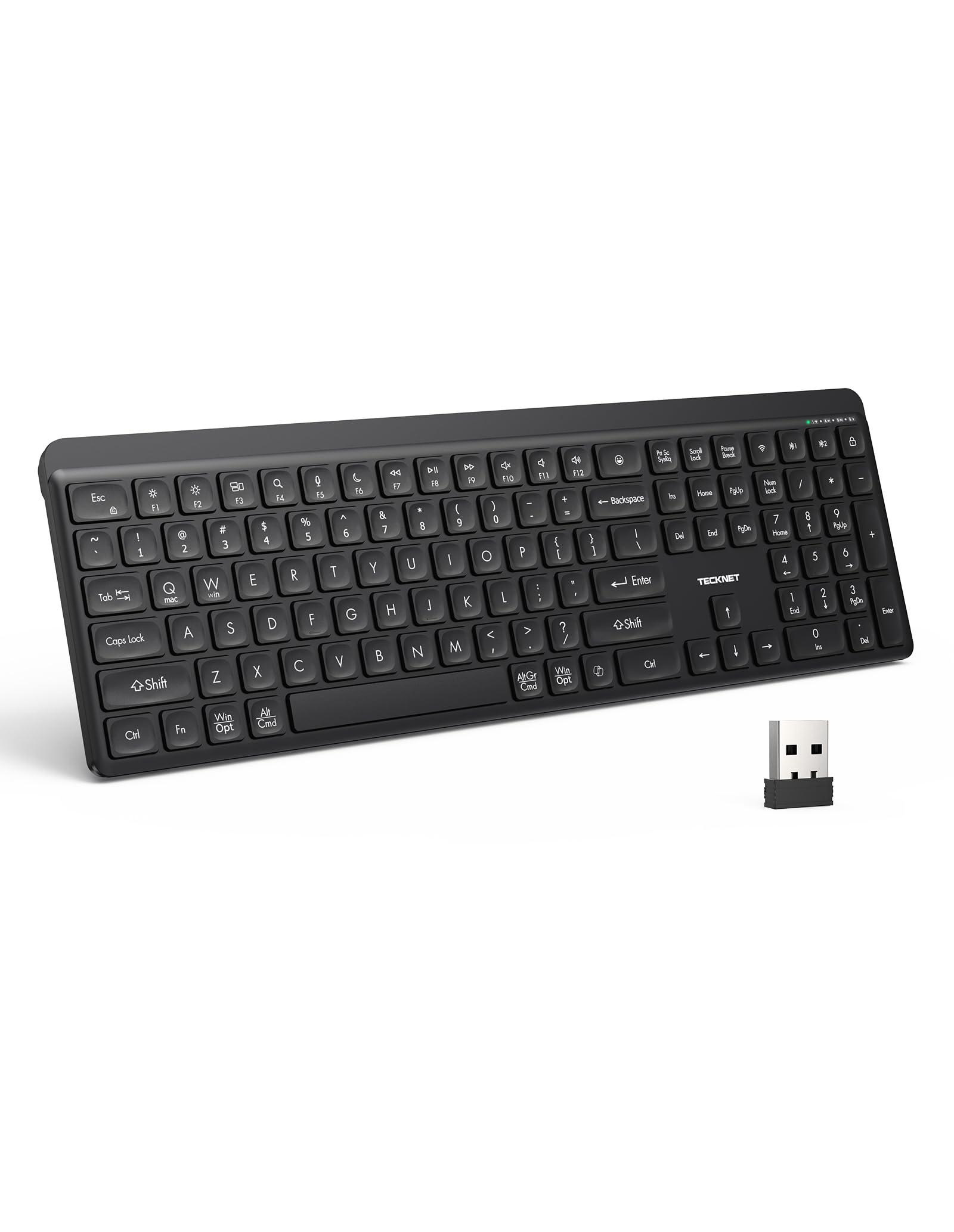
A quiet full-size board that juggles three devices and shrugs off coffee splashes.
Open offices and shared desks are this keyboard’s home turf. Soft membrane keys with an tune rebound structure cut keystroke noise dramatically, so your typing stays discreet during video calls and long sessions. The full-size layout includes a numeric keypad plus 13 multimedia shortcut keys for play/pause, volume, and email.
Connectivity is unusually flexible: one 2.4GHz wireless connection and dual Bluetooth 5.3 modes let you link up to three devices and switch between them. It works within 10 meters and pairs with laptops, desktops, tablets, and smartphones, with a USB receiver included for devices lacking Bluetooth.
A built-in 300mAh rechargeable battery lasts up to 90 days on a full charge based on two hours of daily use, and sleep mode kicks in after 20 minutes of inactivity. It is spill-resistant against light coffee splashes and water drops, though it is not waterproof. Adjustable tilt legs help reduce wrist strain during long sessions.
Best if: you want a quiet, full-size board that stays charged for months and handles light desk spills.
skip it if: your work involves heavy media editing where a more premium key feel matters more than silence.
5. Microsoft Designer Compact Keyboard

The space-saving Microsoft board that pairs cleanly with Windows and Mac alike.
Small desks get a real friend here. The compact design frees up desktop space and lets you pull the mouse in close, while tune key spacing and key travel keep typing fast and fluid. The sleek, low-profile look fits neatly into any workspace without dominating it.
You can connect up to three devices and switch between them smoothly. Nine-month owners across two PCs and an iPad report easy pairing, one battery swap, and laptop-level key noise. The soft matte keys resist greasy fingerprints — a detail that keeps a shared or white keyboard looking clean.
An expressive input key gives quick access to emojis and symbols, though it is limited compared to fully programmable boards. It runs on coin cell batteries, so there is no charging cable to manage. A small quirk: some units ship with the batteries installed but instructions suggest flipping them, which is unnecessary.
Space-first pick: this is the board for tight desks where a compact footprint and clean looks beat a numpad.
Who it misses: heavy spreadsheet users will want the number pad it deliberately leaves off.
6. Logitech Keys-To-Go 2

The featherweight Logitech so thin it disappears into a bag, with a built-in cover for protection.
For tablet travelers, this is the keyboard that takes up no room at all. The super slim, lightweight design packs easily, and the built-in cover shields the keys from damage when it is tossed into a bag. Owners say it pairs well with 10.5″ and 11″ tablets, offering a lighter alternative to bulky keyboard covers.
Typing is roomy thanks to perfectly spaced scissor keys, with a satisfying travel similar to Apple’s Magic Keyboard. Pair up to three devices and switch with the tap of a key. A full row of shortcut keys gives one-tap access to volume, media controls, and screen brightness.
Battery life is the headline: up to 3 years on pre-installed coin cell batteries, so you never think about charging. For a more custom setup, the Logi Options+ app lets you reprogram the entire F-row, though it is available on Windows and macOS only. Keep in mind the coin cell is not rechargeable — but with that runtime, it barely matters.
Grab it for: the bag, the café, and the plane — anywhere a full keyboard would feel heavy.
Think about it: there is no backlight, so late-night typing in the dark is not this board’s strength.
7. Arteck Universal Multi-Device Bluetooth Keyboard

A tiny, light Arteck that connects to three gadgets and runs months on a single charge.
This is the entry-level pick that still does the multi-device trick. It connects to three devices at once and switches between them with a single key click, covering Windows, iOS, iPad OS, Android, and Mac OS. At 12.1oz and just 0.24 inches thick, it is genuinely portable while keeping full-size keys for comfortable typing.
The rechargeable lithium battery is rated for 6 months between charges based on two hours of non-stop use per day. Buyers praise the comfortable flat keys, the clicky feel that is quieter than a mechanical board, and media and brightness controls that work on Windows and Linux. A 24-month warranty backs it up.
The honest caveat is durability. Some customers note the L key cap popping off due to a broken plastic retainer, seen on two units for one buyer. It is not universal, but it is worth knowing before you commit. There is also no Fn lock key, so function keys require holding Fn.
Where it shines
- 3-device switching at a budget-friendly price
- 6-month rated battery life on a 12.1oz frame
- Comfortable flat keys that stay quiet
Watch out for
- Key caps can pop off if the plastic retainer breaks
- No Fn lock — function keys always need the Fn key held
Understanding the Specs
Battery type and rated life
Rechargeable keyboards (like the Apple Magic and ProtoArc K90-A) save you from buying batteries, but you must remember to charge them. Coin-cell boards (Logitech Keys-To-Go 2, Microsoft Designer) run for years but need a replacement battery and a tiny screwdriver when they die. AAA-powered boards (Logitech K950) are the easiest to top up anywhere. The “months between charges” figure usually assumes two hours of daily use — heavier typing drains faster.
Multi-device pairing
Almost every board here pairs with up to three devices, but how you switch differs. Some use a dedicated button, others use a mode key, and a few (like the TECKNET) add a 2.4GHz USB receiver as a backup connection for devices without Bluetooth. If you move between a laptop and a tablet all day, a keyboard with one-tap switching saves real time.
Layout size and key feel
Full-size boards include a numeric keypad for spreadsheet work but take up desk space. Compact tenkeyless designs (no numpad) sit closer to the mouse and travel better. Key feel depends on the mechanism — membrane keys are quiet and soft, while scissor keys give a snappier, laptop-like response. Match the layout to where the keyboard will live, not just how it looks.
OS compatibility
Not every keyboard works with every system. The Apple Magic Keyboard pairs only with Mac, iPad, and iPhone. The ProtoArc K90-A is Mac and iPad only. The Logitech K950 and Arteck cover nearly everything, including Windows, macOS, Chrome OS, Linux, and Android. Check the compatibility list before buying, especially if you switch between a Mac and a Windows PC.
FAQ
Will a Bluetooth keyboard work with both my Mac and Windows PC?
How often do I need to charge a rechargeable Bluetooth keyboard?
What is the difference between a full-size and a compact keyboard layout?
Can I connect a Bluetooth keyboard to more than one device at a time?
How long do coin cell batteries last in a keyboard?
Which keyboard is quietest for an open office?
Do I need the Logi Options+ app to use a Logitech keyboard?
Is a backlit keyboard worth it?
Final Thoughts: The Verdict
For most people, the bluetooth keyboard winner is the Apple Magic Keyboard with Numeric Keypad because it pairs instantly with Apple devices and its battery genuinely lasts months between charges. If you switch between a Windows PC and a Mac all day, grab the Logitech Signature Slim K950. And for travel with a tablet, the Logitech Keys-To-Go 2 is the one to reach for — the crowd favorite among bag-packers, holding one of the highest satisfaction levels in this lineup.
How We Picked
We do not accept paid placement. Every pick is matched to a real buyer and a real use-case; we do not hands-on test units.
Sources & Methodology
Specifications: manufacturer listings and product documentation. Review insights: verified customer reviews, as of September 2026. Pricing: not shown on this page (it changes often); check the current price via the retailer link.
As an Amazon Associate, Gadgets Feed earns from qualifying purchases. This does not affect which products we feature.