
Our readers keep the lights on and my morning glass full of iced black tea. As an Amazon Associate, I earn from qualifying purchases.
Specs are compiled from manufacturer listings and verified buyer reviews and can change over time — please confirm the key details on the product page before buying.
The real question for a gaming 65% keyboard isn’t price — it’s whether the switches, battery, and software match how you actually play. This guide breaks down the top 65% keyboards for gaming, focusing on the specs that matter for fast reaction times and long sessions, all explained in plain English.
I’m Min — the founder and writer behind Gadgets Feed. This guide is built by comparing the manufacturers’ published specifications and the patterns across verified customer reviews, so you get each pick’s real strengths and trade-offs instead of marketing spin.
We separate the honest contenders from the spec-sheet heroes to reveal the true 65% keyboard for gaming that fits your desk and your play style.
Our Picks at a Glance


How To Choose The Best 65% Keyboard For Gaming
Choosing a 65% board is about balancing the essentials: switch type, wireless reliability, and battery stamina. You are trading the numpad and function row for a smaller footprint that gives your mouse more room to move.
Switch Types and Hot-Swap
The switch determines the feel and sound of every press. Linear switches offer a smooth, quiet press, great for rapid gaming inputs. A hot-swappable PCB (the main circuit board) lets you pull out and replace switches without soldering, so you can experiment with different feels or fix a broken key easily.
Connectivity and Wireless Performance
Wireless gaming keyboards usually offer Bluetooth, 2.4GHz (a dedicated USB dongle for low-latency signal), and wired USB-C modes. For competitive gaming, 2.4GHz or wired is your best bet for the fastest response, while Bluetooth suits office use and connecting to multiple devices.
Battery and Software Ecosystem
If you go wireless, battery capacity (measured in mAh, milliampere-hours) dictates how often you need to recharge. Software like QMK/VIA allows deep customization of key layouts and lighting profiles. However, some proprietary software can be clunky, so consider how much you value in-depth programming.
Quick Comparison
| Model | Best For | Battery | Hot-Swap | Connectivity | Amazon |
|---|---|---|---|---|---|
| RK ROYAL KLUDGE RK68★ Best Overall | Budget entry & travel | 1450mAh | Yes | BT 5.0 / USB-C | Amazon |
| BOYI GMK67DIY Enthusiast | DIY custom builds | 4000mAh | Yes | BT / 2.4G / USB-C | Amazon |
| LTC Nimbleback NB682 PROFeature-Rich | Screen & knob features | — | Yes | BT / 2.4G / USB-C | Amazon |
| EPOMAKER Galaxy68 | Premium aluminum build | 6000mAh | Yes | BT / 2.4G / USB-C | Amazon |
| EPOMAKER x Aula F65 | Thocky sound on a budget | 4000mAh | Yes | BT / 2.4G / USB-C | Amazon |
| HyperX Alloy Origins 65 | Plug-and-play reliability | — | No | Wired USB-C | Amazon |
| Corsair K65 PRO Mini | Optical switch speed | — | No | Wired USB-C | Amazon |
| HyperX Origins 2 65 | Customizable housing & mods | — | Yes | Wired USB-C | Amazon |
| ASUS ROG Falchion Ace | Touch panel & compact design | — | No | Wired USB-C | Amazon |
In‑Depth Reviews
1. RK ROYAL KLUDGE RK68
Our pick — over 4★ from 950+ verified ratings; the strongest balance of quality and price.
A compact 68-key board that delivers the essentials of a mechanical upgrade without the premium price tag.
This is the board for anyone making the leap from a cheap membrane keyboard. The RK68 uses a hot-swap PCB (the circuit board that lets you swap switches without soldering), so you can replace the quiet, linear Red switches later if you want a different feel. It also comes with a 1450mAh battery that provides roughly 13 hours of use with the backlight on its lightest setting.
Connectivity is Bluetooth 5.0 or a wired USB-C connection — there’s no 2.4GHz dongle here. Buyers report that Bluetooth lag only appears on a low battery and that you can’t charge and use Bluetooth at the same time. The single blue backlight with 20 dynamic modes adds style without the complexity of full RGB, and the build quality gets strong praise for the category, especially at this price point.
The key feel and sound quality are the standout features, with owners noting it’s surprisingly quiet thanks to pre-lubed switches. The compact size easily fits small desks. A note for gamers: the short right shift key might cause occasional Up-key errors, and there are no dedicated Home/End keys, so it’s a learning curve for some layouts.
What Owners Rave About
- Excellent build quality and value for the price.
- Quiet, smooth Red switches that are pre-lubed.
- Compact footprint that’s perfect for travel or small desks.
The Trade-Offs
- No 2.4GHz dongle, only Bluetooth or wired.
- Single blue backlight, no per-key RGB.
- Short right shift and missing Home/End keys can take getting used to.
Ideal first pick: This is the best entry point for budget gamers who want a reliable, hot-swap board with a trusted reputation.
Consider another if: You need the lowest-latency wireless or full RGB lighting for your setup.
2. BOYI GMK67
A barebones kit that packs enthusiasts’ favorite features like a knob and gasket mount at a friendly price.
The GMK67 is a barebones kit, meaning you bring your own switches and keycaps to complete the build. You’re getting a triple-mode connection (Bluetooth 5.0, 2.4GHz wireless, and wired Type-C) and a hefty 4000mAh battery. That’s a 2.8x capacity gap compared to the RK68, so you’ll spend much less time hunting for a charger.
Its gasket-mount structure and preinstalled foam significantly minimize the hollow “cavity” sound when typing, giving a more satisfying, thocky acoustic. The fully programmable VIA software and an aluminum knob round out a package that feels more premium than its price suggests. Build quality is the most-praised feature, with owners calling it very solid and a great value for a custom option.
The catch is the software — owners mention that VIA can be finicky and sometimes won’t connect unless the keyboard is wired, and even then it can fail to load. It’s also lighter than some expect, though many owners add metal weight inside to fix that. If you’re willing to tinker, this is a rewarding project board.
Pro-Build Checklist
- Tri-mode connectivity with a massive 4000mAh battery.
- Gasket-mounted design delivers a deep, satisfying sound.
- Multifunction knob adds easy media control.
Builder’s Caveat
- VIA software setup can be frustrating and unreliable.
- Feels lighter than expected; may need extra weight for stability.
- You must supply your own switches and keycaps.
Reach for this if: You enjoy building and customizing and want wireless capability with long battery life.
Look elsewhere if: You want a ready-to-type board from the start and don’t want to troubleshoot software.
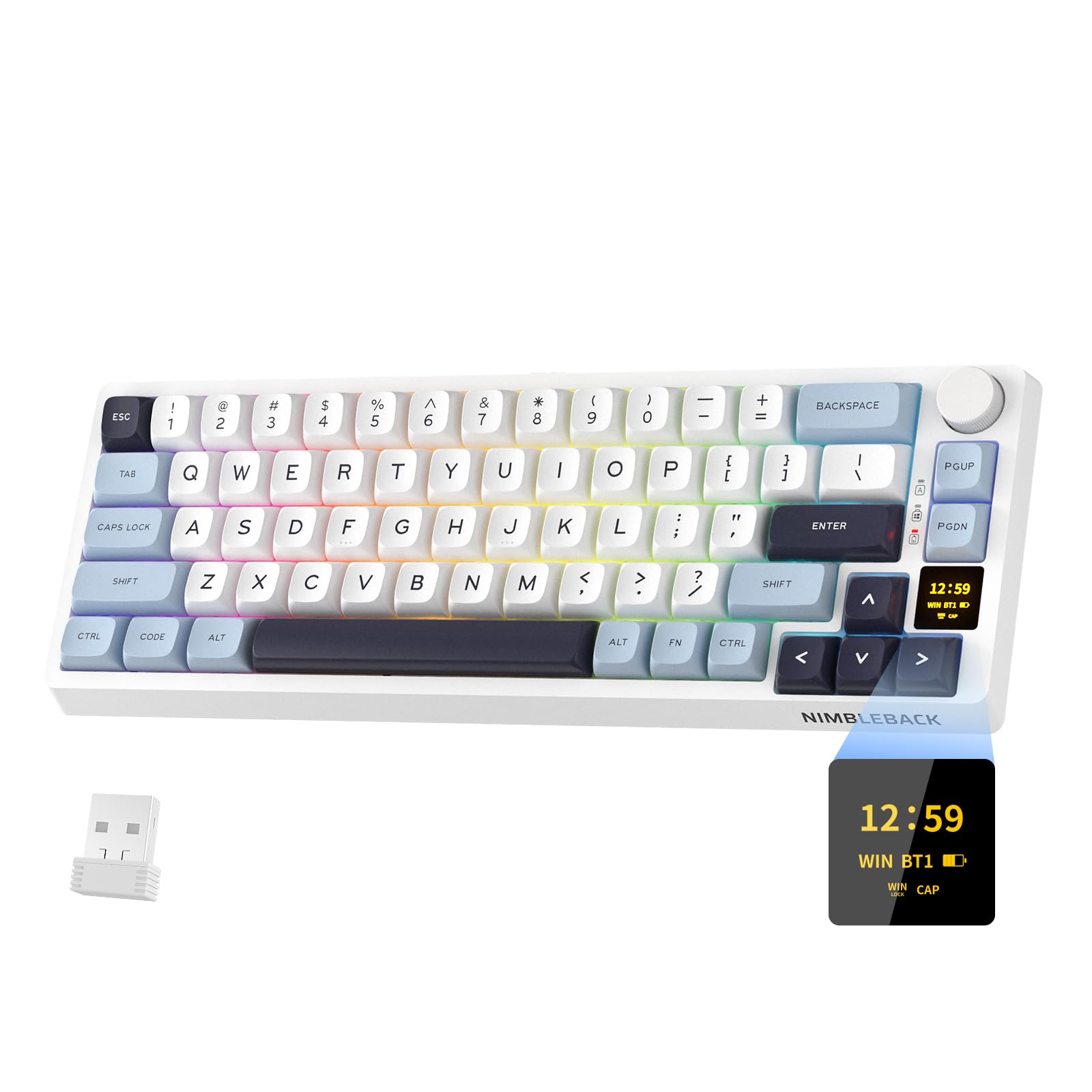
3. LTC Nimbleback NB682 PRO
A 68-key board with a built-in screen that puts stats and GIFs right on your desk.
The NB682 PRO stands out with its multifunctional display screen, which can show GIF images, time, battery status, and even CPU monitoring. An intuitive volume knob lets you adjust audio and lighting with a simple rotation. It’s a 68-key layout with triple connectivity (Bluetooth, 2.4GHz, USB-C) and a hot-swap PCB that accepts standard 3-pin and 5-pin MX-style switches.
The typing experience is enhanced by five layers of internal sound padding, including four dampening mats and a PET film, which effectively minimizes hollow sounds. Owners praise the smooth, soft feel of the keys and the long battery life, with some reporting around a month of use on a charge. The south-faced RGB LED design offers 22 dynamic backlight modes with 5 adjustable speed and brightness levels.
Connectivity issues are the most consistent complaint — some customers note the Bluetooth failing or the 2.4GHz dongle dying within weeks. The software is also described as unintuitive and not automatically installing. It’s also a bit heavy and tall, so a wrist rest is often recommended. If you want the screen and knob without wireless headaches, plan to run it wired.
Standout Extras
- Multifunctional display for GIFs, time, and CPU stats.
- Excellent battery life reported by owners.
- Five-layer sound padding for a smooth, quiet typing feel.
Setup Hurdles
- Recurring reports of Bluetooth and dongle connectivity failures.
- Software is confusing and lacks auto-install.
- Tall profile and weight make a wrist rest a near-necessity.
Grab it for: The wow factor of a keyboard screen and knob, provided you don’t rely heavily on the wireless modes.
skip it if: You want a set-and-forget wireless experience with reliable software support.
4. EPOMAKER Galaxy68
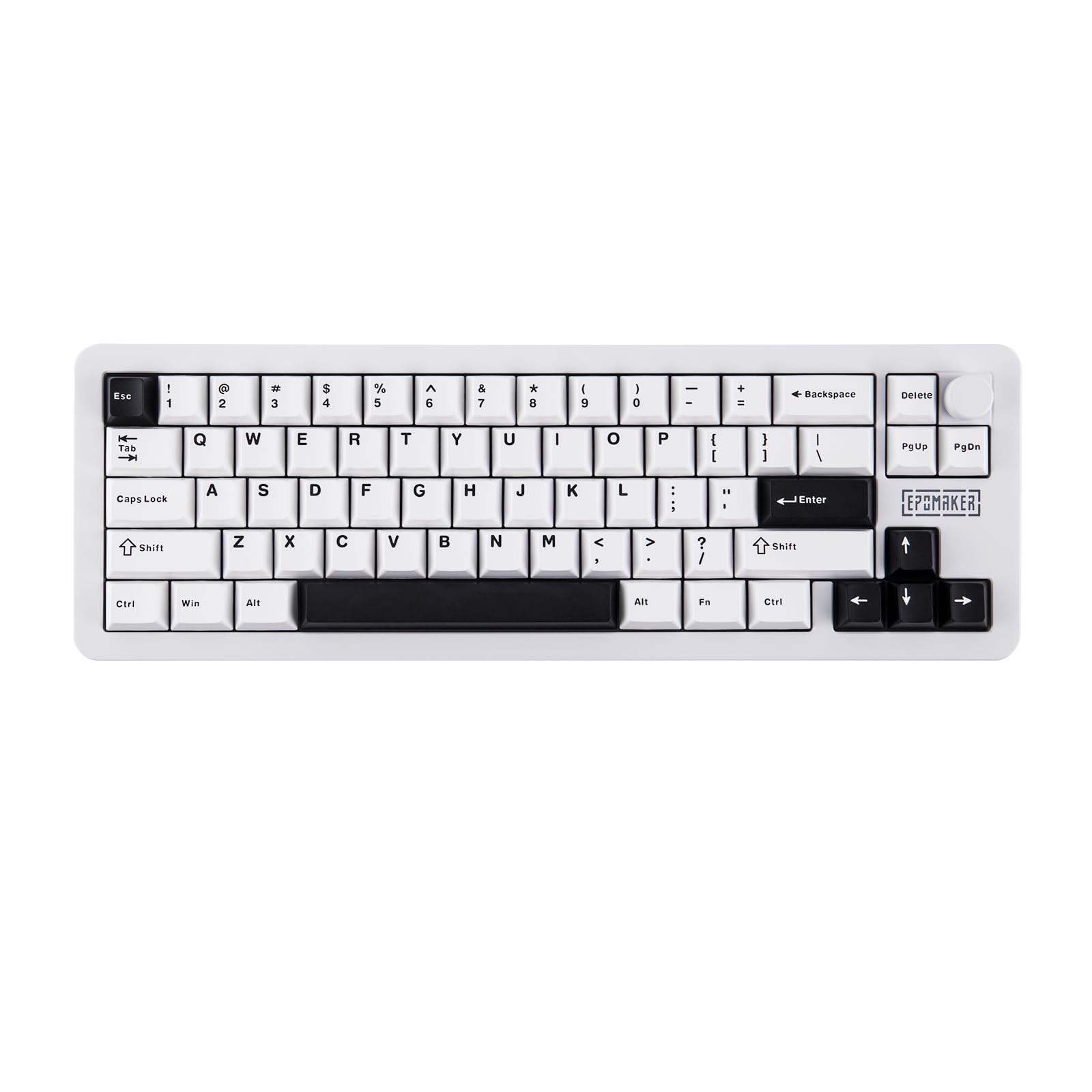
A hefty 67-key board wrapped in a powder-coated aluminum shell that sounds as premium as it feels.
Weighing in at 1.25kg, the Galaxy68 feels incredibly solid and durable. Its anodized aluminum case provides a premium aesthetic and satisfying weight that owners love. The compact 65% layout retains essential keys, while the separated arrow keys and full right shift make it comfortable for daily productivity as well as gaming.
Wireless performance is a strong suit, powered by a dual 3000mAh battery setup (6000mAh total) that delivers an astounding 500 hours of use with the lights off. With backlighting on brightest, you still get 27 hours of continuous gaming. It maintains a stable 1000Hz polling rate in 2.4GHz wireless and wired modes, with a 2.5ms latency in cable mode for near-instant response.
Despite the “Creamy” switch name, many owners describe the lubed linear switches as smooth and satisfying. The 5-layer dampening system creates a deep, thocky sound without rattle. There is a minor caveat that the spacebar sounds worse than other keys, but the overall build quality earns rave reviews as an excellent entry point into aluminum keyboards.
What Makes It Shine
- 6000mAh battery delivers 500 hours of use without lighting.
- Solid aluminum shell with a premium, heavy feel.
- 2.5ms latency in wired mode suits competitive play.
Minor Gripes
- The spacebar’s sound quality is noticeably worse than other keys.
- No numpad means a learning curve for office-heavy work.
Best for: Gamers wanting a truly premium, heavy aluminum board with exceptional wireless battery life.
Think twice if: You primarily need a keyboard for office tasks that rely heavily on a numpad.
5. EPOMAKER x Aula F65

A 68-key board engineered to deliver that deep, satisfying “thocky” sound on a budget.
The F65 is all about acoustic excellence. It features a five-layer sound-dampening design with Poron foam, an IXPE switch pad, and a PET enhancement pad, which owners say produces a rich, deep, noise-free sound. The Reaper switches that come with it are described by buyers as sounding “like heaven.”
Connectivity is versatile with Bluetooth, 2.4GHz wireless, and wired USB options. A large 4000mAh battery supports extended gaming sessions without frequent recharges. The south-facing RGB LEDs offer 16.8 million colors, and the side RGB bar enhances the desktop atmosphere. It also runs a 1000Hz polling rate in wireless mode for swift inputs.
The gasket-mount structure and flex-cut PC plate (a flexible material that softens bottom-outs) make it perfect for long typing sessions. The main drawback is that the RGB presets are all animated — you cannot set a static, solid color. Also, while it can run VIA software, the setup is described as difficult and not beginner-friendly, especially for firmware flashing.
Why It’s a Fan Favorite
- Superb “thocky” sound profile praised across the board.
- Large 4000mAh battery with 3-way connectivity.
- Flex-cut PC plate provides a soft, comfortable typing feel.
What to Know
- RGB presets all animate; you can’t lock a solid color.
- VIA setup is complex and can involve firmware flashing.
Choose this for: Enthusiasts who care deeply about sound quality and want it at a value-focused price.
Pass on it if: You want a simple, static RGB color and don’t want to deal with software complexities.
6. HyperX Alloy Origins 65

A straightforward, rock-solid wired board with the HyperX reliability gamers trust.
If you just want a keyboard that works flawlessly without any software tinkering, the Alloy Origins 65 is it. It’s a wired-only board with USB-C connectivity, offering a simple plug-and-play experience with your PC and PlayStation 4. The linear Red switches (a smooth, quiet switch type) are praised for their satisfying clickiness and are built to last through intense gaming sessions.
The build quality is a high point, featuring a solid, heavy frame with grippy, double-shot PBT keycaps that resist wear. The flat design makes cleaning a breeze. RGB backlighting is vibrant and customizable via the NGENUITY software, though some users note you may need to disable Windows 11 Dynamic Lighting for full control.
Sound is the most-praised aspect, with 42 owners singling it out as excellent. The downside is limited to the compact layout — there’s no function row or numpad, and one owner noted the missing ‘End’ button. Reliability is decent but mixed; most find it works very well, though a small number report issues with the CMD key over time.
Rock-Solid Basics
- Superior sound quality and satisfying clickiness.
- Heavy, durable build with grippy PBT keycaps.
- Simple wired USB-C connection for PC and PlayStation 4.
Consider This
- Wired-only; no wireless or Bluetooth option.
- Compact layout lacks function row and some navigation keys.
Pick it for: A no-fuss, dependable wired keyboard that feels great and sounds better for pure gaming.
Look past it if: You need wireless freedom or a dedicated function row for work.
7. Corsair K65 PRO Mini

A 67-key wired board using light-based switches for the absolute fastest possible inputs.
The K65 PRO Mini uses Corsair’s OPX optical-mechanical switches, which register keystrokes using light. This makes them insanely smooth, linear, and ultra-responsive, and they’re rated to last 150 million presses. AXON Hyper-Processing Technology registers inputs up to 8x faster than standard boards for a competitive edge.
It’s a wired-only keyboard with a detachable USB-C cable, and it’s compatible with gaming consoles as well as PC. The 65% layout includes arrow and utility keys for daily use. Two layers of sound dampening soften keystrokes, making typing a satisfying experience. The aluminum enclosure keeps it light at 1.3 pounds while feeling durable.
Build quality and customization are mixed in owner feedback. Many praise the iCUE software for its lighting features, but some find macro options limited. The Fn key placement is also a minor gripe, being far from the tilde key. It works well with a Mac mini M4 in wired mode, showing good compatibility, though it’s primarily a Windows-focused board.
Light-Speed Inputs
- OPX optical switches are rated for 150 million presses.
- AXON tech delivers inputs up to 8x faster.
- Lightweight aluminum build at just 1.3 pounds.
The Catch
- No wireless option, purely wired.
- Some find macro customization limited and Fn key placement awkward.
Best for: Competitive gamers who want the lowest possible input latency from a reliable wired board.
Consider others if: You need wireless connectivity or extensive macro programming for MMOs.
8. HyperX Origins 2 65
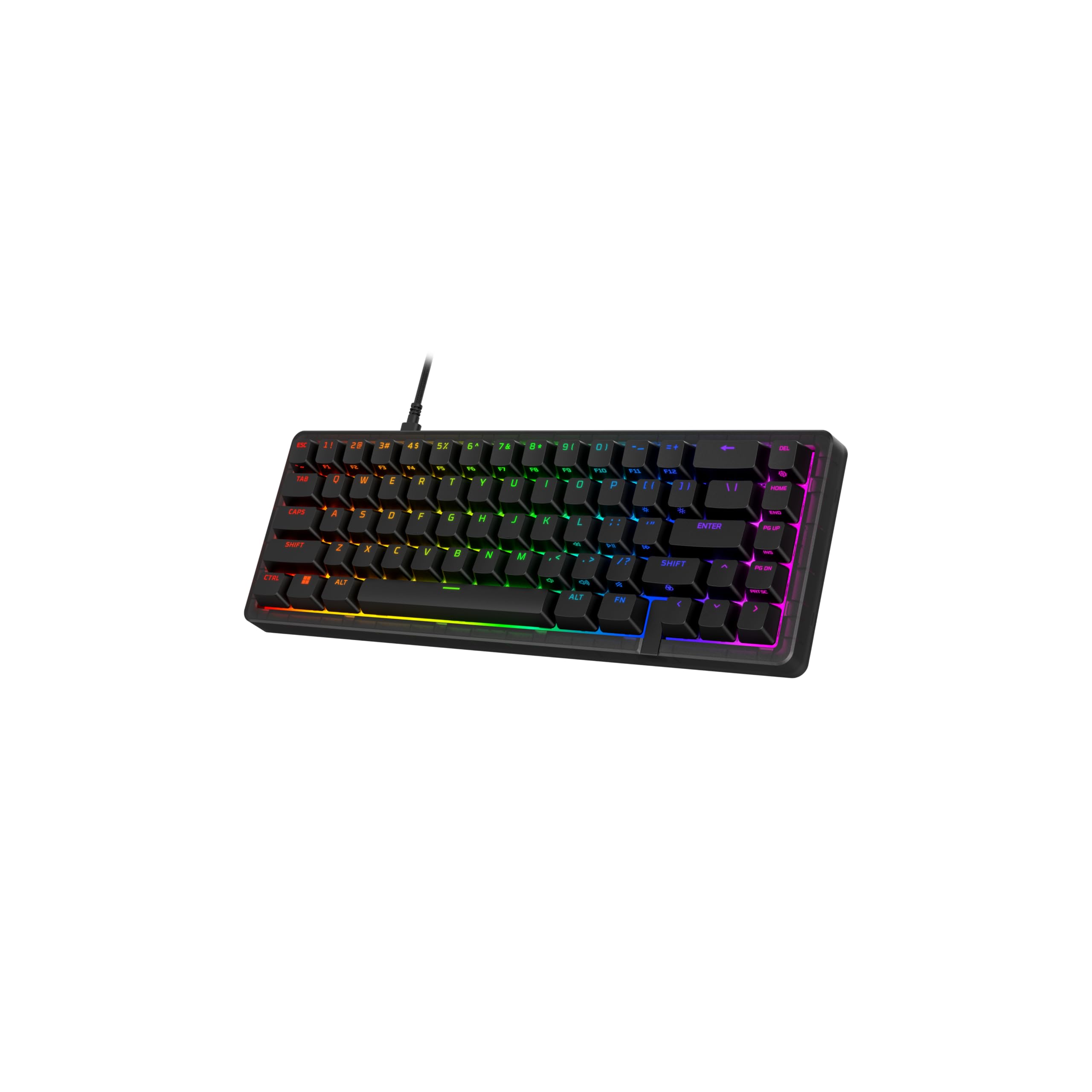
A customization powerhouse with an 8k polling rate and swappable frosted housings.
The Origins 2 65 is built for tinkerers. It features a one-piece drop-in assembly, allowing you to easily swap the colorful frosted housings to match your setup. The hot-swap 5-pin sockets (the circuit board’s slots that accept different switch types) let you change switches and keycaps anytime without soldering, giving you full control over the feel.
If you’re chasing performance, this is a winner — it has a near-instantaneous 8k polling rate, communicating with your PC up to 8000 times per second, ensuring no input is ever missed. The O-ring mount (a mounting style that uses rubber rings for a softer feel) provides a light bounce and deeper sound to each keystroke. The high-profile form factor and flip-down feet let you find the perfect ergonomic angle.
Owners praise the build quality and compact size, saying the keys feel very smooth. The main drawback is that it’s wired-only—one reviewer notes a wireless option would make it “pretty much perfect.” It works with PC, PS5, and Xbox Series, and you can remap keys and lighting through the NGENUITY software (the brand’s customization app).
Performance & Customization
- Blazing-fast 8k polling rate for zero input lag.
- Swappable frosted housings for easy aesthetic changes.
- Hot-swap switches and keycaps with no soldering required.
Worth Noting
- Wired-only; no wireless or Bluetooth mode.
- The high-profile design may require a wrist rest for some users.
Reach for it if: You love modding and want top-tier performance with the ability to make the board truly yours.
Hold off if: Wireless capability is essential to your desk setup.
9. ASUS ROG Falchion Ace

An ultra-compact 68-key board with a unique side touch panel for media control.
The Falchion Ace is designed to be as small as possible without sacrificing functionality. At just 306 mm in length, it’s almost the same size as a 60% keyboard while still including arrow and navigation keys. The innovative interactive touch panel on the left side lets you adjust volume, switch apps, or even program macro keys, an incredibly useful feature for gaming and productivity.
The ROG NX mechanical switches are lubricated for a smoother click feel and to eliminate spring-bouncing noises, providing fast actuation for gaming. The PBT doubleshot keycaps offer a premium feel and long-lasting durability, with a designed shorter stem to reduce key wobble. The specially tuned, lubricated switch stabilizers ensure smooth, stable keystrokes for longer keys like spacebar and shift.
Owners consistently praise the keyboard’s quality and premium feel, with the vibrant lighting being a highlight. The keys are a little loud for some, but the sound is described as satisfying and near-perfect. The main compromise is the size — it’s compact, which some found small initially — and the touch panel, while good for media, isn’t a tactile button, which some prefer for gaming controls.
Ultra-Compact Features
- Unique side touch panel for volume, app shortcuts, and macros.
- Near-60% size (306 mm) while keeping arrow keys.
- Lubricated ROG NX switches and stabilizers for smooth, stable keystrokes.
Compact Compromises
- Touch panel isn’t a tactile button, which some gamers may dislike.
- Keys are a bit loud despite the sound-dampening foam.
Ideal for: Gamers who want the absolute smallest footprint with all essential keys and a unique control panel.
pass on it if: You prefer tactile buttons over a touch interface or need a wireless connection.
Understanding the Specs
Hot-Swap vs. Soldered Switches
A hot-swappable keyboard uses a PCB (circuit board) with sockets that let you pull out and replace switches with no tools. This is ideal for experimenting with different feels or fixing a broken switch. Soldered switches, by comparison, are permanent and require desoldering equipment to change, which is more common on pre-built boards.
Battery Capacity (mAh)
Battery capacity is measured in milliampere-hours (mAh). A higher number means the battery can store more energy and last longer between charges. For example, a 4000mAh battery will last significantly longer on a single charge than a 1450mAh battery, which is a crucial spec for wireless gaming keyboards used in long sessions.
FAQ
What does 65% mean on a gaming keyboard?
Are linear switches better for gaming?
What is a hot-swappable keyboard?
What is a gasket mount and why is it popular?
What is a 2.4GHz connection and how is it different from Bluetooth?
How long does a wireless gaming keyboard battery last?
Is a wired or wireless keyboard better for gaming?
What is the benefit of PBT keycaps?
Will a 65% keyboard work with my console?
Final Thoughts: The Verdict
If you want one dependable pick, the winner for the 65% keyboard for gaming is the BOYI GMK67 because it blends a tri-mode connection and a massive 4000mAh battery with the customization depth of VIA and a gasket mount. If you want the heaviest, most premium feel and the longest battery life, grab the EPOMAKER Galaxy68. And for a bulletproof, no-fuss wired option that just works, the HyperX Alloy Origins 65 is the one to reach for.
How We Picked
We do not accept paid placement. Every pick is matched to a real buyer and a real use-case; we do not hands-on test units.
Sources & Methodology
Specifications: manufacturer listings and product documentation. Review insights: verified customer reviews, as of September 2026. Pricing: not shown on this page (it changes often); check the current price via the retailer link.
As an Amazon Associate, Gadgets Feed earns from qualifying purchases. This does not affect which products we feature.