
Our readers keep the lights on and my morning glass full of iced black tea. As an Amazon Associate, I earn from qualifying purchases.
Specs are compiled from manufacturer listings and verified buyer reviews and can change over time — please confirm the key details on the product page before buying.
Shaky shelves are the silent killer of clean 3D prints. Every layer your printer lays down gets a tiny wobble stamped into it, and the result is that ugly “ringing” or “ghosting” texture on vertical surfaces.
I’m Min — the founder and writer behind Gadgets Feed. This guide is built by comparing the manufacturers’ published specifications and the patterns across verified customer reviews, so you get each pick’s real strengths and trade-offs instead of marketing spin.
You need a desk that won’t wobble when your printer runs at full speed, keeps filament dry, and lets you reach every part for servicing. This 3d printer desk breakdown focuses on those real-world needs, using only verified specs and owner experience.
Our Picks at a Glance
How To Choose The Best 3D Printer Desk
You’re not just buying a table; you’re building the foundation of your print quality. A desk that flexes when your machine moves will ruin dimensional accuracy. You need to prioritize rigidity, storage, and mobility in that order.
Why Rigidity Is the First Filter
The frame material and cross-bracing determine how much vibration transfers to your print. Look for steel frames with X-shaped or horizontal crossbars — these resist twisting forces that cause layer shifting. A desk that resists push-force will also resist the shaking of a high-speed printer.
Weight Capacity Per Shelf, Not Total
Manufacturers often advertise a total capacity, but what matters is the rating for each individual shelf. A printer is a concentrated weight, not a spread-out one. You want a shelf rated for at least 100 lbs to comfortably hold a large-format machine without bowing over time.
Castors Versus Feet for Stability
Locking wheels let you roll the desk out for maintenance, which is fantastic for serviceability. However, wheels can introduce micro-movement during a print. Many buyers swear by swapping to the adjustable feet to create a perfectly level, stationary platform, reserving wheels only for mobility.
Power Output Built In
A desk with integrated AC outlets and USB ports eliminates messy extension cords and keeps your printer, filament dryer, and air purifier wired together. This convenience turns a simple stand into a command center for your entire print station.
Quick Comparison
| Model | Best For | Shelf Capacity | Dimensions (WxDxH) | Power Options | Amazon |
|---|---|---|---|---|---|
| EasyCom 3-Tier★ Best Overall | Versatile Rolling Storage | — | 19.7 x 15.7 x 32.5 in | None | Amazon |
| YAOHUOO 3-TierBest Smart Value | Built-in Power Hub | 120 lbs | 22.05 x 14.96 x 26.38 in | 2 AC, 1 USB, 1 Type-C | Amazon |
| PAINAODAI 3D StandFilament Vault | Dedicated Filament Storage | — | 31.5 x 19.7 x 25.8 in | None | Amazon |
| EMERIT 3-Tier | Heavy Printers | 100 lbs | 23.6 x 18.9 x 31.5 in | None | Amazon |
| METYERRY Under Desk | Compact Tall Printers | 200 lbs | 21.7 x 20 x 22.4 in | 2 AC, 2 USB | Amazon |
| Natwind 3-Tier | High-End Finish & Ports | 250 lbs (total) | 19.7 x 15.7 x 29.5 in | 3 AC, 1 USB, 1 Type-C | Amazon |
| GreenForest Stand | Maximum Stability | 300 lbs (total) | 19.7 x 17.7 x 31.1 in | None | Amazon |
| AHOWPD 3D Table | Complete Print Station | — | 28.4 x 23.7 x 28.4 in | 2 AC, 2 USB | Amazon |
| Fannova Large Stand | Oversized Printers | 200 lbs | 23.62 x 23.62 x 30.12 in | None | Amazon |
In-Depth Reviews
1. EasyCom Large Printer Stand with Drawer, 3-Tier Industrial Rolling Cart
Our pick — over 4.5★ from 500+ verified ratings; the strongest balance of quality and price.
The rolling workhorse that blends generous storage with a flexible height, made for the multi-device owner.
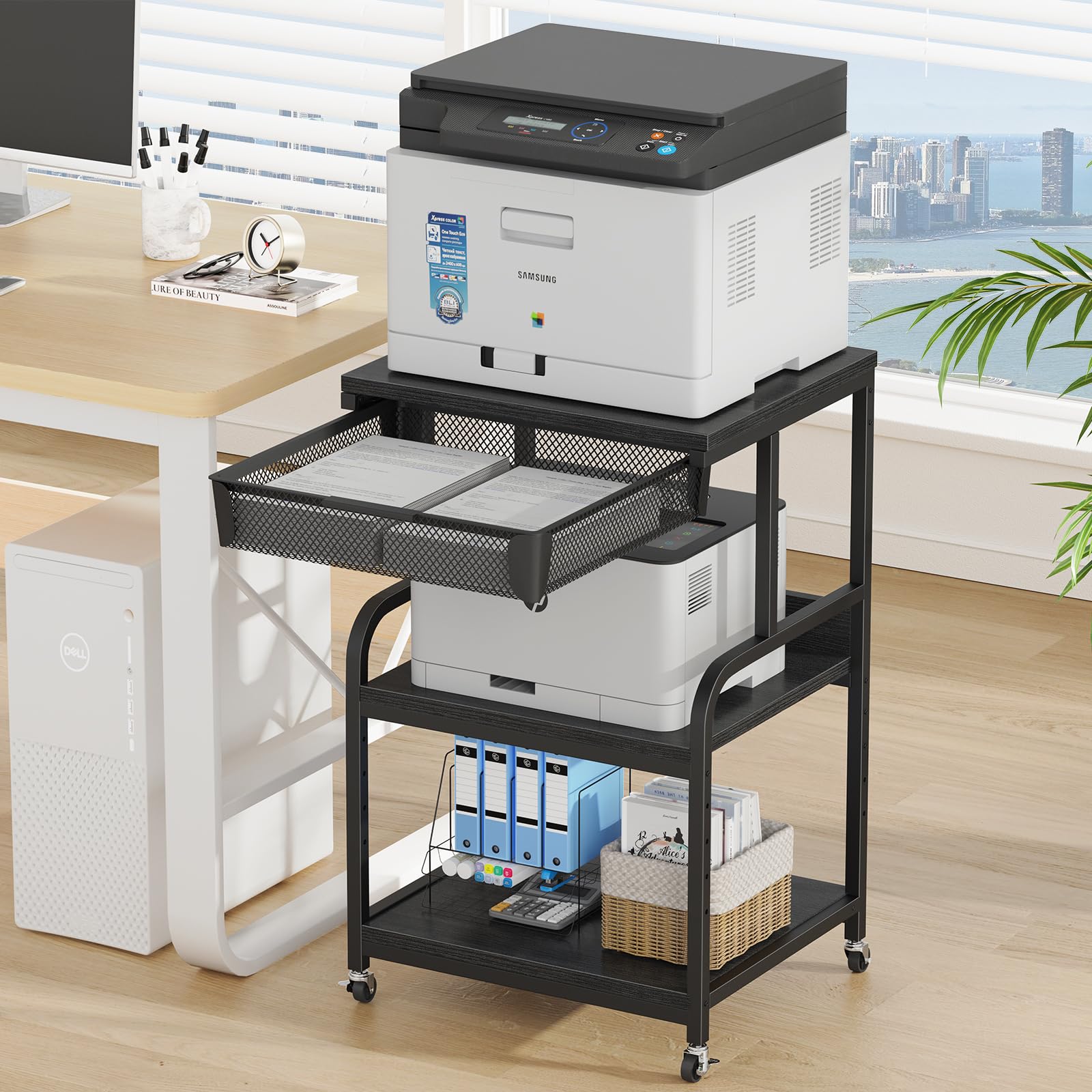
This cart earns the top spot not for one standout spec, but for nailing every daily-use detail. The mesh drawer keeps paper, ink, and cables ventilated and visible, solving the clutter problem that plagues most printing corners. You also get 5 adjustable height settings, so you can level the surface to match your specific printer, fax, or scanner.
The build uses reinforced steel and FSC-Certified wood panels, which keeps it sturdy enough for a 3D printer while still moving smoothly on its locking wheels. Buyers report the setup takes about 45 minutes solo, and they praise how the wheels let them pull it out for cleaning with zero lifting. The catch is the height — at 32.5 inches it stands taller than the YAOHUOO (26.38 inches), so it suits taller users or standing desk setups better than low-profile cabinets.
Assembly is straightforward for two people, though the instructions have substeps that demand attention, and it’s best to leave screws loose until everything lines up. The verdict is positive — the drawer slider needs a minor adjustment, but once set, this cart’s storage, mobility, and customization are hard to match.
Why Owners Love It
- Mesh drawer holds 2 reams of paper with room to spare
- Rolls smoothly on industrial wheels or sits fixed on included feet
- Fits two printers side-by-side on the top deck
Assembly Notes
- Plan for ~45 minutes of careful solo assembly
- Drawer sliders may need a minor alignment tweak
- Weighs 20.2 pounds, so it’s solid but not light to flip over
Your best bet if: you want one cart that handles a printer, a 3D printer, and all the supplies around them.
Think twice if: you need a low-profile stand that hides under a desk, since this one stands tall at 32.5 inches.
2. YAOHUOO 3 Tier Large Printer Stand with Power Outlet/Adjustable Shelf
A stable steel cart with a built-in power strip and adjustable shelf, built for the cable-weary maker.
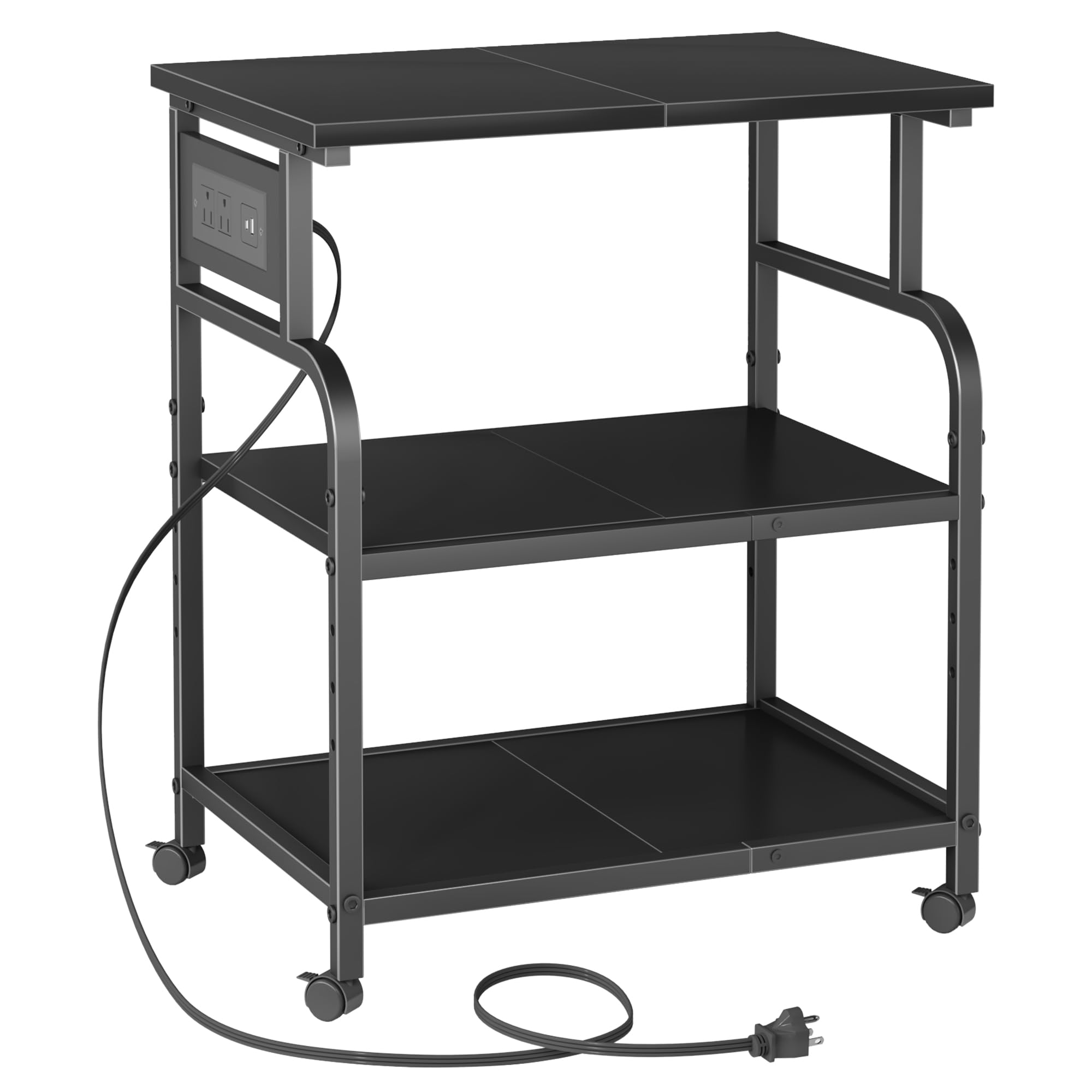
This stand’s defining trick is the integrated charging station — 2 AC outlets plus 1 USB and 1 Type-C port on the cart itself. That means your printer, filament dryer, and phone can all plug in right at the machine, eliminating a tangled mess of extension cords snaking across the room. This feature immediately upgrades any workspace.
The middle shelf has 4 height levels (2 inches each), letting you dial in the spacing for tall laser printers, a 3D printer, or even a CPU tower. Structurally, it’s a heavy-duty metal frame with a waterproof board, and each shelf carries up to 120 lbs — that’s enough for a large-format printer. Owners mention assembly runs just 20-30 minutes, a notably quick build compared to the EasyCom’s 45-minute job, and the lockable caster wheels keep it stable once positioned.
The trade-off is footprint: at 22.05 x 14.96 inches, it’s shallower than the EasyCom (19.7 x 15.7 inches), so a huge printer with a deep base might overhang. It’s also lighter at 19 pounds versus 22.6 for the PAINAODAI, but owners stack heavy printers on it without complaint, praising the minimalist matte black look that blends into a home office.
Power First Design
- 2 AC outlets, 1 USB, and 1 Type-C port mounted right on the frame
- 120 lbs per shelf handles heavy printers and tooling
- 4 lockable caster wheels with adjustable feet included
Minor Setbacks
- Check large printer footprints; the top is 22″ x 15″
- One bolt hole can arrive untapped, needing an M6 tap
- Wheels add height, so measure your total clearance
Reach for this if: you hate cable clutter and want power outlets built into the furniture itself.
Look elsewhere if: you’re mounting a printer with a footprint much wider than 22 inches.
3. PAINAODAI 3D Printer Stand with Filament Storage 31.5×19.7
The maker’s bench designed around one obsession: keeping 40 spools of filament dry and organized.
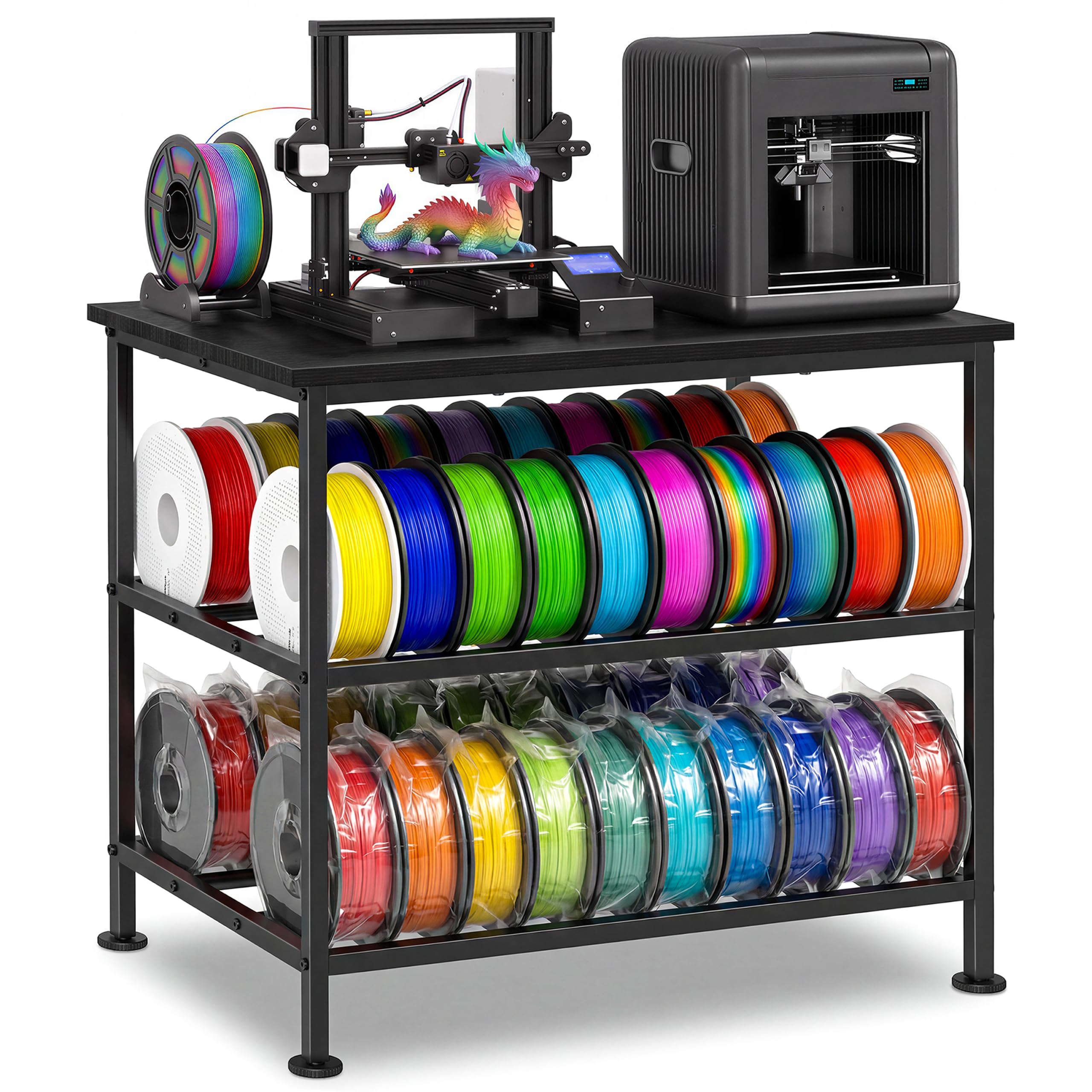
While most stands treat filament as an afterthought, this desk makes it the centerpiece. The high-capacity storage holds up to 40 filament spools, keeping your entire material library visible, dry, and easy to grab during long print sessions. For anyone running multiple materials or colors, that alone justifies the pick.
It’s also tuned for print quality, not just storage. The reinforced steel frame pairs with adjustable anti-vibration feet to reduce shaking and resonance, aiming for stable high-precision printing even at high speeds. The extra-wide tabletop gives room for tools and accessories alongside the printer itself. It’s a heavier unit at 22.6 pounds, which adds mass that helps dampen vibration.
Assembly is genuinely easy — owners note two 10-year-olds managed to build it alone, and it fits a Bambu Lab A1 combo. The honest limitations: it stands at just 25.8 inches tall, which shorter users love but taller ones find low, and there’s no built-in power strip. Buyers also scratch their heads over where to mount a catch bin for excess filament that drops off the back of the machine — a small design gap.
Storage-First Build
- Holds up to 40 filament spools, visible and accessible
- Anti-vibration feet reduce resonance for cleaner layers
- Thickened wood board and industrial steel frame handle heavy printers
Height & Power Gaps
- Sits low at 25.8 inches; taller users add bed risers
- No integrated power outlet or USB hub
- No dedicated bin for dropped filament scraps
Best suited for: the hobbyist with a growing filament collection who wants it all on one sturdy bench.
Pass on it if: you’re tall and need a standing-height work surface, or you require built-in power.
4. EMERIT Heavy Duty 3-Tier Printer Stand with Locking Wheels, 23.6″x18.9″
The industrial-grade cart that holds up to 300 lbs total without wobbling, even mid-print.
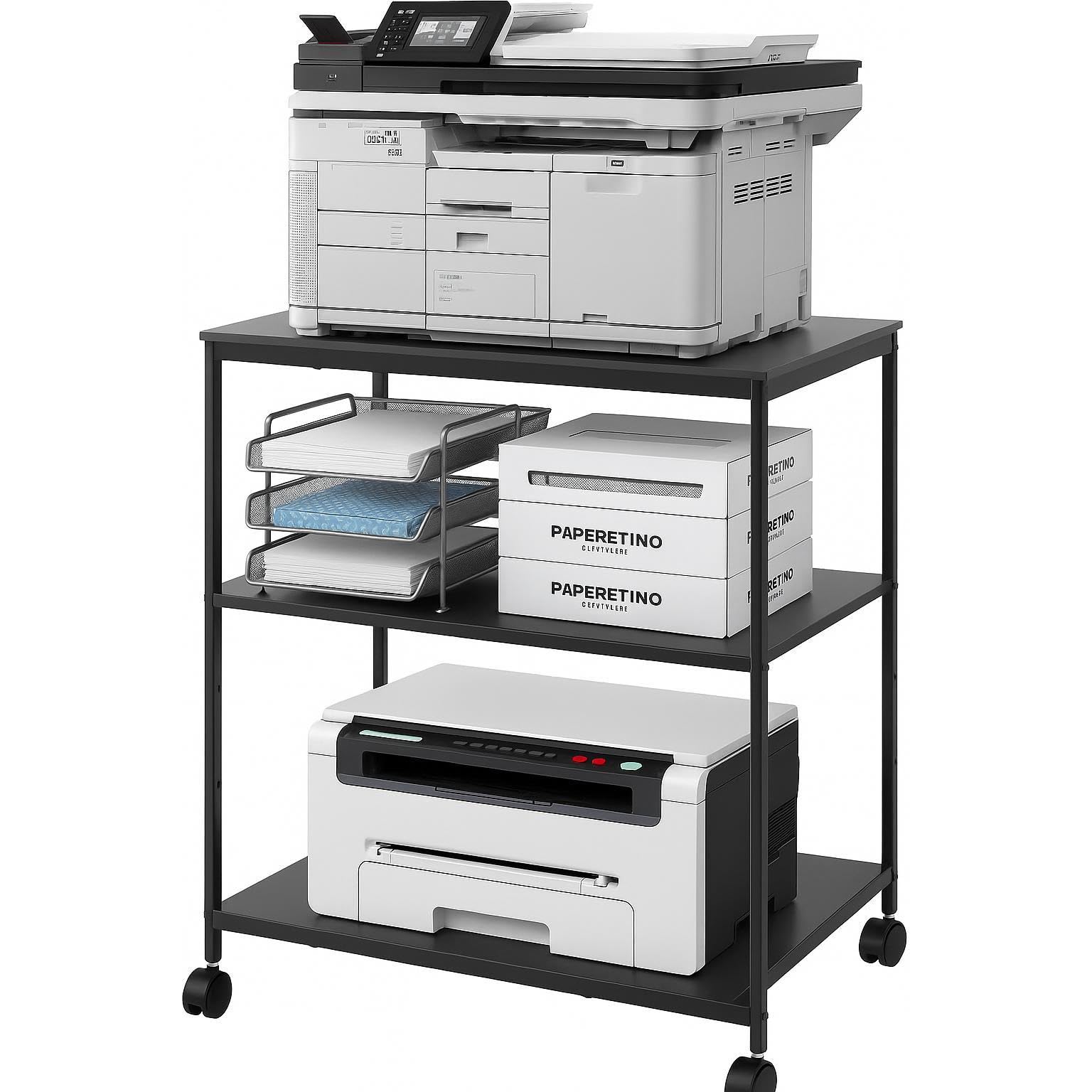
This is the stand you pick when your equipment is heavy and your patience for flex is zero. It holds up to 100 lbs per shelf for a 300 lbs total capacity, with reinforced steel frames and anti-slip support bars that keep heavy laser printers and all-in-one machines rock-solid. Owners have stacked two heavy printers on it without any bowing or flexing of the deck.
The layout boost vertical real estate: a 23.6″ x 18.9″ top shelf for your main machine, a middle shelf with 5 adjustable height settings spanning 11 to 18.9 inches, and a bottom tier for paper reams and ink. The 4 swivel casters with 2 brakes make it easy to pull out for maintenance, then lock it in place. Assembly is tool-free and runs about 15 minutes with clearly labeled parts.
Owners love that it slides into a standard closet for a hidden workspace. The weight is listed at 10.84 kg (about 23.9 pounds), so it’s a solid unit, and the rounded corners give it a clean, modern look. The main consideration is the height — at 31.5 inches it’s tall, so confirm your ceiling clearance if you’re sliding it under a desk.
Built Like a Tank
- 100 lbs per shelf, 300 lbs total capacity
- 5 adjustable middle shelf positions from 11″ to 18.9″
- Tool-free assembly in about 15 minutes
Considerations
- Wheels install takes a bit of effort, not a simple compression fit
- Stands tall at 31.5 inches; measure your under-desk clearance
- Fits most 60″ desks but check the 23.6″ width
Choose this when: you’re supporting a large-format printer or heat press that needs serious weight capacity.
skip it if: you want a built-in power strip or a shorter, more compact profile.
5. METYERRY Under Desk Printer Stand with Power Outlet, Adjustable Shelf, White
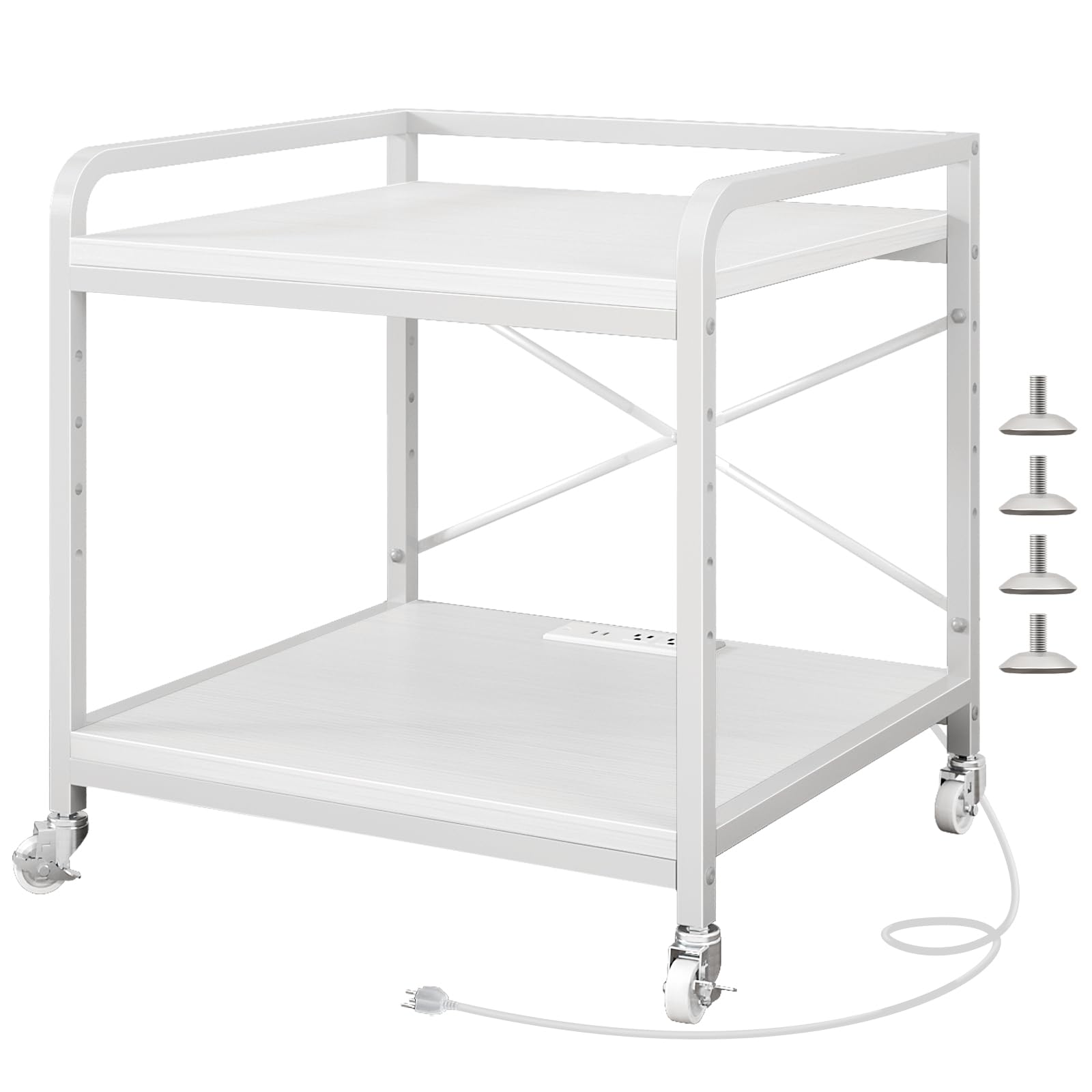
A dense, powerful little stand that packs a 200 lbs rating and a power hub into a compact footprint.
Don’t let the compact size fool you — this stand is engineered for serious loads. Each shelf supports 200 lbs, which is more than enough for a bulky 3D printer, and the 20mm thickened steel frame with an X-shaped back brace keeps it rigid with zero wobble. The 12mm waterproof P2 board resists scratches and cleans easily after messy printing sessions.
The integrated power strip is a highlight: 2 AC outlets plus 2 USB ports create a charging station right on the cart. The top shelf has 5 adjustable height settings, so you can raise it to fit a tall computer tower or a bulky 3D printer with ease. Four upgraded industrial casters with 2 locking brakes glide smoothly even under full load, and 4 adjustable foot pads keep it stable on uneven floors.
Assembly is a quick 20-minute job with clear guides and numbered parts. Owners fit a Prusa Core One L on it with room to spare. The recurring catch is hardware: some bolts arrive too short to tighten properly, forcing a trip to the hardware store for replacements — a frustrating surprise at this level. Most units are perfect, but it’s a risk to weigh.
Strength in a Small Package
- 200 lbs per shelf with a 20mm steel frame
- 2 AC outlets and 2 USB ports built in
- 20-minute tool-free assembly with numbered parts
Watch For
- Occasional bolts run too short, needing replacements
- Compact footprint may not fit oversized printers
- Locking rollers are best placed on the front
Grab this if: you need a compact, powerful stand that feeds power to your printer and accessories.
Pass if: you’re mounting a very wide printer base or you’d rather not risk hardware issues.
6. Natwind 3 Tier Printer Stand, 19.7″x15.7″, with Charging Station, White
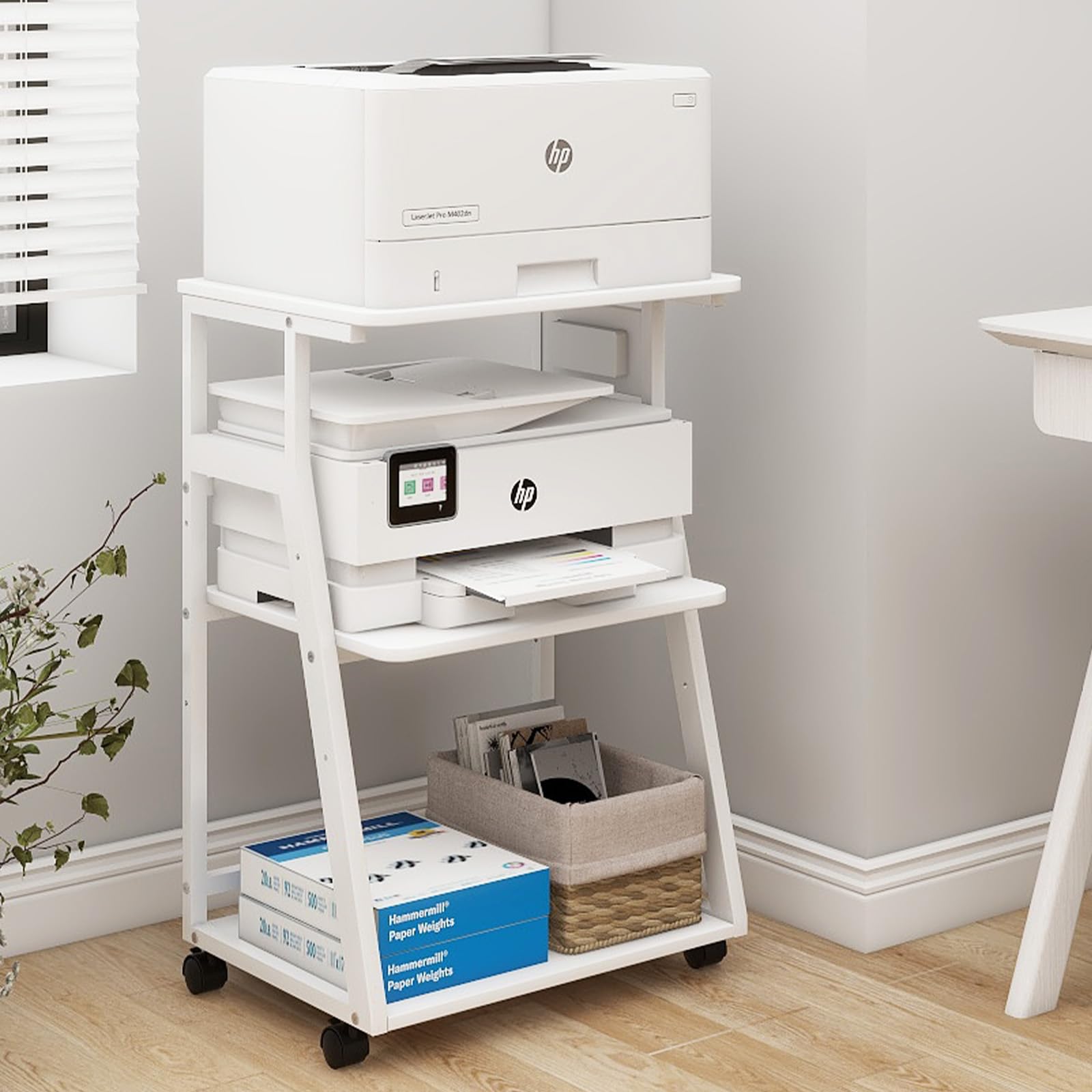
The upscale-looking cart with the strongest port selection, built to look like furniture, not a utility rack.
This stand nails the “form meets function” brief. Owners consistently describe it as looking upscale, with a sleek white finish that fits a craft room or living room rather than just a garage. The charging station on the side panel offers 3 AC outlets, 1 Type-C, and 1 USB port — the most complete power setup in this lineup — so your printer, computer host, and phone can all charge simultaneously.
The steel tube frame is 1″ x 1″ with an extra load-bearing tube under the top shelf, supporting 250 lbs total. The middle shelf has 3 reserved adjustment holes spaced 4 inches apart, so you can change the vertical space during installation. A 5ft power cord gives you placement flexibility, and both caster wheels and foot pads are included.
The main friction point is the assembly instructions, which are image-only and occasionally confusing, with parts that aren’t clearly labeled. It also weighs the most here at 23.1 pounds, making it a solid, heavy unit. Caveat: you have to decide on feet or wheels before loading it, and the shelf height fixes at installation, so plan your setup ahead.
Command Center Ports
- 3 AC outlets, 1 Type-C, and 1 USB for simultaneous charging
- Adjustable center shelf with 3 holes spaced 4″ apart
- 5ft power cord for flexible placement
Build Challenges
- Assembly instructions are image-only and hard to follow
- Shelf height is fixed during installation
- Heavy unit at 23.1 pounds, needs two people to build
Ideal for: the maker who wants a printer station that blends into a finished room and powers everything.
Not for: anyone who hates fiddly, image-only assembly instructions.
7. GreenForest Printer Stand with Lockable Wheels, Heavy Duty, Walnut
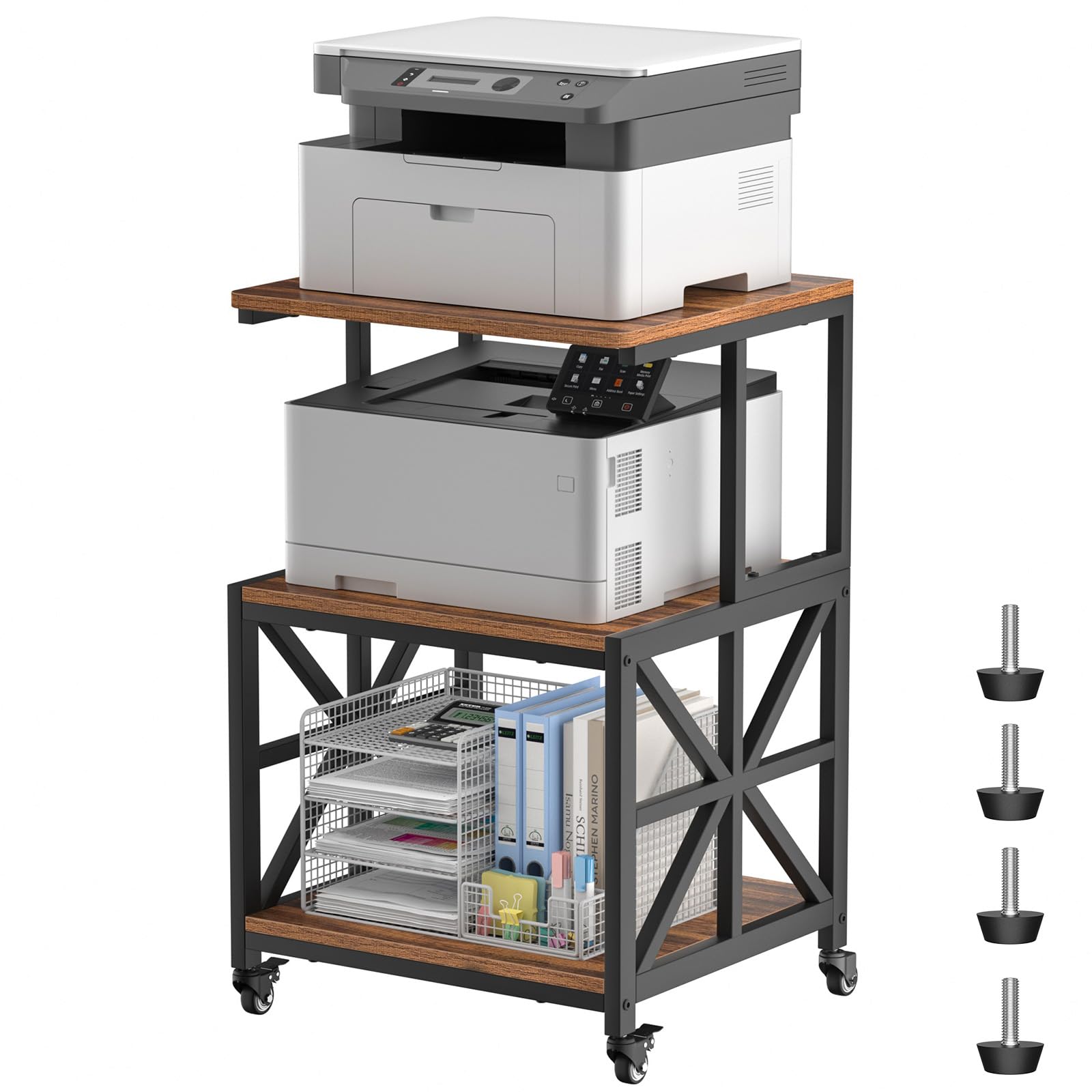
A rigid X-braced frame that swallows vibration, earning a reputation for zero wobble at full speed.
If print quality is your only priority, this is the stand to beat. The thickened metal frame with X-shaped reinforcement supports up to 300 lbs total with no wobble, even when your laser printer runs at full speed or you’re rolling it across the room. The walnut finish also means it looks like a piece of furniture, not a garage shelf.
The industrial-grade casters glide on hardwood and carpet, with 2 that lock securely to keep the stand immovable during prints. If you prefer a totally stationary setup, swap in the included foot pads. The 3-tier layout fits a large printer on top (19.7″ x 17.7″), with a middle tier for paper and files.
Assembly is straightforward at 25-35 minutes with labeled parts. Owners mention it takes a bit longer than the estimated time but is stable and sturdy once built. The only real trade-off is the absence of built-in power outlets — you’ll need your own surge protector. At 25 pounds, it’s the heaviest-frame option here, which is exactly why it feels so planted.
Rock-Solid Foundation
- 300 lbs total capacity with X-shaped reinforcement
- Walnut finish looks like real furniture
- Includes both locking casters and foot pads
Simple Trade-Offs
- No built-in power strip or USB ports
- Assembly runs closer to 30+ minutes
- Heavier frame is harder to move empty
Pick this for: the cleanest possible prints, thanks to a frame that simply does not move.
pass on it if: you want integrated power management or a lighter, more portable cart.
8. AHOWPD 3D Printer Table with Filament Storage Rack & Drawer Organizer
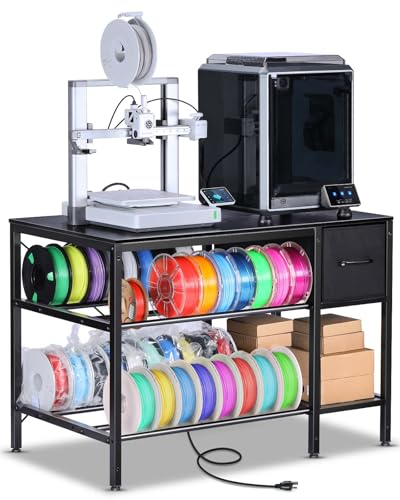
The complete print farm station, with filament racks, fabric drawers, and a power strip all in one frame.
This desk is built for the serious maker running multiple machines or a small print farm. It’s designed to hold up to two Bambu Lab P2S printers on its spacious top, while two levels of metal tube rack storage keep filament spools organized and accessible below. The fabric drawers provide a home for screws, wrenches, and maintenance tools.
The built-in power strip with 2 AC outlets and 2 USB ports can power your printer, a filament dryer, and an air purifier simultaneously — a setup owners actually run. The 140 cm power cord gives flexibility in placement. At 37 pounds, it’s the heaviest unit here, and that mass contributes to its stability. Assembly runs about 30 minutes.
Be aware of the trade-offs: some customers note wobble under heavy loads at high speeds, which can make items on top slide, and the rear filament rows are hard to reach without pulling spools to identify materials. The included Allen wrench strips easily, so bring your own. But for the price, the combination of storage, power, and a professional black finish is class-leading.
Maker-Focused Layout
- Two metal tube racks hold filament on middle and bottom shelves
- Fabric drawers keep tools and small parts within reach
- 2 AC outlets and 2 USB ports for printer, dryer, and purifier
Reality Checks
- Some wobble under heavy loads; tighten all bolts
- Rear filament rows are hard to access
- Heavy at 37 pounds; plan assembly location
Worth it for: anyone running multiple printers who needs filament and tools stored directly on the frame.
Consider otherwise: if you need a fully rigid, wobble-free surface for high-speed machines.
9. Fannova 23.6″x23.6″x30.1″ Large Printer Stand with Adjustable Storage Shelf
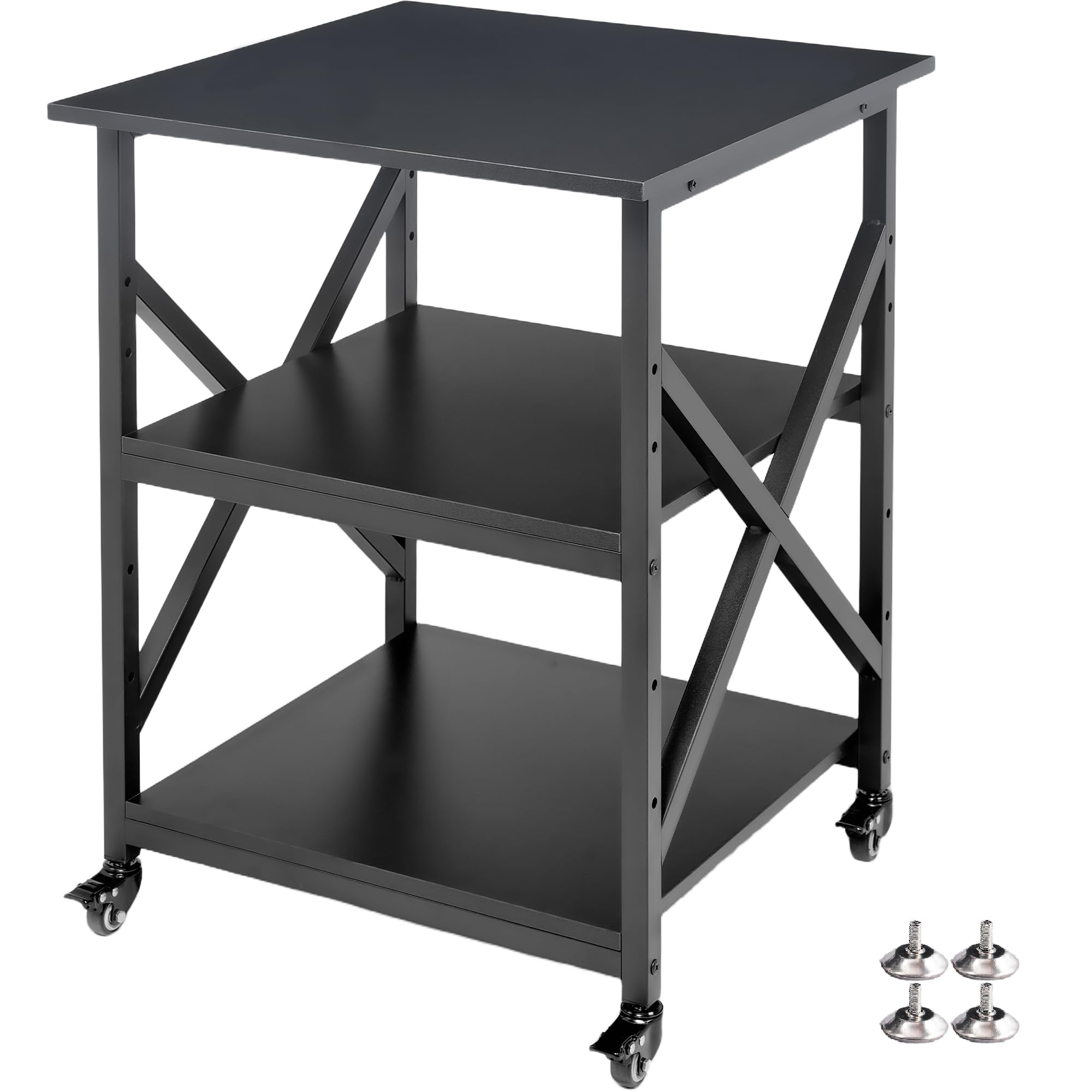
The oversized deck with 25mm steel tubes and 200 lbs per shelf, made for large-format beasts.
This stand is the answer for oversized printers like Bambu Lab H-Series models that dwarf standard carts. The top shelf spans a full 23.6″ x 23.6″, with two lower shelves at 20″ x 20″ each. Every shelf uses 15mm thick premium particle board reinforced by full-length steel support bars, creating a warp-resistant surface rated at 200 lbs per shelf.
The structure is anchored by 0.98″ (25mm) heavy-gauge square steel tubes — noticeably thicker than the standard 0.78″ (20mm) tubes on competing racks. Six horizontal crossbars tie the side frames into a rigid box, effectively absorbing vibration from high-speed printing. All four casters lock independently, a real upgrade over the standard two-lock design, keeping the stand firmly planted during prints.
Assembly is among the easiest here, with numbered parts, threaded crosspieces, and a full-size screwdriver included — no finger-pinching mini wrenches. Reviewers point out it feels like real furniture and has held steady for 6+ months. The downsides: durability opinions are mixed, and at 17.08 kg (about 37.6 pounds) it’s heavy. It lacks built-in power, but for sheer capacity and stability, it’s class-leading.
Large-Format Ready
- 23.6″ x 23.6″ top shelf fits oversized printers
- 200 lbs per shelf with 25mm steel tubes
- 4 independently locking casters for total stability
Big Trade-Offs
- Heavy at ~37.6 pounds, hard to move
- No built-in power strip or USB ports
- Durability opinions vary across owners
Best for: the owner of a giant printer who needs the widest, strongest deck possible.
Not for: small spaces or anyone who wants integrated power management.
Understanding the Specs
Weight Capacity Per Shelf
The number that determines if your desk will sag. It’s the maximum load a single shelf can hold without bending or bowing. A printer is a concentrated weight, so you want a per-shelf rating of at least 100 lbs for a large-format machine. Spread the load across the shelf deck, not just the center.
Frame Tube Thickness
Measured in millimeters, this tells you how beefy the steel frame is. Standard racks use 0.78″ (20mm) tubes, while heavy-duty options step up to 0.98″ (25mm). Thicker tubes resist twisting forces that cause layer shifting and ghosting in your prints. More material equals more rigidity and mass to absorb vibration.
Locking Caster Wheels
Wheels with brakes let you roll the desk for maintenance, then lock it in place so it doesn’t move during a print. The key detail is how many casters lock — two is standard, but four is better for total stability. Some stands include adjustable foot pads as an alternative for a permanent, stationary setup.
Adjustable Shelf Heights
The ability to change the vertical spacing between shelves. This matters because 3D printers come in wildly different heights, from compact bedslinger to tall, gantry-style CoreXY machines. Look for multiple pre-drilled holes or slide positions so you can fit a tall printer or a filament dryer underneath.
FAQ
Does a wobbly desk really ruin my 3D print quality?
Should I use the wheels or the adjustable feet for my 3D printer?
How much weight capacity do I really need for a 3D printer?
Is a built-in power strip worth paying extra for?
Can I store filament spools on the printer desk itself?
What’s the difference between a printer stand and a 3D printer desk?
How long does assembly take for these desks?
Will a 3D printer desk fit under a standard desk or in a closet?
Final Thoughts: The Verdict
For most people, the 3d printer desk winner is the EasyCom Large Printer Stand because it balances a 5-level adjustable height, a mesh drawer, and smooth rolling mobility into one versatile cart that handles both printers and supplies. If you want integrated power outlets and a built-in USB hub to run your dryer and purifier, grab the YAOHUOO 3-Tier. And for the owner of an oversized, heavy printer who demands zero wobble, the Fannova Large Stand with its 25mm steel frame is the one to reach for.
How We Picked
We do not accept paid placement. Every pick is matched to a real buyer and a real use-case; we do not hands-on test units.
Sources & Methodology
Specifications: manufacturer listings and product documentation. Review insights: verified customer reviews, as of September 2026. Pricing: not shown on this page (it changes often); check the current price via the retailer link.
As an Amazon Associate, Gadgets Feed earns from qualifying purchases. This does not affect which products we feature.