
Our readers keep the lights on and my morning glass full of iced black tea. As an Amazon Associate, I earn from qualifying purchases.
Specs are compiled from manufacturer listings and verified buyer reviews and can change over time — please confirm the key details on the product page before buying.
Buying a PC case on a budget usually feels like choosing between looks, cooling, and build quality — and being told to pick only one. This guide cuts through that trade-off by focusing on one thing: how much cool air can flow through your components without forcing you to overspend. Here you will find the cases that balance airflow, price, and features, so your GPU and CPU can run cool under load.
I’m Min — the founder and writer behind Gadgets Feed. This guide is built by comparing the manufacturers’ published specifications and the patterns across verified customer reviews, so you get each pick’s real strengths and trade-offs instead of marketing spin.
Whether you are building your first rig or upgrading a hot-running old one, finding the right budget airflow pc case is the smartest cooling upgrade you can make before you ever touch a fan curve.
Our Picks at a Glance


How To Choose The Best Budget Airflow PC Case
A budget case can still keep your PC cool, but only if you know what to check. The front panel is the single biggest factor — a solid glass or metal front blocks air before it even reaches your fans, while a mesh or perforated front lets it flow freely. Most high-airflow cases pair that open front with at least two fan mounts, and many now ship with fans already installed so you save money on the build.
Fan and Radiator Support
Count the fan mounting positions, not just the fans in the box. If you plan to use an all-in-one liquid cooler, you need to check the radiator size the case accepts at the front or top — a 240 mm or 360 mm radiator opening is common on modern budget cases. Air-cooled builds simply need enough fan mounts to push air through the mesh and out the rear exhaust.
GPU and Cooler Clearance
The longest graphics card the case can hold is printed in millimeters, and on budget cases that number varies widely. A 340 mm limit fits most standard three-fan cards, but the newest high-end GPUs can push past that. Also check the CPU cooler height limit if you are using a big tower cooler instead of a liquid cooler.
Quick Comparison
| Model | Best For | Max GPU Length | Max Front Radiator | Max Fan Count | Amazon |
|---|---|---|---|---|---|
| NZXT H3 Flow★ Best Overall | Compact mATX builds with premium feel | 377 mm | 280 mm | 7 | Amazon |
| Zalman T6Budget Champion | Basic workstation builds on a tight budget | — | — | 4 | Amazon |
| DARKROCK EC2Best Value | Value ATX builds wanting USB-C and glass | 340 mm | 360 mm | 8 | Amazon |
| Zalman i3 Neo | RGB-filled builds with fans from the start | — | 360 mm | — | Amazon |
| MONTECH XR | Showcase panoramic builds with included ARGB | — | 360 mm | 9 | Amazon |
| MONTECH X3 Mesh | Airflow-first builds with six pre-installed fans | 305 mm | — | — | Amazon |
| Lian Li V100 | Showcase builds wanting huge GPU room | 420 mm | 360 mm | 9 | Amazon |
| ASUS Prime AP201 | Small-space mATX builds with full-size PSU | 338 mm | 360 mm | 6 | Amazon |
| NZXT H7 Flow | High-end builds needing max radiator space | — | 420 mm | — | Amazon |
In‑Depth Reviews
1. NZXT H3 Flow – Micro-ATX Airflow PC Case – Black
Our pick — over 4.5★ from 650+ verified ratings; the strongest balance of quality and price.
The compact mATX case that feels like a full tower and cools like one too.
The standout here is GPU clearance: it accepts cards up to 377 mm without front fans, or 352 mm with them, so even a chunky three-fan card slides in comfortably. That clearance beats the DARKROCK EC2’s 340 mm limit by 37 mm, giving you more headroom for high-end graphics hardware in a smaller chassis.
The ultra-fine steel mesh on the panels and PSU shroud boost airflow while filtering dust before it settles on your parts. Cooling support reaches up to a 280 mm radiator at the front, a 240 mm radiator at the top, and as many as seven fans total, with a F120Q fan already exhausting out the rear from the moment you unbox it.
Owners consistently call out the quality first — the phrase that keeps coming up is “very well made, like an engineer designed it, excellent airflow.” The build feels dense and precise rather than cheap, and the cable management earns frequent praise for keeping the inside tidy. It is light but still strong, with easy access for future upgrades, though the PSU mounts upside down, which a few find slightly awkward rather than a real problem.
Why It Wins
- Fits GPUs up to 377 mm in a space-efficient build
- Ultra-fine mesh filters dust while maximizing airflow
- Pre-installed rear fan plus support for seven total
- Feels premium and well-engineered at a budget price
The Trade-Offs
- PSU installs in an upside-down orientation
- Front radiator maxes out at 280 mm, not enough for some large AIOs
- Limited to Micro-ATX boards, not full ATX
Best for: builders who want a compact, well-made case with room for a high-end GPU and a clean interior.
Think twice if: you run a full-size ATX motherboard or want a 360 mm front radiator.
2. Zalman T6 ATX Mid Tower Computer PC Case
A featherweight classic that covers the basics at a price that is hard to argue with.
This is the case buyers describe as “cheap, lightweight ATX case; ideal workstation, not gaming (poor cooling)” — and that honesty matters. It fits ATX, mATX, and mini-ITX boards, so it is genuinely versatile for office or home builds, and its hairline pattern mesh front plus 120 mm rear fan provide decent air circulation for lighter workloads. A total of four fans can be installed if you want to add more.
The powder-coated steel chassis is corrosion-resistant, and the internal layout offers real workspace for a variety of builds. Storage includes two 2.5″ and two 3.5/2.5″ drive positions plus an external 5.25″ bay for an optical drive. Just note the caution: it will not fit ATX motherboards with side-facing SATA ports, and the materials are thin enough that sturdiness earns mixed feedback.
What wins people over is the value — owners praise how much case you get for so little, calling it a great fit for student builds and casual use. But the recurring trade-off is that the build quality and thin material leave it feeling flimsier than pricier options, and the top-mounted PSU arrangement makes it top-heavy. This is a case for light duty, not a hot gaming rig.
What Shines
- Accepts ATX, mATX, and mini-ITX motherboards
- Lightweight, corrosion-resistant powder-coated steel
- Supports up to four fans total
- Excellent value for basic workstation use
Where It Falls Short
- Thin metal feels flimsy in spots
- Top-mount PSU makes the case top-heavy
- Limited cable management room behind the motherboard
- Poor cooling for demanding gaming loads
Reach for this if: you need a cheap, capable ATX case for an office PC or a student build that will not run hot components.
Look elsewhere if: you are building a gaming rig with a powerful GPU — the cooling simply is not there.
3. DARKROCK EC2 ATX Mid Tower Gaming Computer PC Case
A mesh-fronted mid-tower with USB-C that punches far above its price.
The defining move here is the cooling headroom: it supports up to 8 x 120 mm fans and a 360 mm radiator on the front — a 29% larger front radiator opening than the NZXT H3 Flow’s 280 mm max. That makes it a far better home for a big all-in-one cooler if liquid cooling is on your list. It also fits ATX, M-ATX, and ITX boards along with 50 series graphics cards, holding a GPU up to 340 mm long and a PSU up to 200 mm.
The mesh front panel and magnetic dust filters on top and bottom keep airflow strong while keeping dust out, and the tempered glass side panel shows off your hardware. There are four internal bays for drives, and the layout gives plenty of space for cable management. Builders consistently describe it as a solid budget case that is easy to work in, with a hinged glass door and roomy PSU shroud that includes an HDD bay.
The things everyone raves about are the case quality and the appearance — it looks and feels more expensive than it is, with a mature, understated look. The honest downsides surface mainly around fit: some report that a 360 mm radiator can be tricky to install, and the metal is thin enough to bend in places. It is not a quiet case from the start, so noise-sensitive builders may want to plan extra damping.
The Strong Points
- Supports 360 mm front radiator and 8 fans
- USB-C ready for modern connectivity
- Magnetic dust filters keep interior clean
- Tempered glass shows off the build
Watch Out For
- Thin metal can bend easily in a few places
- 360 mm radiator fit can be tight
- Not quiet without added vibration dampening
Grab this if: you want big radiator support and USB-C without stepping up to premium pricing.
skip it if: you demand a whisper-quiet case straight from the box.
4. Zalman i3 Neo ATX Mid-Tower RGB Gaming PC Case
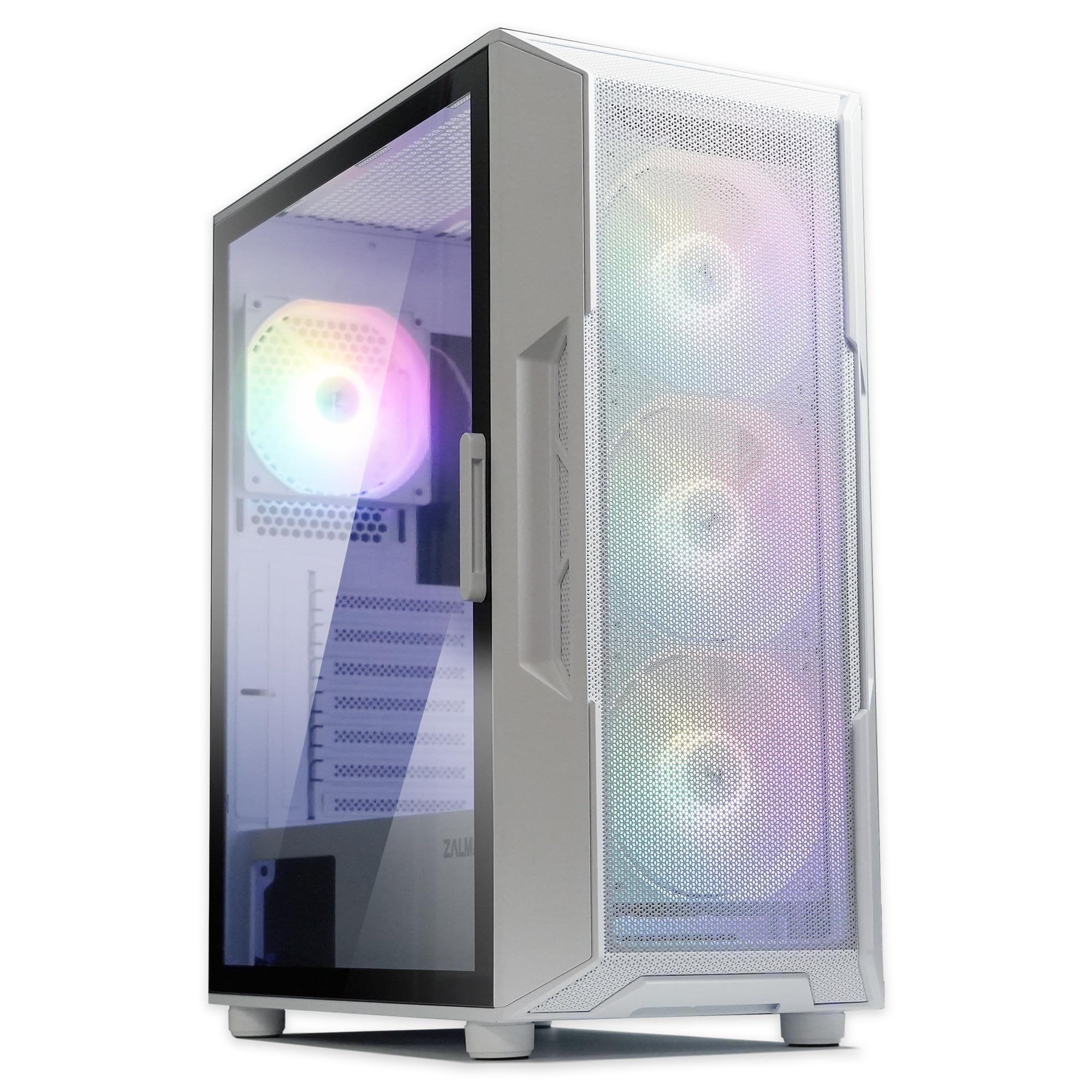
Four fans and a full glass front make this the budget case that lights up your room.
The headline feature is the four pre-installed static rainbow LED fans, so the airflow story starts working the moment you open the box — no extra fan purchases needed. That pairs with a full tempered glass front and side panel, letting you see the fans and your components clearly. A magnetic top dust filter and detachable bottom filter keep dust out, while rubberized metal feet cut vibration noise.
Inside there is space for up to a 360 mm radiator in the front, a 240 mm radiator on top, and a 120 mm at the rear, plus five internal bays for storage. The top I/O includes 2x USB 3.0, USB 2.0, a headphone jack, and a microphone port for easy access. Owners call it a great budget or mid-range case that cools well during gaming and streaming thanks to the mesh front.
What wins people over is the case quality and appearance — it looks clean and premium, especially with the RGB fans filling the front. But there are a couple of caveats to know: the fans are fixed rainbow colors, so you cannot change the hue, and the rear fan may need a separate motherboard header or a jumper to spin up. A few owners also received units with shipping dents, so it is worth inspecting on arrival.
What You Get
- 4 pre-installed static rainbow LED fans
- Full tempered glass front and side panels
- Supports 360 mm front radiator
- Magnetic dust filters and vibration-dampening feet
What To Know
- Fan lighting is fixed rainbow, not changeable
- Rear fan may need a separate header to run
- Occasional shipping damage reported
Choose this if: you want a bright, glass-fronted case with fans already spinning in rainbow colors.
Move on if: you need customizable RGB lighting or a matte black aesthetic.
5. MONTECH XR Panoramic High Airflow ATX PC Case

A panoramic glass front with three ARGB fans makes this the showpiece that stays cool.
The visual hook is the panoramic tempered glass design, which gives you an unobstructed view of your hardware, and it comes backed by three pre-installed ARGB fans spinning up to 1500 RPM. Two of those are reverse-blade fans mounted on the side for intake, with a regular-blade fan at the rear for exhaust — a thoughtful setup that moves air without cramming the front. Total support reaches up to nine fans if you want maximum airflow.
Cooling flexibility extends to a 360 mm radiator at the top, and the case handles high-end GPUs like the 40 series with room to spare. Filters cover the top, bottom, and side panels to keep dust out while heat escapes. The build quality earns consistent praise for being rigid and professional-looking, and the cable management benefits from wide spaces and cutouts that make clean routing easy.
The thing everyone raves about is the design — it looks premium and showcases components beautifully, with the magnetic glass panel adding convenience. Buyers report that you get an awful lot for the money, including zip ties, screws, and mounting hardware in the box. The trade-off is that the fans can run noticeably noisy, audible outside the room for some, and the glass is a fingerprint magnet that will need regular wiping.
Why It Impresses
- 3 pre-installed ARGB fans, two reverse-blade
- Panoramic tempered glass with full view
- Supports 360 mm top radiator and 9 fans
- Rigid, premium-feeling build quality
The Caveats
- Fans can get noisy under load
- Glass surfaces pick up fingerprints quickly
- RGB lighting may distract light-sensitive users
For you if: you want a show-stopping panoramic case with ARGB fans already installed and clean cable routing.
Not for you if: you need a whisper-quiet build or dislike wiping fingerprints off glass.
6. MONTECH X3 Mesh High Airflow ATX Mid-Tower PC Case
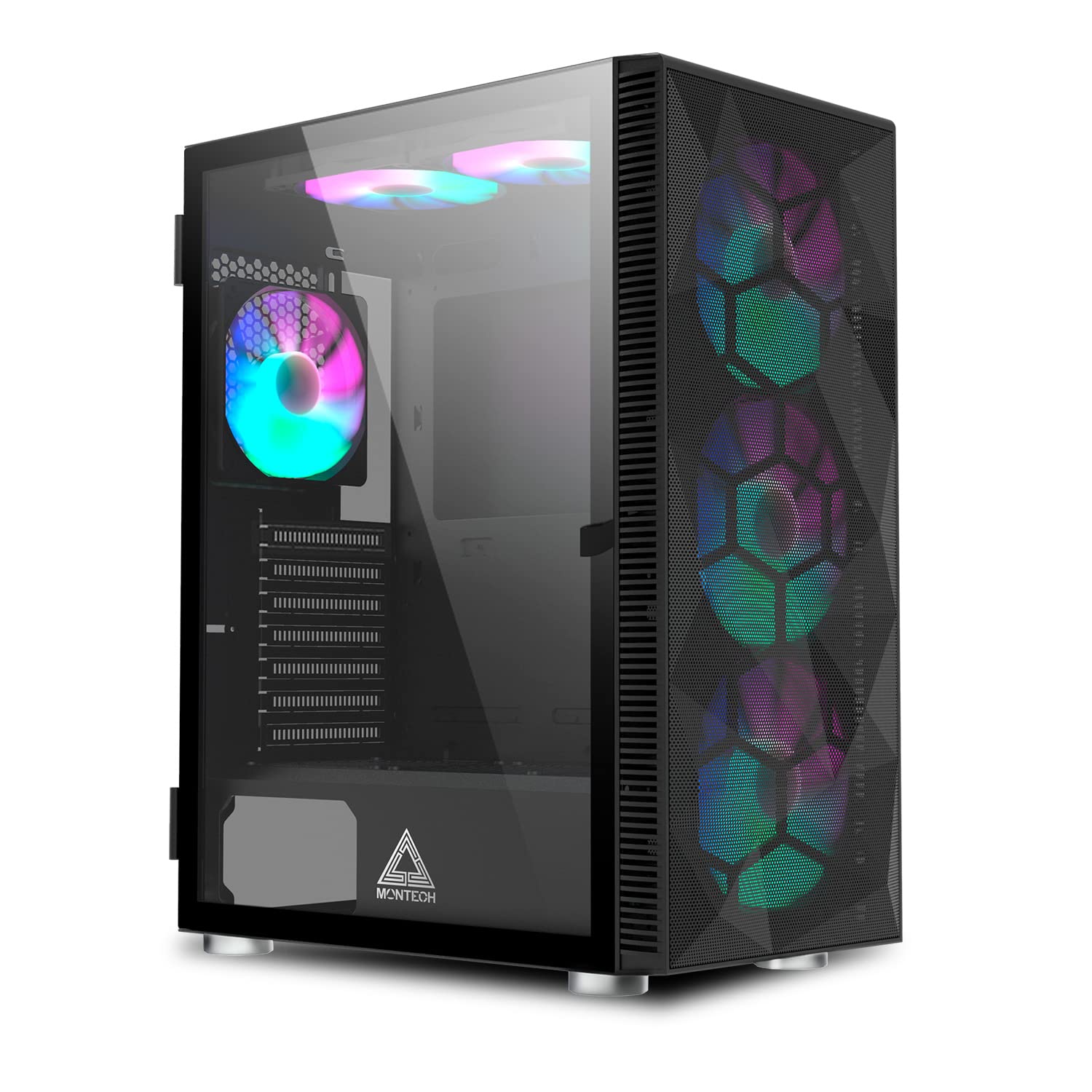
Six RGB fans pre-installed make this the airflow bargain that cools right from the start.
You will not need to buy a single extra fan for this one — it ships with six pre-installed RGB fans, including three big 140 mm units up front that pull in massive amounts of air. Top and rear ventilation come pre-mounted, and the full panoramic tempered glass front and side panels let you enjoy the light show. A simple LED button turns the fan lighting on or off, though the colors are fixed rather than addressable.
Inside, the X3 fits ATX, Micro ATX, and Mini ITX boards with 7 expansion slots, plus 2.5″ and 3.5″ storage drives and VGA cards up to 305 mm in length. The side swivel tempered glass panel uses a zero drill-hole design, which strengthens the glass and makes it safer to handle. Builders describe it as a compact case for full ATX boards with great airflow and easy cable management.
What wins people over is the value and fan capacity — six quiet fans plus a good-looking glass panel for a budget price is a hard combination to beat. The build quality does get mixed feedback, with some calling it solid and others mediocre, and the fixed-speed fans are not PWM-controlled. A few owners note the tiny recessed RGB button needs a pen to press, which can be frustrating at night.
The Big Wins
- 6 pre-installed RGB fans, three 140 mm front
- Full panoramic tempered glass panels
- Fits ATX boards with 7 expansion slots
- Quiet fixed-speed fans with LED off switch
Things To Note
- GPU length caps at 305 mm
- Fans are fixed-speed, not PWM adjustable
- RGB button is tiny and needs a tool to press
This one suits: builders who want six working fans and a glass front without spending extra on cooling parts.
Consider the trade-off: your next GPU must stay under 305 mm to fit.
7. Lian Li V100-ATX Mid-Tower PC Case

A premium-feeling case with huge GPU clearance and four ARGB fans already spinning.
The reason to pick the V100 is raw hardware room: it fits GPUs up to 420 mm, CPU coolers up to 178 mm, and a 360 mm top radiator, so almost nothing you can buy will be too big. That generous interior pairs with four pre-installed PWM-controlled 120 mm ARGB fans that spin up to 1800 RPM, delivering 61.47-60.4 CFM of airflow with a noise level of 26.5-30.8 dBA. An integrated 26-LED ARGB strip adds full-spectrum lighting that syncs with motherboard software.
Builders consistently describe it as one of the easiest cases they have assembled, with tool-less side panels and labeled parts that speed up the process. The cable management is strong overall, and the spacious bottom gives room for a non-modular PSU’s extra cables. Thermal performance earns praise too, with GPU temps staying cool even under heavy load.
What everyone raves about is the case quality and appearance — it looks premium and showcase-ready, especially with the pillarless glass and ARGB strip. The honest caveats are the rear cable area can feel cramped, the stock fans are not the quietest under load, and the top radiator can block RAM access with a thick setup. Storage is also basic, with room for one HDD and one 2.5″ drive.
What It Delivers
- Fits massive GPUs up to 420 mm long
- 4 pre-installed PWM ARGB fans at 1800 RPM
- 26-LED ARGB strip syncs with motherboard
- Tool-less side panels for easy access
Where It Compromises
- Rear cable management area is cramped
- Fans get audible under heavy load
- Limited storage: one HDD and one 2.5″ slot
Pick this when: you are building around a massive modern GPU and want a case that shows it off in style.
Weigh the downside: heavy storage users will outgrow the drive bays quickly.
8. ASUS Prime AP201 Micro ATX PC Case

A 33L micro-tower that fits a full-size power supply and a 360 mm radiator.
The space-efficiency here is the story: despite a compact 33L footprint, the AP201 supports ATX PSUs up to 180 mm long, graphics cards up to 338 mm long, and custom liquid cooling. That means you can build a small-form-factor PC without sacrificing a full-size power supply or a big GPU. The mesh panels are made of over 57,000 precision-machined 1.5 mm holes, which boost airflow while still giving you a view of the components inside.
Internally, the case supports 280 mm and 360 mm radiators and up to six fans total, so thermal headroom is genuinely strong for its size. Tool-free side panels use a secure clip mechanism that is easy to remove but resistant to accidental pops. Cable management benefits from an extended motherboard tray with an extra 32 mm gap to tuck wires out of sight.
What wins people over is the case quality and how spacious it feels for such a compact unit — it fits a 360 mm AIO and a 180 mm+ PSU with room to spare. The all-black exterior looks classy, and the build process is praised as smooth. A few owners note the 3.5″ HDD mounting points do not align universally, so you may need a separate adapter for standard drives, and the PSU must be mounted sideways.
The Strengths
- Compact 33L footprint fits big hardware
- Accepts ATX PSUs up to 180 mm and GPUs to 338 mm
- Over 57,000 mesh holes for strong airflow
- Tool-free panels with secure clip mechanism
The Limitations
- 3.5″ HDD mounting may need an adapter
- PSU must be mounted sideways
- Power switch can be hard to reach
Go with this if: desk space is tight but you still want a full-size PSU and big cooling options.
Pass on it if: you run a full ATX motherboard — this is strictly Micro-ATX territory.
9. NZXT H7 Flow – Mid-Tower ATX Airflow PC Case

The spacious full-size airflow monster with three fans included and room for a huge radiator.
from the start, the H7 Flow already runs cool thanks to three front-mounted 120 mm fans, and it is ready for more. The high-performance mesh panels on every surface boost intake and exhaust airflow while filtering dust, and there is dedicated GPU cooling support for three bottom-mounted 120 mm fans to push air directly at your graphics card. It accepts ATX boards and keeps a narrower mid-tower footprint despite the generous size.
Radiator support is the headline number: up to 420 mm in the front and 360 mm in the top, so you can mount almost any all-in-one cooler on the market. The cable management system uses wide channels, built-in hooks, and included straps to keep routing simple and clean. Owners consistently call it one of the better cases they have built in, with plenty of fan and radiator space and straightforward cable routes.
The thing everyone raves about is the quality and space — it allows far more room than smaller NZXT cases, and the airflow feels measurably better. Builders report installing ten fans and feeling the difference in cooling. The honest trade-offs: the included fans are 3-pin rather than PWM-controlled, there are no dust filters on some vents, and the build is large enough that some call it a full tower despite the mid-tower label.
Why It Leads
- Three front fans pre-installed for instant airflow
- Supports up to 420 mm front radiator
- Dedicated bottom fan mounts for GPU cooling
- Wide cable channels with included straps
The Trade-Offs
- Included fans are 3-pin, not PWM
- No dust filters on several vents
- Larger than a typical mid-tower
Reach for it if: you want the biggest radiator options and maximum airflow for a high-end, hot-running build.
Think about it first: the size demands real desk or floor space.
Understanding the Specs
Max GPU Length
This is the longest graphics card, in millimeters, that fits inside the case. It matters because modern three-fan GPUs are huge, and a case that looks big can still reject a top-tier card. Most budget cases land between 305 mm and 377 mm, with the Lian Li V100 stretching to 420 mm for the newest flagship cards. Always measure your actual GPU before choosing.
Radiator Support
The maximum radiator size a case accepts at the front or top, measured in millimeters. A 360 mm radiator fits three 120 mm fans and is the standard for cooling high-end CPUs with a liquid cooler. If you only plan to use air cooling, this number matters less, but it is the key spec for anyone going with an all-in-one cooler.
FAQ
Will a 360 mm radiator fit in most budget airflow cases?
How do I know if my graphics card will fit in a case?
Is a mesh front panel worth it for cooling?
How many fans do I actually need for a gaming PC?
Can I put a full-size ATX power supply in a Micro-ATX case?
What is the difference between ARGB and static RGB fans?
Do budget cases include fans in the box?
How do I check CPU cooler height clearance?
Final Thoughts: The Verdict
For most builders, the best budget airflow pc case is the NZXT H3 Flow because it pairs a premium, well-engineered feel with class-leading GPU clearance in a compact frame. If you want maximum cooling headroom with up to a 420 mm radiator, the NZXT H7 Flow is the one to reach for. And for the best value with six fans already installed, the MONTECH X3 Mesh delivers airflow without any extra spending — the crowd favorite, with nearly a thousand owners behind it.
How We Picked
We do not accept paid placement. Every pick is matched to a real buyer and a real use-case; we do not hands-on test units.
Sources & Methodology
Specifications: manufacturer listings and product documentation. Review insights: verified customer reviews, as of September 2026. Pricing: not shown on this page (it changes often); check the current price via the retailer link.
As an Amazon Associate, Gadgets Feed earns from qualifying purchases. This does not affect which products we feature.