
Our readers keep the lights on and my morning glass full of iced black tea. As an Amazon Associate, I earn from qualifying purchases.
Specs are compiled from manufacturer listings and verified buyer reviews and can change over time — please confirm the key details on the product page before buying.
You no longer have to settle for a mushy, rattly membrane keyboard that feels like a toy. The budget shelf is crowded, and the difference between a great typing experience and a frustrating one often depends on a few key specs like switch type and build quality. This guide cuts through the noise to help you find a keyboard that feels like a premium upgrade without the premium invoice.
I’m Min — the founder and writer behind Gadgets Feed. This guide is built by comparing the manufacturers’ published specifications and the patterns across verified customer reviews, so you get each pick’s real strengths and trade-offs instead of marketing spin.
You can get a thocky mechanical board or a quiet wireless combo without overspending. Here is your shortlist for the best affordable keyboard options that punch far above their price class.
Our Picks at a Glance

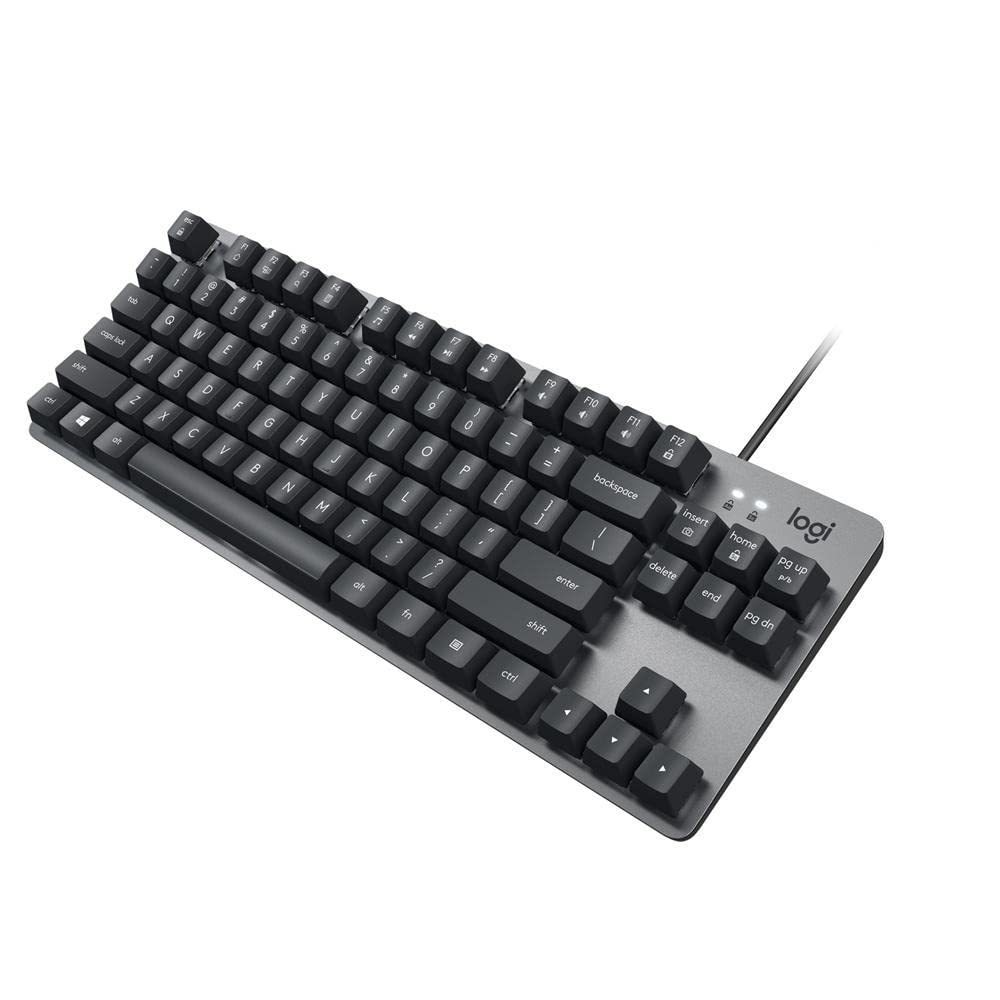
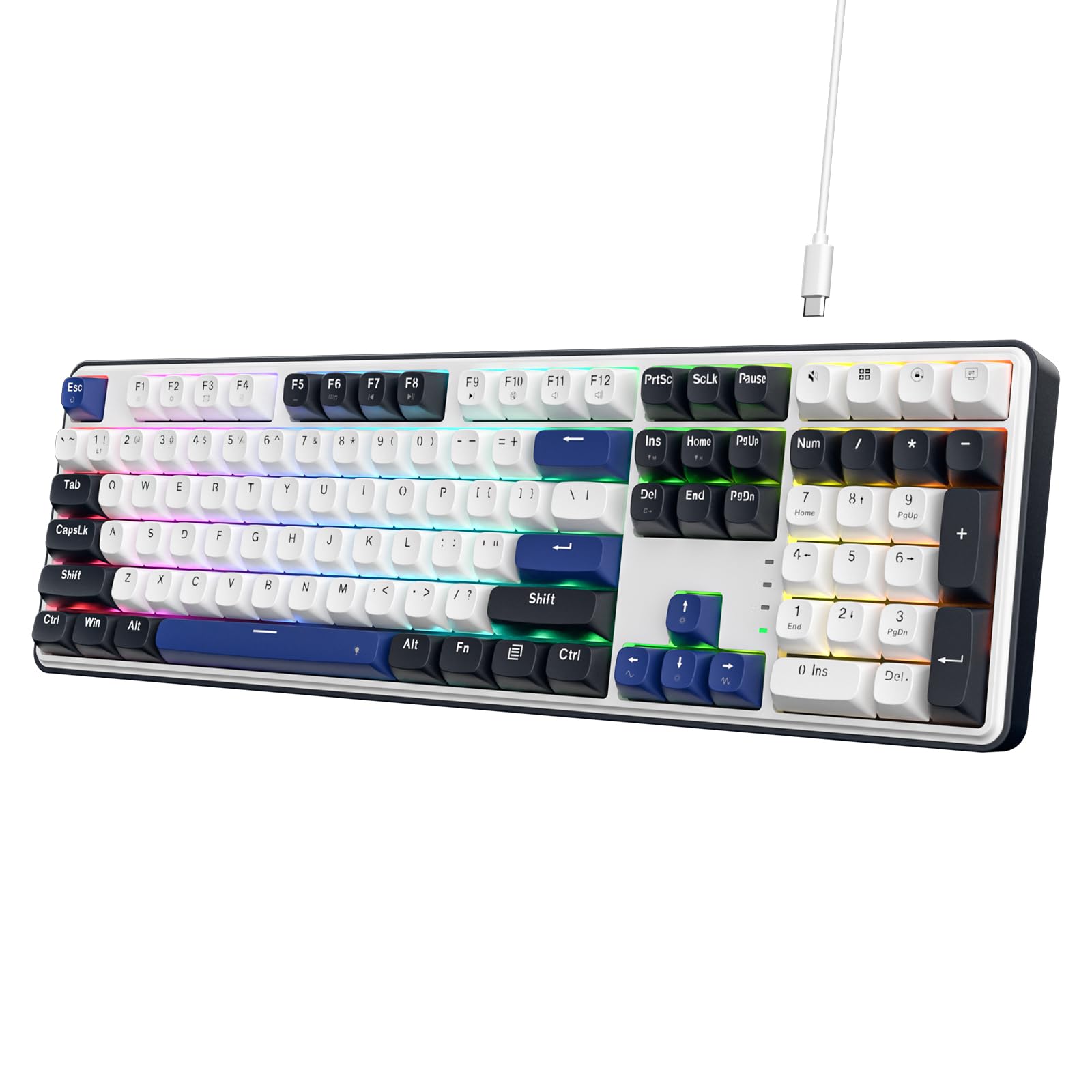
How To Choose The Best Affordable Keyboard
Before you click buy, focus on three things that define your daily experience: the switch type, the physical size, and how much you care about customization. These three choices determine the sound, the feel, and whether the board will still excite you a year from now.
Switch Type: Mechanical vs. Membrane
Mechanical switches use a spring and a stem under each key, giving you a crisp, tactile response and a longer lifespan—often rated for tens of millions of presses. Membrane keyboards use a rubber dome sheet, which feels softer and mushier but is cheaper to make. For a similar price, mechanical usually wins on feel and durability, but membrane boards are quieter and often come with wireless features.
Layout Size: Full, TKL, or 60%
Full-size keyboards keep the number pad, which is essential for data entry and accounting work. Tenkeyless (TKL) boards drop the numpad to free up mouse space, while 60% layouts cut the function row and arrows for maximum portability. The right size is about your desk space and if you need that numpad daily.
Customization and Hot-Swappable Sockets
Hot-swappable means you can pull out the switches and keycaps with a tool and replace them without any soldering. This turns a budget board into a platform you can tune over time—swap in quieter switches or colorful keycaps whenever you want. If you like tinkering, prioritize this feature.
Quick Comparison
| Model | Best For | Switch Type | Layout | Connection | Amazon |
|---|---|---|---|---|---|
| HUO JI E-Yooso Z-99★ Best Overall | Creamy thock and hot-swap tinkering | Mechanical Linear | 99 Keys | Wired USB-C | Amazon |
| Logitech K835 TKLPremium Pick | Aluminum build with compact footprint | Mechanical Linear Red | TKL (No Numpad) | Wired USB-A | Amazon |
| Redragon K689Full-Size Pick | Full-size hot-swap with extra hotkeys | Mechanical Linear | 108 Keys | Wired USB-C | Amazon |
| Logitech MK345 | Reliable office combo with mouse | Membrane | Full Size | 2.4GHz Wireless | Amazon |
| TMKB 60% | Minimal desk footprint for gaming | Mechanical Linear Red | 60% (61 Keys) | Wired USB-C | Amazon |
| EAYBLLY Wave | Ergonomic comfort for long office days | Membrane | Full Size (107 Keys) | 2.4GHz Wireless | Amazon |
| Corsair K55 CORE | Quiet gaming with RGB and media keys | Membrane | Full Size (104 Keys) | Wired USB-A | Amazon |
| SABLUTE MA41 | Ultra-quiet wireless combo with wrist rest | Membrane | Full Size | 2.4GHz Wireless | Amazon |
| Redragon K745 PRO | Tri-mode wireless full-size freedom | Mechanical Linear | 108 Keys | 2.4GHz / BT / USB-C | Amazon |
In‑Depth Reviews
1. HUO JI E-Yooso Z-99
Our pick — over 4.5★ from 800+ verified ratings; the strongest balance of quality and price.
The budget board that types like butter and sounds creamy, not clacky.
The HUO JI E-Yooso Z-99 earns the top spot because it delivers a genuinely premium mechanical feel at a mid-range price. The 99-key layout trims the width to 39×13.5x4cm compared to a full-size board, so you reclaim desktop space while keeping every function you need. It connects with a pluggable USB-C to USB-A cable, making it a straightforward upgrade for both work and gaming setups.
What wins people over is the sound and feel. The gasket structure paired with 5 layers of sound-absorbing foams and a silicone dampener pad cuts noise by 40% and eliminates 80% of the hollow echo, which is why owners describe the typing experience as “like typing on butter.” The pre-lubed linear switches give you a smooth, fast keypress that is ideal for long sessions, and because the PCB is hot-swappable, you can replace the 3-pin or 5-pin switches and keycaps without soldering. One buyer summed up the value sentiment perfectly: “I sold my Gravastar keyboard to get this and I have no regrets!”
The RGB is a treat too, with 15 backlight effects and 8 solid color options that you can adjust for speed and brightness. The double-shot injection PBT keycaps resist fading, so the legends stay sharp over time. It is a wired board, so if you absolutely need Bluetooth, this is the trade-off you are accepting for the creamy feel and the low price.
Why it feels premium
- Gasket mount and 5 foam layers kill the hollow echo
- Pre-lubed linear switches feel smooth from the start
- Hot-swap PCB lets you customize without soldering
- Compact 99-key size saves significant desk space
The honest trade-offs
- Wired-only connection, no wireless option
- Missing the dedicated numpad of a full 104-key board
Reach for this if: you want that satisfying, quiet thock and plan to customize switches down the line without spending premium money.
Look elsewhere if: you need a wireless board for a clean, cable-free desk or require a dedicated number pad for data entry.
2. Logitech K835 TKL
The aluminum-cased tenkeyless that puts brand reliability behind a mechanical feel.
The Logitech K835 is the pick for buyers who want a trusted brand name with a proper mechanical switch and a modern, minimalist look. The defining spec here is the aluminum frame, which gives the board a rigid, premium feel that resists flexing during intense typing. It is a tenkeyless layout, so it drops the numpad to free up space next to your mouse—a move that owners with limited desk real estate specifically appreciate.
The linear red switches provide a smooth, light keypress that is ideal for fast typists and gamers who want a quiet, consistent stroke. Logitech rates these switches for 50 million clicks, which speaks to the durability of the mechanical internals. The board also includes 12 dual-function keys for quick access to media and shortcuts, and the curved profile with adjustable tilt brackets sets up a comfortable typing angle.
It connects via a 5ft USB cable and works with Windows 10 and above, Windows 8, and Windows 7. Compared to the full-size Redragon K689 on this list, the K835 trades the numpad and the hot-swap socket for a slimmer profile and Logitech’s dependable build. This is a straightforward, no-frills mechanical upgrade for someone who values brand trust and a clean desk over RGB flash.
Solid and simple: The aluminum frame and smooth linear switches make this feel like a much more expensive board, and the TKL size keeps your mouse close.
Who it leaves out: There is no wireless option, no hot-swap socket, and no software for deep RGB customization—it is a pure, wired typing tool.
Best for: the professional who wants a reliable, sturdy mechanical keyboard from a top brand without dealing with gamer aesthetics or wireless pairing.
Think twice if: you need a numpad for spreadsheets or want to swap switches later; this board is locked to its stock linear feel.
3. Redragon K689
A full-size board with a cushioned, thocky feel and four extra shortcut keys.
The Redragon K689 is for users who want the full 108-key layout with the number pad but refuse to give up the modern cushioned typing feel. It uses a gasket-mounted construction with 3-layer noise dampening, which gives the keys a soft, silky bounce instead of a harsh bottom-out. The result is that satisfying “thocky” sound that is noticeably quieter than typical clicky mechanical boards.
It ships with four dedicated hotkeys defaulting to mute, calculator, screen lock, and desktop, which is a genuine productivity boost for office work. The hot-swap socket accepts almost any 3-pin or 5-pin switch, so you can change the feel later. The RGB delivers up to 19 preset lighting modes with adjustable brightness and flow speed, including a music-sync mode that pulses with your audio.
One detail that separates it is the mixed-color keycaps, which give the board a distinct DIY look straight from the start. It is a wired board at 0.88 kg, so it stays firmly planted on your desk. If you want the numpad but still want the creamy sound that the HUO JI Z-99 is praised for, this is the full-size equivalent.
Productivity and play
- 4 extra hotkeys save time on mute, calc, and desktop
- Gasket mount with 3 foam layers gives a cushioned feel
- Hot-swap socket supports 3-pin and 5-pin switches
- Music-sync RGB mode for a lively setup
What to note
- Limited Mac support—no dedicated Mac software for remapping
- Keycap font style may not appeal to everyone
Choose this if: you need a full numpad but want the cushioned, quiet feel that gasket mounting provides.
skip it if: you are on macOS and need software-level remapping, or you prefer a wireless desk setup.
4. Redragon K745 PRO

The full-size wireless board that switches between three devices without re-pairing.
The Redragon K745 PRO is the answer for those who want the full 108-key layout but need the freedom of wireless. Its defining feature is tri-mode connectivity, letting you jump between USB-C, Bluetooth, and 2.4GHz wireless connections smoothly—perfect for moving from your PC to a laptop to a tablet. Owners specifically note the wireless feels flawless with zero lag, which is a common fear with budget wireless boards.
The typing feel gets an upgrade over the wired K689 with 5-layer noise dampening in the gasket-mounted construction, giving an extra-soft, silky bounce. The see-through round PBT keycaps let the RGB shine through cleanly while resisting the greasy shine that ABS keycaps develop. This board also includes 4 extra hotkeys for mute, calculator, screen lock, and desktop, plus spare switches and a keycap puller in the box.
The trade-off is the learning curve—the round keycaps and light, smooth switches take some getting used to, and the letter etching is faintly printed. But for a wireless full-size board that feels this cushioned, it holds its value well against wired alternatives like the K689.
Freedom and feel
- Tri-mode connection lets you switch devices without re-pairing
- 5 foam layers in the gasket mount for a soft, quiet bounce
- Translucent PBT keycaps resist shine and show RGB clearly
- Includes spare switches and a puller for customization
Consider before buying
- Letter etching is faint and not filled in
- Round keycap shape has a slight learning curve
Grab this for: a clean wireless desk where you juggle between a work laptop and a gaming PC without swapping cables.
Pass if: you dislike the round keycap aesthetic or prefer a wired connection for ultra-competitive gaming latency.
5. Logitech MK345

The dependable wireless combo with a multi-year battery that offices and shops rely on.
The Logitech MK345 is the classic choice when you need a keyboard and mouse together, and you want them to just work for years. The headline spec is battery life: the full-size keyboard runs up to 3 years on its batteries, and the mouse up to 18 months. That is a set-and-forget setup for a home office or a busy workspace.
The full-size keyboard includes an integrated palm rest and a spill-resistant design, making it a forgiving daily driver. The wireless connection runs on 2.4 GHz with a range up to 10 meters, and a single USB-A Nano Receiver handles both the keyboard and mouse. Owners in rough environments praise it for a specific reason—as one put it, “These are great and inexpensive, making them perfect options for our fabrication shop and field personnel that tend to break them often and quickly!”
The honest trade-off is the typing feel: keys are firm and functional but not as satisfying as a mechanical board. Some owners with larger hands find the compact mouse a bit small, and the keyboard has a mixed reputation for long-term reliability. But for a budget-friendly combo that pairs instantly with Windows, macOS, and ChromeOS, it is a proven workhorse.
Set and forget: With up to 3 years of keyboard battery life and a comfortable palm rest, this combo is built for low-maintenance reliability.
The catch: It is a membrane keyboard, so the feel is soft and mushy compared to a mechanical board, and some units face durability issues over time.
Ideal for: offices, shops, and anyone who needs a cheap, reliable keyboard plus mouse without ever thinking about charging or pairing.
Not for: gamers or heavy typists who want a crisp, tactile mechanical response from their keys.
6. Corsair K55 CORE

A quiet, spill-resistant membrane board with ten zones of customizable RGB.
The Corsair K55 CORE is the gaming pick for those who want the RGB spectacle and durable build without the loud clack of mechanical switches. It is a membrane keyboard, but the switches are engineered to be quiet and responsive—owners specifically note it has a creamy sound rather than a clacky noise. If you share a room or play late at night, this quietness is a genuine advantage.
The defining spec is the 300ml spill resistance, meaning you can survive a full drink spill without ruining the board. It also features four dedicated media buttons for volume and playback control, plus Win lock and brightness buttons. The 12-key rollover with 1,000Hz polling ensures your key presses register accurately and quickly during intense gaming sessions.
The ten-zone RGB is fully customizable through Corsair’s iCUE software, and owners find the lighting bright enough to make a setup stand out. A minor complaint is that the lighting zones are vertical rather than per-key, so the customization is less granular than a premium mechanical board. But for the price, you get a solid, quiet gaming keyboard that handles demanding games and accidental spills equally well.
Built for gaming nights
- Quiet membrane switches are great for shared spaces
- 300ml spill resistance protects against drink accidents
- Four dedicated media keys for easy volume control
- 12-key rollover with 1,000Hz polling for gaming accuracy
Keep in mind
- Softer key feel than mechanical boards
- Non-detachable cable limits portability
Choose for: gamers who want RGB, media keys, and spill protection without the loud mechanical noise.
Look past it if: you need a hot-swappable mechanical feel or per-key RGB lighting for deep customization.
7. TMKB 60%

The minimal 60% board that frees your desk while keeping the mechanical feel.
The TMKB 60% is the pick for minimalists who want to strip their desk down to just the essentials. The 60% layout (61 keys) removes the numpad, function row, and arrow keys, giving you a streamlined ANSI design that boost mouse space. Foldable feet provide an ergonomic tilt for extended comfort during gaming sessions.
Under the keys are ultra-responsive linear red switches with a 45g actuation force—light enough for rapid keystrokes without fatiguing your fingers. These switches are rated for 50 million keystrokes, so this compact board is built to last. It features 15 dynamic lighting modes with adjustable brightness and speed, and the double-shot keycaps resist fading while keeping the backlight visible.
The board connects via a detachable USB-C cable, making it easy to store and replace if needed. Owners note it is a significant upgrade over membrane-type keyboards, with a solid build that feels more expensive than it is. The honest downside is the learning curve—you will rely on function layers for arrow keys and the function row—but for a young gamer or a traveling setup, this compact size is a huge win.
Desk space maximizer: The 60% layout is perfect for small desks or on-the-go setups, and the 45g switches make rapid gaming inputs easy.
Who should skip: Office workers who need the numpad or function row daily will find the missing keys frustrating without a learning curve.
Best for: a beginning gamer or a traveler who wants a mechanical feel in the smallest possible footprint.
Skip if: you do spreadsheets or heavy data entry—the missing numpad will slow you down.
8. EAYBLLY Wave
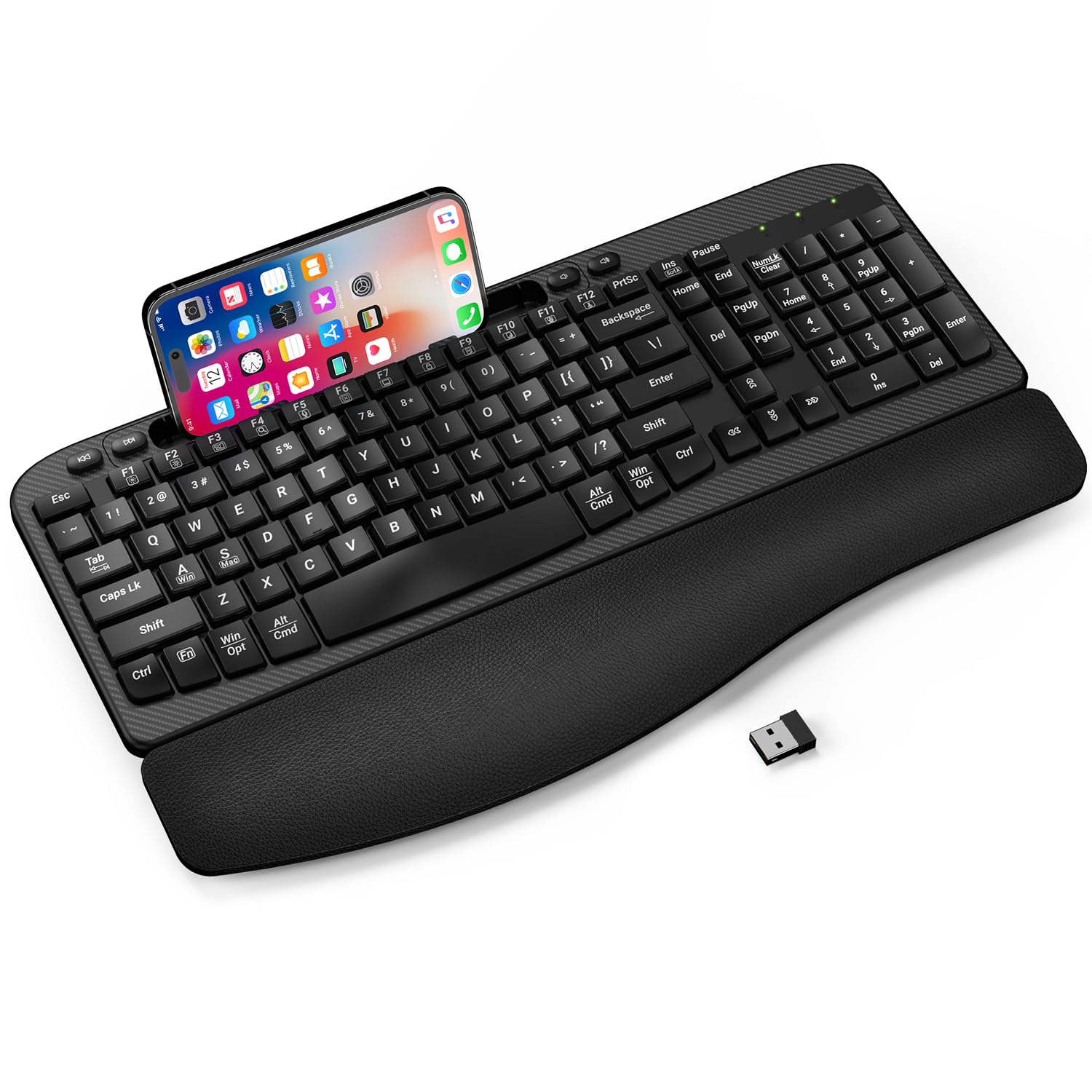
The wave-shaped keyboard with a memory foam rest that eases long typing sessions.
The EAYBLLY Wave keyboard is built around one goal: comfort during 6-8 hours of daily typing. The curved, wave-shaped keys are designed to fit your natural hand posture, and the 3-layer memory foam wrist rest cushions your palms in a way that owners say has genuinely helped with wrist pain. If you are at a desk all day, this is the ergonomic solution you are looking for.
It has a built-in 7.28-inch multi-function device holder, so you can prop up your smartphone or small tablet vertically or horizontally. This is a real desk-space saver for video meetings, online classes, or following along with documents. The keyboard connects via stable 2.4G wireless with a range up to 33 feet, and it includes an extra USB-C adapter for wide compatibility with Windows, Mac OS, and Chrome OS.
The keys are soft-touch and quiet, making it ideal for a shared office. It has dual 8°/12° adjustable tilt legs and a splash-proof structure for everyday spills. The honest trade-off is reliability—while most owners love the comfort, some report finicky keys with occasional double characters or missed keystrokes. It is also powered by 1 AA battery which is not included.
All-day comfort
- 3-layer memory foam wrist rest reduces wrist strain
- Built-in 7.28in phone holder saves desk space
- Soft-touch, quiet keys are great for shared offices
- Dual 8°/12° tilt angles for personalized typing posture
The trade-offs
- Some units experience finicky keys with double characters
- Requires 1 AA battery, which is not included
Reach for this: if wrist fatigue is your top concern and you want a cushioned rest plus a phone holder for multitasking.
Consider elsewhere: if you are a fast, long-form typist who needs flawless key registration every single time.
9. SABLUTE MA41
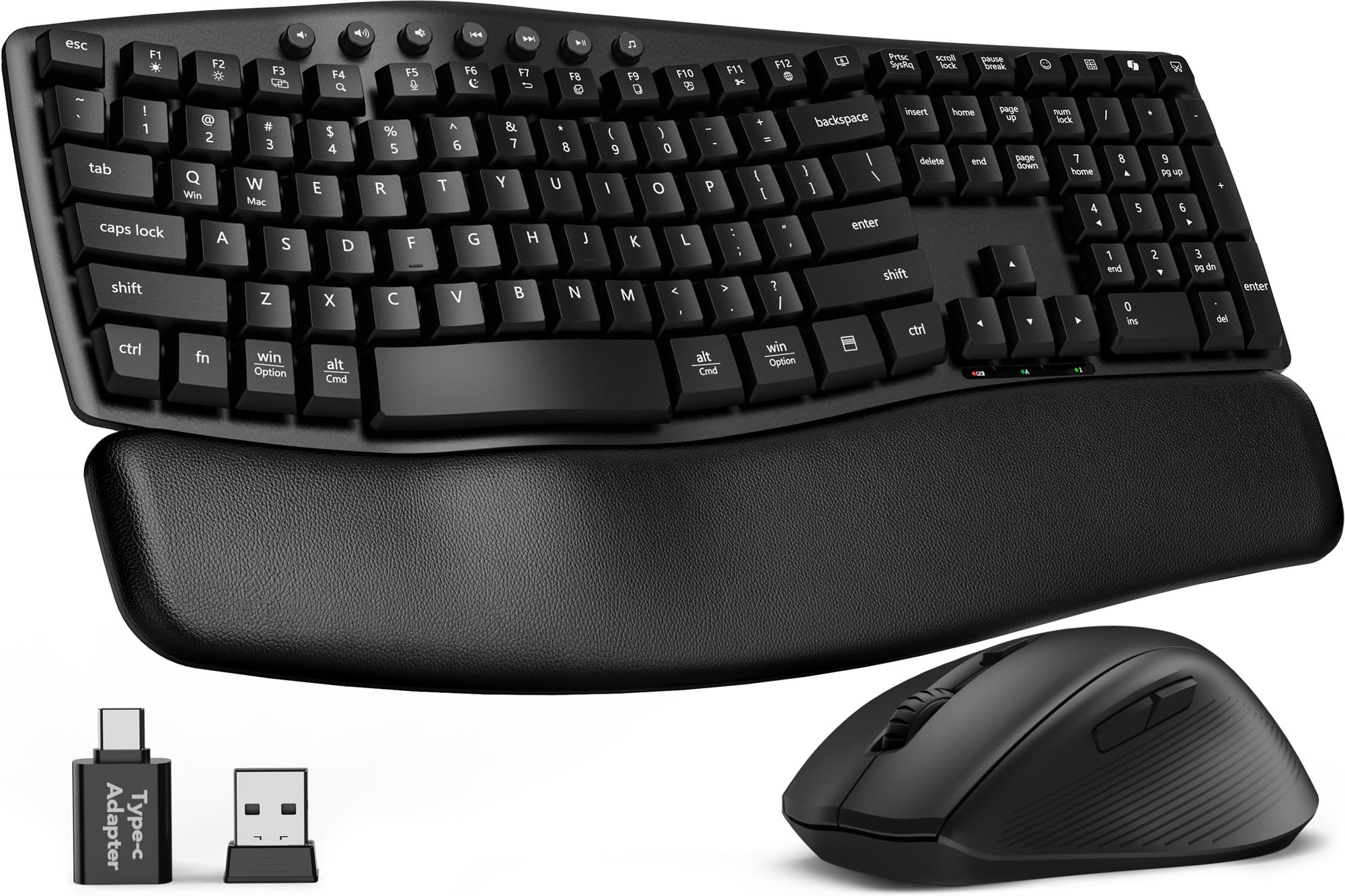
An ultra-quiet wireless combo with a leather wrist rest built for focus.
The SABLUTE MA41 is the choice for late-night workers and shared offices where noise is the enemy. Its defining spec is the 30dB quiet typing, which buyers report up to 90% less noise than standard keyboards. The mouse clicks are just as quiet, so you can work without disturbing anyone else in the room.
Comfort is handled by a cushioned leather wrist rest that is soft and supportive, unlike the hard plastic rests on many keyboards. The ergonomic wave design includes 2 adjustable tilt angles to support a natural typing posture. The set also offers 12 productivity shortcuts for screenshots, media controls, calculator, and more, which helps keep your hands on the keys and your focus on the task.
The build quality is backed by a 2-year replacement warranty, and the laser-etched keys are rated for 10 million keystrokes. A single 2.4GHz receiver connects both the keyboard and mouse, and it includes a USB-C adapter for use with Windows, macOS, ChromeOS, Linux, and Android. The trade-off is the same as many budget wireless combos: some owners mention the keyboard stopping working after a couple of weeks, so reliability is a mixed bag.
Focus-friendly: The 30dB quiet keys and leather wrist rest keep long sessions calm and comfortable.
The risk: The single receiver dongle can feel less durable over time, and a minority report connectivity failures within weeks.
Choose this if: you work in a shared space or at night and want a whisper-quiet typing experience with a soft wrist rest.
Look elsewhere if: you need a mechanical feel or want to avoid any risk of wireless reliability issues.
Understanding the Specs
Switch Type and Feel
The switch is the heart of the keyboard. Mechanical switches use springs and give a crisp, tactile response with a longer lifespan, often rated for 50 million presses. Membrane boards use rubber domes, which are softer and quieter but feel mushier. Linear mechanical switches, like the Red Linear type, press straight down without a bump, making them fast and smooth for both typing and gaming.
Hot-Swappable Sockets
A hot-swappable keyboard lets you pull out the switches and keycaps using a simple tool and replace them without soldering. This is a huge deal for budget buyers because it means your keyboard can evolve—you can swap in quieter or clickier switches, or colorful keycaps, whenever you want. Boards with this feature, like the HUO JI Z-99 and Redragon K689, turn a cheap keyboard into a lifelong customization project.
FAQ
What is the difference between mechanical and membrane keyboards?
What does a 60% keyboard mean and who should buy one?
What are hot-swappable switches and why do they matter?
How long do wireless keyboard batteries last?
What is anti-ghosting and N-key rollover?
Are membrane keyboards good for gaming?
What does a gasket mount do for typing feel?
Can these keyboards work with a Mac?
Final Thoughts: The Verdict
If you want one dependable pick, the affordable keyboard winner is the HUO JI E-Yooso Z-99 because it delivers a creamy, gasket-mounted mechanical feel with hot-swap customization that rivals boards costing far more. If you want a wireless keyboard and mouse combo with a multi-year battery, grab the Logitech MK345. And for a full-size board with the freedom of tri-mode wireless, the Redragon K745 PRO is the one to reach for.
How We Picked
We do not accept paid placement. Every pick is matched to a real buyer and a real use-case; we do not hands-on test units.
Sources & Methodology
Specifications: manufacturer listings and product documentation. Review insights: verified customer reviews, as of September 2026. Pricing: not shown on this page (it changes often); check the current price via the retailer link.
As an Amazon Associate, Gadgets Feed earns from qualifying purchases. This does not affect which products we feature.