
Our readers keep the lights on and my morning glass full of iced black tea. As an Amazon Associate, I earn from qualifying purchases.
Specs are compiled from manufacturer listings and verified buyer reviews and can change over time — please confirm the key details on the product page before buying.
Sitting on a stack of business cards is like sitting on a pile of unfinished work—each one is a contact you have to manually type into your phone or computer before it becomes useful. A dedicated scanner digitizes a stack of cards into searchable contacts in seconds, letting you follow up immediately instead of losing time to manual data entry.
I’m Min — the founder and writer behind Gadgets Feed. This guide is built by comparing the manufacturers’ published specifications and the patterns across verified customer reviews, so you get each pick’s real strengths and trade-offs instead of marketing spin.
This breakdown focuses on the machines that turn a business card reader from a desk accessory into a genuine productivity tool for professionals who value their time.
Our Picks at a Glance


How To Choose The Best Business Card Reader
Before you pick a scanner, think about where you’ll actually use it. A desk-bound unit with a document feeder makes sense for a home office, while a lightweight model you can slip into a travel bag is better for sales reps who live on the road. Match the scanner to your workflow—a desk unit with a feeder suits a home office, while a lightweight model fits a travel-heavy routine.
Duplex vs. Simplex: The Two-Sided Question
If your contacts come from conferences, you’ll want a duplex scanner, which captures the front of a card and the back in a single pass. This captures handwritten notes or second phone numbers that people often scribble on the reverse side. A simplex scanner reads one side at a time, which is fine for basic cards but means you must flip and re-feed if you want that back-side data.
Software and OCR: The Real Engine
The scanner captures the image; the bundled software converts it into an editable contact. OCR (Optical Character Recognition) reads the text in a scanned image and converts it into editable fields like name, title, and email. Look for software that saves directly to your CRM or Outlook; if you have to manually copy and paste from a PDF, you’ve only half-solved the problem.
Quick Comparison
| Model | Best For | Resolution | Weight | Scanning Type | Amazon |
|---|---|---|---|---|---|
| Doxie Pro★ Best Overall | Duplex doc & card capture | 600 dpi | 3 pounds | Automatic duplex | Amazon |
| Plustek S410 PlusBest Value | Travel-friendly sheet-fed | 600 dpi | 0.41 kg | Sheet-fed simplex | Amazon |
| Brother DS-640Compact Pick | Ultra-compact mobile | 300 dpi | 1 pounds | Mobile single-feed | Amazon |
| Epson DS-70 | Travel and occasional docs | 1200 dpi | 9.44 ounces | Mobile single-sheet | Amazon |
| HP HPPS100 | Simple USB connectivity | 1200 dpi | 3 ounces | Simplex single-pass | Amazon |
| Swish S1 | Medical & photo ID cards | 600 dpi | 14 ounces | Simplex optical | Amazon |
| Canon R10 | Duplex with document feeder | 600 dpi | 998 g | Duplex with feeder | Amazon |
| BizCardReader BCR901 | Office ID card processing | 300 dpi | 8 ounces | Simplex optical | Amazon |
| Ambir nScan 690gt | Outlook CRM integration | 600 dpi | 1.3 pounds | Vertical card simplex | Amazon |
In‑Depth Reviews
1. Doxie Pro Duplex Scanner
Our pick — over 4.5★ from 650+ verified ratings; the strongest balance of quality and price.
The desk-bound workhorse that swallows both sides of a card at once
If you’re tired of flipping every card over to capture a back-side note, the Doxie Pro makes that a non-issue with true automatic duplex scanning, reading both sides of a two-sided paper in a single pass. It scans at 600 dpi in both color and black and white, so even fine print on a glossy card stays crisp enough for reliable text recognition.
Weighing just over 3 pounds, this is a heavier, more capable unit than the pocket-sized competitors below—it’s built for a home office or reception desk rather than a shirt pocket. The collapsible document feeder and a direct feed slot for thick or delicate paper mean you can run everything from a crumpled receipt to a plastic card without jamming. Buyers report fast duplex scanning, and though jams happen roughly once in 300 pages, they’re easy to clear.
The bundled software imports and organizes scans, then sends them to Dropbox, Evernote, OneNote, or iCloud without complex driver installs. Reviewers call it a complete, subscription-free package that delivers great value.
Why Owners Love It
- Automatic duplex reads both sides in one pass, saving hours of manual flipping
- 600 dpi scans stay sharp for reliable OCR on fine print
- Software sends scans directly to cloud apps like Dropbox and Evernote
The Trade-Offs
- No battery and no SD slot, so it must stay plugged into a computer via USB
- At 3 pounds it’s a desk fixture, not a travel companion
Your best bet: This is the pick for a fixed workspace where you process a steady flow of cards, receipts, and documents, and you want the software to handle the organizing.
Think twice if: You need to scan cards on the road—this one demands a wired connection to your laptop.
2. Plustek Mobile Scanner S410 Plus
A featherlight sheet-fed option that powers itself from your laptop’s USB port
You can skip the setup hassle with the Plustek S410 Plus: it weighs less than 1 lb—lighter than a bottle of mineral water—and runs entirely off the USB bus, so there are no batteries to charge and no power brick to pack. Just connect it to your computer and drop in a card; the automatic button-free design processes the image and saves it to your designated folder without you clicking a single screen.
Its slim 1.6″D x 11.7″W x 1.9″H footprint makes it roughly half the depth of the Doxie Pro above, and at 600 dpi resolution it captures enough detail on ID cards and receipts for reliable OCR. Unlike the Doxie, this is a sheet-fed design rather than a duplex unit, so it handles one side at a time—but for capturing a single business card face, that’s all most people need. The bundled Plustek DocAction software converts scans into searchable PDF, Excel, or Word files and can save them locally, to FTP, or to a shared folder.
Owners call it easy to set up and well worth the money, but it must stay tethered via USB—no wireless option. The top praise centers on its functionality—it’s exactly what a desk worker needs to avoid the walk back and forth to the office printer for a quick scan.
Great for: A tidy, low-cost desk setup where you want plug-and-play simplicity and the ability to toss the scanner in a travel bag when needed.
The catch: It’s simplex only, so capturing the back of a card means a second pass, and it relies entirely on your computer for power.
3. Brother DS-640 Compact Mobile Scanner
This 1-pound pocketable unit scans color and black-and-white at the same rapid pace
The Brother DS-640 is the speed demon of the compact class, hitting up to 16ppm (pages per minute) for both color and black-and-white documents, so your color business cards scan just as fast as plain text. Weighing only 1 pound and measuring under a foot in length, it’s built to disappear into a bag, purse, or even a large pocket—making it 3.0x lighter than the 3-pound Doxie Pro if you’re comparing travel burdens.
On paper, it falls short on resolution: at 300 dpi (dots per inch, a measure of sharpness) it’s half the sharpness of the 600 dpi Plustek S410 Plus, which matters when you rely on OCR (optical character recognition, the software that reads text from images) to read small email addresses on a glossy card. The trade-off is versatility—it handles plain paper, receipts, and embossed or laminated cards, and Brother’s free iPrint&Scan app pushes scans to your PC, network, cloud services, email, or OCR, with support for Windows, Mac, and Linux.
Owners say it’s refreshingly well-made with clean, ad-free software, and it’s a favorite for daily use—people have run dozens of pages through it for months without a hitch. The catch is the single-page feed: each card or document goes through one at a time, and recent owners mention it needs the included micro USB 3.0 cable rather than a hub to power up reliably.
What Stands Out
- 16ppm speed in color and black-and-white keeps a card stack moving fast
- Weighs just 1 pound, so it travels better than most competitors
- Free software works across Windows, Mac, and Linux with cloud destinations
What to Watch
- 300 dpi is lower than rivals, which can strain OCR on tiny card text
- Single-sheet feeding only—no stack feeder for bulk jobs
Reach for it if: Speed and portability top your list, and you want a scanner that plays nicely with Mac, Windows, and Linux machines.
Look elsewhere if: You regularly scan dense, fine-print cards where maximum OCR accuracy beats raw throughput.
4. Epson DS-70 Portable Document Scanner

The lightest full-featured pick here, at just 9.44 ounces, with resolution to spare
Epson’s DS-70 makes a strong case as the ultimate travel companion because it tips the scales at just 9.44 ounces—a fraction of the weight of the 1-pound Brother DS-640 and even lighter than many tablets. That portability pairs with a 1200 dpi scan resolution, which is double the Doxie Pro’s 600 dpi output and gives OCR software plenty of detail to work with on dense cards.
It powers through a single page in as fast as 5.5 seconds and handles documents up to a generous 8.5″ x 72″ length, which means you can feed a long receipt without chopping it into pieces. The included OCR and document management software turns scans into editable text and searchable PDFs, and customers note it fits neatly in a backpack and survives the occasional drop.
Reviewers point out mixed reliability: some units develop hazy lines after years of service, and setup demands you plug it in and use the online-only process before the software recognizes it. It’s also strictly single-sided, so flipping a card to capture the back is on you.
Who it’s for: A traveler who prioritizes the lightest possible kit and wants high-resolution scans of cards and long receipts on the go.
The honest limit: Durability is a lottery according to owners, and the simplex feed plus awkward setup means it’s not the most forgiving for tech novices.
5. HP Small USB Document Scanner (HPPS100)

At 3 ounces, this is the lightest unit on the list and it still hits 15ppm
If the Epson DS-70 felt like a feather, the HP HPPS100 is practically weightless—it comes in at just 3 ounces, so you’ll forget it’s in your briefcase until you need it. Despite that tiny footprint, it delivers a reliable 15ppm operating speed (about 4 seconds per page) for both black-and-white and color jobs, which is nearly on par with the heavier Brother DS-640.
You get sharper scans than the Doxie Pro with the HP: it quotes a 1200 dpi resolution that matches the Epson and beats the 600 dpi Doxie Pro, and its versatile paper handling covers anything from a 2″ x 2.9″ business card up to a full 8.5″ x 14″ legal sheet. It powers via USB 2.0 with the cable included, and the free HP WorkScan software offers auto-scan with size detection, preview and zoom, and background cleanup—no tech savvy required.
The downside is that image quality draws mixed owner feedback, and this simplex scanner accepts just one page at a time, so bulk jobs mean standing at your desk feeding sheets. Some users find the software needs a specific plug-in order to be recognized, though the majority report it’s easy to set up and say pages come out clear and fast.
The High Points
- 3-ounce build quality makes it the most portable option here
- 1200 dpi resolution delivers sharp detail for card capture
- HP WorkScan software auto-detects size and cleans up backgrounds
The Low Points
- Single-sheet feed only, so a stack of cards takes hands-on time
- Some shoppers say finicky USB recognition and mixed image sharpness
Grab it for: The lightest possible carry that still handles cards, photos, and full legal documents when you’re away from the office.
skip it if: You’re processing stacks of cards at once and can’t spare the time to feed them one by one.
6. Swish S1 Medical Insurance Card Scanner
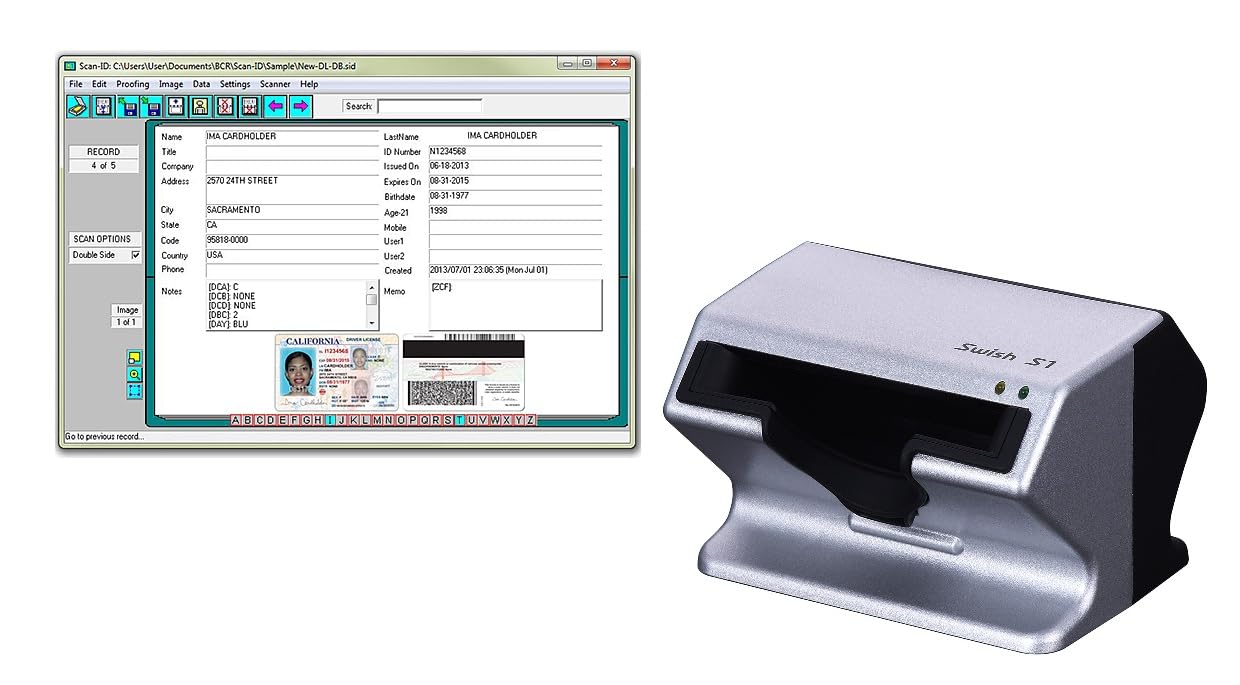
A camera-based card scanner that eliminates rollers entirely, so fragile cards never jam
The Swish S1 solves the biggest fear of card scanning—damaging a thin or fragile ID—by using a camera-based optical design instead of moving rollers that drag documents over sensors. You just drop the card into a wide slot and the camera captures a clear image automatically, making it safe for paper, plastic, or other thick rigid material.
This is a niche tool built for healthcare and admin desks: it’s a Windows-only device (not Mac compatible) that’s fully TWAIN compliant, meaning it works with electronic healthcare and medical practice management systems. It scans at 600 dpi and captures both sides of a card one at a time, combining them into a single composite image for your application. The small 5.2″ x 4.5″ footprint squeezes into tight desk spaces, and it’s self-powered from the USB port.
Owners describe it as easy to set up and reliable, with the automatic scan-and-save setting a standout for quick capture. The honest gripe is the Windows-only limitation and the dated-feeling software workflow—one buyer called it a great scanner if you don’t mind going back to 1997 for the interface.
Perfect for: Medical offices and front desks that need to digitize insurance cards and IDs without risking damage, and already run on Windows.
Not for: Mac users or anyone who wants a modern, polished software experience—this one leans utilitarian.
7. Canon imageFORMULA R10

The only pick here with a 20-sheet automatic feeder, making it the batch-work king
When you’re staring down a mountain of collected cards and receipts, the Canon R10 is the one that actually clears the pile. It’s the only scanner on this list with a 20-sheet automatic document feeder, so you can stack a handful of cards and let it pull them through rather than feeding each one by hand. It scans both sides of a document at the same time, in color or black-and-white, at up to 12 pages-per-minute.
At 600 dpi it matches the Doxie Pro and Plustek for resolution, and it handles receipts, plastic or embossed cards, reports, and legal documents with ease. The built-in software requires no installation and updates automatically, which removes the setup friction that plagues other units on this list. Canon rates it for a suggested daily volume of 500 scans, signaling it’s built for steady, heavy use rather than occasional capture.
The review pages are split, though: the thing owners love most is the quality and ease of use, while the scanner speed and value draw mixed feedback. Some report the feeder jams when you push three or more pages through at once, and Mac compatibility has been a sore spot for certain iMac and MacBook Pro owners.
Why It Wins for Bulk
- 20-sheet feeder is class-leading on this list for batch processing
- Duplex scanning in one pass handles two-sided cards efficiently
- Built-in software needs no install and updates automatically
The Frustrations
- Feeder jams reported when loading more than a few sheets at once
- Some Mac users hit compatibility walls with the driver
Choose it when: You process regular batches of cards and documents at a fixed desk and want the convenience of a feeder plus duplex capture.
Be cautious if: You’re on a Mac—check recent compatibility reports before committing.
8. BizCardReader BCR901 Medical ID Card Scanner

A tiny 8-ounce vertical or horizontal scanner that’s been reliable in offices since 2019
The BCR901 is the quiet veteran of this list—a compact card scanner that owners have trusted for years, with one noting it’s been reliable since 2019. It weighs just 8 ounces and takes up a 2″D x 6.75″W x 1.75″H footprint, and you can mount it horizontally or vertically to suit your desk layout. It scans cards one side at a time, but the bundled software captures front and back and lets you manage a searchable database of card images.
At 300 dpi it’s on the lower end of resolution here—matching the Brother DS-640 but half the sharpness of the 600 dpi Swish S1 above—yet owners consistently praise the clear color images and fast scanning speed. It’s fully TWAIN compliant, so it works with bank, medical, and healthcare imaging apps, and it scans directly to PDF, JPEG, and TIF formats with automatic saving to a chosen folder.
The top praise centers on ease of use, with reliability a close second, making it a low-drama addition to a medical front desk or insurance office. The recurring note of caution is compatibility: some buyers report difficulty integrating it with their medical EHR system, so it’s worth confirming your software plays nice before buying.
Ideal for: Medical or administrative offices that want a proven, budget-conscious way to file insurance cards and IDs without wrestling with software.
The trade-off: The 300 dpi ceiling and one-side-at-a-time capture mean it’s not the sharpest or fastest, but it’s rarely the bottleneck in a busy office.
9. Ambir nScan 690gt-BCS
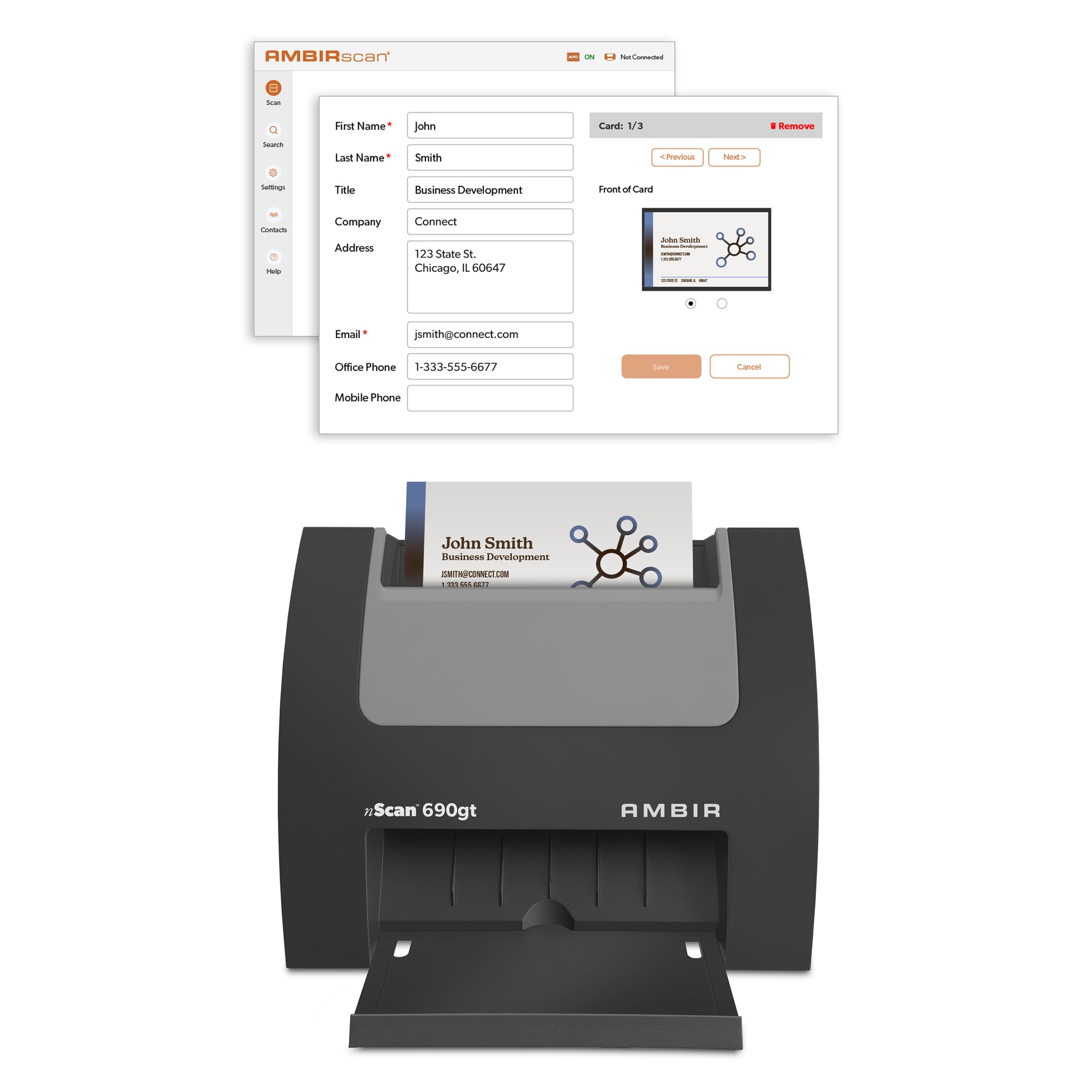
The vertical speed-scanner that pushes cards straight into Outlook and your CRM
For sales teams and executive assistants, the Ambir nScan 690gt is less about the scan and more about what happens after: it imports contacts directly into Microsoft Outlook, with automatic duplicate detection to keep your address book clean. You scan a card in seconds, and the data lands in your Outlook contacts—no manual typing, no copy-paste from a PDF.
It scans at 600 dpi with a CCD sensor, delivering clear tiny print that medical offices say saves time and paper. When you enable the optional AI processing in AmbirScan, it improves accuracy extracting names, titles, phone numbers, and email addresses, with multi-language support for English, French, Italian, German, and Spanish cards. Everything processes locally on your PC, and it exports to CSV for third-party CRMs like Salesforce and Google Contacts.
The hardware earns praise for its scanning speed and quality, but the software is the weak link—owners repeatedly call it poor. The OCR mis-fields data on Outlook imports, only US phone numbers are recognized, and multi-card saves can crash the app, meaning heavy users spend time editing manually. It’s a Windows-only tool (10 and 11), backed by a 2-year limited warranty.
The Big Win
- Direct Outlook import with duplicate detection saves real data-entry hours
- Optional AI processing boosts OCR accuracy on names and emails
- 600 dpi CCD scans render small print clearly for medical IDs
The Letdown
- Software is the consistent complaint—mis-fields data and crashes on bulk saves
- Only US phone numbers recognized, limiting global contact capture
Best for: A Windows-centric office where Outlook and CRM integration outweighs the cost of editing occasional OCR mistakes.
Look past it if: You want a one-time, jam-proof simple scanner without relying on finicky bundled software to get the job done.
Understanding the Specs
OCR Software and Accuracy
OCR (Optical Character Recognition) reads the text in a scanned image and converts it into editable fields like name, title, and email. On a business card, accuracy matters more than raw resolution because a single misread digit in a phone number makes the contact useless. Look for software that offers post-scan editing and direct export to your CRM or Outlook—that’s where the real time-savings live.
Resolution and Card Detail
Resolution, measured in dpi (dots per inch), determines how much fine detail the scanner captures. A 300 dpi scan is readable but may struggle with tiny 8-point email addresses on glossy cards, while 600 dpi gives OCR software a much better chance at flawless reads. Higher-resolution units like the 1200 dpi Epson DS-70 and HP HPPS100 offer the most headroom for dense, small-print cards.
FAQ
Is a dedicated business card scanner better than scanning with my phone?
What is duplex scanning and why does it matter for cards?
Will these scanners work with my Mac?
Can I scan plastic or embossed cards without damaging them?
Do I need an internet connection or subscription to use these scanners?
What is OCR and how accurate is it on business cards?
How do I get scanned contacts into Outlook or my CRM?
What’s the difference between a document feeder and a single-sheet feed?
How do I power a portable scanner on the road?
Which resolution should I choose for business cards: 300, 600, or 1200 dpi?
Final Thoughts: The Verdict
For the majority of shoppers, the business card reader winner is the Doxie Pro because its automatic duplex scanning, 600 dpi clarity, and bundled cloud-ready software cover the full workflow without requiring a subscription. If you want the lightest possible travel companion, grab the HP HPPS100 at 3 ounces. And for a Windows office that lives in Outlook, the Ambir nScan 690gt is the one to reach for, provided you can live with its software quirks.
How We Picked
We do not accept paid placement. Every pick is matched to a real buyer and a real use-case; we do not hands-on test units.
Sources & Methodology
Specifications: manufacturer listings and product documentation. Review insights: verified customer reviews, as of September 2026. Pricing: not shown on this page (it changes often); check the current price via the retailer link.
As an Amazon Associate, Gadgets Feed earns from qualifying purchases. This does not affect which products we feature.