
Our readers keep the lights on and my morning glass full of iced black tea. As an Amazon Associate, I earn from qualifying purchases.
Specs are compiled from manufacturer listings and verified buyer reviews and can change over time — please confirm the key details on the product page before buying.
If you are reviving an old office PC or building a super-budget rig, the right 2GB graphics card can turn a sluggish desktop into something that actually plays games and drives multiple monitors without breaking a sweat. The catch is that most of these cards look identical on paper, so you need to know whether you are buying for gaming, for multi-screen productivity, or just to fix a dead display port.
I’m Min — the founder and writer behind Gadgets Feed. This guide is built by comparing the manufacturers’ published specifications and the patterns across verified customer reviews, so you get each pick’s real strengths and trade-offs instead of marketing spin.
Whether you are resurrecting a small-form-factor Dell or building a home theater PC, the best 2gb graphics card for you depends entirely on your case size, power supply, and whether gaming or spreadsheets rule your day.
Our Picks at a Glance


How To Choose The Best 2GB Graphics Card
Every card here holds 2GB of memory, so that spec will not separate them. What separates them is the memory type, the physical size, and the power draw, which decide whether a card can actually fit inside your machine and run the software you care about.
Check Your Case and Power First
Before you fall in love with any model, measure your case. Slim Dell OptiPlex and HP ProDesk towers often need a low-profile bracket, while standard ATX towers accept a full-height card. Also check your power supply: most of these cards sip power straight from the motherboard slot, but a weak unit can still cause random shutdowns under load.
Match the Card to the Job
A fanless card with passive cooling is a blessing for a home theater PC where silence matters. A card built on the newer Pascal architecture with GDDR5 memory is the one to pick if light gaming like Fortnite or Counter-Strike is on the menu. For pure office duty with three or four monitors, a workstation-grade Quadro card earns its place.
Quick Comparison
| Model | Best For | GPU Clock | Memory Type | Max Resolution | Amazon |
|---|---|---|---|---|---|
| ASUS GT 1030★ Best Overall | Light Gaming | 1506 MHz | GDDR5 | 1920×1200 | Amazon |
| Glorto GT 610Best Value | SFF Repair | 523 MHz | GDDR3 | 2560×1600 | Amazon |
| ASUS R7 240Quiet Value | Quiet Upgrades | 730 MHz | DDR3 | 1920×1200 | Amazon |
| maxsun GT 710 | Home Theater | — | GDDR3 | 1920×1080 | Amazon |
| PNY Quadro P600 | Pro Multi-Display | 1354 MHz | GDDR5 | 5120×2880 | Amazon |
| HP Quadro P620 | Workstation 4K | — | GDDR5 | 5120×2880 | Amazon |
| GIGABYTE GT 730 | Legacy Systems | 902 MHz | DDR3 | 2048×1536 | Amazon |
| PNY Quadro P400 | 3-Monitor Work | 1070 MHz | GDDR5 | 5120×2880 | Amazon |
| PowerColor RX 550 | Modern Budget | 1071 MHz | GDDR5 | 4096×2160 | Amazon |
In‑Depth Reviews
1. ASUS GeForce GT 1030 2GB GDDR5 Graphics Card
Our pick — over 4.5★ from 800+ verified ratings; the strongest balance of quality and price.
The pocket rocket that turns an old OptiPlex into a real gaming machine.
This is the card buyers reach for when they want actual gaming frames, not just a working desktop. The 1506MHz boost clock on NVIDIA’s Pascal architecture is a massive step up from the older DDR3 cards in this list — buyers report jumping from a stuttery 30-60 fps to a smooth 120-560 fps in their Dell OptiPlex systems, enough to run Fortnite and Counter-Strike comfortably.
What wins people over, beyond the raw speed, is the silence. ASUS uses a passive cooling heatsink design with no fan at all, so a media center or office PC stays completely quiet. It draws roughly 30W straight from the PCIe slot, meaning no extra power cables and no power-supply upgrade. The trade-off is heat: in a poorly ventilated case the card can reach 80°C, which is still under the 85°C maximum but worth knowing if you are cramming it into a tiny enclosure.
The GDDR5 memory here crushes the older DDR3 alternatives on bandwidth, which is exactly why it leads this list as the top performer. Buyers praise its performance-to-cost ratio and the quality of its gaming output, and the included low-profile bracket means it slips into slim Dell and HP towers. The one honest warning is physical size — the heatsink is massive, making the card as thick as a dual-slot model, so it may not fit a secondary PCIe slot in a tight workstation.
quiet budget starter
- Real fps gains in light games like Fortnite and Counter-Strike
- Totally silent passive cooling for quiet builds
- Draws about 30W — no extra power cable needed
weak for modern games
- Oversized heatsink makes it act like a dual-slot card
- Runs hot at 80°C in cases with poor airflow
entry-level pick: If a light-gaming rig or a media PC that must stay silent is your goal, this is the card to beat.
skip if gaming: your case only has one slim expansion slot free — the massive cooler will not squeeze in.
2. Glorto GeForce GT 610 2GB DDR3 Low Profile
The five-minute fix that brings a dead Dell tower back to life.
This is the card for the moment your old office PC throws a GPU failure and you need it working again today. Owners mention fixing a Dell OptiPlex 9020 GPU failure in under five minutes, running a 1920×1080 display cleanly, and avoiding a repair bill that would have dwarfed the card’s cost. It is plug-and-play with Windows 11, with no manual driver download needed.
The 523MHz core clock and 2048MB of DDR3 memory on a 64-bit bus make this a modest performer, but that is exactly the point. This card is not about gaming — it is about powering a 55-inch TV, driving a couple of office monitors, and doing it with low heat and low power draw. Its half-height bracket fits small-form-factor towers and HTPCs alike, and it also works in full-size PCIe slots without fuss.
Where it shines brightest is compatibility with aging Dell hardware, which owners mention again and again. The honest caveats are a known quirk where the HDMI port can arrive inactive (the VGA port works fine) and a note that Windows 11 fast startup can leave the fan stopped after boot, pushing temperatures to around 75°C until you disable that setting. For basic desktop duty, that is a small price to pay.
repair-desk pick: If a dead GPU in a corporate hand-me-down is your problem, this is your cheapest, quickest cure.
look elsewhere if: gaming is the plan — the modest clock speed is built for spreadsheets, not shooters.
3. ASUS R7240-2GD3-L 2GB Radeon R7 240
A near-silent Radeon that sneaks a sound-card bonus into your build.
This AMD Radeon R7 240 runs its 730MHz engine clock and 2GB of DDR3 memory across a wider 128-bit interface, which gives it more memory bandwidth than many rivals at this level. Owners are genuinely surprised by how quiet it is — one buyer notes you cannot hear it even at full load — and they value the fact that it needs no extra power connection from the power supply.
Where this card surprises people is outside the graphics chip itself. Several buyers discovered it includes an integrated sound card that delivers noticeably better audio over HDMI. That makes it a sleeper pick for a home theater PC where both picture and sound quality matter. In games it handles StarCraft II at 1650×1080 and Counter-Strike: Global Offensive at medium settings around 60fps once the system has enough RAM.
The value story is strong versus its own sibling R7 250, which owners note is slower, has less memory, and costs roughly double. The recurring complaint is driver installation, which proved troublesome on older Windows versions, and there are occasional reports of a DOA unit arriving — so test it the day it lands. As a quiet, low-power upgrade for a media center, this one earns its spot.
silent workhorse: If a no-fuss, near-inaudible card for streaming and light gaming is the ask, this Radeon delivers more than its price suggests.
low memory speed: budget for a possible driver headache on legacy Windows, and verify the card works immediately on arrival.
4. maxsun GeForce GT 710 2GB Low Profile
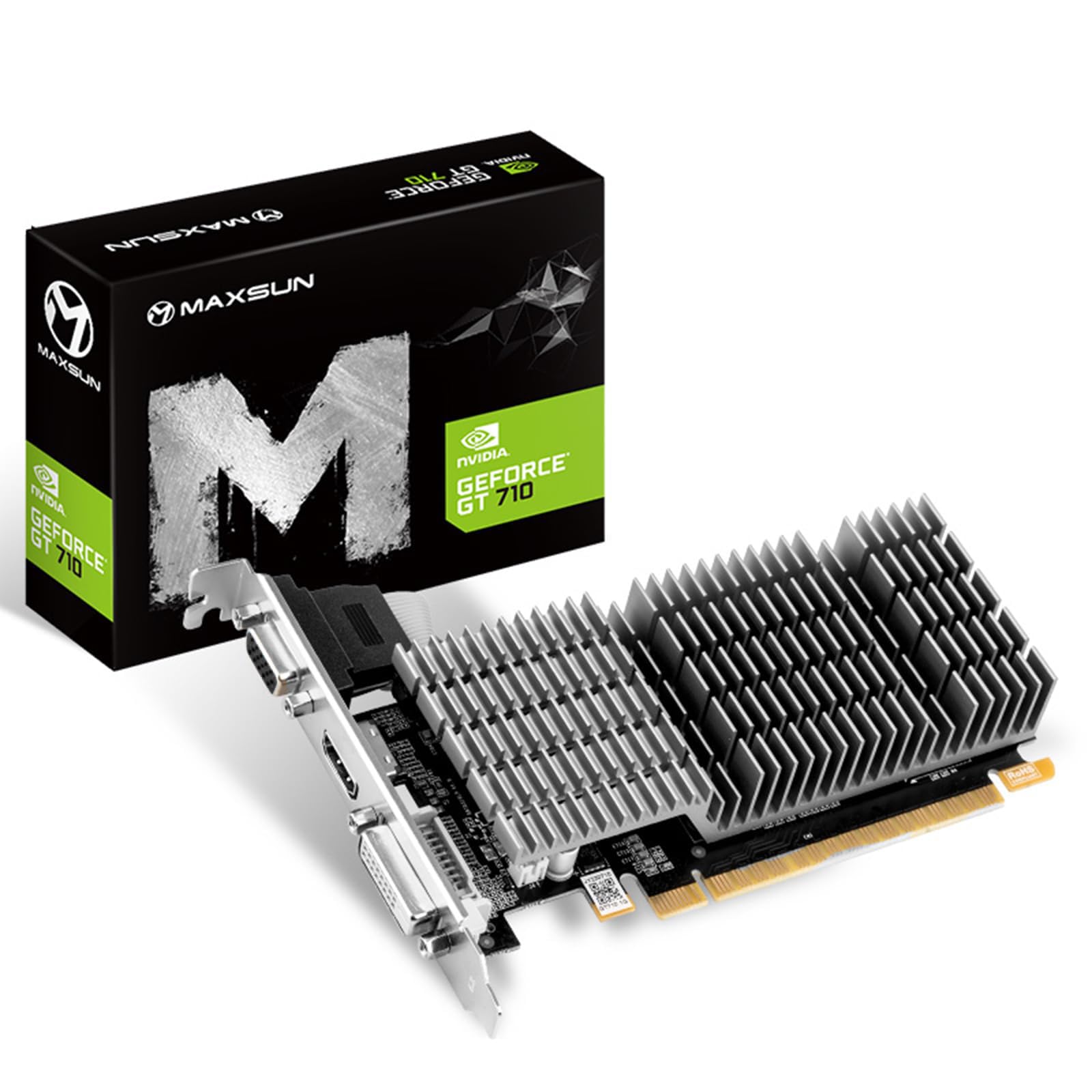
The silent 4K decoders’ secret weapon for a living-room home theater PC.
If your project is a home theater PC that must sit silently beside the TV, this GT 710 is purpose-built for the job. Its passive 0dB cooling uses a huge heatsink covering both the GPU and memory, so there is no fan to whir and no moving part to wear out. Customers note it handles 4K video playback flawlessly, delivering full 7.1-channel audio to an AV receiver without sync issues.
The trio of HDMI, VGA, and DVI-D outputs means you can drive multiple screens, which is why it also rescued more than one dead dual-monitor setup in HP and Dell small-form-factor PCs. It is light at 145 grams, draws no extra power, and generated a fair share of “plug and play” praise for Windows 11 systems. The low-profile design fits most cases, even ITX and small-form-factor builds.
The honest reading of owner feedback is that connectivity and the low-profile feature get mixed reviews — some units arrive missing the bracket you need, and one buyer had to use pliers to convert it to half-height. Also, this is not a gaming card: game compatibility draws the most negative mentions, so treat it as a video-and-productivity card and you will be thrilled.
basic display card: a silent, fanless card for 4K video and office multitasking in a small case is exactly your scenario.
skip for tasks: you expect to play modern games — performance here is strictly for media and spreadsheets.
5. PNY NVIDIA Quadro P600 Professional Graphics Board

Four crisp displays from a low-profile board built for serious work.
This is a professional workstation card, not a gaming card, and that distinction matters. Built on NVIDIA’s Pascal architecture with a 1354MHz GPU clock and 2GB of GDDR5 memory, the Quadro P600 is tuned and tested for professional applications like CAD, 3D modeling, and video editing. Its claim of up to 70% more visualization performance than the prior-generation Quadro K620 tells you where its priorities lie.
The headline feature is its four mini-DisplayPort 1.4 connectors, which owners use to drive four separate 4K displays simultaneously for massive multitasking setups. Reviewers point out crisp text and clean 2D output, quiet operation, and low heat — one owner stacking three Quadro cards noted each idles under 40°C. For streaming and light video editing, it outperforms even a 1660 Super in one owner’s handbrake conversion test.
The main friction point is ports: older displays need adapter cables, and the port numbering arrives mismatched (port 1 is physically port 2, and so on), though it is reorderable in software. The number of ports draws mixed feedback because some buyers expect all four to work before a driver update. If your job is wall-to-wall monitors with zero lag on huge spreadsheets, this is the card.
spreadsheet general: If four crisp 4K displays for work are the dream, no gaming card here matches this one’s display muscle.
not for gamers: skip this if frame rates are your metric — Quadro cards chase precision, not fps.
6. HP Quadro P620 Graphic Card 2GB GDDR5
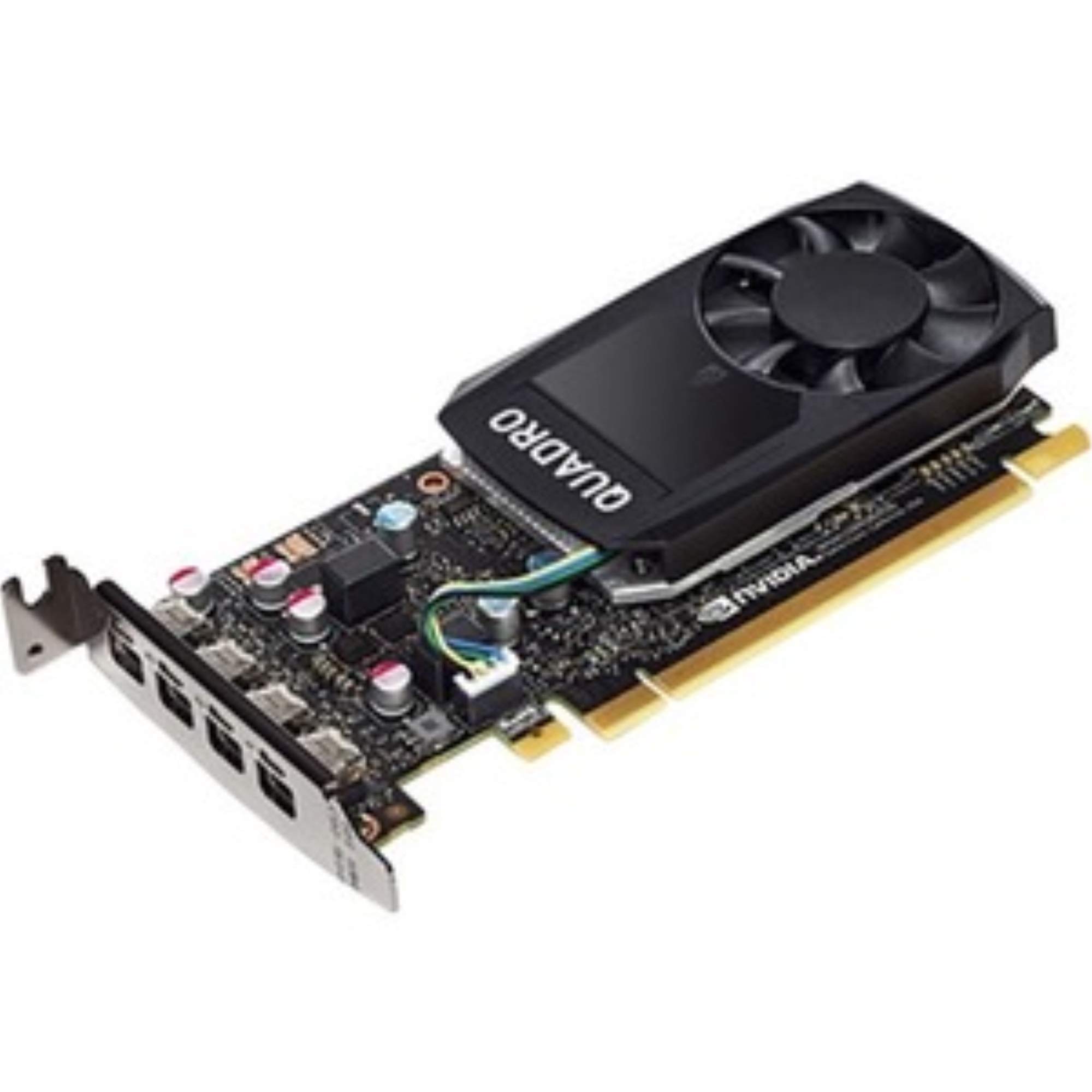
The single-slot specialist that pushes three 4K monitors from one HP tower.
For owners of HP Z-series workstations, this Quadro P620 is the sanctioned upgrade path. It is explicitly compatible with the Z240 Tower, Z240 Small Form Factor, Z440, Z640, and Z840, which removes the guesswork about whether a card will fit your specific machine. Buyers describe it as one of the cheapest ways to power more than two monitors, with one owner driving three 27-inch 4K displays for Outlook, Excel, Chrome, and more simultaneously.
The single-slot design is a genuine advantage in workstation builds where every expansion slot counts. With 2GB of GDDR5 memory and support for resolutions up to 5120×2880 or 7680×4320, it handles rendering of models and textures well, and owners confirm it works cleanly with KVM switches using mini-DisplayPort to DisplayPort cables. It draws little power and runs quietly, keeping a multi-screen desk tidy.
In gaming it lands at low-to-average frame rates, which owners state plainly — this is a workstation tool, not a toy. The card arrives in ESD-safe packaging that buyers appreciate, and it does exactly what it advertises. If your machine is an HP Z-series and your bottleneck is display outputs, this is the safest, most direct fix you can buy.
hp owners’ answer: If you run an HP Z-series workstation and need three or four 4K screens, this single-slot card is the clean fit.
skip it if: you are on a non-HP board and want gaming performance — this is built for productivity, not play.
7. GIGABYTE GeForce GT 730 2GB 64-bit DDR3

The dependable resurrection card for Windows 7-era machines that refuse to die.
When your aging desktop still does the job but the graphics chip has given up, this GT 730 is the reliable replacement. Powered by NVIDIA’s GT 730 GPU with a 902MHz core clock and 2GB of DDR3 memory on a 64-bit interface, it breathed new life into a Windows 7 machine with 32GB of RAM, according to one owner. Its full-height ATX form factor and PCI Express 2.0 x8 bus make it a natural fit for standard tower cases.
Where this card earns affection is stability on older hardware and Linux systems. Shoppers say it fixed recurring Linux crashes caused by exhausted shared video memory, and it installed cleanly on Windows Server 2012 R2. The three outputs — Dual-Link DVI-D, HDMI, and D-Sub — cover both modern and vintage monitors, and its digital max resolution reaches 4096×2160 while analog tops out at 2048×1536.
The most-discussed downside is physical width: the card is wider than a single slot and presses against an adjacent WiFi adapter in some builds, and the PCB is wider than standard, which can stop EATX case PCIe clips from closing. Owners are clear this is not a gaming card, but for email, web, and video on a legacy box, it is exactly right.
old-rig savior: If a late-2000s desktop needs dependable video output again, this GIGABYTE is a proven cure.
measure first: if your case is crammed or uses EATX clips, the extra-wide PCB might cause a fit headache.
8. PNY NVIDIA Quadro P400 Professional Graphics Card

Zero-lag third screens for spreadsheet warriors who refuse to tab between windows.
Office power users will recognize this card’s mission instantly: it exists to end the nightmare of juggling giant Excel sheets across too few monitors. Built on NVIDIA’s Pascal architecture with a 1070MHz core clock and 2GB of GDDR5 memory, it drives three monitors through its trio of mini DisplayPort 1.4 outputs. Buyers report running video on every screen while keeping Excel open with zero lag.
The P400’s performance claim of up to 2x more visualization power than the Maxwell-based Quadro K420 translates into smooth Autodesk Maya 3D modeling and 4K playback at 60fps with no issues, according to buyers. It draws low power with no extra cable, runs quietly, and its low-profile form factor includes both an attached SFF bracket and an unattached full-height bracket so it adapts to any tower. Three mDP-to-DP adapters come in the box.
Quality and performance are the two things owners praise most, and the card works from the start with Ubuntu 20.04 and NVIDIA’s 440.64 driver. The honest mixed note is suitability: this is emphatically not a gaming card, and owners mention so plainly. If your daily reality is multiple spreadsheets and a 3D modeling tool, this is a precisely targeted tool.
multi-monitor desk: If three smooth screens for office apps and 3D modeling are the requirement, the P400 hits the mark.
not a gaming card: leave this one on the shelf if your goal is high frame rates in modern shooters.
9. PowerColor AMD Radeon 550 2GB GDDR5

A modern Radeon architecture that finally drags a 4xxx-series relic into the present.
If your old card predates modern video codecs, this Radeon 550 is the clean upgrade. Its 512 stream processors with an engine clock that boosts up to 1071MHz, paired with 2GB of GDDR5 memory, add up to a card one owner described as faster, quieter, smaller, and lower-power than the aging 4xxx-series GPU it replaced. It supports modern codecs the old card could not touch.
The memory runs at 1500MHz (6.0 Gbps effective) across a 64-bit interface, and the card pushes a maximum resolution of 4096×2160, making it a solid everyday driver for a new office build. Owners call it a solid budget GPU that performs exactly as advertised, with easy installation and stable output. It is compact at 7.13 inches long, fitting comfortably in most standard cases.
The recurring point of contention is honest: several customers note this is the OEM version with a 64-bit bus rather than the standard 128-bit bus of the retail RX 550, and one owner had to cut metal tabs to make it fit a particular case. It also carries no customers-say summary, so weigh the individual reports carefully. For straightforward office and everyday desktop duty at a budget price, this is a worthy pick.
everyday modernizer: If you want current codec support and clean 4K output for an office build without spending big, this Radeon fits.
entry-level power: confirm your case clearance first — the tabs may need trimming on some towers.
Understanding the Specs
GPU Clock Speed
Measured in megahertz (MHz), this is how fast the graphics chip crunches numbers. A higher clock — like the 1506MHz on the ASUS GT 1030 versus the 523MHz on the Glorto GT 610 — means the card can push more frames in games and handle smoother video. It is the single clearest sign of a card’s raw muscle.
Graphics RAM Type
The 2GB capacity matters, but the type of memory matters more. GDDR5 transfers data much faster than the older DDR3 and GDDR3 — roughly a 67% bandwidth advantage in this list — which directly affects how smoothly games run at higher resolutions. If gaming is the goal, GDDR5 is a must.
FAQ
Will a 2GB graphics card fit in my small-form-factor Dell OptiPlex?
Is GDDR5 memory worth paying extra for over DDR3?
Can these cards run Fortnite or Counter-Strike?
Do I need to upgrade my power supply for a 2GB card?
What is the difference between a GeForce GT card and a Quadro card?
How many monitors can a 2GB graphics card support?
Why is my fanless graphics card running hot at 80°C?
Are these cards compatible with Windows 11?
What does a 64-bit memory interface mean for performance?
Should I buy a 2GB card or save up for a 4GB model?
Final Thoughts: The Verdict
For the majority of shoppers, the 2gb graphics card winner is the ASUS GT 1030 because it pairs the fastest GDDR5 memory in this list with silent passive cooling and real light-gaming capability. If you are resurrecting a specific small-form-factor office PC, grab the Glorto GT 610. And for multi-monitor professional work, the PNY Quadro P600 drives four displays from one low-profile board. The ASUS GT 1030’s 4.6-star average across 800+ owners makes it the safest bet of the group.
How We Picked
We do not accept paid placement. Every pick is matched to a real buyer and a real use-case; we do not hands-on test units.
Sources & Methodology
Specifications: manufacturer listings and product documentation. Review insights: verified customer reviews, as of September 2026. Pricing: not shown on this page (it changes often); check the current price via the retailer link.
As an Amazon Associate, Gadgets Feed earns from qualifying purchases. This does not affect which products we feature.