
Our readers keep the lights on and my morning glass full of iced black tea. As an Amazon Associate, I earn from qualifying purchases.
Specs are compiled from manufacturer listings and verified buyer reviews and can change over time — please confirm the key details on the product page before buying.
If your file transfers crawl, your ping spikes in games, or your motherboard’s built-in network port keeps dropping, a dedicated add-in card fixes it outright. A separate interface takes the load off your CPU and gives you a stable, full-speed link that onboard chips often can’t deliver. This guide focuses on the real-world differences that matter, not just spec-sheet noise.
I’m Min — the founder and writer behind Gadgets Feed. This guide is built by comparing the manufacturers’ published specifications and the patterns across verified customer reviews, so you get each pick’s real strengths and trade-offs instead of marketing spin.
Choosing a 1g ethernet interface depends on three things: how many ports you need, which operating system you run, and whether you prefer Intel’s dependable drivers or a budget chipset that simply works. For most buyers, a four-port Intel card offers the best balance of reliability and value, but if you run Linux or need just one port, a cheaper Realtek option may suit you better.
Our Picks at a Glance

How To Choose The Best 1G Ethernet Interface
Buying a gigabit network card is a simple upgrade physically, but the differences between models decide whether it’s a ten-minute fix or a weekend of driver headaches. The three factors that actually change your experience are the chipset inside, how many ports you need, and whether the card fits your computer’s case and slot.
Intel vs. Realtek: The Chipset Decision
The chipset is the brain of the card, and it dictates which drivers you will fight with. Intel-based cards (like the 82576 and I210) are the gold standard for Linux and BSD systems like pfSense or TrueNAS because the kernel recognizes them without extra work. Realtek chips work fine on Windows, but they occasionally need manual driver installation on other operating systems.
Ports: How Many Do You Actually Need
A single-port card is enough for a desktop that just needs a reliable wired link. Dual-port cards shine when you are building a software router, a firewall, or a server that separates its WAN and LAN traffic. Quad-port cards are for serious home-lab setups where you want to run multiple virtual machines or segment your network without adding a switch.
Physical Fit: PCIe Slot and Brackets
Almost every card here uses a PCIe x1 lane, which slots into x1, x4, x8, or x16 slots on modern motherboards. The real fit concern is the bracket: standard cases use a full-height bracket, but slim or small-form-factor desktops need a low-profile bracket. Look for a card that ships with both brackets so you are not stuck buying a separate one later.
Quick Comparison
| Model | Best For | Chipset | Ports | Transfer Rate | Amazon |
|---|---|---|---|---|---|
| Intel I210-T1 E0X95AA★ Best Overall | Low latency & gaming | Intel I210 | 1 | 1000 Mbps | Amazon |
| H!Fiber Dual NIC 82576Server Workhorse | Home servers & firewalls | Intel 82576 | 2 | 1 Gbps | Amazon |
| StarTech ST1000SPEX2 | Simple plug-and-play | Realtek (per review) | 1 | 1000 Mbps | Amazon |
| 10Gtek 82576-2T-X1 | Budget dual-port servers | Intel 82576 | 2 | 1000 Mbps | Amazon |
| ULANSeN Dual NIC | TrueNAS & Proxmox | Intel 82575/82576 | 2 | 2000 Mbps | Amazon |
| StarTech ST1000SPEXI | Intel I210 reliability | Intel I210-AT | 1 | 1024 Mbps | Amazon |
| Binardat 4-Port | Multi-VLAN workstation | Realtek RT8111H | 4 | 100 Mbps | Amazon |
In‑Depth Reviews
1. Intel I210-T1 Network Adapter E0X95AA
Our pick — over 4.5★ from 200+ verified ratings; the strongest balance of quality and price.
The gamer’s choice that shaves milliseconds off your ping and slashes CPU load.
If you live in competitive shooters, every millisecond counts. This Intel card delivers data at 1000 Mbps while keeping latency low, and buyers report cutting their Fortnite ping by 2-5ms with less jitter and desync. The Intel I210 chipset handles traffic efficiently, freeing up CPU cycles compared to older onboard controllers. — One gamer reported a +10-20 FPS gain in Overwatch after swapping it in.
Owners switching from a faulty Killer or Atheros onboard NIC describe the difference as night and day. One buyer’s file transfer jumped from 2.3 MB/s to 50.5 MB/s after installing this card. Windows auto-installs the drivers, so you are up and running minutes after seating the card.
The single port is all most desktops need, and the ultra-compact 1″L x 1″W x 1″H footprint means it fits anywhere. The trade-off is that at this premium tier, you are paying extra for a proven Intel name over cheaper alternatives, but owners mention the stability is worth the premium.
Why Gamers Love It
- Trims ping by 2-5ms in competitive titles
- Cuts jitter and improves shot registration
- Plug-and-play on Windows with auto drivers
The Premium Catch
- Only one port, so no router duty here
- Costs more than budget Realtek cards
Reach for this if: you are a gamer or streamer who wants the lowest possible lag without building a complex setup.
Look elsewhere if: you need multiple ports for a home server or firewall, since this card offers just the one.
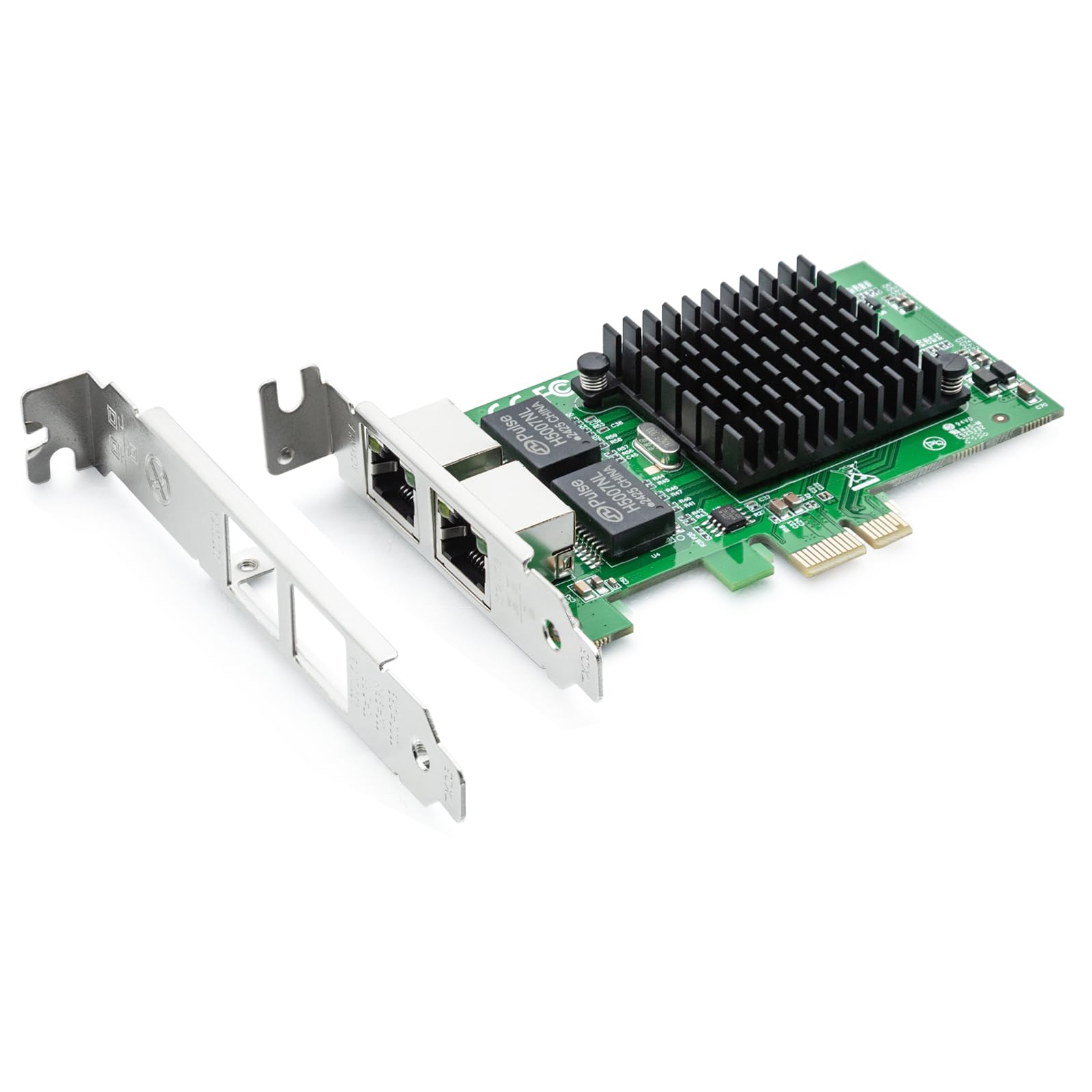
2. H!Fiber Gigabit Dual NIC with Intel 82576 Chip
Two Intel ports for your firewall or NAS at a price that undercuts the big names.
Building a pfSense router or an OpenMediaVault NAS? This dual-port card gives you two independent gigabit connections on the genuine Intel 82576 controller, which is the secret to its wide compatibility. Customers note that both a pfSense box and an OpenMediaVault box recognized it with zero configuration drama, and an old PC turned opnsense firewall found and configured both ports instantly.
The card supports 10/100/1000Mbps data rates over Cat5e cable up to 100 meters, so it handles standard home runs without issue. The package includes both a low-profile bracket and a full-height bracket, letting you install it in a slim server chassis or a standard desktop tower. The physical size is a hefty 8.8″L x 1.2″W x 5.7″H, which is an 8.8x length gap versus the tiny Intel I210-T1 — a fair trade for the second port.
What wins people over is the sheer functionality, with the most owner praise going to how well it just works across Windows, Linux, and even VMware ESXi 5/6. The honest caveat: it does not support VMware ESXi 7.0 or Mac OS, so check your hypervisor version first.
Server Ready: The genuine Intel 82576 controller delivers the driver stability that FreeBSD and Linux users demand, avoiding the Realtek headaches some brands cause.
One Limitation: If you run VMware ESXi 7.0 or a Mac, this card will not work for you — verify your system before ordering.
3. StarTech 1-Port PCIe Gigabit Network Server Adapter (ST1000SPEX2)

The drop-in fix for a dying motherboard port, with zero driver fuss on Windows.
Sometimes your onboard LAN just quits, and you need a card that works the moment it is seated. This StarTech adapter earns its praise for instant driver recognition on Windows 10 and 11 — no CD hunting, no manual installs. One owner used it to fix onboard LAN dropouts and immediately hit 1Gig upload speeds in speed tests, while another running a media server confirmed it handled the gigabit connection needed for smooth streaming.
The card is fully compliant with IEEE 802.3, 802.3u, 802.3x, and 802.3ab standards, plus it supports 802.1Q VLAN tagging and jumbo frames for more advanced network setups. Weighing just 1.28 ounces with a compact 2.7″L x 4.7″W x 0.7″H footprint, it fits easily even in tight cases, and the included half-height bracket covers slim desktops.
One honest note: while the listing implies an Intel chipset, reviewers point out this revision actually uses a Realtek chip. The card performs well regardless, but if you specifically need an Intel-based NIC for Linux compatibility, this may not be your pick.
Truly Plug-and-Play: Shoppers say Windows installs drivers automatically and full gigabit speeds follow, making this the least technical card here.
Know Before You Buy: The chipset is Realtek in this revision despite the description, so Linux purists should choose the Intel I210 version instead.
4. 10Gtek Gigabit Ethernet PCIe RJ45 Network Adapter

An Intel-powered dual-port card that treats your wallet and your server kindly.
For a home-lab builder on a budget, this 10Gtek card delivers two copper RJ45 ports on the original Intel 82576 controller. Owners running OpenMediaVault report flawless plug-and-play performance, with one enthusiast enabling bonding mode that doubled throughput without needing a managed switch. The card supports PCI Express 2.0 at 2.5 GT/s on an x1 lane, and it includes both standard and low-profile brackets for flexible mounting.
What impresses users most is the performance per dollar. One long-term owner noted it is identical to Intel-branded cards at less than half the price, confirmed by the proper Intel MAC prefix. Another praised its stability in production on Linux, citing zero dropped packets and low CPU overhead versus Realtek alternatives.
The main compatibility caveat mirrors the H!Fiber card: it does not support VMware ESXi 7.0 or above, and Wake-on-LAN is unreliable on Windows 10. Also, an occasional report of card failures exists, though the seller’s customer service earned praise for making it right with refunds.
What Owners Rave About
- Genuine Intel chip at a third-party price
- Native Linux kernel support, no driver hunting
- Dual ports enable link bonding for double speed
Fair Warnings
- No support for VMware ESXi 7.0 or newer
- Wake-on-LAN unreliable on Windows 10
- Rare reports of dead-on-arrival units
Best for: Linux and BSD users who want a cheap dual-port Intel card for a router or NAS build.
Think twice if: you rely on Wake-on-LAN from Windows or run the newest VMware hypervisor.
5. ULANSeN Dual-Port PCIe Gigabit Network Card

The dual-port enabler for turning an old PC into a serious Proxmox router.
This card exists for one great purpose: giving you the extra ports to build a software router. Owners describe slotting it into a small form-factor PC with the included low-profile plate, installing Proxmox, and creating an OPNsense VM for home WAN and LAN routing. The genuine Intel 82575/82576 controller keeps things stable, and the imported alloy heat sink helps it run cool during constant packet processing.
It runs at a combined 2000 Mbps across the two gigabit ports, with individual links at 10/100/1000. The card supports PCI Express 2.1 at 2.5 GT/s on an x1 lane, fitting x1, x2, x4, x8, and x16 slots. Beyond routing, it handles iSCSI boot, Wake-on-LAN, PXE remote boot, and VLAN filtering for more advanced network setups.
Compatibility is broad across Windows, Linux, FreeBSD, and even DOS, though it skips VMware ESXi 7.0 or above. A few owners note that Windows Server 2022 had hiccups, and there is no Mac OS support listed, so double-check your OS before purchase.
Purpose-Built for Routing: Owners running Proxmox and OPNsense confirm it delivers exactly the extra ports needed for a home router, at a price that makes the project worthwhile.
Watch the OS List: Windows Server 2022 and VMware ESXi 7.0 users have reported compatibility issues, so verify your environment first.
6. StarTech 1-Port Gigabit Ethernet Network Card, Intel I210 NIC (ST1000SPEXI)

The certified Intel I210 card for deskside servers that run hot and need quiet cooling.
Sometimes you want the Intel I210 chipset with a brand name behind it, and that is exactly what this StarTech card delivers. Owners running Proxmox on a Dell Optiplex found it outperformed their built-in NIC, which struggled with server operations. The card provides a fully compliant 10/100/1000 RJ-45 port and clocks a transfer rate of 1024 Mbps.
The design is cleverly tune for deskside systems where a fan sits above the card. In winter testing, One owner saw temperatures hold at 38-45°C with a 120mm Noctua fan at low RPM, achieving roughly 960 Mb/s per port—about 98% of theoretical maximum. That is quieter and cooler than a competing Intel 2-port card that runs hot without a heatsink.
What owners praise most is the value for money at this premium tier. Windows handles the driver automatically during install, though a few buyers report that Intel ProSet software support has been finicky. If you want a single reliable port with PXE network boot support and a trusted brand, this is a clean pick.
Built for Cooling: The layout works with a deskside fan overhead, keeping temperatures low even under constant load — ideal for a quiet home server.
The Fine Print: Intel ProSet driver integration has drawn mixed feedback from owners, so be ready to use standard drivers if you hit issues.
7. Binardat 4 Port Gigabit PCIe Network Adapter

Four independent gigabit ports to segment your whole network from one PCIe slot.
If one or two ports are not enough, this Binardat card stuffs four gigabit RJ45 interfaces onto a single PCIe card. Each port runs on the Realtek RT8111H controller, supporting 100M/10M auto-negotiation and standard Cat5e cabling up to 100 meters.
The card works across Windows, Linux, and Mac OS, with drivers readily available from the Binardat or Realtek website. It supports Auto MDIX, IEEE 802.1Q VLAN tagging, full-duplex flow control, and 9K jumbo frames, making it capable of serious network segmentation. The physical card uses a 2.5Gbps PCI Express bus, so the four ports together do not bottleneck the PCIe slot.
The honest caveat is the chipset’s age. Owners note it performs on par with onboard Realtek and offloads CPU work, but the older RT8111H lacks the latest power efficiency and advanced features. One quirk: Linux enumerates the ports in an unusual 1-3-4-2 order rather than sequential, though it works fine once you know the layout.
Why Four Ports Win
- Segment WAN, LAN, and DMZ without a switch
- Supports Windows, Linux, and Mac OS
- Auto-negotiates down to 100M/10M for legacy gear
Ports vs. Polish
- Older Realtek chipset lacks modern efficiency features
- Ports enumerate out of order on Linux (1-3-4-2)
- Generic drivers may cap you at 2.5gb until updated
Grab this for: a homelab where four separate network segments beat the cost and clutter of an extra switch.
Pass if: you want the latest Intel efficiency or need predictable port numbering in Linux right from the start.
Understanding the Specs
Chipset: The Real Compatibility Decider
The chipset is the controller that manages your network traffic, and it determines which drivers your operating system needs. Intel chipsets like the 82576 and I210 are natively supported in Linux and BSD kernels, meaning pfSense, TrueNAS, and Proxmox recognize them instantly with no extra work. Realtek chips are fine on Windows but often need manual driver installation on other systems, so match the chipset to your OS before choosing.
Ports and Throughput
Each gigabit port gives you a separate 1000 Mbps link, but the total card throughput depends on the PCIe bus. A single port saturates an x1 lane easily, while dual-port cards share that same x1 lane’s bandwidth — fine for routing but not for doubling a single connection’s speed unless you use bonding. Quad-port cards usually require a faster PCIe bus to avoid bottlenecking all four links at once.
FAQ
Will a gigabit PCIe card fit in my motherboard’s slot?
Is an Intel chipset worth paying extra for over Realtek?
Why would I need a dual-port or quad-port network card?
Will this card work with VMware ESXi for my home server?
Do I need to install drivers manually or will Windows recognize the card?
What is the difference between a full-height and low-profile bracket?
Can a dedicated network card improve my gaming ping?
Does Wake-on-LAN work with these PCIe network cards?
Is a 1G Ethernet Interface still worth it if my motherboard has gigabit built in?
What does PCI Express 2.1 and 2.5 GT/s mean for real-world speed?
Final Thoughts: The Verdict
The crowd favorite here is the 1g ethernet interface from Intel because it pairs the lowest reported latency with the trust of a first-party chipset. If your goal is a dual-port router or NAS build, the H!Fiber 82576 offers two genuine Intel ports at a price that is hard to argue with. And for anyone who wants four separate network segments from one slot, the Binardat quad-port is the only way to get there without adding a switch.
How We Picked
We do not accept paid placement. Every pick is matched to a real buyer and a real use-case; we do not hands-on test units.
Sources & Methodology
Specifications: manufacturer listings and product documentation. Review insights: verified customer reviews, as of September 2026. Pricing: not shown on this page (it changes often); check the current price via the retailer link.
As an Amazon Associate, Gadgets Feed earns from qualifying purchases. This does not affect which products we feature.