
Our readers keep the lights on and my morning glass full of iced black tea. As an Amazon Associate, I earn from qualifying purchases.
Specs are compiled from manufacturer listings and verified buyer reviews and can change over time — please confirm the key details on the product page before buying.
Soft, flexible filament like TPU is a nightmare on a stock Bowden setup — it kinks, jams, and extrudes in lazy spurts. A direct drive extruder solves that by mounting the motor right above the hotend, slashing the distance the filament has to travel. The result is tighter retraction, crisper details, and reliable TPU printing without constant supervision.
I’m Min — the founder and writer behind Gadgets Feed. This guide is built by comparing the manufacturers’ published specifications and the patterns across verified customer reviews, so you get each pick’s real strengths and trade-offs instead of marketing spin.
The most important thing to check before you buy is motor compatibility and your printer’s mounting pattern. Reviewing the 3d printer direct drive extruder options below will show you which upgrades are true drop-ins and which ones demand firmware tinkering.
Our Picks at a Glance


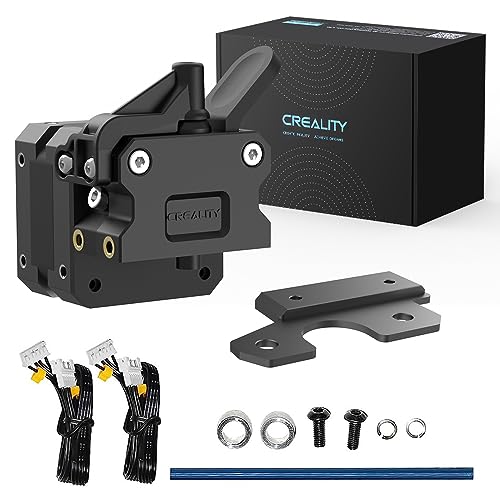
How To Choose The Best 3D Printer Direct Drive Extruder
Switching to direct drive is the single best upgrade for an Ender 3 family printer, but not every kit suits every machine. Nail down your printer model first, then match the extruder’s mounting style, motor compatibility, and hotend temperature range to your actual printing goals.
Match the mount to your carriage
The biggest mistake beginners make is assuming every kit drops onto any printer. Some extruders bolt directly to the stock carriage with a single plate, while others need you to relocate the X-axis limit switch or print a custom bracket. Read the compatibility list carefully — a kit made for the Ender 3 family may not fit a CR-10S without shaving parts or adjusting the axis.
Check your motor shaft shape before buying
Many stock Creality extruder motors have a round shaft, but several premium direct drive kits expect a D-shaped shaft for a secure gear grip. If your motor uses a round shaft and the kit needs a D-shaft, you will need to swap in a new motor. This is a detail owners often discover only after the package arrives, so verify it early to avoid a stalled install.
Look for dual gears and an all-metal hotend
Dual-gear drive systems grip the filament from both sides, which stops the gear from grinding a flat spot into soft TPU. An all-metal hotend lets you push temperatures safely past 240°C for PETG and ABS without worrying about a PTFE tube degrading inside. These two features together determine whether your upgrade handles just PLA or the full filament library.
Quick Comparison
| Model | Best For | Gear Drive | Weight | Hotend Included | Amazon |
|---|---|---|---|---|---|
| Micro Swiss Direct Drive★ Best Overall | All-metal reliability | Single gear | 7 oz | Yes — all-metal | Amazon |
| Creality Direct Drive KitBest Value | Drop-in value kits | Single gear | 1.7 lb | Yes — all-metal | Amazon |
| Creality Sprite SE KitEasy Install Pick | Easy Creality install | Dual gear | 9.9 oz | No | Amazon |
| ELEGOO Neptune Extruder | OEM Neptune replacement | Dual gear | 1.08 lb | Yes — assembled | Amazon |
| CR Sprite Pro Kit | High-temp multi-material | Dual gear 3.5:1 | 1.79 lb | Yes — all-metal | Amazon |
| Creality Sprite Pro Kit | Official 300°C printing | Dual gear 3.5:1 | 10.2 oz | Yes — all-metal | Amazon |
| Bondtech LGX | High-end Voron builds | Dual gear | 8.1 oz | No | Amazon |
| Micro Swiss NG | Compact CR-10/Ender builds | Bevel gear 3:1 | 15.5 oz | Yes — full assembly | Amazon |
| E3D Hemera | Integrated compact system | Dual gear | 1.1 lb | Yes — integrated | Amazon |
In-Depth Reviews
1. Micro Swiss Direct Drive Extruder for Creality CR-10 / Ender 3
Our pick — over 4.5★ from 750+ verified ratings; the strongest balance of quality and price.
The machined-aluminum workhorse that turns clog-prone Bowden setups into consistent performers.
Owners consistently call this the best single upgrade they have added, and the reason shows up in the hardware: a solid all-metal hotend that removes the PTFE tube failure point entirely. It fits the entire Creality family — CR-10, CR-10S, CR-10 Mini, CR-20, Ender 2, Ender 3, and Ender 3 Pro — and runs a standard 0.4mm nozzle with 1.75mm filament. Owners praise the machining quality and report noticeably fewer clogged nozzles when used correctly.
You get a QR video guide for setup, but budget time for calibration afterward — buyers report the unit needs to be “Calibrated to 139.25 steps/mm; X/Y offset needed.” That offset matters because the nozzle sits in a new position relative to the bed. After calibration, retraction is clean with no swelling, and one user ran a 0.8mm nozzle at 70mm/s without issues. The 7-ounce body reduces gantry strain compared to bulkier rivals.
Value perception varies, and a few owners found the small screws fragile, with one needing to file a lever arm countersink. Some units arrive with minor cosmetic marks, but functionality remains solid. One builder swapped in the included lever and saw print failure rates drop dramatically after a simple install.
Real-world verdict: The quality, the most-praised aspect, shows in every layer, making PETG and other finicky filaments behave on an Ender 3 Pro.
Reach for it if: you want a proven all-metal direct drive that handles demanding filaments without heat-creep drama.
Think twice if: you hate firmware tinkering — the e-steps and X/Y offset calibration here is mandatory, not optional.
2. Creality Original Ender 3 Direct Drive Upgrade Kit
The 100% official Creality kit that kills print failures with an easy afternoon install.
This is the upgrade that owners buy twice — literally, with one builder purchasing a second unit for their other Ender 3 after the first impressed them. It’s a full extrusion kit that switches your Bowden setup to direct drive without touching the printer’s core function. The all-metal structure is durable and wear-resistant, and the integrated design keeps wiring and replacement clean. It handled PLA, PETG, and PLA+ well, and it’s specifically built for flexible TPU where Bowden tubes fail.
Owners praise functionality most, and one buyer put it plainly: “This one change brought my print failure rate down drastically and it was super easy for me to install.” That ease comes from a kit that includes the longer connecting cable, tools, accessories, and a diagram instruction sheet. The 42-40 stepper motor lowers torque requirements, reducing nozzle blockages during retraction and hiccups when loading fresh filament.
The catch is that installation is genuinely involved — you’ll go into the processor board, remove hot glue securing small connectors, and untape the wiring harness. Loose screws and filament breakage were occasional gripes, so check every fastener before powering on. The added 1.7-pound head on your gantry is heavier than dedicated direct drive designs, which can affect print speeds on a stock Ender 3.
Editor’s take: For the money, this delivers the biggest reliability jump of any kit here — the functionality praise is well-earned by real failure-rate reductions.
Best for: Ender 3, V2, and Pro owners who want an official Creality-branded path to flexible filament printing.
Worth noting: the meticulous wiring work will test your patience, and one owner’s gear started clicking after two months — treat it as a consumable.
3. Official Creality Ender 3 Sprite Direct Drive Extruder SE Kit
A dual-gear Sprite that upgrades to direct drive without tearing your printer apart.
This 2023 Sprite Extruder SE Kit takes a different approach than most: instead of replacing the whole hotend assembly, it mounts onto your existing setup using just one installation component and an isolation column. That means no extensive disassembly or machine rebuild for most users — the thing owners noticed immediately is how much easier the workflow is. It’s compatible with the Ender 3, V2, Pro, Ender 5, and CR-10 lines, though the hotend itself isn’t included; the extruder works with your original hotend.
The dual-gear drive is the star here, using a 3.5:1 gear reduction ratio that improves squeezing performance without damaging the filament. Weighing just 210 grams, it’s light enough to avoid stressing the gantry while still delivering smoother, more precise prints. One owner called it the best Ender 3 V2 upgrade they made, noting less retraction needed and more accurate prints. It also handles soft filaments like TPU 95A well, plus mid-print color changes.
The value-for-money question splits owners, though print quality and ease of use earn consistent praise. Expect roughly a 30-minute install, and be aware the included mounting plate isn’t a perfect fit for a CR-10 V2 — one owner had to make a custom mount. Stock firmware resets your e-steps, so you’ll set them to 424.9 and likely flash Jyers firmware to make the setting stick.
What wins owners over
- Dual-gear grip handles TPU without grinding
- 210-gram body is gantry-friendly
- Easy install, no missing pieces reported
The setup reality
- Stock firmware resets e-steps — needs a flash
- Mounting plate misses CR-10 V2 fit
Who it suits: Ender 3 V2 owners who want dual-gear reliability without a full hotend replacement.
Who should pass: beginners hoping for a pure plug-and-play swap — firmware tuning is part of the deal here.
4. ELEGOO Dual-Gear Direct Drive Extruder for Neptune 3 Series

The fully assembled, drop-in fix that makes a clogged Neptune 3 feel brand new in minutes.
This is the rare extruder that isn’t an upgrade at all — it’s a direct OEM replacement for the Neptune 3 Pro, 3 Plus, and 3 Max only. If your stock extruder clogs or a bad print rips the hotend off, this bolts on fully assembled with no calibration drama. One owner swapped a clogged unit in 10 minutes and said it works like a brand new printer. Another fixed homing failures and auto-leveling issues simply by replacing the worn part, since it’s the genuine ELEGOO component the machine expects.
Reliability is the trait owners praise most, and the “easy to install” feedback backs it up — several describe a 2-minute turnaround restoring print quality. The dual-gear design is already dialed in from the factory, which is why it works as a true plug-and-play swap rather than a tinkering project. Because every extruder is tested before shipping, you may find a small amount of test filament left inside, which is a sign of quality control rather than a defect.
The recurring durability gripe is the hotend — several owners reported burnt-out units, so keep an eye on temperatures during long prints. It’s also a better deal than buying the individual parts after a blob-of-plastic disaster strips your fan and heat block. The 1.08-pound assembled weight means it’s not the lightest, but as an OEM part that doesn’t matter for reliability.
The bottom line: If you own a Neptune 3 series and your extruder died, this is the exact part you need — no research, no compatibility guessing, just a working printer again.
Perfect for: Neptune 3 owners with a clogged or damaged extruder who want the official part back in place fast.
skip it if: you run an Ender 3 or any non-Neptune machine — this fits one family only, by design.
5. CR Sprite Direct Drive Extruder Pro Kit with Dual Fan Design
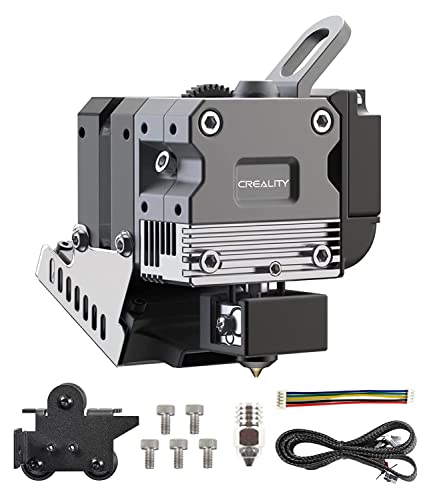
A dual-fan, all-metal Sprite that pushes Ender 3 series printing into high-temperature territory.
This kit combines a dual-gear extruder with an all-metal hotend so your Ender 3, V2, Pro, or Max can handle the full filament lineup — PLA, PETG, ABS, and TPU. The 3.5:1 gear ratio pairs with the motor to deliver up to 80N of extruder force, giving you precise control over feeding and retraction. Owners running print farms called the output quality excellent, with one noting near injection-molded results when paired with Klipper and pressure advance.
The dual-fan design is the defining feature here, using flow-field simulation for powerful heat dissipation and a quiet fan behind a metal cover for high-temp safety. The compact package measures 54x50x64.3mm and weighs 288g, keeping the gantry load reasonable. Quality is what owners praise most, and the kit works for both direct and Bowden feeding — a rare flexibility that lets you experiment. It also works on non-Creality 2020-gantry machines like the Sunlu S8 with minor bed spacers.
The installation is where opinions split — it’s a genuine project on an Ender 5 Pro, requiring carriage trimming, X-stop relocation, and fan shroud clearance mods. CR Touch owners need firmware with a -30, -40mm offset, and the included mount can position the probe too far forward. Heat control reaches up to 300 degrees, which is powerful but demands respect. Expect to dial in e-steps between 424.9 and 433.5 and adjust your Z-offset after setup.
Why it earns its place
- 80N extruder force for reliable flex filament feed
- Dual-fan cooling handles sustained high-temp prints
- Works on direct and Bowden configurations
Where it fights back
- Complex install on Ender 5 Pro needs modifications
- CR Touch mount may need a custom print
Best for: experienced Ender 3 Max or 5 Pro users who want a high-temp all-metal setup and don’t fear a carriage mod.
Not for: first-time upgraders — this kit assumes you can modify mounts and flash custom firmware comfortably.
6. Creality Official Sprite Extruder Pro Kit, 300°C All-Metal

The official Sprite Pro that open up 300°C printing and kills heat creep on Ender 3 machines.
Creality’s own Sprite Pro kit merges the dual-gear extruder with an all-metal hotend, and the headline number is 300°C — high enough for engineering materials that stock Ender 3 hotends can’t touch. The all-metal design eliminates heat creep and PTFE degradation, which one owner called “shockingly good” for finally clearing up chronic clogs. Functionality and quality both earn top praise, with users reporting sharp details, consistent flow, and excellent flexible filament handling.
The dual-gear system uses a 3.5:1 ratio that produces up to 80N of force without damaging the filament, and the compact 54x50x64.3mm body weighs just 288g. Fast heating and effective cooling mean minimal retraction is needed for clean prints, and the included short cable connects BL Touch or CR Touch for auto-leveling. One builder saw a huge print quality jump on a self-built printer, needing only custom Thingiverse parts to mount it.
Installation gets mixed feedback — it’s not plug-and-play, and owners warn about unlabeled connectors where a wiring mistake can fry your board, plus a loud heat break fan. Check polarity with a multimeter before powering on, and plan for a firmware update since some units default to Chinese. Probe offsets sit around X: -28, Y: -40, and you’ll need to retune retraction and leveling after setup. Durability concerns exist, with occasional units clogging within a month or breaking after extended use.
What the data says: When it works, it transforms print quality — the functionality praise is loud and consistent. The catch is a demanding install that rewards careful wiring.
Reach for it if: you print high-temperature materials and want an official Creality all-metal solution with dual-gear reliability.
Look elsewhere if: you want true plug-and-play — this kit needs firmware work and careful connector handling before first print.
7. Bondtech LGX Extruder
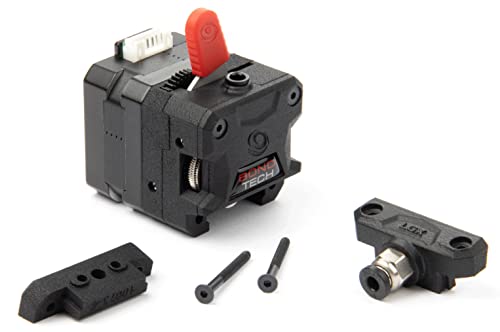
The large-gear Bondtech that serious Voron builders treat as the only extruder worth mounting.
This is the first Bondtech feeder built around their new Dual Drive Technology with larger drive gears, and the 4.8-star crowd — nearly three dozen owners, every one smitten — treats it as a workhorse. The big gears grip filament securely with no grinding or stripping even under high resistance, which is exactly what you want on a fast CoreXY machine. One owner summed it up: “This thing is a workhorse and i’ve yet to have a single problem!”
The LGX shines on machines like the Voron 2.4, where it pairs with a Mosquito hotend for instant performance gains over Afterburner and BMG-M setups. Owners mention it adds hotend pressure, allowing 15°C lower print temperatures and drastically reduced retraction — which means better quality and fewer stringing artifacts. The lever-style tension control replaces the usual spring, letting you set grip precisely; one user found a single click enough for their filament.
At 8.1 ounces, it’s a featherweight for the grip it delivers, which matters on fast-moving gantries where head mass causes ringing. The honest catch is that you’re buying an extruder mechanism only — there’s no hotend or mounting plate for a specific printer, so it’s built for tinkerers with a mounting solution ready. It’s a major upgrade for cheap printers, but you’ll pay a premium that reflects genuine engineering rather than a generic kit.
The enthusiast read: If you’re building a Voron or upgrading a CoreXY, this is the extruder that owners say they wish they’d bought before assembling their machine at all.
Who it’s for: experienced builders with custom mounts who want maximum grip reliability on high-speed or high-flow setups.
Who it isn’t for: Ender 3 owners wanting a bolt-on kit — this is a component, not a complete solution.
8. Micro Swiss NG Direct Drive Extruder with Bevel Gear

A bevel-gear Micro Swiss with the industry’s shortest filament path for ultra-rigid, compact printing.
Micro Swiss engineered this NG extruder around a bevel gear design that achieves a filament path under 41mm — the shortest in the industry. That tiny path means less filament flex and more precise extrusion, and the unique motor placement keeps the overhang low for a compact, rigid system. The 3:1 gear ratio delivers high torque for reliable feeding, and the kit arrives with everything: master extruder assembly, adaptation plate, stepper motor, fan shroud, custom extension cable, and hotend assembly. Owners praise print quality most, with one calling it a standout for PETG.
The assembly reuses your stock fans, heater, and thermistor, which keeps costs down, and owners found the build sturdy compared to stock parts. On an Ender 3 Pro with Klipper, users report glossy, near-invisible layers after setting rotation distance to 7.8 and retraction to just 1mm. The compact head also works for flexible filaments without the constant babysitting that Bowden setups require. Made in the USA by Micro Swiss, it carries the same machining pedigree as their classic direct drive.
Here’s where buyer expectations clash with reality: the “drop-in” claim is misleading for many users. The CR-10S needed an X-axis mod when the roller screw blocked the limit switch, and there’s no BLTouch bracket included — you’ll print one. Filament loading is genuinely tricky and requires a sharp 45° cut to feed correctly. The value question splits owners sharply, with some calling it well worth the money and others feeling the price doesn’t match the effort.
What makes it special
- Under-41mm filament path for precise extrusion
- 3:1 gear ratio with high torque feed
- Reuses stock fans and heater to save cost
The honest friction
- Not truly drop-in for every listed printer
- Filament loading takes technique to master
Best for: Ender 3 Pro tinkerers who want premium print quality and don’t mind a printed BLTouch bracket.
Choose differently if: you expect pure plug-and-play — the Micro Swiss NG demands more setup than its listing suggests.
9. Genuine E3D Hemera 1.75mm 12V Direct Kit
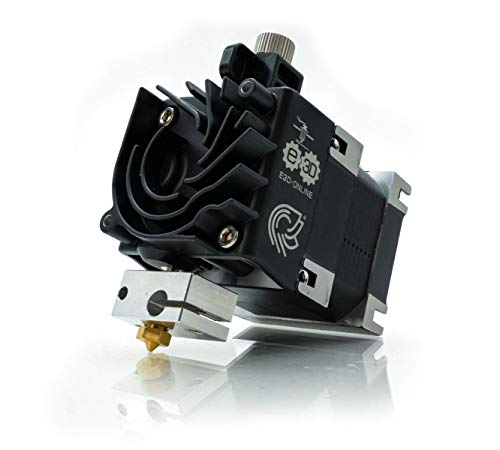
The legendary E3D Hemera that owners swear will go on every machine they ever build.
E3D’s Hemera is a dual-drive, compact extruder with the hotend built directly into the system — no separate parts to align, no Bowden tube in the path. It’s designed around integrated filament constraint and a never-before-seen heatsink, and owners who have “tried everything out there” call it simply the best. One devoted user said that as long as E3D makes them, they’ll put one on every machine they own. It prints any filament type without issue, according to the consensus among its small but passionate owner base.
The dual-drive gears grip from both sides, which combined with the ultra-short filament path makes flexible materials behave flawlessly. The 12V configuration suits most standard builds, and at 1.1 pounds it’s a reasonable gantry load for a unit that bundles extruder and hotend together. Owners note it’s better than most even without tuning, and once dialed in, it’s effectively perfect — the fine-tuning in firmware is what separates good results from exceptional ones.
The trade-offs are real but specific. The firmware tuning takes genuine effort to get to “perfect,” and owners acknowledge the install has a degree of complexity common to high-end extruders. Quality control on delivery is the bigger risk — reports include a heavily used and broken unit arriving, plus an early-model box with seals broken and a labeling inconsistency (one unit still says “Hermes”). Check gears for cracks on arrival, as early production units were known for that issue.
The verdict from owners: Once it’s set up, the Hemera prints anything with an accuracy that owners describe as “ridiculous” compared to alternatives — it’s a destination, not a stepping stone.
Who it’s made for: builders who want an integrated, dual-drive system and are willing to invest time in firmware calibration.
Who should be cautious: anyone nervous about receiving a used or early-model unit — inspect carefully on arrival and verify the gears.
Understanding the Specs
Gear ratio and extruder force
The gear ratio tells you how much torque the motor multiplies before it reaches the filament. A 3.5:1 or 3:1 ratio means the motor turns several times to move the filament once, which gives you finer control and more pushing force — up to 80N on some Sprite designs. Higher ratios handle soft filaments and high flow rates without skipping, but they’re also slower to respond during fast retraction moves.
E-steps and calibration
E-steps is the number of motor steps your firmware uses to push exactly 1mm of filament. Every direct drive swap changes this value because the gear diameter and ratio differ from your stock Bowden extruder. Kits specify values like 424.9 or 139.25 steps/mm — you enter these in firmware, and on some stock Creality boards you’ll need custom firmware like Jyers to make the setting persist through a reboot.
FAQ
Will a direct drive extruder fit my stock Ender 3 carriage?
What is the difference between direct drive and Bowden extrusion?
Do I need to change my printer firmware after installing a direct drive kit?
Why won’t my direct drive extruder print TPU without grinding?
How do I know if my motor shaft is compatible with a direct drive kit?
What does an all-metal hotend give me over a stock PTFE-lined one?
How long does installation take for a typical direct drive upgrade?
Why is my direct drive nozzle hitting the bed or missing the print area?
Can I use a direct drive extruder with a CR Touch auto-leveling sensor?
What is the heaviest part of a direct drive upgrade and why does weight matter?
Final Thoughts: The Verdict
For most users eager to upgrade an Ender 3 or CR-10, the 3d printer direct drive extruder winner is the Micro Swiss Direct Drive — its machined all-metal quality and proven clog reduction make it the crowd favorite across more than 700 owner experiences. If you want the official Creality route with dual-gear confidence and 300°C capability, grab the Creality Sprite Pro Kit. And for a quick OEM swap that revives a dead Neptune 3, the ELEGOO Extruder is the one to reach for.
How We Picked
We do not accept paid placement. Every pick is matched to a real buyer and a real use-case; we do not hands-on test units.
Sources & Methodology
Specifications: manufacturer listings and product documentation. Review insights: verified customer reviews, as of September 2026. Pricing: not shown on this page (it changes often); check the current price via the retailer link.
As an Amazon Associate, Gadgets Feed earns from qualifying purchases. This does not affect which products we feature.