
Our readers keep the lights on and my morning glass full of iced black tea. As an Amazon Associate, I earn from qualifying purchases.
Specs are compiled from manufacturer listings and verified buyer reviews and can change over time — please confirm the key details on the product page before buying.
A 110 film scanner is the key to rescuing tiny 13mm negatives from the 70s and 80s. Those tiny 13mm negatives from the 70s and 80s are easy to misplace and even easier to overlook. Only a scanner with a dedicated 110 holder can convert those frames into sharp digital JPEGs.
I’m Min — the founder and writer behind Gadgets Feed. This guide is built by comparing the manufacturers’ published specifications and the patterns across verified customer reviews, so you get each pick’s real strengths and trade-offs instead of marketing spin.
Pocket-size 110 negatives need a holder that fits or they slip through the scan. 110 film scanner picks here are ranked on holder fit, ease of use, and image quality from the data.
Our Picks at a Glance

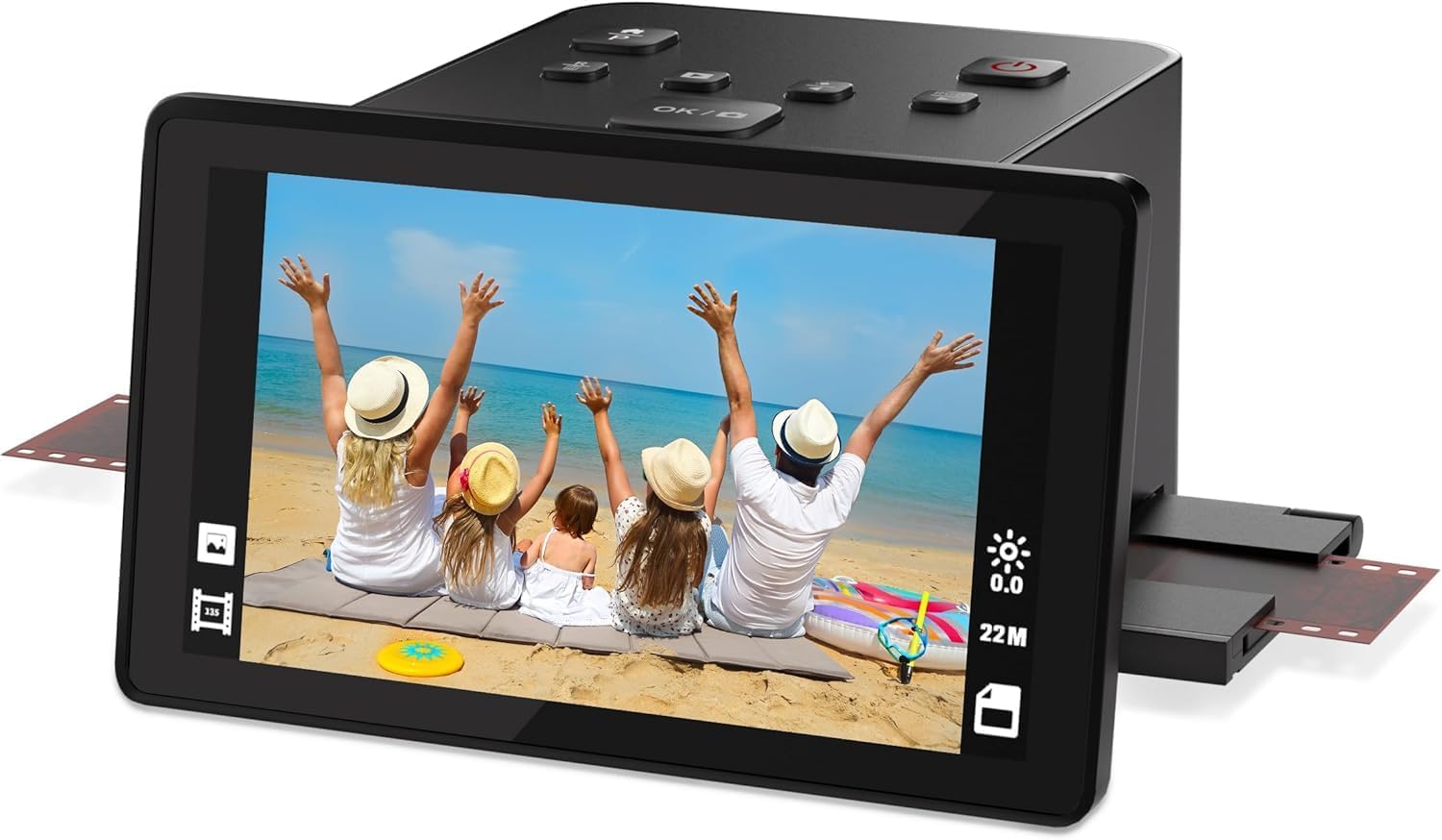

How To Choose The Best 110 Film Scanner
Before you buy, know that a 110 film scanner is judged on one thing first: how well it handles the tiny 13mm-wide film strip. A scanner that treats 35mm film beautifully can still ruin 110 frames if the holder lets them slip or sit crooked. Here is what actually separates a good buy from a frustrating one.
The 110 holder is the whole game
A tight-fitting 110 film holder or adapter is non-negotiable. A loose sled means your negatives slide out of alignment mid-scan, producing blurry or crooked frames you will have to reshoot.
Optical resolution vs. interpolated numbers
Manufacturers list big numbers like 22MP or 25MP, but much of that is interpolated (the scanner software stretching a smaller true image). For family viewing and social media, that is fine. For giant enlargements, you need a higher native optical sensor.
Preview screen matters for tiny frames
Since 110 frames are so small, a large 5-inch LCD preview screen is your friend. It lets you check focus and alignment before saving, so you don’t end up with a full card of blurry shots.
Quick Comparison
| Model | Best For | Max Resolution | Preview Screen | 110 Support | Amazon |
|---|---|---|---|---|---|
| ClearClick Virtuoso 2.0★ Best Overall | All-rounder for film + slides | 22 MP | 5″ LCD | Yes (holder) | Amazon |
| DigitPro 22MPBest Value | Large slide collections | 1080P | 5″ LCD | Yes (holder) | Amazon |
| Magnasonic FS70Top Performer | Fast batch scanning | 25 MP | 5″ TFT | Yes (insert) | Amazon |
| KEDOK 4-in-1 | Photos, cards & film | 22 MP | 5″ LCD | Yes (holder) | Amazon |
| PORTTA NS10 | Simple slide viewing | 22 MP | 5″ LCD | Yes (adapter) | Amazon |
| Magnasonic FS71 | Gifting to non-tech users | 24 MP | 5″ LCD | Yes (insert) | Amazon |
| KODAK Slide N Scan | Reliable brand trust | 22 MP | 5″ LCD | Yes (adapter) | Amazon |
| HP FilmScan HPFS500 | Touchscreen controls | 13 MP | 5″ Touch | Yes (tray) | Amazon |
| ClearClick QuickConvert 2.0 | Cord-free photo scanning | 22 MP | 5″ LCD | Yes (holder) | Amazon |
In-Depth Reviews
1. ClearClick Virtuoso 2.0
Our pick — over 4★ from 300+ verified ratings; the strongest balance of quality and price.
A versatile scanner that handles 110, 126, and 35mm film plus slides with a 5-inch preview.
This is the machine for the family archivist who has a shoebox of mixed media. The Virtuoso 2.0 outputs 22 MegaPixels (interpolated), and its extra-large 5-inch preview screen shows photos in real time as you scan, so you can catch a bad frame before committing it to the SD card. That real-time check matters when your negatives are tiny 110 frames.
Buyers report crunching through over 500 old negatives and slides in under 8 hours, which speaks to its per-scan speed and its removable trays that handle short strips and last slides. It supports 35mm, 110, and 126 negatives plus 50mm slides, and with the Mini HDMI output you can view everything on the TV without hooking up a computer.
The trade-off is image character: scans lean toward a clean digital look, and owners note the auto-brightness runs hot, so knocking exposure down manually by a stop or two gives more natural results. Saturation is also fixed high, so plan on a little free photo-editing software for color correction.
Why it wins
- Fast per-frame scanning with real-time 5-inch preview
- Handles 110, 126, and 35mm plus slides in one unit
- Runs fully standalone with no drivers needed
The honest catches
- Auto-brightness overexposes; expect manual tuning
- Fixed high saturation limits in-scanner color control
Reach for it if: you have a big mixed pile of 110 and 126 film plus slides and want one box that powers through it.
Consider the catch: you will want a free photo editor for color fixes, and you need to provide your own SD card and HDMI cable.
2. DigitPro 22MP Film & Slide Scanner
A high-volume scanner that digitizes thousands of frames quickly without a computer.
The DigitPro C190 is the pick when you have serious volume sitting in drawers. It digitizes color and B&W 35mm, 110, and 126 negatives plus Super 8 film, saving right to built-in 128MB memory or an SD card up to 64GB. Its 5-inch LCD gives a wide viewing angle, and the one-touch scan button means no settings maze.
What wins people over is how fast the slide-through scanning feels. Owners mention running through thousands of frames in just days, with sharp, colorful results on aged negatives. The bundle is generous: you get film holders for 135, 110, 126, and Super 8, HDMI and USB cables, a power adapter, and a cleaning brush.
The caveat is the sled fit. Customers note the film can sit loose in the sled, so 110 strips risk misalignment and slippage if you rush the feed, and enlarged prints stay soft — one owner calculated roughly 75 DPI at 4×6 inch enlargement.
Who it beats: big-volume archivists who want faster throughput than fiddly tray-based rivals at a lower spend.
Who it doesn’t: anyone planning large prints — and you must supply your own SD card.
3. Magnasonic FS70
A fast tray-loading scanner that processes each frame in under 5 seconds.
You will spend less time waiting with the FS70, because its fast-loading film inserts scan each frame in under 5 seconds. It handles 35mm, 110, 126, and Super 8 film plus slides, saving them as JPEGs at a headline 25MP. It is one of the few models here using a CCD optical sensor (the component that captures the image), which gives you better light sensitivity, so your shots stay clear even in tricky lighting.
Owners rate the pace highly — one reported roughly 450 scans done in about 2 hours. The 5-inch TFT LCD shows results on the scanner itself, with brightness, RGB color, flip, and mirror adjustments handled on-device. There’s 64MB of internal memory plus an SD slot supporting up to 128GB.
Expect to manage expectations on sharpness: the 25MP figure is interpolated from a lower native capture, so zoomed-in pixels smear, and reviewers advise that a real flatbed or DSLR copy setup still beats it for archival-grade detail. Dark slides can also scan as a pink blob, so check each preview immediately.
Speed star: the scanning tempo is the headline — sub-5-second frames make a 300-slide evening genuinely realistic.
Know the limit: for serious print archiving, this is not the tool; treat it as a fast sharing machine.
4. KEDOK 4-in-1 Scanner

A 4-in-1 scanner that also digitizes printed photos, business cards, and negatives.
The KEDOK goes beyond film. Its 22MP scanner takes 135 and 110mm negatives, 135 slides, plus printed photos up to 5R (5×7 inch), 4R, and 3R, and even business cards — making it a full memory-drawer workstation. A 5-inch LCD gives live preview, and an 8GB SD card ships in the box, saving you that first accessory trip.
The workflow is genuinely simple: owners describe scanning roughly 1,500 slides over 50 years old, four at a time, with satisfaction given the age of the media. The package is complete with holders for 135 negative, 135 positive, and 110 film, plus photo and business card holders.
Scratch-resistance is the weak point buyers flag. Some report blurred and off-color results on sharp originals, with distortion that made a few return the unit, so the quality depends on batch luck. This one demands careful inspection of each scan before you delete the original.
For the frame-count this handles in a session, the workflow rhythm matters more than optical purity — and that rhythm is decent. It is a strong fit for casual family sharing rather than pixel-peeping.
Reach for it if: you also need prints and business cards digitized without buying a separate flatbed.
Look elsewhere if: consistency is your priority — this scanner shows occasional blur and off-color results on sharp originals.
5. PORTTA NS10

An easy-to-use scanner that delivers impressive slide results at a budget price.
For a first-time digitizer with a stack of inherited slides, the PORTTA NS10 keeps things wonderfully simple. Choose between 16MP standard or enhanced 22MP output, line up your frame on the bright 5-inch LCD, and save to an SD card up to 128GB. It handles 35mm (135), 126, and 110 film plus Super 8 photos with no computer in sight.
The experience is where this one shines. Owners describe it as brilliantly easy to use, with slides that look really good on the screen — the kind of result that makes a Sunday-afternoon digitizing session feel easy. Built-in brightness, color, and orientation tools let you fix frames before saving.
The sticking point is the adapter. Several users wish they could just push a slide straight into the machine instead of lining it up in the included holder, which feels clumsy for quick jobs.
First-timer friendly: the setup-to-first-scan time is near zero, which is the whole point of a starter scanner.
Grind factor: the fiddly adapter makes fast batch work slower than rivals with push-through trays.
6. Magnasonic FS71

A gift-ready scanner with a 32GB SD card included, turning old negatives into colorful digital images.
The FS71 takes the Magnasonic formula and adds the one thing frustrating to everyone: a bonus 32GB SD card included in the box, ready to scan from minute one. It outputs 24MP JPEGs from 35mm, 110, and 126 film plus slides, previewing on that same large 5-inch LCD.
This is the pick for a non-tech-savvy parent. Owners describe it as the absolute hit as a gift, extremely easy to use with a bright, clear 5-inch preview, and large buttons that reduce strain during long sessions. It handles 1950s negatives with excellent colors and crisp images, per owner reports.
The 2-piece 110 holders are thicker and need a manual push-pull to advance, which slows things down versus a true push-through tray. Vertical slides also need rotating after the scan, and dust on one negative can transfer to the next — so keep the cleaning brush handy.
Opens well
- Bonus 32GB SD card means it works from the start
- Easy, bright LCD with large low-strain buttons
- Strong color balance on very old negatives
Slows you down
- Thick 110 holders need manual push-pull advancing
- Dust transfers between frames if you skip cleaning
Buy it for: anyone who found a drawer of family negatives and wants the gentlest possible on-ramp to digitizing.
Keep in mind: the 110 workflow is manual, so pace yourself for longer sessions.
7. KODAK Slide N Scan

The household name that has already digitized a nation’s worth of attic slides.
KODAK brings its imaging pedigree to a scanner that is quick to set up and intuitive to run. It handles 135, 110, and 126mm negatives plus 50mm slides, saving to an SD/SDHC card up to 32GB, with a 5-inch LCD that doubles as a gallery-mode digital picture frame when you are not scanning. Quick-feeding tray inserts keep the loading action continuous.
The volume owners put through this is staggering — reports of a full carousel of slides scanned in about 45 minutes or less, with roughly 2 seconds per scan. The color-correction feature earns specific praise for reviving faded Ektachrome, and image quality holds up well even at 8×10-inch prints.
The recurring friction is the manual loading: aligning each slide and negative in the tray takes care, and dust can mark frames if you do not use the included brush. Color adjustment settings are also fairly limited on-device, so fine tuning happens after the scan.
The catch is the SD requirement: no SDXC cards, only SD or SDHC up to 32GB, and the card is not included. That 2-second speed, though, makes it the crowd favorite among serious slide archivists.
Reach for it if: sheer throughput matters and you trust the KODAK name for consistent color science.
Plan around it: you need a 32GB-or-smaller SD card on hand, and frame alignment is on you.
8. HP FilmScan HPFS500

The only touchscreen here, pairing a 13MP CMOS sensor with genuinely bigger clarity.
You get a clearer view of your scans on the HPFS500 thanks to its 5-inch all-angle LCD touchscreen, which you can tilt to avoid glare. Inside, a 13MP CMOS sensor (the chip that captures light) captures natively, then interpolates up to 22MP — that native 13MP capture is why sharp originals stay sharper here than on interpolated-only rivals like the FS70. Its quick-load tray accepts 135, 126, and 110 film strips and positive slides, so you can switch formats without fuss.
This is the pick for the picky senior in your life. Reviewers point out it satisfying even fussy older users scanning 100+ slides without issues, and it is genuinely faster than a dedicated Plustek flatbed and Silverfast software combo. It is USB-C powered, working from a PC’s USB port or a 5V adapter.
The frustrating bit is date metadata: typing dates in via arrow keys is slow, and the scanner cannot date anything before the 1970s, so older family history needs manual correction later. Value also divides opinion, with some finding it pricey for the output size.
Why it leads
- True 13MP CMOS optical capture beats pure interpolation
- Intuitive touchscreen menu for easy navigation
- Push-through tray handles large batches fast
Frustrations
- Date entry is slow and caps before the 1970s
- SD card not included; needs its own USB-C power
Buy it for: the most image quality per frame among standalone scanners, especially for slides into archival files.
Accept that: dating old images will cost you extra time you did not plan for.
9. ClearClick QuickConvert 2.0

The couch-friendly scanner that frees you from the desk with a built-in rechargeable battery.
You can scan anywhere with the QuickConvert 2.0, because it is the only model here with a built-in rechargeable battery, so you do not need to hunt for an outlet. It scans photos, slides, and 35mm, 110, and 126 film at 14 MegaPixels (22 MegaPixels interpolated), saving JPEGs to an SD card as roughly 3824 x 2512-pixel files — enough detail for crisp prints or close crops.
Its a neat extra is scanning photos without removing them from albums or mounts — a massive time saver for fragile 1920s-to-1960s albums. Owners praise the auto color level feature that brightens old slides and shadowed negatives, with each scan taking just 2-3 seconds after you press the size button. It handles 4×6 photos or smaller.
The battery is the asterisk: one owner found it died within an hour despite a full day of charging. The negative tray also tends to crop a tiny sliver off the picture edge, and glossy photos in plastic sleeves can show LED reflection lines.
Cord-free freedom: the rechargeable battery makes this the only pick that travels or scans from the sofa.
Budget the battery: expect short cordless sessions, and remove glossy prints from sleeves to avoid reflections.
Understanding the Specs
Optical vs. Interpolated resolution
The megapixel number on the box often includes interpolated detail — software guessing extra pixels to stretch a smaller true image. A scanner with a higher native sensor (like the HP’s 13MP CMOS) keeps more genuine sharpness than one whose 22MP is all upscaling. For family sharing and web use, interpolation is fine; for big prints, favor the higher optical sensor.
The 110 film holder fit
110 film is just 13mm wide, so a loose or thick holder causes slippage and misalignment mid-scan. A tight push-through tray (the KODAK and HP approach) gives the fastest, steadiest results, while thicker 2-piece holders (the FS71) need manual push-pull that slows batches down.
FAQ
Does a standard film scanner really work with 110 film?
How many megapixels do I need for good 110 scans?
Do these scanners need a computer to operate?
What is the difference between 16MP and 22MP or 25MP scanning modes?
Will these scanners also handle 35mm and 126 film?
Why do my old dark slides come out looking pink or blown out?
How long does it take to scan a full roll of 110 film?
Why do my scans have dust spots on every image?
Is a dedicated 110 film scanner better than using a flatbed scanner?
Do I need an SD card or is memory built in?
Final Thoughts: The Verdict
For the majority of shoppers, the 110 film scanner winner is the ClearClick Virtuoso 2.0 because it pairs real-time 5-inch preview with genuinely fast throughput and a complete 110 holder set. If you want the fastest push-through tray for huge slide piles, grab the DigitPro. And for the truest optical sharpness per frame, the HP FilmScan HPFS500 with its 13MP CMOS sensor is the one to reach for.
How We Picked
We do not accept paid placement. Every pick is matched to a real buyer and a real use-case; we do not hands-on test units.
Sources & Methodology
Specifications: manufacturer listings and product documentation. Review insights: verified customer reviews, as of September 2026. Pricing: not shown on this page (it changes often); check the current price via the retailer link.
As an Amazon Associate, Gadgets Feed earns from qualifying purchases. This does not affect which products we feature.