
Our readers keep the lights on and my morning glass full of iced black tea. As an Amazon Associate, I earn from qualifying purchases.
Specs are compiled from manufacturer listings and verified buyer reviews and can change over time — please confirm the key details on the product page before buying.
Your laptop’s tiny USB-C port is the single point of failure for your whole desk setup. One AV multiport adapter fixes that by turning that single port into a gateway for your monitor, mouse, keyboard, and charger all at once. The hard part is picking the right one, because the port count and video quality vary wildly, and a wrong guess means buying twice.
I’m Min — the founder and writer behind Gadgets Feed. This guide is built by comparing the manufacturers’ published specifications and the patterns across verified customer reviews, so you get each pick’s real strengths and trade-offs instead of marketing spin.
Whether you’re mirroring a MacBook to a hotel TV or running a triple-monitor office desk, the best av multiport adapter must match how you actually work, not just how many ports it claims.
Our Picks at a Glance

How To Choose The Best AV Multiport Adapter
Picking an adapter starts with one question: does your laptop’s USB-C port actually carry a video signal? Ports labeled Thunderbolt 3/4 or DisplayPort Alternate Mode do. If your port is data-only, no adapter in the world will light up a monitor, so check your laptop’s spec sheet first.
Video resolution and refresh rate
The single biggest spec gap is 4K@30Hz versus 4K@60Hz. At 30Hz the screen refreshes only 30 times a second, which makes moving your mouse cursor feel laggy and stuttery. At 60Hz everything feels fluid and natural, like a normal built-in laptop screen, so it is worth paying a little more for 60Hz support.
Charging passthrough wattage
Most adapters include a USB-C port for power delivery, letting you charge your laptop while everything else is plugged in. A 100W PD port can feed a demanding laptop, but remember that the hub itself consumes some of that power, so the actual charge left for your computer is often lower. Check the fine print on the product.
Port count versus your real desk
Count what you actually plug in daily, not what sounds impressive. A teacher with a display, a clicker, and an external drive needs different ports than a traveler who just wants to mirror to a hotel TV. More ports mean more flexibility, but also a bigger footprint and often more heat, so match the port list to your real routine.
Quick Comparison
| Model | Best For | Port Count | Video Output | Max Charging | Amazon |
|---|---|---|---|---|---|
| Apple USB-C Digital AV Multiport Adapter★ Best Overall | Flawless Mac mirroring | 3 | HDMI | USB-C PD | Amazon |
| Vrebrey 11-in-1 USB C HubMost Ports Per Dollar | Full workstation on a budget | 11 | 4K HDMI + VGA | 100W PD | Amazon |
| Battony USB C Multiport AV AdapterPocket 4K Pick | Pocket-size 4K streaming | 3 | 4K HDMI | USB-C | Amazon |
| ZMUIPNG 10-in-1 USB C Hub | MacBook wired networking | 10 | 4K@60Hz HDMI | 100W PD | Amazon |
| Plugable USB C to HDMI | Driverless dual-device simplicity | 3 | 4K@60Hz HDMI | 100W PD | Amazon |
| j5create 7-in-1 USB-C Hub | Travel with audio and card slots | 7 | 4K@30Hz HDMI | 100W PD | Amazon |
| Selore 14-in-1 Docking Station | Windows triple-display desks | 14 | 2x 4K HDMI + VGA | 100W PD | Amazon |
| LIONWEI 13-in-1 Docking Station | Home office with many devices | 13 | 2x 4K HDMI + DP | 100W PD | Amazon |
| VANGREE 9-in-1 USB C Hub | USB-C native video and audio | 8 | 4K@60Hz HDMI + USB-C DP | 100W PD | Amazon |
In‑Depth Reviews
1. Apple USB-C Digital AV Multiport Adapter
Our pick — 4.5★ from 950+ verified ratings; the strongest balance of quality and price.
The featherweight that turns any MacBook into a big-screen presenter without a single hiccup
At just 23 g, this is the adapter you forget is in your bag until a conference room calls. It mirrors your Mac or iPad to an HDMI TV or projector, and because it is Apple-built, the connection is recognized instantly the moment you plug in. That reliability is the reason owners call it essential, with quality being the single most-praised thing about it.
You get three ports doing three clear jobs: one HDMI for video, one USB-A for a flash drive or camera cable, and one USB-C strictly for charging your Mac, iPad, or iPhone. In a world of 11-port hubs, that simplicity is the point. It weighs a fraction of the 95 g Vrebrey 11-in-1 below, yet buyers report it added a second monitor to an iMac setup with zero fuss.
The trade-off is real: at three ports it cannot run a full desk of peripherals, and a few owners found the USB-C port finicky or hit incompatibility with certain iPhone models. If your routine is mirroring a screen and plugging in one accessory, this is the most dependable pick of the group. Owners mention it is a smart investment despite costing more than third-party rivals.
Why it wins: Apple’s own silicon-level compatibility means no driver hunting, no signal drops, just a screen that appears. The most-mentioned strengths are build quality and durability, and owners say it holds up to daily use.
The honest limit: Three ports cap you at mirroring plus one USB device plus charging — anyone running a multi-monitor Windows desk should look at the 14-in-1 below instead.
Reach for this if: you live in the Apple ecosystem and want a mirror solution that simply works on the first plug.
Look elsewhere if: you need to connect more than a single accessory or drive a second extended display.
2. Vrebrey 11-in-1 Docking Station
The budget workstation that bolts eleven ports onto a laptop in one clean move
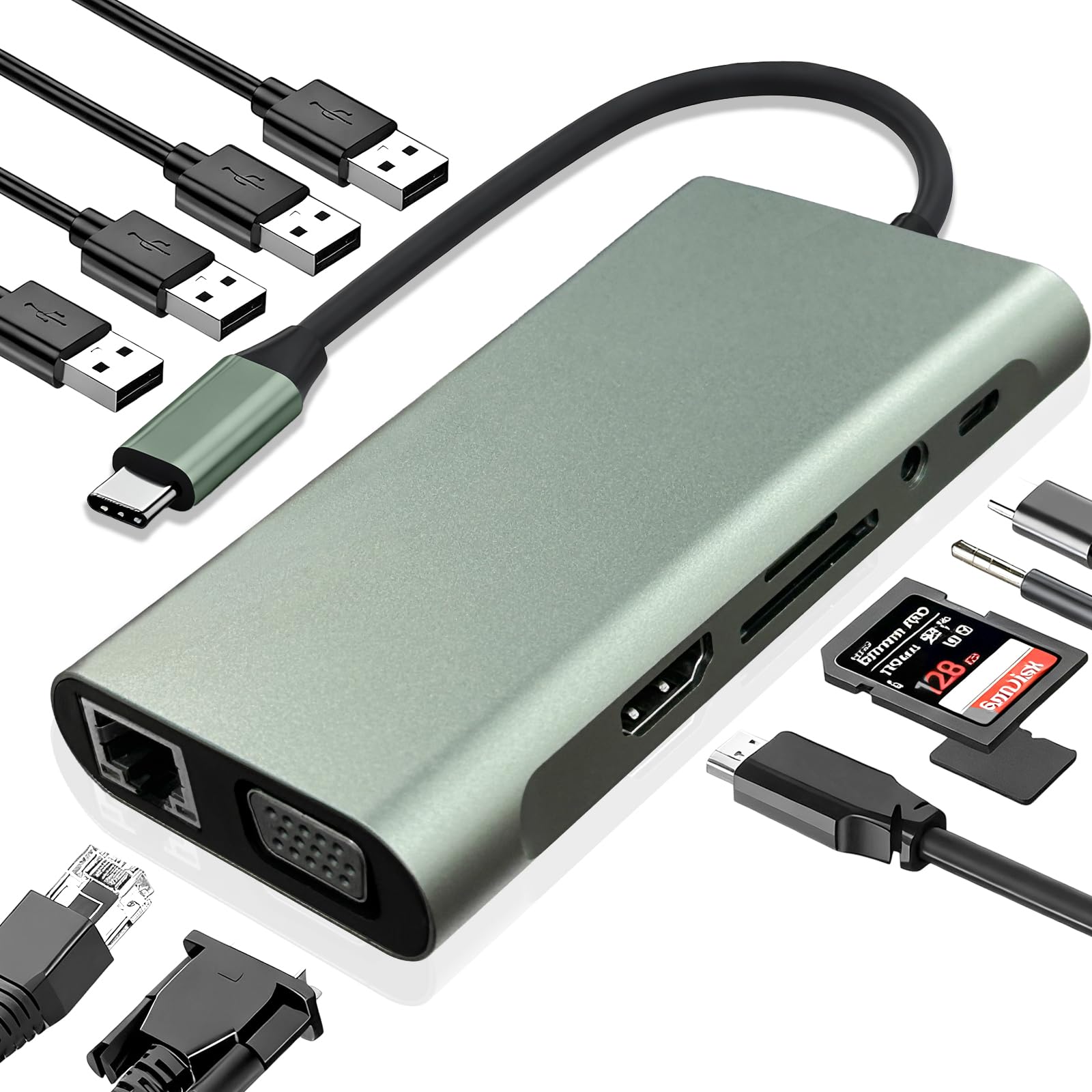
This is the adapter for the classic problem: your laptop has two USB-C ports and your desk has a monitor, keyboard, mouse, printer, and ethernet cable all begging for a home. With 11 ports including 4K HDMI, VGA, 100W PD charging, USB 3.0, RJ45 ethernet, SD/TF card slots, and an audio jack, it turns a Chromebook or MacBook into a full desktop. Customers note hooking up a monitor, keyboard, mouse, and printer simultaneously with everything working fine.
The dual video output is the standout for older hardware. You can run 4K at 30Hz through HDMI or drop to 1080P at 60Hz, and the VGA port is a lifesaver when the only projector in the room predates HDMI. At 95 g it is heavier than the Apple above — more than four times heavier — but it also carries nearly four times the ports: 11 versus 3.
The honest catch is longevity. While build quality earns praise and the value is clear, some reviewers point out the unit stopping after about a month of use, so treat it as a capable budget workhorse rather than a decade investment. For a first hub or a secondary travel dock, the port spread at this price is hard to argue with.
Where it shines
- VGA output keeps old projectors and monitors in service
- RJ45 gigabit ethernet beats flaky Wi-Fi for stable connections
- 100W PD keeps a laptop charged while every port is active
Where it stumbles
- Longevity is a gamble, with some units failing around a month in
- Plastic shell feels less premium than aluminum rivals
Best for: budget buyers who need every port type now and accept that durability is unproven.
Not for: anyone who needs a mission-critical dock that must last years without fail.
3. Battony USB C Multiport AV Adapter
A slim 3-in-1 that slides into a pocket and throws 4K onto any hotel or living-room TV
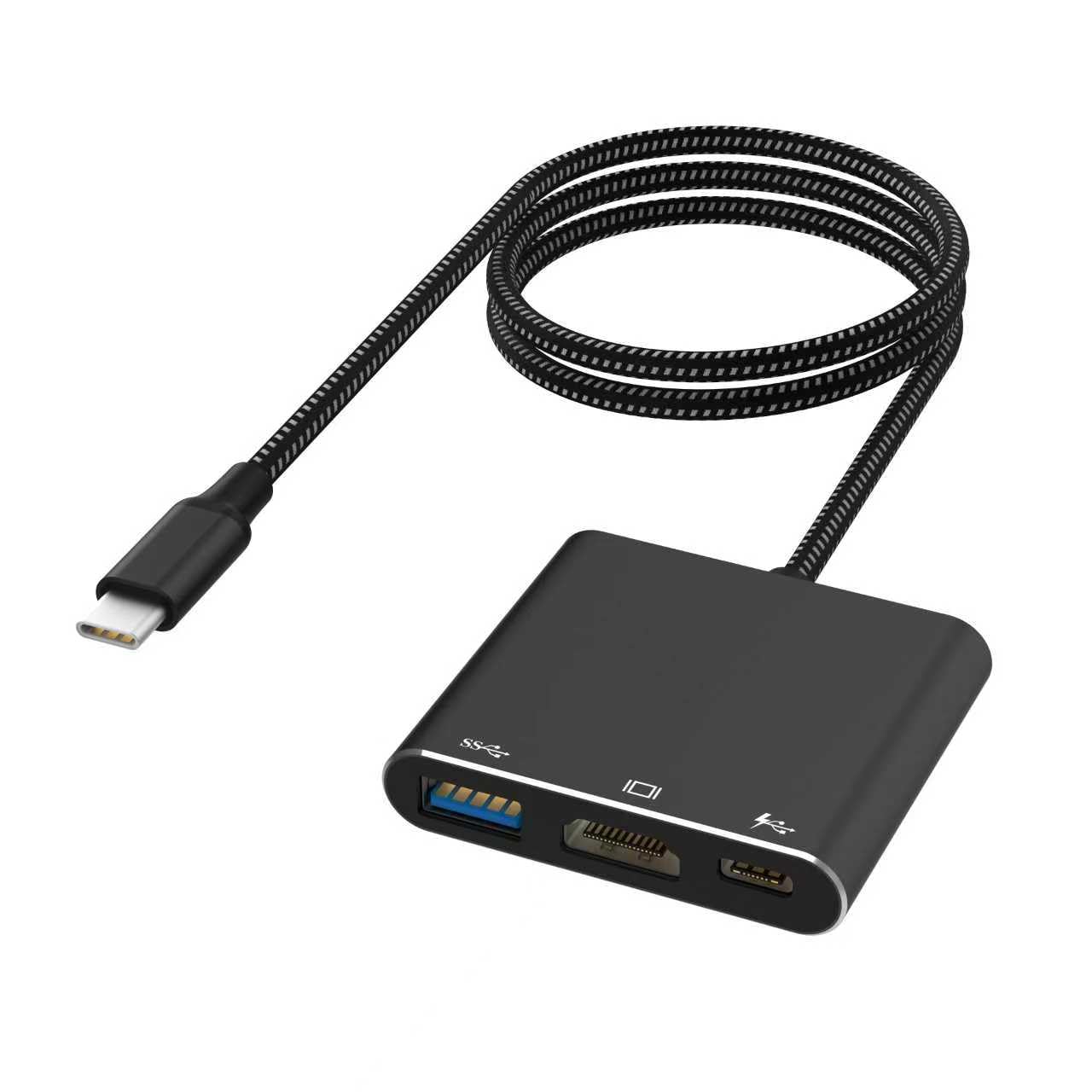
Built for the traveler who wants to stream from a laptop or phone to a big screen, this Battony adapter keeps things deliberately small. Its aluminum body manages heat better than plastic rivals, and the compact size is purpose-built to ride in a pocket or bag. The design goal is home-theater and presentation use, and owners find it genuinely handy and easy to use.
The specs stay focused: one HDMI output running up to 4K UHD at 30Hz, one USB-C for charging, and one USB 3.0 port moving data at up to 5Gbps — roughly 10 times faster than USB 2.0. That is enough to stream vivid video to a TV while keeping a phone topped up. Shoppers say clear images with no lag across streaming apps, and some note it kept working strong a year later.
Compatibility is where opinions split. It pairs beautifully with many MacBook Air setups, but a portion of owners hit walls with iPad Pro units or found it would not drive a second monitor alongside an existing adapter. The metric that trips people up is the 4K claim, with some reporting the picture did not actually hit 4K as advertised. For simple mirroring to one screen, it delivers; for exotic multi-display rigs, it does not.
Grab it when: you need a slim, single-screen mirror adapter for travel presentations or living-room streaming.
Think twice if: your display ambitions involve dual monitors, iPads as hosts, or guaranteed true 4K output.
4. ZMUIPNG 10-in-1 USB C Hub
The Mac desk companion that streams silky 60Hz video while keeping the wired internet honest
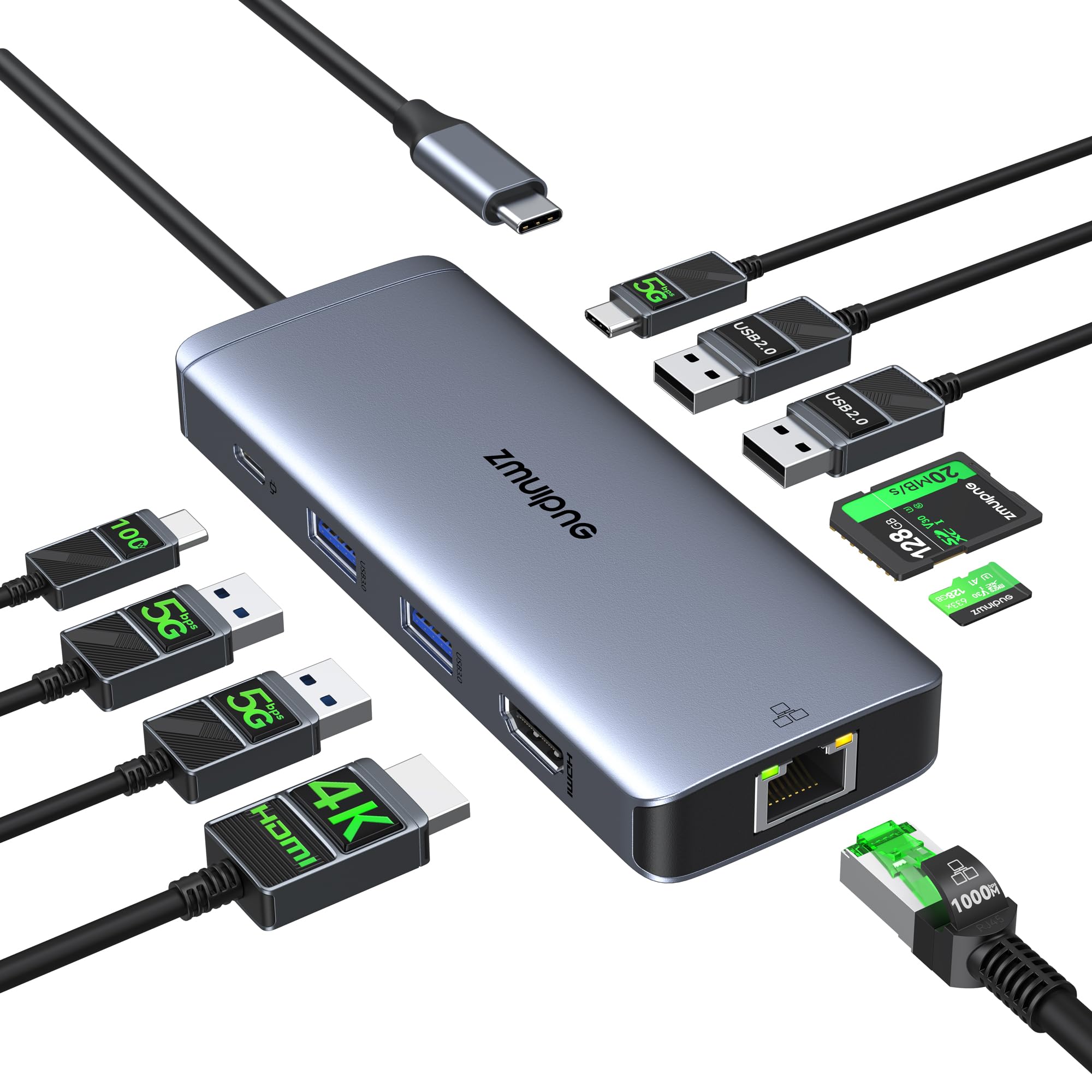
For MacBook owners tired of dongle sprawl, this 10-in-1 hub cleans up the desk in one plug. The headline feature is HDMI output at a fluid 4K@60Hz — double the refresh rate of budget hubs — so cursor movement on an external monitor feels exactly like the built-in screen. It also packs a 1000Mbps gigabit ethernet port for rock-solid wired internet.
Five USB ports handle external drives and peripherals, TF and micro SD readers pull files from camera cards, and the USB-C PD port charges a host laptop up to 100W. Everything can run at once, which owners confirm in home-office setups with multiple monitors and ample USB devices. One owner reports it still working strongly after over two years of use.
The critical spec is buried in the fine print: this hub only works with laptops that have Thunderbolt 3/4 or a full-featured USB-C port that carries video. It also needs a separate HDMI cable and, for full-load charging, a 100W adapter that is not included. Durability draws mixed notes, with some units failing after about six months, though the seller’s refund process earned praise from owners who hit that wall.
The winning move: 60Hz video plus gigabit ethernet in one small Mac-focused dock — the thing owners praise most is overall quality.
The fine print: verify your laptop has Thunderbolt 3/4 or full-featured USB-C, or this hub will not show a picture.
Pick this for: a Mac-based home office that demands smooth 4K@60Hz video and wired internet stability.
skip it if: your laptop’s USB-C port is data-only, since video will never appear.
5. Plugable USB C to HDMI Multiport Adapter

The Macworld-honored 3-in-1 that undercuts Apple’s own adapter while matching its job
Here is a rare case where an award citation tells you exactly what a product is. Macworld named this Plugable the best alternative to Apple’s AV Multiport Adapter, and the logic is easy to see. It mirrors the Apple layout — one HDMI port, one USB 3.0 port, and one USB-C charging port — but at a lower cost, which owners highlight as the main reason to buy.
The HDMI port drives external monitors up to a smooth 4K 60Hz, and the USB-C pass-through charges a laptop with up to 100W of power. No drivers are needed, so it is genuinely plug-and-play across M1/M2/M3/M4 Macs, Thunderbolt 3/4 PCs, and USB-C Chromebooks. Buyers report it auto-detecting 4K with their HP Spectre and syncing UHD monitors flawlessly with a MacBook Pro.
Every Plugable ships with a 2-year defect warranty and lifetime support from a North American team, which is a safety net most rivals skip. The caveats are modest: some owners found it ran warm in use, and one iPad streaming setup hit flickering with a capture card. Keep your expectations to single-screen mirroring and this is a dependable, fairly priced workhorse.
What earns the award
- 4K 60Hz output for genuinely smooth external displays
- 2-year warranty plus lifetime support as a real safety net
- Genuinely driverless across Mac, PC, and Chromebook hosts
What to watch
- Runs warm during extended 4K sessions, which is expected but noticeable
- Only three ports, so no room for card readers or ethernet
Choose it over Apple’s own if: you want identical mirroring capability with a warranty and a smaller bill.
Pass it by if: your desk needs card slots or ethernet, which this slim adapter simply does not carry.
6. j5create 7-in-1 USB-C Hub

The travel hub that adds audio out and card slots without weighing down a carry-on
When you travel and do not know what your setup will be, this j5create hub is the safety net. Seven ports cover the essentials: two 5Gbps USB-A data ports, a 4K HDMI output, a 100W PD charging port, a 3.5mm audio jack, and SD/Micro SD card readers. Owners lean on it as the go-to for adding a mouse and monitor to a port-starved laptop, calling it a workhorse.
You get smooth video for slideshows and movies, but not the ultra-fluid 60Hz refresh that some other adapters deliver — the HDMI port tops out at 4K@30Hz. What makes this one different is the 3.5mm audio jack (the standard headphone plug size), which most compact hubs omit, so you can connect speakers or headphones when your laptop’s own jack is missing. It works instantly with no drivers across MacBook, iPad Pro, Chromebook, Surface, and even Steam Deck and Switch.
Reliability is the story owners tell most, with no flickering or dropouts reported during use. The build quality earns consistent praise for solid construction. The one sharp warning is clear: this unit does not play nice with Mac computers for USB data, so MacBook owners should treat it as a monitor-plus-charging tool rather than a full dock.
Best suited to: travelers on Windows or Chromebook who want audio, card slots, and HDMI in one compact shell.
Not the right fit: for Mac users who need USB data ports, since those reportedly fail to connect on macOS.
7. Selore 14-in-1 Docking Station

The desk dock that turns a Windows laptop into a three-screen command center
For the Windows user who lives on multiple monitors, this 14-in-1 dock is the endgame. It expands one USB-C port into dual 4K HDMI outputs plus VGA, letting a Windows laptop run three different screens at once — perfect for spreadsheets on one display, email on another, and a browser on the third. The feature set is the most praised thing about it.
Beyond video, the port list is enormous: two 4K HDMI ports, VGA, three 10Gbps USB-C/A ports, four USB-A ports, a 100W PD charging port, SD/Micro SD readers, a 1000M ethernet port, and a 3.5mm audio jack. USB 3.1 A/C ports hit 10Gbps for fast file moves, and the whole thing is plug-and-play with no driver installation. Owners running 4K monitors alongside Thunderbolt displays report no lag.
Mac users need a reality check: macOS only supports mirror mode here, showing three identical screens rather than an extended desktop. The PD port caps power delivery at 87W for safety even though it accepts 100W input. Reliability earns mixed notes, with some ethernet failures reported around five months in, though the support team resolved those issues to owners’ satisfaction.
The triple-screen payoff
- Dual 4K HDMI plus VGA drives three distinct Windows displays
- 10Gbps USB-C/A ports move large files in seconds
- Ethernet, card readers, and audio cover every desk need
The honest limits
- Macs mirror screens only — no extended desktop on macOS
- Power out is capped at 87W despite 100W input
The winner for: Windows professionals running triple displays who want every desk port in one hub.
Wrong choice for: Mac owners expecting extended multi-monitor support, which this dock does not offer.
8. LIONWEI 13-in-1 Docking Station

A 13-port dock built for the person juggling a display, a TV cast, and a dozen accessories at once
Some desks simply have a lot going on, and this LIONWEI dock was designed for exactly that chaos. A classroom teacher described running two displays plus a TV cast while an iPad, clicker, charger, and external drive all stayed connected with room to spare. With 13 ports including dual 4K HDMI, DisplayPort, dual USB-C with 100W PD and 10Gbps data, three USB 3.0, two USB 2.0, gigabit ethernet, and a 3.5mm audio jack, nothing gets left unplugged.
The video output is genuinely flexible. Windows systems support MST and SST modes, meaning you can mirror or extend across triple screens with HDMI running up to 4K@60Hz on a DP1.4 source. A one-touch display switch button cycles between modes without crawling through settings. At 140 g it is heavier than compact hubs, but that weight carries serious connectivity.
The recurring notes are about long-term reliability of specific ports. Several owners reported HDMI ports failing around the six-month mark while USB kept working, and the SD/microSD readers earned a reputation for unreliability. The 100W PD port reserves 13W for the dock itself, so laptops receive up to 87W for charging. The 18-month warranty and responsive seller support softened the blow for affected owners, but the pattern is worth knowing.
Where it dominates: raw port variety and triple-display Windows support at a value price — the thing owners praise most is the sheer capability.
Where it worries: HDMI and card-reader longevity is the recurring gripe, so keep the 18-month warranty in mind.
Ideal for: educators and home-office users who need every port type active and appreciate a display-switch button.
Consider elsewhere if: you need a dock that will run flawlessly for years without any port failures.
9. VANGREE 9-in-1 USB C Hub
The rare hub with a native USB-C video port, open up direct 4K monitors without HDMI cables
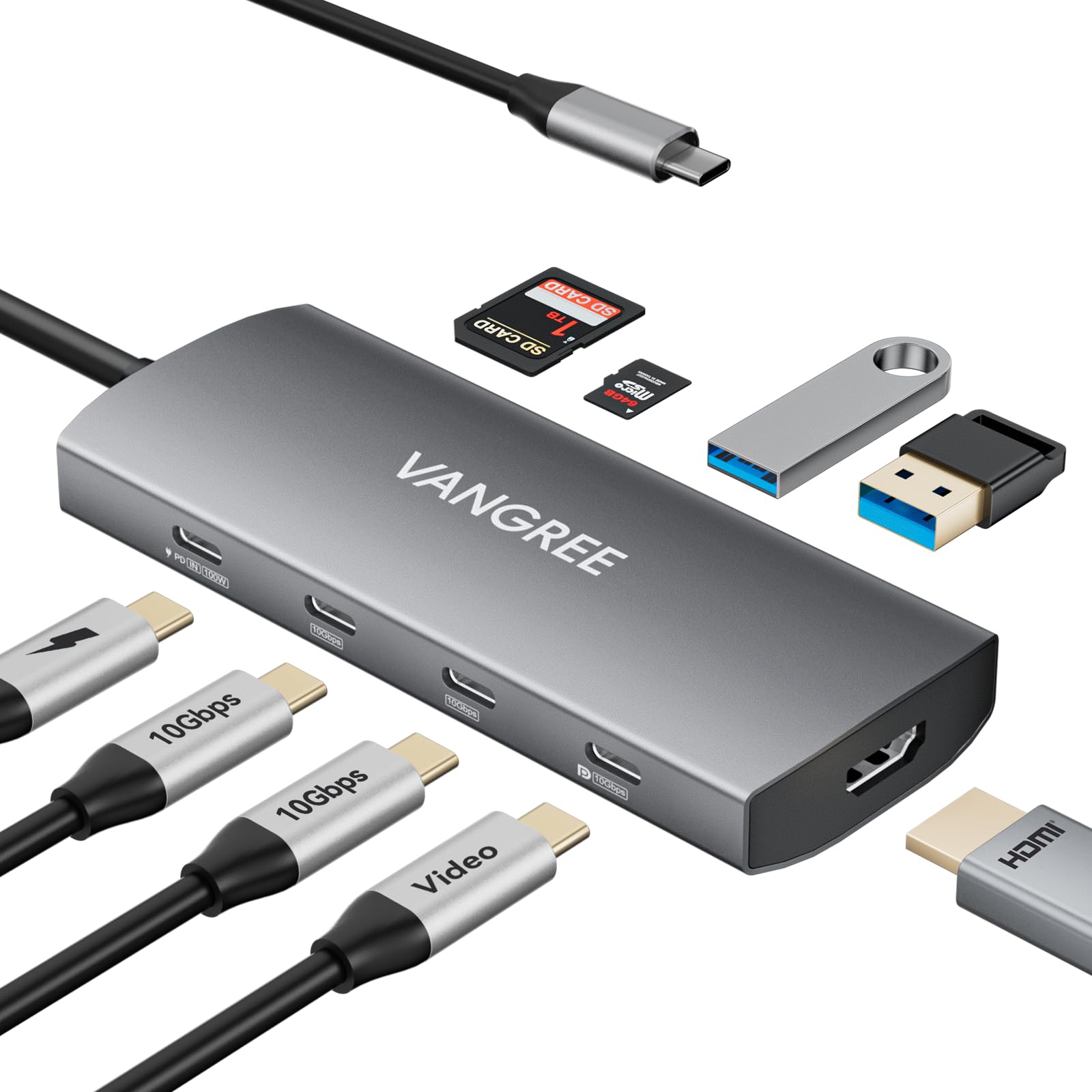
Here is the adapter that solves a problem most hubs ignore: what if your monitor takes USB-C instead of HDMI? This VANGREE hub carries a dedicated USB-C DisplayPort output running 4K@60Hz, alongside a standard 4K HDMI port. Owners call it a rare find, noting the only other hub with USB-C video output costs notably more. It also backs into 1080p@120Hz and 1080p@240Hz for high-refresh displays.
Data speeds are the other headline. Three USB-C and two USB-A 3.2 ports all deliver a full 10Gbps, which owners confirm by running two SSDs, an HDD, and a microSD card simultaneously without a hitch. The SD/TF reader hits 50–104MB/s read speeds. A 100W PD port handles pass-through charging, and four of the USB-C ports support USB Audio Class for MIDI controllers, audio interfaces, and DAC headphones.
Heat is the trade-off everyone mentions. The aluminum body runs very hot under maximum load, with owners advising you place it where air can circulate. iPhone users saw HDMI flicker with portable monitors when PD power was active, though iPad worked fine. And check your laptop: if its USB-C port caps at 15W output, heavy peripherals can cause disconnections.
The unique advantages
- Native USB-C DP output for direct connection to USB-C monitors
- True 10Gbps across all USB-C and USB-A 3.2 data ports
- USB Audio Class support for musicians and audio gear
The operating cautions
- Runs quite hot at full load, demanding open-air placement
- iPhone HDMI output can flicker when PD charging is active
Made for: Samsung DEX users, iPad Pro travelers, and anyone with a USB-C-native monitor who wants 10Gbps speeds.
Not for: those who need silent cool operation or rely on iPhone-to-HDMI with simultaneous charging.
Understanding the Specs
4K@30Hz versus 4K@60Hz
The refresh rate — how many times per second the screen redraws — determines how smooth everything looks. At 30Hz, moving the mouse cursor across a big monitor feels laggy and sluggish. At 60Hz, it feels identical to your laptop’s built-in screen. For office work and presentations, pay the small premium for 60Hz; for static slides, 30Hz is fine.
Power Delivery (PD) passthrough
This is the USB-C port that charges your laptop while the hub runs everything else. The wattage listed (like 100W) is the maximum the port can accept, but the hub itself consumes power to operate. That is why some docks state a lower actual output, like 87W. Match the number to your laptop charger’s wattage for best results.
Thunderbolt and DisplayPort Alternate Mode
Your laptop’s USB-C port must support one of these two video standards for an adapter to show a picture. Thunderbolt 3/4 ports are common on Macs and premium PCs, and DisplayPort Alternate Mode (DP Alt Mode) appears on many phones and laptops. A data-only USB-C port cannot output video no matter which adapter you buy.
Mirror versus Extend mode
Mirror mode shows the same screen on every display — ideal for presenting. Extend mode gives you separate desktops, turning a laptop into a multi-monitor workstation. Windows generally supports both via MST, while macOS often limits Apple silicon Macs to mirroring across multiple external screens or a single extended monitor. Check the product’s macOS notes before buying a dual-display dock for a Mac.
FAQ
Will an AV multiport adapter work with any USB-C laptop?
Why does my 4K adapter look blurry or run at only 30Hz?
Can I charge my laptop and use all the hub ports at the same time?
Why does macOS only mirror my screens instead of extending them?
How long do these adapters typically last?
Do I need a separate HDMI cable to use these adapters?
What is the difference between the Apple adapter and a third-party hub?
Why does my hub get hot during use?
Final Thoughts: The Verdict
For most people, the av multiport adapter worth buying is the Apple USB-C Digital AV Multiport Adapter — its mirroring starts instantly and reliably, which is why nearly a thousand owners rate it as the top pick. If you want a full workstation without spending much, the Vrebrey 11-in-1 gives you eleven ports, including VGA (the older blue video connector for projectors), at a much lower price. And for Windows desks running three screens, the Selore 14-in-1 is the one to choose, because its two 4K HDMI ports plus VGA are designed for that exact setup.
How We Picked
We do not accept paid placement. Every pick is matched to a real buyer and a real use-case; we do not hands-on test units.
Sources & Methodology
Specifications: manufacturer listings and product documentation. Review insights: verified customer reviews, as of September 2026. Pricing: not shown on this page (it changes often); check the current price via the retailer link.
As an Amazon Associate, Gadgets Feed earns from qualifying purchases. This does not affect which products we feature.