
A conference room with poor audio and grainy video kills collaboration. Remote participants feel like they’re watching from behind a window, straining to catch every word. The difference between a productive hybrid meeting and a frustrating one comes down to the tools in the room — and choosing the right audio visual conference room equipment fixes that gap permanently.
I’m Min — the co-founder and writer behind Gadgets Feed. I’ve spent hundreds of hours analyzing technical specifications, comparing microphone beamforming patterns, optical zoom ranges, and camera field-of-view coverage to find the gear that actually works for real teams.
This guide covers the best audio visual conference room equipment currently available, organized by room size and feature priorities, to help you find the right system for your team without wasting time on bad options.
How To Choose The Best Audio Visual Conference Room Equipment
Picking a conference room system starts with your room layout and your team size, not the flashiest feature list. A 360-degree camera in a narrow huddle room captures half-empty walls. A PTZ camera with 12x zoom in a small room is wasted hardware. Match the gear to the space, and the meeting quality follows.
Microphone pickup range and beamforming
Audio is the part your remote participants notice first. Look for a microphone pickup range that covers the furthest seat from the device. Beamforming arrays — typically 4 to 8 MEMS microphones — focus on the active speaker and suppress noise from air conditioning, shuffling papers, or hallway chatter. A unit with 18-foot pickup covers most medium rooms without expansion mics.
Camera field of view and tracking intelligence
360-degree cameras work best for round or square tables where participants face each other. 180-degree wide-angle bars suit long rectangular tables mounted at one end. PTZ cameras with AI tracking are ideal for lecture-style rooms or spaces where a single presenter moves around. Check whether the tracking is speaker-voice based, face-recognition based, or motion based — voice-based tracking is generally more reliable in larger rooms with multiple speakers.
Connectivity and platform compatibility
Most modern conference cameras are USB plug-and-play, but some premium units add HDMI for direct display connection or Wi-Fi for standalone operation. Verify that the device is at minimum compatible with Zoom, Microsoft Teams, and Google Meet — certified devices (like Teams-certified) usually receive better firmware support and fewer compatibility surprises during software updates.
Quick Comparison
On smaller screens, swipe sideways to see the full table.
| Model | Category | Best For | Key Spec | Amazon |
|---|---|---|---|---|
| Meeting Owl 4+ | Premium 360° | Large Teams & Boardrooms | 4K 360° / 18ft audio / Wi-Fi + PoE | Amazon |
| Jabra PanaCast 50 | Premium 180° | Medium Rooms & Huddle Spaces | 180° FOV / 3x13MP / 8 mics | Amazon |
| NexiGo Meeting 360 Ultra (Gen 3) | Mid-Range 360° | Multi-Camera Large Rooms | 8K capture / 4 camera support / 18ft audio | Amazon |
| Meeting Owl 3 | Premium 360° | Versatile Hybrid Rooms | 1080p 360° / 18ft audio / Wi-Fi ready | Amazon |
| Logitech Group Bundle + Expansion Mics | Mid-Range System | Big Conference Rooms (20 ppl) | 1080p PTZ / 28ft audio / expansion mics | Amazon |
| Nearity A20Sx3 (3-pack) | Mid-Range Audio | Large Room Audio Expansion | 8 mics / daisy chain up to 6 units / 16ft | Amazon |
| Logitech Group | Mid-Range System | Standard Mid-Sized Rooms | 1080p PTZ / 20ft audio / Zeiss optics | Amazon |
| Tenveo 4K PTZ System Bundle | Mid-Range PTZ | Large Rooms with Presenter Tracking | 12x optical zoom / AI tracking / 33ft audio | Amazon |
| KanDao Meeting Pro | Value 360° | Small Teams & Standalone Use | 360° / 18ft audio / built-in Android OS | Amazon |
| COOLPO PANA 360 | Value 360° | Huddle Rooms & Small Teams | 4K 360° / 15ft audio / 8 mics | Amazon |
| COOLPO Camera 360 (AI Huddle Pana) | Value 360° | Entry-Level Conference Room | 4K 360° / AI speaker tracking / 8 mics | Amazon |
In-Depth Reviews
1. Meeting Owl 4+

The Meeting Owl 4+ upgrades the proven Owl Labs platform to 4K 360-degree video while keeping the same 18-foot audio pickup range and the Owl Intelligence System that detects who is speaking through visual and audio cues. The Snapdragon 8250 processor inside handles the AI tracking and real-time stitching without introducing noticeable latency, and the 360-degree panoramic view means every person around a round or square table is equally visible to remote participants.
Enterprise features like on-device Wi-Fi for standalone operation, a Kensington lock slot, and Power over Ethernet compatibility (via adapter) make it suitable for IT-managed deployments. The 4K resolution is a meaningful jump from the 1080p of the Owl 3 — remote participants get a much sharper view of documents and whiteboards visible in the room. Audio clarity remains strong, with the eight-microphone array doing a solid job filtering out ambient HVAC noise and paper shuffling.
The trade-off is the speaker-switching lag: when a new person starts talking, the camera takes about a second to re-center, and the transition can feel slightly abrupt. For fast-moving discussions with multiple back-and-forth speakers, this hesitation is noticeable. Still, for any room where meeting quality matters more than split-second transitions, the Owl 4+ is the most complete single-device solution currently available.
Why it’s great
- True 4K 360-degree video with reliable AI speaker tracking
- 18-foot audio pickup covers medium to large rooms
- Enterprise-ready with Wi-Fi, Kensington lock, and PoE support
Good to know
- Speaker-switching delay of around one second between active speakers
- Premium price compared to 1080p alternatives
2. Jabra PanaCast 50

The Jabra PanaCast 50 takes a different approach from 360-degree omnidirectional cameras — it uses three 13-megapixel sensors and real-time video stitching to create a seamless 180-degree panoramic view. This makes it ideal for long rectangular tables where a camera at one end captures every face without the distortion that comes with fisheye lenses. You can adjust the field of view between 90, 120, 140, and 180 degrees through software, giving you flexibility to crop out irrelevant wall space.
The audio subsystem is equally impressive: eight beamforming microphones with intelligent noise suppression that handles everything from typing to nearby construction. The Virtual Director mode automatically frames the active speaker, though it works best when the speaker is within the 180-degree zone. Remote participants consistently report hearing clear, balanced audio even when multiple people speak from different parts of the room.
The most common complaint is that the remote control is not included in the box — you need to purchase it separately. For a premium device in this price tier, that feels like an oversight. Without the remote, you miss out on manual pan, tilt, and zoom controls that are useful for fixed camera positions. If your team is fine with automatic framing only, the omission may not matter, but it is worth factoring into the total cost.
Why it’s great
- Three-sensor 180-degree view with adjustable field of view
- Excellent beamforming mic array with real noise suppression
- Certified for Microsoft Teams and compatible with all major platforms
Good to know
- Remote control is sold separately
- Limited to 180 degrees — not suitable for 360-degree table layouts
3. NexiGo Meeting 360 Ultra (Gen 3)

The NexiGo Meeting 360 Ultra Gen 3 targets a specific pain point: large rooms with U-shaped or long-table layouts where a single 360-degree camera leaves distant participants looking like tiny heads in a wide shot. The system supports daisy-chaining up to four camera units through the NexiGo Meeting Studio app, giving you simultaneous video feeds from multiple angles that the software stitches into a unified stream. Dual 195-degree lenses on the base unit capture 360-degree video at 8K resolution internally, outputting 1080p to the meeting platform.
The built-in Android operating system means the camera can operate standalone when connected directly to a TV via HDMI — no laptop required. The eight omnidirectional microphones and integrated Hi-Fi speakers provide 18-foot audio coverage, and the AI autoframing does a reasonable job of keeping the active speaker centered when using a single unit. The privacy cover adds a layer of security that enterprise buyers appreciate.
Where the Gen 3 falls short is in the software refinement: the multi-camera setup requires some fiddling to calibrate the stitching correctly, and the built-in Android OS lacks Google Play certification, meaning you have to sideload APKs for some conferencing apps. For a dedicated single-camera room, the setup is straightforward. For multi-camera large rooms, prepare for a more involved configuration process.
Why it’s great
- Multi-camera support covers complex room layouts effectively
- 8K capture sensor for high-resolution reference footage
- Standalone operation with built-in Android OS and HDMI output
Good to know
- Multi-camera setup requires manual calibration
- Built-in OS lacks Google Play certification
4. Meeting Owl 3

The Meeting Owl 3 is the device that established Owl Labs as the standard for 360-degree conference cameras, and it remains a strong option for teams that do not need 4K resolution. The 1080p video is crisp enough for seeing facial expressions and body language on screens up to 65 inches, and the 18-foot audio pickup range covers most standard conference rooms without needing external microphones. The Owl Intelligence System uses visual and audio cues to lock onto whoever is speaking, and it handles multiple speakers reasonably well for a single-device solution.
The durability is notable: numerous user reports confirm the Owl 3 survives accidental drops from table height and continues working without issues. The design is lightweight and portable enough to move between rooms, and the plug-and-play USB setup means anyone can get it running in a few minutes with no IT support. The companion Nest management tool gives IT admins remote control over firmware updates and device settings across a fleet of units.
The resolution limitation is the main drawback. On large displays (75 inches and above), the 1080p feed looks noticeably softer, and the digital zoom reveals pixelation when the camera crops in on a speaker. For teams that regularly present to large rooms with big screens, the 4K Owl 4+ is worth the upgrade. For everyone else, the Owl 3 delivers reliable performance at a more accessible price point.
Why it’s great
- Proven reliability with excellent build quality
- 18-foot audio coverage that handles real-world room acoustics
- Easy plug-and-play setup with IT management tools
Good to know
- 1080p resolution looks soft on large displays over 65 inches
- Speaker-switching transition not instantaneous
5. Logitech Group Bundle + Expansion Mics

The Logitech Group system with expansion microphones is a complete audio-visual bundle designed for large conference rooms where a single all-in-one device cannot cover the full table. The 1080p PTZ camera with Zeiss-certified optics provides smooth digital pan, tilt, and zoom with 10 preset positions that you can configure for different meeting layouts. The speakerphone base delivers 20 feet of audio coverage, and the two expansion microphones push that range to 28 feet, which comfortably covers rooms with 20 or more participants.
The bundle earns its place through sheer consistency: Logitech has been shipping this system for years, and the USB plug-and-play compatibility with Zoom, Teams, Webex, and Skype for Business is thoroughly tested. The expansion mics are wired and connect to the speakerphone base with standard RJ45 cables, making them easy to place at the far ends of long tables. Audio quality remains clear and balanced even when participants at the far end of the table speak at normal volumes.
The main limitation is the 1080p maximum resolution, which feels dated compared to modern 4K offerings. The digital zoom also loses clarity as you crop in — this is a software zoom, not an optical one. For teams that prioritize audio coverage for very large groups over 4K video, this bundle remains a reliable workhorse. The separate camera and speakerphone units also mean more cables and setup time compared to an all-in-one device.
Why it’s great
- Expansion microphones extend audio coverage to 28 feet
- Proven compatibility across all major conferencing platforms
- PTZ camera with 10 preset positions saves time between meetings
Good to know
- 1080p resolution only — no 4K option in this bundle
- Digital zoom reduces image quality at maximum magnification
6. Nearity A20Sx3 (3-pack)
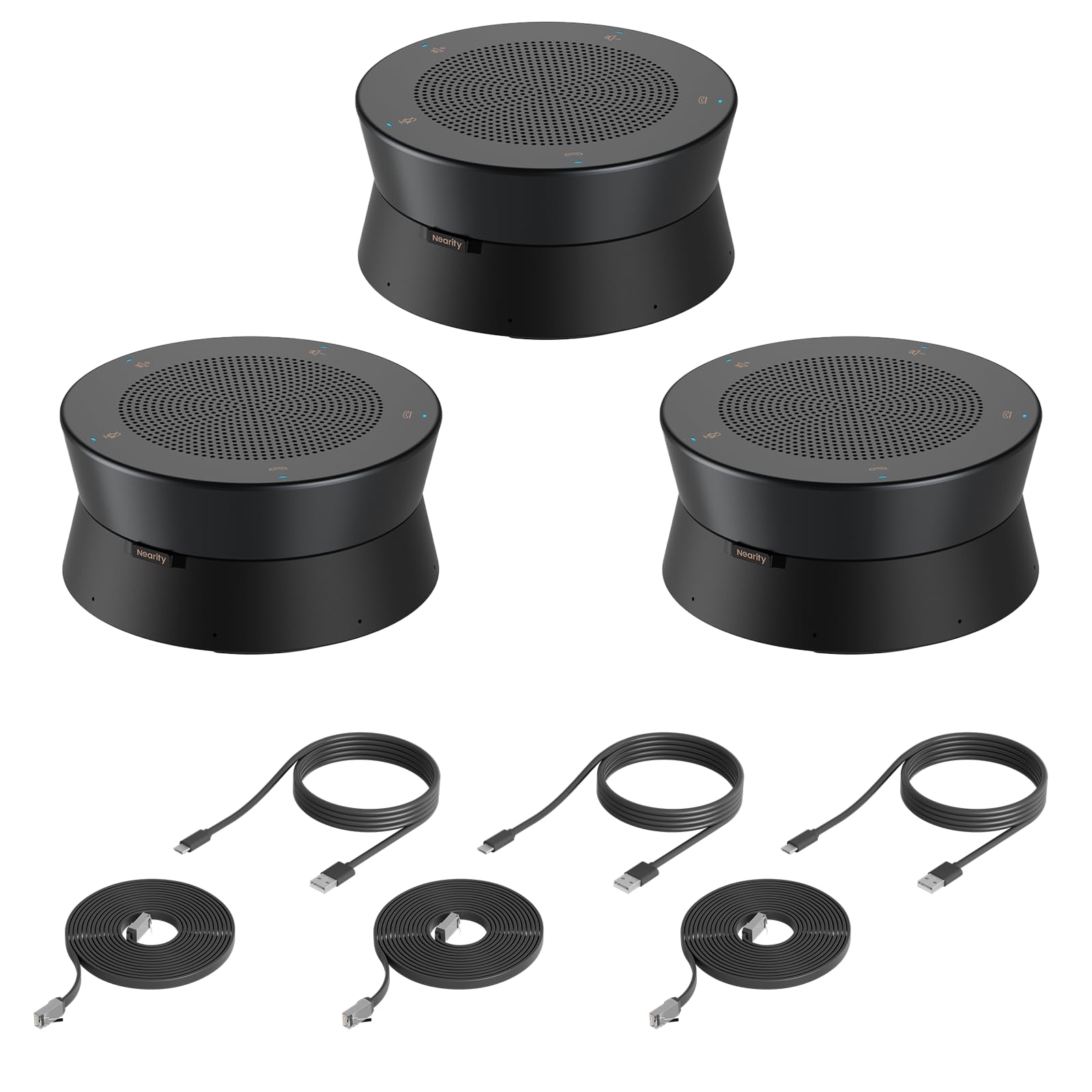
The Nearity A20S is not a camera — it is a dedicated conference speakerphone with eight omnidirectional MEMS microphones and a 360-degree 16-foot audio pickup range. Where it becomes interesting is the daisy-chain capability: you can connect up to six A20S units via POE cables, covering rooms with 30 or more participants with consistent audio pickup across the entire table. The three-pack bundle gives you a ready-to-deploy setup for medium-to-large rooms straight out of the box.
The AI 2.0 noise cancellation handles echo and reverberation better than most speakerphones in this tier. Nearity claims the algorithm filters out not just background noise but also the hollow sound that plagues glass-walled conference rooms. In real-world use, participants report clear, natural voice transmission from 15 feet away, and the automatic gain control ensures quiet and loud speakers are heard at similar levels without manual adjustment.
This is a pure audio solution, so you will need to pair it with a separate camera. The A20S connects via USB and works with any PC or laptop running Windows, macOS, ChromeOS, or Linux — no drivers required. If your conference room already has a good camera but suffers from poor audio pickup, the A20S three-pack fixes that gap more effectively than replacing the entire system.
Why it’s great
- Daisy-chain up to six units for large room coverage
- AI 2.0 noise cancellation reduces echo in glass rooms
- Automatic gain control balances loud and quiet speakers
Good to know
- No integrated camera — must pair with a separate camera system
- Larger physical footprint than a single speakerphone
7. Logitech Group

The standard Logitech Group system (without expansion mics) is tuned for mid-sized conference rooms with up to 14 participants. The 90-degree field of view with Zeiss-certified optics delivers sharp 1080p video, and the mechanical pan, tilt, and zoom via the included remote give you precise framing control. The four integrated omnidirectional microphones in the speakerphone base deliver 20 feet of full-duplex audio, meaning both sides of the conversation can speak simultaneously without cutting out.
The professional-grade certifications — Microsoft Lync 2013, Skype for Business, Cisco Jabber, and Webex — mean this system was built for corporate IT environments where platform compatibility is non-negotiable. The USB plug-and-play setup works reliably across Windows and macOS, and the camera presets let you save three different framing positions for different meeting configurations.
The biggest miss is the 90-degree field of view, which is narrow by modern standards. On a standard 8-foot conference table, the camera frames the people closest to it well but cuts off participants at the far ends. The expansion microphones are sold separately, and adding them pushes the total cost close to the premium tier. For rooms with fewer than 12 people seated within 20 feet of the camera, this is a solid, reliable system.
Why it’s great
- Zeiss-certified optics deliver sharp 1080p with smooth PTZ
- Full-duplex audio with 20-foot range for natural conversations
- Certified for major enterprise platforms like Skype and Webex
Good to know
- 90-degree field of view is narrow for wide tables
- Expansion mics are an additional cost
8. Tenveo 4K PTZ System Bundle
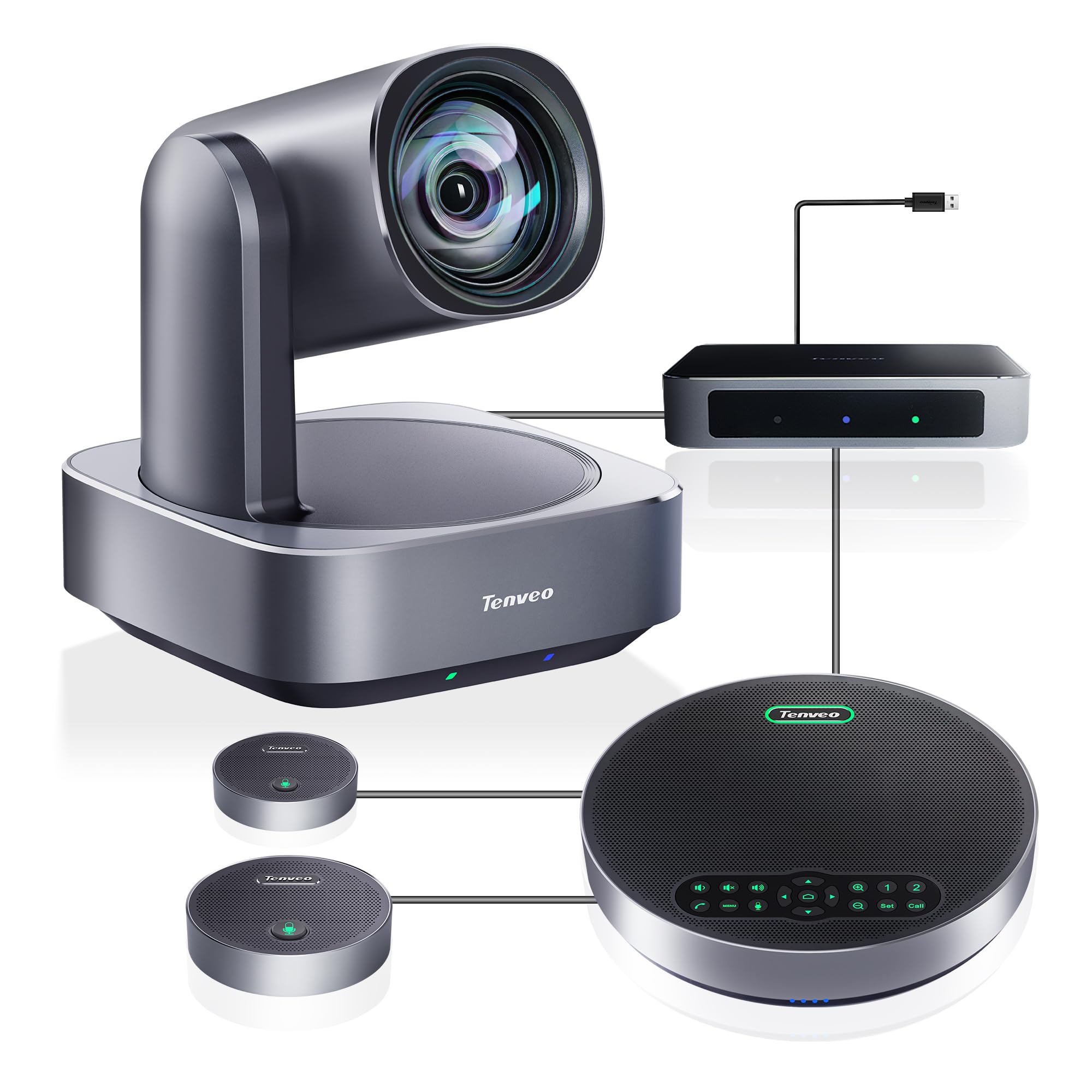
The Tenveo 4K PTZ bundle is a complete audio-visual kit built around a professional-grade PTZ camera with 12x optical zoom, a separate Bluetooth speakerphone with two expansion microphones, and a central hub that ties everything together. The 12x optical zoom is the standout feature here — it captures details from across the room without the quality loss of digital zoom, making it ideal for lecture halls, training rooms, or any space where a presenter stands at a distance from the camera.
AI humanoid and face tracking locks onto a presenter and follows them as they move, with the ability to switch between presenter mode and autoframing mode depending on the meeting style. The speakerphone with two expansion mics provides 33 feet of audio pickup, which covers large rooms of 40 to 100 square meters with 10 to 25 participants. The DSP-based audio processor handles noise reduction and echo cancellation at a level that rivals systems costing significantly more.
The main drawback is the setup complexity: the camera, speakerphone, expansion mics, and hub all need to be connected and configured correctly, and the first-time user may need to refer to the manual. The remote control is functional but feels less refined than Logitech or Jabra remotes. Once configured, however, the video and audio quality punch well above the mid-range price tier, especially for rooms that need optical zoom and long audio reach.
Why it’s great
- 12x optical zoom captures details across large rooms without pixelation
- 33-foot audio pickup with expansion mics covers very large spaces
- AI humanoid tracking follows presenters reliably
Good to know
- Multiple components require careful initial setup
- Remote control feels less premium than competitor offerings
9. KanDao Meeting Pro
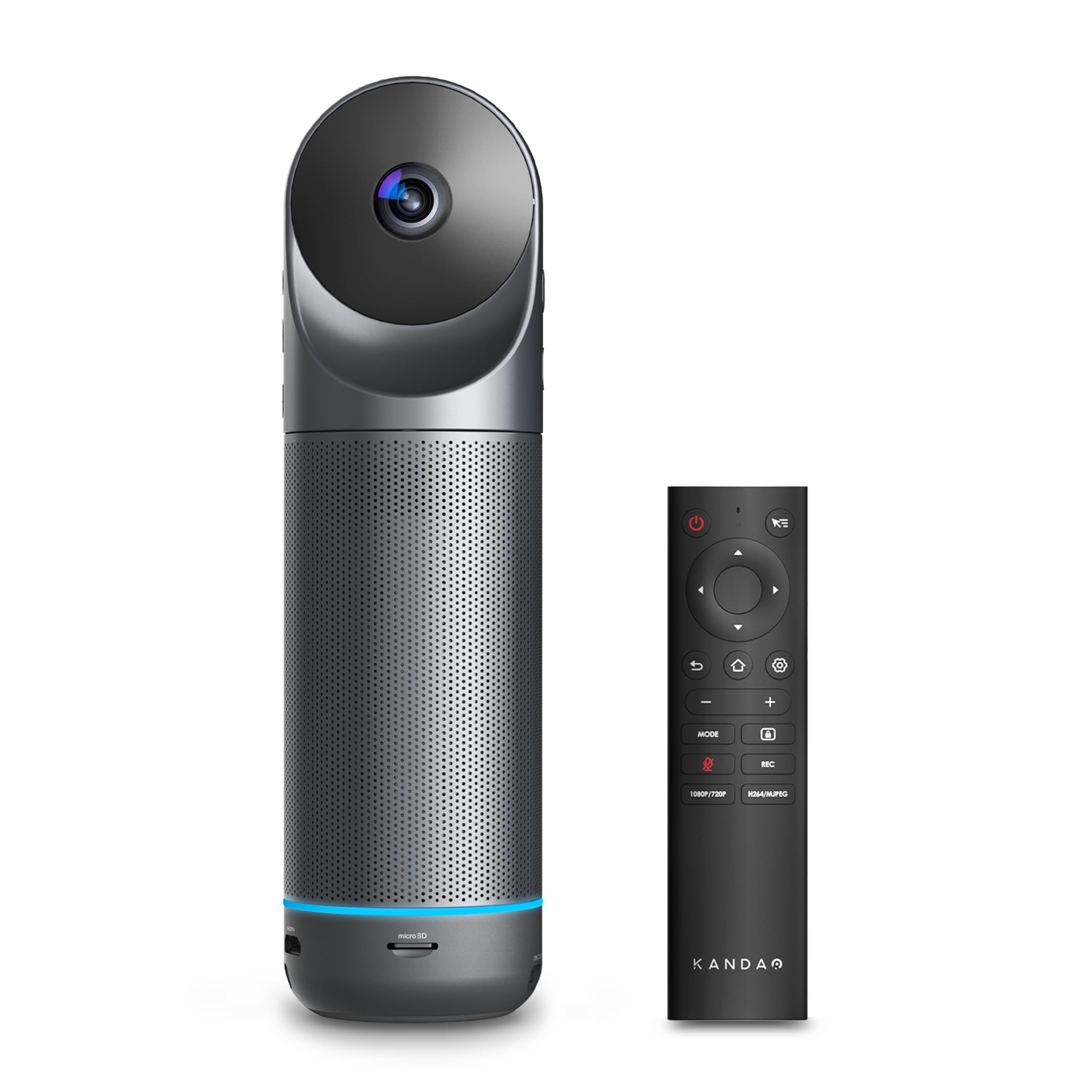
The KanDao Meeting Pro is a 360-degree all-in-one conference camera that distinguishes itself with a built-in Android operating system, allowing it to function as a standalone device without a computer. You can plug it directly into a TV via HDMI, connect to Wi-Fi, and run Zoom, Google Meet, or Teams directly on the camera itself. This makes it an excellent option for rooms where you do not want to dedicate a laptop to the conference setup, or for teams that value simplicity over raw specs.
Dual 195-degree lenses provide complete 360-degree coverage, and the AI face and voice tracking automatically focuses on the active speaker. The eight-microphone array with a 5W speaker delivers 18 feet of audio pickup with intelligent noise and echo cancellation. The Meeting Pro also supports local recording to a micro SD card, which is useful for teams that need to archive meetings without relying on cloud recording services.
The biggest frustration is the lack of Google Play certification on the built-in Android OS. Installing apps requires manually enabling developer options and sideloading APK files, which is a tedious process for a device marketed as easy to use. As a standard USB webcam connected to a PC or Mac, it works perfectly. The standalone mode is usable but takes extra setup effort. If you plan to use it primarily as a computer-connected webcam, this limitation does not apply.
Why it’s great
- Standalone operation via built-in Android OS and HDMI output
- 360-degree video and 18-foot audio in a compact 0.8 kg body
- Local recording to micro SD card for meeting archiving
Good to know
- No Google Play certification — apps require manual APK sideloading
- 1080p output resolution only
10. COOLPO PANA 360

The COOLPO PANA 360 packs a 4K 360-degree camera, eight-microphone array, and Hi-Fi speaker into a single compact unit designed for huddle rooms and small-to-medium conference spaces. The 360-degree panoramic lens provides full-room visibility, and the AI voice tracking automatically identifies and focuses on the active speaker. The 15-foot audio pickup range covers standard huddle rooms without needing external microphones.
The all-in-one design is the main selling point: no separate speakerphone, no expansion mics, no multiple cables. The USB plug-and-play setup works with Windows and macOS, and the device is compatible with Zoom, Teams, Google Meet, Skype, and other major platforms. The built-in 24x digital zoom gives you the ability to crop in on specific participants when needed, though digital zoom does reduce image clarity at maximum magnification.
There is no wireless connectivity, no Bluetooth, and no internal software — the camera is purely USB-based, which is actually a security advantage since there is no network attack surface. The trade-off is that the 10-foot USB cable limits placement options, and the camera cannot be mounted on a standard tripod. The silicone privacy cap covers the lens and microphones when not in use, which is a nice touch for security-conscious teams.
Why it’s great
- True all-in-one 4K 360-degree design with no separate components
- USB-only design eliminates network security risks
- AI voice tracking works well in small to medium rooms
Good to know
- 10-foot USB cable limits placement flexibility
- No tripod mount option
11. COOLPO Camera 360 (AI Huddle Pana)

The COOLPO Camera 360 (AI Huddle Pana) is the entry-level option in Coolpo’s lineup, offering 4K 360-degree video and an eight-microphone array at a price point that undercuts most competitors. The 360-degree panoramic view requires no stitching, and the AI speaker tracking automatically focuses on whoever is speaking. The 15-foot audio pickup range works well for standard conference rooms and huddle spaces with up to about 10 participants.
The security model is worth highlighting: all AI processing happens locally on the device via edge computing, with no data transmitted to external servers. COOLPO uses its own in-house training data, so the camera does not need to collect user data to improve its algorithms. For organizations with strict data privacy requirements, this local-only processing is a meaningful advantage over cloud-dependent systems.
The build quality is decent for the price, but the fish-eye lens creates noticeable visual distortion, especially on rectangular tables where people at the edges appear stretched. The device uses a micro-USB connection, which feels outdated, and the included cable is relatively short. The AI tracking occasionally snaps between speakers too quickly, which can feel jarring during meetings with frequent back-and-forth. For the price, it delivers 4K 360-degree capability that rivals more expensive systems in basic functionality.
Why it’s great
- 4K 360-degree video at an entry-level price point
- All AI processing is done locally — no data leaves the device
- Simple USB plug-and-play setup with no drivers needed
Good to know
- Fish-eye distortion visible on rectangular table layouts
- Micro-USB connection feels outdated
FAQ
Do I need a 4K camera for my conference room?
What is the difference between AI speaker tracking and manual PTZ presets?
Can I use these conference cameras with any video conferencing software?
Final Thoughts: The Verdict
For most users, the best audio visual conference room equipment winner is the Meeting Owl 4+ because it combines 4K 360-degree video, reliable AI speaker tracking, and 18-foot audio coverage in a single plug-and-play device that works in most conference room layouts. If you need a 180-degree camera for a long rectangular table, grab the Jabra PanaCast 50. And for very large rooms where audio clarity is the bottleneck, nothing beats the Nearity A20S three-pack daisy-chained across the table.