
Our readers keep the lights on and my morning glass full of iced black tea. As an Amazon Associate, I earn from qualifying purchases.
Specs are compiled from manufacturer listings and verified buyer reviews and can change over time — please confirm the key details on the product page before buying.
You want a gaming laptop that runs today’s big titles smoothly without draining your wallet, so you need to balance three things: how fast the graphics chip draws frames, how long the battery lasts through a lecture or flight, and how well the chassis pushes out heat before the fans scream. For most players, the balance is a 15.6-inch screen with a 144Hz or faster refresh rate (how many times the screen updates per second), a modern 8-core processor, and at least 16GB of RAM — that combo handles most games at high settings without breaking your budget.
I’m Min — the founder and writer behind Gadgets Feed. This guide is built by comparing the manufacturers’ published specifications and the patterns across verified customer reviews, so you get each pick’s real strengths and trade-offs instead of marketing spin.
Whether you’re a student, a competitive shooter fan, or a creative who also games, this breakdown of awesome laptops for gaming helps you spend smartly on the machine that genuinely fits your routine.
Our Picks at a Glance



How To Choose The Best Awesome Laptops For Gaming
Start with the graphics chip, not the processor brand. For 1080p gaming, an NVIDIA GeForce RTX 4050 or RTX 4060 gives you the best balance of price and performance. If you want to run games at higher resolutions or with ray tracing on, step up to an RTX 5070 or higher. The CPU just needs enough cores to feed the GPU without becoming a bottleneck.
Match the Screen to Your Games
A high refresh rate (144Hz or 165Hz) makes fast motion look fluid and reduces ghosting in shooters. If you mostly play story-driven games, a beautiful OLED panel with accurate colors matters more than a super-fast refresh rate. Look for at least 16GB of RAM so you can keep a browser, a game, and a voice chat app open at the same time.
Quick Comparison
| Model | Best For | Graphics Chip | Refresh Rate | Battery Life | Amazon |
|---|---|---|---|---|---|
| Acer Nitro V (i7-13620H)★ Best Overall | Streamers & heavy multitaskers | RTX 4050 | 165 Hz | 5 hours | Amazon |
| HP Victus (i5-12450H)Best Value | Budget-conscious gamers | RTX 3050 | 144 Hz | 10 hours | Amazon |
| HP Victus (Ryzen 7)Budget Champion | Everyday gamers on a value plan | RTX 4050 | 144 Hz | — | Amazon |
| MSI Thin (i5-13420H) | Portable gaming on a budget | RTX 4060 | 144 Hz | — | Amazon |
| Lenovo LOQ (Ryzen 7) | Balanced performance for students | RTX 4060 | 144 Hz | — | Amazon |
| Acer Nitro 5 (i7-12650H) | High-end 1080p gaming with added storage | RTX 4060 | 144 Hz | — | Amazon |
| ASUS ROG Strix G16 (RTX 5060) | Top-tier performance with next-gen Wi-Fi | RTX 5060 | 165 Hz | — | Amazon |
| Lenovo Legion 5i (RTX 5070) | Vivid OLED display for gamers & streamers | RTX 5070 | 165 Hz | 9 hours | Amazon |
| MSI Crosshair 18 HX AI | Desktop replacement with a huge screen | RTX 5070 | 240 Hz | — | Amazon |
| ASUS ROG Strix G16 (RTX 5070 Ti) | High-FPS 1440p gaming | RTX 5070 Ti | 240 Hz | — | Amazon |
| Alienware 18 Area-51 (RTX 5070) | Premium desk-bound power | RTX 5070 | — | — | Amazon |
| Dell Alienware 18 (RTX 5090) | Maximum performance desktop replacement | RTX 5090 | 300 Hz | — | Amazon |
| Razer Blade 18 (RTX 4090) | Luxury build with serious power | RTX 4090 | 240 Hz | — | Amazon |
In-Depth Reviews
1. Acer Nitro V Gaming Laptop
Our pick — over 4.5★ from 350+ verified ratings; the strongest balance of quality and price.
The streamer’s choice: record, play, and edit without asking the machine to wait.
This Acer is built for players who don’t just game — they capture clips, run a voice chat, and maybe edit video after. The Intel Core i7-13620H processor is tuned for heavy multitasking, so you can juggle all of that without the frame rate collapsing. Buyers report it handles demanding titles with ease, which is exactly what you want from a daily driver.
On the visual side, the 15.6-inch Full HD screen refreshes at 165 Hz — higher than the 144 Hz on many rivals — which makes fast camera sweeps feel fluid and cuts down on ghosting. The GeForce RTX 4050 graphics (194 AI TOPS) uses AI-powered DLSS 3.5 to boost ray tracing quality, giving you richer lighting without tanking performance. You get 16GB of DDR5 memory and a 1TB Gen 4 SSD, so storage and speed are covered from day one.
The clear trade-off is heat and fan noise. Owners mention it gets warm under load — usually not overheating, but warm enough that a cooling pad helps. Sound from the speakers also draws complaints. Battery life sits around 5 hours, and when you’re playing AAA titles, expect to stay plugged in.
Why players praise it
- Top-tier multitasking: i7-13620H handles gaming plus editing workloads
- Fast 165Hz panel minimizes ghosting for reflexive shooters
- Thunderbolt 4 port handles power, data, and video in one connection
Who should think twice
- Fans get loud under heavy load — a cooling pad is a smart add-on
- Battery drains quickly when playing demanding titles
- Built-in sound quality is a recurring gripe
Grab it if: you need one machine for gaming, streaming, recording, and creative apps without a hiccup.
Look elsewhere if: you’re strictly a plugged-in desktop-replacement gamer who hates any fan whirr.
2. HP Victus 15.6″ (i5-12450H)
The efficient marathon runner of budget gaming — hours of life for when the power outlet is far away.
This HP stands apart from the crowd for one standout reason: it’s rated for 10 hours of battery life. That is double the endurance of the Acer Nitro V above, which manages around 5 hours — a 2.0x gap that matters if you’re moving between classes or coffee shops without hunting for sockets. Customers note picking it up for specific needs like a SkyTrak launch monitor, needing an onboard graphics card and a beefy processor while staying affordable.
Performance comes from an Intel Core i5-12450H processor, which tops out at 4.4 GHz — a step down from the 4.9 GHz of the i7-13620H in the Acer Nitro V. Paired with the NVIDIA GeForce RTX 3050 6GB GDDR6 graphics card, it plays games well enough for most 1080p titles. The 15.6-inch FHD IPS Micro-Edge Anti-Glare display runs at 144 Hz, so motion stays smooth without the glare you get on glossy screens.
The honest catch is the touchpad. A few buyers mention it sticks at times, so you might rely on a mouse for longer sessions. It’s also a more budget-minded GPU, so don’t expect to crank every new AAA title to ultra settings.
What wins people over
- Rare 10-hour battery life for a gaming laptop
- 144Hz anti-glare display keeps fast scenes clear
- Smooth performance with almost every game buyers wanted
The trade-offs
- Touchpad can stick — bring a mouse for long play sessions
- RTX 3050 is entry-level; skip ultra settings on newest AAA games
Reach for this if: battery endurance is your top priority and your game library is mostly 1080p-friendly.
Think twice if: you want to play the newest titles at maxed-out visuals — you’ll want a beefier GPU.
3. HP Victus 15.6″ (Ryzen 7 7445HS)
A budget-friendly gift that runs most 1080p titles on high settings without complaint.
If you want solid 1080p gaming muscle without spending premium money, this HP Victus is hard to look past. Its AMD Ryzen 7 7445HS processor (a chip that runs between 3.1 GHz and 4.5 GHz) pairs with the NVIDIA GeForce RTX 4050 graphics card, and reviewers point out it’s “Good for gaming honestly” — handling most 1080p titles on high settings. It even bundles a mouse pad, though several owners note it never actually arrived in the box.
The 15.6-inch FHD display uses a 144 Hz refresh rate with AMD FreeSync Premium technology, which matches the screen’s refresh to the game’s frame rate. That cuts down screen tearing and stutter, so gameplay feels smooth. The IPS micro-edge anti-glare panel lives in the sRGB color space, meaning colors look accurate rather than oversaturated. You get 16GB of DDR5 RAM and a 512GB SSD for storage.
Quality is where this earns its reputation. Buyers praise the build quality and consider it a great price-performance ratio. That said, the included mouse pad is advertised but often missing — treat it as a bonus that may not show up, not a core feature.
Why it’s a crowd pleaser
- AMD FreeSync Premium reduces screen tearing for fluid motion
- Strong build quality praised across reviews
- Runs most 1080p titles on high settings
Know before you buy
- Bundled mouse pad frequently missing from delivery
- Not built for heavy triple-A titles at maxed settings
Best for: gamers on a budget who want an RTX 4050 and smooth adaptive sync for everyday titles.
Not ideal for: anyone who needs the advertised mouse pad — plan to use your own.
4. MSI Thin 15.6″ (i5-13420H)

The slimline performer that brings RTX 4060 power into a tidy, travel-friendly frame.
MSI’s “Thin” name is the whole story: this machine squeezes real gaming power into a slim chassis. The star is the NVIDIA GeForce RTX 4060 8GB Laptop GPU, which is a meaningful step up from the RTX 3050 — and this model packs more graphics muscle than the budget Victus above while staying portable. Shoppers say it runs every game they’ve thrown at it from Steam without trouble, even while handling schoolwork on the side.
The 15.6-inch FHD screen uses a thin bezel IPS panel with a 144 Hz refresh rate, keeping fast motion crisp. Under the hood you get an Intel Core i5-13420H processor and 16GB of DDR4 memory, with a 512GB NVMe SSD for storage. While the RAM is DDR4 rather than the newer DDR5, most games won’t notice the difference at this level.
There’s a reason it stays slim: the fans work hard. Owners say they can get pretty loud under load, though the machine doesn’t get super hot and keeps running without issues. Think of fan noise as the price you pay for the thin profile.
What owners love
- RTX 4060 delivers strong 1080p and 1440p performance
- Slim design with thin bezels fits easily in a backpack
- Runs games and schoolwork without hiccups
Keep in mind
- Fans get loud under heavy gaming loads
- Uses DDR4 RAM instead of newer DDR5
Choose this if: you want RTX 4060 performance in a machine that doesn’t weigh you down.
skip it if: you can’t tolerate audible fan noise during intense sessions.
5. Lenovo LOQ Gaming Laptop

A gaming laptop that doubles as a serious study partner, with a screen color purists will appreciate.
Lenovo’s LOQ line strikes a careful balance between gaming and everyday productivity. It pairs an AMD Octa-Core Ryzen 7 7435HS processor with the NVIDIA GeForce RTX 4060 8GB — a combination owners say gives “Good FPS from the start” for a young gamer. The 15.6-inch FHD IPS display runs at 144 Hz and covers 100% sRGB, meaning colors look accurate and vibrant for both gaming and coursework. It supports G-SYNC, which helps eliminate screen tearing.
Port selection is generous: 1 USB-C 3.2, 3 USB-A 3.2, 1 HDMI 2.1, and 1 RJ45 Ethernet. You get 16GB of RAM and a 512GB SSD, plus a privacy camera shutter. Nahimic audio technology adds virtual surround sound and noise cancellation.
Buyers praise its speed and easy setup, and one small-business owner reports it feels like it will last — a big deal after other brands failed after about two years. The honest caveat: functionality gets mixed reviews, with a few owners reporting issues that required a board replacement. Keyboard problems can crop up, so check your unit early while the return window is open.
Why it stands out
- 100% sRGB color coverage for accurate, vivid visuals
- G-SYNC support smooths out frame pacing
- Full port selection including HDMI 2.1 and Ethernet
Watch for this
- A few units need keyboard board replacements
- Functionality isn’t consistent across every unit
Pick this if: you want a well-rounded machine for gaming plus coursework with great color accuracy.
Be cautious if: you’re outside the US — the warranty may not be international, so test the keyboard early.
6. Acer Nitro 5 (i7-12650H)

The 1TB powerhouse for gamers who hoard entire libraries without worrying about space.
Storage is the headline here. This Nitro 5 comes with a 1TB PCIe Gen 4 SSD and still has room to grow: 2 PCIe M.2 slots with one available, plus a 2.5-inch hard drive bay. Buyers call the terabyte of space a welcome upgrade. Under the hood sits the 12th Gen Intel Core i7-12650H paired with the NVIDIA GeForce RTX 4060 Laptop GPU, which owners confirm runs Cyberpunk 2077 on medium without lag.
The 15.6-inch Full HD IPS display refreshes at 144 Hz, keeping gameplay fluid and unbroken. Killer Ethernet E2600 and Killer Wi-Fi 6 1650 let you prioritize network traffic toward your game, which helps reduce lag spikes. A dual-fan cooling system with dual-intakes and a quad-exhaust design keeps temperatures in check during those long sessions.
The major honest caveat is battery life — reports put unplugged gaming at around 50 minutes, and performance drops when unplugged. This is a machine that wants to stay plugged in for serious play. It’s also a heftier unit at 5.51 lbs., so it’s not the lightest travel companion.
The strengths
- 1TB Gen 4 SSD plus spare M.2 slot and 2.5″ bay for expansion
- RTX 4060 runs demanding titles like Cyberpunk 2077 smoothly
- Killer networking prioritizes game traffic to cut lag
The limitations
- Battery life is very short when gaming unplugged
- Performance degrades off AC power — plan to keep it plugged in
Best suited to: desktop-replacement gamers who want massive storage and strong 1080p performance.
Not for: people who need to game away from a power outlet for long stretches.
7. ASUS ROG Strix G16 (RTX 5060)

The future-proof performer pairing a 16:10 screen with next-gen Wi-Fi 7 and DLSS 4.
ASUS ROG’s Strix G16 is about future-proofing. The NVIDIA GeForce RTX 5060 Laptop GPU uses the new NVIDIA Blackwell architecture with DLSS 4, which uses AI to boost frame rates while keeping image quality high. Buyers report playing most games at around 100fps and running every title at max graphics with zero hiccups. The 16-inch FHD+ display uses a 16:10 aspect ratio — taller than standard 16:9 — refreshing at 165Hz with a 3ms response time.
Under the hood you get an Intel Core i7 Processor 14650HX that boosts up to 5.2 GHz, 16GB of DDR5-5600MHz memory, and a 1TB PCIe Gen 4 SSD. It also comes with Wi-Fi 7, the latest wireless standard — ahead of the Wi-Fi 6 found on most rivals here. ROG’s Intelligent Cooling uses an end-to-end vapor chamber, tri-fan technology, and Conductonaut extreme liquid metal on the chipset to keep things cool and quiet.
A 360° RGB light bar syncs with the keyboard, and Stealth Mode kills all lighting for professional settings. Buyers rave about build quality and screen clarity. The honest notes: the bottom center can get hot during gaming, and 16GB of RAM might feel tight down the road for heavy multitaskers.
Why it leads
- RTX 5060 with DLSS 4 pushes high frame rates in modern titles
- Wi-Fi 7 gives you the fastest wireless standard available
- Vapor chamber cooling with liquid metal keeps it quiet
Consider this
- Bottom center gets hot during intense gaming sessions
- 16GB RAM is fine now but may need an upgrade later
Go for it if: you want the newest GPU architecture and Wi-Fi 7 to keep this machine relevant for years.
Hesitate if: you’re on a tight budget — this premium pick commands a higher price.
8. Lenovo Legion 5i (RTX 5070)
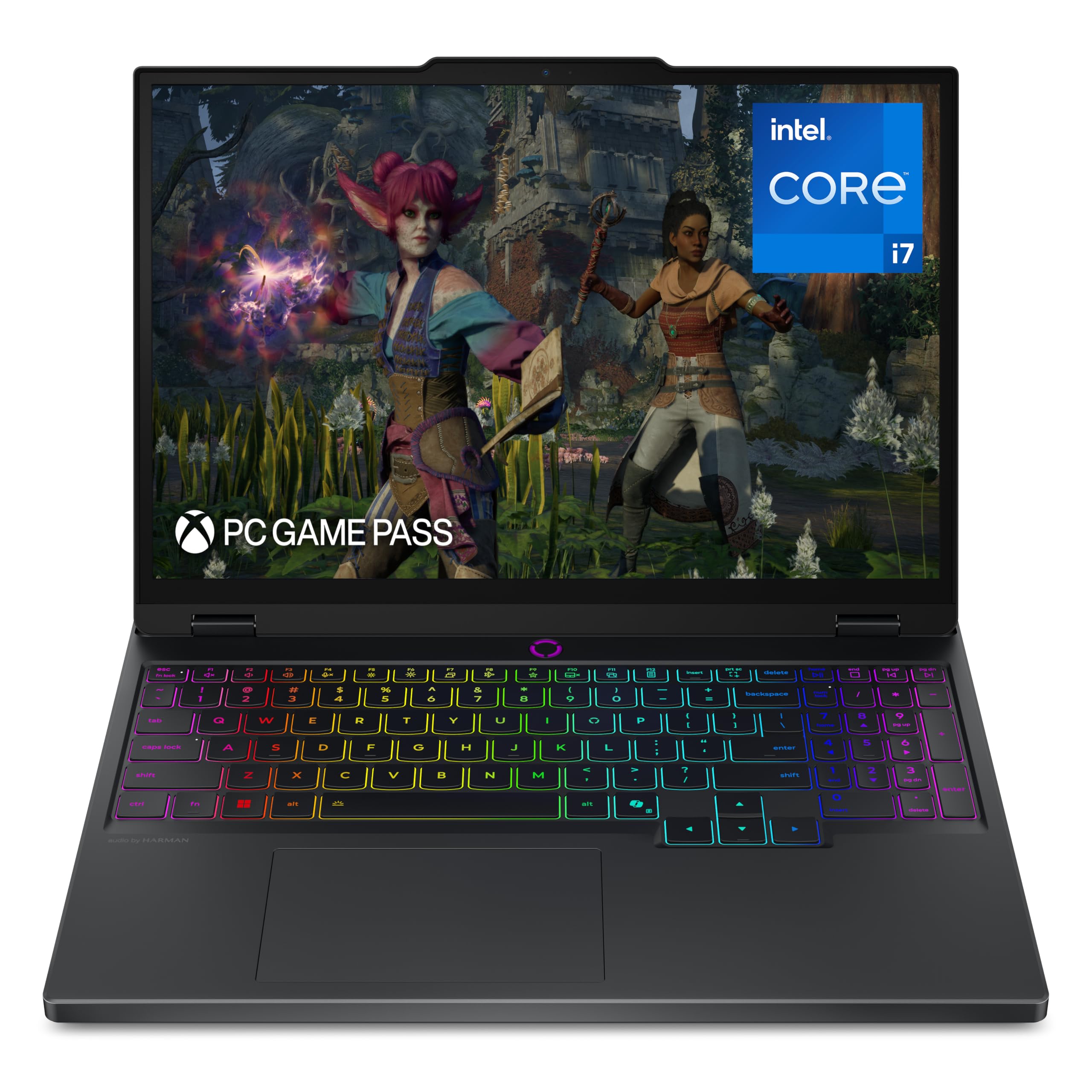
The OLED showpiece — true-to-life colors on a 2.5K screen that doubles as a creator’s canvas.
If the display is your priority, the Legion 5i takes the crown. Its 15-inch 2.5K WQXGA PureSight OLED panel refreshes at 165 Hz and serves up the kind of contrast and color you simply don’t get on IPS screens. Buyers describe it as beautiful and fast, handling high-end game settings while also serving as a great work machine off the charger. For university gamers juggling gaming, streaming, and coursework, this is built for that exact lifestyle.
Power comes from an Intel Core i7-14700HX processor boosting to 5.4 GHz, paired with the NVIDIA GeForce RTX 5070 graphics. It ships with 16GB of memory and 1TB of storage, plus 3 months of PC Game Pass including EA Play. The Legion Coldfront: Hyper cooling system uses stealth fans and copper heat pipes to keep things quiet. Fast-charging technology boosts the battery from 0 to 70% in under 30 minutes via USB Type-C.
Battery life is rated at 9 hours, though real-world reports vary. Owners praise the light weight and vivid graphics, but note the fans can get loud like jets under heavy load. A few report the RAM ships as single-channel, which can bottleneck performance — check that.
What makes it special
- PureSight OLED display with stunning color accuracy
- Fast-charging hits 70% from empty in under 30 minutes
- RTX 5070 plus i7-14700HX handles high-end settings
Note this
- Fans get loud under heavy loads
- Some units ship with single-channel RAM, reducing performance
Choose it for: gamers and creators who want OLED color fidelity without giving up a fast refresh rate.
Think twice if: you need long battery life under load — expect to plug in for serious gaming.
9. MSI Crosshair 18 HX AI

An 18-inch arena on your desk — desktop-level power for those who refuse to compromise on screen real estate.
This MSI is essentially a desktop replacement with a monstrous 18-inch display. The screen runs at a blistering 240 Hz refresh rate with QHD+ (2560×1600) resolution and 100% DCI-P3 color gamut — owners mention it’s crisp enough to surpass their old curved monitors. Inside, the Intel Core Ultra 9 Processor 275HX boasts 24 cores boosting from 2.1 GHz to 5.4 GHz, paired with 32GB of DDR5-5600MHz RAM.
The NVIDIA GeForce RTX 5070 carries 8GB of GDDR7 memory, enabling advanced ray tracing and AI acceleration. Customers note it handles ARK with excellent graphics. The SteelSeries keyboard features 24-zone RGB with 99 anti-ghost keys, so rapid multi-key inputs register correctly. A 90Whr 4-cell Li-Ion battery powers it, though at 6.83 lbs., this isn’t a lap-friendly machine for hours on end.
What wins people over is the combination of a gorgeous, large screen with top-tier performance and responsive inputs. The trade-off is physical: it’s big and heavy, and owners recommend a cooling pad for sessions longer than 4 hours. Make sure you actually want an 18-inch laptop before committing — it’s a statement piece, not a commuter.
The appeal
- 18″ QHD+ display at 240 Hz with 100% DCI-P3 color
- 24-core Core Ultra 9 with 32GB DDR5 for serious multitasking
- SteelSeries keyboard with 99 anti-ghost keys
The reality check
- Heavy at 6.83 lbs — not comfortable on your lap
- Cooling pad recommended for gaming sessions over 4 hours
Pick this if: you’re replacing a desktop and want a huge, fast screen with desktop-class components.
pass on it if: portability matters — this stays on your desk.
10. ASUS ROG Strix G16 (RTX 5070 Ti)

The 240Hz speed demon for competitive players chasing every possible frame in 1440p.
For high-refresh 1440p gaming, this ROG Strix G16 is the one to beat. Its 16-inch ROG Nebula display runs at 2.5K resolution with a 240Hz refresh rate and 3ms response time — a combination that gives esports players a tangible edge. Reviewers point out strong 1440p ultra performance at 60-90+ fps in most games, and even good VR experiences through a Quest 3. The Intel Core Ultra 9 Processor 275HX boosts to 5.4 GHz.
Graphics come from the NVIDIA GeForce RTX 5070 Ti, powered by the Blackwell architecture with DLSS 4. It ships with 32GB of DDR5-5600MHz memory and a 1TB PCIe Gen 4 SSD. The cooling system uses an end-to-end vapor chamber with tri-fan technology and Conductonaut extreme liquid metal — buyers confirm it runs cool and quiet during normal use. Dual Thunderbolt ports let you connect multiple high-resolution monitors.
What stands out in reviews is the balance: powerful yet cool, beautiful yet practical. A full-surround RGB light bar syncs with the keyboard, and Stealth Mode dims everything for professional settings. The frustrations are minor — some find the number pad placement awkward, and a couple of units had keyboard standby quirks. Battery life is around 4.5 hours, so plug in for gaming.
Why it’s elite
- 2.5K 240Hz Nebula display with 3ms response
- RTX 5070 Ti delivers 60-90+ fps at 1440p ultra
- Dual Thunderbolt ports for multi-monitor setups
Quirks to know
- Number pad placement feels awkward to some buyers
- Keyboard occasionally enters standby unexpectedly
Reach for this if: high-frame-rate 1440p gaming and a silky 240Hz screen are your priorities.
Look elsewhere if: you want the absolute best value — premium performance here comes at a premium price.
11. Alienware 18 Area-51 (RTX 5070)

The Alienware legend reborn — unapologetic desktop-class power wrapped in a Liquid Teal shell.
Alienware’s Area-51 name carries weight, and this 18-inch model lives up to the legacy. It’s powered by the Intel Core Ultra 9-275HX processor with a 5.4 GHz max boost and the NVIDIA GeForce RTX 5070. Buyers call it “almost as good as a built PC” — high praise from gamers who usually prefer desktops. The performance for gaming and multitasking is described as fast, with a sharp display and premium build quality.
The design centers on the new Cryo-Chamber structure at the bottom, which focuses airflow to the core components where it matters most. Shoppers say the heat level isn’t bad at all and the fan stays quiet, even on demanding games. The 1 Year Onsite Service from Dell means support comes to your home if an issue can’t be resolved remotely — though at least one buyer found the onsite service wasn’t honored as advertised.
The trade-off is physical: this machine weighs over 9 lbs., making it uncomfortable on your lap and strictly a desk-bound companion. Battery life is acceptable but not great — it’s power-focused, not portable. It’s a top-tier choice if you want desktop power in a laptop form factor that rarely moves.
What makes it legendary
- Near-desktop performance in gaming and multitasking
- Cryo-Chamber cooling keeps it quiet with manageable heat
- Premium build with a sharp, larger display
Know the limits
- Weighs over 9 lbs — strictly for stationary use
- Onsite service coverage may not be honored as advertised
Best for: gamers who want desktop-class power and don’t plan to move their laptop around.
Not for: anyone who needs a portable machine or lap-friendly comfort.
12. Dell Alienware 18 Area-51 (RTX 5090)

The ultimate desktop killer — an 18-inch 300Hz display with an RTX 5090 that never blinks.
This is the most extreme laptop on the list, and it earns that title through sheer specification. The 18-inch display runs at a jaw-dropping 300 Hz refresh rate with 2.5K WQXGA (2560×1600) resolution and an anti-glare finish. Owners describe it as a monster — running the most demanding games flawlessly at max settings while staying nice and cool without being noisy. The 300Hz panel is the fastest on this list, designed for ultra-competitive play where every millisecond counts.
Under the hood sits the massive Intel Core Ultra 9 processor paired with the GeForce RTX 5090. This is the flagship GPU of the RTX 50 Series, featuring full ray tracing and neural rendering technologies. DLSS 4 with Multi Frame Generation delivers ultra-smooth frame rates. NVIDIA Reflex 2 with Frame Warp reduces latency based on the game’s latest mouse input — a real edge in competitive shooters. Memory and storage are equally serious: 64GB of DDR5 RAM and a 2TB PCIe SSD.
Buyers call it a “rookie gamer’s dream machine” and a “desktop replacement” that excels. But the physical reality is unavoidable: it’s very large and heavy, requiring a separate case for transport. This is not a laptop you carry daily — it’s a stationary gaming tower in a laptop shell, insanely powerful but firmly desk-bound.
The ultimate appeal
- 300Hz refresh rate — the fastest display on this list
- RTX 5090 with DLSS 4 and Reflex 2 for peak frame rates
- 64GB DDR5 RAM and 2TB SSD handle anything
The honest trade-off
- Very large and heavy — needs a dedicated case for travel
- Priced at the very top of the market
Choose this if: you want the absolute fastest, most powerful gaming laptop money can buy.
it’s not for you if: you need portability or anything close to a reasonable price.
13. Razer Blade 18 (RTX 4090)

The CNC-machined luxury giant — a desktop-grade RTX 4090 in a chassis that feels like jewelry.
Razer’s Blade 18 is the connoisseur’s choice, wrapped in a single block of CNC aluminum that feels premium in the hand. The 18-inch QHD+ (2560×1600) display covers 100% DCI-P3 color space and refreshes at 240 Hz — buyers report it’s perfect for everything. Inside sits the NVIDIA GeForce RTX 4090, pushing up to 175W of power, paired with the 13th Gen Intel 24-Core i9 13950HX processor boosting to 5.5 GHz.
This is a desktop replacement in the truest sense. The RTX 4090 with DLSS 3 and full ray tracing delivers quantum-leap performance. The 32GB of RAM runs at an ultra-fast 5200 MHz, and there’s a 2TB SSD. That m.2 slot is compatible with dual-sided NVMe drives, allowing expansion up to 8TB total storage. The compact GaN charger is a thoughtful touch, keeping the travel weight down.
High-quality 6-speaker audio with THX Spatial Audio immerses you in sound. But reviews are mixed here. Some call it a powerhouse that “rips,” while others report “terrible blooming” on the screen — light bleeding that ruins dark scenes. Razer’s extended warranty policy for Amazon purchases has also frustrated some buyers. At this price point, you’re paying for the brand and the build, and expectations should match.
The luxury perks
- CNC aluminum chassis with a premium, solid feel
- RTX 4090 up to 175W delivers desktop-class power
- Compact GaN charger reduces travel weight
Consider carefully
- Some owners mention screen blooming issues at this price
- Razer warranty options limited for Amazon purchases
Buy this if: you value the machined-aluminum build and want the most premium-feeling gaming laptop available.
Look elsewhere if: you expect flawless quality control at this price — or want a safer warranty path.
Understanding the Specs
Graphics Chip (GPU)
The GPU determines how many frames per second your games render. RTX 4050 and RTX 4060 handle 1080p gaming well. RTX 5070 and above push into high-refresh 1440p territory. Higher-tier GPUs like the RTX 5070 render faster but generate more heat and cost more.
Refresh Rate (Hz)
Refresh rate tells you how many times the screen updates per second. A 144Hz display updates 144 times per second, making motion visibly smoother than a 60Hz panel. Competitive shooters gain an edge with 240Hz or 300Hz panels, which reduce input lag. Casual gamers can save money by sticking with a 144Hz panel.
FAQ
How much RAM do I actually need for gaming?
Is a 144Hz display worth the extra cost?
What’s the difference between an RTX 4050 and an RTX 4060?
How long should a gaming laptop battery last?
Do gaming laptops overheat?
Is DDR5 RAM worth paying extra for?
Can I upgrade the storage or RAM later?
What’s the difference between Wi-Fi 6 and Wi-Fi 7?
Are 18-inch gaming laptops too big for travel?
Do I need a cooling pad?
Final Thoughts: The Verdict
For the majority of shoppers, the awesome laptops for gaming winner is the Acer Nitro V because it balances a fast 165Hz display (updates 165 times per second) with the multitasking muscle of an i7-13620H processor and RTX 4050 graphics — ideal for gamers who also stream or edit. If you want the best battery life for on-the-go use, grab the HP Victus (i5). And for high-refresh 1440p gaming (a sharper resolution than 1080p), the ASUS ROG Strix G16 (RTX 5060) is the one to reach for.
How We Picked
We do not accept paid placement. Every pick is matched to a real buyer and a real use-case; we do not hands-on test units.
Sources & Methodology
Specifications: manufacturer listings and product documentation. Review insights: verified customer reviews, as of September 2026. Pricing: not shown on this page (it changes often); check the current price via the retailer link.
As an Amazon Associate, Gadgets Feed earns from qualifying purchases. This does not affect which products we feature.