
The anxiety of leaving the house without locking up vanishes the moment you install a handle that does it for you. An automatic locking door handle combines the convenience of a keyless entry system with the security of a deadbolt that engages without you ever touching it. This is not just about forgetting keys—it is about eliminating the single point of failure in your home security routine.
I’m Min — the co-founder and writer behind Gadgets Feed. I spend my days dissecting the technical specifications of smart home security products, comparing latency, biometric sensor accuracy, wireless protocol stability, and build materials to separate genuine innovation from marketing fluff. This guide is the result of analyzing hundreds of hours of customer feedback and specification sheets to find the handles that actually work.
After sorting through the top models on the market, I have compiled the definitive list of the best automatic locking door handle options to help you secure your home without the hassle of a physical key.
How To Choose The Best Automatic Locking Door Handle
Picking the right automatic locking door handle comes down to balancing how you live with how much you trust technology. The market splits between basic keypad models that handle auto-lock on a timer and full smart locks that integrate with your home Wi-Fi and voice assistants. Your choice should factor in door traffic, the need for remote monitoring, and tolerance for battery changes.
Auto-Lock Timer and Reliability
The core promise of this category is that the deadbolt engages automatically after the door closes. The timer range—typically adjustable from 10 seconds to several minutes—determines how quickly the lock secures behind you. Models with a wider programmable range (like 0 to 180 seconds) offer more flexibility for scenarios involving arms full of groceries or small children following behind. Reliability matters most: a lock that fails to auto-lock defeats the entire purpose. Customer review patterns reveal that firmware and mechanical consistency separate premium locks from budget alternatives.
Biometric Speed and Accuracy
Fingerprint sensors have become a common upgrade on keyless handles, but not all sensors perform equally. The fastest models unlock in under half a second, while slower or poorly calibrated sensors require multiple attempts and lead to frustration. Sensor type matters: optical scanners are cheaper but struggle with wet or dirty fingers, while semiconductor capacitive sensors are more reliable. False rejection rates climb significantly in cold weather for some budget models, as noted in user reviews for certain entry-level biometric locks.
Connectivity and Smart Home Integration
An automatic locking door handle can operate purely as a standalone mechanical device or become a node in your smart home ecosystem. Built-in Wi-Fi allows remote lock/unlock and real-time notifications without an extra hub. Bluetooth-only models require a separate Wi-Fi bridge for remote access. Voice assistant compatibility with Alexa or Google Assistant adds hands-free convenience but often requires the same bridge. The trade-off is battery life, as always-connected Wi-Fi drains power faster than Bluetooth or offline operation.
Build Quality and Security Certification
ANSI/BHMA Grade ratings directly correlate with a lock’s physical resilience. Grade 2 certification, found on more premium models, offers significantly tougher construction than Grade 3, which is the minimum standard for basic residential locks. The material composition—zinc alloy or aluminum versus plastic internals—affects both longevity and resistance to physical attack. An IP54 weather rating is essential for exterior doors exposed to rain or humidity, as electronic components inside the handle need protection from moisture.
Quick Comparison
On smaller screens, swipe sideways to see the full table.
| Model | Category | Best For | Key Spec | Amazon |
|---|---|---|---|---|
| Schlage Encode Smart Wi-Fi Lever | Premium | Remote access and high security | Built-in Wi-Fi, up to 100 codes, BHMA Grade 1 | Amazon |
| Philips 4200 Series WiFi Smart Lock | Premium | Fast biometric access with built-in WiFi | 0.3s fingerprint sensor, auto-lock 0-180s | Amazon |
| eufy Security Smart Lock C33 | Premium | Integrated fingerprint in handle grip | Wi-Fi, 8 AA batteries, 15-min install | Amazon |
| Kwikset SmartCode 270 | Mid-Range | Simple keypad with reliable auto-lock | 50 user codes, 12-month battery life | Amazon |
| Veise VE06-L Smart Lock | Mid-Range | App control with large code capacity | 250+ codes, IC cards, auto-lock 5-900s | Amazon |
| TEEHO TK001H | Budget | Entry-level auto-lock with ANSI Grade 3 | IP54 rated, auto-lock 10-99 seconds | Amazon |
| NICE DIGI X1 Keypad Lock | Budget | Budget-friendly multi-protocol smart lock | Fingerprint, Wi-Fi, 6 unlock methods | Amazon |
In‑Depth Reviews
1. Schlage Encode Smart Wi-Fi Lock with Lever Handle
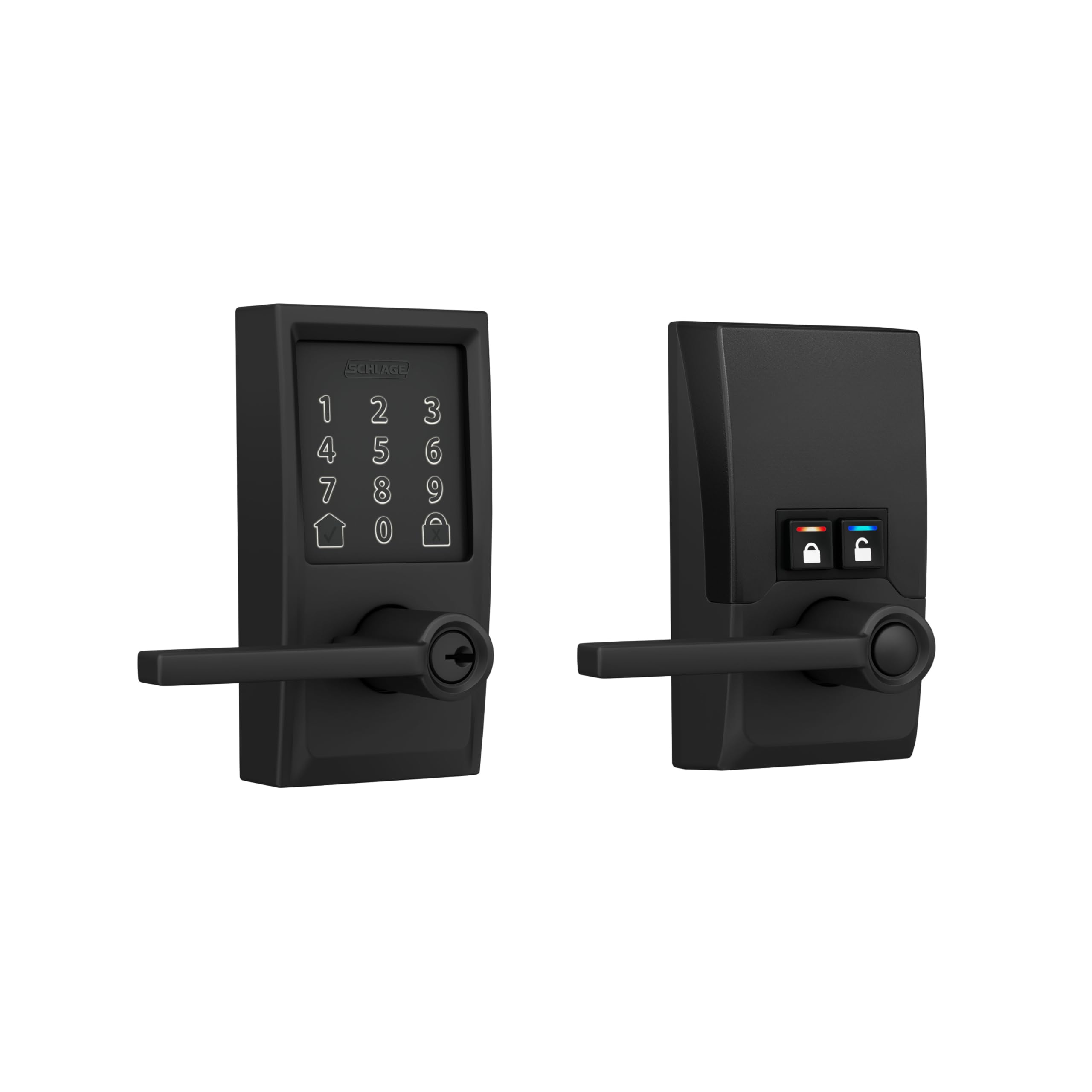
The Schlage Encode is the benchmark for the category, offering a heavy-duty zinc construction that feels substantial in the hand. Its built-in Wi-Fi connects directly to your home network without requiring a separate hub, enabling remote lock/unlock and real-time notifications through the Schlage Home app. The touchscreen keypad is resistant to fingerprint smudging, and a built-in customizable alarm triggers on door movement or forced entry attempts—a security layer absent from most competitors.
Managing access is straightforward with support for up to 100 unique codes, easily assignable and revocable through the app. The auto-lock function offers flexible time delay options configured directly in software, and the physical backup key provides a fail-safe when batteries run out. The reversible lever fits both right and left-handed doors, and installation takes minutes with just a screwdriver.
Some reviewers noted that the included latch’s release button and connecting posts felt flimsy compared to the rest of the lock’s build, and a handful of units arrived with cosmetic damage in transit. The keypad is also quite sensitive, which can occasionally lead to unintended entries. Nevertheless, the combination of Grade 1 security certification and reliable Wi-Fi connectivity makes this the most trustworthy automatic locking handle for homeowners who prioritize remote access.
Why it’s great
- BHMA Grade 1 certified for highest residential security
- Built-in Wi-Fi with no hub required for remote access
- Supports up to 100 user codes with customizable notifications
Good to know
- Premium pricing places it above most competitors
- Keypad sensitivity can cause unintended entries
- Some units reported cosmetic damage in shipping
2. Philips 4200 Series WiFi Smart Lock

Philips enters the automatic door handle market with a strong contender that prioritizes biometric speed. The 4200 Series incorporates a semiconductor fingerprint sensor that unlocks in 0.3 seconds, matching the responsiveness of high-end smartphone scanners. This model connects directly to 2.4 GHz Wi-Fi without any bridge, and the Philips Home Access app provides full remote control, real-time access history, and user management for up to multiple fingerprints and PIN codes.
The auto-lock timer is adjustable from 0 to 180 seconds through the app, offering fine-grained control that suits both frantic mornings and lazy weekends. The handle set is included, creating a complete front door solution without needing to purchase additional hardware. Voice control works with both Alexa and Google Assistant, and the keypad supports permanent, one-time, periodic, and recurring codes—ideal for households with regular guests or service providers.
Battery life is rated at up to six months with four AA alkaline batteries, and the lock sends a low-battery alert before power runs out. A few users mentioned that the default installation assumes a right-opening door, requiring a reset procedure for left-handed doors. The lock also explicitly warns against using rechargeable or high-power lithium batteries to avoid potential damage. Despite these quirks, the fingerprint reader’s speed and the unified handle design make this a standout choice.
Why it’s great
- Fast 0.3-second fingerprint unlocking
- Built-in Wi-Fi eliminates the need for a separate hub
- Versatile passcode options including one-time and recurring codes
Good to know
- Only works with 1.5V alkaline batteries; no rechargeables
- Left-handed door requires a manual reset procedure
- Auto-lock feature is off by default and must be enabled via app
3. eufy Security Smart Lock C33
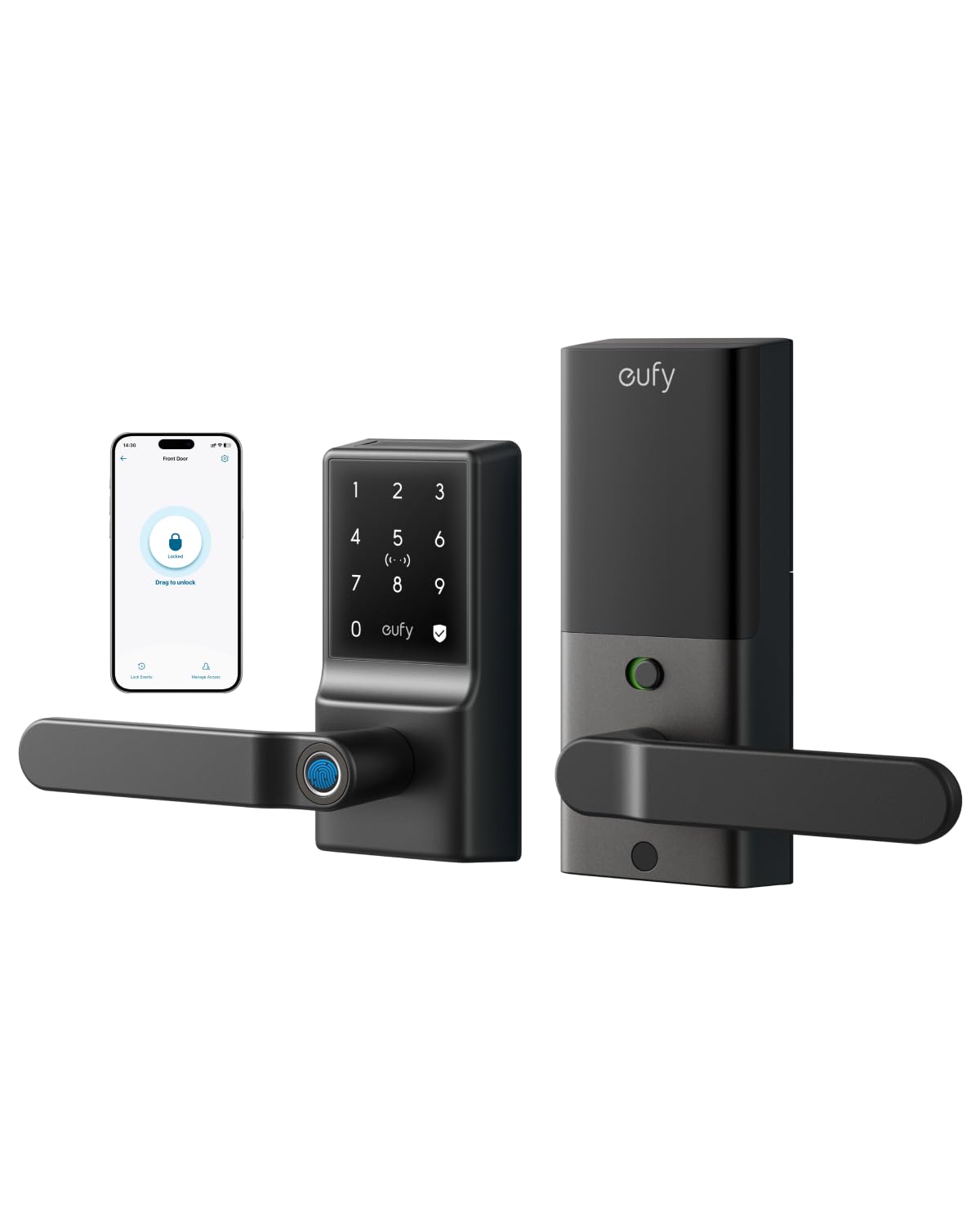
The eufy C33 distinguishes itself by embedding the fingerprint sensor directly into the handle grip, allowing you to unlock the door with a natural hand position as you grasp the lever. The biometric technology adapts to your usage over time, improving recognition accuracy as it learns your typical fingerprint placement. Powered by 8 AA batteries (rather than the common 4), this lock provides more consistent power to the motor and Wi-Fi radio, contributing to its reliable auto-lock performance.
Installation takes about 15 minutes with no drilling required, and the lock is compatible with both left and right-handed doors. The integrated Wi-Fi allows full remote control via the eufy Security app, including real-time notifications, access management, and event history. The IP53 weather rating ensures protection against rain and dust for exterior installations, and the auto-lock function provides peace of mind for nightly security.
Some users found that the included alkaline batteries depleted faster than expected, with several recommending a switch to Energizer Ultimate Lithium or rechargeable lithium cells for extended life. The lock also has a noted dependence on a stable 2.4 GHz Wi-Fi network; a network outage can require full reconfiguration. The lock integrates with eufy’s camera ecosystem, creating a cohesive security setup for existing eufy users.
Why it’s great
- Fingerprint sensor integrated into lever handle for natural unlocking
- Quick 15-minute installation with no drilling
- Runs on 8 AA batteries for reliable power delivery
Good to know
- Stock alkaline batteries drain quickly; lithium recommended
- Wi-Fi network outage may require full reconfiguration
- Requires a 2.4 GHz network; 5 GHz not supported
4. Kwikset SmartCode 270

The Kwikset SmartCode 270 strips away the complexity of app connectivity and focuses on doing one thing exceptionally well: providing a reliable, keyless auto-lock experience. This is a Grade 2 BHMA certified lock, meaning it is up to 2.5 times stronger than the Grade 3 locks found on most budget models. The touchpad keypad is illuminated with bright LED lights for easy code entry at night, and the auto-lock timer can be set to 30 seconds, 1, 3, 5, or 10 minutes through the programming menu.
Code management supports up to 50 user codes and 10 one-time codes, with a dedicated programming code for editing or deleting access. The intrusion alert sounds an alarm after three incorrect attempts and disables the keypad for a minute. Vacation Mode temporarily disables the keypad entirely, and the SmartKey security feature lets you re-key the lock to any KW1 key in seconds without removing the lock from the door.
Battery life is rated at a minimum of 12 months using four AA alkaline batteries, and the lock provides a low-battery warning before depletion. Some users reported that the deadbolt mechanism can be slow and noisy when locking and unlocking, which may be noticeable in quiet hallways. There are also isolated reports of units failing early with a flashing red light error, though these appear to be manufacturing defects rather than a widespread design flaw.
Why it’s great
- BHMA Grade 2 certified for superior durability and security
- No app or Wi-Fi needed; straightforward keypad operation
- SmartKey allows quick re-keying without removing the lock
Good to know
- Deadbolt mechanism can be noisy during operation
- No smart home or remote access capabilities
- Isolated reports of early unit failures
5. Veise VE06-L Smart Lock
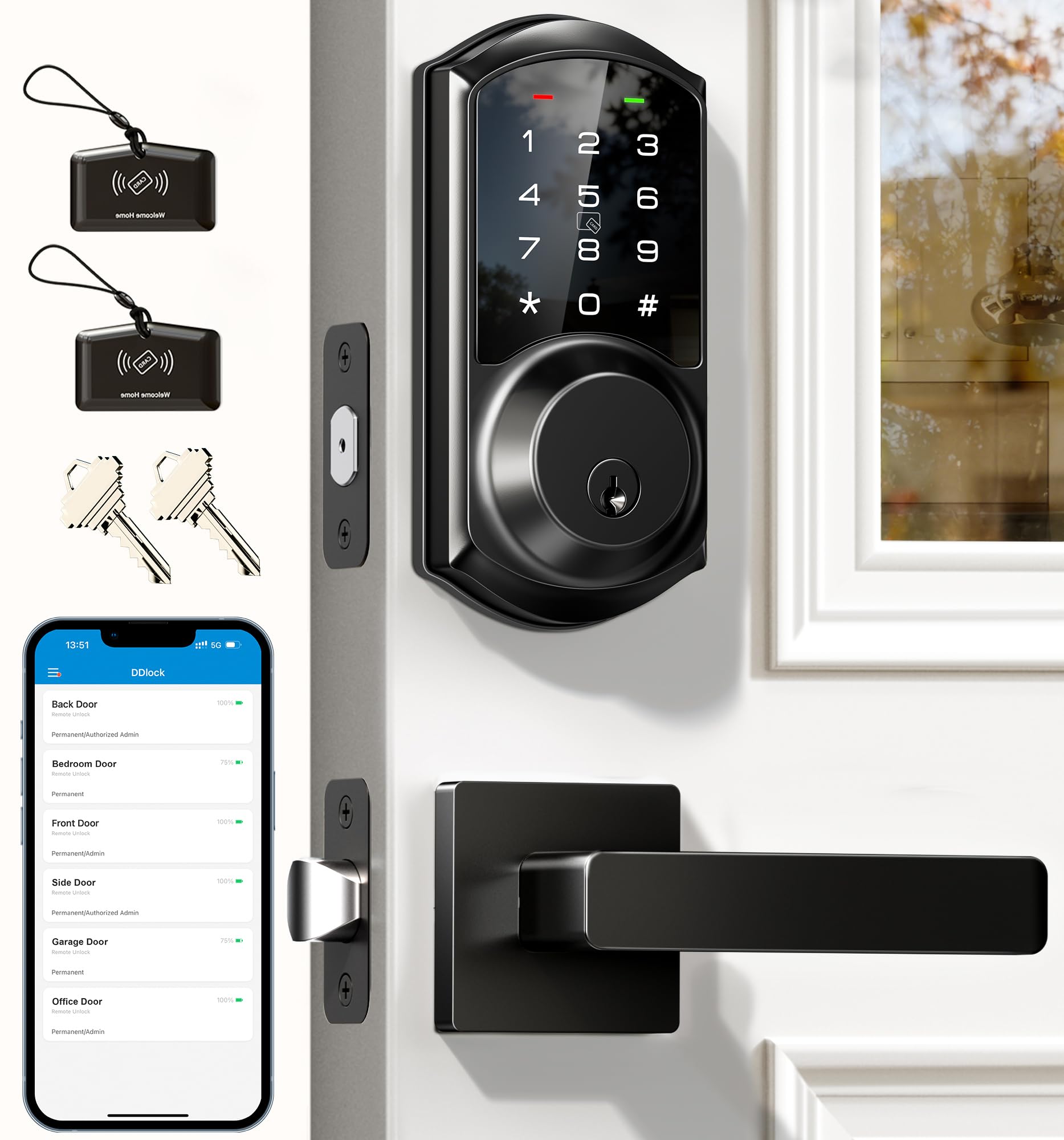
The Veise VE06-L packs an impressive range of features into a mid-range package, including support for over 250 codes and two included IC cards. The auto-lock timer is adjustable from 5 to 900 seconds, offering the widest range in this comparison. The lock can be controlled via the free DDlock app, which has no subscription fees, and supports e-key sharing, access logs, and remote passcode generation when paired with the optional G2 gateway.
Beyond the standard code and app unlocking, the IC card reader adds a physical credential option that is convenient for children or elderly family members who may struggle with touchscreens. The lock is made from solid zinc alloy and is IP54 rated with BHMA/ANSI Grade 3 certification. Features like Privacy Mode, Silent Mode, and Passage Mode give flexibility for different scenarios, and the anti-peeping password allows random digits before and after the true code.
Setup requires attention to detail; some users needed customer support to fully configure the app integration, though the support team was praised for their responsiveness. The lock stores data locally on the chip using AES encryption, which protects against cloud-based data breaches but means you cannot view access logs without the G2 gateway. The lock body is slightly bulky compared to simpler models, which may be noticeable on narrow doors.
Why it’s great
- Huge code capacity with over 250 programmable entry codes
- IC card support provides an alternative to codes and keys
- Wide auto-lock timer range from 5 to 900 seconds
Good to know
- Requires optional G2 gateway for remote access and voice control
- App setup can be finicky without customer support assistance
- Lock body is larger than some competing models
6. TEEHO TK001H Keyless Entry Door Lock
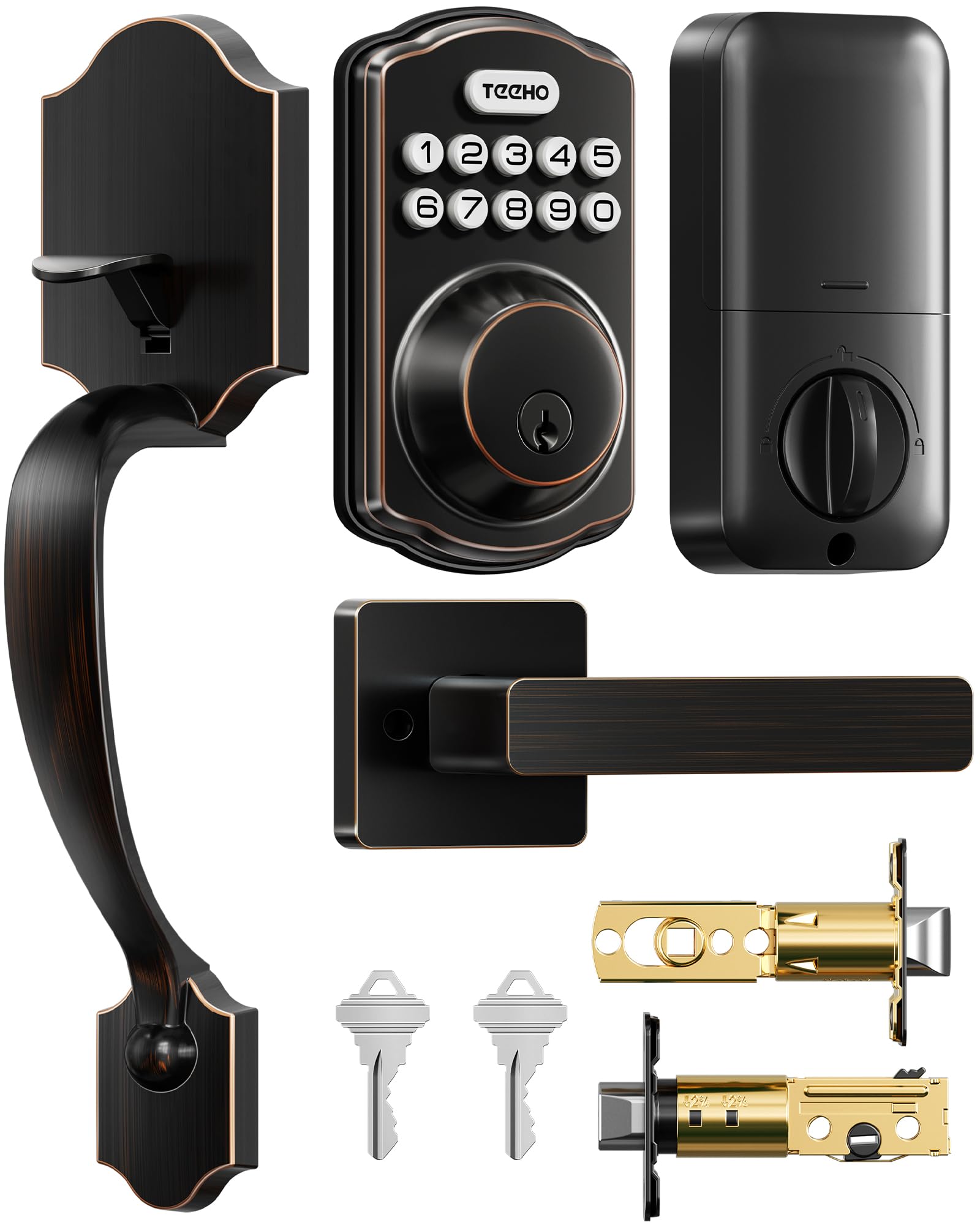
The TEEHO TK001H proves that a reliable automatic locking handle does not require a triple-digit investment. This keyless entry lock offers four ways to unlock—20 user codes, 2 backup keys, one-time codes, and passage mode—all within a simple, no-app design. The auto-lock timer is programmable from 10 to 99 seconds and is disabled by default, requiring a deliberate activation during setup. The lock is ANSI Grade 3 certified with an IP54 weather rating, making it suitable for covered exterior doors.
Installation fits most standard U.S. doors with a 2-1/8 inch hole and door thickness between 1-3/8 and 2 inches, requiring only a screwdriver. The handle hole is adjustable and works for both orientations. The anti-peeping code feature lets you enter extra digits before or after the correct code, and the lock disables after 10 incorrect attempts to prevent tampering. A low battery alert flashes red when power drops below 15%, and battery life is rated at up to a year with four AA batteries.
Some users reported initial setup confusion, with the master code programming requiring external guidance from YouTube tutorials. A few found that the strike plate screw holes did not align perfectly with standard door prep, and the square latch corners required chiseling for a flush fit. The finish has received mixed feedback on durability over extended outdoor use. For the price, however, the TK001H delivers the core automatic locking functionality without any ongoing subscription costs.
Why it’s great
- Affordable entry point with essential auto-lock functionality
- IP54 weather resistance for outdoor installation
- Anti-peeping code entry and 2-year warranty support
Good to know
- Master code setup can be confusing without video guidance
- Strike plate may require chiseling for proper fit
- No app control or smart home integration
7. NICE DIGI X1 Keypad Door Lock

The NICE DIGI X1 packs an astonishing number of entry methods into its compact aluminum body: fingerprint scanning, app control via Bluetooth and Wi-Fi, PIN code, key fobs (13.56 MHz), mechanical keys, and Alexa voice control when paired with the optional Wi-Fi gateway. This level of redundancy means you will never be locked out, as there are six distinct ways to gain entry. The auto-lock feature can be configured through the app, and the fingerprint sensor registers using a similar process to smartphone sensors.
The app supports managing multiple locks across different properties, making it particularly useful for landlords managing Airbnb units or rental properties. You can grant permanent or time-limited access and generate one-time passcodes for visitors. The reversible handle fits both left and right-handed doors, and installation takes roughly five minutes with a screwdriver for standard wooden door cutouts. The lock body is slim at 2.79 inches wide, fitting comfortably on most doors without looking bulky.
Customer reviews highlight a significant cold-weather issue: the fingerprint sensor can fail in freezing temperatures, triggering an “operation failed” error that requires the lock to warm up before functioning normally. The physical key is also described as rough and difficult to duplicate, requiring a specific blank (Ilco DM1054K – MD17) that may not be available at all hardware stores. The lock lacks a dedicated auto-lock disable option in its basic firmware, which may be inconvenient for households that prefer manual locking during the day.
Why it’s great
- Six different entry methods provide maximum flexibility and backup
- Slim aluminum design fits standard door cutouts without looking bulky
- Multi-lock app management ideal for rental property owners
Good to know
- Fingerprint sensor fails in freezing weather conditions
- Physical key is rough and difficult to duplicate
- No way to disable auto-lock in the basic firmware
FAQ
Can I install an automatic locking door handle on any door?
How long do batteries last in an automatic locking handle?
What happens if the fingerprint sensor stops working in cold weather?
Can I still use my existing keys with an automatic locking door handle?
Final Thoughts: The Verdict
For most users, the best automatic locking door handle winner is the Philips 4200 Series WiFi Smart Lock because it combines a fast capacitive fingerprint sensor, built-in Wi-Fi, and a complete handle set at a mid-range price point that undercuts premium competitors. If you want absolute top-tier security and remote access without compromise, grab the Schlage Encode Smart Wi-Fi Lever. And for a straightforward, no-app-auto-lock experience that just works, nothing beats the value of the Kwikset SmartCode 270.