
Our readers keep the lights on and my morning glass full of iced black tea. As an Amazon Associate, I earn from qualifying purchases.
Specs are compiled from manufacturer listings and verified buyer reviews and can change over time — please confirm the key details on the product page before buying.
If you are shopping for a 24GB card right now, the short answer is this: the EVGA FTW3 Ultra is the one most owners keep recommending, and the ASUS TUF is the quietest all-rounder. Everything below explains which of the nine cards actually fits your case, your power supply, and the work you do — because the 24GB of memory on an RTX 3090 is the real reason these cards still matter, not their age.
I’m Min — the founder and writer behind Gadgets Feed. This guide is built by comparing the manufacturers’ published specifications and the patterns across verified customer reviews, so you get each pick’s real strengths and trade-offs instead of marketing spin.
Every card here carries the same NVIDIA GeForce RTX 3090 chip, so the differences come down to cooling, power draw, and physical size. I’ve laid out the 3090 24gb desktop picks by what actually matters once the box is open.
Our Picks at a Glance


How To Choose The Best 3090 24GB Desktop
An RTX 3090 is not a plug-and-play upgrade for an older PC. It draws serious power, it is physically long, and it dumps a lot of heat into whatever case you put it in. The good news is that once you match the card to your power supply and your case, the 24GB of memory does the rest.
Check your power supply first
The card needs three separate PCIe power cables on most models here, and buyers routinely report needing a higher-wattage unit than they expected. A 750W supply shows up as the bare minimum on some listings, but real owners who run heavy loads move up to an 1100W unit for breathing room. If your current supply only has two PCIe cables, plan on replacing it.
Measure your case before you buy
These are some of the longest consumer graphics cards ever sold. The MSI Gaming X Trio measures 13.9 inches long and the ZOTAC Trinity is 12.5 inches, while the PNY XLR8 comes in closer to 11.57 inches. Because the card is also 2.7 to 3 slots thick on some models, the space under it matters too — one owner mentions the backplate heating a nearby CPU cooler.
Think about heat and noise, not just speed
Every 3090 runs hot, and that is normal for this GPU. What separates the cards is how well their cooler handles it. The three-fan designs here keep core temperatures in the low-to-mid 70s Celsius under load, but memory-chip temperatures climb higher on some models, which is why water-cooling shows up again and again in owner reports.
Quick Comparison
| Model | Best For | Boost Clock | Memory | Card Width | Amazon |
|---|---|---|---|---|---|
| EVGA RTX 3090 FTW3 Ultra★ Best Overall | All-round performance | 1800 MHz | 24GB GDDR6X | 5.38″ | Amazon |
| EVGA RTX 3090 FTW3 (Renewed)Best Value | Budget 24GB entry | 1800 MHz | 24GB GDDR6X | 5.38″ | Amazon |
| ZOTAC RTX 3090 Trinity OCCompact Pick | Quiet 4K gaming | 1710 MHz | 24GB GDDR6X | 4.75″ | Amazon |
| ASUS TUF RTX 3090 OC | Cool and quiet builds | — | 24GB GDDR6X | 5.0″ | Amazon |
| PNY RTX 3090 XLR8 Revel Epic-X | Workstation and AI | 1695 MHz | 24GB GDDR6X | 4.41″ | Amazon |
| MSI RTX 3090 Gaming X Trio 24G | Quiet 4K and AI work | — | 24GB GDDR6X | 5.5″ | Amazon |
| NVIDIA RTX 3090 Founders Edition | Creator rendering | — | 24GB GDDR6X | 5.4″ | Amazon |
| MSI Aegis RS 10TH-061US | Full tower bundle | — | 24GB GDDR6X | — | Amazon |
| iBUYPOWER TraceMR 224i | Turnkey rendering rig | — | 24GB GDDR6X | — | Amazon |
In‑Depth Reviews
1. EVGA GeForce RTX 3090 FTW3 Ultra Gaming, 24GB GDDR6X, iCX3 Technology
Our pick — over 4.5★ from 950+ verified ratings; the strongest balance of quality and price.
The 24GB card that loads 12-billion-parameter AI models without running out of memory
This is the 3090 that keeps coming up when owners talk about getting work done with 24GB of video memory. A single buyer reports running a 12-billion-parameter language model using about 18GB of the available 24GB, with a vision encoder attached, and hitting no out-of-memory errors. For anyone loading large AI models, that headroom is the whole reason to buy this generation at all.
Gaming holds up too. Owners describe smooth 4K/120Hz HDR output on an OLED TV and Red Dead Redemption 2 running at 4K on Ultra settings at 60fps. A separate owner says the card maxes out every game except Cyberpunk 2077 with ray tracing switched on. The 10496 CUDA cores and the 1800 MHz boost clock — the ceiling speed the card reaches under load — put it above the ZOTAC Trinity OC at 1710 MHz, so it edges that card out on raw clock.
What wins people over here is performance, and it is the praise that shows up most in the feedback. The honest catch is heat. One owner had to move to full water cooling with an active backplate to hold the memory chips near 70°C after the top memory chips hit 105°C and started throttling. Stock fans kept the core under 75°C in the same report, so the card works fine on air — it just runs warm, like every 3090. It also needs three 8-pin power cables and a beefy supply, and at 11.81″ long by 5.38″ wide it is a wide card that needs a roomy case.
Where It Wins
- Enough VRAM for 12-billion-parameter models with room left over
- 1800 MHz boost clock beats the ZOTAC Trinity OC’s 1710 MHz
- iCX3 thermal sensors plus adjustable ARGB and an all-metal backplate
- Handles 4K Ultra gaming at 60fps and above in owner reports
What To Plan Around
- Runs hot — memory chips can throttle without extra cooling
- Needs three 8-pin connectors and a strong power supply
- Wide at 5.38″ — confirm case clearance first
Reach for this if: you want the highest-rated 24GB card here and you load large models or render 4K footage. The crowd favorite — 4.6 stars across 900+ ratings — and the one most owners keep buying again.
Look elsewhere if: a small case or a modest power supply is what you have — the ZOTAC Trinity’s 4.75″ width and lower power draw suit tighter builds.
2. EVGA GeForce RTX 3090 FTW3 Ultra Gaming (Amazon Renewed)
The same FTW3 board, professionally inspected and sold as a renewed unit
If the new FTW3 is more than you want to spend, this is the identical card through Amazon Renewed — a returned or traded-in unit that Amazon-qualified suppliers inspect and test to work and look like new. It carries the same 1800 MHz boost clock, 10496 CUDA cores, and 2.5-pound build as its new counterpart, and the 24GB of GDDR6X memory is unchanged. For AI and 3D work, that is the part that counts.
The performance wins people over here, and value right behind it. Buyers describe it staying cool and quiet after a driver reinstall, replacing a two-card setup in Blender Cycles because the memory was maxing out, and holding up through VRAM tests. It draws power spikes up to 420W on the GPU alone under load, so an 800W supply is the practical floor per owner reports — and it needs three PCIe power inputs to boot at all.
Condition reality check: renewed stock varies. Most units arrive looking new with solid packaging, but a few report bent heatsink fins, a box serial that does not match the card, or a flaky HDMI port. Because renewed purchases fall under the Amazon Renewed Guarantee, a return is straightforward if yours arrives off.
The fit note: reliability reads mixed in the feedback, so treat this as the pick for a buyer comfortable testing a card in its first week and returning it if something is wrong. That is the trade you make for the lower entry point.
Who it suits: a budget-conscious builder who wants 24GB of VRAM and does not mind running a quick stress test on arrival.
When to pass: if you want a factory-sealed box and zero risk, step up to a new card instead.
3. ZOTAC Gaming GeForce RTX 3090 Trinity OC 24GB GDDR6X
The narrowest card here at 4.75″ wide, for cases the wider 3090s will not fit
At 4.75″ wide the Trinity is the narrowest card on this list, which matters when you are squeezing a 3090 into a mid-size case. It is the mirror image of the EVGA FTW3 — that card is wider at 5.38″, while this one is longer at 12.5″ versus the FTW3’s 11.81″. So the Trinity trades width for length. Check which dimension your case is tight on before deciding.
The cooling numbers are the headline. Buyers report idle temperatures between 45–55°C and load temperatures between 60–75°C, with near-silent fans at those levels, and one buyer in a six-hour session topped out at 72°C. The IceStorm 2.0 cooler uses a 2.5-slot design and a metal frontplate and backplate, and it pulls 350W with a 750W supply recommended.
The recurring gripe is reliability, which is the most-discussed topic in the feedback. Some units run for years without issue; a few report fan failures or a card that stopped displaying after a few months, with support experiences that were not smooth. This is worth knowing going in, but with hundreds of owners and a 4.1 rating, most are getting solid use. And the boost clock of 1710 MHz trails the EVGA FTW3’s 1800 MHz, so it is the slightly slower card on paper.
Why It Earns Its Spot
- Narrowest card here at 4.75″ wide for tighter cases
- Owners mention idle 45–55°C and load 60–75°C
- Near-silent fans at typical loads per owner accounts
- 2.5-slot design with metal frontplate and lighted backplate
The Honest Trade-Offs
- 1710 MHz boost is the lower figure versus the EVGA FTW3’s 1800 MHz
- Reliability reads mixed in owner feedback — a few cards failed early
- Fans can get loud past roughly 60% speed
Pick this when: your case is narrow and you want a quiet 4K gaming card that already reports cool temperatures.
The caveat to weigh: read up on support before you buy, since a few owners hit unhelpful service on failed units.
4. ASUS TUF Gaming NVIDIA GeForce RTX 3090 OC Edition

The 3090 that holds roughly 70°C in OC mode and runs quieter than the rest
What sets the TUF apart is durability rather than clock speed. It uses military-grade capacitors, dual ball fan bearings that ASUS says last up to twice as long as sleeve bearings, and an Axial-Tech fan design with a reversed central fan to cut turbulence. Owners describe holding 1770 MHz and above while running no hotter than roughly 70°C in OC mode, and one runs mining, a game, and 4K video across three monitors at once without a hiccup.
The cooling is the second most-praised trait here. Multiple owners call the TUF the quietest and coolest-running of the 3090s they have owned, and one says it whips up far less coil whine than a prior card with better temperatures. The 24GB of GDDR6X future-proofs the card for editing and 3D work, which is why buyers keep choosing it over a cheaper 10GB option.
For gaming alone, several owners admit the TUF is more than you need, and one notes the power limit is capped at 107% (about 375W) by the BIOS — so if serious overclocking is your goal, a different model is the better tool. Durability is the one place the feedback splits: most report years of steady running, while a few had a unit fail within a year or a port stop working. That is a small slice of a large pool and reads as build variability rather than a pattern.
Second Opinion
- Customers note max temperatures around 70°C in OC mode
- Military-grade capacitors and dual ball fan bearings for long life
- Reversed central fan keeps turbulence and noise down
- Quietest-running 3090 per multiple owner comparisons
Second Thoughts
- BIOS caps the power limit at 107%, limiting overclocking headroom
- Overkill — and more than many buyers need — for pure gaming
- A few units failed early despite the durability build
The verdict: the safest 24GB pick if quiet, cool, and long-life operation tops your list over squeezing out peak clock speeds.
skip it if: you plan aggressive overclocking — the BIOS power cap gets in your way.
5. PNY GeForce RTX 3090 24GB XLR8 Gaming Revel Epic-X RGB Triple Fan

A reference-layout 3090 with 936GB/sec bandwidth, built for stock-speed AI and rendering work
The PNY XLR8 leads with memory bandwidth: 936GB/sec across its 24GB of GDDR6X on a 384-bit bus, paired with 10496 CUDA cores. The card runs a 1695 MHz boost clock, below the EVGA FTW3’s 1800 MHz, and it is limited by the BIOS and only two 8-pin connectors — so there is no room for a third power cable and no big overclocking headroom. For AI and rendering work that runs at stock speeds, that is a fair trade for quiet, stable operation.
Owners handle exactly that kind of work on it. One runs machine-learning benchmarks on Linux, games on Windows, and a GPT-2 XL transformer, describing near-silent operation even at high fan speeds. Another notes the fans can spin all the way down to 0 RPM at idle, which is unusual for a 3090. The rigid backplate and true reference layout also make it straightforward to bolt on a water block later.
The one that bites: noise is genuinely mixed in the feedback. Some find it near-silent, while others compare the fans under load to jet turbines and say the card is distracting without a silencing case. The GDDR6X backplate also runs hot, with one owner measuring 54°C at 80% fan in a cold room.
What to do with that: if you value a quiet desk, plan on good case airflow or a water block. If you value straightforward, stable workstation duty at stock settings, the PNY does the job without fuss.
Made for: the builder who wants a reference-layout 3090 for AI and editing, with easy water-block mounting and a quiet at-idle profile.
Pass on it if: you chase peak clock speeds or want the loudest-fan risk off the table — the two-connector power limit and fan noise work against both.
6. MSI Gaming GeForce RTX 3090 Gaming X Trio 24G
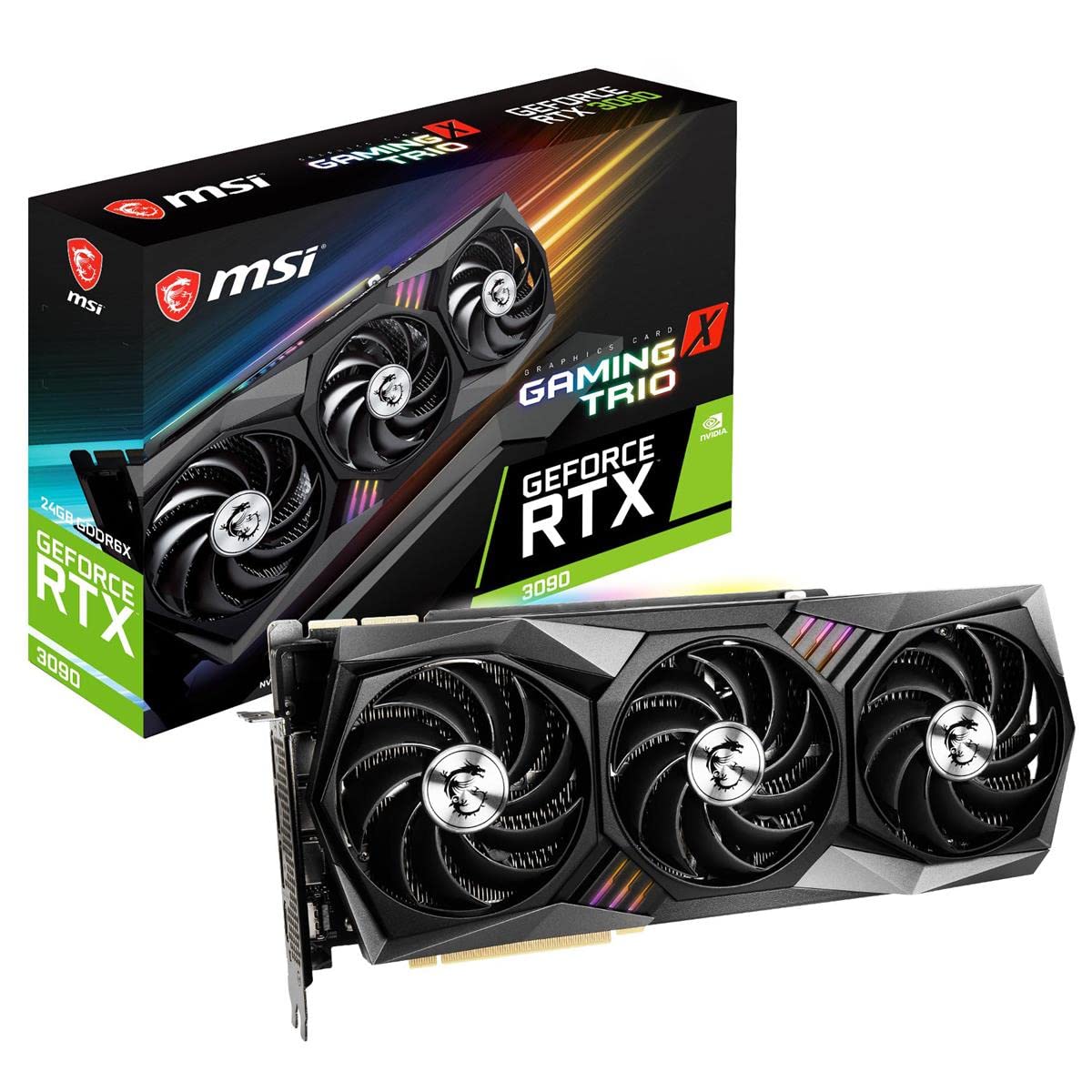
Copper heat pipes run across the backplate to cool the GDDR6X memory directly
MSI took a different approach to the 3090’s heat problem by running copper heat pipes across the backplate to cool the GDDR6X memory chips directly — the parts that run hottest on this GPU. Owners call it the quietest 3090 they have used, with no coil whine, and describe good 4K 60fps gaming performance. It runs the same 10496 CUDA cores and 24GB of GDDR6X on a 384-bit bus as the rest of the field.
The size is the trade. At 13.9″ long, 5.5″ wide, and 5.2 pounds, this is the largest card here, and one owner barely fit it into an ITX case. The three fans also push hot air out the sides into the case rather than out the back, and the backplate adds about 3mm of height that can warm a nearby CPU cooler. The included support brace draws criticism for being too flimsy to hold the card’s weight.
Owners keep returning to: performance. It is the trait praised most in the feedback, and the Tri Frozr 2 cooler backs it with quiet, cool running. Where it lands on price is a matter of taste — opinions split between reasonable and a steep premium.
What to sort out before buying: overheating comes up as the main complaint, and the flimsy support brace means you should budget for a stronger brace if you care about long-term PCIe slot strain.
Buy it if: you have a large case, want the quietest cooler here, and want memory cooled from the back side by dedicated copper pipes.
Think twice if: you are building in a small case or relying on the included brace — neither suits this 13.9″ card.
7. NVIDIA GeForce RTX 3090 Founders Edition Graphics Card

NVIDIA’s own two-slot 3090, a favorite for 6K editing and 3D rendering
The Founders Edition is the reference design every other card here is measured against. It carries the same 24GB of GDDR6X and 384-bit interface, with 3 DisplayPort 1.4a outputs and a single HDMI 2.1 port. What earns it a place is creator work: one video editor reports real-time 6K playback in DaVinci Resolve with an eight-node timeline and no slowdown, and GPU renders finishing in about four minutes where a CPU took 20 to 30 minutes.
It is also the pick for buyers who want a clean two-slot card, and NVIDIA’s own unit shows up in owner hands almost like new despite OEM packaging. The catch is heat and power. Owners warn that an 850W supply is just enough and recommend jumping to a 1100W unit for headroom, and more than one notes the card runs hotter than it should. That is the price of a card this dense in a smaller frame.
Performance reads honestly: opinions on this card split down the middle — some owners are thrilled and some are not — so this is a pick for someone drawn to the reference design and creator workloads rather than raw benchmark bragging rights.
Where it wins: the Founders Edition’s slim two-slot body and NVIDIA’s own build make it the natural choice for a workstation that needs 24GB with a smaller footprint than the third-party cards.
Best for: video editors and 3D artists who want a two-slot 24GB card and pair it with a 1100W supply.
Not for: anyone with an 850W supply and no plan to upgrade it, given the card’s heat and draw.
8. MSI Aegis RS 10TH-061US Gaming Desktop Tower with RTX 3090

A complete 3090 tower with an i7-10700K, liquid cooling, and 3TB of storage
If you would rather not assemble anything, this is the complete 3090 desktop. It pairs the 24GB RTX 3090 with an Intel Core i7-10700K running 8 cores and 16 threads, plus 16GB of DDR4 at 3000 MHz that expands to as much as 128GB, and a 1TB NVMe SSD alongside a 2TB drive. There is liquid cooling, WiFi 6 at 2.4 Gbps, and a 2.5 GbE wired port, so the whole machine arrives ready to run.
One owner calls it the best 3090 prebuilt they have found, running the GPU near 70°C at 190fps in Apex Legends at 1440p, and overclocking the CPU to 5.0 GHz. Another uses it for video editing and says Cyberpunk 2077 runs on ultra settings where most PCs would struggle. The machine ships with a keyboard and mouse, so it is a genuine out-of-the-box setup.
The build note that matters: the included 750W power supply shows up as the weak point. One owner had it burn out after a day of gaming before MSI sent a higher-wattage replacement under warranty, and another points out the case design blocks airflow at the front. Front-panel airflow is the recurring room for improvement.
What that means: expect to run it as delivered and let the warranty cover early problems, or plan a power supply swap if you push heavy loads all day.
Fits you if: you want a plug-in-and-play 3090 tower with liquid cooling and generous storage, and you are not worried about doing your own build.
Skip if: you want to choose every part — the fixed power supply and front airflow give you less control than a custom build.
9. iBUYPOWER Pro Gaming PC TraceMR 224i with RTX 3090

A turnkey 3090 tower with an i9-11900KF and 32GB of DDR4 for heavy rendering
This is the highest-spec prebuilt here on memory and processor: an Intel Core i9-11900KF that boosts to 5.3 GHz, 32GB of DDR4, a 1TB SSD plus a 2TB drive, and 240mm liquid cooling around the 24GB RTX 3090. It ships with Windows 11 Home, a keyboard, a mouse, WiFi, and a 1-year parts-and-labor warranty with lifetime support. A VFX professional bought it as a rendering rig and reported it exceeded expectations.
Owners lean on the raw capability. It handles Cyberpunk 2077 on ultra settings and renders heavy workloads that would choke a lesser machine. The tower arrives well-packaged, and the build includes a tempered-glass side panel that shows off the hardware inside.
The pattern to know: reliability and the liquid cooler are where the feedback concentrates. A few reviewers point out radiator noise developing after several months, and one dealt with a roughly 30-day turnaround to get a part replaced — though that owner simply installed a different cooler and moved on.
Weigh it honestly: the machine is a capable 24GB rendering tower, and a handful of early cooler complaints should be read as variability rather than a universal flaw. Treat the first months as a trial window and lean on the included warranty if anything is off.
Choose this if: you want the most processor and memory headroom here and are leaning on it for rendering rather than gaming alone.
Consider another if: you want the simplest, lowest-risk turnkey buy — the cooler and reliability feedback makes this the one to research hardest before you commit.
Understanding the Specs
VRAM: Why 24GB Is The Whole Point
VRAM is the card’s own working memory, and 24GB of GDDR6X is what lets an RTX 3090 hold large AI models, 8K footage, and complex 3D scenes without running out of space. Buyers describe loading 12-billion-parameter language models using roughly 18GB of the available memory with a vision encoder attached, with no out-of-memory crash. A card with less memory simply stops before the job finishes. For AI, video editing, and 3D rendering, that capacity matters far more than a small clock-speed difference between models.
Boost Clock And CUDA Cores
Boost clock is the top speed the card reaches under load, measured in MHz, and CUDA cores are the processing units that do the work. All the cards here share 10496 CUDA cores, so the clock is the main performance separator. The EVGA FTW3 runs at 1800 MHz and the ZOTAC Trinity OC at 1710 MHz — a modest gap that shows up as a few frames in games. Cooling, not clock speed, is what usually separates one 3090 from another in daily use.
Power Draw And Connectors
The RTX 3090 is a thirsty card, and the number of 8-pin PCIe power cables each model needs tells you what your supply must handle. The PNY XLR8 uses only two 8-pin connectors and is power-limited by its BIOS, while others need three. Owners running heavy loads report moving up to an 1100W unit for headroom. Fewer connectors means less overclocking room but an easier match for a modest supply.
Card Size And Slot Width
Physical fit bites people more often than speed. Cards here range from 11.57″ to 13.9″ long and 4.41″ to 5.5″ wide, with slot thickness up to 2.7 or 3 slots on the chunkiest models. Measure your case’s graphics-card clearance and the space below the slot before buying. A card that does not fit is a return, no matter how good the specifications look on paper.
FAQ
Will an RTX 3090 24GB fit in my existing case?
What power supply do I need for a 3090 desktop?
Is 24GB of VRAM enough for AI work?
Why does an RTX 3090 run so hot?
Is a renewed or refurbished 3090 worth it?
Should I buy a 3090 card or a full prebuilt desktop?
How much slower is a 1710 MHz card than an 1800 MHz card?
Do I need to replace the power supply in a 3090 prebuilt?
Can a 3090 handle 4K gaming and VR at the same time as other work?
Does the number of fans tell me how quiet a 3090 will be?
Final Thoughts: The Verdict
For most people buying in this category, the winner is the EVGA GeForce RTX 3090 FTW3 Ultra because it pairs the highest boost clock here at 1800 MHz with enough 24GB memory headroom to run large AI models and 4K games without running out of room. If quiet, cool operation matters more than a few megahertz, the ASUS TUF RTX 3090 OC holds the steadiest temperatures and the best durability story of the group. And if you want a whole rendering tower rather than a bare card, the MSI Aegis RS puts the 24GB card, an i7-10700K, and liquid cooling in one box so you can skip the build.
How We Picked
We do not accept paid placement. Every pick is matched to a real buyer and a real use-case; we do not hands-on test units.
Sources & Methodology
Specifications: manufacturer listings and product documentation. Review insights: verified customer reviews, as of September 2026. Pricing: not shown on this page (it changes often); check the current price via the retailer link.
As an Amazon Associate, Gadgets Feed earns from qualifying purchases. This does not affect which products we feature.