
Your CPU is a furnace under load, and the stock cooler is barely keeping the smoke in. A 240mm all-in-one liquid cooler is the focused solution for gamers and power users who want serious thermal headroom without the case-clutter of a massive 360mm radiator. The right unit delivers whisper-quiet operation and keeps modern high-core-count chips below throttling temps during extended sessions.
I’m Min — the co-founder and writer behind Gadgets Feed. I’ve spent hundreds of hours cross-referencing pump RPMs, radiator fin densities, fan static pressure ratings, and real-world customer temperature logs to separate genuine thermal performance from marketing claims.
Whether you are building a new rig or upgrading from a noisy air tower, this guide cuts through the spec sheets to find the best aio 240mm cooler for your specific build and budget.
How To Choose The Best AIO 240mm
Every 240mm AIO moves heat from the CPU to the radiator via a pump, but the execution varies wildly. Prioritize models with a high-quality ceramic bearing pump for longevity, a copper cold plate for better thermal transfer, and fans with at least 2.0 mmH₂O static pressure for pushing air through dense fins. Check your case specs for radiator mount positions (top vs. front) and the combined depth of the radiator and fans — a standard is 38mm thick, but some premium units go to 55mm.
Socket Compatibility and Contact Pressure
Modern AIOs must support Intel LGA 1700/1851 and AMD AM5/AM4 out of the box. The best models include a contact frame for Intel sockets, which distributes mounting pressure evenly across the IHS and prevents bending. For AMD AM5, a native offset mounting bracket that shifts the cold plate over the chiplet hotspot delivers visibly lower load temperatures — a critical feature for Ryzen 7000/9000 series chips.
Pump Noise and Fan Acoustics
Not all quiet coolers are equal. A pump running above 3800 RPM can produce a high-pitched whine that penetrates fan noise. Look for models with a rated noise level at or below 30 dBA for the pump itself. The fan blades should be fluid-dynamic or hydraulic bearing designs rather than standard sleeve bearings to avoid rattling after months of use. The ARCTIC Liquid Freezer III Pro’s 38mm radiator demands more aggressive fans, while the be quiet! Light Loop targets low dBA at the cost of slightly higher airflow rates.
Quick Comparison
On smaller screens, swipe sideways to see the full table.
| Model | Category | Best For | Key Spec | Amazon |
|---|---|---|---|---|
| ARCTIC Liquid Freezer III Pro 240 | Premium | Maximum thermal headroom on AM5/Intel | 38mm thick radiator + VRM fan | Amazon |
| Corsair Nautilus 240 RS | Premium | Low-noise builds with daisy-chain simplicity | 20 dBA pump, convex cold plate | Amazon |
| NZ XT Kraken Elite 240 RGB 2024 | Premium | Customizable IPS LCD and aesthetics | 2.72″ 640×640 60Hz IPS display | Amazon |
| Lian Li GA II LITE 240mm | Mid-Range | High CFM with 28mm-thick ARGB fans | 3800 RPM pump, 79 CFM fans | Amazon |
| be quiet! Light Loop 240mm | Mid-Range | Near-silent operation with ARGB | 48 total LEDs, 34.9 dBA max | Amazon |
| Thermaltake TH240 ARGB Sync V2 | Mid-Range | Budget-friendly with infinity mirror cap | 2000 RPM fans, 25.8 dBA | Amazon |
| MSI MAG Coreliquid A13 240 | Budget | Entry-level liquid cooling on a tight budget | 3800 RPM pump, 14.4 dBA noise | Amazon |
In‑Depth Reviews
1. ARCTIC Liquid Freezer III Pro 240 A-RGB

ARCTIC packs a 38mm thick radiator into this 240mm AIO — a full 10mm more than standard — which dramatically increases the surface area for heat dissipation. The included 120mm P12 Pro fans push 77 CFM at their peak, making this one of the most thermally capable 240mm coolers available. Users reported load temperatures dropping by 4–6°C compared to standard 27mm radiators on the same CPUs, and the integrated PWM VRM fan keeps motherboard voltage regulators cool under sustained load.
The mounting system is solid but requires patience: the offset mounting bracket for AM5 shifts the cold plate directly over the chiplet hotspot, delivering measurably lower temperatures on Ryzen 7800X3D and 9800X3D chips. The Intel contact frame for LGA 1851 and 1700 ensures even pressure distribution. Some users noted that the thick radiator may impede top-mounted fan clearance in compact cases, and the install forces you to tighten the cold plate down with significant pressure.
At full tilt, the fans are not quiet — several reviews describe them as “loud at max speed” — but with a custom fan curve in BIOS, the noise becomes manageable while still outperforming most rivals. The single-cable PWM daisy-chain management is a neat touch that reduces cable clutter, though the 38mm depth requires careful case measurement before purchase.
Why it’s great
- Thick 38mm radiator offers class-leading thermal capacity
- Integrated VRM fan cools motherboard power delivery
- Native offset mount for AM5 hotspot improves Ryzen temps
Good to know
- Radiator depth may conflict with top-mounted fans in compact cases
- Fans are loud at 100% PWM; requires fan curve tuning
- Install process is more demanding than standard AIOs
2. Corsair Nautilus 240 RS

Corsair’s Nautilus line focuses on acoustic refinement without sacrificing thermal performance. The pump operates at a whisper-quiet 20 dBA, which is near the threshold of human hearing in a typical room. The convex cold plate design applies even pressure across the CPU IHS, and the pre-applied thermal paste pattern speeds up installation. Users report idle temperatures around 28°C on Ryzen 9 9950X systems, with gaming loads staying under 65°C with a decent thermal paste replacement.
The daisy-chain fan connection reduces cable management headaches significantly — each RS120 fan connects to the next, requiring only a single 4-pin PWM header on the motherboard. This is a huge quality-of-life feature for builders who value clean interior aesthetics. The pump noise is genuinely imperceptible at low loads, and even under sustained Cinebench stress, the acoustic profile remains unobtrusive.
The trade-off is that the included RS120 fans push only moderate static pressure compared to dedicated high-performance fans. Some users reported that replacing the stock thermal paste with a high-quality third-party compound dropped CPU temperatures by up to 10°C. This is not a cooler for extreme overclocking, but for noise-sensitive builders running stock or PBO configurations, it is a near-perfect choice.
Why it’s great
- Exceptionally quiet 20 dBA pump for noise-sensitive builds
- Daisy-chain fan wiring simplifies cable management
- Convex cold plate ensures consistent contact pressure
Good to know
- Stock thermal paste is adequate but not optimal; replacement yields better temps
- Fan static pressure is moderate, not best for high-density radiators
- No RGB model available for those wanting lighting effects
3. NZXT Kraken Elite 240 RGB 2024

The Kraken Elite is as much a visual centerpiece as it is a cooling solution. The 2.72-inch IPS LCD runs at 640×640 resolution with a 60Hz refresh rate and 690 cd/m² brightness — you can display system stats, GIFs, or YouTube integration directly on the pump cap. The Turbine pump design delivers a claimed 10% performance increase over previous generations with lower noise, and users confirm it keeps Ryzen 7 7800X3D and 9800X3D chips under 70°C during extended gaming sessions.
Installation is genuinely straightforward thanks to pre-applied thermal paste, tool-free brackets, and a single breakout cable that consolidates power and USB connections. The F120P fans include a Zero RPM mode that stops the blades entirely during low-load scenarios, making the cooler silent when the PC is idling. The NZXT CAM software is required for display customization, but it offers deep control over pump speed, fan curves, and lighting sync.
The price is the highest in this roundup, and the cooler targets users who prioritize aesthetics as much as thermals. The pump produces a subtle hum at full load that some users describe as noticeable but not intrusive. The white color scheme of this variant looks stunning in light-themed builds. For pure performance per dollar, other options win; for the complete package of cooling and customization, the Kraken Elite is unmatched.
Why it’s great
- Brilliant 2.72″ IPS LCD for real-time system monitoring and custom content
- Zero RPM fan mode for silent idle operation
- Tool-free mounting and single breakout cable simplify install
Good to know
- Premium price point that is significantly higher than comparable coolers
- Pump produces a subtle but audible hum under full load
- NZXT CAM software is required for LCD and fan control
4. Lian Li GA II LITE 240mm
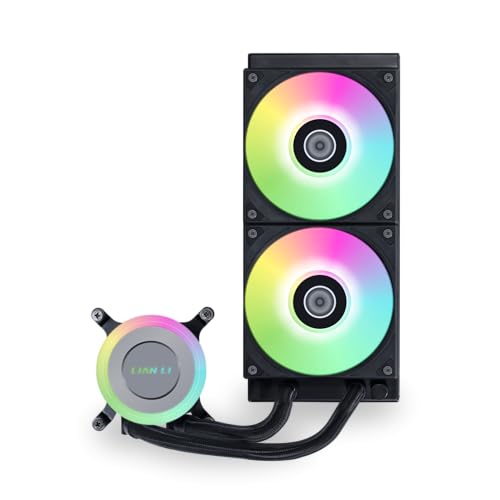
Lian Li’s GA II LITE uses 28mm-thick fans (3mm thicker than standard) to push an impressive 79 CFM at 2500 RPM, making this one of the highest airflow 240mm AIOs you can buy. The hydraulic bearing design aims for longevity, and the 3800 RPM pump circulates coolant aggressively. Users report idle temperatures in the low 50s for Ryzen 9 7900X chips, with gaming loads peaking around 73°C — solid performance for a mid-range unit that balances cost and capability.
The daisy-chain fan system simplifies wiring, and the ARGB pump cap offers customizable lighting without needing extra controllers. The design language is industrial and understated, which fits well in black-out builds. Some users noted that the pump produces a low-frequency throbbing sound at lower speeds — running it at a constant 50–75% PWM mitigates this and avoids early pump wear.
At this price point, the GA II LITE is a strong competitor for those who want performance over flashy aesthetics. The “Lite” naming is slightly misleading — this is actually the highest airflow version in the GA II lineup, while the “Pro” model focuses on quieter fluid-dynamic bearing fans. Installation is straightforward, though the mounting bracket for the radiator in the Hyte Y60 case was reported as very tight-fitting.
Why it’s great
- Highest CFM (79) in this comparison for maximum airflow
- Thicker 28mm fans improve static pressure through the radiator
- Daisy-chain fan cabling keeps the build clean
Good to know
- Pump can produce a low-frequency throbbing at low speeds
- Fans are loud at 100% PWM; best run with custom curve
- Limited ARGB customization compared to dedicated RGB-focused AIOs
5. be quiet! Light Loop 240mm
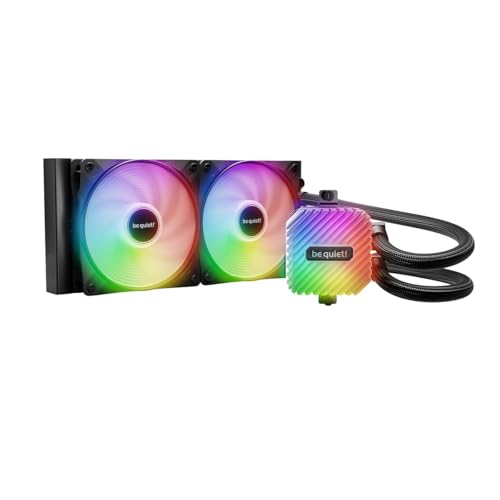
be quiet! delivers on its name with the Light Loop, prioritizing acoustic performance while still offering full ARGB lighting across 48 LEDs. The Jet Plate design increases coolant flow speed within the pump, while the progressive IC reduces switching noise — the result is a pump that stays below audible thresholds during normal operation. Users consistently report that the cooler keeps Ryzen 7 7800X3D and 9800X3D chips below 65°C during gaming, with some stress tests peaking at 84°C before stabilizing.
The included ARGB-PWM-Hub supports up to six fans and six ARGB components, making this a great choice for builds with multiple lighting elements. The refill port is a rare feature in the AIO space — it allows you to top off the coolant over time, potentially extending the lifespan beyond the 3-year warranty. The Light Wings LX fans produce 61.8 CFM but are rated at a reasonable 34.9 dBA, so they won’t be disruptive in a quiet room.
Installation is smooth thanks to the included universal brackets, though the heatsink mount can be finicky — consulting the manual or online guides helps. The coolant bottle included in the box is a thoughtful addition. The uniform black aesthetic with white ARGB lighting looks clean in any build. For users who want silence and RGB without compromise, the Light Loop is a balanced choice.
Why it’s great
- Very quiet pump and fan operation suitable for noise-sensitive setups
- User-refillable coolant loop extends cooler lifespan
- Comprehensive ARGB-PWM-Hub for multi-device synchronization
Good to know
- Airflow (61.8 CFM) is moderate compared to high-speed competitors
- Heatsink bracket installation can be slightly tricky
- RGB only fully controllable with motherboard software; no standalone controller
6. Thermaltake TH240 ARGB Sync V2

Thermaltake’s TH240 V2 updates the original with a refreshed industrial design that features an infinite-mirror effect on the 360-degree rotatable pump cap. The cooling performance is reliable for mid-range builds: users report CPU temperatures never exceeding 68°C on typical workloads, with idle temps hovering around 38°C on older chips like the FX-9370. The copper base plate and rubber tubing are standard for the price tier, and the 2000 RPM fans strike a decent balance between airflow and noise at 25.8 dBA.
RGB synchronization works with ASUS Aura Sync, Gigabyte RGB Fusion, MSI Mystic Light, and ASRock Polychrome, so the lighting integrates seamlessly into existing setups. The installation instructions are less clear than they could be, and the 4-pin fan connector may not cooperate with every motherboard header. Several users noted that the build quality feels functional rather than premium — the pump housing is plastic and the tubing is less flexible than higher-end units.
The TH240 V2 is a serviceable entry-level AIO that gets the job done without fuss. It keeps temperatures under control and looks good doing it, but the lack of a thicker radiator or higher-static-pressure fans means it is not suited for aggressive overclocking on high-core-count CPUs. For a budget-conscious builder upgrading from a stock cooler, this is a solid visual and thermal upgrade.
Why it’s great
- Eye-catching infinite-mirror pump cap rotates 360 degrees
- Wide RGB sync support across all major motherboard brands
- Very quiet at 25.8 dBA for general use and gaming
Good to know
- Build quality feels less robust than premium competitors
- Vague installation instructions may confuse first-time builders
- Radiator is standard 27mm, limiting peak thermal headroom
7. MSI MAG Coreliquid A13 240

MSI’s MAG Coreliquid A13 is the entry-level option that still delivers genuine 240mm cooling capability. The integrated three-phase pump spins up to 3800 RPM and uses ceramic bearings for durability, while the rated noise level of just 14.4 dBA is the quietest spec in this entire list. Users report excellent thermal results on chips like the Ryzen 7 7800X3D and i7-14700KF, with temperatures staying under 65°C under gaming loads and stress tests passing without issue.
The split-flow radiator design improves heat exchange, and the 390mm triple-layered reinforced tubing resists evaporation effectively. The installation supports both AMD AM5/AM4 and Intel LGA 1700/1851 out of the box, and the included thermal paste gets you started immediately. Some users noted that the AMD mounting requires slightly more preparation than Intel, but the overall process is straightforward. The fans move 60.78 CFM — adequate but not exceptional.
At this price point, the A13 makes significant compromises: the radiator is standard 27mm thick, the fans are not high-static-pressure models, and the ARGB implementation is basic. The pump is genuinely quiet in operation, with multiple reviews confirming no audible pump noise. For a first liquid cooler or a budget-focused build that still wants reliable thermal performance, the MSI MAG Coreliquid A13 is a compelling entry point.
Why it’s great
- Remarkably quiet 14.4 dBA pump operation
- Three-phase ceramic bearing pump for durability
- Out-of-box compatibility with LGA 1851 and AM5
Good to know
- Standard 27mm radiator limits extreme overclocking headroom
- Fan static pressure is moderate, not ideal for dense radiators
- Basic ARGB implementation with limited customization
FAQ
Is a 240mm AIO enough for a Ryzen 9 7950X or Intel i9-14900K?
What is the maximum recommended pump RPM for daily use?
Can I mount a 240mm AIO at the front of my case?
How long should a 240mm AIO last before needing replacement?
Final Thoughts: The Verdict
For most users, the best aio 240mm winner is the ARCTIC Liquid Freezer III Pro 240 because its 38mm radiator and VRM fan deliver unmatched thermal capacity in the 240mm form factor at a competitive price. If you want a near-silent experience with easy cable management, grab the Corsair Nautilus 240 RS. And for the ultimate combination of cooling and customization, nothing beats the NZXT Kraken Elite 240 RGB 2024.