
Our readers keep the lights on and my morning glass full of iced black tea. As an Amazon Associate, I earn from qualifying purchases.
Specs are compiled from manufacturer listings and verified buyer reviews and can change over time — please confirm the key details on the product page before buying.
The short answer: the calculator that actually earns its desk space is the one that leaves a paper tape, so you can check every total without retyping a single number. A printing calculator — an adding machine that stamps each entry onto a paper roll — turns your daily reconciliation into a receipt you can staple, initial, and hand over. The picks below cover every desk size and workload, from a compact machine that fits beside a laptop to a high-volume unit built for all-day entry.
I’m Min — the founder and writer behind Gadgets Feed. This guide is built by comparing the manufacturers’ published specifications and the patterns across verified customer reviews, so you get each pick’s real strengths and trade-offs instead of marketing spin.
Every machine here is judged on print speed, key feel, display readability, and whether the numbers survive a month of tax season. If your work involves ledger entries, margin math, or expense books, this is how you pick the right accounting calculator for the way you actually work.
Our Picks at a Glance


How To Choose The Best Accounting Calculator
Buying a printing calculator is really about three things: how fast it stamps a tape, whether the keys feel right under your fingertips, and whether it draws power from a wall outlet or batteries. Get those right and the rest of the feature list takes care of itself.
Print speed sets your pace
Print speed is measured in lines per second — the number of tape lines the machine stamps in one second. A machine printing 2.0 lines per second produces a tape line roughly every half-second. A faster unit at 4.8 lines per second finishes long invoices noticeably quicker, which matters when you are logging dozens of entries a day. If most of your work is a few daily totals, print speed is a small factor. If you run a whole day of 10-key entry, a slower printer turns into a bottleneck you feel by mid-morning.
Two-color tape catches mistakes
Two-color printing — black for positive values, red for negative — lets you scan a tape and spot a wrong sign instantly. That single visual cue is why accountants keep a paper tape at all: a red figure stands out on a strip of black ones, so an incorrect negative number never slips into a ledger.
Keys and display decide your accuracy
Look for large, clearly spaced keys and a display you can read without leaning in. A 12-digit display covers the totals most small-business books produce, and a fluorescent or backlit screen stays readable in dim rooms during evening work. Cost, sell, and margin keys are worth having on any accounting calculator. Enter two of the three figures and the machine produces the third, so pricing and markup math takes two keystrokes instead of a separate scratch pad.
Quick Comparison
| Model | Best For | Print Speed | Power | Weight | Amazon |
|---|---|---|---|---|---|
| Casio HR-170RC Plus★ Best Overall | Everyday desk accounting | 2.0 lines/sec | 4 AA batteries or AC cord | 1.7 pounds | Amazon |
| Canon P1-DHV-3Compact Pick | Home-to-office portability | — | 4 AA batteries | 11.2 ounces | Amazon |
| Victor 1208-2 | Compact desk, fast tape | 2.3 lines/sec | AC adapter or battery | 16 ounces | Amazon |
| Casio HR-300RC | Low-light, backlit screen | — | AC power only | 1.4 pounds | Amazon |
| Canon P170-DH-3 | Heavy office volume | — | AC power, CR2032 backup | 1.8 pounds | Amazon |
| Sharp EL-1801V | All-day professional use | 2.5 lines/sec | AC power only | 2 pounds | Amazon |
| Sharp VX-2652H | High-volume tape printing | 4.8 lines/sec | AC power only | 2 pounds | Amazon |
In‑Depth Reviews
1. Casio HR-170RC Plus Mini Desktop Printing Calculator, Assorted
Our pick — over 4.5★ from 5,000+ verified ratings; the strongest balance of quality and price.
The best-selling desk printer in this roundup, with 4.6 stars across 5,000-plus ratings.
If you want the safest first purchase in this category, this is it. The Casio HR-170RC Plus prints at 2.0 lines per second in two colors — black for positive figures, red for negative — so a debit standing out in red on the tape is instantly visible. That two-color cue is the whole reason accountants bother with a paper tape at all. And it has clearly won the room: 4.6 stars across 5,000-plus ratings, making it the single most-reviewed printing calculator in this roundup.
You get pure usefulness here. It runs on 4 AA batteries or an AC cord, so it can sit on a corner desk with no outlet nearby. It handles up to 150 reviewable steps — you can scan back through the last 150 entries before you print the tape. Business keys for cost, sell, and margin mean pricing math gives you an answer in two keystrokes. The display and printability are an honest split: most buyers find the 12-digit LCD (a screen that shows 12 digits) clear and readable, but some find the digits small — so if your eyesight is marginal, budget time to test it or step up to a bigger display model below. A subset of long-term reviews mention durability issues, but with 5,000-plus ratings averaging 4.6, that is a small tail against a very large sample.
One practical caveat worth planning around: the box includes paper rolls, but regular users burn through them quickly and report it’s worth buying a supply up front. If you don’t do daily entry — say, a fortnightly expense run — the roll-replacement rhythm may feel like one more errand. For everyone else who touches a calculator every working day, this sits at the sweet intersection of price, size, and feature depth.
Why this deserves the top spot
- Fires two-color tape at 2.0 lines per second, so booking sessions move without a print bottleneck
- 150-step review and reprint means you catch a wrong entry before you commit the tape
- Cost/sell/margin and tax keys turn multi-step pricing and bookkeeping math into two or three keystrokes
- Runs on 4 AA batteries or AC cord — goes anywhere on the desk without a nearby outlet
- The most-reviewed unit here at 4.6 stars across 5,000-plus ratings, so the verdict is well-tested
Where it asks for patience
- Some buyers find the LCD digits small — worth checking your eyesight against the tape before relying on it all day
- A subset of durability mentions suggests the roll-mechanism end is the wear point over years of use
- Ships with starter rolls only; regular users go through them fast and buy spares separately
The verdict: buy this if you want a daily-use desk printer with the deepest track record in the category — the 4.6-star consensus across thousands of ratings backs it.
Pass it over if: you need a display big enough to read without glasses, where the backlit Casio HR-300RC below is the better pick.
2. Canon P1-DHV-3 Printing Desktop Calculator, Sliver (2203C001)
At 11.2 ounces and running on 4 AA batteries, it moves between home, office, and client meetings without an outlet.
The P1-DHV-3 is the grab-and-go option for consultants, small-business owners with client visits, and anyone whose desk changes day to day. It weighs 11.2 ounces and takes 4 AA batteries, so there’s no cable trailing across your workspace and no scramble for an outlet at a client’s kitchen table. It also carries a stylish silver metallic body, which is a rare design move in a category full of plain grey workhorses. The Canon’s own durability claim includes a back-up CR-style battery in the box, so your tax rate memory and stored decimals survive a battery swap.
Time-based fee calculation — handy if you bill by the hour — and same-key cost/sell/margin calculations sit right on the panel. Paper loading is tool-free: drop in the roll and you are back to work. The obvious trade-off is length: at 7.7″L x 3.9″W the P1-DHV-3 is a much smaller footprint than the Casio HR-170RC Plus at 11.61″L x 6.49″W, swapping tape capacity and paper-roll size for portability. Choose the Canon if you want to slip it into a bag; choose the Casio if you park it on one desk all week.
Where this one gets honest: the compact form factor tightens some tolerances. Owners flag that the decimal key occasionally needs a firmer press, and functionality feedback across reviews is mixed rather than glowing. None of that trips a 4.2-star rating over the line, and plenty of users pick it as a straight replacement for a model they’ve already owned for years. Just know you’re buying portability and a small table-presence, not the deepest feature set or the biggest keys in the room.
Portability at a premium: At 11.2 ounces with AA power and a silver metallic finish, it travels in a laptop bag without dragging on the seams — a stark contrast to the 2-pound Sharp units that stay plugged into a wall.
Don’t expect desktop-class keys: Compact keys are the price of compact size, and buyers name the decimal key as occasionally stubborn; if accuracy on every digit is the priority, a larger unit with tactile keys will win your trust faster.
Reach for this if: the calculator has to move with you — home desk Monday, client’s conference room Tuesday — and you value a small footprint on a crowded table.
Look elsewhere if: every keystroke must land first-time and the machine never travels, in which case a bigger desktop model with more generous key spacing makes more sense.
3. Victor 12-Digit Compact Adding Machine Printing Calculator, White (1208-2)
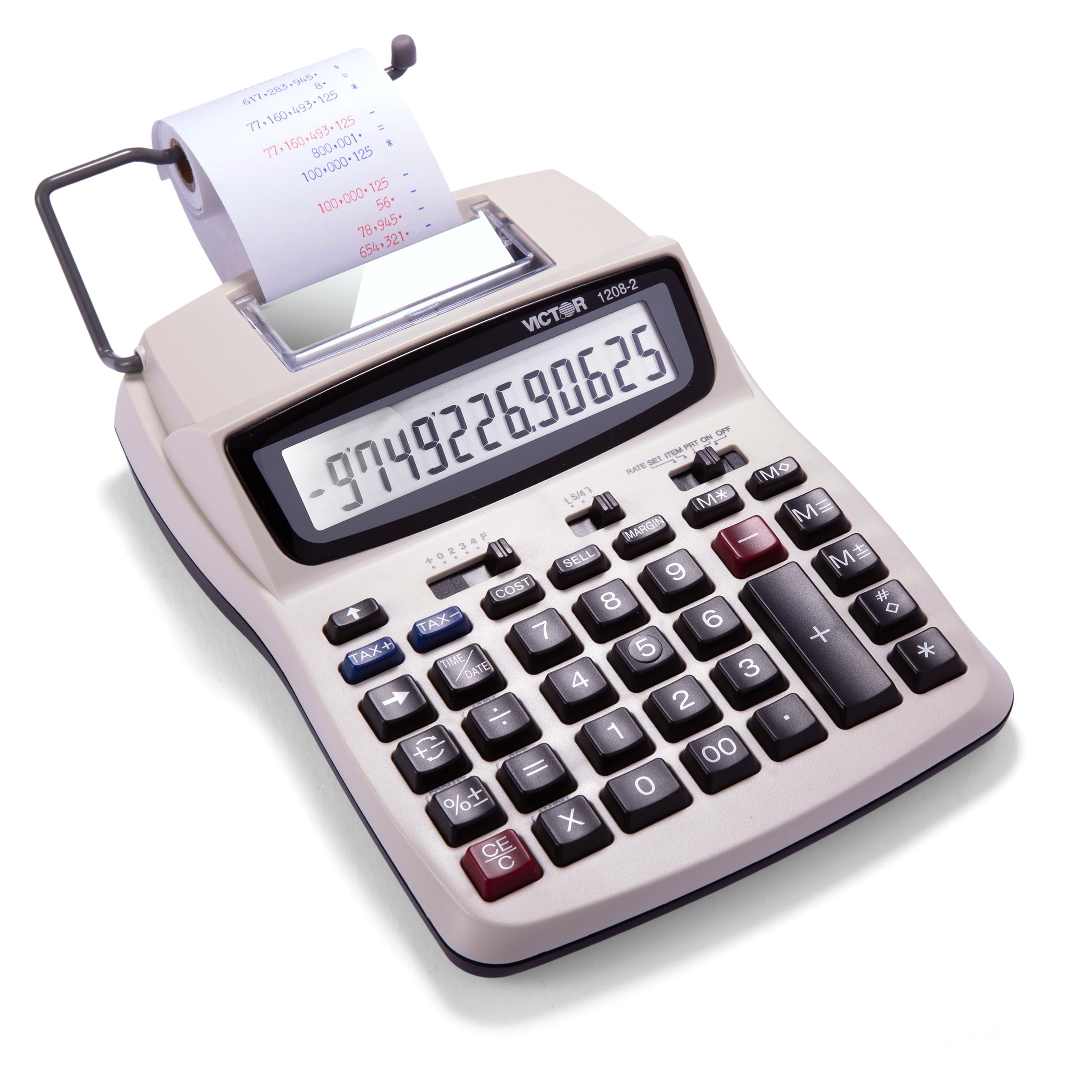
Prints 15 percent faster than the Casio HR-170RC Plus — at 2.3 lines per second versus 2.0 — with a 20 percent recycled plastic shell.
The Victor 1208-2 is the mid-range pick for buyers who want speed and desk-fit without paying premium-tier prices. It stamps a tape at 2.3 lines per second — a real edge over the Casio HR-170RC Plus’s 2.0 lines per second when you’re knocking out a long run of invoices. And it’s built from a 20 percent recycled plastic enclosure, a small sustainability win rare in this category.
What wins people over is speed paired with an uncluttered layout. Its functionality feedback is the dominant positive note across reviews, followed closely by how well it fits a tight desk: owners describe sitting it beside a laptop on a small table without any sense of crowding. The extra-large 12-digit LCD makes the totals comfortable to scan at a glance. Cost/sell/margin keys compute the third value from any two you enter, and the machine runs on either the AC adapter or batteries, so you can leave it cord-free when you need to.
The recurring honest note is the keyboard feel: a subset of buyers find the keys a little punchier — one described them “clinky” — which isn’t a defect, just a firmer press than the quiet, softer buttons on some premium rivals. Battery-only operation also gets mixed feedback, with some owners reporting it doesn’t want to run on batteries alone, so treat the AC adapter as the primary power path. For a mid-range machine at this price tier, it delivers the core jobs with room to spare.
Worth the step up: 2.3 lines per second and a 20 percent recycled plastic build define what mid-range delivers here — more speed, a lighter environmental footprint, and enough desk presence to feel like a proper tool.
Run it on the cord: some buyers report battery-only operation is inconsistent, so plug in the AC adapter for reliability; you still get the option to go cordless now and then, just not as the everyday mode.
Choose this one if: you want fast two-color tape printing and a compact footprint on a smaller desk, and you’re fine plugging into a wall outlet most of the time.
skip it if: cord-free operation is a must — the more battery-friendly Casio HR-170RC Plus handles that demand better.
4. Casio HR-300RC Printing Calculator, Backlit LCD Display

A backlit 12-digit LCD that stays legible in dim evening light for late ledger work.
If you work in low light or your eyes strain by afternoon, the Casio HR-300RC is the one to consider first. The 12-digit LCD is backlit, so the digits glow instead of relying on ambient light. For anyone doing evening work or sitting in a dim home office corner, that single feature changes the whole experience from squint-and-hope to read-and-go.
The rest of the panel matches the Casio HR-170RC Plus in feature depth: two-color tape printing (black positive, red negative), 150-step review and reprint so you can catch a wrong entry before committing it, and dedicated cost/sell/margin keys. A time-and-date stamp function lets you print the current date and time directly on the tape — genuinely useful for ledger documentation. The one big difference versus the HR-170RC Plus: this unit runs on AC power only, with no battery option. The trade-off is that it’s lighter than its sibling at 1.4 pounds versus 1.7 pounds, since there’s no battery compartment adding bulk.
On the honest side, AC-only power means the machine has to live within reach of an outlet. Buyers who didn’t catch that note in the listing have been frustrated to discover it after purchase, so triple-check your desk layout before committing. Key size and readability are praised — owners describe large, clearly spaced keys that make accurate entry easier, and the backlit display as easy to catch from any angle. Functionality feedback is the strongest positive cluster across reviews.
What earns the display crown
- Backlit 12-digit LCD keeps digits readable when the room light drops — solving the single biggest complaint about the plastic-key Casio HR-170RC Plus’s non-backlit screen
- Two-color tape printing catches sign errors instantly on long ledgers
- 150-step review and reprint means you audit before you commit the tape
- Time and date stamp prints the current date on the tape for ledger documentation
- Lighter than the HR-170RC Plus at 1.4 pounds versus 1.7 pounds
The trade you are making
- AC power only with no battery option — the listing says so plainly, but buyers have missed it, so plan for an outlet
- Button responsiveness gets a few mixed notes, so presses want to land squarely
- No cord-free operation means no moving between rooms without unplugging
Get this if: your workspace light is dim, your eyes tire easily, or you want a backlit screen without paying premium-tier money — this is the value choice for readability.
Keep shopping if: you need true portability; the AC-only cord is a deal for a fixed desk but a nuisance if the calculator travels.
5. Canon P170-DH-3 Desktop Printing Calculator
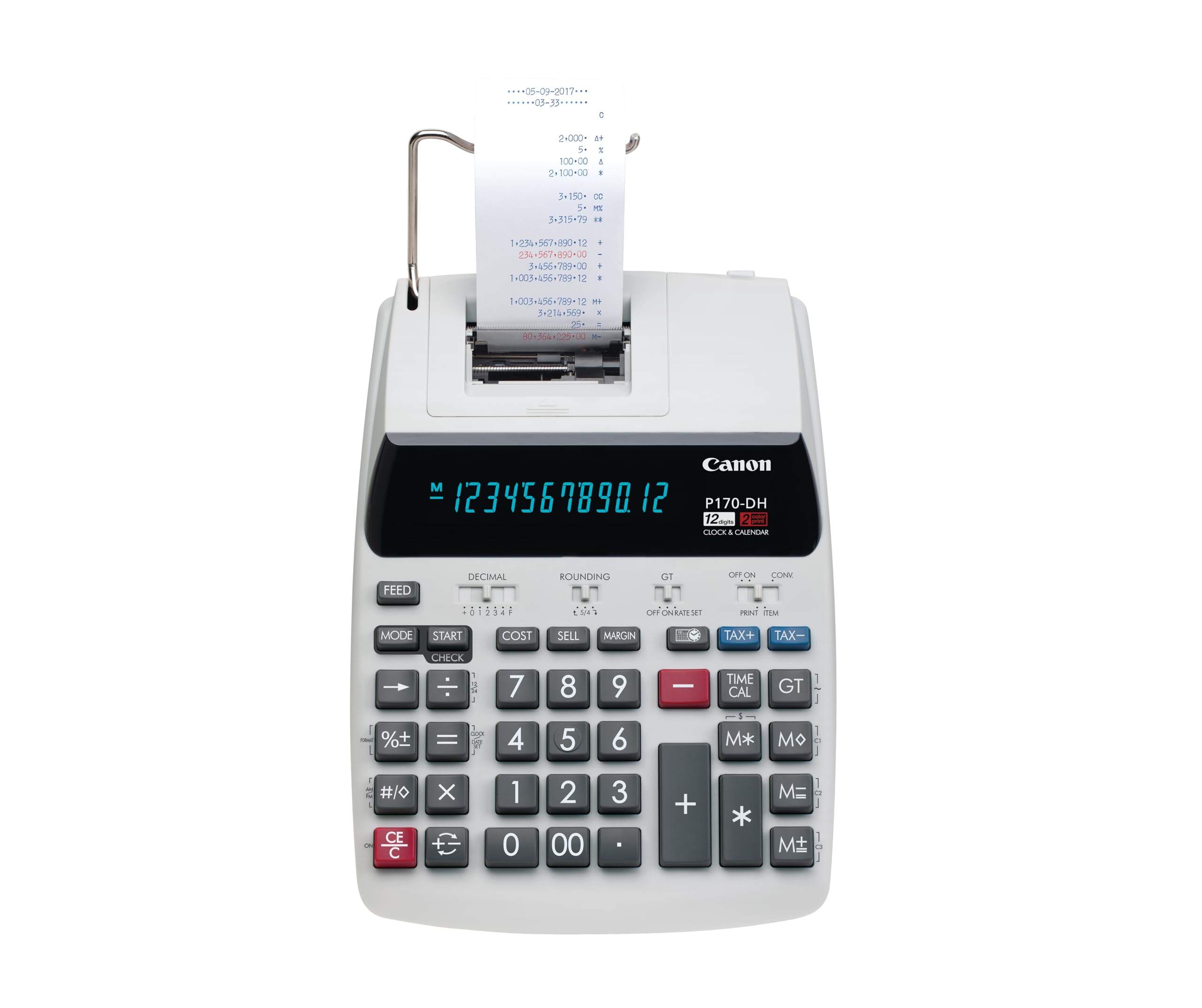
The heavy-duty Canon owners describe replacing only after years of service.
The P170-DH-3’s defining feature is its Double Check Function, which lets you verify a calculation without retyping the entire tape — a genuine time-saver when you’re reconciling a stack of invoices. Its 14.6″L x 9.6″W footprint is the largest here by a clear margin; where the Casio HR-170RC Plus runs 11.61″L x 6.49″W, the Canon takes almost 12.65 more inches of combined desk length and width. It fills an office desk, not a corner of a home table. It also carries the same cost/sell/margin business keys as the rest of the Canon line and a back-up CR2032 battery that preserves memory across power interruptions.
What earns people’s trust is build quality and reachable, big-number key layout. Its VFD (vacuum fluorescent display — the glowing green type you’ve seen on office equipment for decades) shows big, bright, easy-to-catch numbers. Owners repeatedly describe this as a straight replacement for one they’d had for years, and the phrase “well-made product” turns up in their own words. Cost/sell/margin keys mean pricing decisions take two or three keystrokes.
Two honest gripes worth sizing. First, some owners note the unit runs short of full silence and emits a constant high-pitched tone during operation — noticeable in a quiet room but rarely during busy office hours. Second, print speed is slower than some buyers expect, which shows up against the faster Sharp VX-2652H at 4.8 lines per second. Both notes come from a minority of reviews, and 4.5 stars across 500-plus ratings keeps this firmly in the recommended category.
Built to outlast the desk: the Double Check Function plus big VFD digits make this a proper tool for a fixed office workstation, and the CR2032 back-up battery keeps your stored tax rates and settings intact through unplugs.
An honest trade-off: if you print hundreds of tape lines per hour, the slower print speed — where the Sharp VX-2652H fires at 4.8 lines per second — is a bottleneck you feel by midafternoon. For everyday office-level volume, it never surfaces.
Buy this if: you’re equipping an office desk where the calculator never moves and precise reconciliation via Double Check is worth a slower tape.
Look past it if: you need either high-speed printing or cord-free operation — both go to Sharp and Casio respectively.
6. Sharp EL-1801V Ink Printing Calculator, 12-Digit LCD, AC Powered, Off-White

Sharp’s smooth key action and 2.5-lines-per-second two-color tape, backed by 8,000-plus ratings.
With 8,000-plus ratings behind it, the EL-1801V is the machine accountants most often describe as the one their firm has run for years. It fires two-color tape at 2.5 lines per second — a step up on the Canon P170-DH-3 — and its 12-digit fluorescent display stays clear from virtually any viewing angle. At 10″L x 7.6″W it’s a mid-size desk footprint, wider than the compact Canon P1-DHV-3 by a lot but well under the full-office Canon P170-DH-3.
The keys are the standout: they’re smooth with natural resistance, so long 10-key sessions don’t leave your fingers fatigued and your error rate stays low. Two-color printing — black positive, red negative — travels down the paper as a legible strip you can scan. The enclosure blends metal and plastic, which is part of why the machine has a more solid feel than all-plastic rivals. Roll-replacement and ribbon-replacement are both standard-parts simple, so ongoing maintenance is not a specialty errand.
The gripes buyers name most are noise and long-term durability. At 2 pounds with a metal/plastic build, it’s a substantial desk machine — and its printer is noticeably louder than the Canon P1-DHV-3, so if your workspace is shared or quiet-critical you’ll want to print on demand, not per keystroke. On durability, a subset of long-haul reviews mention units needing replacement over time, though the far larger story across 8,000-plus ratings is years of dependable daily service. Overall, the value-for-money aspect gets mixed signals — some buyers call it an excellent deal, some wish it came in cheaper — and that split is normal at this price tier.
What buyers come back for
- 2.5 lines per second two-color tape beats the Canon P170-DH-3 for print speed
- 12-digit fluorescent display stays readable from any angle — the readability praise is a top positive cluster here
- Smooth, well-spaced keys with natural resistance reduce finger fatigue on long sessions
- Metal-and-plastic enclosure gives a sturdier desk feel than pure-plastic competitors
- Standard Victor IR40T ink roller and standard paper rolls make maintenance a simple re-supply
What to weigh before you commit
- Printer noise is the most common complaint; in a shared space, use print-on-demand rather than auto print
- AC-powered only — this desk tool stays tethered
- Occasional durability mentions from long-term owners; the bigger picture in 8,000-plus reviews is years of reliable service
Pick this for: an all-day professional desk where smooth keys, a bright fluorescent display, and 2.5-lines-per-second two-color tape matter more than silence or portability.
Look past it if: you need a silent workspace or a battery-powered machine — this one is loud and corded.
7. Sharp 12-Digit Print Calculator Desktop Adding Machine, White (VX-2652H)

The fastest tape printer here at 4.8 lines per second, more than double the Casio HR-170RC Plus’s 2.0 lines per second.
The VX-2652H is the high-volume choice for anyone who prints tape lines all day and can’t afford to wait. At 4.8 lines per second it clears the Casio HR-170RC Plus’s 2.0 lines per second by a huge margin — you’re watching tape spit out, not drip. Two independent 4-key memories handle heavier workloads, letting you park a running subtotal in one memory while you work the next batch in the other. That dual-memory setup is the reason office teams with several categories of running totals go for this model.
Business functions are broad: a Mark Up key handles cost-sell-margin, and the panel covers automatic add-on/discounts, percent change, grand total, change sign, decimal settings, average, and rounding switches. The 12-digit fluorescent display stays easy to catch, with clear commas and decimal points that keep large totals readable at a glance. The plastic enclosure keeps pace with high-volume typing without sacrificing quiet operation — notably, quiet operation is one of the strongest positive clusters in its reviews, which is unusual for a fast printer.
Reliability is the mixed note to weigh honestly. A subset of owners say buttons stop working over time and describe about a year of daily use, though the broader set of reviews describes long service and straight praise from people who’ve used Sharp calculators for decades. The advantage is that Sharp keeps a familiar keyboard layout across models, so if you’re already a Sharp user the migration is basically free. Replaceable standard Victor 7010 ink ribbons keep maintenance simple, and there’s no battery option — it’s a corded desk machine.
Speed is the reason to buy: At 4.8 lines per second, it is the fastest here — the Casio HR-170RC Plus runs at less than half that pace — so on heavy days you’re not watching a printer catch up to your typing.
Recognize the durability trade: A subset of owners describe buttons failing after about a year of daily use, though most owners mention years of reliable service; if your volume is extreme, plan to treat this as a workhorse with a lifespan, not an heirloom.
Best for: high-volume desk work where tape speed and dual-memory calculation are worth the premium tier — the fastest printer in this lineup.
Not for: occasional users or anyone wanting portability; a basic Casio or Canon covers light-duty needs for far less, and this machine stays plugged in.
Understanding the Specs
Print speed (lines per second)
This is the number of tape lines the printer stamps in one second. A 2.0 lines-per-second machine produces a line every half-second. A 4.8 lines-per-second machine finishes long tape runs far quicker. If you type a steady stream of entries, a slower printer visibly lags behind your keystrokes; if you only print a few totals across the day, the difference is barely felt.
Cost, sell, and margin keys
These three keys solve pricing math in one step. Enter cost and selling price and the machine returns your margin. Enter cost and margin and it returns your price. For anyone who calculates markups, discounts, or profitability, this is the single most useful business function on the panel — it removes the scratch-pad calculation that used to sit beside the bookkeeping.
Power: AC versus battery
AC-powered machines stay tethered to a wall outlet but never run out of charge — a safe pick for a fixed desk. Battery-powered (or dual AC/battery) units can go anywhere on the desk and travel, at the cost of replacing batteries. If you carry the calculator between home and office, battery power is worth the extra convenience. If the calculator lives on one desk within reach of an outlet, AC is simpler and cheaper to run.
Display type: LCD versus fluorescent (VFD)
An LCD screen is a flat panel that shows dark digits against a light background; it is crisp in good light and can be backlit for dim rooms. A fluorescent display (VFD — the bright greenish glow you’ve seen on office equipment) is legible from a wider range of angles and tends to look sharper under ballast glare. Neither is universally better, but backlit LCD suits low-light desks, and VFD suits wide-angle viewing in bright offices.
FAQ
What does the print speed number mean in real use?
Do accounting calculators work without paper rolls?
Are accounting calculators and basic calculators the same thing?
Can I use an adding machine without plugging into a wall outlet?
How do cost, sell, and margin keys help with pricing?
Do two-color tapes actually matter for bookkeeping?
How long do accounting calculators typically last?
Is a bigger display always easier to read?
Will a printing calculator be too loud for a shared office?
Does a printing calculator need a special paper roll or ink?
Final Thoughts: The Verdict
For most people buying a accounting calculator, the winner is the Casio HR-170RC Plus because it nails the fundamentals — 2.0 lines per second two-color printing, 150-step review, cost/sell/margin keys, and the option to run on batteries or AC — behind the deepest review history in the category at 4.6 stars across 5,000-plus ratings. If dim lighting or tired eyes are the real problem, the Casio HR-300RC backlit display solves it. For all-day professional volume, the Sharp EL-1801V with its smooth keys and 2.5 lines per second is the workhorse to reach for, and if you need the very fastest tape printer available, the Sharp VX-2652H at 4.8 lines per second leaves the rest of the field well behind.
How We Picked
We do not accept paid placement. Every pick is matched to a real buyer and a real use-case; we do not hands-on test units.
Sources & Methodology
Specifications: manufacturer listings and product documentation. Review insights: verified customer reviews, as of September 2026. Pricing: not shown on this page (it changes often); check the current price via the retailer link.
As an Amazon Associate, Gadgets Feed earns from qualifying purchases. This does not affect which products we feature.