
Finding a monitor that delivers true 4K resolution without sacrificing audio quality is the real challenge. Most displays treat speakers as an afterthought, bolting on thin, tinny drivers that distort at moderate volume, while exceptional 4K panels often ship without any audio hardware at all. You need a screen that balances pixel density, color accuracy, and connectivity with built-in sound that actually fills a room.
I’m Min — the co-founder and writer behind Gadgets Feed. I’ve spent countless hours dissecting panel technologies, measuring refresh rate real-world performance, and comparing integrated audio solutions across dozens of monitors to separate the few genuinely capable all-in-one 4K displays from the sea of disappointing compromises. This guide is the result of deep spec-by-spec analysis and careful reading of real ownership experiences.
Whether you are upgrading a home office, building a clutter-free gaming setup, or simply want one clean cable to your laptop, finding the right 4k monitor with speakers means balancing pixel density, panel type, color gamut coverage, and the quality of the integrated audio system against your actual workspace and budget.
How To Choose The Best 4K Monitor With Speakers
Picking the right monitor involves more than just resolution. The best 4K display for your desk must align with how you use it—whether that is professional color work, console or PC gaming, or all-day productivity—and that means paying attention to panel type, refresh rate, and the quality of the integrated audio.
Panel Technology: IPS, VA, or OLED
IPS panels offer wide viewing angles and consistent color, making them ideal for photo editing and collaborative work. VA panels deliver deeper blacks and higher contrast ratios, which enhances movie watching and dark-room gaming but often suffer from narrower viewing angles. OLED panels, like the QD-OLED used in premium models, produce perfect blacks and infinite contrast, but come at a significantly higher price point and require some care to avoid burn-in over years of static desktop use.
Refresh Rate and Adaptive Sync
A standard 60Hz refresh rate is perfectly adequate for office work, web browsing, and watching video. If you play fast-paced games, a 120Hz or 144Hz panel provides noticeably smoother motion. Adaptive sync technologies like AMD FreeSync and NVIDIA G-Sync eliminate screen tearing, which is a must for competitive gaming. The trade-off is that higher refresh rate monitors typically cost more and may consume more power.
Integrated Audio Quality
Built-in speakers vary enormously. Many monitors include a pair of 2W or 3W drivers that are acceptable for system sounds and casual YouTube but distort at higher volumes. Better models feature dual 5W speakers or integrate audio tuning from companies like Waves MaxxAudio. For critical listening or immersive gaming, even the best built-in speakers cannot match a dedicated soundbar or external speakers, but for a clean desk setup they eliminate the need for extra hardware.
Connectivity and USB-C Power Delivery
A 4K monitor that accepts a single USB-C cable for video, data, and power delivery simplifies your desk. Look for monitors offering 65W or 90W Power Delivery to charge a laptop without a separate brick. HDMI 2.1 and DisplayPort 1.4 are required to drive 4K at high refresh rates without compression.
Quick Comparison
On smaller screens, swipe sideways to see the full table.
| Model | Category | Best For | Key Spec | Amazon |
|---|---|---|---|---|
| MSI PRO MAX 271UPXW12G | Premium OLED | Color-critical work & Mac users | QD-OLED, 98W PD, ΔE < 2 | Amazon |
| Samsung M8 (M80F) 32″ | Smart Monitor | Streaming & home office | Smart TV apps, 400 cd/m² | Amazon |
| Samsung 43″ M7 (M70D) | Large Smart Display | TV replacement & desktop | 5000:1 contrast, Gaming Hub | Amazon |
| LG 27UP850K-W | Pro IPS | Creative professionals | 95% DCI-P3, USB-C 90W PD | Amazon |
| Dell S2725QS 27″ | High Refresh IPS | Mixed productivity & light gaming | 120Hz, FreeSync Premium | Amazon |
| KTC H27P22S 27″ | Gaming IPS | PC gaming & design | 160Hz, G-Sync Compatible | Amazon |
| LG 32UR500K-B | Value VA | Budget home office & movies | VA panel, MaxxAudio speakers | Amazon |
| Amzfast AMZG27F6U | Dual Mode Gaming | Competitive & AAA gaming | 4K 160Hz / FHD 320Hz | Amazon |
| ViewSonic VX3276-4K-MHD | Value IPS | General productivity & media | 32″ MVA, HDR10 support | Amazon |
| KTC A32Q8 32″ Smart Monitor | Smart TV Monitor | Entertainment & casual use | Google TV, 65W PD | Amazon |
| CRUA 32″ Curved 1500R | Curved VA | Immersive gaming & streaming | 144Hz, 3000:1 contrast | Amazon |
In‑Depth Reviews
1. MSI PRO MAX 271UPXW12G

The MSI PRO MAX 271UPXW12G sets a new benchmark for professional-grade 4K monitors with built-in audio. Its 27-inch QD-OLED panel delivers a true 3840×2160 resolution with per-pixel lighting, achieving perfect blacks and infinite contrast that IPS and VA panels simply cannot match. The VESA DisplayHDR True Black 400 certification ensures that HDR content renders with exceptional depth, while the factory-calibrated ΔE < 2 color accuracy makes this monitor a serious tool for video editors and photographers who demand color fidelity.
Performance is equally impressive with a 120Hz refresh rate and FreeSync Premium Pro support, providing smooth, tear-free motion without the ghosting typical of slower VA panels. The built-in speakers are noticeably clearer than most integrated solutions, handling dialogue and system audio without distortion at moderate levels. The dual USB-C hub is a standout feature—one port delivers up to 98W Power Delivery, enabling a true single-cable connection for modern laptops, while the second USB-C port offers 15W for peripherals.
MSI’s Mac Optimization Software synchronizes color profiles and macOS shortcut keys, making this an excellent companion for creative workflows on Apple hardware. The height-adjustable stand offers full ergonomic range, and the white finish matches a clean, modern desk aesthetic. The premium price reflects the QD-OLED technology, but for users who prioritize image quality from a single, speaker-equipped display, this monitor is in a class of its own.
Why it’s great
- QD-OLED delivers perfect blacks and infinite contrast ratio.
- USB-C PD at 98W charges even high-power laptops.
- Factory-calibrated ΔE < 2 color accuracy out of the box.
Good to know
- Premium pricing reflects OLED panel cost.
- Built-in speakers are clear but not replacement-level for music.
2. Samsung 32” Smart Monitor M8 (M80F)

The Samsung M8 (M80F) reimagines the monitor as a multifunctional smart display. Its 32-inch VA panel delivers bright, detailed 4K UHD visuals with a contrast ratio of 3000:1, producing deep blacks that enhance movie and gaming content. What truly sets the M8 apart is its integrated smart TV platform: you can stream Netflix, Prime Video, or Disney+ directly without connecting a PC, and the Samsung Gaming Hub gives instant access to cloud gaming services from partners like Xbox Game Pass and NVIDIA GeForce NOW.
The built-in speakers are among the best in this class, producing full-bodied sound with an Active Voice Amplifier that automatically adjusts volume based on background noise. The 400 cd/m² brightness is adequate for well-lit rooms, and the matte finish helps reduce glare. Connectivity is versatile with USB-C, HDMI, and USB-A ports, though there is no DisplayPort input. The included SolarCell Remote charges from ambient light, reducing battery waste.
The AI Picture Optimizer adapts visuals based on on-screen content, enhancing documents with sharper text and games with deeper contrast. Samsung Knox security protects the smart platform, and accessibility tools like screen magnification and audio description make the M8 more inclusive. Some users report that small text in smart apps can appear tiny without HiDPI scaling, but for a mixed-use setup combining work and entertainment, this monitor offers unmatched versatility.
Why it’s great
- Built-in smart TV with all major streaming apps.
- Active Voice Amplifier adjusts audio to ambient noise.
- SolarCell Remote charges from room light.
Good to know
- Limited to 60Hz refresh rate.
- No DisplayPort input.
3. Samsung 43-Inch M7 (M70D)

The Samsung 43-inch M7 (M70D) bridges the gap between a large desktop monitor and a full-featured smart TV. The 4K VA panel delivers a class-leading 5000:1 contrast ratio, producing deep, inky blacks that make movies and HDR content visually striking. The 43-inch size is ideal for users who want a single display for both productivity with side-by-side windows and entertainment from across the room, though it demands a deep desk or wall mounting to be comfortable.
Integrated speakers provide clear dialogue and sufficient volume for a mid-sized room without external audio. The built-in smart platform offers instant access to OTT streaming services like Netflix, Prime Video, and Samsung TV Plus, while the Samsung Gaming Hub enables cloud gaming without a console. The USB-C port supports power delivery and data transfer, simplifying the connection to a laptop, and the SolarCell Remote is included.
Vision Accessibility Tools, including screen magnification and audio descriptions, make the M7 more usable for low-vision users. Some buyers note that the glossy screen can refract light in bright rooms, and the lack of a DisplayPort input means you rely on HDMI 2.x. For a spacious, all-in-one 4K display that doubles as a living room TV, the M7 delivers enormous versatility at a moderate premium.
Why it’s great
- 5000:1 contrast ratio produces excellent black levels.
- Large 43-inch screen suited for mixed monitor and TV use.
- Built-in streaming and cloud gaming platforms.
Good to know
- Glossy screen may cause reflections in bright rooms.
- 60Hz refresh rate limits competitive gaming.
4. LG 27UP850K-W

The LG 27UP850K-W is purpose-built for creative professionals who demand accurate color from a 4K IPS display. Covering 95% of the DCI-P3 color gamut, this 27-inch monitor reproduces rich, nuanced colors that are essential for video editing, graphic design, and photo retouching. The 400 cd/m² brightness and VESA DisplayHDR 400 certification ensure HDR content has distinct highlights and shadow detail, while the 1200:1 contrast ratio is typical for high-quality IPS panels.
Connectivity is a highlight: a single USB-C port handles video, data, and up to 90W Power Delivery, which is enough to charge a MacBook Pro. The built-in stereo speakers feature Waves MaxxAudio, delivering a noticeably fuller soundstage than the 2W and 3W drivers found on most competitors. The ergonomic stand supports height, tilt, pivot, and swivel adjustments, allowing precise positioning for long editing sessions.
The LG Switch app enables seamless screen splitting into up to six sections, streamlining multitasking. Black Stabilizer and Dynamic Action Sync provide some gaming utility, but the 60Hz refresh rate means this is not a monitor for competitive play. For desktop professionals who need one-cable convenience, accurate color, and adequate built-in audio, the 27UP850K-W is a well-executed choice worth its mid-range price.
Why it’s great
- 95% DCI-P3 color gamut covers professional color spaces.
- USB-C with 90W PD charges laptops via single cable.
- Waves MaxxAudio speakers outperform typical drivers.
Good to know
- 60Hz refresh rate limits gaming potential.
- No built-in KVM switch.
5. Dell 27 Plus 4K Monitor S2725QS

The Dell S2725QS offers a rare combination in the 4K monitor space: a 120Hz refresh rate with integrated speakers at a price that undercuts most competition. The 27-inch IPS panel delivers sharp 3840×2160 resolution with 99% sRGB coverage, and the 1500:1 contrast ratio provides noticeably deeper blacks than typical IPS monitors. The 350 cd/m² brightness is sufficient for most indoor environments, and the ComfortView Plus reduces harmful blue light emissions to below 35% without washing out colors.
Performance is smooth thanks to AMD FreeSync Premium, which eliminates screen tearing across the 120Hz range. The re-engineered speakers offer greater output power and a deeper frequency response than the previous Dell generation, making dialogue and sound effects more present. The ultra-thin bezels and ash white finish give the S2725QS a modern, minimalist look that fits well in home and office settings.
The stand provides height, pivot, swivel, and tilt adjustments, ensuring comfortable ergonomics. Some users report minor ghosting during fast-paced gaming, making this a better fit for productivity and casual gaming rather than competitive play. For buyers seeking a high-refresh 4K IPS monitor with decent built-in audio and a fully adjustable stand, the Dell S2725QS is a strong mid-range value.
Why it’s great
- 120Hz refresh rate with FreeSync Premium support.
- 1500:1 contrast ratio for deeper blacks.
- ComfortView Plus reduces blue light without color shift.
Good to know
- Minor ghosting visible in fast FPS games.
- Slight vignetting reported on some units.
6. KTC 27″ H27P22S

The KTC H27P22S is a 27-inch Fast IPS gaming monitor that punches above its price bracket with a native 160Hz refresh rate and certified G-Sync Compatibility alongside FreeSync Premium. The 4K UHD resolution ensures crisp detail, while the 1ms GTG response time eliminates motion blur in fast-moving scenes. With 400 cd/m² brightness and HDR400 certification, highlights pop without washing out shadow detail, and the 97.5% DCI-P3 color gamut makes this monitor capable for creative tasks between gaming sessions.
Connectivity is comprehensive with HDMI 2.1, DP 1.4, and USB 2.0 ports, and the ergonomic stand offers height, pivot, swivel, and tilt adjustments. The low blue light and flicker-free features reduce eye fatigue during long sessions. One note for buyers prioritizing audio: this model includes a headphone jack but does not have built-in speakers, so you will need external speakers or headphones. The anti-glare coating and quick-release stand add convenience for multi-monitor setups.
Customer support is responsive, and the build quality exceeds expectations for the price. Some users have noted that the H27P22S works well for both office productivity and gaming, though the lack of integrated audio may be a dealbreaker for those seeking a complete all-in-one solution. For gamers who already own speakers or headsets, this monitor delivers exceptional motion clarity and color at a mid-range price.
Why it’s great
- 160Hz refresh rate with certified G-Sync Compatibility.
- 97.5% DCI-P3 color coverage for vivid gaming visuals.
- Full ergonomic stand with height and pivot adjustments.
Good to know
- No built-in speakers included.
- Color accuracy out of box may require minor calibration.
7. LG 32UR500K-B

The LG 32UR500K-B is a 32-inch VA panel monitor that delivers strong contrast for a budget-friendly price. The 3840×2160 resolution ensures sharp text and detailed images, while the 3000:1 contrast ratio produces deep blacks that make movies and photos look more dimensional. The 250 cd/m² brightness is adequate for indoor use, though brighter rooms may push the panel to its limits.
The built-in stereo speakers feature Waves MaxxAudio, providing a richer, fuller sound than the 2W drivers found on cheaper displays. The OnScreen Control software allows easy workspace splitting and monitor adjustments via mouse clicks. Connectivity includes two HDMI ports and one DisplayPort, and the ergonomic stand offers tilt adjustment for comfortable viewing angles.
The VA panel’s limited off-axis viewing angles mean color shifts when viewed from the side, but for a primary desk setup where the user sits directly in front, this is rarely an issue. The 60Hz refresh rate is standard for productivity and media consumption, not competitive gaming. For budget-conscious buyers who want a large 4K VA panel with decent built-in audio, the LG 32UR500K-B is a practical choice.
Why it’s great
- VA panel with 3000:1 contrast for deep blacks.
- Waves MaxxAudio delivers better-than-average built-in sound.
- Large 32-inch screen at a budget-friendly price.
Good to know
- 250 cd/m² brightness may feel dim in bright rooms.
- VA panel has narrow viewing angles.
8. Amzfast AMZG27F6U
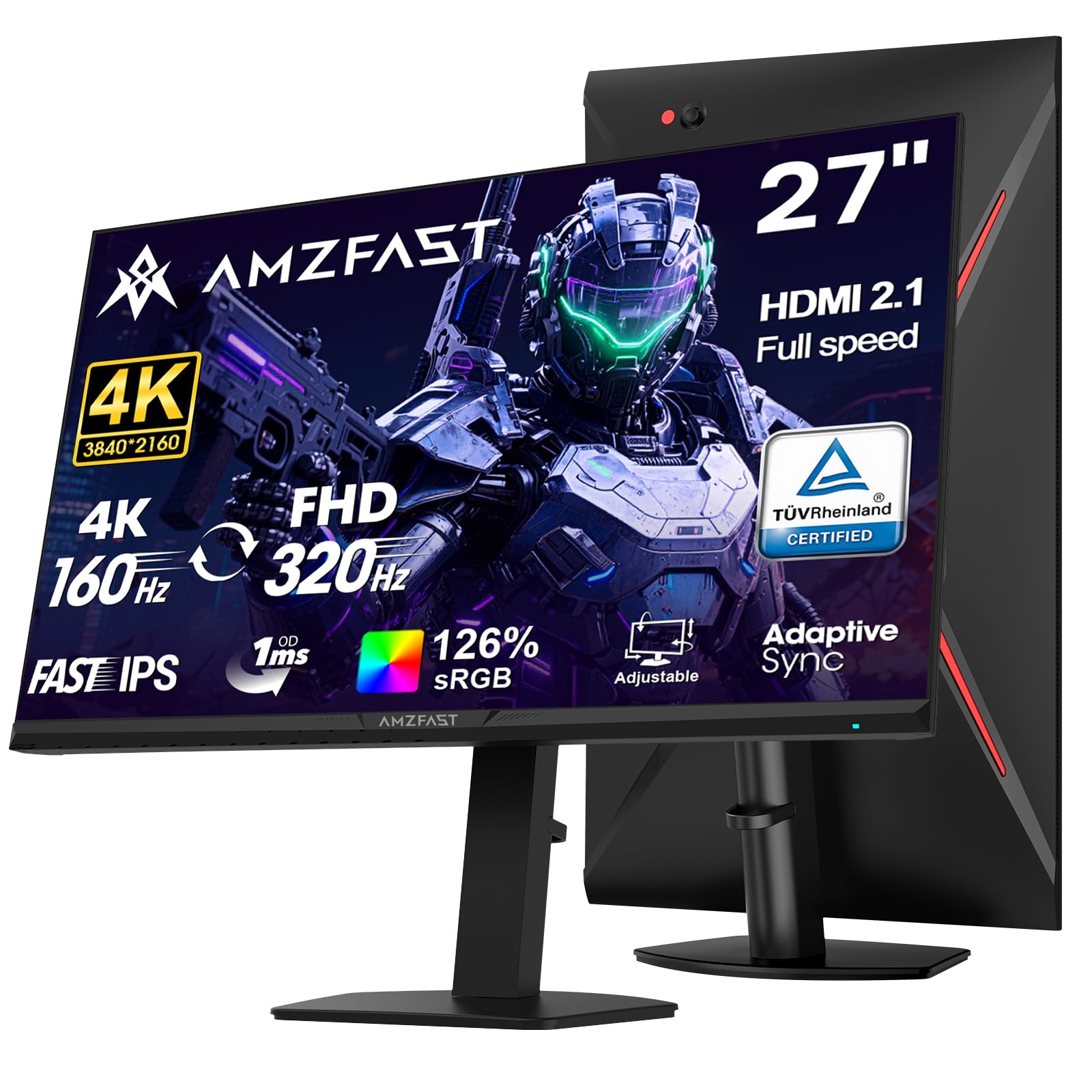
The Amzfast AMZG27F6U introduces a dual-mode refresh rate that adjusts between 4K at 160Hz for story-driven games and FHD at 320Hz for competitive esports. The 27-inch Fast IPS panel renders vibrant colors with 126% sRGB and 93% DCI-P3 coverage, while the 400 cd/m² brightness and HDR400 support deliver punchy highlights. The 1ms MPRT response time ensures minimal motion blur across both modes.
This monitor includes 2-way built-in speakers, providing audio that works well for casual gaming and media without external hardware. The dual HDMI 2.1 ports support up to 4K 144Hz, while dual DP 1.4 ports handle the full 4K 160Hz mode. The metal base is sturdy, and the ergonomic stand offers height, pivot, swivel, and tilt adjustments. Low Blue Light and anti-flicker features help reduce eye strain during extended sessions.
Some users report that the stand’s pivot mechanism feels lower quality than the rest of the build, with a slight forward lean. The MPRT mode can introduce reverse ghosting, so it is best used sparingly. For gamers who want the flexibility to switch between high-resolution visuals and ultra-smooth performance in the same display, the Amzfast AMZG27F6U represents a unique and well-priced offering.
Why it’s great
- Dual mode switches from 4K 160Hz to FHD 320Hz.
- 126% sRGB color gamut for vivid visuals.
- Built-in 2-way speakers and dual HDMI 2.1 inputs.
Good to know
- MPRT mode can cause reverse ghosting.
- Stand pivot quality could be better.
9. ViewSonic VX3276-4K-MHD

The ViewSonic VX3276-4K-MHD is a 32-inch 4K monitor that prioritizes value without cutting critical corners. Its MVA panel delivers a 2500:1 contrast ratio, which is significantly better than budget IPS panels for blacks and shadow detail. The 300 cd/m² brightness is standard for this tier, and HDR10 support improves dynamic range for movies and games. The ultra-thin bezels and silver brushed-metal frame give this monitor a premium aesthetic that belies its price.
The built-in speakers are adequate for system sounds and video calls, though they lack the volume and bass clarity of higher-end integrated solutions. Connectivity is solid with two HDMI inputs, a DisplayPort, a Mini DisplayPort, and an audio out. The monitor includes optimized presets for Game, Movie, Web, Text, and Mono modes, making it easy to adjust for different tasks. Flicker-Free technology and a blue light filter reduce eye strain during long workdays.
The fixed-height stand and limited viewing angles are the main compromises. The MVA panel shows color fade when viewed off-center, and the rear-mounted buttons are fiddly to use by touch. Some units have reported vertical line defects after extended use, but overall this monitor offers strong image quality for productivity and media consumption at a budget price. For buyers who can work around the stand limitations, the VX3276 is a reliable entry-level 4K monitor with built-in audio.
Why it’s great
- Large 32-inch 4K MVA panel with deep black levels.
- Ultra-thin bezels with a premium brushed-metal finish.
- HDR10 support and multiple preset modes.
Good to know
- Fixed-height stand with no ergonomic adjustments.
- Narrow viewing angles cause color shift off-center.
10. KTC A32Q8 32 Inch Smart Monitor

The KTC A32Q8 is a 32-inch smart monitor that runs the full Google TV platform, giving you access to Netflix, Prime Video, YouTube, and thousands of apps without any external streaming device. The 4K VA panel provides a 3000:1 contrast ratio for deep blacks and good HDR support. The 300 cd/m² brightness is sufficient for indoor viewing, though it lacks the punch needed for brightly lit living room setups.
Audio is handled by dual 5W built-in speakers that produce enough volume for a bedroom or small living space, with Dolby Audio support adding a touch of immersion. The remote control and Hey Google voice commands make navigation effortless. Connectivity is comprehensive: HDMI 2.1, DP 1.4, four USB 2.0 ports, and a USB-C port that delivers up to 65W Power Delivery for laptop charging. Bluetooth 5.0 allows wireless peripheral connections.
The stand is functional but basic, offering tilt adjustment only, and the built-in apps can feel less responsive than a dedicated streaming box. Some users have noted that the Google TV interface can be sluggish at times. For buyers wanting a single screen that doubles as a large 4K monitor and a smart TV for streaming, the KTC A32Q8 offers impressive functionality at a mid-range price.
Why it’s great
- Full Google TV platform integrated with Netflix license.
- Dual 5W speakers with Dolby Audio.
- USB-C 65W PD charges laptops via single cable.
Good to know
- Smart interface can feel sluggish at times.
- Stand offers tilt adjustment only.
11. CRUA 32″ Curved 4K Monitor

The CRUA 32-inch Curved 4K Monitor wraps your peripheral vision with a 1500R curvature, creating an immersive feel for gaming, streaming, and productivity. The VA panel delivers a 3000:1 contrast ratio and 120% sRGB color gamut, producing rich, saturated colors and deep blacks. The 320 cd/m² brightness is solid for indoor use, and the 144Hz refresh rate with AMD FreeSync ensures smooth motion without tearing.
The built-in speakers provide convenient audio for movies and casual gaming, though they lack the bass and volume of dedicated desktop speakers. The white chassis with integrated RGB lighting adds a stylish accent to any gaming desk. Connectivity includes HDMI 2.1 and DP 1.4, supporting the full 4K 144Hz bandwidth, and 75x75mm VESA mount compatibility allows flexible placement options.
Some users report that the monitor is not bright enough for well-lit rooms, and there have been isolated quality control issues with screen failures after a few months. The stand assembly can be more complicated than expected. For budget-conscious gamers who want a large curved 4K display with integrated audio and RGB flair, the CRUA monitor offers an attractive package, but potential buyers should verify the warranty terms before purchase.
Why it’s great
- 1500R curvature enhances immersion in games and movies.
- 144Hz with FreeSync for smooth motion.
- Built-in RGB lighting and white design stand out.
Good to know
- 320 cd/m² brightness feels dim in sunny rooms.
- Reliability concerns with some units failing early.
FAQ
Can I use a 4K monitor with speakers for console gaming?
Are built-in monitor speakers good enough for watching movies?
What is the difference between HDR10 and DisplayHDR 400?
Why would I need USB-C Power Delivery in a monitor?
Final Thoughts: The Verdict
For most users, the 4k monitor with speakers winner is the MSI PRO MAX 271UPXW12G because its QD-OLED panel delivers unmatched contrast and color accuracy while the built-in speakers and 98W USB-C hub provide true all-in-one functionality. If you want integrated smart TV features and a large screen for streaming, grab the Samsung 43-inch M7 (M70D). And for a budget-friendly 4K workhorse with decent audio, nothing beats the LG 32UR500K-B.