
Our readers keep the lights on and my morning glass full of iced black tea. As an Amazon Associate, I earn from qualifying purchases.
Specs are compiled from manufacturer listings and verified buyer reviews and can change over time — please confirm the key details on the product page before buying.
If your graphics card is running hot and your fans sound like a hairdryer, the problem is usually the box it lives in. An airflow case pulls cool air straight across your GPU and CPU instead of trapping heat behind a solid front panel, which lowers both temperatures and fan noise. One quick note on this list: matching here is flexible and human-like for ATX motherboard form factor support, so the nearest same-type case serves the same purpose even when it is not the exact model you searched for.
I’m Min — the founder and writer behind Gadgets Feed. This guide is built by comparing the manufacturers’ published specifications and the patterns across verified customer reviews, so you get each pick’s real strengths and trade-offs instead of marketing spin.
Mesh front panels, large pre-installed fans, and 360mm radiator support are the three specs that decide whether an ATX build runs cool. Below you will find the best Airflow ATX Case picks for every budget and build size.
Our Picks at a Glance


How To Choose The Best Airflow ATX Case
Picking an airflow ATX case depends on three numbers — fan size, radiator support, and GPU clearance — plus one shape: the front panel. Get the front intake open enough, and the rest of the cooling falls into place.
Intake design and front panel open area
A mesh or perforated steel front lets your intake fans pull air in with almost no resistance. A solid panel forces those same fans to work harder and pull in less air, which is exactly how heat pockets form. The Corsair 4000D RS, for example, uses a steel front panel perforated in three dimensions with a Y-pattern to keep the intake path open.
Fan size, count, and where they sit
A 160mm or 170mm fan moves the same air as a 120mm fan at lower RPM, so it cools as well with less noise. A 160mm or 170mm front fan is doing more work per rotation than a 120mm fan, and it typically spins slower to do it. Count matters too, but only alongside placement — front and bottom fans feed your graphics card, while a rear and top fan pull hot air out.
Clearance for your actual parts
Before you buy, measure three things: your graphics card length, your CPU cooler height, and your power supply length. Most mid-towers list these as maximums, and a case that fits a 360mm radiator on top may still block a tall air cooler.
Quick Comparison
| Model | Best For | Fan Size | Internal Bays | Item Weight | Amazon |
|---|---|---|---|---|---|
| MONTECH AIR 903 MAX★ Best Overall | Best overall airflow value | 14 centimeters | 2 | 9.14 kg | Amazon |
| Zalman i3 NeoMost Storage Bays | Budget builds needing bays | — | 5 | 12.5 pounds | Amazon |
| MONTECH XR PanoramicBest Looking | Panoramic glass showcases | 12 centimeters | 3 | 14.5 pounds | Amazon |
| FOIFKIN F1 | Fan-heavy budget builds | — | 4 | — | Amazon |
| CORSAIR 4000D RS Frame | Modular long-term upgrades | — | 3 | 8.2 kg | Amazon |
| LIAN LI LANCOOL 216 RGB | Big-fan quiet cooling | 14 centimeters | 8 | — | Amazon |
| NZXT H9 Flow | Dual-chamber showcase builds | — | 10 | 12.5 kg | Amazon |
| Hyte X50 Air | High-airflow premium builds | — | 3 | 23.6 pounds | Amazon |
| Lian Li LANCOOL 217 | Wood-trim quiet builds | 17 centimeters | 5 | 10.5 kg | Amazon |
In‑Depth Reviews
1. MONTECH AIR 903 MAX High Airflow E-ATX PC Case, 4x140mm PWM Fans, Black
Our pick — over 4.5★ from 400+ verified ratings; the strongest balance of quality and price.
A metal front panel that is 51% ventilation, so your GPU breathes instead of bakes.
That 51% ventilation rate is the headline here — the metal front panel is more than half open, so your intake fans are pulling through a screen rather than fighting a wall. If you are running a modern triple-fan graphics card in a mid-range build, this is the case that stops the hot air from pooling. Four 140mm PWM fans come pre-installed, three of them ARGB, and a PWM hub keeps them all fed from one place.
Space is not your problem inside the AIR 903 MAX. It swallows a 360mm AIO cooler at the front or the top, leaves 180mm of clearance for a tall CPU tower cooler, and takes graphics cards up to 400mm long and 190mm wide. Power supplies up to 240mm fit as well. Compared with the Zalman i3 Neo, this case carries fewer internal bays — 2 against 5 — so if you are hauling a stack of drives, the Zalman is the better host. If your storage lives on a couple of SSDs, the trade is worth it.
What wins people over is the raw value of the whole package. The case quality is the thing owners come back to praise most, and the reusable builder detail keeps showing up in feedback: “Easy build, removable HDD cage, ample radiator/GPU clearance (fits XFX RX 6800), 4x140mm fans (3 ARGB) + hub, magnetic dust filters, excellent airflow, tool-free thumb screws, above-average build quality.” The recurring gripe is fan noise at full tilt — the stock fans are loud wide open. Set a custom fan curve and they quiet right down while the case still runs cool, which is what most owners end up doing. The side-mounted I/O and average rear cable space are the other honest notes.
What Earns It The Top Spot
- 51% ventilated metal front panel for near-unobstructed intake
- Four 140mm PWM fans included, three with ARGB lighting
- Fits a 360mm AIO up front or on top and GPUs up to 400mm
- 180mm CPU cooler clearance and a PWM hub for the fans
Where It Asks For Patience
- Stock fans are loud at full speed until you tune the curve
- Rear cable space is average
- Only 2 internal bays, well short of the 5 on the Zalman i3 Neo
- Side-mounted I/O takes adjusting to
Reach for this if: you want the most airflow and the biggest part clearances for the least money, and you are willing to set a fan curve once.
Look elsewhere if: you need five drive bays or you refuse to touch fan settings and want quiet from the start.
2. Zalman i3 Neo ATX Mid-Tower RGB Gaming PC Desktop Computer Case, Black
Five drive bays behind a mesh front — the pick for builders with a drawer full of old drives.
Storage is the reason to look here. This case packs 5 internal bays, which is more than double the 2 you get in the MONTECH AIR 903 MAX, and for anyone migrating a stack of 3.5-inch drives into a new build that gap is the whole decision. It also weighs a relatively light 12.5 pounds — a step down from the 14.5 pounds of the MONTECH XR Panoramic — so hauling it to a LAN or lifting it onto a desk is less of a chore.
The cooling setup is a mesh front with four pre-installed fans, and a swing-door tempered glass side panel that opens on a hinge instead of lifting off. That hinge is a genuinely handy touch when you are swapping a graphics card and do not want to find somewhere safe to park a pane of glass. Cooling support runs to a 360mm radiator in the front, a 240mm on top, and a 120mm in the rear, with ports up top for a headphone jack, microphone, two USB 3.0, and a USB 2.0.
Buyers report the airflow moves plenty of air and the panel-hinge design makes cleaning easier over time, with long-term users still happy with it well past the first year. The fits are the part to check carefully — most components drop in cleanly, but a large card can get tight, so measure before you commit. What people mention most is the overall case quality, followed closely by how it looks, and the RGB fans are the visual draw. One caveat worth knowing: the bundled fans use fixed rainbow LEDs rather than addressable, color-changeable RGB, and the rear fan needs its own motherboard header or a jumper. There is also a rarer report of a unit arriving with a bent rear corner that blocked the power supply — worth an unboxing check before you start the build.
Why Builders Pick It
- 5 internal bays, more than double the AIR 903 MAX
- Four pre-installed fans with a mesh front panel
- Hinged tempered glass side door for easy access
- 360mm front, 240mm top, and 120mm rear radiator support
Details To Weigh Up
- Fan lighting is fixed rainbow, not addressable RGB
- Rear fan needs its own header or a jumper
- Large graphics cards can fit tightly
- Occasional units arrive with shipping damage, so inspect on arrival
The case for it: this is the drive-library builder’s case — five bays, four fans, and a hinged glass door at the entry tier.
Worth knowing: you give up color-changeable RGB lighting and get close tolerances around big graphics cards in return.
3. MONTECH XR Panoramic High Airflow ATX PC Case, 3 ARGB PWM Fans, Black
A panoramic glass box that hides nothing — provided you are ready to keep it clean.
Two panes of tempered glass give you a near-uninterrupted view of your build, and a wood grain I/O panel up top adds a warmer look than the usual black plastic. What surprises people is that the glass does not come at the cost of airflow. Design is the aspect buyers single out above everything else, and the appearance of the glass panels runs a close second — this is a case people buy partly to look at.
Three ARGB PWM fans come pre-installed, rated up to 1500 RPM, and they use a mixed blade layout — two reverse-blade on the side and one regular-blade at the rear — so the side fans push air without showing their frames. You can run up to 9 fans total. There is a 360mm radiator mount up top, room for 420mm graphics cards, USB-C on the front panel, and dust filtration covering the top, bottom, and side panels. It is a heavier case at 14.5 pounds, but its 12-centimeter fan size is smaller than the 14-centimeter fans running in the AIR 903 MAX — the AIR 903 MAX simply moves more air per fan.
Build quality is praised for feeling more rigid than the entry-tier price suggests, and the included fans get credit for being bright, vibrant, and quiet in normal use. Assembly is straightforward with generous cable space and tie-downs. The honest catch is fitment against your parts list: three-fan graphics cards and 360mm AIOs fit, but a hot processor in a heavy load needs that top radiator rather than air cooling. One owner returned the case purely over fan noise, finding the stock fans audible from another room at full tilt, so if you are noise-sensitive plan on a fan curve or a swap. The glass also holds fingerprints, and it is worth knowing the panel mounts with push-in pins rather than hinges.
What Stands Out
- Dual tempered glass panels with a wood grain I/O panel
- Three ARGB PWM fans pre-installed, up to 9 fans total
- 420mm GPU support and a 360mm top radiator mount
- Dust filters on top, bottom, and side panels
What To Plan Around
- Stock fans can get noisy at full speed
- Glass attracts fingerprints and mounts on push-in pins
- Smaller 12-centimeter fans than the AIR 903 MAX
- Heavy 14.5 pounds to move around
Best for: showcase builds that still need real airflow, especially if you are adding a 360mm AIO up top.
Think twice if: fan noise bothers you or you would rather not wipe glass and fingerprints regularly.
4. FOIFKIN F1 PC Case – Pre-Installed 6 PWM ARGB Fan, ATX Mid-Tower Computer case, Gaming PC Case, Type-C, 360mm Radiator Support, FOIFKIN (Black)

Six ARGB fans arrive already mounted, which is more cooling than most builders buy separately.
Six 120mm ARGB PWM fans ship pre-installed, five of them reverse-blade for cleaner visuals and one forward — that is the highest fan count among the mid-tier picks here, and it means you can finish a build without shopping for extra fans at all. A dual-chamber layout splits your main hardware away from the power supply and cabling underneath, which helps both temperatures and how tidy the final result looks.
Clearance is generous in every direction that matters. Graphics cards run up to 400mm, ATX power supplies up to 220mm, and a 360mm radiator fits on top, with radiator support spanning 360, 280, 240, and 120mm sizes. Storage covers 1 HDD and 3 SSDs across 4 internal bays. The front panel gives you USB Type-C 3.0, one USB 3.0, two USB 2.0, plus mic and audio jacks, with a dedicated LED switch for the lighting. Software support is worth flagging: an older RGB motherboard may need a 12V-to-5V converter, and the fan wiring is short enough that some owners rotate a couple of side fans just to daisy-chain all six.
Case quality is the trait buyers rate highest by a wide margin, and the appearance of the near-fully-assembled unit — real high-hardness tempered glass over a metal frame — gets plenty of credit too. Ease of use shows up again and again, since the case arrives mostly put together and runs largely tool-light. What tempers that is the fan quality: most sets arrive working well and moving quiet air, but a small share of owners receive faulty ones, so test each fan before you finish the build. A bent power-supply corner from shipping is another occasional note, alongside limited rear cable space and individual front-panel pins that take a minute longer to connect.
Built for fan-count buyers: six pre-installed ARGB PWM fans, a dual-chamber layout, and 400mm GPU clearance make this the pick when you want maximum included cooling with zero extra shopping.
Do a fan test first: run every fan before you commit the build — a handful arrive faulty — and budget a 12V-to-5V converter if your motherboard predates current addressable RGB support.
Right call when: you want the most included fans of any mid-tier pick here and a dual-chamber layout that hides your cabling.
Check first: your motherboard’s RGB generation and whether the short fan runs will reach your daisy-chain point.
5. CORSAIR 4000D RS Frame Modular High Airflow Mid-Tower PC Case – 3X RS Fans – InfiniRail Mounting System – Fits Multiple 360mm Radiators – Reverse Connector Motherboard Compatible – Black

The case you upgrade instead of replace — its mounting rail slides, and its panels come off by design.
Most cases are a sealed box; this one is a system. The FRAME design lets you swap parts like the motherboard tray or front I/O panel down the line, and the InfiniRail fan mounting system is a sliding steel rail that lets you position front and roof fans wherever you want instead of locking them to fixed holes — up to 200mm in the front and 140mm in the roof. Three CORSAIR RS PWM fans come pre-installed up front, supporting daisy-chainable 4-pin connections and a Zero RPM mode that stops the fans entirely at low load.
Airflow gets its own piece of engineering: a steel front panel perforated in three dimensions with a Y-pattern that keeps the intake path low-obstruction, plus an internal side panel you can use either as a cable cover or, once removed, as a mounting point for side fans when you want more cooling. It takes a 360mm radiator in three locations and is built for reverse-connector motherboards like ASUS BTF, Gigabyte Project Stealth, and MSI Project Zero. At 8.2 kg it is lighter than several picks here, which makes it easier to reposition on a desk.
Owners consistently call the thermals excellent once intake and exhaust are tuned, with no dead zones or heat pockets and a quiet broadband hum rather than rattle or buzz. Case quality leads the praise, then spaciousness, and a 4090 running cool while max clocked comes up as a real-world proof point. Cable routing channels and tie-downs make the wiring side painless. A few honest notes: there are no rubber grommets on the wire routes, older 4000D variants will not take a top 360 AIO, and a front USB panel that arrives broken has been a recurring shipping issue — though Corsair’s support replaced it promptly in the cases where it happened.
Why it lasts: the FRAME modular system and sliding InfiniRail mounting mean this case adapts to your next upgrade rather than getting replaced by it, and the 3D Y-pattern front panel keeps the intake open.
The fine print: expect no rubber grommets on cable routes, and verify your exact 4000D variant if a top-mounted 360mm radiator is part of your plan.
Choose this if: you upgrade often and want fan placement, panels, and front I/O that can change with your build.
Skip if: you want a case you set up once and never touch again — the modularity is the point here.
6. LIAN LI LANCOOL 216 RGB Black ATX Mid-Tower Case, 2x160mm ARGB Fans

Two 160mm front fans move serious air at low RPM, so the cooling is quiet by nature.
This case leans all the way into big-fan quiet cooling: two 160mm ARGB front fans and a 140mm rear fan pre-installed, with fine mesh across the front, top, and the power supply shroud’s side. A 160mm fan pushes more air per rotation than a 120mm fan, so the LANCOOL 216’s two 160mm front fans deliver strong airflow without the high-pitched whine of small fast fans. It also carries the most internal bays of any mid-tier pick here at 8, so storage-heavy builds fit cleanly.
The flexibility is what separates it from the crowd. The modular motherboard I/O lets you raise or lower the tray to favor air cooling or water cooling, the top radiator bracket is removable, and a seal plate on that bracket stops pressure leaks when you install a radiator or fans smaller than a 360mm. A rear PCIe fan bracket, fan-cable grooves, and velcro straps round out the build convenience. It fits graphics cards up to 392mm long and 180mm tall in air-cooling mode, and supports E-ATX, ATX, Micro-ATX, and Mini-ITX boards.
The praise concentrates on case quality first and spaciousness second, and builders keep calling out how easy it is to assemble — the pre-routed fan and front I/O cabling through a power hub board means far fewer wires to chase. It supports a 360mm AIO in multiple spots, with 2 x 3.5-inch HDD and 6 x 2.5-inch SSD mounts for storage. The honest caveats: at this size it is a heavy case, the dust filter can slide out when you lift it, and front USB or audio connectors occasionally need a BIOS fix or arrive faulty. SSD access could also be easier, and the bottom power panel takes some getting used to.
Strengths Worth Noting
- Two 160mm ARGB front fans plus a 140mm rear fan pre-installed
- 8 internal bays for 2 x 3.5-inch HDD and 6 x 2.5-inch SSD storage
- Modular motherboard I/O for air or water cooling positioning
- 392mm GPU and 180mm cooler clearance in air-cooling mode
Small Things To Know
- Heavy at this size to lift and move
- Dust filter can slide out when you pick the case up
- Front USB or audio connectors sometimes need attention
- SSD access is more fiddly than it should be
The strongest case for this one: you get 160mm front fans and 8 internal bays, so both the cooling and the storage are handled without add-ons.
One honest catch: it is a large, heavy tower, so plan the lift before it is fully loaded with parts.
7. NZXT H9 Flow – Dual-Chamber ATX PC Case – Black

A dual-chamber box built around a 420mm radiator and wraparound glass.
The dual-chamber layout separates your main components from the power supply and drives, so the working half of the case stays clear for airflow and the wiring half stays hidden. Perforated steel panels and angled front-right fans handle the intake, and four fans come pre-installed — three F140Q and one F120Q. It is also built for back-connect motherboards like ASUS BTF and MSI Project Zero.
Design leads what owners value here, with cable management and spaciousness tied right behind it. Behind the motherboard there is real room to work, and extra-wide channels with built-in velcro straps and tie-downs keep the run tidy. The wraparound tempered glass paneling is the visual payoff — it shows the whole build, not just the front third, which is why it lands closer to a showcase piece than a plain box. It fits ATX and E-ATX boards and carries 10 internal bays.
The one thing to size up before buying is bulk. It is heavy and large, and owners say plainly that it may not fit every desk or under-desk slot. The stock fans move air quietly, but a few builders swap them purely by preference, and one returned set of stock fans ran loud enough that a swap was the fix. A stripped rear screw has come up as an isolated shipping fault. Otherwise the build quality reads as solid metal and glass, assembly is clear from the instructions, and the swing-open power supply bracket is a nice touch when you are wrestling a heavy PSU into place.
Where it wins: 420mm radiator support top and front-right, ten-fan capacity, and a dual-chamber layout make it the most expandable cooling platform of the picks here.
Measure twice: it is a genuinely large, heavy case, so confirm clearance for your desk or shelf before it arrives.
Pick it if: you want room for a 420mm radiator and a clean, glass-fronted showcase without giving up airflow.
Pass if: you are tight on desk or floor space — its size is the main consideration.
8. Hyte X50 Air – Modern Performance ATX Mid-Tower Gaming PC Case – tune High Airflow Chassis – Curved Micro Mesh Side Panel with Sturdy Stamped Steel Front Panel – Pitch Black
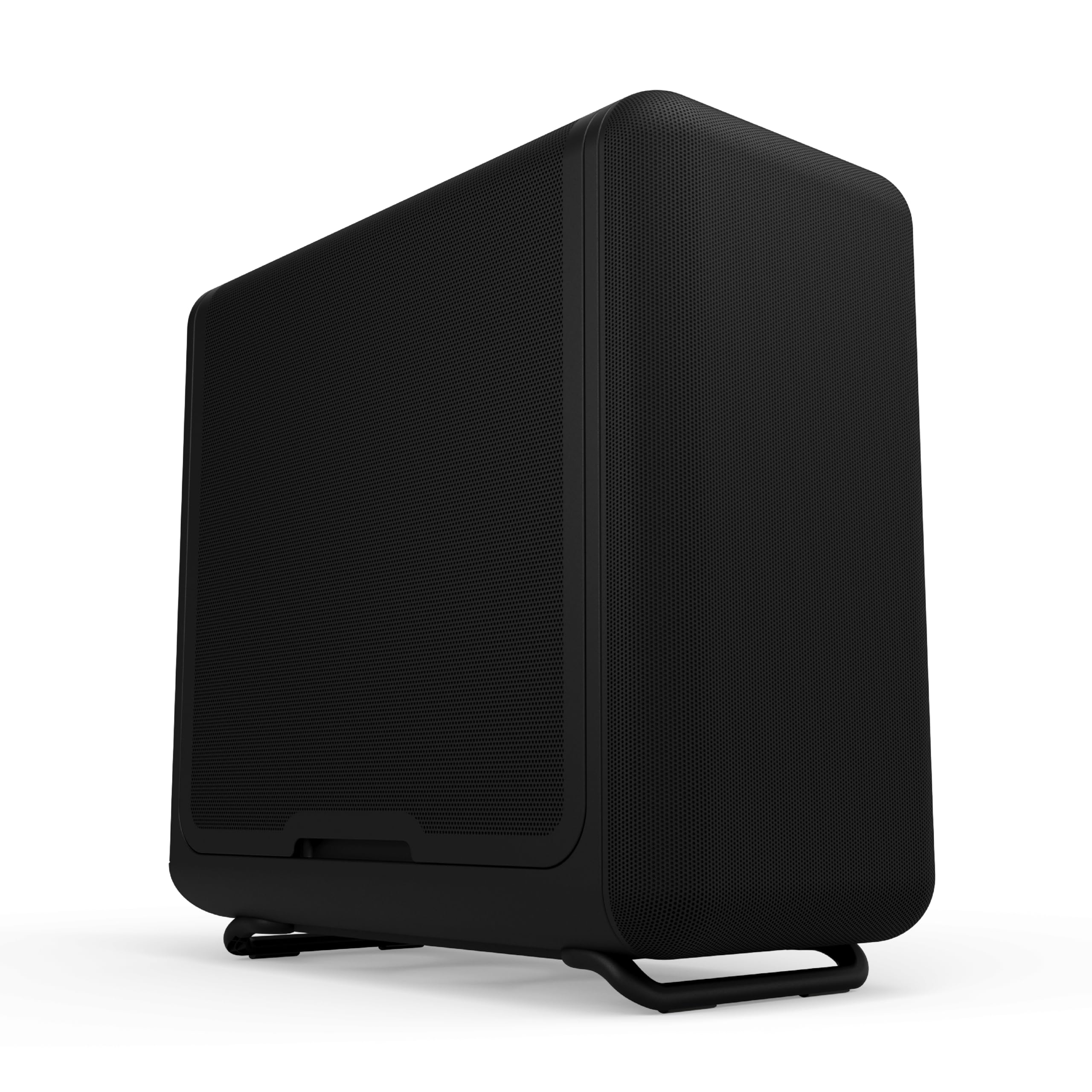
A curved micro-mesh side panel means more than one wall feeds your graphics card.
Most cases give you one intake face; this one gives you two. The thick curved micro-mesh side panel is a second significant airflow point, and the front uses a micro-mesh panel as a low-pressure, low-resistance intake. A stamped steel front panel backs that up with rigidity, and louvered blades cut exhaust impedance while stiffening the chassis. Up to three 120mm fans can sit at the bottom, feeding your graphics card directly — and it takes cards up to 360mm.
Behind the airflow design sits a structural power supply canopy mounted at the top, which frees up space and gives you accessible tie-down points and velcro straps for cabling. Build quality is the trait buyers highlight above all, with the case’s large size, airflow, cable management, and clean appearance rounding out the praise. Owners running a demanding combination — a 7800X3D paired with an RTX 4090 — report everything staying cool with front and bottom intake feeding a side intake and rear exhaust, and report that three 120mm fans fit at the bottom without issue.
The trade-offs are worth knowing up front. Storage is modest, with room for a single 3.5-inch drive mounted on top of its holder and two 2.5-inch drives, and the 3.5-inch cable direction is the one thing owners flag as awkward. Dust builds on the intake faces quickly, so weekly cleaning is part of owning it, and there are no dust filters on the side and front — only on the bottom. At 23.6 pounds it is the heaviest case on this list by a clear margin, so it is a set-it-and-leave-it tower rather than something you move around.
Where It Earns Its Keep
- Curved micro-mesh side panel adds a second intake face
- Up to three 120mm bottom fans for direct GPU airflow
- Top-mount power supply canopy with tie-downs and velcro straps
- Fits graphics cards up to 360mm
Where It Asks More
- Only 1 x 3.5-inch and 2 x 2.5-inch drive mounts
- No dust filters on the side and front, only the bottom
- Intakes need frequent dusting
- Heavy at 23.6 pounds to move or reposition
Choose this when: your build runs hot and you want airflow feeding the GPU from the side and bottom as well as the front.
Weigh it against your storage: if you run multiple 3.5-inch drives, this case will not hold them.
9. Lian Li LANCOOL 217 ATX Mid-Tower PC Case, 5 PWM Fans, Black Walnut Wood

Five fans, two of them 170mm, plus real walnut trim that hides its size well.
Cooling and looks arrive together here. Five PWM fans come pre-installed — two 170mm front fans, two 120mm reverse-blade fans, and one 140mm rear fan — and those front fans are not fixed in place. They mount tool-free and can be raised into a CPU-focused position that aims airflow straight at the processor, or left in the balanced default that splits cooling between the CPU and graphics card. The visible wood accents are genuine walnut, which gives the case a quieter, furniture-like look than the RGB-heavy options.
Build flexibility runs deep for the tier. It supports back-connect motherboards to keep cabling hidden, offers two power supply mounting positions — front-facing or rotated for easier cable access — and fits power supplies up to 220mm long. The dimensions make it one of the taller options here, with the largest fan size of any pick in this list at 17 centimeters. Two power buttons let you reach the front of the case from wherever it sits on your desk.
Quality is what buyers call out most, followed by appearance, and the all-black-with-walnut look earns repeated compliments for looking classy and subtle. The big front fans get credit for keeping systems cold while running quietly, and the toolless design with adjustable GPU support is a recurring plus. Fan noise is the split point in the feedback: some owners find the setup quiet, while others note the SATA-powered fan hub can run the stock fans at full speed until you configure PWM in your BIOS, and one 170mm fan running permanently full-tilt turned up as an issue solved with a low-noise adapter. Two smaller quirks are worth knowing — the front panel cable can run short on Mini-ITX boards with a mid-board connector, and the snap-on magnetic panels take care when moving the case.
The draw here: five pre-installed fans including two 170mm front units, plus genuine walnut trim make it the most distinctive-looking pick without trading away airflow.
The catch to plan for: the SATA-powered fan hub can leave stock fans at full speed until you set PWM in BIOS — a quick fix, but one to expect.
Best fit for: builders who want quiet big-fan cooling and a wood-accented case that looks at home in a living space.
Less ideal for: a Mini-ITX build with a mid-board front panel connector, where the cable may come up short.
Understanding the Specs
Ventilation rate and panel open area
Ventilation rate is the percentage of the front panel that lets air through. A higher number means your intake fans meet less resistance, which is the difference between air moving across your graphics card and heat pooling around it. Mesh panels act as a dust filter too, and most can be lifted off or slid out for cleaning.
Radiator and cooler clearance
Radiator support is measured in millimeters and tells you which all-in-one liquid coolers fit and where. A 360mm radiator is the common size for high-end builds, and mounting it on the top usually keeps the front intake clear for airflow. CPU cooler height and graphics card length are the two other clearance numbers worth checking against your parts before you buy.
Fan size and PWM control
Fan size is measured in millimeters, and larger fans move more air at lower rotation speeds. PWM fans are speed-controlled by your motherboard, so they spin up only when things get hot, while a fixed-speed fan runs at one pace. A PWM hub or controller lets several fans share one connection.
Internal bays and cable space
Internal bays are the mounting points inside the case for 3.5-inch hard drives and 2.5-inch SSDs. If you are moving a drive collection into a new build, the bay count is a hard limit. Cable management space behind the motherboard tray decides how tidy the back of your build looks and how easily the side panel closes.
FAQ
Will my graphics card fit in an Airflow ATX Case?
Can I fit a 360mm radiator in a mid-tower airflow case?
Why does a mesh front panel matter for cooling?
How many fans do I actually need in an ATX airflow case?
How much space do I need behind the motherboard for cable management?
Is a dual-chamber case better for airflow than a standard mid-tower?
Do pre-installed fans run loud from the start?
Which airflow case is easiest for a first-time builder?
How much storage can I fit in an ATX airflow case?
Final Thoughts: The Verdict
For most builders, the airflow atx case winner is the MONTECH AIR 903 MAX because it pairs a 51% ventilated metal front panel with four pre-installed 140mm PWM fans, accepts a 360mm AIO at the front or top, and clears graphics cards up to 400mm — all for a mid-tier price. If you want the biggest cooling platform and room for a 420mm radiator, grab the NZXT H9 Flow. And for a showcase build that still vents properly through dual tempered glass, the MONTECH XR Panoramic is the one to reach for, while drive-heavy builds are best served by the Zalman i3 Neo and its five internal bays.
How We Picked
We do not accept paid placement. Every pick is matched to a real buyer and a real use-case; we do not hands-on test units.
Sources & Methodology
Specifications: manufacturer listings and product documentation. Review insights: verified customer reviews, as of September 2026. Pricing: not shown on this page (it changes often); check the current price via the retailer link.
As an Amazon Associate, Gadgets Feed earns from qualifying purchases. This does not affect which products we feature.