
Our readers keep the lights on and my morning glass full of iced black tea. As an Amazon Associate, I earn from qualifying purchases.
Specs are compiled from manufacturer listings and verified buyer reviews and can change over time — please confirm the key details on the product page before buying.
If you want to know how fast you actually swing and how far the ball really goes, you do not need to spend simulator money to find out. The right budget unit measures club speed, ball speed and carry distance, sends the data to your phone, and fits in your bag’s side pocket. What separates the picks below is not the feature list on the box but how reliably each one reads a real swing and how much fiddling it demands first.
I’m Min — the founder and writer behind Gadgets Feed. This guide is built by comparing the manufacturers’ published specifications and the patterns across verified customer reviews, so you get each pick’s real strengths and trade-offs instead of marketing spin.
A budget unit still has to earn its place: honest speed numbers, a readable screen and no surprise subscription. This breakdown of the budget launch monitor field covers nine radar and camera units tested by real golfers.
Our Picks at a Glance

How To Choose The Best Budget Launch Monitor
The first thing to settle is what you want to measure, because that single answer rules out half the field. A unit that reads swing speed and ball speed is a speed-training tool; a unit that also reads spin rate and launch angle is a ball-flight tool. Budget tier hardware rarely does both well, and the honest units tell you which camp they sit in.
Radar Or Camera — Know Which One You Are Buying
Doppler radar sends out a microwave signal and listens for the frequency shift as the club and ball move past it, which is why it works with no ball at all. Photometric tracking instead uses a high-speed camera to photograph the ball and work backward from the images. Radar copes with more space constraints; camera systems tend to want a straighter, longer look at the ball flight.
How Much Room You Really Need
Radar units are typically placed a few feet behind the ball, so the total space you need includes both the gap behind you and enough flight distance for the ball to register. One pick here spells that out exactly — 5ft behind the ball plus 10ft of flight, so 15ft total. If your garage is shorter than that, a camera-based unit that reads the ball close to impact is the safer call.
Subscriptions, Batteries And The Hidden Running Costs
Some units bundle a lifetime free app and stop there. Others hand you a trial, then charge for simulated courses or shot history afterward. Neither is wrong, but you should know which one you are buying before you commit. Battery style matters too — a rechargeable pack saves you hunting for disposables, while a long-life cell means fewer charges between sessions.
Quick Comparison
| Model | Best For | Tracking Type | Battery | Weight | Amazon |
|---|---|---|---|---|---|
| TheStack Radar★ Best Overall | Speed training with the Stack system | Radar | Disposable batteries | 0.14 kg package | Amazon |
| Shot Scope LM1 BundleBest Value | No-subscription club gapping | Doppler radar | 5 hours | 300 g | Amazon |
| Voice Caddie SC200PlusBudget Champion | No-ball indoor speed work | Doppler radar | Up to 20 hours | 8 ounces | Amazon |
| Swinora GX-03 | Garage simulator builds | Radar | ~1 week per review | 0.65 kg package | Amazon |
| Garmin Approach R10 | Home range and virtual courses | Radar | 10 hours | 340 g | Amazon |
| Izzo Swami Launch Master Pro | Full swing data suite at the range | Doppler radar | — | — | Amazon |
| SkyTrak | Small-space indoor simulator | Photometric camera | 4 hours | — | Amazon |
| Rapsodo MLM2PRO | Metric depth and course play | Doppler radar + dual camera | — | 16 ounces | Amazon |
| Garmin Approach G82 | GPS rangefinder that also tracks shots | Radar + GPS handheld | 25 hours GPS / 8 hours radar | 10.9 ounces | Amazon |
In‑Depth Reviews
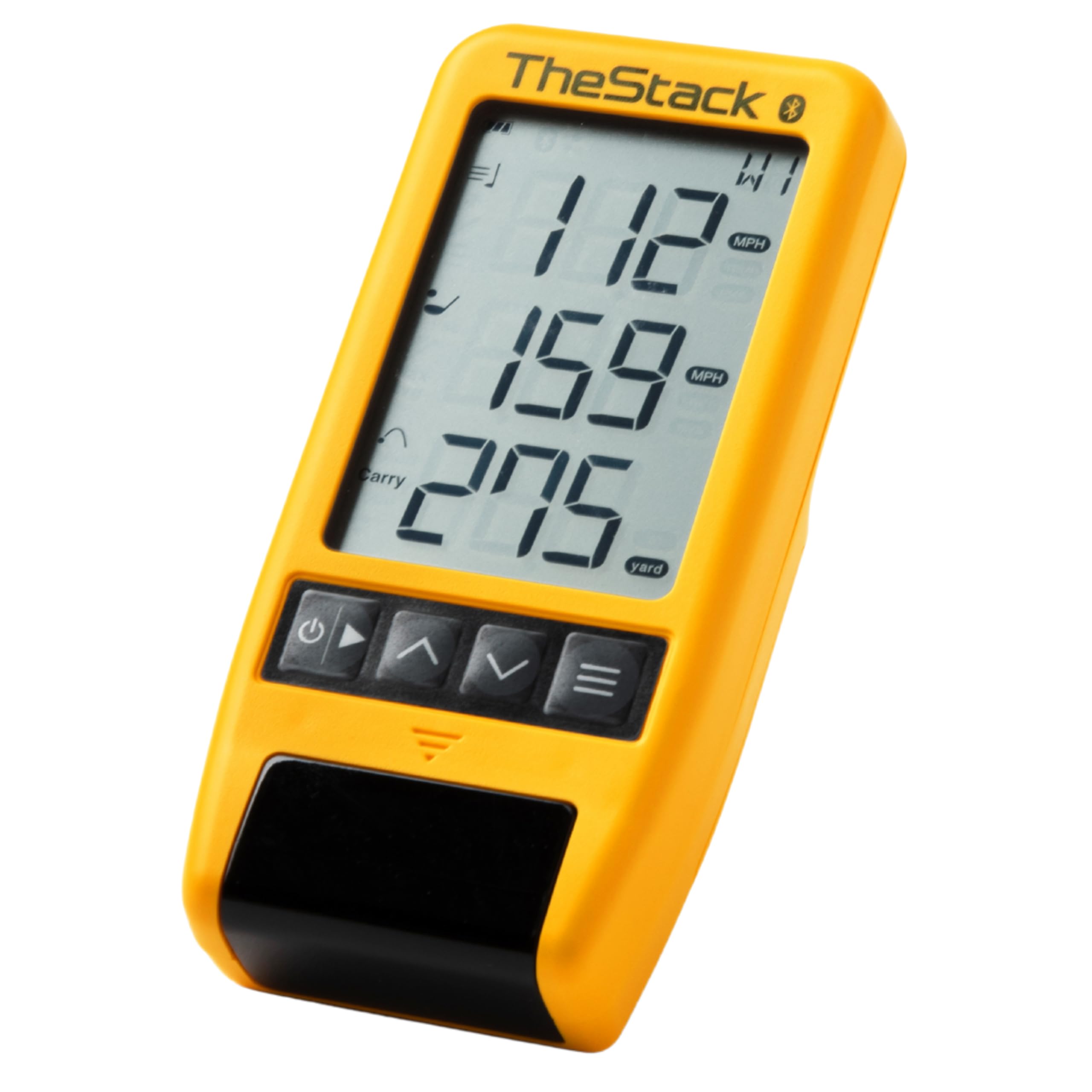
1. TheStack™ Radar – Portable Golf Launch Monitor, Swing Speed & Ball Tracker
Our pick — 4.5★ from 50+ verified ratings; the strongest balance of quality and price.
Pocket-sized radar that turns speed training into a scored, phone-tracked game you actually finish.
At 0.12 kg on its own and 0.14 kg in the box, this radar is light enough that you forget it is in the bag — and it is noticeably smaller than the Voice Caddie SC200Plus below, whose 0.36 kg package weighs 2.6x as much. That gap matters if you carry your own clubs. The radar measures your swing speed and ball speed directly, then calculates an estimated carry distance and smash factor, which is the ratio of ball speed to club speed that tells you how well you struck it. It is perfect for speed work with TheStack, Stack Wedge practice on the range, and logging your numbers out on the course.
Where this pick wins people over is its software. Stack Radar connects straight to TheStack App on iOS or Android over Bluetooth, so your training speeds go to your phone automatically instead of being scribbled on a card. You also get Stack Wedging, a gamified wedge practice mode exclusive to this radar, with a 1-month free trial included. Speed Training is now available on both iOS 15.0 or later and Android, but Wedging is not yet available on Android — so a green-bubble phone owner misses the wedge games. Stack Wedging runs on iOS 15.0 or later only.
The honest catch is what it is not. Distance, spin and launch angle readings belong to pricier units; this one gives you speed and an estimated carry. It runs on disposable batteries rather than a rechargeable cell, so keep spares in the bag. And on driver pop-ups it reads ball speed only rather than a true clubhead speed. It is a speed instrument first and a launch monitor second, and golfers who accept that get real results from it.
Why Speed Seekers Keep It
- 0.14 kg package weight — the lightest radar in this round-up, so it disappears in a side pocket.
- Stack Radar pairs over Bluetooth and pushes every training speed into the app automatically.
- Smash factor and estimated carry distance come free with each measured strike.
- Used by 2022 US Open Champion Matt Fitzpatrick for Stack speed training and range practice.
Where It Draws The Line
- No spin rate, launch angle or attack angle data — this is a speed tool, not a ball-flight analyzer.
- Runs on disposable batteries instead of a rechargeable pack.
- Driver pop-ups register ball speed but not clubhead speed.
- Stack Wedging stays iOS-only; Android owners get speed training but no wedge games.
Buy it if you follow the Stack speed program and want the missing piece of that system in your pocket.
Look elsewhere if you need spin rate and launch angle to shape a full ball-flight picture.
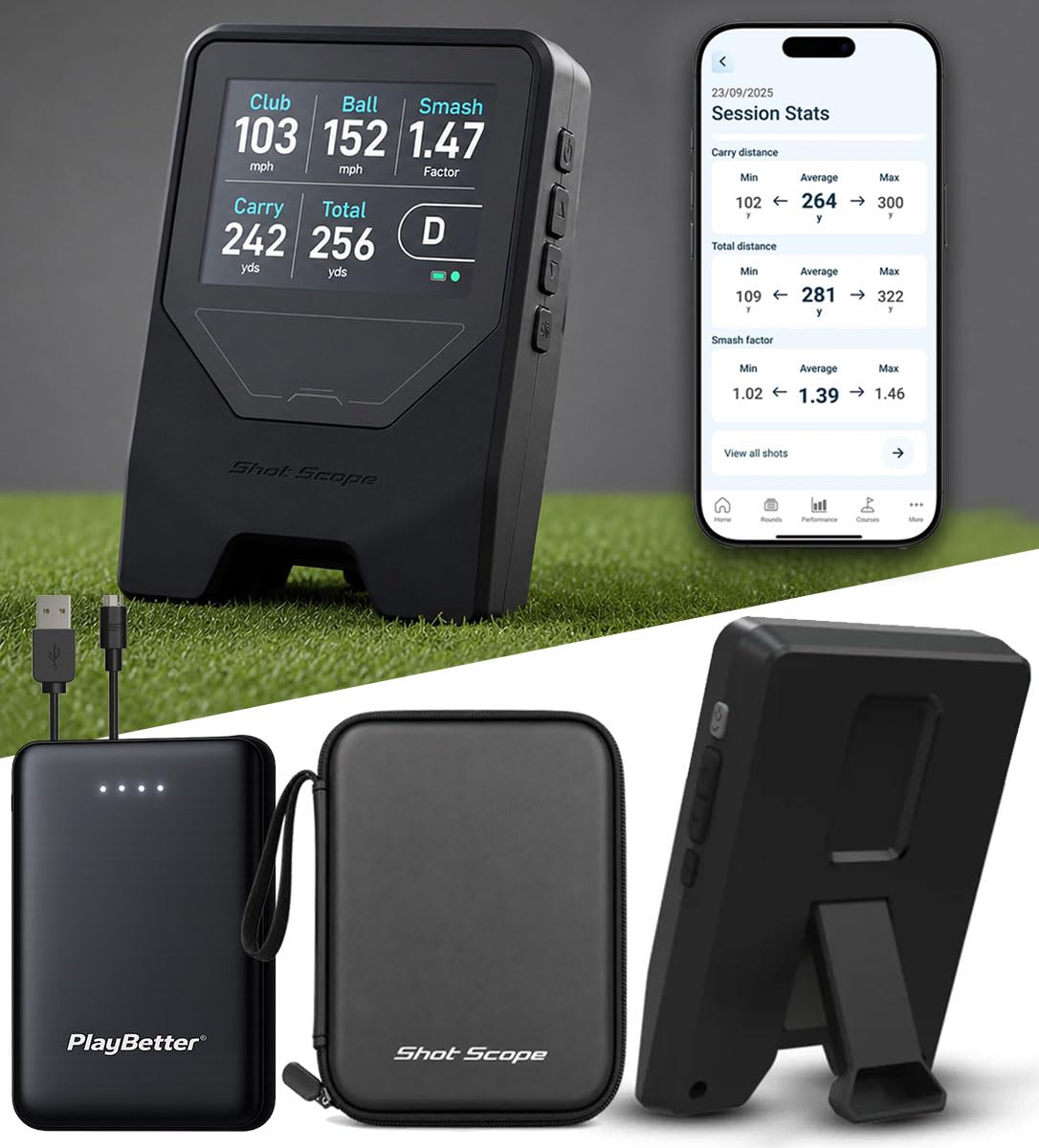
2. Shot Scope LM1 Portable Golf Launch Monitor PlayBetter Bundle
A -class radar with a real screen and no monthly bill attached — the value play here.
Buy this one for the pricing model as much as the hardware. Shot Scope gives you full launch data with zero monthly fees and a free lifetime app subscription, so your session history does not vanish if you stop paying. Inside the box you get the LM1, a USB-C charging cable, a protective case, a cleaning cloth, a user manual, and a PlayBetter 5000mAh portable charger — the last item is why this bundle makes sense for range sessions that outlast the battery.
The screen is a 3.5″ color display, which sounds small until you compare it with the OLED readouts on cheaper units — you get club speed, ball speed, smash factor, carry and total distance on the device itself, not squinted at through a phone. There are three modes covering course, practice range and speed training. It is IPX3 rated, meaning it shrugs off light rain and splash, and you place it five feet behind the ball to start hitting. At 300 g it is heavier than the Swami Launch Master Pro, but it also carries a screen and a battery that most rivals split across two devices.
What wins people over, judging by the feedback, is how quickly the LM1 becomes second nature — usability is the most-praised thing about it by a clear margin. The recurring caveat is accuracy, where experience splits: plenty of golfers find the yardages line up with their real game, while others report readings landing well off what a Trackman shows, and one owner found the range tool locking up and skipping swings before returning the unit. There is also no launch angle or spin rate here, which one owner said was not worth paying extra for anyway — the club-gapping data alone reshaped their bag. Hot-weather tip: it can overheat and shut down in direct sun during long sessions, so park it in shade on a baking day.
For an entry-level price you get a screen, a charger and no ongoing fee. That combination is hard to find anywhere else in this tier.
What the bundle adds: the included 5000mAh power bank solves the 5-hour battery limit without a hunt for wall sockets, and the protective case means the unit survives living in a cart bag.
Set your expectations: with no spin or launch angle, this is a club-gapping and speed tool rather than a ball-flight analyzer.
Reach for this if you want a colour screen, a five-hour battery and a lifetime app with nothing to pay monthly.
Think twice if you need spin rate and launch angle, or plan to leave the unit baking in midday sun.
3. Voice Caddie Portable Golf Launch Monitor and Swing Analyzer with Real-Time Shot Data Tracking
Twenty hours of battery and a no-ball swing mode make this the indoor-tinkerer’s pick — as long as you keep your loft expectations honest.
Twenty hours of battery is the number that defines this one. That is a week of living-room sessions on a single charge, and it is the longest stated runtime in this entire round-up — the Garmin Approach R10, for comparison, runs for 10 hours, and the SkyTrak four. Voice Caddie’s all-new swing speed mode lets you perfect speed and tempo by swinging the club in your living room with no ball at all, which is the single best use case for a budget radar and the reason this unit earns its place.
The hardware is a Doppler radar core with calibrating atmospheric pressure sensors, an LCD display, and voice output that calls out your numbers in real time. It shifts between MPH and KM/H from the remote, so set your unit before you start or the data reads nonsense. The adjustable loft settings let you fine-tune by club, and the device stores your session data and per-club averages for later. At eight ounces and with a package weighing 0.36 kg, it is a genuinely portable unit — though that 0.36 kg package is 2.6x the weight of the TheStack Radar’s 0.14 kg, so it is the larger piece of kit in the bag.
The thing every buyer falls in love with here is the build quality, because a device that will not survive range conditions is useless no matter how accurate it is. Its 82 owners rate it highly for value for money. The honest wrinkle is accuracy on wedges — shorter clubs tend to read short — and a handful of buyers report landing on a unit that never read well for them at all. It runs on standard batteries rather than a rechargeable pack, and it wants a protective case that does not come in the box. Read it as a practice aid that gives you feedback, not a certified measuring instrument, and it delivers.
Suits the golfer who wants the longest battery here, no-ball speed work indoors, and a bright screen that stays readable outdoors.
Not for anyone chasing pinpoint wedge distances or a rechargeable battery straight from the start.
4. Golf Launch Monitor & Portable Swing Analyzer with 13 Metrics

Environmental sensors and a metal body make this the calibration-obsessed golfer’s quiet bargain radar.
What sets the Swinora GX-03 apart is a detail most buyers only notice afterward: built-in temperature, humidity and barometric pressure modules that automatically adjust your shot data to real-time conditions. Air density changes how far a ball actually travels, so a unit that reads the weather alongside the swing is doing a real calculation rather than a lookup. There are zero annual fees, the app is a one-time download for lifetime use, and indoor setup needs at least 15ft of total space — device five feet behind the ball plus 10ft of ball flight.
The metric list is the deepest here outside the premium tier: attack angle, launch angle, spin rate, vertical clubface data, plus the usual club speed, ball speed, smash factor and distance. Multi-angle practice views at 45° and 90° show you the swing shape, and a Distance Compensation function lets you scale yardage from 80% to 120% per club, defaulting to 100%, so measured carry lines up with how you actually play. The body is aluminium with an OLED display, and a magnetic mount lets you park it anywhere ferrous. It weighs 0.65 kg in the package.
Its appeal among owners is build feel and size — people keep describing it as something you toss in a bag and forget about. One garage-based owner ran it against a Trackman setup and reported numbers landing within 1%. The trade-off is that this is an unfamiliar brand, and reviewers are thin on the ground, so a couple of duds in that small pool carry more weight than they would on a product with thousands of ratings. If you read the data honestly, the GX-03 is a specification-forward radar that is worth testing against your own numbers rather than taking on reputation.
The Case For It
- Built-in temperature, humidity and barometric sensors adjust shot data to actual conditions.
- Zero annual fees — one app download covers lifetime use with all features accessible.
- 13 metrics including attack angle, launch angle and spin rate — rare at this tier.
- Distance Compensation scales carry from 80% to 120% per club so data matches your real play.
Read The Fine Print
- Needs 15ft of total indoor space — 5ft behind the ball plus 10ft of flight.
- You must select the correct club before every swing or the data drifts.
- Review coverage is thin, so a lone negative rating looks larger than it is on a big-product listing.
The bet here is on specification over brand recognition — you get spin, launch angle and environmental correction without a subscription.
The catch is that a short garage will not work: 15ft is a hard requirement, not a suggestion.
5. Garmin 010-02356-00 Approach R10, Portable Golf Launch Monitor (Renewed)

The radar that turns your garage into a course — provided you respect its placement rules.
For anyone with 10 hours of range time in a bank account, the R10 lands in the balance. It runs for up to 10 hours on a charge and is IPX7 rated, which means it survives being submerged in water up to a metre for 30 minutes — overkill for a golf bag, but useful in a damp garage. By comparison, the SkyTrak manages four hours of continuous use, and the G82’s radar mode is rated eight. Set up on a solid, level surface with the right distance behind the ball, and it reads club head speed, ball speed, swing tempo, ball spin, launch angle and more.
The reason it earns a recommendation here is the software ecosystem. Paired with a compatible smartphone and the Garmin Golf app, you get automatic video clips of your swing annotated with that swing’s metrics, a shot dispersion chart based on estimated ball flight, and a training mode that tracks stats for every club in the bag. With an active subscription you open up virtual rounds on over 42,000 courses and a weekly tournament scored on a global leaderboard. The included phone mount clips to a golf bag so you can actually watch the screen while you hit.
The recurring caveat is setup sensitivity. Owners are candid that precise alignment and levelling decide whether you get useful numbers or skewed shot shapes — misalign it and the ball flight lies to you. Judged as a training aid for the home range that will also drive a simulator app, this is among the most capable options in its bracket. Just go in knowing you are going to spend a session or two dialling it in before the numbers settle.
Best home-range pick: 10-hour battery, IPX7 sealing and swing video clips that make garage practice feel like real coaching.
Only skip it if your heart is set on an out-of-the-box experience — this radar rewards patience with placement.
6. Izzo Golf Swami Launch Master Pro Golf Launch Monitor

A data-heavy range companion that measures everything from chips to drivers — with one blind spot worth knowing.
The headline here is the breadth of data. The Swami Launch Master Pro runs a high-precision Doppler radar sensor and outputs total distance, carry distance, swing speed, ball speed, smash factor, launch angle, attack angle, spin rate and apex — the same sheet of numbers you would expect from a unit charging several times as much. It measures across a 30–420 yard range, so it does not care whether you are chipping three feet or hitting driver, and it has integrated temperature, humidity and altitude sensors that factor real conditions into the analysis.
Everything is selectable: you choose specific club types and loft angles before each session so the metrics are relevant to the club in your hand. The package arrives with a carry case, the screen is readable in direct sunlight, and there is audible voice output for feedback on the range. It works equally well indoors and outdoors, and it runs on standard batteries with no complicated setup — though note that this unit lacks app integration, so all your data stays on the device rather than being logged to a phone.
The recurring theme in feedback is that the data is only as good as the point of contact. On the range, the driver readings are reliable and the practice numbers are strong, but multiple owners mention a consistent 10–15 yard discrepancy on mid-irons despite calibration — which is a legitimate complaint for a unit asking as much as this one does, even if the rest of the numbers are close. If your practice relies on iron distances, that is the number to check hard. For everything else, it is a compact, capable range unit with more measured metrics than its price suggests.
What you get for the money: nine types of ball-flight and swing data, weather-compensated, on a screen you can read on a sunny tee box — no phone required.
What you should test first: iron distances. If you trust your mid-iron carries to the yard, run a session before you commit.
The winning line is data breadth — spin rate and attack angle at a mid-range price with no app dependency.
Where doubt creeps in is iron accuracy, which owners repeatedly flag as the weak metric.
7. SKYTRAK Golf Launch Monitor | Photometric Technology

The photometric camera unit that shines in tight indoor bays where radar struggles to get a clean read.
This one works on a different principle to everything above it. SkyTrak uses high-speed photography to capture the ball at impact and work backward to ball speed, launch angle and spin rate, with 3D ball-flight visuals displayed on a connected device. Because it reads the ball close to the tee rather than tracking it downrange, it is the pick for golfers whose garage is too short for radar tracking — one owner who tried the Garmin R10 in a garage found SkyTrak worked where the radar did not.
It connects wirelessly to compatible devices over WiFi or a direct connection, supports iOS, Android and PC, and carries a built-in rechargeable lithium-ion battery with up to 4 hours of continuous use. The package includes a 14-day trial membership to get you started, and the base unit covers driving range sessions on its own. Critically, the software is the long-term cost story: club challenges and shot history sit behind an annual subscription, and full course play costs more again — so the hardware price is only the opening chapter.
Feedback on this unit is genuinely split, and it is worth being straight about that. Plenty of owners find it quietly excellent — reliable shot tracking, distances, club and ball speed, apex and flight — and consider it the best option at its price for a small indoor bay. The other half report setup friction: alignment is everything, the unit must sit perfectly level or the laser misfires, and horizontal launch angle is the weakest metric, with some owners seeing sustained left pulls and heavy draw readings that drive them to a different platform. If you can give it a flat, level, well-lit home and take the alignment seriously, it is a rewarding camera-based system; if your setup space is uneven or ad hoc, expect a lot of fiddling.
What It Does Brilliantly
- Photometric camera reads ball speed, launch angle and spin rates close to impact.
- Works in tight indoor bays where radar tracking struggles for space.
- 4-hour rechargeable battery, wireless connection and iOS, Android and PC support.
- 3D ball-flight visuals plus a 14-day trial membership in the box.
Where It Demands Patience
- Alignment and levelling are unforgiving — a badly placed unit skews shot shape.
- Club challenges, shot history and full courses sit behind yearly subscriptions.
- Horizontal launch angle is the least reliable metric in the suite.
Reach for SkyTrak if your indoor bay is short on depth and you have a level, well-lit space to dial it in.
Give it a miss if the unit will bounce between uneven surfaces — the levelling demands will wear you down.
8. Rapsodo MLM2PRO Mobile Launch Monitor Golf Simulator
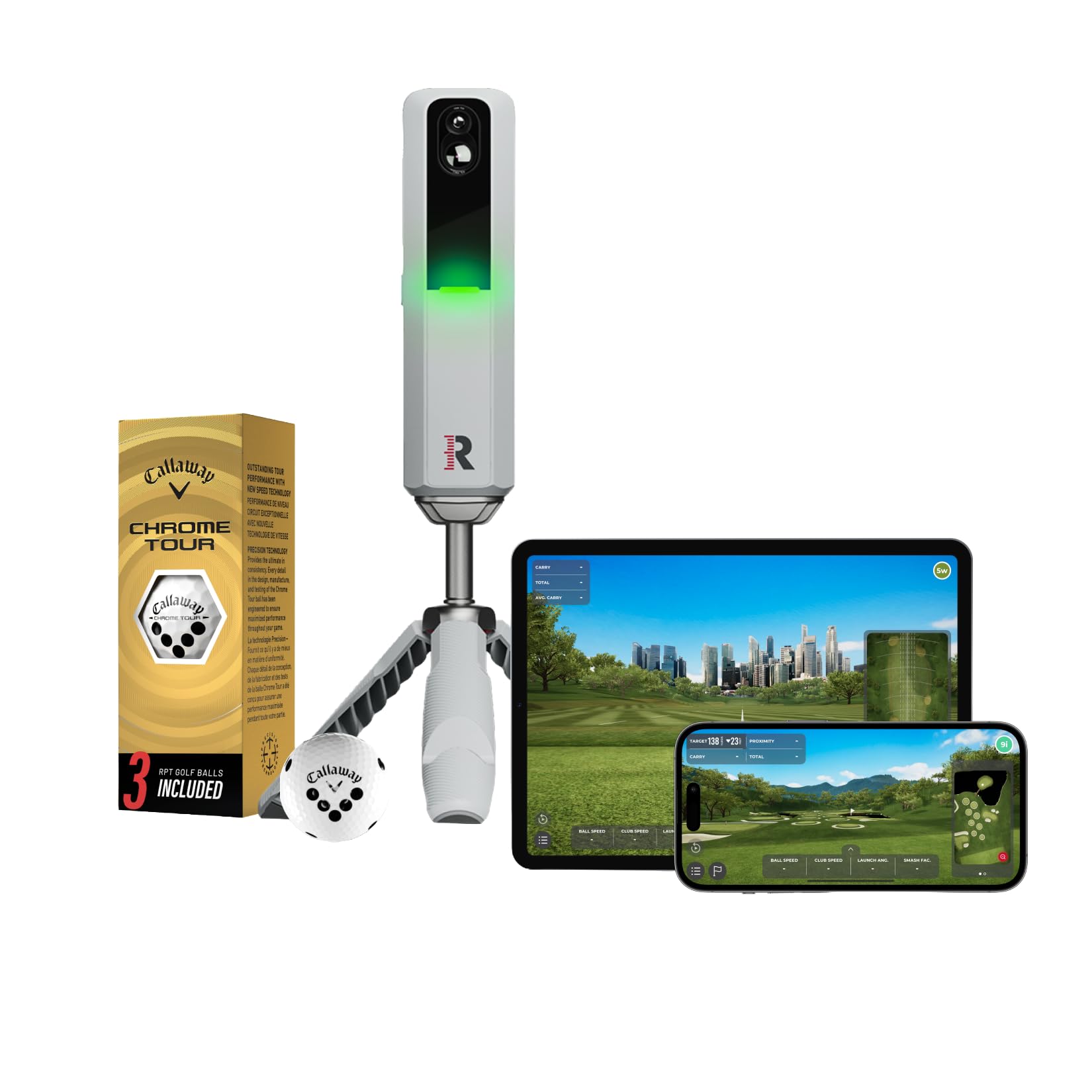
Dual cameras plus radar capture 15 metrics, and it throws in 30,000+ simulator courses to keep you hitting.
Rapsodo does not hold back on the numbers. The MLM2PRO combines Doppler radar with a dual camera setup to capture 15 key metrics, including spin rate, spin axis, carry distance, club speed, club path and launch angle. The second camera records your club and ball contact in slow motion from any angle, which is genuinely useful for spotting a swing fault you cannot feel — something the voice-only and screen-only units in this list simply cannot do. It weighs 16 ounces and includes a tripod, a carrying case, a charging cable and three Callaway RPT Chrome Soft X balls.
The software bundle is where the draw really sits. You get a 45-day premium trial that opens up simulated courses, third-party app integration, target range, impact vision, the Rapsodo combine and speed training. With premium active, 30,000+ home golf simulator courses are available, with multiple tee boxes and game formats for any age or skill level. One-year customers note regular firmware and game updates, and one credits the unit with a handicap drop to the low 80s.
The honest caveat is connection behaviour. Setup is generally painless and Bluetooth solid, but a common report is that the shared WiFi link drops and the fix is to switch to Direct WiFi instead. There is also a well-documented frustration behind the paid tiers — some owners feel features get locked behind subscriptions without warning, and a minority hit persistent crashing that no amount of repositioning fixes. The comfortable majority get accurate data and love the course library. As a value proposition against units charging markedly more, it is difficult to argue with what is in the box.
Buy it for spin rate and slow-motion contact video plus a course library big enough to keep practice from getting stale.
Know before you buy that the premium features cost money after the trial, and Direct WiFi is the connection mode to use.
9. Garmin Approach® G82, Portable Golf Launch Monitor & Premium GPS Handheld
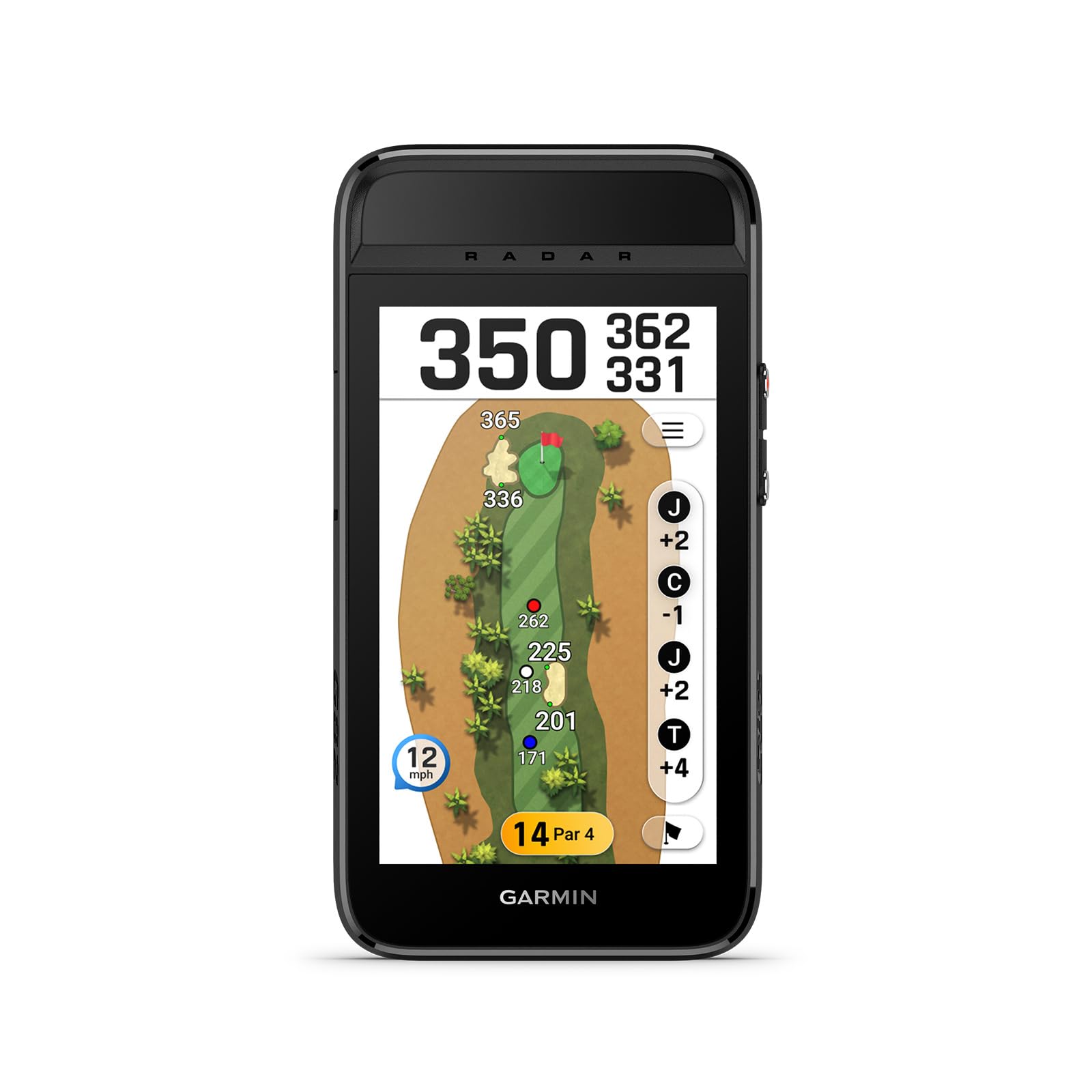
A premium GPS handheld that also measures your swing — the ideal answer if launch tracking is a bonus, not the main event.
You buy the G82 for what it does on the course, not just on the range. A 5″ high-resolution touchscreen brings 43,000+ preloaded courses to life in your hand, and the device tracks distances, keeps score, auto-advances holes, and records shot measurements — all with a 25-hour battery in GPS mode. That is the longest stated runtime here by some way; the Garmin Approach R10 runs 10 hours, and the SkyTrak just four. It comes with a radar stand and a carabiner bag clip, and slots into a cart with the built-in magnetic mount.
The launch-monitor side is narrower than the dedicated units. The radar measures ball speed, club speed, smash factor and swing tempo, and there is a measured putting function that tracks stroke length, tempo, and club and ball speed. Bag mapping at the range lets you evaluate each club against your real yardages, and that data flows into the virtual caddie alongside wind speed and direction from a paired phone. In radar mode the battery drops to eight hours, so heavy launch-monitor use with GPS tracking together will not make the full 25-hour number.
The consensus is clear on one thing and split on another. Owners are genuinely impressed with the GPS functionality — multiple distances at a glance, reliable scoring, and accuracy verified against a laser rangefinder. Value for money, on the other hand, draws mixed opinions, with some buyers questioning the premium. The launch-monitor accuracy is the other honest asterisk: some owners find it perfectly serviceable, others find it noticeably inconsistent against their own sense of ball flight. If you mostly want a premium GPS device and treat launch data as a bonus, it lands well. If launch metrics are your priority, the dedicated radar units above are the better fit.
What Wins People Over
- 5″ high-resolution touchscreen with 43,000+ preloaded courses in a handheld form.
- 25-hour battery in GPS mode — nearly double the Approach R10’s 10-hour rating.
- Radar measures ball speed, club speed, smash factor and swing tempo, plus putting stroke data.
- Bag mapping plus virtual caddie driven by your own club data.
Where The Value Split Shows
- Launch-monitor accuracy draws mixed feedback from owners.
- Radar mode drops the battery to 8 hours.
- Value for money is a matter of debate at its premium tier.
Best for the golfer who wants one premium touchscreen device for GPS yardages, scoring, bag mapping and putting metrics.
Only if launch tracking is a secondary want — buy the dedicated radar units if swing data is your main goal.
Understanding the Specs
Radar vs Photometric Tracking
Radar sends out a microwave signal and reads the frequency shift as the club and ball move, which is why it can measure swing speed with no ball at all. Photometric units use high-speed cameras to photograph the ball at impact and work backward. Radar handles tighter setups and no-ball training; camera units can read spin rate and launch more directly but want a level, well-lit placement.
Spin Rate And Launch Angle
Spin rate is how fast the ball is rotating, in rpm — it is what makes a shot climb or hold a green. Launch angle is the vertical angle the ball leaves the club on. Measuring both typically pushes a unit from the entry tier into premium territory, which is why many budget radars list speed and estimated distance instead.
Smash Factor
Smash factor is ball speed divided by club speed — a single number that tells you how much of your swing energy went into the ball rather than being wasted. A higher figure means a more efficient strike. It is among the most actionable metrics a budget unit can give you, since a rising smash factor is direct feedback of better contact.
Setup Distance And Battery Style
Radar units need space behind the ball and enough flight distance for the signal to register — some here specify 5ft behind the ball plus 10ft of flight. Battery style matters too: a rechargeable pack means one cable, while standard batteries mean stocking spares. Check both before you buy.
FAQ
Can a budget launch monitor measure spin rate and launch angle?
How much space do I need indoors for a radar launch monitor?
Do I need a subscription to use a launch monitor?
Can a launch monitor measure swing speed without hitting a ball?
Is a radar launch monitor accurate enough to trust my distances?
What is the difference between Doppler radar and photometric camera tracking?
How long does the battery last on a portable launch monitor?
Will a launch monitor work with my phone?
Can I use a launch monitor for putting practice?
What is smash factor and why does it matter?
Final Thoughts: The Verdict
<
For most golfers, the budget launch monitor winner is the TheStack Radar because it turns raw swing speed into a tracked, scored training habit through the Stack app, and it does it at the lightest package weight in this round-up at 0.14 kg. If you want a colour screen and a lifetime app with no monthly fee, grab the Shot Scope LM1 PlayBetter Bundle. And for no-ball indoor speed work with the longest battery here, the Voice Caddie SC200Plus is the one to reach for.
Three other picks are worth keeping on your shortlist depending on what you value most. The Swinora GX-03 is the specification-forward choice if you want spin rate, launch angle and environmental correction without a subscription. The Garmin Approach R10 suits anyone with 10 hours of range time in mind who wants swing video and virtual courses behind it. And the Rapsodo MLM2PRO delivers the deepest metric list here with dual cameras and slow-motion contact video.
The nudge, if you need one: the TheStack Radar carries a 4.5-star rating across 50+ owners and is the only unit here that pairs speed measurement with a structured training system. If speed training is your goal rather than ball-flight analysis, that is the piece of kit that earns its place in the bag.
How We Picked
We do not accept paid placement. Every pick is matched to a real buyer and a real use-case; we do not hands-on test units.
Sources & Methodology
Specifications: manufacturer listings and product documentation. Review insights: verified customer reviews, as of September 2026. Pricing: not shown on this page (it changes often); check the current price via the retailer link.
As an Amazon Associate, Gadgets Feed earns from qualifying purchases. This does not affect which products we feature.