
Our readers keep the lights on and my morning glass full of iced black tea. As an Amazon Associate, I earn from qualifying purchases.
Specs are compiled from manufacturer listings and verified buyer reviews and can change over time — please confirm the key details on the product page before buying.
If you are wiring security cameras, access points, or a small office network, you want a switch that powers those devices and carries data over one cable each. Before you buy, know this: I use flexible matching for 10 Port Ethernet Switch picks — the list accepts both true 10-port units and 8+2 setups, where eight ports carry Power over Ethernet (PoE, meaning the switch sends both power and data down one network cable) plus two dedicated uplink ports. Not every pick is the exact 10-port layout you searched, but each nearest same-type size does the same job, and I flag it every time.
I’m Min — the founder and writer behind Gadgets Feed. This guide is built by comparing the manufacturers’ published specifications and the patterns across verified customer reviews, so you get each pick’s real strengths and trade-offs instead of marketing spin.
The budget-tier options here cluster around the same power budget, so the real difference is if you need cloud management or higher port speeds in your setup. That one question decides most of these picks, which is why this guide lines up a 10 port ethernet switch against both the managed and unmanaged trade-offs.
Our Picks at a Glance

How To Choose The Best 10 Port Ethernet Switch
Most people buying a switch at this size are powering cameras, access points, or VoIP phones, and the spec that trips them up is almost never the port count. It is the power budget. Here is what to check before you click buy.
Match the PoE budget to your device count
The total PoE budget is the ceiling on how much power the switch can hand out across every powered port at once. A 120W budget (watt, the standard unit of electrical power) spread across eight ports sounds generous, but the real math is your devices. A single wireless access point can draw up to 30W on a 802.3at port, so a couple of them eats a large share of that budget fast. Check what each camera or access point actually pulls, add them up, and stay under the total.
Decide if you need management or just plug-and-play
Unmanaged switches (plug-and-play boxes with no settings to configure) are the right call for a simple camera setup. Smart managed switches add VLAN (virtual LAN — splitting one physical switch into isolated groups) and QoS traffic priority, and they can be worth it if VoIP calls or video streams share the same network. If you have no plans to segment traffic, the unmanaged pick will do the same job for less money.
Check your speed needs before you overpay
Gigabit means 1000Mbps (megabits per second) per port, which covers most cameras and access points comfortably. If your NAS, gaming PC, or WiFi 7 access point is the bottleneck, a 2.5G switch with 10G SFP+ uplinks (higher-speed fibre or copper slots for the backbone) moves data far faster. Only chase the higher port speeds if some device on your network actually generates that much traffic.
Quick Comparison
| Model | Best For | PoE Budget | Port Layout | Management | Amazon |
|---|---|---|---|---|---|
| YuLinca 10 Port Gigabit PoE Switch★ Best Overall | Fanless plug-and-play camera power | 120W total, 30W per port | 8 gigabit PoE+ / 2 gigabit uplink | Unmanaged | Amazon |
| SICSOLINK 10-Port Gigabit PoE+ SwitchBest Value | Small business camera runs | 120W total, 30W per port | 8 PoE+ / 2 gigabit uplink | Unmanaged | Amazon |
| Goalake 10-Port Gigabit PoE SwitchRemote Monitoring | Remote cloud monitoring | 120W total, 30W per port | 8 gigabit PoE / 2 gigabit uplink | Easy Smart Managed | Amazon |
| WAVLINK NW0820GP 10-Port Switch | Short-run APs and cameras | 120W total, 30W per port | 8 PoE+ / 2 gigabit uplink | Unmanaged with modes | Amazon |
| UGREEN 10-Port PoE Switch | Quiet home AV and camera setups | 60W total, 30W per port | 8 PoE+ / 2 gigabit uplink | Unmanaged with modes | Amazon |
| MokerLink 10 Port Gigabit PoE Switch | APs and multi-camera rigs | 120W total, 30W per port | 8 gigabit PoE+ / 2 gigabit uplink | Unmanaged with VLAN/Extend | Amazon |
| Binardat 10 Port 2.5G Switch | Gaming, NAS, desktop backbone | — | 8 x 2.5G Base-T / 2 x 10G SFP+ | Unmanaged | Amazon |
| YuanLey 10 Port 2.5G PoE Switch | Rack-mount 2.5G PoE deployments | 120W total, 30W per port | 8 x 2.5G PoE / 2 x 10G SFP | Unmanaged with one-key VLAN | Amazon |
| TP-Link TL-SG2210MP | Managed networks and VLAN control | 150W total, 30W per port | 8 PoE+ / 2 gigabit SFP | Smart Managed (Omada) | Amazon |
In‑Depth Reviews
1. YuLinca 10 Port Gigabit PoE Switch
Our pick — over 4.5★ from 500+ verified ratings; the strongest balance of quality and price.
The quiet metal box that powers a full camera run without a single adapter.
This pick earns the top spot because it nails the basics at a 4.6-star level — 8 gigabit PoE+ ports that each push up to 30W, plus 2 gigabit uplink ports, all sharing a 120W total budget, and all in a fanless metal case you can sit on a desk or hang on a wall. That 120W is the number to watch: it means the switch can hand out power and data to your cameras over one cable each, so you skip a power adapter at every camera. It is unmanaged and plug-and-play, so there is no software to learn.
The switching capacity is 20Gbps, and every port auto-negotiates its speed, which matters on a busy network — it means the box keeps data moving between ports without one device crowding out the rest. Smart PoE detection is built in, so the switch automatically works out which connected device needs power and only sends power there. It will also pass data to non-PoE gear like a printer or a laptop without trying to power it. What buyers keep coming back to is straightforward function — buyers report it powers up almost any PoE device they throw at it.
The honest catch is compatibility at the fringes. Passive 24V PoE devices and plain non-PoE gear get data only, never power, so check what your devices actually need before you buy. Speeds on a heavily congested mesh network can also be hard to confirm, though that is more about the network than the switch. For a home surveillance build or a small office, the YuLinca is the safe default.
What buyers praise
- 8 PoE+ ports each at up to 30W over a 120W total budget — enough for a multi-camera run with no extra adapters
- Fanless metal body with double-sided vents — no fan noise near your desk or recording gear
- Plug-and-play with no configuration — power cord and network cable and you’re live
- Works with non-PoE devices for data, and supports both desktop and wall mounting
Fit notes before you buy
- Does not power passive 24V PoE or non-PoE devices — data only on those
- Unmanaged, so no VLAN or traffic control if you later want to segment a network
Best for: a home or small-office build where cameras just need to work from the start.
Look elsewhere if: your devices are passive 24V PoE, which this switch will not power.
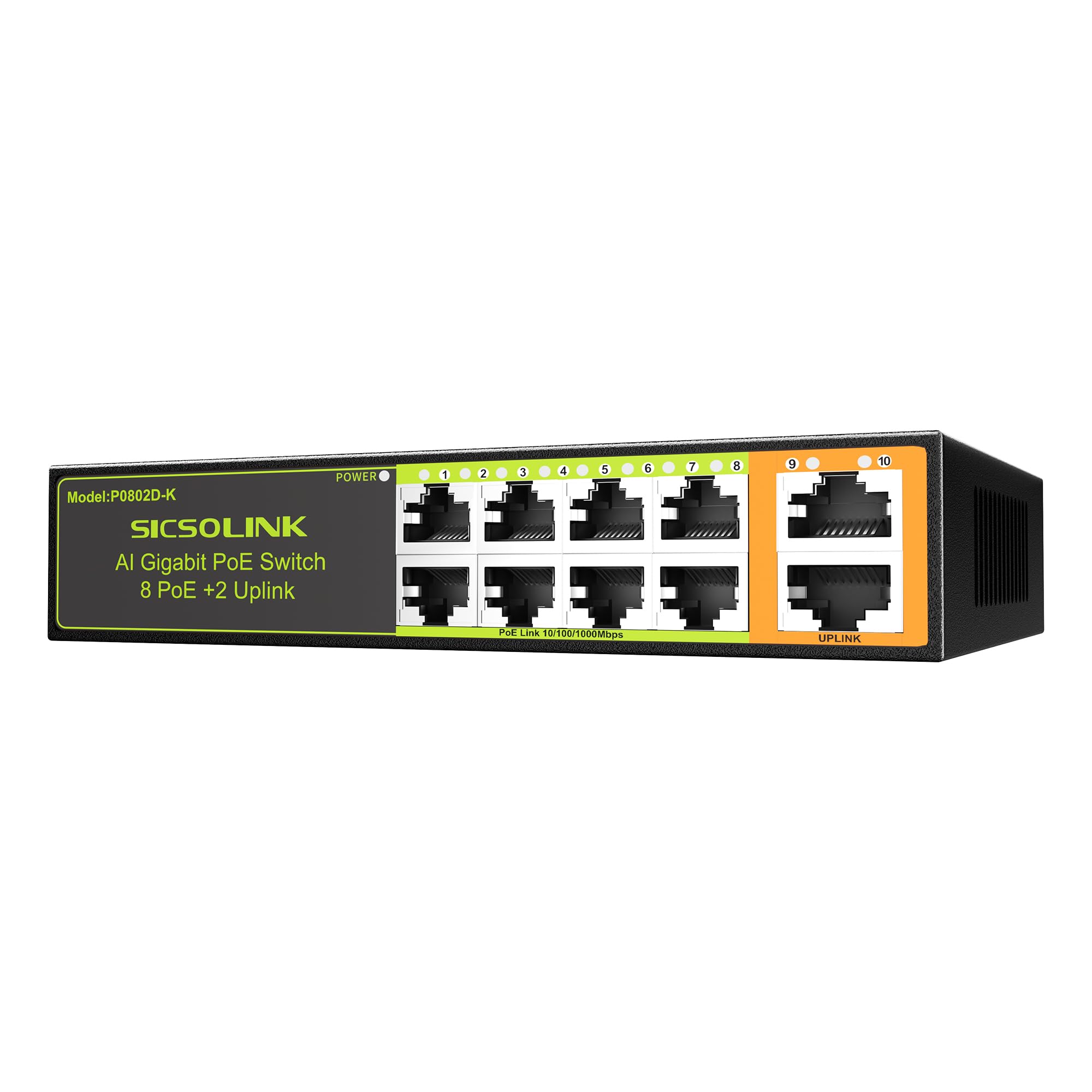
2. SICSOLINK 10-Port Gigabit PoE+ Switch
Ten full-gigabit ports and a 120W budget, built for tucking into a small cabinet.
Picture an installer wiring a four-camera home setup in a cramped electrical box: this is the switch for that job. It runs 8 Gigabit PoE+ ports plus 2 dedicated Gigabit uplink ports, all at 10/100/1000Mbps, with a 120W total PoE budget and 30W max per port. The built-in smart chip auto-detects whether a device is active PoE, passive, or non-PoE, so it sends power only where it belongs and protects the ports from a short. For your cameras and access points that means one cable carries both jobs and you can retire the power adapters.
The 1.1-pound metal housing is fanless — silent in a cabinet or a small retail space. The physical footprint is compact enough for a small cabinet or an electrical enclosure, and it comes with the hardware to wall-mount or sit it on a desk. Setup is plug-and-play, though the orange uplink port and the green device ports are not interchangeable: owners mention that feeding the modem into the green ports instead of the orange one slows every connected device, while the correct wiring hit 800-980Mbps simultaneously on a 1GB fibre line. Get the two port groups right and it flies.
At 4.4 stars from a few hundred buyers, the sentiment is broad satisfaction, and the occasional complaint centres on setup confusion rather than hardware. If you would rather not think about port colours, the YuLinca above is more forgiving from the start. Otherwise this is a strong small-business buy.
Standout strengths
- 120W PoE budget with 30W per port — powers a full camera or access-point load
- Two independent Gigabit uplink ports for linking your router or NVR
- Fanless 1.1-pound metal case fits a small cabinet and mounts on a wall
- Smart chip cuts idle power draw and guards ports against short circuits
Before you commit
- Wiring the modem into the wrong port group throttles all devices — follow the orange-uplink layout
- Unmanaged, so no VLAN or traffic prioritisation
Reach for this if: you want the fullest 10-port gigabit layout for a small install and value a low-noise, cabinet-friendly build.
Go with a managed model instead if: you need to separate camera traffic from the rest of your network.
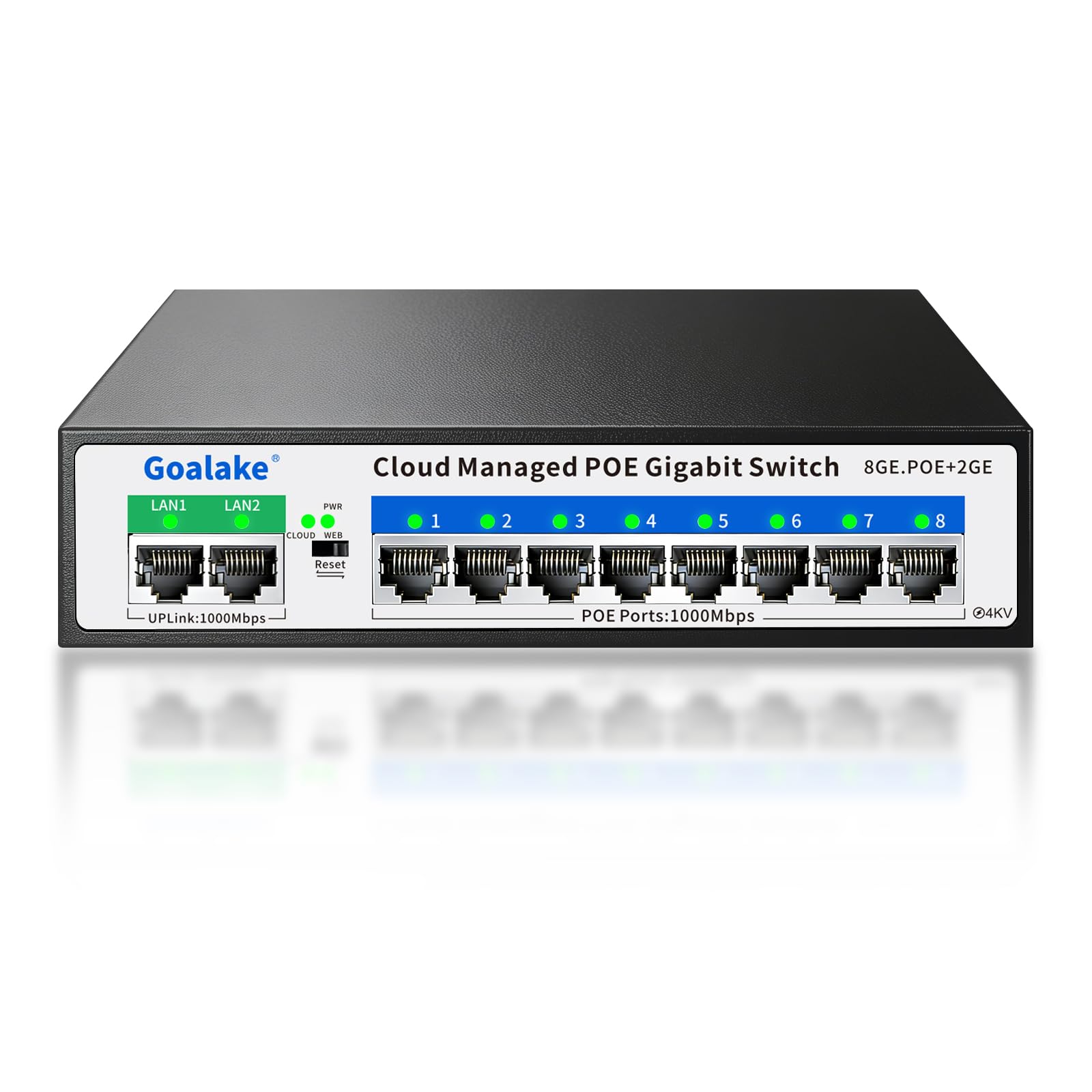
3. Goalake 10-Port Gigabit PoE Switch
The one that lets you reboot a dead camera without ever leaving your desk.
If your cameras live somewhere you would rather not visit, the feature that earns this switch its place is cloud management. It carries 8 Gigabit PoE ports and 2 Gigabit uplink ports, each PoE port delivering up to 30W across a 120W total budget, and you can reach its settings through an app, a web interface, or free cloud software from anywhere. When a camera drops, you can see the network status and fix it remotely instead of climbing a ladder. PoE coverage stretches up to 250 metres in Extend mode, which is handy when a camera sits at the far end of a long cable run.
Under the hood it packs the controls a growing network wants — 802.1Q VLAN (isolating ports into their own groups), QoS for prioritising video, storm control, port mirroring, and per-port bandwidth control. It also adds 4KV lightning protection with two levels of shielding, which speaks to owners who run cameras in exposed spots. The fanless metal body and built-in industrial power supply mean no fan noise and no separate power brick. In the size-to-power column it goes bigger than the SICSOLINK — its chassis stretches longer than the SICSOLINK’s compact shell, but that extra room buys the management hardware.
The trade-off here is durability, and it is worth an honest mention. Most buyers are happy and praise the functionality, but a chunk of the feedback notes units that failed within months, and there is a note about limited 1Gbps ports. An occasional unit failing is not something to ignore — but a lot of this depends on placement, so keep it out of the weather. One buyer running three cameras outdoors got six months out of it in a tarped box before slugs shorted an empty port — keep this one indoors and sheltered.
Where it wins
- Cloud, app, and web management — reboot or reconfigure cameras from anywhere
- 120W budget with 30W per port over 8 PoE ports plus 2 uplinks
- 250m Extend mode for long runs and 4KV lightning protection for exposed installs
Worth knowing
- Only two ports are full 1Gbps uplinks — plan your backbone around that limit
- Durability is a recurring concern; an occasional unit fails early, so keep it indoors and dry
Pick this when: the cameras are somewhere awkward and you want to fix problems remotely without a site visit.
Skip the cloud overhead if: your setup is one room, static, and you never need to touch it — a simpler unmanaged box saves the trouble.
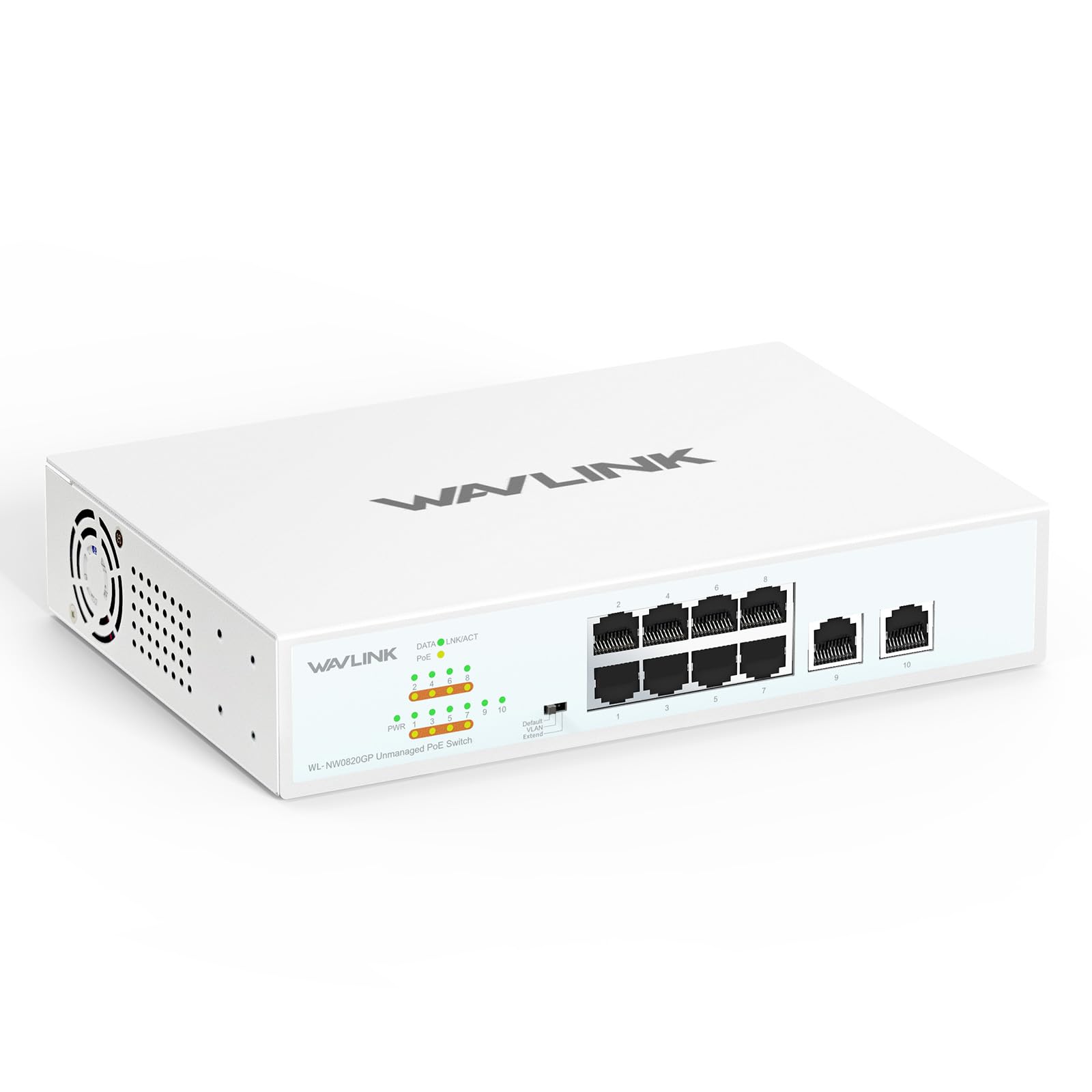
4. WAVLINK 10-Port Full Gigabit Switch
A three-mode switch with rack ears in the box and clean signal isolation on tap.
You get 8 PoE+ ports (each up to 30W, IEEE 802.3af/at compliant) and 2 Gigabit Ethernet uplinks, all sharing a 120W PoE budget. Every PoE+ port pushes both power and gigabit data down one cable, which is the whole point if you are hanging IP cameras, wireless access points, or IP phones — no power adapters, no separate runs. The three modes are where this one separates itself: Default for everyday office traffic, VLAN to isolate the ports and cut signal interference, and Extend to stretch transmission to 250 metres at reduced speed.
What owners keep coming back to is the build and the flexibility. It ships with rack ears, an IEC cord, sticky feet, and wall-mount slots, so it slots into a rack or a shelf without extra parts. A quiet fan keeps it cool, and the LED panel reports link status plus power draw per port (with a blink signalling a problem). Replacement stories are a real strength too — one owner swapped out a Ruckus switch and it just worked on first power. The full unmanaged feature set plus VLAN in the box is a solid combination for the category.
The main limitation is that VLAN mode is basic port isolation rather than a fully configurable managed switch — if you want per-port rules and traffic shaping, this is not that box. If you do not need per-port rules, the WAVLINK’s three modes and rack hardware make it a solid pick. It is note the review base is smaller than the Goalake’s, so the score leans on a lighter sample, but the read is consistent across them.
What stands out
- Three switch modes: Default, VLAN isolation, and Extend to 250 metres
- Rack ears, feet, and wall-mount slots all in the box — no extra hardware to buy
- 120W budget across 8 PoE+ ports, quiet fan for a rack or shelf
Where it is limited
- VLAN mode is basic port isolation, not full per-port management
- Extend mode trades signal strength and speed for that longer reach
Suits you if: you want a small, quiet, rack-mountable switch with signal isolation and long runs on hand.
Not your pick if: you need deep per-port control — that calls for a fully managed model.
5. UGREEN 10-Port PoE Switch

When a camera freezes at 2am, this one restarts it for you.
The standout feature here is PoE Auto Recovery: in Extend mode, ports 1–6 automatically detect a frozen or offline powered device and restart it. If you run IP cameras that occasionally lock up, that means no more driving out to pull a cable — the switch handles the reboot on its own. The layout is 8 PoE+ ports (802.3at/af, up to 30W each) with 2 Gigabit uplinks, and the whole power budget is 60W. That lower budget is the key trade-off: this switch is built for a handful of cameras, not a full rack of high-draw access points.
Power management is smarter than most at this size. If draw would exceed 60W, the switch sheds ports in priority order from 8 down to 1 so nothing overloads, and it auto-detects PoE devices and feeds them while sending data only to non-PoE gear. Short-circuited ports shut off on their own, and a single button flips between Standard, Port Isolation (VLAN), and Extend — with Extend allowing PoE runs up to 820ft for long-distance security deployments. Reliability is the quality buyers keep coming back to: two PoE access points powered by this unit gave strong WiFi coverage across a home, and the energy draw came in lower than comparable devices.
Two things to weigh. That 60W budget will not stretch to eight power-hungry devices, so count your draw first. And there is a wall-mount detail buyers flag — the mounting recesses are shallow and need flathead screws (size #6 or smaller), since a buttonhead #6 will not seat. The port configuration draws mixed feedback too, with some wanting more full-speed ports. Neither is a dealbreaker for a small camera or AV setup.
Why it earns a spot
- PoE Auto Recovery restarts frozen cameras or access points automatically in Extend mode
- Priority-based power shedding keeps a 60W budget from overloading
- One-button modes: Standard, Port Isolation, and Extend up to 820ft
- Low power draw — customers note less electricity use than comparable units
Plan around these
- 60W total PoE budget is modest — enough for a few cameras, not a full high-draw rack
- Wall-mount recesses are shallow and need flathead #6 or smaller screws
Best fit: a small security or AV setup where you want automatic camera recovery and long PoE runs.
Look at a 120W model instead if: you need to power several high-draw access points at once.
6. MokerLink 10 Port Gigabit PoE Switch

A compact metal switch that powers access points and cameras without a wall wart.
MokerLink puts 8 Gigabit PoE+ ports and 2 Gigabit uplink ports into a small metal shell, all at 10/100/1000Mbps, with a 120W output and 30W max per port under IEEE 802.3af/at. The built-in power supply is the detail that matters day to day — you plug a standard power cord straight into the switch and skip the chunky external brick that clutters most DIY installs. Two uplinks give you flexibility to feed distinct networks or devices, like a router on one and an NVR on the other. Power detection runs in the background, so it powers what needs power and passes data to non-PoE gear like a computer or printer.
Owners put these to work on real gear — powering two Reolink PoE cameras plus a PoE Zigbee controller over a long cable run, with the switch running cool throughout. Others lean on it for the backbone of a wireless setup, feeding both a NAS and a Ubiquiti access point from the same box. Extend mode stretches PoE ports to 250 metres at 10Mbps, and VLAN isolation keeps ports talking only to the uplink for a cleaner network. Plug and play the whole way: no configuration, no settings to learn.
The one note worth flagging is that it does not support passive 24V PoE, so confirm your devices are the standard active type before wiring them up. Buyers rate it 4.6 stars across a healthy review base, and value for money is what they mention most. If you want strong performance in a compact box with no brand lock-in, the MokerLink is the pick.
What earns the nod
- Built-in power supply means no external wall brick cluttering the install
- 120W across 8 PoE+ ports with 30W per port, plus 2 uplinks for flexible routing
- Extend mode to 250 metres and VLAN isolation for cleaner traffic
- Runs cool even powering cameras and access points over long cable runs
Know before you buy
- Passive 24V PoE is not supported — check your devices use standard active PoE
- Unmanaged, so no per-port control beyond VLAN isolation
Great for: DIY installers who want a clean, brick-free setup powering cameras and access points from one box.
Not the one for: passive-PoE devices, which this switch will not power.
7. Binardat 10 Port 2.5G Switch

Eight 2.5G ports and two 10G slots for a network that outgrew gigabit.
This is the odd one out on the list, and on purpose: it drops PoE entirely and doubles down on speed. You get 8 x 2.5Gigabit Ethernet ports (auto-adaptive at 2500/1000/100Mbps) plus 2 x 10G SFP+ slots that take a 1G or 10G module (module not included), with 80Gbps of backplane bandwidth to move data between them. If your setup is a gaming PC, a NAS, or a WiFi 7 access point, that headroom means transfers finish in far less time than a gigabit box allows. It is the fastest-connecting pick here for a wired home or small-office backbone.
No PoE means every connected device needs its own power — so this is a data backbone, not a camera-powering switch. What it does offer is quiet, cool operation: fanless design with dual-side heat sinks, a wide -10°C to 55°C working range, and a metal case you can set on a desk or mount to a wall. Setup is pure plug-and-play, auto-negotiating every connection with no configuration. Buyers running three of them around a house for a TV, computers, and a server report the ports behave exactly as advertised, and one test hit 2.37Gbits/sec through cheap Cat5e and taped-down cable.
The clear limitation is the missing PoE — if you want to power cameras or access points, look at the YuanLey below or a PoE pick above. But if raw wired speed is your priority, this earns its spot. Buyers call it worth the money and note they see full speed on both the 10GbE and 2.5GbE ports, which is exactly what you want from a switch at this tier.
Where it pulls ahead
- 8 x 2.5G ports plus 2 x 10G SFP+ slots with 80Gbps backplane bandwidth
- Fanless with dual-side heat sinks and a -10°C to 55°C operating range
- Plug-and-play with auto-negotiation and auto MDI/MDIX — nothing to configure
- Full speed verified on both 10GbE and 2.5GbE ports
The honest limits
- No PoE at all — every device needs its own power source
- SFP modules are not included, so factor them into your plan
Built for: a wired backbone feeding a NAS, gaming PC, or WiFi 7 access point where raw speed matters more than PoE.
Wrong tool if: your cameras or access points need power over Ethernet.
8. YuanLey 10 Port 2.5G PoE Switch

2.5G PoE and 10G uplinks in a rack-ready metal chassis.
If you want PoE and higher-than-gigabit speed together, this is the box that bridges both. It runs 8 x 2.5Gigabit PoE ports (ports 1–8, IEEE 802.3bz compliant, auto-adaptive on 10/100/1000M/2.5G) plus 2 x 10G SFP slots for a 1G or 2.5G module (module not included). PoE budget is 120W with up to 30W per port under 802.3af/at, so it powers cameras and access points while still moving data at 2.5 gig. A one-key VLAN toggle isolates traffic between the RJ45 ports on demand, and a 60Gbps switching capacity keeps the whole thing flowing.
For a rack install this is the tidy pick — it supports rack mounting or desktop placement, with a durable metal case, fanless cooling, double-sided vents, and a wide -10°C to 50°C range. The 6KV lightning protection adds a layer of resilience for exposed runs. Owners pushed it hard: one stress test saturated six ports at 2.5Gb with near-zero packet loss, and a 114-hour ramp test across two switches linked by fibre logged zero packet loss with a median latency of 0.72ms. That is real-world proof the throughput holds up under load.
The honest caveat is one to weigh carefully: at 4.3 stars the feedback is mixed on reliability, with some buyers reporting PoE issues and durability concerns over the long term. It is a strong switch when it works, and the vast majority have no trouble, but for a mission-critical run you might want the safety net of the managed TP-Link below. For a home or small-business build that wants 2.5G PoE on a budget, it earns its place.
Why it stands out
- 2.5G PoE ports plus 10G SFP slots — speed and power in one box
- 120W budget, 30W per port, and 60Gbps switching capacity
- Rack-mount or desktop with fanless cooling and a wide temperature range
- 6KV lightning protection and one-key VLAN isolation
Handle with care
- Reliability feedback is mixed — some reviewers point out PoE faults and early failures
- SFP modules not included; VLAN is a single-key toggle, not deep management
Ideal for: a homelab or small-business rack that wants 2.5G plus PoE without paying flagship prices.
Consider managed instead if: the run is mission-critical and you need stronger long-term reliability.
9. TP-Link TL-SG2210MP Jetstream 10 Port PoE Switch

The managed switch that ties a whole small network into one dashboard.
Step up here if you want control, not just power. The TL-SG2210MP packs 8 PoE+ ports (802.3at/af, up to 30W each) and 2 Gigabit SFP slots, with the largest PoE budget on the list at 150W — headroom to run more devices at once than the 120W picks. The SFP slots accept fibre or copper modules for longer backbone runs. It integrates into Omada SDN (TP-Link’s software-defined networking platform), letting you manage switches, access points, and gateways from a single interface through a hardware controller, software controller, or cloud controller, so one dashboard covers the whole site.
Security and traffic control are where it earns the premium. You get 802.1Q VLAN, IP-MAC-Port binding, ACLs, port security, DoS defence, storm control, DHCP snooping, and 802.1X authentication. For keeping video and voice calls clean it layers in L2/L3/L4 QoS, IGMP snooping, link aggregation, and flow control. That is real network segmentation, not the single-key isolation the budget picks offer. Owners call it a mini datacenter switch, running it across a large home lab — 4 Proxmox nodes, over 120 containers, a dozen VLANs — with solid performance, and it pairs cleanly with the OC-200 controller.
Two things to note. The SFP slots are for fibre or copper modules rather than PoE ports, so budget for modules separately. And the recurring gripe is logging — buyers find it hard to pull meaningful logs for performance monitoring and SIEM use, and controller updates have broken custom hooks. If you do not need deep logging, this is the most capable pick here. TP-Link backs it with a 5-year warranty and technical support, which is the strongest coverage in the lineup.
What you pay for
- 150W PoE budget with 8 PoE+ ports — the most power headroom here
- Omada SDN integration for single-dashboard control across the site
- Full management: VLAN, ACLs, port security, 802.1X, QoS, link aggregation
- 5-year warranty with dedicated technical support
Reality check
- Logging is weak for performance monitoring and SIEM use
- SFP slots are not PoE ports and need modules bought separately
The right call for: anyone running a managed network who wants central control, deep security features, and the longest warranty on the list.
Overkill if: you just need to power a few cameras with zero configuration.
Understanding the Specs
PoE Budget and Per-Port Wattage
PoE budget is the total watts the switch can supply across all its powered ports at once, and it is the number that decides how much you can hang off the box. A 120W budget means your cameras and access points share that ceiling, while a 150W model like the TP-Link gives more running room. Per-port wattage is the separate cap — up to 30W on an 802.3at port. In plain terms, check what each device draws: a simple camera might sip a few watts, but a wireless access point can pull close to that 30W, so run the tally before buying.
Gigabit, 2.5G, and SFP Uplinks
Gigabit means 1000Mbps per port, which handles cameras and access points comfortably. A 2.5G port moves two-and-a-half times that, which matters when a NAS, gaming PC, or WiFi 7 access point is your bottleneck. SFP slots are a separate connector for uplink modules (fibre or copper), giving you a faster spine between switches or back to your router. The rule of thumb: buy gigabit if your devices stay under a gig, and step to 2.5G only if something on your network genuinely pushes more data.
FAQ
Will an 8+2 switch work the same as a 10-port switch?
Can I power a wireless access point and cameras at the same time?
Do I need a managed switch or is unmanaged enough?
What does Extend mode actually do to my network?
Is a fanless switch loud or does it run hot?
Will a 2.5G switch speed up my regular gigabit devices?
Can I mount these switches on a wall or in a rack?
What happens if my PoE devices draw more than the budget?
Do these switches support PoE passthrough for non-PoE devices?
How long do these switches typically last?
Which switch should I pick for a small business camera setup?
Final Thoughts: The Verdict
For most people wiring up cameras or a small office, the 10 port ethernet switch winner is the YuLinca 10 Port Gigabit PoE Switch because it pairs a 120W PoE budget and 30W per port with a fanless metal build and true plug-and-play — the safest default in the lineup. If you want cloud management to fix problems remotely, grab the Goalake 10-Port Gigabit PoE Switch. For raw wired speed on a NAS or WiFi 7 backbone, the Binardat 10 Port 2.5G Switch is the one to reach for. And if central control with the longest warranty matters most, the TP-Link TL-SG2210MP closes the list on top.
How We Picked
We do not accept paid placement. Every pick is matched to a real buyer and a real use-case; we do not hands-on test units.
Sources & Methodology
Specifications: manufacturer listings and product documentation. Review insights: verified customer reviews, as of September 2026. Pricing: not shown on this page (it changes often); check the current price via the retailer link.
As an Amazon Associate, Gadgets Feed earns from qualifying purchases. This does not affect which products we feature.